

Google Maps Scraper & Business Leads Export
Pricing
from $1.00 / 1,000 verified business results
Google Maps Scraper & Business Leads Export
Extract Google Maps business leads across multiple cities and categories. Collect names, addresses, available phone numbers, websites, ratings, and review counts. Set search limits and export paid results to CSV and Excel for lead generation, market research, and business intelligence.
Pricing
from $1.00 / 1,000 verified business results
Rating
0.0
(0)
Developer

Artashes Arakelyan
Maintained by CommunityActor stats
1
Bookmarked
73
Total users
0
Monthly active users
17 days ago
Last modified
Categories
Security
Limited permissionsShare
Discover businesses across multiple categories and locations, collect publicly available Google Maps business information, and export confirmed paid results to CSV and Excel.
Use this Apify Actor for B2B prospect research, competitor discovery, local market analysis, and CRM data preparation.
What You Can Get
The Actor can collect the following information when available:
| Field | Description |
|---|---|
name | Business name |
address | Business address |
phone | Publicly displayed phone number |
website | Business website |
rating_label | Numeric business rating |
reviews_count | Number of reviews |
industry_category | Business category, when available |
google_maps_url | Google Maps listing URL |
source_query | Search term used |
source_location | Location searched |
run_id | Run identifier |
combo_id | Search combination identifier |
Not every business has every field. Missing values are omitted where appropriate.
Quick Start: Your First Search
You can use the Input Form without writing JSON.
- Open the Actor's Input tab. Under Business categories, enter a search term such as
cafes. Under Cities or locations, enterGlendale, CA. - Set Maximum results per search to
10. For your first run, keep Scroll steps at4and Run headless enabled. - Review the Actor's Pricing tab, start the run, and wait for completion. Open the run's Dataset for confirmed paid business records, or its Key-value store to download
PAID_OUTPUT.csvandPAID_OUTPUT.xlsx.
A small first run is recommended to evaluate coverage and data quality before increasing the workload.
How the Input Works
The Actor searches every combination of business category and location.
For example, two categories and three locations produce six search combinations.
| Input field | JSON key | Default | Allowed values | Guidance |
|---|---|---|---|---|
| Business categories | queries | ["dentists"] | List of search terms | Use specific business types or keywords |
| Cities or locations | locations | ["Glendale, CA"] | List of locations | Include city and state or country to reduce ambiguity |
| Maximum results per search | max_results_per_location | 10 | Integer from 1 to 1000 | Limit per category-location combination, not per entire run |
| Scroll steps | scroll_steps | 4 | Integer from 1 to 20 | More scrolling may discover additional results and increase runtime |
| Run headless | headless | true | true or false | Keep enabled for ordinary Cloud runs |
All five fields are optional in the published schema; the defaults apply when fields are omitted.
Using the JSON Editor
You can switch from the Input Form to the JSON editor and paste an example below.
Important: The examples use only the five fields supported by the published Input Form. The internal scraper also recognizes legacy query and location keys, but new users should use queries and locations.
How to Estimate the Search Size
Calculate the number of search combinations as:
Search combinations = number of queries × number of locations
Calculate the theoretical result limit as:
Theoretical result limit = search combinations × max_results_per_location
This is an upper limit for collected records before final validation and deduplication, not a guarantee of available businesses or published results.
Ready-to-Use Input Examples
Example 1 — Small Test Run
Goal: Check the available business data in one location before committing to a larger search.
- Search combinations: 1
- Theoretical result limit: 10 records
- Maximum result-event charge at the stated rate: $0.010
- Expected output: A Dataset of confirmed paid business records and, when paid publication succeeds, CSV and Excel exports.
This is the recommended starting point for a new user.
Example 2 — B2B Lead Generation
Goal: Build a prospect list across several service industries in one city.
- Search combinations: 3
- Theoretical result limit: 90 records
- Maximum result-event charge at the stated rate: $0.090
- Useful output fields:
name,phone,website,address,source_query, andgoogle_maps_url.
Phone numbers and websites are not guaranteed. Review and qualify prospects before CRM import or outreach.
Example 3 — Competitor Research
Goal: Compare businesses in the same category across several cities.
- Search combinations: 3
- Theoretical result limit: 60 records
- Maximum result-event charge at the stated rate: $0.060
- Useful output fields:
source_location,name,rating_label,reviews_count, andaddress.
The data can support a preliminary competitor inventory. It does not represent a complete census of every business in a city.
Example 4 — Local Market Analysis
Goal: Explore several business sectors across several locations.
- Search combinations: 9
- Theoretical result limit: 450 records
- Maximum result-event charge at the stated rate: $0.450
- Useful output fields:
source_query,source_location,industry_category,address, andgoogle_maps_url.
Export the results for subsequent geographic analysis. The Actor does not itself produce a GIS suitability model or market-demand forecast.
Example 5 — Larger Business Discovery
Goal: Collect business listings across multiple industries and cities.
- Search combinations: 25
- Theoretical result limit: 2,500 records
- Maximum result-event charge at the stated rate: $2.500
- Expected output: A larger structured business dataset with CSV and Excel exports of confirmed paid records.
Larger workloads can require more execution time and Apify platform resources. Test a smaller subset first.
Understanding Your Output
The Actor collects business listings for each category-location combination, then prepares the Cloud results for publication.
Before charging and publishing, it:
- Keeps the supported business fields.
- Removes records without a business name or Google Maps URL.
- Normalizes available rating and review-count values.
- Removes duplicate records that share the same Google Maps URL after trailing-slash normalization.
- Requests payment for the remaining valid unique records.
- Publishes only records for which the charge is confirmed.
Different URLs for the same real-world business may not always be recognized as duplicates.
Real Example: Glendale Cafe
The following business was included in a previously successful Actor run.
| Field | Example value |
|---|---|
| Business name | Love You Latte |
| Search query | cafes |
| Search location | Glendale, CA |
| Address | 275 W Lexington Dr, Glendale, CA 91203 |
| Phone | (818) 696-1363 |
| Rating | 4.6 |
| Reviews | 2,013 |
| Website | https://www.loveyoulatte.cafe/ |
This example illustrates available fields; current listing details may change.
Real CSV Output Example
The following values come from an actual local scraper export for restaurants in Los Angeles, CA.
| Field | Actual exported value |
|---|---|
| Business name | Culina Ristorante and Caffè |
| Search query | restaurants |
| Search location | Los Angeles, CA |
| Address | Address: 300 S Doheny Dr, Los Angeles, CA 90048 |
| Rating | 4.5 |
| Reviews | 417 |
| Phone | (310) 860-4000 |
| Website | Four Seasons — Culina restaurant website |
| Google Maps URL | Available in the exported record |
This is a real collected record from a local CSV export, not evidence of a separately confirmed Cloud billing transaction.
The inspected local CSV contains ten columns: source_query, source_location, industry_category, name, address, reviews_count, rating_label, phone, google_maps_url, and website.
Cloud records may additionally include run_id and combo_id. The industry_category field may be empty, and some addresses contain an Address: prefix. Validate and clean the data before CRM or GIS import.
The five Input JSON examples above illustrate supported searches; they do not imply that all five searches were executed.
Output Locations in Apify
| Output | Where to find it | What it contains |
|---|---|---|
| Dataset | Run → Storage → Dataset | Confirmed paid business records |
PAID_OUTPUT.csv | Run → Storage → Key-value store | Paid records in CSV format |
PAID_OUTPUT.xlsx | Run → Storage → Key-value store | Paid records in Excel format |
View Exported Businesses on Google Maps
Each exported business record includes a google_maps_url field containing a direct link to its Google Maps listing.
To view a business on the map:
- Open the exported Dataset, CSV, or Excel file.
- Find the
google_maps_urlcolumn. - Open the link for the selected business.
- Review its location and available information in Google Maps.
Note: These links open individual business listings. The Actor does not currently generate a single interactive map containing all exported businesses.
To download your data:
- Open the completed run in the Apify Console.
- Open Storage and select Dataset to inspect records or use Dataset export options.
- Open Key-value store to locate and download
PAID_OUTPUT.csvorPAID_OUTPUT.xlsx.
The paid export files are created after successful billing confirmation and Dataset publication. If no records are confirmed as paid, no paid records are published.
The internal scraper also produces a local RUN_REPORT.csv describing individual search combinations. This file is not advertised as a guaranteed Cloud download.
Real Run — Input to Paid Exports
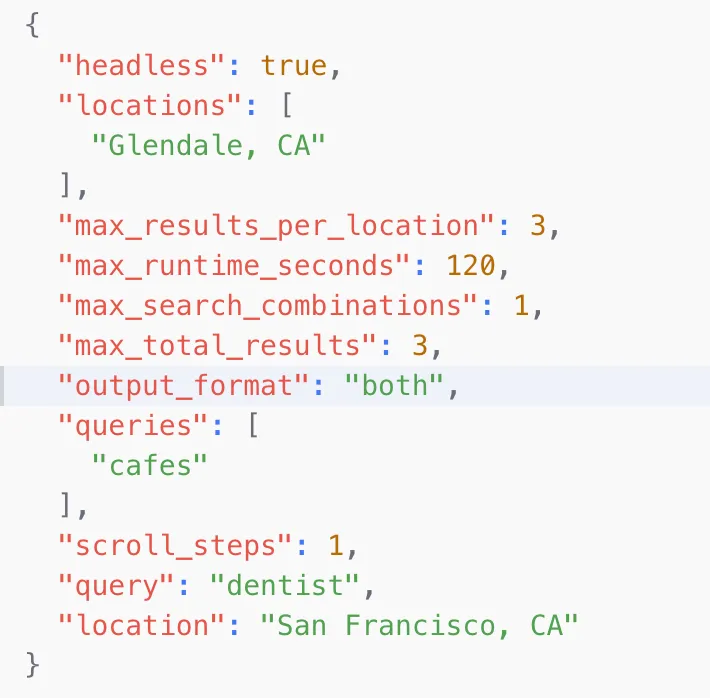
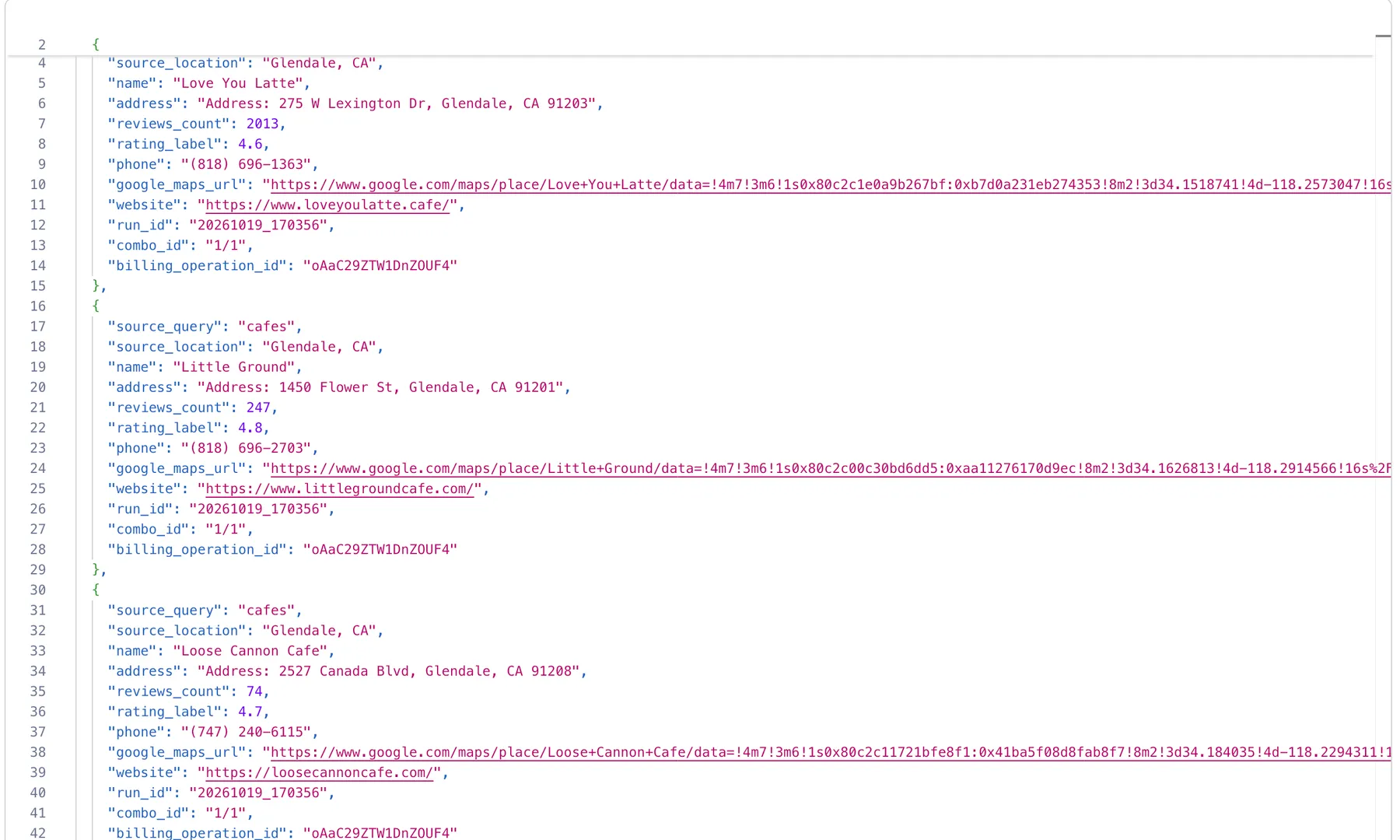
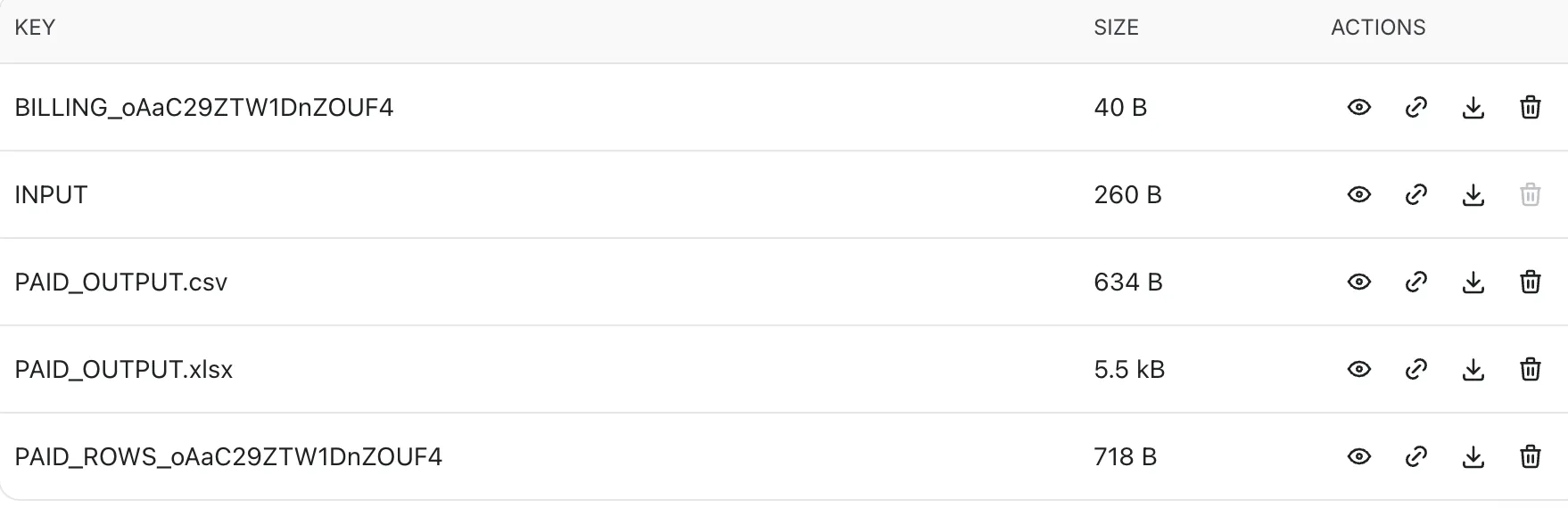
The four screenshots below document the same completed Apify run (oAaC29ZTW1DnZOUF4). They show the workflow from saved input to dataset records and downloadable exports.
Original Run Input
The original saved input for a Glendale, CA cafe search. This historical run contains legacy input fields; the current published Input Form uses five parameters.
Real Dataset Results
Three business records collected during the same successful run.
Excel Business Leads Export
Business names, addresses, ratings, reviews, phone numbers, websites, and Google Maps links exported from the paid output.

Paid CSV and Excel Files
PAID_OUTPUT.csv and PAID_OUTPUT.xlsx available in the run's Key-value store.
Pricing and Cost Estimation
Result-Based Pricing
The documented result-event rate is:
$1.00 per 1,000 confirmed billable business records, or $0.001 per record.
Additional charges may include:
- An Actor-start event charge.
- Applicable Apify platform usage, such as execution resources.
Always check the Actor's Pricing tab for the current published rates and terms before starting a run.
Cost Formula
Estimated cost components = (confirmed billable records × $0.001) + Actor-start charge + Apify platform usage
The result-event component depends on confirmed paid records, not merely the number requested in the Input.
Cost Estimates by Input Size
| Example | Search combinations | Theoretical result limit | Result-event charge if all limit slots become billable |
|---|---|---|---|
| Small test | 1 | 10 | $0.010 |
| B2B lead generation | 3 | 90 | $0.090 |
| Competitor research | 3 | 60 | $0.060 |
| Local market analysis | 9 | 450 | $0.450 |
| Larger discovery | 25 | 2,500 | $2.500 |
These figures exclude Actor-start and Apify platform charges. They are not guaranteed final run prices.
Example: Requested vs. Collected vs. Charged
Suppose an Input has a theoretical limit of 100 results.
- The scraper collects 82 records.
- Validation and URL-based deduplication leave 75 valid unique records.
- The billing API confirms payment for all 75.
The result-event charge is:
75 × $0.001 = $0.075
If the billing API confirms fewer than 75 records, only the confirmed paid subset is returned for publication.
Does CSV or Excel File Size Affect the Price?
The result-event charge is not calculated from the CSV/XLSX file size in megabytes.
It is calculated from the number of confirmed billable business records. Platform usage can vary with runtime and resource consumption.
Two exports with similar file sizes can therefore have different result-event charges if they contain different numbers of billable records.
How to Control Costs
- Start with one business category and one location.
- Use
max_results_per_location: 10for initial testing. - Keep
scroll_stepsat the default until you assess search coverage. - Increase categories, locations, and result limits gradually.
- Estimate the number of category-location combinations before each run.
- Review the Pricing tab and the actual charges shown for completed runs.
A larger result limit does not guarantee that Google Maps will return that many usable listings.
Common Questions and Troubleshooting
Why did I receive fewer results than requested?
The requested value is a limit, not a guaranteed count. Available listings, search coverage, scrolling, validation, deduplication, and execution conditions affect the result.
Why are some phone numbers or websites missing?
The Actor exports publicly displayed fields when available. Some Google Maps listings do not provide these details.
Why is the number of paid records smaller than the number collected?
Records without a valid name or Google Maps URL are removed. Duplicate Google Maps URLs are also filtered. Only confirmed charged records are published.
Why did I not receive a CSV or Excel file?
Check the run status, Dataset, and Key-value store. Paid exports are generated after successful billing confirmation and Dataset publication. If no paid records were confirmed or publication failed, the expected exports may not be present.
Can I use multiple categories and locations?
Yes. The Actor searches every combination of the provided categories and locations.
Can I filter businesses by minimum rating in the Input?
Not through the currently published Input Form. You can filter exported data afterward using Excel or another analysis tool.
Can I select only CSV or only Excel in the Input Form?
The currently published Input Form does not expose an export-format selector. In normal Cloud operation, the Actor prepares both paid CSV and Excel exports after successful publication.
Is the data ready for CRM import?
The exports provide structured business information. You should still review duplicates, missing contacts, data quality, consent requirements, and the format required by your CRM.
Limitations and Responsible Use
- Google Maps listing coverage and field availability vary.
- Search results are not a complete business census.
- Phone numbers, websites, ratings, and reviews may be missing.
- Google Maps data can change over time.
- URL-based deduplication does not guarantee perfect real-world business deduplication.
- Higher search workloads may increase runtime and platform charges.
- Validate the data before using it for business decisions.
- Comply with applicable data-use, privacy, and outreach requirements.
Support
For questions, troubleshooting, or feature requests, use the Actor's Issues tab on Apify.


