

App Reviews Scraper: iOS App Store Reviews
Pricing
from $0.21 / 1,000 review saveds
App Reviews Scraper: iOS App Store Reviews
Export public App Store reviews for any iOS app into one table, with star ratings, app version, country and review text. Find iOS apps by name, filter by rating, date or keyword, and download as CSV, Excel or JSON. No login needed.
Pricing
from $0.21 / 1,000 review saveds
Rating
0.0
(0)
Developer

David Avalos
Maintained by CommunityActor stats
0
Bookmarked
2
Total users
1
Monthly active users
3 hours ago
Last modified
Categories
Features
Share
This App Reviews Scraper exports public iOS App Store reviews into one table, with star ratings, review text, app version, country and date. Filter by country or keyword, look up an app by name, and download the table as CSV, Excel or JSON.
It is for a straightforward task: collect the reviews already public on the App Store after a release, or compare ratings across storefronts, without logging in. It reads Apple's official customer-reviews RSS and iTunes Search APIs and writes one row per review. It does not access private accounts. It is not affiliated with Apple or Google.
Google Play reviews are paused. A Play link, package name, or Play name search is skipped, writes no rows, and is not charged. App Store work still runs as usual.
Quick start
- Paste one or more App Store links for the apps you want. An App Store app name, such as Instagram, also works.
- Choose the countries and how many reviews to collect. The form already has a small example so a first run stays short.
- Click Start. When the run finishes, open Export and download the results as Excel or CSV.
Price: $0.0005 per run start plus $0.0003 per review saved. Paid Apify plans are charged less per review: Bronze $0.00027, Silver $0.00024, Gold $0.00021. Only saved rows are charged; filtered-out reviews are free. Skipped Google Play input is not charged.
Example input
How to get an app's link
- App Store: copy the address from apps.apple.com, or type the app's name (for example Instagram) instead of a link.
Features
- Export public iOS App Store reviews with star ratings, review text, app version, country and date.
- Find iOS apps by name through Apple's official iTunes Search API, or paste a store link or numeric ID.
- Filter by rating, date, app version or words in the review, then download as CSV, Excel or JSON.
- Schedule exports or send the table into your own ASO, sentiment or QA workflow. No login is needed.
Use cases
- Pull recent reviews after a release and scan them for crash reports or feature requests.
- Compare star ratings and review text for the same iOS app in more than one country.
- Export public reviews to a spreadsheet or BI tool on a schedule, or into your own sentiment or ASO workflow.
Input
The form is prefilled with Instagram and YouTube App Store links and maxReviews: 10 so a first run stays small. If you leave the input empty, the default is Instagram on the App Store with maxReviews: 50 (maximum 5,000). You can mix App Store URLs, numeric IDs, and App Store app names in startUrls.
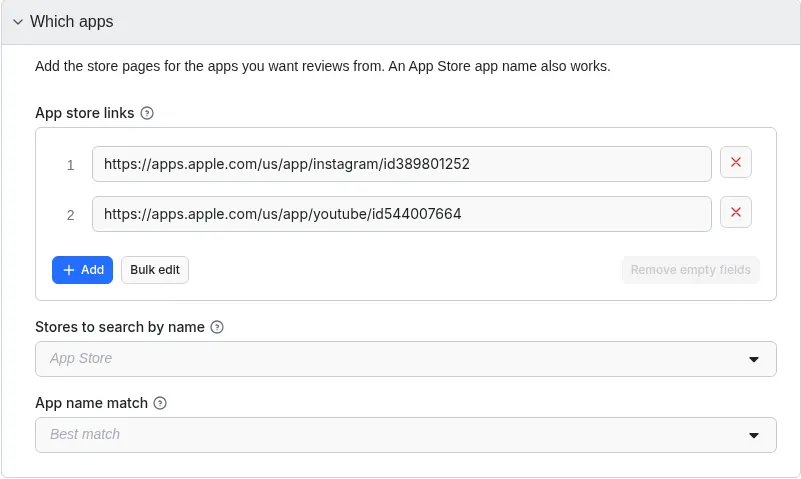
Paste App Store links, or type an iOS app name.
| Field | Required | Default | Description |
|---|---|---|---|
startUrls | Yes | Instagram's App Store link | App Store links, numeric App Store IDs, or an App Store app name (for example Instagram), looked up through Apple's official iTunes Search API. A Google Play link or package name is skipped, writes no rows, and is not charged, because Google Play reviews are paused. The run fails only if none of the entries can be used. A Play-only input still finishes successfully, with no review rows. |
nameSearchStores | No | ["app_store"] | Which stores to look up when a line is a name rather than a link. Only App Store name lookup is available. Google Play reviews are paused, so a name with Google Play selected is skipped and no Play request is made. |
nameMatch | No | best | How to pick an official App Store result. best uses the top result when its name contains the words you typed. strict keeps a result only when the name matches, ignoring case and punctuation. A name with no confident match is skipped, and up to three official candidates are listed. |
maxReviews | No | 50 (form prefill 10) | Maximum matching reviews per app per country after star, date, and app-version filters (max 5,000). Those filters are applied while paging. A word filter then runs on the reviews already fetched, so it can return fewer rows and cannot exceed this limit or Apple's 500-review cap. |
countries | No | ["us"] | Country names or two-letter codes. If you leave this on the default, an App Store link that includes a country in the address (for example /gb/) is fetched for that country. Choose one or more countries to use the same storefronts for every app. The first country is also used for App Store name lookup. |
language | No | en | Ignored for the App Store, which uses the country storefront instead. Google Play reviews are paused, so this setting does not fetch Play reviews. |
sort | No | newest | newest uses Apple's most-recent feed. most_helpful uses Apple's official most-helpful feed. most_relevant is ignored while Google Play reviews are paused, and App Store results stay newest. Apple's 500-review cap applies per sort, so the two App Store sorts can return different reviews. |
minRating / maxRating | No | empty | Keep reviews in this star range (1–5). The Actor keeps paging until it has saved maxReviews matching reviews or the store has no more pages. |
sinceDate | No | empty | YYYY-MM-DD. Only reviews on or after this date (compared in UTC) are kept. With newest sort, paging stops once older reviews appear. With most_helpful, paging continues and older reviews are only left out of the results. |
appVersions | No | empty | Keep only reviews written on these app versions, one per line (for example 455.0.0). A leading v and missing trailing zeros are ignored, so v455 matches 455.0.0. A longer store value such as 455.0.0.51.72 is not the same as 455.0.0; list the full version as the store shows it. |
minAppVersion | No | empty | Keep reviews written on this dotted version or a later one (for example 14.0 keeps 14.0, 14.2, and 15.0). A value that is not a dotted number is ignored with a warning. |
keepReviewsWithoutVersion | No | false | When a version filter is set, reviews with no app version are left out unless you turn this on. Does nothing when both version fields are empty. |
includeWords | No | empty | Keep only reviews whose title or body mentions these words, one per line. Matching is case-insensitive and whole-word (crash does not match crashed), except in scripts that typically have no spaces (for example Chinese), where the character sequence is enough. |
includeWordsMode | No | any | any keeps a review that mentions at least one include word; all requires every include word. Does nothing when includeWords is empty. |
excludeWords | No | empty | Drop reviews whose title or body mentions any of these words. Same matching rules as includeWords. Applied after the include filter. |
includeDeveloperReplies | No | true | Include public developer reply text and date when the store shows one. The App Store feed does not include developer replies, so replyText and replyDate stay empty. |
includeReviewerName | No | false | Off by default. Turn on only if you need the public display name shown on the store and have a lawful reason to process it. When off, authorName is null. |
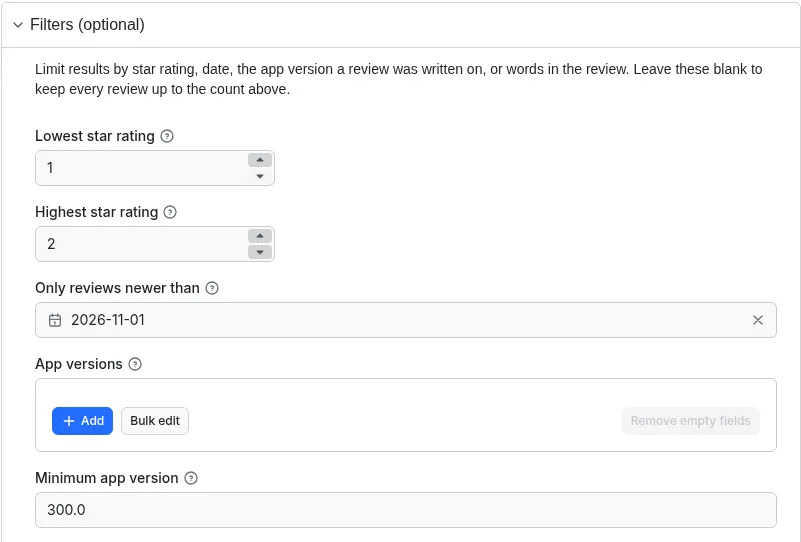
Keep only the reviews you need: stars, date, app version.
The Actor never fills gaps with a different app or country. The word filter runs after reviews have already been fetched for your review limit, so a narrow word list can return fewer rows than you asked for.
Output
Each dataset item is one review. Fields a store does not provide are present as null, not omitted. Current runs write App Store rows only. The store field can still be google_play on older datasets; those columns stay in the schema so existing exports remain stable. The Output tab has an overview table, a developer-replies view, and an Apps view.
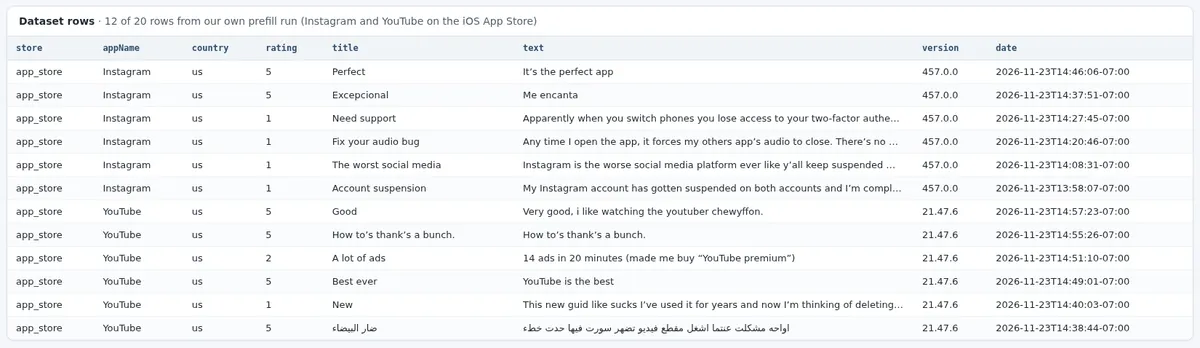
One table of public App Store reviews, ready to download. Prefill run NodZAluq02LRZoiOQ, 24 Nov 2026.

Default run Gq1AqfeEZf0fGeVwI, 24 Nov 2026: why it saved 50 reviews.
| Field | Type | Notes |
|---|---|---|
store | string | app_store on current rows. Older datasets may also contain google_play. Required; never empty on a saved row. |
country | string | Storefront country used for the request. Always filled on a saved row. |
language | string or null | Always null for App Store rows. |
appId | string | Numeric App Store ID. Required; never empty. |
appName | string or null | From the store listing. |
matchedFromName | string or null | The typed app name when this row came from an App Store name lookup. null when the app was given as a link or ID. |
appUrl | string or null | Store listing URL. |
bundleId | string or null | App Store bundle ID. |
developer | string or null | Seller or developer name. |
genre | string or null | Primary category. |
averageRating | number or null | App-level average, not the review's stars. |
ratingsCount | integer or null | App-level ratings count. |
currentVersion | string or null | Current store version. |
reviewId | string | Store review ID. Required; never empty. |
date | string | Review timestamp. App Store values include an offset (for example -07:00). Required; never empty. |
rating | integer | Star rating, 1–5. Required; never empty. |
title | string or null | App Store title. null when the reviewer did not write a title. |
text | string or null | Review body. null when the store did not include one. |
matchedKeywords | array of strings, or null | The include words that matched this review. null when the include-word filter is off. |
version | string or null | App version the reviewer had installed, when the store provides it. |
authorName | string or null | null by default (includeReviewerName is off). Also null if you turn names on and the store did not show a display name. |
helpfulCount | integer or null | App Store vote sum. null when the store did not include a count. |
voteCount | integer or null | App Store total votes. null when no vote total is present. |
replyText | string or null | Developer reply. Always null for App Store RSS rows. |
replyDate | string or null | Developer reply timestamp. Empty in the same cases as replyText. |
reviewUrl | string or null | The app's "see all reviews" page. The RSS feed does not provide a per-review permalink. null when the store did not provide a link we can store. |
scrapedAt | string | UTC timestamp when the row was written. Required; never empty. |
appName, appUrl, bundleId, developer, genre, averageRating, ratingsCount, and currentVersion are null when the store listing request did not return that value. We add columns over time when a new value is useful, but we never rename or remove an existing column. Missing values are stored as null. The dataset schema marks store, appId, reviewId, date, rating, and scrapedAt as required.
Pricing
This Actor uses pay-per-event pricing: $0.0005 per run start plus $0.0003 per review written to the dataset.
| Reviews saved | Calculation | Total |
|---|---|---|
| 100 | $0.0005 + (100 × $0.0003) | $0.0305 |
| 1,000 | $0.0005 + (1,000 × $0.0003) | $0.3005 |
| 10,000 | $0.0005 + (10,000 × $0.0003) | $3.0005 |
You are charged only for rows actually written to the dataset. Reviews removed by a star, date, app-version, or word filter are not saved and are not charged. Skipped Google Play input writes no rows and is not charged. You can set a maximum cost per run, and the Actor stops when that limit is reached. If the price ever changes, it follows Apify's advance-notice rules for pay-per-event Actors.
Limits
- App Store volume: this Actor calls Apple's official customer-reviews RSS feed and requests at most 10 pages of 50 reviews each, in most-recent or most-helpful order. That is a hard maximum of 500 reviews per app per country per sort. Apple does not serve older reviews through this feed, and the Actor does not request pages beyond 10. Rating and date filters can only choose among those results. To cover other storefronts, add country codes.
- App Store sort and replies:
newest(andmost_relevant) use Apple's most-recent feed.most_helpfuluses Apple's official most-helpful feed; that list is a different slice of the same 10-page / 500-review cap. The RSS feed does not include developer replies, soreplyTextandreplyDateare alwaysnull.languageis alsonull. - Google Play reviews: paused. The Actor does not request review or app-detail URLs on play.google.com, including paths under
/_, because Google's robots.txt disallows/_. If the input includes a Play link, package name, or Google Play name search, the run logs one message, writes no Play rows, and does not charge for Play. App Store work continues. A Play-only input finishes successfully with no review rows. - Country in an App Store URL: if you leave Countries on the default (United States), a link such as
https://apps.apple.com/de/app/...is fetched for that country (de). If you choose one or more countries yourself, those storefronts are used for every app and the country in the link is ignored. - Dates:
sinceDateis compared in UTC. App Store timestamps keep the offset returned by Apple. - Pacing and access: Apple requests are spaced at least 3 seconds apart (Apple documents its lookup API at about 20 calls per minute). The Actor does not use proxies, rotating or spoofed user agents, logins, cookies, CAPTCHA solving, or any other way around access controls. On App Store HTTP 429 or 5xx it backs off and honors
Retry-After. - Timeouts: the default run timeout is 10 minutes, enough for the prefilled input and typical small jobs. A large job (many apps, many countries, or thousands of reviews) may need a higher timeout because requests are deliberately paced. If a run still fails after the App Store retries described above, retry with fewer apps or a lower
maxReviews. Default memory is 512 MB. The Actor uses HTTP requests, not a browser. - This Actor collects public review content for research, ASO, and analytics. Do not use it to build a competing store or to republish reviews in bulk.
FAQ
Why did I get fewer results than I asked for?
The status message and the RUN_SUMMARY record say why. Your "How many reviews per app and country" setting is separate from Apple's cap of 500 recent reviews per country; the status names the cap when it was reached. Star, date, and app-version filters only keep matching reviews, and reviews with no version are left out of a version filter unless you turn on "Keep reviews with no app version". A word filter runs after those reviews have already been fetched, so it can only choose among them and cannot exceed your review limit or the store cap. A country storefront may also simply have fewer public reviews than you asked for. Google Play reviews are paused, so a Play input adds no rows.
How many reviews can I get for one country? The App Store cap is 500 of the most recent reviews (10 pages of 50 from the official RSS feed). There is no official way around that cap with this Actor; add more country codes for other storefronts.
Can I search by app name?
Yes, for the App Store. Type an app name (for example Instagram) in App store links. The Actor uses Apple's official iTunes Search API, with Best match (the default) or Exact name. If nothing can be matched confidently, that line is skipped and nearby official results are shown so you can paste a link. A saved review from a name lookup includes matchedFromName.
Are reviewer names included?
Not by default. authorName is null unless you set includeReviewerName to true. Names are the public display names shown on the store. The Actor does not look up people anywhere else, and it does not log in.
Why are some fields always null?
App Store RSS rows always have null for language, replyText, and replyDate. Other fields may be null when the store simply did not provide a value (for example a missing app version).
Will one bad URL fail the whole run? Unrecognized entries and unmatched App Store names are skipped. A missing or invalid app is recorded as an error and the run continues. A Google Play link is skipped because Play reviews are paused; it does not fail the run. The run fails only if no valid App Store app is left, or if every valid App Store app fails to return reviews. A Play-only input finishes successfully with no review rows.
Does this collect Google Play reviews? No. Google Play reviews are paused. A Play link, package name, or Play name search is skipped, writes no rows, and is not charged. App Store reviews still run as usual.
How do I export reviews for one country?
Set Countries to the storefront you want. If you leave the default (United States), a link such as https://apps.apple.com/de/app/... is fetched for that country (de). The table can be downloaded as CSV, Excel or JSON.
Issues are checked every weekday. Open one if something breaks or you need a new field.
Integrations and API
You can start a run from the Apify Console, the REST API, the JavaScript or Python client, or the Apify CLI. Replace $APIFY_TOKEN with your token from API & Integrations. Do not commit the token.
Legal and acceptable use
What the Actor collects. Only content the App Store already shows to anyone without signing in: review text, star rating, date, app version, helpful votes, and app metadata. The official App Store review feed does not include developer replies, so those fields stay empty. Reviewer display names are off by default. It never collects email addresses, profile photos, account IDs, or anything behind a login.
How it collects it. Apple's official customer-reviews RSS, lookup, and search APIs. App names are resolved only through Apple's official search, not by scraping a search page. Requests are paced (see Limits). No proxies, logins, cookies, CAPTCHA solving, or other ways around access controls. Google Play reviews are paused: the Actor honors play.google.com/robots.txt, which disallows /_, and it does not request Play review or app-detail URLs.
Your responsibilities. You choose which apps to scrape and what to do with the results, so you are responsible for using the data lawfully:
- Personal data. Reviews can contain personal data, such as a name typed into the text, and display names if you turn them on. Under the GDPR, UK GDPR, CCPA and similar laws, public information can still be personal data. Only collect it if you have a lawful basis, keep only what you need, and honor deletion requests.
- Copyright. Review text belongs to the people who wrote it. Analysis, sentiment scoring, quotes and internal reports are typical uses. Republishing reviews in bulk, or building a competing review site or store, is not.
- Platform terms. Your use must comply with the Apple Media Services Terms and, if you use a Google Play link in the input, the Google Terms of Service. The Actor itself does not request Google Play review pages.
- Not allowed: identifying, profiling or contacting individual reviewers; spam or unsolicited messages; harassment; using the output to make decisions about individuals (credit, employment, housing, insurance); or reselling the raw data as a people-search or data-broker product.
The Actor is provided as is under the Apify Standard Actor Contract. This section is general information, not legal advice. If you're unsure whether your use is lawful, ask a lawyer.
Not affiliated with, endorsed by, or maintained by Apple Inc. or Google LLC. App Store is a trademark of Apple Inc. Google Play is a trademark of Google LLC.
Looking for open jobs from company career pages? See ATS Jobs Scraper: Greenhouse, Lever & Ashby Job Boards.
Changelog
0.1.25
- README: input and filter screenshots. No code or price changes.
0.1.24
- README: App Store output-table and status screenshots. No code or price changes.
0.1.23
- SEO fields retuned to Apify's 40-50 / 145-155 character guidance. README opening and FAQ state the Actor is App Store only. Marketing category dropped. No code or price changes.
0.1.22
- README polish: the 0.1.20 changelog line no longer quotes the retired title.
0.1.21
- Google Play reviews paused (play.google.com/robots.txt disallows
/_). A Play input is skipped, writes no rows, and is not charged. App Store reviews are unchanged.
The full history is in this Actor's Changelog tab.


