
Booking.com Scraper
Pricing
from $3.50 / 1,000 hotel scrapeds
Booking.com Scraper
Scrape hotels and prices from Booking.com by city or search URL. Returns separate price fields — nightly rate, price before discount, taxes and fees, and total — plus ratings, stars, location and coordinates. Filter by dates, stars, score and price. Residential proxy, honest run status.
Pricing
from $3.50 / 1,000 hotel scrapeds
Rating
0.0
(0)
Developer

Agilevendor
Maintained by CommunityActor stats
0
Bookmarked
6
Total users
0
Monthly active users
a month ago
Last modified
Categories
Security
Limited permissionsShare
Booking.com Scraper — hotels & prices
Scrape hotels and room prices from Booking.com by destination or search URL. Give it a city and dates, and the Actor returns a structured list of properties with separate price fields — nightly rate, strike-through price, taxes and fees, and the total for the stay — plus ratings, stars, location and coordinates. Built for travel analysts, price-monitoring and market research.
What does this Booking.com scraper do?
For each property in the search results it collects:
- Separate price fields —
nightly,strikeout(price before discount),taxesAndFees, andtotalfor the whole stay, each as its own number, plus ataxInclusiveflag so you always know whether tax is already in the total. This is the main reason to use it: most scrapers give you a single blended number you can't break down. - Property facts — name, Booking.com URL, hotel id, address, city, country, latitude/longitude, and the main photo URL.
- Ratings — review score, number of reviews, star rating.
- Honest run status — if Booking blocks a request, the run does not silently report success with an empty result. The page is retried on a fresh session; you are not charged for blocked, empty pages.
How to scrape hotel prices from Booking.com?
- Enter a destination in Search (for example
Amsterdam) — or paste Booking.com search-result URLs into Start URLs. - Set check-in and check-out dates (optional). Prices exist only for specific dates; if you leave the dates empty, the Actor uses a default stay ~30 days ahead so you still get live prices.
- Choose how many hotels to collect with Max hotels, pick a currency, and optionally filter by stars, score, price range or property type. The Actor pages through the results for you and keeps collecting until it reaches Max hotels or the end of the result set. Booking.com caps any single result set at about 1000 properties; to go beyond that, run several narrower searches (by stars, price band, area or dates) — each returns its own set.
- Run it. Results appear in the dataset and can be exported to JSON, CSV or Excel.
Ready-made examples
Each example is a saved configuration you can open and run as is:
- Track competitor hotel prices in a city — rate shopping with nightly, taxes and total per property.
- Find hotels under $100 a night — budget stays with a hard price cap.
- Scrape 5-star luxury hotels and their prices — 5-star properties rated 9+.
- Scrape apartment and vacation rental prices — short-stay rentals for STR market analysis.
- Scrape top-rated 9+ hotels with live prices — best-reviewed properties in a destination.
- Scrape hotel photos, facilities and room types — full property profiles with the extra hotel data.
Input
| Field | Description |
|---|---|
search | Destination to search (city, region, landmark). Either this or startUrls. |
startUrls | Booking.com search-result page URLs to scrape directly. |
maxItems | How many hotels to collect (controls cost). |
checkIn / checkOut | Stay dates (YYYY-MM-DD). Default to 30/32 days ahead if left empty, so prices are always available. |
adults / children / rooms | Occupancy. |
currency / language | Picked from a list. |
propertyTypes | One or more accommodation types (hotels, apartments, hostels, …). |
starsCount | One or more star ratings (1–5). |
minScore | Minimum review score (6, 7, 8 or 9). |
minPrice / maxPrice | Price-per-night range in the chosen currency. |
sortBy | Result ordering (price, stars, distance, top reviewed, …). |
extractAdditionalHotelData | Visit each hotel's own page to also collect the photo gallery, full description, facilities, per-room details and featured reviews. Loads one extra page per hotel and is billed as a separate event. |
proxyConfiguration | Residential proxy (required — see below). |
Example:
Output (one record per hotel)
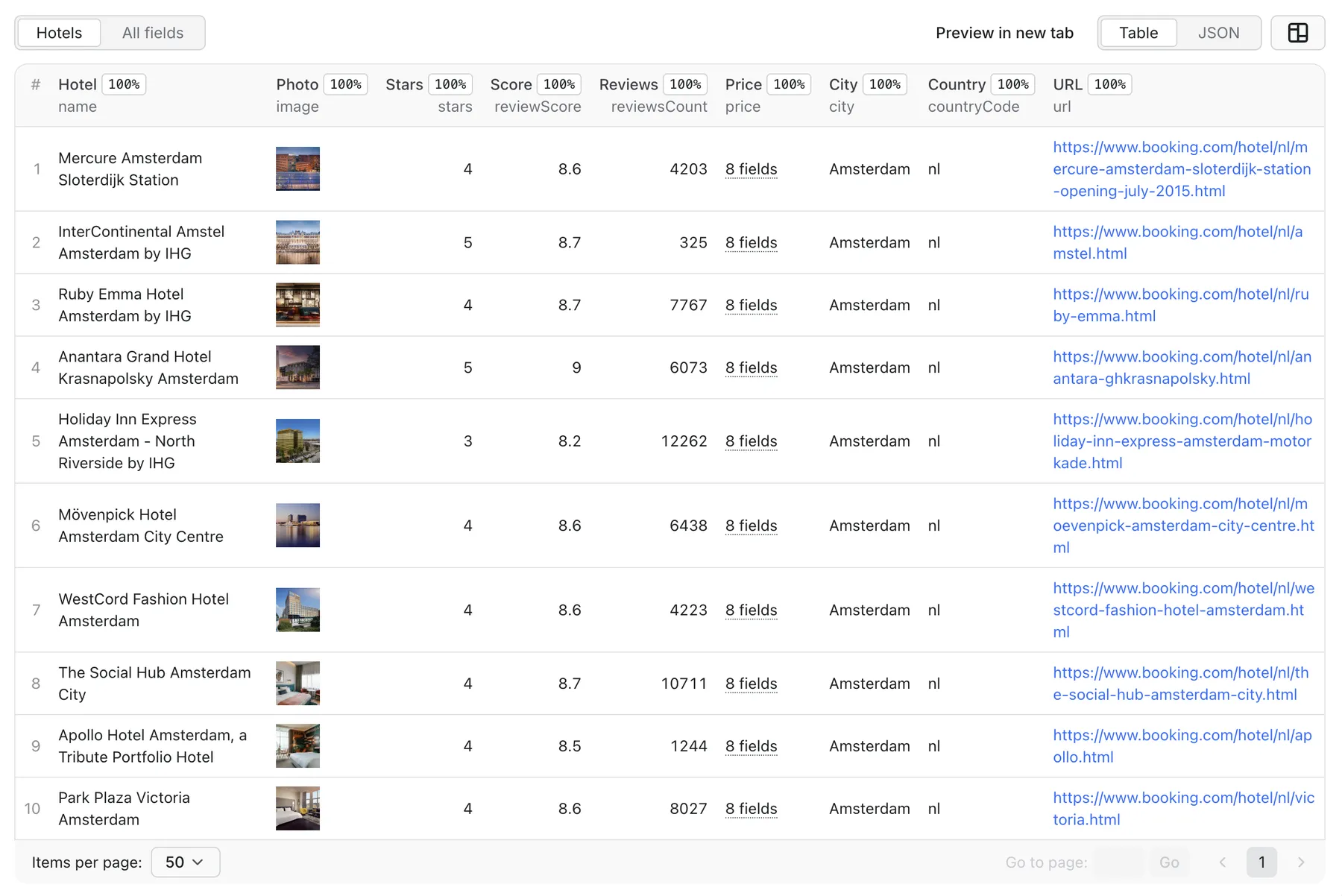
Notes on prices: nightly/strikeout/taxesAndFees/total come straight from what Booking.com shows for your dates. When taxes are charged on top, taxInclusive is false and taxesAndFees holds the amount; when they are already included, taxInclusive is true and taxesAndFees is null. genius holds the Genius discount info when Booking applies one, otherwise null. Anything you pass in Custom data is attached to every record under customData.
rooms, location and policies are taken from the search result itself, so every record carries them at no extra cost.
Additional hotel data (optional)
The photo gallery, full facilities list, long description, per-room details and featured reviews live only on each hotel's own page. Turn on extractAdditionalHotelData to have the Actor visit each hotel page and add these fields to the record. This loads one extra page per hotel and is billed as a separate event, so enable it only when you need this depth.
When enabled, each record additionally contains:
(In this mode rooms is enriched with the per-room detail — size, occupancy, bed configuration and room photos — from the hotel page.)
Proxy and cost
Booking.com blocks datacenter IP addresses, so residential proxies are required. Proxy traffic is billed to the account that runs the Actor. The Actor is priced per scraped hotel, with no charge for blocked or empty pages.
Is it legal to scrape Booking.com?
This Actor collects only public, non-personal data — hotel listings and prices shown to any visitor. It does not log in, bypass access controls, or collect personal data. Scraping public pages is generally lawful, but you are responsible for how you use the data and for complying with Booking.com's terms and applicable laws. This is not legal advice.
Your feedback
This Actor is actively maintained. If you hit a bug, notice a change on Booking.com that breaks the output, or want a new field or option, open an issue on the Issues tab of this Actor — it goes straight to the developer.


