

YouTube Transcript Scraper
Pricing
$6.00 / 1,000 transcript scrapeds
YouTube Transcript Scraper
Extract transcripts and subtitles from any public YouTube video, playlist, or channel. Get plain text, timestamped segments, and ready-to-use SRT and VTT files in one run — plus title, channel, and language. Bulk playlists and channels, language selection. You only pay for successful transcripts.
Pricing
$6.00 / 1,000 transcript scrapeds
Rating
0.0
(0)
Developer

Agilevendor
Maintained by CommunityActor stats
0
Bookmarked
4
Total users
0
Monthly active users
22 days ago
Last modified
Categories
Share
Extract transcripts and subtitles from any public YouTube video, playlist, or channel — full text, timestamped segments, plus ready-to-use SRT and VTT files, all in one run.
Why this scraper
- ✅ All subtitle formats in one shot — plain text, timestamped segments, SRT, and VTT returned together, no second run needed.
- ✅ Playlists and channels expand automatically — paste a single channel URL and get transcripts for every video in it. Each record carries a
playlistfield with the source playlist ID (empty for single videos), so you can tell which playlist a video came from. - ✅ You only pay for successful transcripts — videos without captions, private videos, and age-restricted content are flagged and skipped; no charge for empty results.
- ✅ Multi-language in one run — list several languages and get a separate record for each one that exists on the video, or leave it empty to grab a single best track per video.
- ✅ Metadata in every record — title, channel name, language code, and whether captions are auto-generated or human-made, attached to each transcript.
- ✅ Anti-bot protection handled — residential proxies and PO-token bypass built in and on by default, no setup required.
- ✅ Pay only for what works — you are charged only for successfully extracted transcripts; skipped videos (no captions, private, unavailable) are free.
What it does
- One record per video. Each video in the dataset gets its own record with the full transcript text, time-aligned segments, SRT subtitles, VTT subtitles, and metadata — everything in a single dataset row.
- Flexible input. The
videoUrlsfield accepts YouTube video URLs, playlist URLs, channel URLs, and bare video IDs — any mix in any order. - Bulk expansion. Playlist and channel URLs are resolved to their full video lists automatically. Use
maxVideosto cap the number of expanded videos and keep the cost predictable. - Multi-language. Set
languagesto a list of ISO 639-1 codes (e.g.["en", "de", "ru"]). Every selected language that exists for a video is returned as its own record (and billed as one transcript), so you can grab several languages in one run. Leave it empty to get a single best track per video (a human-made track is preferred, otherwise the first available) — roughly one unit per video. - Honest status field. Every record carries a
statusvalue:ok(transcript returned),no_captions(no captions exist for this video),private,age_restricted, orunavailable. This makes it easy to filter results downstream and understand exactly why a video was skipped. - Timestamps optional. Set
includeTimestampstofalseto omit thesegmentsarray and get a leaner output when all you need is the plain text.
How to scrape YouTube transcripts?
- Open the YouTube video, playlist, or channel you want to scrape and copy the URL from the browser address bar. You can also copy a plain video ID (the part after
?v=). - Paste one or more URLs or IDs into the Video URLs field. Mix and match — videos, playlists, and channels can go in the same list.
- Optionally set
languagesto the caption languages you want (e.g.["en", "ru"]) — each one becomes its own record. Leave empty for a single best track per video. - Set
maxVideosif you are expanding a large playlist or channel and want to control cost. - Click Start and wait for the run to finish.
- Download the results from the Output tab in JSON, CSV, Excel, XML, or HTML.
Ready-made examples
Each example is a saved configuration you can open and run as is:
- Download transcripts from a YouTube channel — a whole channel, capped by
maxVideos. - Extract transcripts from a YouTube playlist — every video in a playlist.
- Download YouTube subtitles as SRT and VTT — ready-to-use subtitle files.
- YouTube transcripts for RAG and AI training data — text plus timestamped segments for chunking.
- Scrape transcripts in multiple languages — one record per language per video.
- Turn YouTube videos into blog post drafts — full text to repurpose into content.
Input
| Field | Type | Description |
|---|---|---|
videoUrls | array | YouTube video / playlist / channel URLs or bare video IDs (required). |
languages | array | Caption languages to scrape (ISO 639-1). Each selected language that exists becomes its own record (billed as one transcript). Empty → a single best track per video (human-made preferred). |
maxVideos | integer | Cap on the number of videos expanded from a playlist or channel (default: 50). Controls cost. |
includeTimestamps | boolean | Include the segments array with per-segment timecodes (default: true). |
proxyConfiguration | object | Proxy settings. Defaults to Apify Residential Proxies, which are required for reliable YouTube access. |
Example input:
To scrape a full playlist, replace the video URL with a playlist URL:
Output format
Each output record is one video and includes the plain text, timestamped segments, source playlist, and metadata (title, channel, language). It also includes srt and vtt fields with properly formatted SRT / VTT subtitle files — ready to drop into a video editor, subtitle tool, or upload to a platform. No conversion needed.
Output (one record per video):
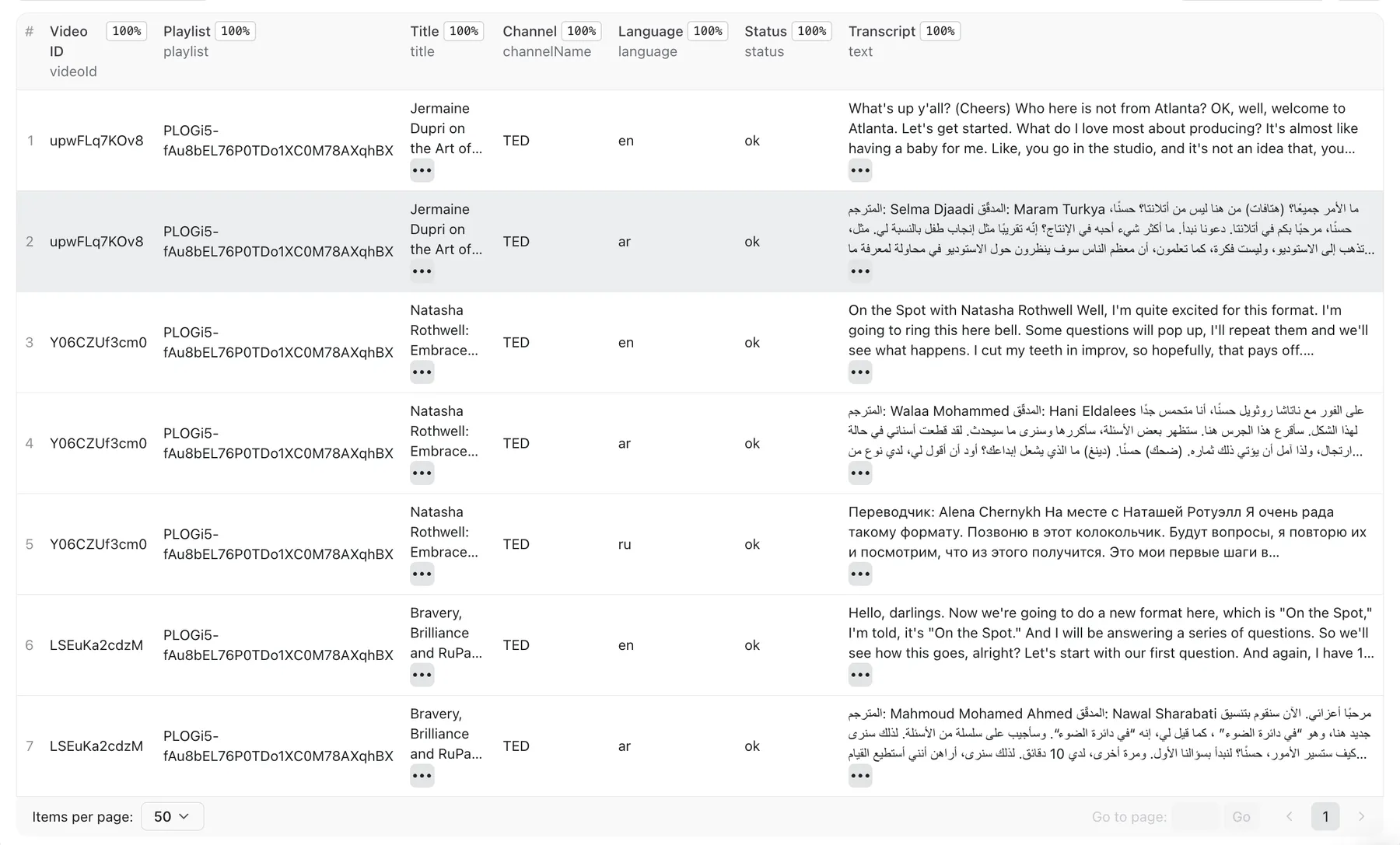
Videos without available captions return a record with "status": "no_captions" and empty transcript fields — so you can see exactly which videos were skipped.
Proxy and cost
YouTube requires a non-datacenter IP for reliable access. This scraper uses Apify Residential Proxies by default, which rotate automatically and handle YouTube's bot detection together with PO-token support baked into the scraper.
Proxy usage is included in the price — there are no separate proxy or platform charges on top. You pay a single flat rate per successfully extracted transcript and nothing else.
You are only charged for records with "status": "ok" — successfully extracted transcripts. Videos that turn out to have no captions, are private, age-restricted, or unavailable do not count toward the bill. See the current price on the Actor's page.
Is it legal to scrape YouTube transcripts?
YouTube transcripts and subtitles are publicly accessible without logging in — the same content any visitor can read or download in their browser. Scraping publicly available data without bypassing authentication or access controls has generally been found permissible under US law (see hiQ Labs v. LinkedIn, 2022), though terms of service may still apply.
This scraper does not log into YouTube, does not access private or members-only content, and does not bypass any access controls — it only retrieves captions that are already publicly available.
Note that transcript text may be subject to copyright (belonging to the video creator), and names or usernames attached to content may qualify as personal data under GDPR or CCPA. You are responsible for how you use the extracted data and for ensuring your use complies with applicable laws and platform terms in your jurisdiction.
This is not legal advice. If you have questions about your specific use case, consult a qualified attorney.
Your feedback
Found a bug or have a feature request? Open an issue here: https://console.apify.com/actors/5LUyoa5qazqEd6R9A/issues


