
![Amazon Bestsellers Scraper [💰$2.5/1K] | Prices | Rankings avatar](https://images.apifyusercontent.com/PXM4M5QGnWGta3mxCNdUzT54gTUm6veMx5OBD59b9pA/rs:fill:250:250/cb:1/aHR0cHM6Ly9hcGlmeS1pbWFnZS11cGxvYWRzLXByb2QuczMudXMtZWFzdC0xLmFtYXpvbmF3cy5jb20vZHRSN3FuVGJRck5pU0NtajctYWN0b3ItRG80NTNXZWxUMlFUckM1YU8tbkpYODAxeHkyYy1pbWFnZXNfJTI4NSUyOS5wbmc.webp)
Amazon Bestsellers Scraper [💰$2.5/1K] | Prices | Rankings
Pricing
from $2.20 / 1,000 results
Amazon Bestsellers Scraper [💰$2.5/1K] | Prices | Rankings
Scrape Amazon bestseller lists with full product details, prices, ratings and rankings. Track category winners, monitor product launches and build Amazon product research datasets.
Pricing
from $2.20 / 1,000 results
Rating
5.0
(1)
Developer

Ahmed Jasarevic
Maintained by CommunityActor stats
1
Bookmarked
14
Total users
3
Monthly active users
2 days ago
Last modified
Categories
Share
Amazon Bestsellers Scraper
Scrape Amazon Bestseller Lists — Product Rankings, Prices, Ratings & More
The Amazon Bestsellers Scraper is a fast, reliable Apify Actor that extracts product data from Amazon's bestseller lists. Get rankings, prices, ratings, review counts, ASINs, and Prime status for every product in any bestseller category.
Whether you're tracking competitor pricing, analyzing market trends, or building product databases, this Actor delivers clean, structured Amazon data at scale.
What It Does
- Scrapes Bestseller Lists — Extracts all products from Amazon's bestseller pages
- Captures Product Data — Rank, title, price, rating, review count, ASIN, category, Prime status
- Handles Pagination — Automatically navigates through multi-page bestseller lists
- Supports All Categories — Works with any Amazon bestseller URL across all departments
How It Works
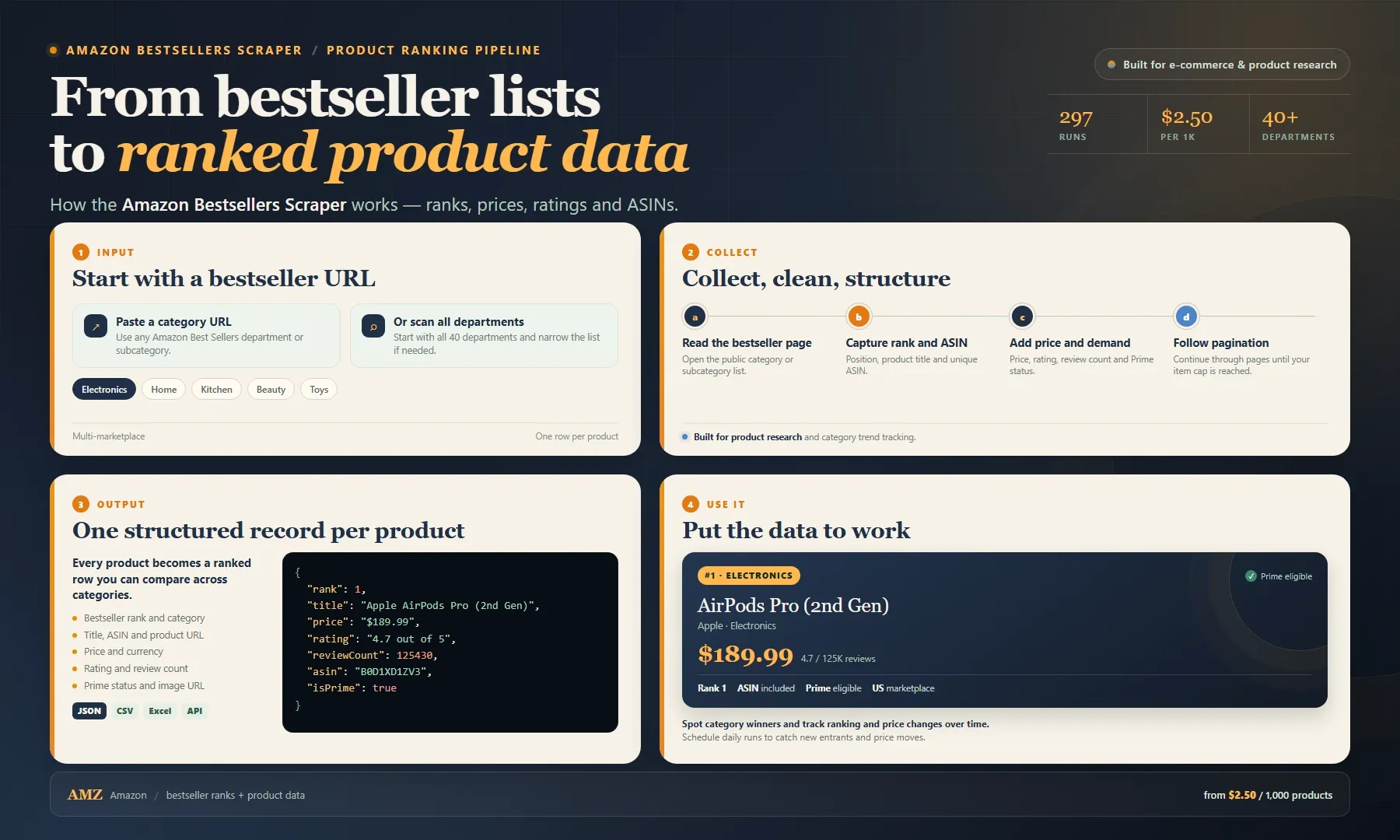
Looking for an Amazon bestsellers scraper or a practical Amazon API alternative? Paste bestseller category URLs or scan every department and get ranked product records for product research, price monitoring and market analysis. Each record includes rank, title, price, rating, review count, ASIN, category, Prime status and image URL.
Use the dataset to spot category winners, track rank changes, compare prices or build a product research database. Export as JSON, CSV or Excel, or pull results through the Apify API. Start with one category, then pay from $2.50 per 1,000 products.
Features
- Complete Product Data — Rank, title, price, rating, reviews, ASIN, image URL
- Scrape ALL Departments — One click scrapes all 40 Best Sellers departments in parallel
- Subcategory Crawl — Crawls each department's subcategories for tens of thousands of results
- Multi-Marketplace — Same bestsellers on Amazon US, UK, DE, FR, IT, ES, CA, MX, JP, IN & more
- Prime Detection — Identifies Prime-eligible products
- Category Tracking — Captures the bestseller category/department
- ASIN Extraction — Get Amazon Standard Identification Numbers for API cross-referencing
- Image URLs — Direct links to product images
- Proxy Support — Built-in proxy configuration for reliability
Input Schema
| Field | Type | Required | Default | Description |
|---|---|---|---|---|
includeAllCategories | boolean | No | true | Scrape all 40 Best Sellers departments automatically |
includeSubcategories | boolean | No | true | Crawl each department's subcategories (one level deep) |
marketplace | string | No | www.amazon.com | Amazon country site for the auto-generated department URLs |
startUrls | string[] | No | — | Custom Amazon bestseller page URLs (used as-is) |
proxy | object | No | — | Apify proxy configuration |
maxPages | number | No | 500 | Max bestseller pages per category (~30 products/page; default basically never caps) |
maxItems | number | No | 100000 | Global safety cap — crawl stops exactly when reached |
Tiers: Free (non-paying) runs are capped at 100 items. Paid users get the full amount set in
maxItems— the free cap never applies to them.
Example Input
Output Schema
| Field | Type | Description |
|---|---|---|
rank | number | Bestseller rank (1 = #1 bestseller) |
title | string | Product title |
price | string | Current price |
rating | string | Customer rating (e.g., "4.7 out of 5 stars") |
reviewCount | number | Total number of customer reviews |
url | string | Product page URL |
imageUrl | string | Product image URL |
asin | string | Amazon Standard Identification Number |
category | string | Bestseller category/department |
isPrime | boolean | Whether the product is Prime-eligible |
Example Output
How to Use
Quick Start
- Click Try Actor on the Actor page
- Paste Amazon bestseller category URLs
- Configure proxy settings
- Click Start
- View results in the Output tab
Using the API
Data Export
- JSON — Native format via API
- CSV — Download from Apify Console
- Excel — Import CSV to spreadsheet
- Google Sheets — Use Apify's Google Sheets integration
Usage Examples
Competitor Price Tracking
"Scrape the Electronics bestsellers daily to track price changes on top 100 products."
Product Research
"Extract all top-rated Kitchen bestsellers to identify high-review products for sourcing."
Market Trend Analysis
"Monitor bestseller rank changes across categories to spot emerging product trends."
For AI Agents
This Actor enables automated Amazon data workflows:
- Price Intelligence — Feed pricing data into dynamic pricing algorithms
- Product Discovery — Identify trending products across categories
- Chatbot Integration — Provide bestseller lookup via conversational interface
- Inventory Planning — Track bestseller movements to inform stock decisions
API Integration
Pricing
| Item | Cost |
|---|---|
| Per result | $0.002 |
| 1,000 products | ~$2.00 |
| 10,000 products | ~$20.00 |
Pay-per-result pricing. You are only charged for successfully scraped products.
Legal Disclaimer
This Actor scrapes publicly available product listing data from Amazon.com. All data is sourced from publicly accessible pages. Users must comply with Amazon's Terms of Service and applicable laws. This tool is not affiliated with or endorsed by Amazon. The developer assumes no responsibility for misuse of scraped data. Product prices, ratings, and availability change frequently — always verify with the original source.
Frequently Asked Questions
How many bestseller pages can I scrape per run?
You can submit multiple bestseller URLs. The Actor processes each URL sequentially. For very large categories (100+ pages), consider increasing the run timeout.
Does this work with Amazon.ca/.co.uk/.de?
Yes. The Actor works with Amazon's international sites. Use the appropriate country-specific bestseller URL.
Can I scrape specific subcategories?
Yes. Use the direct URL to any bestseller subcategory page (e.g., "Best Sellers in Headphones" instead of the top-level Electronics page).
Does the price include shipping?
The price field shows the product's listed price. Shipping costs are not included and vary by seller and customer location.
Can I get historical price data?
This Actor provides current pricing only. For historical data, combine with a price tracking service or schedule regular runs.
SEO Keywords
Amazon bestseller scraper, Amazon product data, bestseller list extractor, Amazon price tracker, Amazon ASIN lookup, Amazon product rankings, Amazon scraper tool, bestseller data extraction, Amazon API alternative, product data scraping, Amazon market research, Amazon price monitoring, bestseller analysis tool, Amazon listing data, product ranking scraper
Support
- Issues: Report bugs or request features via the Apify Console
- Documentation: Apify Docs
- Community: Apify Discord
Built on the Apify Platform — scalable web scraping and automation.
Related Actors
Verified related actors on Apify that pair well with this one. All links point to real, publicly available actors.


