

Data Center Map Scraper [$5/1K💰] | Baxtel | Operators | MW
Pricing
from $4.90 / 1,000 results
Data Center Map Scraper [$5/1K💰] | Baxtel | Operators | MW
Extract 12,700+ data centers from Baxtel's public map: operator, company type, region, stage, power capacity in MW and profile URL. Filter by stage, operator or minimum MW. Export JSON, CSV or Excel.
Pricing
from $4.90 / 1,000 results
Rating
0.0
(0)
Developer

Ahmed Jasarevic
Maintained by CommunityActor stats
0
Bookmarked
2
Total users
1
Monthly active users
7 days ago
Last modified
Categories
Features
Share
Baxtel Data Center Map Scraper – Facilities, Operators & Power Capacity
Extract 12,700+ data centers from Baxtel's public map as structured rows: facility name, operator, company type, region, stage, power capacity in MW, facility type, status and profile URL. Filter by stage, operator or minimum MW and export JSON, CSV or Excel. $5 per 1,000 facilities, no browser, no API key. Datacentermap.com coverage is planned, not live yet.
What Can You Do With Data Center Map Data?
- Data center market research – count operational, planned and under-construction facilities per region and operator
- Site selection and power screening – filter for facilities above a MW threshold in a target region
- Colocation and hyperscale competitive mapping – see which operators run which sites, at what capacity
- Infrastructure investment research – build a facility list for a market study, a broker brief or an M&A screen
- Operator lead lists – one row per site with the operator name and profile URL for follow-up research
- Capacity dashboards – schedule weekly runs and track how many MW are announced or decommissioned in a region
How It Works
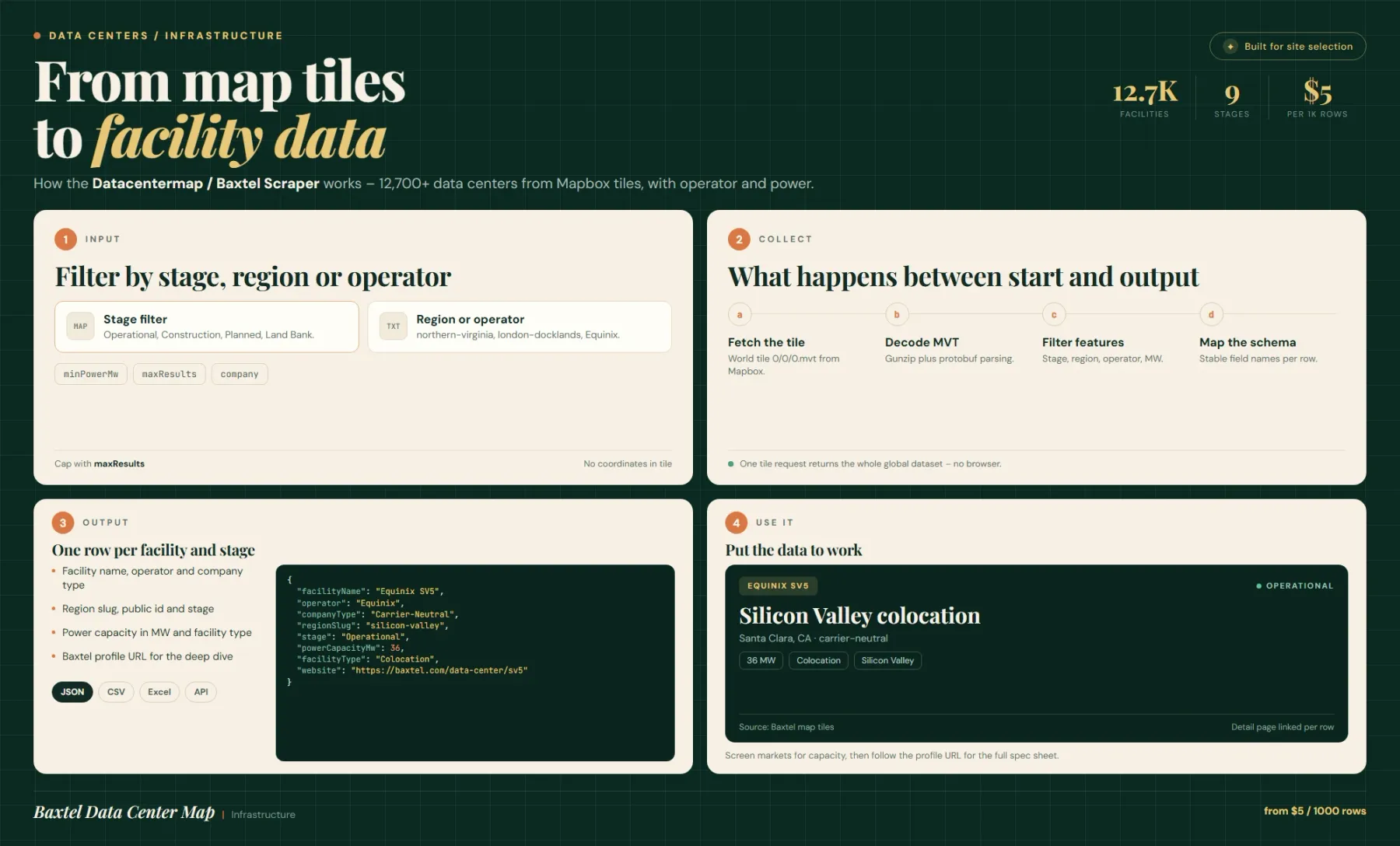
Baxtel renders its map from a public Mapbox vector tileset. The actor requests that tileset directly, decodes the vector tile buffer and reads the facility features — no browser, no headless rendering and no HTML parsing. A full pull of the layer returned 12,721 facilities when measured; nothing about the request is account-bound.
Each feature is normalised into a fixed record: facilityName, operator, companyType, regionSlug, facilityType, stage, status, powerCapacityMw, publicId and a derived website URL on baxtel.com. Filters (stage, region, company, minPowerMw) are applied in memory before rows are pushed, so you only pay for the facilities you keep.
Extract Data Center Facilities Without An Official Data Center API
There is no public data center API that returns a global facility list with power capacity. Commercial alternatives are paid market databases or platform-specific APIs. Baxtel publishes the map for humans; the underlying vector tiles are what the browser downloads to draw it.
This actor reads those tiles and returns the same facilities as rows. It is a map-layer extract, not a scraping of the HTML listing pages, so it is fast (seconds, not minutes) and does not depend on page layout.
Filter Data Centers By Stage, Operator And Power Capacity
stage uses Baxtel's own vocabulary: Operational, Construction, Planned, Prospective Expansion, Land Bank, In Doubt, Withdrawn and Decommissioned. region is a partial match on the Baxtel region slug — los-angeles, northern-virginia, london-docklands, germany-deutschland — and company is a partial, case-insensitive operator match (Equinix, Digital Realty, Vantage).
minPowerMw keeps only facilities with at least that much published total power capacity. Facilities without a published MW value are treated as 0 and drop out of any threshold above zero — that is intentional, so a "50 MW+" screen never returns a site with unknown capacity.
Coverage Limits You Should Know Before You Buy
The vector tile layer carries site geometry, operator, stage, category, power and a Baxtel public_id. It does not carry street addresses, city, country, latitude or longitude, so those fields exist in the record but come back empty ("" or 0). If you need addresses, use the website / sourceUrl link or enrich with a geocoder.
Datacentermap.com is not scraped by this version. The project is listed as planned; today the actor is a Baxtel map extract only. Free Apify users are capped at 10 results per run.
Input – Configure A Facility Extract
| Field | Type | Required | Default | Notes |
|---|---|---|---|---|
stage | string | No | all | Operational, Construction, Planned, Prospective Expansion, Land Bank, In Doubt, Withdrawn, Decommissioned |
region | string | No | "" | Partial match on the Baxtel region slug (e.g. northern-virginia) |
company | string | No | "" | Partial, case-insensitive operator match (e.g. Equinix) |
minPowerMw | number | No | 0 | Minimum published total power capacity in MW; 0 includes sites with no published MW |
maxResults | integer | No | 0 | Max facilities saved; 0 = no limit. Free users capped at 10 |
Output – Data Center Facility Fields
Dataset view overview plus the full record:
| Field | Type | Description |
|---|---|---|
facilityName | string | Site name as published on Baxtel |
operator | string | Operator or company name |
companyType | string | Operator class from the tile layer (e.g. Carrier-Neutral) |
regionSlug | string | Baxtel region slug |
facilityType | string | Lower-cased category: colocation, hyperscale, enterprise, carrier, edge, cloud, real estate |
stage | string | Lifecycle stage |
status | string | Status value from the tile layer |
powerCapacityMw | number | Total power capacity in MW (totalPowerMw carries the same value) |
publicId | string | Baxtel site identifier |
website | string | https://baxtel.com/data-center/<publicId> |
source / sourceUrl | string | baxtel.com (Mapbox vector tile) / https://baxtel.com/map |
streetAddress, city, state, country, latitude, longitude | string / number | Present in the schema but empty — the tile layer does not carry them |
The record also carries placeholder fields (siteSizeSqft, coolingType, certifications, networkCarriers, phone, photos) that are empty for the same reason.
Example Input – Operational Sites Above 20 MW
Example Output – One Facility Row
Export Data Center Data To JSON, CSV Or Excel And Schedule Runs
Results land in the default dataset: JSON, CSV, Excel or XML from the run page, or through the Apify API. The whole extract usually completes in seconds because it is one tiled request plus in-memory filtering.
Announcements move slowly, so a weekly or monthly schedule is enough for most research; quarterly is enough for investment work. At $0.005 per facility, the full ~12.7k-site map costs roughly $64 — cap it with maxResults while iterating.
Related Actors
- Google Maps Scraper – geocode and enrich facility addresses, since the tile layer carries no coordinates
- Website Content Crawler – pull operator pages, press releases and capacity announcements into clean text
- Google Search Scraper – find data center announcements, permits and news per region
- World Happiness Report Scraper – country-level context data when a facility list is joined to national indicators
FAQ
Why use this actor instead of the Baxtel website?
Baxtel's map is built for browsing, not for export. There is no download button, no CSV and no public API for the facility layer. This actor returns the same facilities as rows in seconds and lets you filter by stage, region, operator and MW before you pay for them.
Does this actor scrape datacentermap.com?
Not yet. The Actor name mentions Datacentermap because that coverage is planned, but the current version reads Baxtel's public Mapbox vector tiles only. Check the run output: every row carries source: "baxtel.com (Mapbox vector tile)".
Why are address and coordinates empty?
The tile layer Baxtel uses to draw the map contains site geometry, operator, stage, category, power and a public ID, but not street addresses, city, country or WGS84 coordinates. The fields exist in the dataset schema for consistency but are empty. Use website to open the Baxtel profile page or enrich with a geocoder.
How many data centers are in the dataset?
A full pull of the layer returned 12,721 facilities when measured, which matches the "12,700+" figure in the Actor description. Baxtel's own marketing cites a higher number because it counts sites the map layer does not carry.
What are alternatives for data center data?
Commercial market databases (structure research firms, colocation market reports) sell curated facility lists with addresses, pricing and capacity. This actor is the cheap, raw layer: no curation, no addresses, but real operator, stage and MW data at $0.005 per facility.
Do I need a proxy?
No. The tileset is served publicly and the actor runs on 256 MB without a browser. No proxy is configured.
Can I get power capacity for every facility?
Only where Baxtel publishes it. Sites without a published MW value return 0 and are excluded by any minPowerMw above zero. Counting rows with powerCapacityMw: 0 tells you how much of a region's capacity is undisclosed.
SEO Keywords
data center map scraper, baxtel scraper, baxtel api, data center database, colocation map data, data center locations dataset, data center power capacity mw, hyperscale data center list, data center market research, data center investor data, carrier neutral facility list, data center operators list, datacentermap alternative, data center site selection data, edge data center list, cloud region facility data, data center m&a research, colocation facility data, data center infrastructure data
For AI Agents & LLM Apps
Returns one row per data center facility from Baxtel's public vector-tile layer, with operator, category, stage, status, power capacity and a profile URL.
Minimal working input:
Variant — operational sites above a power threshold in one region:
Output fields: facilityName, operator, companyType, regionSlug, facilityType, stage, status, powerCapacityMw, publicId, website, source, sourceUrl — plus placeholder fields that are empty (city, country, latitude, longitude, streetAddress).
Behaviors an agent should know:
maxResults: 0(default) means no limit — always set it for exploratory runs.minPowerMw > 0silently drops facilities with unknown capacity (they are treated as 0).stagemust match Baxtel's vocabulary exactly;alldisables the filter.regionandcompanyare partial matches, not exact.- Address/coordinate fields are always empty in this version — do not build logic that expects them.
- Datacentermap.com is not a supported source yet, despite the Actor name.
Billing: pay-per-event at $0.005 per saved facility, plus a small per-GB actor-start event. 1,000 facilities ≈ $5.
Legal & Compliance Disclaimer
This actor is an independent tool. It is not affiliated with, endorsed by, or sponsored by Baxtel or Datacentermap.com.
It reads a publicly served Mapbox vector tileset that Baxtel's own map page downloads for rendering. No login, no paywall bypass, no CAPTCHA solving, no private endpoints. The output contains business information about facilities and operators (no personal contact data), and it omits fields the source does not publish rather than inventing them.
Users are responsible for complying with Baxtel's Terms of Service, with Mapbox's terms for tile usage, and with applicable law when they redistribute or commercialise the data. This section is a factual disclosure, not legal advice.


