
![Discord Username Checker [CHEAP💰] | Bulk Availability | Brands avatar](https://images.apifyusercontent.com/0UYDhy9H83XMhLgmcKe43R5FazremKM0INJdohd8O2I/rs:fill:250:250/cb:1/aHR0cHM6Ly9hcGlmeS1pbWFnZS11cGxvYWRzLXByb2QuczMudXMtZWFzdC0xLmFtYXpvbmF3cy5jb20vZHRSN3FuVGJRck5pU0NtajctYWN0b3Itb2VocGhOTWgyMmRpelR3OG4tYmM0YkJDcnJzMi1kaXNjb3JkX1BORzgucG5n.webp)
Discord Username Checker [CHEAP💰] | Bulk Availability | Brands
Pricing
from $3.70 / 1,000 results
Discord Username Checker [CHEAP💰] | Bulk Availability | Brands
Bulk-check up to 500 Discord usernames per run and get available, taken or invalid verdicts with exact error codes. A concise summary makes handle research and brand screening fast and easy.
Pricing
from $3.70 / 1,000 results
Rating
5.0
(1)
Developer

Ahmed Jasarevic
Maintained by CommunityActor stats
0
Bookmarked
55
Total users
7
Monthly active users
2 days ago
Last modified
Categories
Share
Discord Username Checker — Bulk Availability in One Run
Bulk-check up to 500 Discord usernames per run for availability. Paste your list, or let the built-in generator expand a few base words into thousands of handle candidates (prefixes, suffixes, leetspeak). Returns per-handle status (available, taken, invalid), specific diagnostics (e.g. USERNAME_INVALID_CHARACTERS), the exact requested vs. resolved handle, and a completed OUTPUT summary. Built for username acquisition research, brand protection and handle portfolio management.
Main Use Cases
- Brand protection — check all your trademarks and brand-word handles at once; log validity endings for renewal decisions.
- Username acquisition research — find available handles for gamer tags, vanity handles and portfolio buying.
- Handle generation — feed 5 base words and get the whole
the_,_yt,g4m3r-style candidate space checked in one run. - Handle portfolio management — monitor a large list of your own handles in one scheduled run (validity ending, case resolution).
- Social-launch planning — reserve/claim planning for product names across Discord before release.
How It Works
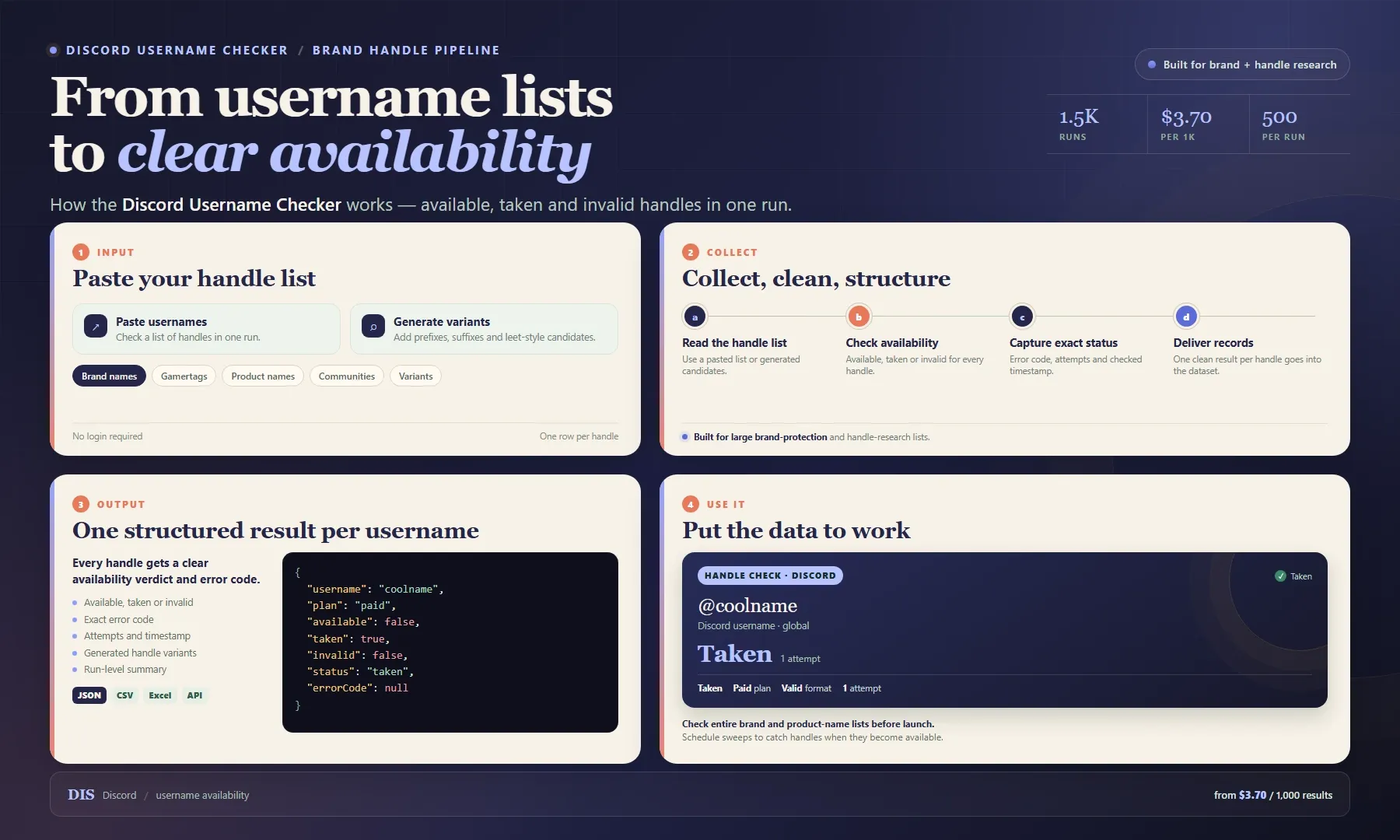
Looking for a Discord username checker for bulk brand and handle research? Paste a list of usernames and get a clear available, taken or invalid verdict for each one. Every record includes the handle, status, exact error code, attempt count and timestamp, with a run-level summary for easy tracking.
Use it to protect brand names, plan product launches, research vanity handles or monitor a portfolio of names. Export as JSON, CSV or Excel, or pull results through the Apify API. Start with a small list, then pay from $3.70 per 1,000 results.
Check Up to 500 Usernames in One Run
Check a full launch shortlist, brand portfolio or campaign list in a single run. Results are returned one row per handle, so you can sort available names and prioritize the best candidates without splitting your list.
Detect Exact Reasons a Handle Is Rejected
Beyond yes/no, when Discord rejects a handle outright (HTTP 400) each row carries the precise errorCode it returned (USERNAME_INVALID_CHARACTERS, USERNAME_TOO_SHORT, USERNAME_TOO_LONG, USERNAME_INVALID_RATE_LIMIT, USERNAME_CLAIMED...) plus the human-readable error message — so you can tell a handle that is genuinely taken from one that simply breaks the rules, and retry precisely.
Input
| Field | Type | Required | Default | Notes |
|---|---|---|---|---|
usernames | array | No* | — | Handles to check, one per line — no per-run limit, lists of many thousands are fine. |
usernamesText | string | No | — | Same thing as a paste box: new lines, commas or semicolons separate handles. Merged with usernames. |
baseWords | array | No | — | Generator base words (e.g. gamer, shadow). Empty = generator off. |
prefixes | array | No | the, im, real, official | Prepended to each base word (the_gamer). |
suffixes | array | No | yt, tv, gg, plays, xd | Appended to each base word (gamer_yt). |
useLeet | boolean | No | false | Also emit leetspeak variants (gamer → g4m3r). |
joiner | string | No | _ | Glue between base and prefix/suffix (_, ., or empty for thegamer). |
maxGenerated | integer | No | 0 | Cap on generated candidates; 0 = unlimited. |
maxConcurrency | integer | No | 15 | Parallel checks (1–50). Higher is faster but more likely to hit Discord rate limits. |
proxyConfiguration | object | No | Apify residential | Keep Apify Proxy enabled for reliable bulk checks. |
* At least one source must be filled: usernames, usernamesText, or baseWords. Everything is merged and de-duplicated (case-insensitive) before checking.
Generate Handle Candidates
No wordlist handy? Give the generator a few base words and it expands them into the whole candidate space — base, prefix_base, base_suffix, prefix_base_suffix, optionally in leet — and checks every one of them in the same run.
Produces (after de-duplication): known_handle, gamer, the_gamer, gamer_yt, the_gamer_yt, g4m3r, the_g4m3r, … — candidate count ≈ bases × (1 + prefixes) × (1 + suffixes) × (2 if leet).
Example Input
Example Output
Taken / invalid / error use the same shape
status: "taken"—taken: true: the handle exists on Discord.status: "invalid"—invalid: true: Discord rejected it;errorCode(e.g.USERNAME_INVALID_CHARACTERS) anderrorsay why.status: "error"— the check itself failed after all retries;errorcarries the reason. These rows stay in the dataset so nothing disappears silently.
Status Diagnostics, Attempts & Rate Limits
status is one of available | taken | invalid | error | rate_limited, attempts tells you how many tries a handle took, and checkedAt timestamps every check — so reruns can dedupe, and rate-limit noise is visible in data, not hidden in logs. Handles that are still rate-limited after all back-offs are not written to the dataset (you are not billed for a failed check); they are listed in OUTPUT.rateLimitedUsernames for a follow-up run.
Integrations & Automation
- Apify API — pipe results into a handle-portfolio ledger or brand-watch alerting.
- Scheduling — daily validity-ending watchers, weekly brand-handle sweeps.
- Webhooks — notify when a monitored handle flips to
available. - Export — JSON, CSV, Excel.
Recommended schedule: daily for validity-ending alerts and brand monitoring; the JSON body in a scheduled task makes large-handle sweeps a one-click routine.
Related Actors
- Discord Username Checker — the largest checker on the Store (4,300+ users), per-check billing.
- Discord Username Checker — single-username availability checks with retries.
- Discord Username Checker — availability + plus-suffix removal checks.
- Discord Member Scraper — extract members from public channels and servers.
FAQ
Why use this Actor for bulk checks?
This Actor is built specifically for bulk Discord handle checks. It returns clear verdicts, exact error codes and consistent rows, so you can manage a large name list without building and maintaining your own checker.
What are alternatives to this actor / Discord username checking?
- maged120/discord-username-checker — $0.01/result.
- dev00/discord-username-checker — $0.005/check, single-handle.
- khadinakbar/discord-username-checker — $0.008/handle.
- Community and open-source checkers vary widely in coverage and reliability.
How do I check a whole list of handles daily?
Create a task with your full list as usernames, schedule it daily — the OUTPUT summary only marks totals; you diff dataset rows across days to see availability flips.
Can it invent candidate handles for me?
Yes — fill baseWords (plus optional prefixes, suffixes, useLeet, joiner) and the generator expands them into the whole candidate space, then checks every candidate in the same run. Leave baseWords empty to disable it.
Why did a handle I know is available come back invalid?
Discord rejects handles violating its rules with specific codes — read the errorCode: spacing is resolved (e.g. my brand → my_brand), but unsupported characters or reserved words return e.g. USERNAME_INVALID_CHARACTERS.
How is availability checked without logging in?
No Discord login is required. Provide your handles and the Actor returns an availability verdict for each one.
SEO Keywords
discord username checker, discord username availability, discord handle sniper, bulk discord name check, discord username taken, discord name validation, discord brand protection, discord handle monitoring, bulk discord username checker, discord username api, discord unique username, discord vanity handle, discord username error codes, discord username generator, discord handle generator, discord username ideas, leetspeak username checker
For AI Agents & LLM Apps
- Purpose: given handles (via
usernamesarray,usernamesTextpaste box, and/or abaseWordsgenerator run — any size, all merged and de-duplicated), returns one row per handle withavailable/taken/invalid, astatus, Discord'serrorCodewhen rejected (HTTP 400), attempt count and timestamp; run-level totals land in the OUTPUT record. - Minimal input:
- Generator input (expands to the full candidate space):
- Output field list:
username,available,taken,invalid,status,error,errorCode,attempts,checkedAt - OUTPUT summary keys:
total,published,available,taken,invalid,rateLimited,rateLimitedUsernames,errors,elapsedSeconds,availableUsernames
Behaviors an agent should know:
- No field is strictly required — but at least one source (
usernames,usernamesText,baseWords) must be non-empty or the run fails with a clear error. - No per-run limit — pass the whole list; rows are flushed to the dataset in batches of 200, so a large run survives interruption with partial results already stored.
status(available | taken | invalid | error | rate_limited) is the source of truth;errorCodeis non-null only when Discord rejected the handle with HTTP 400 (e.g.USERNAME_INVALID_CHARACTERS,USERNAME_TOO_SHORT). A taken handle comes back astaken: trueon HTTP 200, not as an error code.- Handles that stay rate-limited are excluded from the dataset (not billed) and listed under
OUTPUT.rateLimitedUsernames— retry them in a fresh run. - Repeated/aggressive runs may hit a temporary rate limit — back off and retry in a fresh run.
- Apify residential proxy is the default — Discord rate-limits unproxied requests, so disabling
proxyConfigurationwill cause many checks to fail. - Spacing is normalized (e.g.
my brand→my_brand); case and most separator chars resolve silently. - Billing: pay-per-result —
resultper checked username (price set by the publisher in monetization settings), + Actor Start ~$0.00005 (Apify default); one run of any size is a single cheap call.
Legal & Compliance Disclaimer
This actor is an independent tool and is not affiliated with, endorsed by, or sponsored by Discord Inc. It works only with public username-availability information and does not access private data. Users are responsible for complying with Discord's Terms of Service and applicable law, including rate limits and platform rules; automated monitoring should respect Discord's documented usage policies.


