
![OTTO.de Scraper [~$0.76/1K💰] | Prices | Products | Repricing avatar](https://images.apifyusercontent.com/Ser2RPx6TNyOVD3jJBrgzjMecpewienClIWmPsJRNug/rs:fill:250:250/cb:1/aHR0cHM6Ly9hcGlmeS1pbWFnZS11cGxvYWRzLXByb2QuczMudXMtZWFzdC0xLmFtYXpvbmF3cy5jb20vZHRSN3FuVGJRck5pU0NtajctYWN0b3IteEV5MTA1dVJibmlRVVdDOTQtNzBLMjFpNkJIVC1FX0JEUlVEOXcwV1F1cUxYVmFVbXJhYXltbUdWRDBKNDAxY3lQT285YzUxQUh3eHRCZnQ3Q29UdmhWNDRMSTR1.webp)
OTTO.de Scraper [~$0.76/1K💰] | Prices | Products | Repricing
Pricing
from $0.76 / 1,000 results
OTTO.de Scraper [~$0.76/1K💰] | Prices | Products | Repricing
The cheapest verified OTTO.de scraper — ~$0.76 per 1,000 products. Extract prices, compare-at UVP, discount %, ratings, availability, variants and product IDs from Germany's 2nd largest marketplace. Reads OTTO's tilelist JSON (no browser). Built for repricing, Preisüberwachung & market research.
Pricing
from $0.76 / 1,000 results
Rating
0.0
(0)
Developer

Ahmed Jasarevic
Maintained by CommunityActor stats
0
Bookmarked
3
Total users
3
Monthly active users
13 days ago
Last modified
Categories
Security
Limited permissionsShare
Extract OTTO.de Product Data for Repricing, Preisüberwachung & Market Research
Scrape OTTO.de — Germany's 2nd largest online marketplace (12M+ active customers/month, 19M+ articles) — at ~$0.76 per 1,000 products, the cheapest verified Otto scraper on Apify. Get prices, compare-at UVP, Rabatt/%, ratings, reviews, availability, variants, images and repricer-ready identifiers as clean structured JSON — no browser, no $15/month subscription.
Main Use Cases
- Preisüberwachung & Repricing — Track competitor prices and UVP (compare-at) pricing on OTTO.de for Buy Box decisions
- Rabatt-Tracking — Monitor discount % (
rabattsort) and sale-priced products as they launch - Product catalog & assortment analysis — Build structured catalogs with EAN/GTIN, variant matrices and availability for DACH marketplaces
- Competitive intelligence — Compare brand pricing, ratings and review counts across categories
- Market research & product feed building — Turn OTTO listings into a clean, deduplicated feed for pricing engines or downstream analytics
- Neuheiten-Tracking — Follow new arrivals (
neuheitsort) without manual checking
How It Works
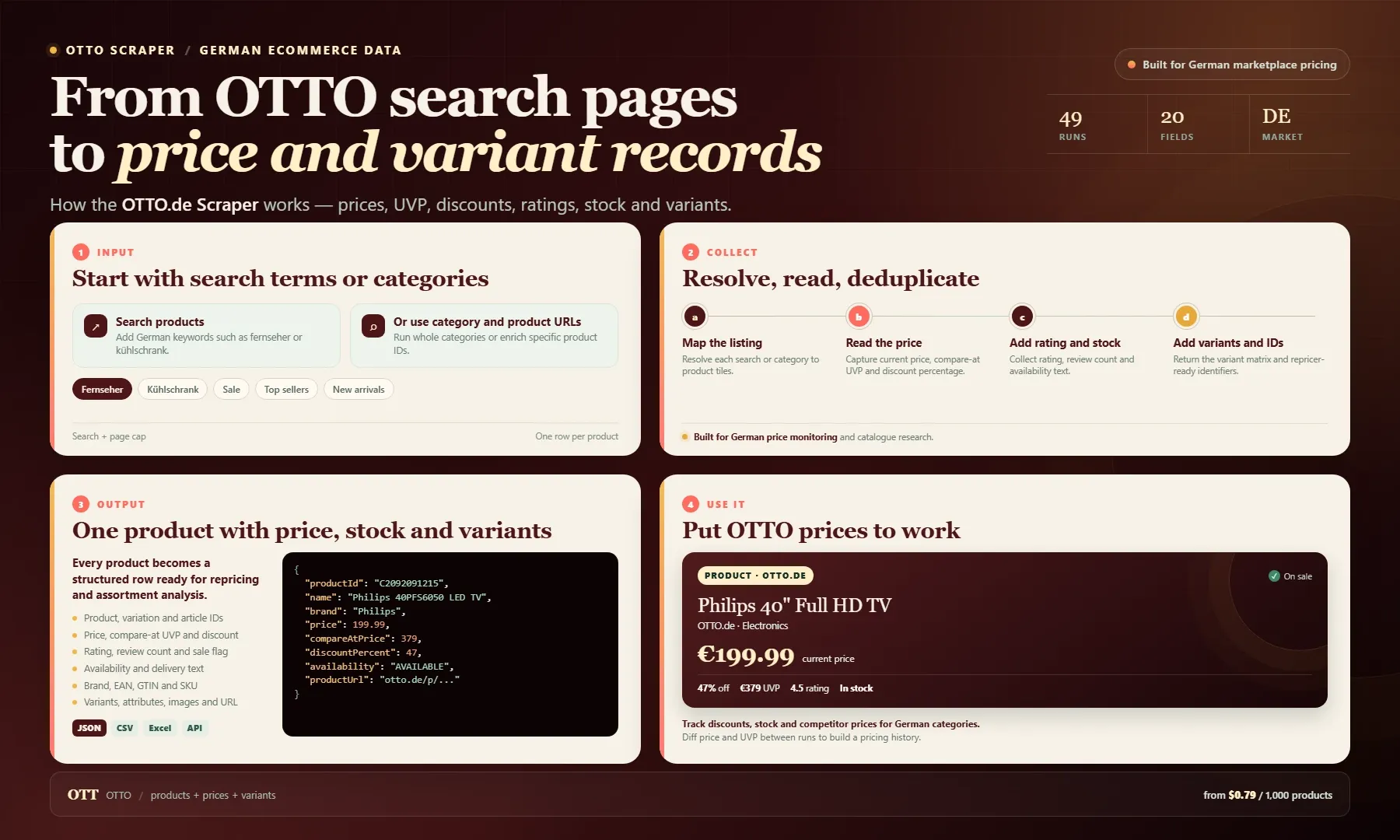
Looking for an OTTO.de scraper or a practical German ecommerce data alternative? Add search terms, category URLs or product URLs, choose a sort order and set product and page limits. Each product row includes product, variation and article IDs, name, brand, current price, compare-at UVP, discount percentage, sale flag, rating, review count, availability, images, product URL, variant matrix, key attributes and best-effort EAN, GTIN and SKU.
Use the dataset for price monitoring, repricing, discount tracking, assortment analysis and German marketplace research. Export as JSON, CSV or Excel, or pull results through the Apify API. Pay from $0.79 per 1,000 products.
Build Business Databases Without Official API Access
OTTO's Consumer API requires a partner account and approval, and the OTTO Market API serves seller-side management (products, orders, shipping) — neither exposes the public catalog, pricing and availability data this actor extracts. For marketplace price monitoring, competitor tracking and catalog matching, running this scraper on a schedule is the practical path.
Input
| Field | Type | Required | Default | Notes |
|---|---|---|---|---|
searchTerms | array | no | ["fernseher"] | Free-text keywords to search on OTTO.de, paginated automatically |
categoryUrls | array | no | [] | OTTO.de category/listing URLs, e.g. https://www.otto.de/technik/fernseher/ |
productUrls | array | no | [] | OTTO.de product page URLs for EAN/GTIN enrichment |
maxItems | integer | no | 100 | Max products returned across all inputs. Free users capped at 10 |
maxPagesPerListing | integer | no | 10 | Max result pages per search/category (~158 tiles/page, subset hydrated) |
sortBy | enum | no | topseller | topseller, preisaufsteigend, preisabsteigend, rabatt, neuheit, bewertung |
proxyConfiguration | object | no | AUTO datacenter | Native Apify proxy editor; AUTO is fine for search/category listings |
Example Input
Output
Each dataset item is a flat product record:
| Field | Description |
|---|---|
productId / variationId / articleNumber | OTTO's internal repricer-ready identifiers |
name / brand | Product title and brand |
price / compareAtPrice / discountPercent / isOnSale | Current price, UVP compare-at price, discount % and sale flag (EUR) |
rating / reviewCount | Average rating and number of reviews |
availability / availabilityText | Stock state and human-readable availability text |
images | Array of image URLs |
productUrl | Canonical product page URL |
variants | Colour/size variant matrix with per-variant IDs |
topInfos | Key product attributes (e.g. screen diagonal, resolution) |
ean / gtin / sku | Barcode identifiers (best-effort via productUrls) |
source / scrapedAt | Which input produced the record and when |
Example Output
Otto Scraper vs. Competitors (verified from Apify Store)
| Capability | This actor | m3web/otto-de | studio-amba/otto |
|---|---|---|---|
| Price | ~$0.76/1K results | $15/mo rental + usage | ~$1/1K |
| Search terms input | ✅ | ❌ categories only | ✅ |
Product detail URLs (/p/...) | ✅ | ❌ | ❌ |
| Compare-at UVP price + discount % | ✅ | ❌ | partial (originalPrice only) |
| Variant matrix with per-variant IDs | ✅ | ❌ | ❌ |
| EAN/GTIN best-effort | ✅ | ❌ | ❌ |
| Deduplication by product/variation ID | ✅ | ❌ | ❌ |
| No monthly subscription | ✅ | ❌ ($15/mo) | ✅ |
Monitor OTTO Prices on a Schedule
Schedule a daily or weekly run to track Preisänderungen and Verfügbarkeit over time. Diff price / compareAtPrice / discountPercent between runs to build a price history for your categories or brands. Results land in an Apify dataset, readable via the Apify API, webhooks, Zapier, Make, or any REST client.
Related Actors For German E-Commerce Data
- Otto.de Listings Scraper — listings-only alternative
- Otto Scraper — German E-Commerce Products & Prices — pricier general Otto scraper
- Otto.de Product Scraper — JSON-LD based listing scraper
- Otto.de Product Scraper (bulk/Catalog) — sitemap bulk mode at $3/1K
- Otto.de Product Scraper — subscription actor, categories only
Frequently Asked Questions
Why use this actor instead of the official OTTO API?
OTTO's official Consumer API requires a partner account and approval, and the Market API is built for sellers managing their own products/orders — neither gives you the public catalog, prices, UVP, ratings and availability this actor extracts from OTTO's own tilelist JSON, instantly, per-result-priced, with no approval process.
Is it legal to scrape OTTO.de?
Scraping publicly available product data for your own analysis is generally permitted; you are responsible for complying with OTTO's Terms of Service and applicable law (including German UrhG/BDSG where relevant). This actor only reads public pages — it does not log in, bypass CAPTCHAs or circumvent access controls.
What does OTTO.de Preisüberwachung involve?
Run this actor (or any of its saved tasks) on a schedule for your search terms or categories, and diff price, compareAtPrice (UVP) and discountPercent between runs — the fields are already there for repricing and Rabatt tracking.
Can I get EAN/GTIN barcodes?
Yes, best-effort via the productUrls input. OTTO serves a JS challenge (KPSDK) on some /p/ pages; listing surfaces (search + category) are unaffected. For high-volume EAN extraction, category and search runs cover the vast majority of the catalog.
How much does it cost to scrape OTTO.de?
Typical runs finish in well under a minute at 256MB. At ~$0.76 per 1,000 products, a 100-product monitoring run costs well under $0.10, with free users capped at 10 products per run.
SEO Keywords
otto.de scraper, otto preisüberwachung, otto price monitoring, otto preisvergleich, otto api alternative, otto repricing, otto uv preis, otto rabatt tracking, otto händler, otto marktplatz, otto produktdaten, otto ean gtin extrahieren, otto sortiment, otto bewertungen, otto artikelnummer, otto varianten, otto verfügbarkeit, german ecommerce data, preisbeobachtung otto, otto fernseher preisvergleich, otto katalogabgleich, otto preisvergleich elektronik
For AI Agents & LLM Apps
Purpose: Return OTTO.de product records (price, compare-at UVP, discount %, rating, availability, variants, identifiers, product URL) from search terms, category URLs or product URLs.
Minimal working input:
Variant inputs:
Output fields: productId, variationId, articleNumber, name, brand, price, compareAtPrice, discountPercent, isOnSale, currency, rating, reviewCount, availability, availabilityText, images[], productUrl, variants[], topInfos[], ean, gtin, sku, source, scrapedAt.
Behaviors an agent should know:
- If both
searchTermsandcategoryUrlsare set, all are processed in one run; results include asourcefield identifying which input produced each record. maxItems(default 100) caps total output. Free-tier runs are capped at 10 products.sortByapplies OTTO's server-side sort before pagination (rabatt= discount/sale order,neuheit= new arrivals,bewertung= rating).ean/gtin/skuarenullfor search/category records unless the product was also requested viaproductUrls(KPSDK challenge may block some detail pages).- Deduplication is automatic by product/variation ID — sponsored repeats do not inflate results.
Billing: pay-per-result at ~$0.76 per 1,000 products (0.000076 USD/product) + nominal actor-start cost; no monthly subscription.
Legal & Compliance Disclaimer
This actor is an independent data-extraction tool and is not affiliated with, endorsed by, or sponsored by OTTO GmbH & Co. KGaA. It accesses only publicly available pages on otto.de; it does not bypass logins or CAPTCHAs, and it does not circumvent access controls. Users are responsible for their own compliance with OTTO's Terms of Service and applicable law, including the German Urheberrechtsgesetz (UrhG) and Bundesdatenschutzgesetz (BDSG) where relevant. Scraped data should be used lawfully and in accordance with OTTO's robots.txt expectations.


![Amazon Bestsellers Scraper [💰$2.5/1K] | Prices | Rankings avatar](https://images.apifyusercontent.com/TS4hpxVjr3wUGIU441mmF_CaJ2Nim6hWSuCyyAdAZOQ/rs:fill:76:76/cb:1/aHR0cHM6Ly9hcGlmeS1pbWFnZS11cGxvYWRzLXByb2QuczMudXMtZWFzdC0xLmFtYXpvbmF3cy5jb20vZHRSN3FuVGJRck5pU0NtajctYWN0b3ItRG80NTNXZWxUMlFUckM1YU8tbkpYODAxeHkyYy1pbWFnZXNfJTI4NSUyOS5wbmc.webp)


![PropertyGuru Scraper [Only $0.85/1K💰] | SG/MY/TH | PSF | MRT avatar](https://images.apifyusercontent.com/sMrBQqRnbiPmNTua8pnwa4PwiyB-BIh5yemAzaNfZy4/rs:fill:76:76/cb:1/aHR0cHM6Ly9hcGlmeS1pbWFnZS11cGxvYWRzLXByb2QuczMudXMtZWFzdC0xLmFtYXpvbmF3cy5jb20vZHRSN3FuVGJRck5pU0NtajctYWN0b3ItZ0pRSXcxUE9qY3d0NWhmQmYtM1BoelR4SmhFcC1pbWFnZXNfJTI4NCUyOS5qZmlm.webp)
![Trustpilot Scraper [$0.70/1K💰] | Reviews | Ratings avatar](https://images.apifyusercontent.com/mcW2vplLG6GYOoG4bodomGCfhKukaKvxaYH9Qo5uTx4/rs:fill:76:76/cb:1/aHR0cHM6Ly9hcGlmeS1pbWFnZS11cGxvYWRzLXByb2QuczMudXMtZWFzdC0xLmFtYXpvbmF3cy5jb20vZHRSN3FuVGJRck5pU0NtajctYWN0b3ItQjlha1FDZmxpN1d3R3M5Y1Mtd0R2YXZLZGpHai1UUlNULkwtNWFkYTljOTIucG5n.webp)


![Zimmo Scraper [Only $1.5💰] | Belgian Property | Prices avatar](https://images.apifyusercontent.com/IEt6LPBafYAEWs9sp-WGv7m7O0Nv95DifmshNNsmgqc/rs:fill:76:76/cb:1/aHR0cHM6Ly9hcGlmeS1pbWFnZS11cGxvYWRzLXByb2QuczMudXMtZWFzdC0xLmFtYXpvbmF3cy5jb20vZHRSN3FuVGJRck5pU0NtajctYWN0b3Itb3N2Y3pLeWh0em9xcXdPemktbmhHZGExTlFobS11bm5hbWVkLnBuZw.webp)

