
![Ticketmaster Scraper [Only $2/1K💰] | Events | Ticket Status avatar](https://images.apifyusercontent.com/-REcqK51m2ImZrrHgD1SVSKQU9vngwwBSOTT2zf7rTM/rs:fill:250:250/cb:1/aHR0cHM6Ly9hcGlmeS1pbWFnZS11cGxvYWRzLXByb2QuczMudXMtZWFzdC0xLmFtYXpvbmF3cy5jb20vZHRSN3FuVGJRck5pU0NtajctYWN0b3Itbjhnc2xMNjdpNURZT1FhYnctZDhmYXZIZUdjRC1pbWFnZXNfJTI4MTQlMjkucG5n.webp)
Ticketmaster Scraper [Only $2/1K💰] | Events | Ticket Status
Pricing
from $1.80 / 1,000 results
Ticketmaster Scraper [Only $2/1K💰] | Events | Ticket Status
Scrape Ticketmaster events — concerts, sports and theater with venue, dates, ticket status, lineups and images. No API key needed, $0.002 per event.
Pricing
from $1.80 / 1,000 results
Rating
0.0
(0)
Developer

Ahmed Jasarevic
Maintained by CommunityActor stats
0
Bookmarked
3
Total users
2
Monthly active users
5 days ago
Last modified
Categories
Share
Ticketmaster Scraper
Scrape Ticketmaster events — concerts, sports, theater and family shows — with event name, date/time, venue + city, category/genre, ticket status (on sale / limited / sold out / cancelled), ticket URL, artist lineup, seatmap and images. Built for event promoters, ticket resellers, market researchers, travel/fan apps and data journalists — and it needs no API key: the actor reads Ticketmaster's own internal public JSON API at $0.002 per event, the cheapest no-key option verified on the Apify Store.
Main Use Cases
- Live events database — build clean event datasets per market, category or artist, with dates, venues, lineups and ticket status
- Sold-out event tracking — scheduled daily runs detect when events go from on-sale to sold out or cancelled
- Concert price tracking — monitor face-value price ranges and currency where Ticketmaster publishes them
- Event market research — tour activity, genre mix and venue usage per city and country
- Promoter lead generation — identify active events, artists and venues per market for outreach planning
How It Works
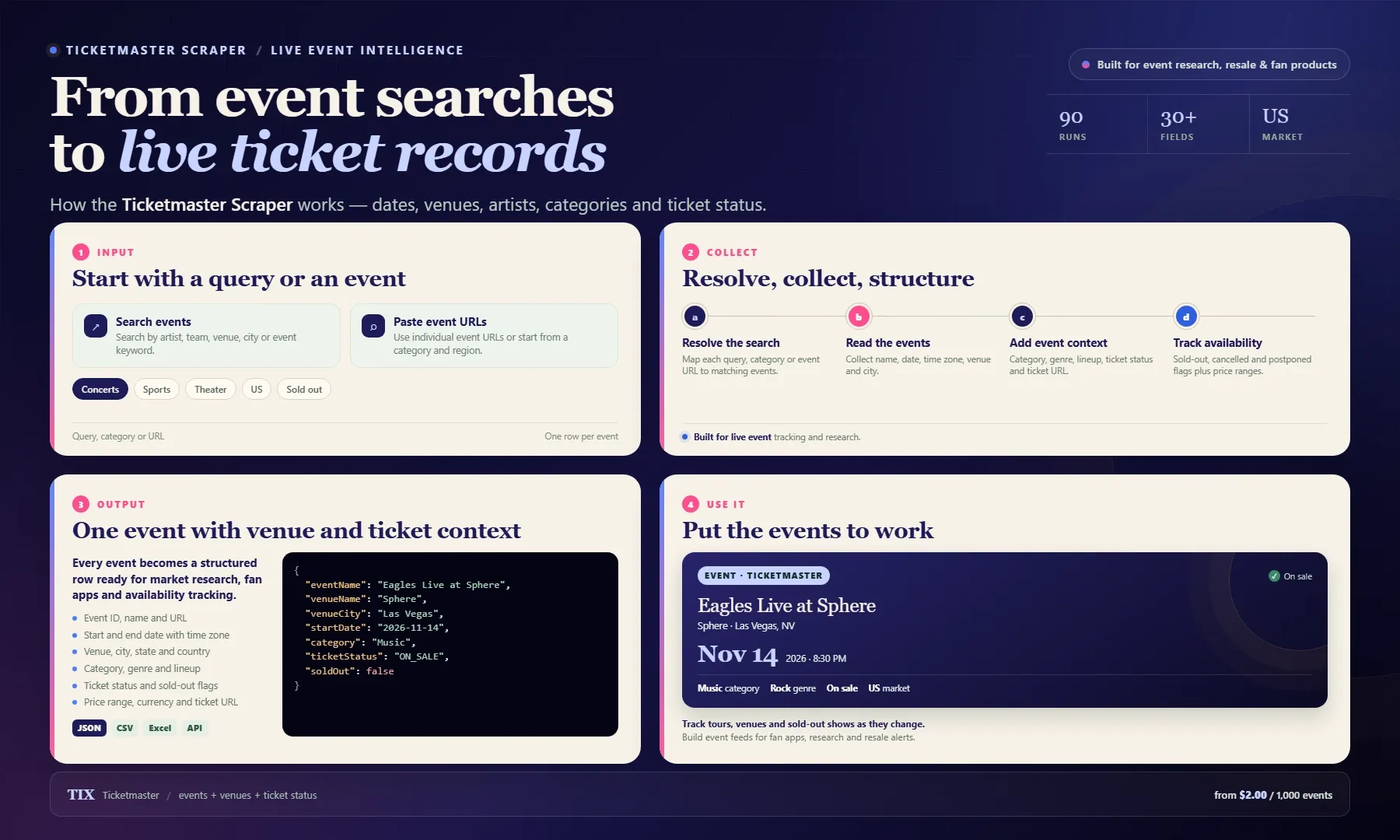
Looking for a Ticketmaster scraper or a practical Ticketmaster event data alternative? Search by artist, team, venue or keyword, browse a category, or paste event URLs. Each row includes event name, date and time zone, venue and city, category and genre, artist lineup, ticket status, sold-out and cancelled flags, price range, currency, images and ticket URL.
Use the dataset for live event databases, tour and venue research, fan apps, price tracking and availability alerts. Export as JSON, CSV or Excel, or pull results through the Apify API. Pay from $2.00 per 1,000 events.
Collect Live Event Data Without the Discovery API
The official Ticketmaster Discovery API requires a developer key from a paid partner agreement, and the mobile gateway is not publicly routable. This actor uses the www JSON API — the only key-free, publicly routable machine-readable surface — while competitor labrat011/event-ticket-scraper at $0.0005 relies on an official apiKey input. At $0.002/event this is the cheapest no-api-key Ticketmaster scraper on the Store (the nearest key-free competitor is $0.00225).
Every run also includes one built-in showcase event (SHOWCASE_EVENT — currently "Eagles Live at Sphere"), always fetched through /api/eventinfo with full enrichment, so the output demonstrates the difference the includeEventDetails enrichment makes. Turn it off with includeShowcaseEvent: false.
Input
| Field | Type | Required | Default | Notes |
|---|---|---|---|---|
searchQueries | array | No | [] | Keyword queries to /api/search/events, e.g. beyonce, comedy. Empty = category IDs only |
categoryIds | array | No | [] | Major-category IDs: Music KZFzniwnSyZfZ7v7nJ, Sports KZFzniwnSyZfZ7v7v1, Arts & Theater KZFzniwnSyZfZ7v7nK, Family KZFzniwnSyZfZ7v7nJ2 |
startUrls | array | No | [] | Direct Ticketmaster event URLs, e.g. https://www.ticketmaster.com/artist/event/1A9Zk37GkdXVozi |
startDate / endDate | string | No | "" | YYYY-MM-DD event start-date window (empty end = no upper bound) |
countryCode | string | No | US | Market host: US, GB, DE, AU, CA, … |
region | string | No | 200 | Ticketmaster region code (200 = United States / all regions) |
includeEventDetails | boolean | No | true | Enrich each event via /api/eventinfo: venue address/coords, full artist lineup, images, currency |
includeShowcaseEvent | boolean | No | true | Add the built-in always-enriched reference event |
maxItems | integer | No | 100 | Hard cap on events (free users: 10) |
maxPagesPerQuery | integer | No | auto | Optional cap on result pages (20 events each); auto-derived from maxItems |
maxConcurrency | integer | No | 6 | Parallel requests (1–20); the main speed knob |
maxRequestRetries | integer | No | 3 | Retries for a failed HTTP request |
requestHandlerTimeoutSecs | integer | No | 60 | Per-request timeout in seconds |
autoProxyOnBlock | boolean | No | true | Replay blocked requests through Apify Proxy RESIDENTIAL |
proxy | object | No | off | Standard Apify proxy picker (used from the first pass when enabled) |
Output — Event Records for Market Research
One dataset item per event (see Example Output below).
Data table:
| Field | Description |
|---|---|
eventName, eventId, discoveryId, sourceId | Event identity across Ticketmaster systems |
startDate, startDateTimeLocal, endDateTimeLocal, timeZone | When the event happens |
onsaleDate, offsaleDate | Ticket sale window |
venueName, venueCity, venueState, venueCountry, venueAddress, venueLatitude, venueLongitude, venueUrl | Where it happens |
category, subCategory, genre, subGenre | Ticketmaster taxonomy |
priceMin, priceMax, currencyCode | Face-value range when published (often null, see limitation) |
ticketStatus | ON_SALE, LIMITED_AVAILABILITY, SOLD_OUT, CANCELLED, POSTPONED, RESCHEDULED, TBA |
ticketUrl | Canonical Ticketmaster event page |
artists | Lineup with artist page URLs, images and rank |
seatmapUrl, imageUrl, images | Static seatmap image and event/artist photos |
Known limitation: Ticketmaster only publishes face-value pricing inside the bot-walled checkout flow (a FlatBuffer/AVSC payload), so
priceMin/priceMaxare usuallynullwhilecurrencyCodeis always present. Prices shown on listing cards are dynamic resale values and are not exposed by any public endpoint.
Example Input
Keyword search with enrichment:
One specific event by URL:
Example Output — Event Record (trimmed)
Track Concert and Sports Events at $0.002 Per Event
One price, one line, no options: the actor bills every dataset row automatically via Apify's apify-default-dataset-item event at $0.002 per event plus Apify's standard $0.00005 actor start. includeEventDetails does not change the price — enriching an event or not costs the same per row; it only changes how fast the run finishes. Free Apify accounts are capped at 10 events per run; paid plans run uncapped. Budget separately for residential proxy traffic only if you get blocked (requests replayed through RESIDENTIAL are billed by Apify at standard proxy rates on top of compute).
Integrations & Automation
- API — run and fetch via the Apify REST API, or call it from AI agents through the Apify MCP server
- Scheduling — daily runs with a date window track status changes (onsale → sold out → cancelled) over time
- Webhooks — push new/changed events to your app, alerting or warehouse
- Export — JSON, CSV, Excel, XML, HTML
Recommended schedule: weekly for event databases per market; daily for sold-out/schedule-change tracking with a startDate window.
Related Actors
- Ticketmaster Scraper —
solidcode/ticketmaster-scraper— closest key-free competitor; $0.00225/event - Ticketmaster Events Scraper 🎫 —
easyapi/ticketmaster-events-scraper— $0.00499/event + $0.09 start - Ticketmaster Scraper | Events, Tickets & Seat-Level Prices —
lentic_clockss/ticketmaster-scraper— $0.003/event + $0.005 start, seat-level pricing - Ticketmaster Event Scraper —
labrat011/event-ticket-scraper— $0.0005/event but requires the official Discovery API key - Ticketmaster Radar — Presale Codes, Alerts & On-Sale —
bovi/ticketmaster-radar— stateful change-feed for presale/on-sale tracking
FAQ
Why use this actor instead of the official Ticketmaster API?
The official Discovery API requires a developer key from a paid partner agreement, and the mobile gateway is not publicly routable. This actor reads Ticketmaster's www JSON API — the only key-free, publicly routable machine-readable surface — with TLS impersonation and an automatic residential-proxy fallback for IP blocks.
What are alternatives to this actor for concert event data?
Key-free Store options: solidcode/ticketmaster-scraper ($0.00225/event), easyapi/ticketmaster-events-scraper ($0.00499 + $0.09 start), lentic_clockss/ticketmaster-scraper ($0.003 + $0.005 start). If you already hold a Discovery API key, labrat011/event-ticket-scraper is cheaper ($0.0005). Ours is the cheapest key-free option.
How can I scrape Ticketmaster without an API key?
Point the actor at Ticketmaster's internal api/search/events and api/eventinfo endpoints via searchQueries/categoryIds/startUrls. No key input exists on this actor — the only requirements are the TLS impersonation and, when IP-blocked, a residential replay.
How do I track sold-out shows?
Schedule daily runs with a startDate window and read the ticketStatus field (ON_SALE, LIMITED_AVAILABILITY, SOLD_OUT, CANCELLED, POSTPONED, RESCHEDULED, TBA). Each run also returns the dates and onsale windows needed to detect schedule changes.
Why are prices empty on my events?
Ticketmaster serves face-value pricing only inside the bot-walled checkout flow. currencyCode is always present; priceMin/priceMax stay null unless the API payload carries them. Resale prices shown on listing cards are not exposed by any public endpoint.
Why did my run log "Pass 2/3 — Apify Proxy group RESIDENTIAL"?
Ticketmaster refused the first (direct, free) pass — HTTP 403 on Apify's datacenter IPs. Only the blocked requests were replayed through residential IPs, so you still get data. Set autoProxyOnBlock: false to stay direct for zero proxy spend (at the risk of an empty run from datacenter IPs).
Does it work outside the US?
Yes — set countryCode to switch market hosts (GB, DE, AU, CA, …). Some smaller markets return fewer fields.
For AI Agents & LLM Apps
- Purpose: given keyword queries, Ticketmaster category IDs, or direct event URLs, returns one structured row per event with dates, venue + geo-coordinates, category/genre, ticket status, ticket URL, artist lineup, seatmap and images.
- Minimal working input:
- Variant inputs: category browse —
{ "categoryIds": ["KZFzniwnSyZfZ7v7nJ"], "maxItems": 50 }; single event —{ "startUrls": ["https://www.ticketmaster.com/artist/event/1A9Zk37GkdXVozi"] }; date window — add"startDate": "2026-11-01", "endDate": "2026-12-31". - Output fields:
eventName, eventId, discoveryId, sourceId, startDate, startDateTimeLocal, endDateTimeLocal, timeZone, onsaleDate, offsaleDate, venueName, venueCity, venueState, venueCountry, venueAddress, venueLatitude, venueLongitude, venueUrl, category, subCategory, genre, subGenre, priceMin, priceMax, currencyCode, ticketStatus, ticketUrl, artists, seatmapUrl, imageUrl, images. - Behaviors an agent should know: with no input at all, the actor defaults to upcoming Music events for the next 90 days — always pass at least one of
searchQueries/categoryIds/startUrls.includeEventDetails(defaulttrue) adds one/api/eventinfocall per event but does not change price — only runtime. A built-in showcase event ("Eagles Live at Sphere") is added to every run unlessincludeShowcaseEvent: false.maxItemscaps events;maxPagesPerQueryis auto-derived when omitted (20 events/page).autoProxyOnBlock(defaulttrue) replays HTTP 403 responses through residential proxies billed separately by Apify — set itfalsefor zero proxy spend.countryCodeswitches market hosts (GB,DE,AU,CA);regiondefaults to200(US).priceMin/priceMaxare usuallynull— this is a Ticketmaster platform limitation, not a bug; do not retry events to recover prices. - Billing: pay-per-result — $0.002 per dataset row + standard $0.00005 actor start; residential proxy replay (only when blocked) is billed separately by Apify.
Legal & Compliance Disclaimer
This actor is an independent tool and is not affiliated with, endorsed by, or sponsored by Ticketmaster, Live Nation, or any of their affiliates. It accesses only Ticketmaster's own publicly served JSON endpoints with the same headers its website uses; it does not bypass login walls or access private data. Respect Ticketmaster's Terms of Use and applicable law, and do not use the data for unauthorized resale or ticket-scalping activities prohibited by applicable law. You are responsible for your own compliance with Ticketmaster's Terms of Service and applicable data-protection law.
SEO Keywords
ticketmaster scraper, concert event data, event discovery api alternative, event ticketing data, sold out event tracking, event market research, ticket resale analysis, live events database, concert price tracking, ticketmaster api without key, venue capacity data, band tour data scraping, event calendar data, promoter lead generation, events by city data, ticketmaster discovery api, concert industry analytics, artist performance tracking, event aggregation api, secondary market ticket research


