

US Building Permits Scraper | Construction & Real Estate Leads
Pricing
from $1.97 / 1,000 results
US Building Permits Scraper | Construction & Real Estate Leads
Find fresh US construction leads from public building permits. Scrape any Socrata city portal and extract permit details, project value, contractor, owner, address, coordinates and work description. Filter by date, trade, keywords and project value.
Pricing
from $1.97 / 1,000 results
Rating
0.0
(0)
Developer

Ahmed Jasarevic
Maintained by CommunityActor stats
0
Bookmarked
3
Total users
2
Monthly active users
19 days ago
Last modified
Categories
Features
Share
US Open Data Scraper — Socrata Permits & Public Records
Extract building permits and other public records from any open-data portal powered by Socrata. Point the actor at a city domain and dataset ID, and it returns clean, deduplicated rows with permit numbers, dates, addresses, contractor details, valuations and coordinates. Built for roofing, solar and HVAC contractors, building-material suppliers, real-estate investors and construction-market researchers.
How It Works
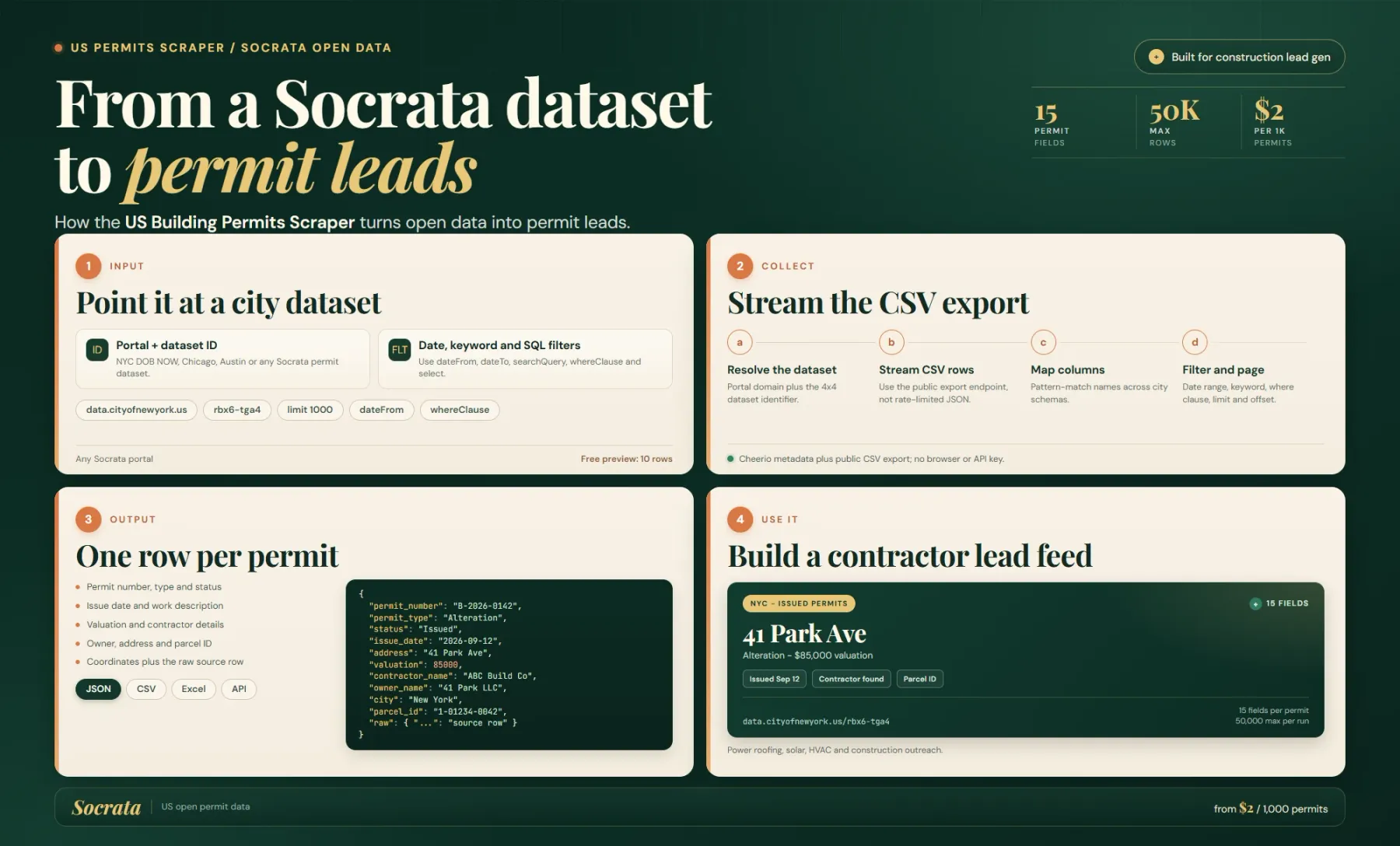
The actor downloads the dataset's public CSV export from https://{domain}/api/views/{datasetId}/rows.csv?accessType=DOWNLOAD, reads it as a stream, applies your filters and saves mapped records. There is no login, no API key and no browser.
Socrata portals publish thousands of different schemas, so the actor maps common permit columns through alias lists. For example, permit_number can come from job_filing_number, permit_number, permit_no, permitid, permit_id or filing_number. The full original row is always preserved in raw, so no source column is lost when a dataset uses an unfamiliar name.
What You Can Scrape
- Building and construction permits — NYC DOB, Chicago, San Francisco, Austin, Seattle, Los Angeles and hundreds of other Socrata portals.
- Contractor and owner leads — applicant business name, licence number, owner name and job address, ready for CRM enrichment.
- Job valuations — filter by estimated cost to find larger projects.
- Geocoded records — latitude and longitude when the source dataset publishes them.
- Any tabular Socrata dataset — the same mapping works for business licences, inspections, code violations and other public records with permit-like columns.
Input
| Field | Type | Required | Default | Notes |
|---|---|---|---|---|
domain | string | Yes | — | Socrata host, for example data.cityofnewyork.us or data.sfgov.org. Do not include https://. |
datasetId | string | Yes | — | Four-by-four dataset identifier from the portal URL, for example ipu4-2q9a. |
searchQuery | string | No | — | Case-insensitive full-text search across every text column, applied locally while streaming. |
dateField | string | No | — | Column to filter by date, for example issued_date. |
dateFrom | string | No | — | Keep rows on or after this date (YYYY-MM-DD). Requires dateField. |
dateTo | string | No | — | Keep rows on or before this date (YYYY-MM-DD). Requires dateField. |
whereClause | string | No | — | Simple filter such as borough='MANHATTAN' or estimated_job_costs > 50000. Supports =, !=, >, >=, <, <= and AND. |
select | string | No | — | Comma-separated source columns to keep inside raw. It does not remove the 14 mapped fields. |
limit | integer | No | 1000 | Maximum records to return (1–50,000). |
offset | integer | No | 0 | Records to skip in the filtered stream. |
proxyConfiguration | object | No | Apify Proxy | Optional. Useful for very large downloads or rate-limited portals. |
Example input
Output
One dataset item per filtered source row. The actor returns 14 mapped fields plus raw:
| Field | Source examples | Description |
|---|---|---|
permit_number | job_filing_number, permit_number | Permit or filing identifier |
permit_type | work_type, permit_type | Work or permit category |
status | permit_status, status | Current permit status |
issue_date | issued_date, issuance_date | Issue or approval date |
address | address, site_address | Site address |
work_description | job_description, description | Scope of work |
valuation | estimated_job_costs, job_cost | Declared job value |
contractor_name | applicant_business_name, contractor_name | Contractor or applicant business |
contractor_license | applicant_license, license_number | Contractor licence |
owner_name | owner_name, owner_business_name | Property owner |
latitude | latitude, lat, gis_latitude | Latitude when published |
longitude | longitude, lon, lng | Longitude when published |
city | city, borough, municipality | City or borough |
parcel_id | bbl, parcel_id, lot | Parcel, block/lot or lot identifier |
raw | all columns | Original CSV row, optionally narrowed with select |
Missing or unmapped values are returned as null; the actor does not invent data.
Data Behaviour and Limits
- One dataset per run. Use separate runs for different cities or datasets.
- Filters run locally.
searchQuery,dateFrom,dateToandwhereClauseare evaluated while the CSV is streamed; they are not pushed down as SoQL. Large portals can therefore download a large file even whenlimitis small. - Scan cap. The actor reads at most 200,000 rows in one run to protect memory.
limitcan be up to 50,000. - Date sorting. When
dateFieldis set, the actor needs the filtered list before slicing, so expect a longer scan on very large datasets. - Column aliases are finite. Most permit portals match the built-in aliases. If a dataset uses a completely different schema, mapped fields can be
nullwhilerawstill contains the values. - Coordinates are source-dependent. The actor does not geocode addresses.
- CSV export must be public. Private or disabled exports return an HTTP error.
Pricing
Pay-per-result with no subscription:
| Event | Price | What triggers it |
|---|---|---|
| Actor start | $0.00005 | Once per run |
| Result row | $0.002 | Each saved dataset item |
That is $2 per 1,000 rows. Free Apify accounts can preview 10 rows; paid runs are bounded by limit (default 1,000, maximum 50,000).
FAQ
How do I find the Socrata domain and dataset ID?
Open the dataset in your browser. The domain is the host, such as data.cityofnewyork.us. The dataset ID is the four-by-four code in the path, such as ipu4-2q9a in /d/ipu4-2q9a.
Do I need a Socrata API token?
No. The actor uses the public CSV export, which does not require an app token. A proxy can help if the portal rate-limits repeated large downloads.
Does this work outside the US?
Technically it works with any public Socrata portal, but the field aliases and documentation are optimised for US municipal permit data.
Can I get every original column?
Yes. raw contains the full source row. Use select if you want to keep only specific columns inside raw.
SEO Keywords
socrata scraper, open data scraper, us building permits, building permit data, construction leads, contractor leads, nyc dob permits, socrata api alternative, permit dataset, public records scraper, construction market research, solar leads, roofing leads, hvac leads, socrata csv export
Legal & Compliance Disclaimer
This actor accesses publicly available open-data exports. You are responsible for complying with the source portal's terms, local laws and any restrictions on using permit or contractor data for marketing. Verify records before making business or legal decisions.


