Cookie & Session Manager
Pricing
from $50.00 / 1,000 session manageds
Cookie & Session Manager
A general-purpose cookie/session manager that captures, stores, validates & refreshes browser cookies for any website. Many scrapers need authenticated sessions to access data behind login walls. Manually exporting cookies from your browser is tedious & they expire frequently. This actor solves that
Pricing
from $50.00 / 1,000 session manageds
Rating
0.0
(0)
Developer

The Howlers
Maintained by CommunityActor stats
0
Bookmarked
58
Total users
4
Monthly active users
2 months ago
Last modified
Categories
Share
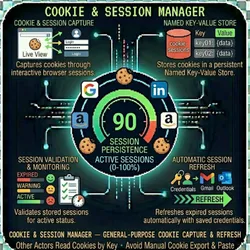
A general-purpose cookie/session manager that captures, stores, validates, and refreshes browser cookies for any website. Other Apify actors can read stored cookies by key instead of requiring users to manually export and paste cookies.
Why use this?
Many scrapers need authenticated sessions to access data behind login walls. Manually exporting cookies from your browser is tedious and they expire frequently. This actor solves that by:
- Capturing cookies through an interactive browser session (you log in via Apify's live view)
- Storing them in a persistent Named Key-Value Store
- Validating stored sessions to check if they're still active
- Refreshing expired sessions automatically with saved credentials
Your other actors simply call Actor.openKeyValueStore('cookie-sessions') and read cookies by key.
Supported Platforms
Built-in login detection for:
| Platform | Login URL | Success Detection |
|---|---|---|
| Nextdoor | nextdoor.com/login | Feed page loaded |
| linkedin.com/login | Global nav visible | |
| facebook.com/login | Banner visible | |
| instagram.com/accounts/login | Nav element loaded | |
| TikTok | tiktok.com/login | For You page loaded |
| Yelp | yelp.com/login | User account menu visible |
| Custom | Any URL you provide | Your CSS selector or URL pattern |
Modes
Mode 1: Capture (Interactive Login)
Opens a real browser you can see via Apify's Live View (or VNC). Navigate to the login page, log in manually, and the actor captures all cookies once it detects a successful login.
Mode 2: Validate
Reads stored cookies and checks if the session is still valid by navigating to the platform and looking for authenticated content.
Mode 3: Refresh (Automated Re-login)
Performs a headless automated login with saved credentials, captures fresh cookies, and overwrites the stored ones. Schedule this to run every few days to keep sessions alive.
Using Stored Cookies in Other Actors
Once cookies are captured, any Apify actor can read them:
Output Format
Scheduling Auto-Refresh
Set up an Apify Schedule to run the actor in refresh mode every 3 days to keep sessions alive:
- Go to Schedules in your Apify dashboard
- Create a new schedule with cron:
0 6 */3 * *(every 3 days at 6 AM) - Set the actor input to refresh mode with your credentials
Pricing
$0.05 per session managed (capture, validate, or refresh operation).
Plus standard Apify platform costs (compute, proxy, storage).
Compatible Actors (22 Actors Support Cookie Manager)
These actors have built-in Cookie Manager support — just set cookieStorageKey in their input:
LinkedIn (10 actors)
| Actor | What It Does |
|---|---|
| LinkedIn Post Scraper | Scrape viral posts by hashtag, keyword, or profile |
| LinkedIn Profile Scraper | Extract full profile data (experience, education, skills) |
| LinkedIn Post Engagers Scraper | Get people who liked/commented on a post |
| LinkedIn Company Followers Scraper | Extract company page followers |
| LinkedIn Event Attendees Scraper | Get attendees of LinkedIn events |
| LinkedIn Jobs Scraper | Scrape job listings with company data |
| LinkedIn Poster | Post content to LinkedIn profiles and company pages |
| LinkedIn Sales Navigator Scraper | Extract Sales Navigator search results and leads |
| LinkedIn Engage | Auto-engage (like, comment) on targeted posts |
| LinkedIn Voice Trainer | Collect writing samples for AI voice training |
Instagram (3 actors)
| Actor | What It Does |
|---|---|
| Instagram Poster | Post photos, carousels, and reels to Instagram |
| Instagram Scraper | Extract profiles, posts, and engagement data |
| Instagram Lead Generator | Find leads from followers and engagers |
TikTok (3 actors)
| Actor | What It Does |
|---|---|
| TikTok Poster | Post videos to TikTok |
| TikTok Scraper | Extract profiles, videos, and engagement data |
| TikTok Shop Scraper | Scrape TikTok Shop product catalogs and vendors |
Facebook (2 actors)
| Actor | What It Does |
|---|---|
| Facebook Poster | Post to Facebook pages and profiles |
| Facebook Page Post Scraper | Extract posts from Facebook pages |
Other Platforms (4 actors)
| Actor | Platform | What It Does |
|---|---|---|
| Twitter/X Poster | Twitter/X | Post tweets and threads |
| Reddit Poster | Post to subreddits | |
| Pinterest Poster | Pin images and create boards | |
| Nextdoor Scraper | Nextdoor | Business profiles, recommendations, neighborhood posts |
One cookie capture → all actors on that platform read from the same key. No manual pasting, no re-exporting.
Example Workflow
FAQ
Q: Do I need to keep Cookie Manager running while my scrapers run?
A: No. Cookie Manager captures cookies once and stores them. Your scrapers read from the store independently. Cookie Manager only needs to run again when cookies expire.
Q: How do I know when cookies expired?
A: Run Cookie Manager in validate mode. It checks if the stored session is still valid. You can also schedule validation runs to get alerted before expiry.
Q: Can multiple actors use the same cookies at the same time?
A: Yes. The Key-Value Store is read-only for scrapers — they don't modify the cookies. Multiple actors can read the same key concurrently.
Q: What if a platform has 2FA or CAPTCHA on login?
A: Use capture mode. It opens a real browser in Apify's Live View where you can manually handle 2FA, CAPTCHA, or any interactive login flow. The actor waits for you to finish and then captures the cookies.
Q: Can I manage cookies for multiple accounts?
A: Yes. Use different storage keys: linkedin-john, linkedin-marketing-team, nextdoor-jane, etc. Each key stores a separate session.
Q: What if refresh mode fails?
A: The actor logs a clear error and doesn't overwrite existing cookies. Your scrapers keep using the last known good cookies until you manually recapture or fix the refresh credentials.
Q: Will this work with platforms not in the supported list?
A: Yes. Set platform to "custom" and provide loginUrl and successIndicator (a CSS selector that appears only when logged in). Works with any website.
Troubleshooting
"Capture mode timed out"
- Make sure you're watching the Apify Live View and logging in manually
- Increase
waitForLoginSecs(default is 120 — try 300 for slow logins) - Check that the platform's login page actually loads in the browser
"Refresh mode failed to login"
- Verify your email/password are correct
- The platform may have changed its login form selectors
- The platform may require 2FA — use
capturemode instead - Try with residential proxies (the default) — some platforms block datacenter IPs
"Stored cookies not found by my scraper"
- Make sure the
storageKeymatches exactly (case-sensitive) - Make sure the
kvStoreNamematches (default:cookie-sessions) - Run Cookie Manager in
validatemode to confirm cookies exist and are valid
"Cookies expire too quickly"
- Schedule Cookie Manager in
refreshmode every 2-3 days - Some platforms (LinkedIn) expire cookies every 2-7 days
- Using residential proxies with the same session can extend cookie life
Tips
- Capture mode requires you to be present at the Apify Live View to log in manually — great for platforms with 2FA or CAPTCHA
- Refresh mode works best for platforms with simple email/password login (no 2FA)
- Use descriptive storage keys like
nextdoor-johnorlinkedin-marketing-teamto manage multiple accounts - Always validate before using stored cookies in production scrapers
- Residential proxies (default) provide the best success rate for login sessions
Technical Details
- Browser: Camoufox stealth browser (C++ fingerprinting) with Firefox fallback
- Storage: Apify Named Key-Value Store (persistent across runs)
- Cookie Format: Standard Playwright cookie format (name, value, domain, path, secure, httpOnly, sameSite)
- Metadata: Each stored session includes
capturedAt,platform,emailtimestamps - Memory: 2 GB default
- Timeout: 5 minutes default (increase for slow logins in capture mode)
How do I test without an API key?
Just run the actor without a password, or set demoMode: true. You get labeled sample data and no task events are charged.
Support
- Actor Arsenal: Full Actor Catalog
- Developer: John Rippy
Built by John Rippy | Actor Arsenal