

God Mode - Marketing Intelligence MCP
Pricing
from $0.01 / 1,000 results
God Mode - Marketing Intelligence MCP
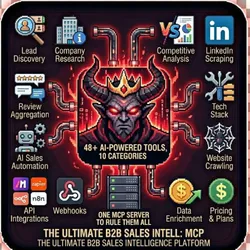
The Ultimate B2B Sales Intelligence Platform 48+ AI-Powered Tools in One MCP Server. GOD MODE consolidates lead discovery, company research, competitive analysis, LinkedIn, reviews & AI-powered sales automation into a single platform that works seamlessly with Make.com, Zapier, n8n, Claude Desktop.
Pricing
from $0.01 / 1,000 results
Rating
0.0
(0)
Developer

John Rippy
Actor stats
0
Bookmarked
1
Total users
1
Monthly active users
3 minutes ago
Last modified
Categories
Share
GOD MODE INTEL MCP Server
What is MCP (Model Context Protocol)?
MCP is a protocol that allows AI assistants (like Claude) to interact with external tools and data sources. This MCP server connects to various APIs and services.
How to Use MCP Servers
- Install the MCP server in Claude Desktop's config
- The server provides tools the AI can use
- Ask Claude to use the tools (e.g., "Search for local businesses...")
The Ultimate B2B Sales Intelligence Platform | 48+ AI-Powered Tools in One MCP Server
Stop juggling 15 different tools for sales intelligence. GOD MODE INTEL MCP consolidates lead discovery, company research, competitive analysis, LinkedIn scraping, review aggregation, and AI-powered sales automation into a single, unified platform that works seamlessly with Make.com, Zapier, n8n, webhooks, Claude Desktop, and any MCP-compatible client.





Why GOD MODE INTEL?
The Problem: Sales Intelligence Tool Sprawl
Modern B2B sales teams face a fragmented landscape:
- $500-2,000/month spent on 5-10 different tools (Apollo, ZoomInfo, BuiltWith, SimilarWeb, etc.)
- Hours wasted switching between platforms and manually copying data
- No unified workflow - data silos everywhere
- Complex integrations that break and require maintenance
- Inconsistent data formats that don't talk to each other
The Solution: One MCP Server to Rule Them All
GOD MODE INTEL consolidates everything into a single API endpoint with:
- 48+ intelligence tools spanning 10 categories
- Native MCP protocol support for AI-first workflows
- Unified data format across all tools
- Real-time execution with live data (not stale databases)
- Pay-per-use pricing - no monthly minimums
- Seamless integration with Make.com, Zapier, n8n, and custom webhooks
Platform Integrations
GOD MODE INTEL works with all major automation platforms:
| Platform | Integration Method | Use Case |
|---|---|---|
| Make.com | HTTP Module, Apify Module, or SSE/MCP | Complex multi-step workflows |
| Zapier | Webhooks or Apify Integration | Simple trigger-action automations |
| n8n | HTTP Request Node or Apify Node | Self-hosted automation workflows |
| Claude Desktop | MCP Protocol (stdio) | AI-assisted research |
| Custom Apps | REST API or Webhooks | Direct integration |
Webhook Support
Send results directly to any endpoint:
Compatible webhook formats:
- Zapier - Catch Hook triggers
- Make.com - Custom Webhook modules
- n8n - Webhook nodes
- Custom endpoints - Any URL that accepts POST requests
Who Is This For?
Sales Development Representatives (SDRs)
- Find and qualify leads 10x faster
- Auto-generate personalized outreach at scale
- Prioritize leads with AI scoring
Growth Marketers
- Monitor competitor ads and content strategy
- Track brand mentions across Reddit, Quora, and review sites
- Analyze market sentiment in real-time
Agency Owners
- Research prospects before pitches
- Audit client competitors comprehensively
- Generate local SEO reports automatically
RevOps Teams
- Enrich CRM data in bulk
- Build automated lead scoring pipelines
- Integrate intelligence into existing workflows
Founders & Entrepreneurs
- Research markets and competitors affordably
- Find your first 100 customers
- Understand your competitive landscape
Features & Capabilities
Lead Discovery & Prospecting
| Tool | What It Does | Use Case |
|---|---|---|
find_prospects | Search Google Maps for businesses | "Find all dentists in Austin, TX" |
find_lookalikes | Find companies similar to your best customers | "Find 50 companies like Stripe" |
scrape_local_leads | Bulk extract local business data | "Get all restaurants in 5 cities" |
discover_companies | AI-powered company discovery from any URL | "Find SaaS companies mentioned on TechCrunch" |
enrich_from_url | Extract company data from any webpage | "Pull company info from this About page" |
Lead Enrichment
| Tool | What It Does | Use Case |
|---|---|---|
enrich_lead | Full enrichment: email, company, social, tech stack | "Enrich john@acme.com" |
enrich_leads_batch | Enrich up to 100 leads at once | "Enrich my CSV of 100 leads" |
enrich_company_contacts | Find decision-makers at a company | "Find VPs at Salesforce" |
LinkedIn Intelligence
| Tool | What It Does | Use Case |
|---|---|---|
scrape_linkedin_profile | Full profile: experience, education, skills | "Get profile data for /in/elonmusk" |
scrape_linkedin_posts | Recent posts with engagement metrics | "Analyze their content strategy" |
analyze_linkedin_voice | AI analysis of writing style and tone | "Personalize my outreach to match their voice" |
Company Research
| Tool | What It Does | Use Case |
|---|---|---|
research_company | Comprehensive company intel in one call | "Tell me everything about Stripe" |
scan_tech_stack | Detect 100+ technologies on any website | "What tools does Shopify use?" |
get_crunchbase_data | Funding rounds, investors, key people | "Who invested in OpenAI?" |
get_glassdoor_reviews | Employee reviews, ratings, salary data | "What's the culture like at Meta?" |
scrape_g2 | G2 software reviews and ratings | "What do users say about HubSpot?" |
scrape_capterra | Capterra reviews and comparisons | "Compare Salesforce vs HubSpot" |
Review Intelligence
| Tool | What It Does | Use Case |
|---|---|---|
scrape_trustpilot | Consumer reviews and trust scores | "Check reputation of this vendor" |
scrape_yelp | Local business reviews | "Get reviews for this restaurant" |
aggregate_reviews | Combine reviews from all platforms | "Show me all reviews everywhere" |
analyze_sentiment | AI sentiment analysis of reviews | "What are the common complaints?" |
Competitive Intelligence
| Tool | What It Does | Use Case |
|---|---|---|
monitor_competitors | Track website, hiring, social changes | "Alert me when competitors update pricing" |
scrape_facebook_ads | Facebook Ad Library scraping | "What ads are my competitors running?" |
track_competitor_keywords | SEO keyword tracking | "What keywords do they rank for?" |
compare_tech_stacks | Side-by-side technology comparison | "How does our stack compare?" |
competitive_gap_analysis | AI-powered gap analysis | "Where are we falling behind?" |
Local Business Intelligence
| Tool | What It Does | Use Case |
|---|---|---|
scrape_gbp | Google Business Profile data | "Get all GBP data for this business" |
track_local_serp | Local pack ranking tracking | "Where do we rank for 'plumber near me'?" |
audit_citations | NAP consistency across 50+ directories | "Find citation errors" |
analyze_local_competitors | Local market competitive analysis | "Who are the top 10 dentists nearby?" |
Social Intelligence
| Tool | What It Does | Use Case |
|---|---|---|
scrape_reddit | Reddit discussions and sentiment | "What does Reddit say about our product?" |
scrape_quora | Quora questions and answers | "Find questions we can answer" |
monitor_brand_mentions | Cross-platform brand monitoring | "Track mentions of our brand everywhere" |
AI-Powered Sales Actions
| Tool | What It Does | Use Case |
|---|---|---|
score_and_prioritize | AI lead scoring based on ICP fit | "Rank these 100 leads A/B/C/D" |
generate_outreach | Hyper-personalized message generation | "Write 3 email variants for this lead" |
analyze_buying_signals | Detect intent from multiple sources | "Is this company ready to buy?" |
predict_deal_probability | AI deal close prediction | "What's the chance this closes?" |
recommend_approach | AI sales strategy recommendation | "How should I approach this prospect?" |
Full Pipelines (End-to-End Automation)
| Tool | What It Does | Use Case |
|---|---|---|
full_company_research | Tech + funding + reviews + contacts in one call | "Complete dossier on this company" |
full_prospect_pipeline | Discover → Enrich → Score → Generate Outreach | "Find and prep 50 leads automatically" |
full_competitive_audit | Tech + content + ads + SEO + reviews audit | "Full competitive analysis report" |
Quick Start Guide
Option 1: Direct Apify Actor Execution
Option 2: MCP Server (Claude Desktop / Make.com)
Connect to the SSE endpoint:
Or use the REST API directly:
Option 3: Make.com Integration
- Add HTTP Module or Apify Module to your scenario
- Configure the request to GOD MODE INTEL
- Map the output to your next modules
- Build powerful automation workflows
Option 4: Zapier Integration
- Use Webhooks by Zapier (Catch Hook) as trigger
- Add Apify action or Webhooks (POST) action
- Configure with GOD MODE INTEL actor
- Use results in subsequent Zap steps
Option 5: n8n Integration
- Add HTTP Request node or Apify node
- Configure POST to GOD MODE INTEL endpoint
- Parse JSON response
- Continue your workflow
Input Schema
Required Fields
| Field | Type | Description |
|---|---|---|
tool | string | The tool to execute (see tool list above) |
Tool Input Fields (vary by tool)
| Field | Type | Description |
|---|---|---|
toolInput | object | Parameters specific to the selected tool |
Optional Configuration
| Field | Type | Description |
|---|---|---|
demoMode | boolean | Return sample data without API calls (default: false) |
apifyToken | string | Your Apify API token (auto-provided on Apify platform) |
anthropicApiKey | string | For AI-powered tools (scoring, outreach, analysis) |
webhookUrl | string | Send results to Zapier, Make, n8n, or custom endpoint |
webhookPlatform | string | Format output for specific platform: zapier, make, n8n, custom |
Example: Full Configuration
Output Schema
All tools return a consistent JSON structure:
Dataset Schema by Tool Type
Prospect/Lead Data
Tech Stack Data
LinkedIn Profile Data
AI Analysis Output
Automation Workflow Examples
Make.com: Auto-Enrich New CRM Contacts
Zapier: Competitive Intelligence Alerts
n8n: Local Lead Generation Machine
Webhook: Review Monitoring Dashboard
API Keys & Configuration
Required for Full Functionality
| Service | Required For | Get Key |
|---|---|---|
| Apify | All scraping tools | Auto-provided on Apify platform |
| Anthropic | AI scoring, outreach, analysis | console.anthropic.com |
Optional Enhancements
| Service | Enhances | Get Key |
|---|---|---|
| Apollo.io | Lead enrichment accuracy | apollo.io |
| Hunter.io | Email verification | hunter.io |
| Clearbit | Company enrichment | clearbit.com |
| Firecrawl | Web crawling tools | firecrawl.dev |
| OpenAI | AI fallback | platform.openai.com |
Pricing
Pay-Per-Use Model
No monthly fees. Only pay for successful results.
| Operation | Cost |
|---|---|
| Prospect found | $0.01 |
| Lead enriched | $0.05 |
| LinkedIn profile scraped | $0.03 |
| Company researched | $0.10 |
| Tech stack scanned | $0.02 |
| Review scraped | $0.01 |
| AI analysis | $0.05 |
| Full pipeline | $0.25-0.50 |
Cost Comparison
| Task | Traditional Tools | GOD MODE INTEL |
|---|---|---|
| 1,000 leads enriched | $500-2,000/mo subscription | $50 one-time |
| Competitive analysis | $300/mo (SimilarWeb) | $5-10 per report |
| Tech stack detection | $100/mo (BuiltWith) | $0.02 per scan |
| LinkedIn scraping | $100/mo + manual work | $0.03 per profile |
Frequently Asked Questions
Is the data real-time?
Yes. Unlike database-based tools (ZoomInfo, Apollo), GOD MODE INTEL scrapes live data at execution time. You always get the freshest information.
Can I use this for cold outreach?
Absolutely. The generate_outreach tool creates hyper-personalized messages based on enriched lead data. Combined with score_and_prioritize, you can focus on the hottest leads.
How does it compare to Apollo/ZoomInfo?
- Fresher data: Real-time scraping vs. stale databases
- Lower cost: Pay-per-use vs. $500-2,000/month subscriptions
- More tools: 48+ tools vs. limited feature sets
- Better integration: Native MCP protocol for AI workflows
Does it work with my CRM?
Yes, via Make.com, Zapier, n8n, or direct webhooks. You can enrich contacts, score leads, and update records automatically.
Which automation platform should I use?
- Make.com: Best for complex, multi-step workflows with conditional logic
- Zapier: Best for simple trigger-action automations and wide app support
- n8n: Best for self-hosted, privacy-focused, or highly custom workflows
- Webhooks: Best for direct integration into your own applications
Is there rate limiting?
Apify handles rate limiting and proxy rotation automatically. For high-volume use, contact for enterprise plans.
Can I run it locally?
Yes! The MCP server supports stdio mode for Claude Desktop:
More Tools & Resources
Check out my other projects:
- Actor Arsenal - 280+ Apify actors for web scraping and automation
- Zapier Quake - Zapier integrations and automation tools
- Duke SEMrush Tools - SEO and marketing intelligence tools
Support & Contact
- Website: johnrippy.link
- LinkedIn: linkedin.com/in/johnrippy
- Actor Arsenal: actor-arsenal-site.vercel.app
- Issues: Open a ticket on Apify
Changelog
v2.0.0 (Current)
- True MCP protocol implementation
- 48+ tools across 10 categories
- Real-time data via Apify actor routing
- AI-powered analysis with Claude/GPT
- Full support for Make.com, Zapier, n8n, and webhooks
- Unified output schema
v1.0.0
- Initial release with demo mode
- Basic tool structure
Built by John Rippy
Dominate your market with intelligence.
GOD MODE INTEL is built by John Rippy, Zapier Zappy 2025 Automation Hero of the Year winner. Specializing in B2B sales intelligence, web scraping, and automation with 280+ Apify actors and deep expertise in Make.com, Zapier, and n8n integrations.




"John Rippy was named Automation Hero of the Year at the 2025 Zappy Awards for his innovative work scaling sales and marketing through automation." - Zapier Blog
Keywords: B2B sales intelligence, lead generation, lead enrichment, competitive intelligence, LinkedIn scraper, company research, tech stack detection, review scraping, AI sales tools, MCP server, Make.com integration, Zapier integration, n8n integration, webhook automation, Apollo alternative, ZoomInfo alternative, BuiltWith alternative, sales automation, prospect discovery, local business leads, Google Maps scraper
Common Problems & Solutions
"Invalid API key" error
Cause: Your API key is wrong, expired, or doesn't have the right permissions. Fix: Double-check your API key. Make sure you copied it exactly without extra spaces.
"Rate limit exceeded" error
Cause: You've hit the API's rate limits. Fix: Wait a few minutes, then try again. Consider reducing the number of concurrent requests.
Empty or incomplete results
Cause: The target may have anti-scraping protection or the data doesn't exist. Fix:
- Check if the URL/search query is correct
- Try with different parameters
- Some sites may block automated access
Demo data showing instead of real results
Cause: demoMode is still set to true.
Fix: Set demoMode: false and provide your API key(s).
Built by John Rippy | Actor Arsenal


