
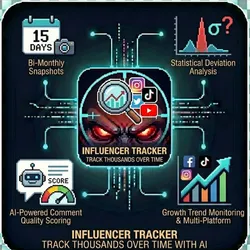
Influencer Tracker w/AI-powered comment scoring
Pricing
from $0.01 / 1,000 results
Influencer Tracker w/AI-powered comment scoring
Influencer Tracker monitors Instagram, TikTok, and YouTube influencers at scale, capturing profile metrics over time and detecting suspicious patterns that indicate fake engagement or purchased followers.
Pricing
from $0.01 / 1,000 results
Rating
0.0
(0)
Developer

The Howlers
Maintained by CommunityActor stats
0
Bookmarked
6
Total users
1
Monthly active users
20 days ago
Last modified
Categories
Features
Share
Influencer Tracker
Track Instagram and TikTok influencers over time with periodic metric snapshots: followers, following, post count, average likes, comments and views, engagement rate, statistical deviation analysis, growth trends against your previous snapshot, and optional AI comment quality scoring.
How it works
For each influencer the actor reads the public profile through an Apify Store scraper:
- Instagram:
apify/instagram-profile-scraper(profile counts plus the 12 latest posts) - TikTok:
clockworks/tiktok-scraper(profile counts plus up to 30 recent videos)
These scraper runs start on your own Apify account and their usage is billed to you by those actors, separately from this actor's events (a few tenths of a cent per profile at the time of writing).
Every snapshot has a status:
| Status | Meaning |
|---|---|
ok | Profile read. Metrics are real |
private | Private account. Follower counts are real, post metrics are null |
not_found | No public account with that username |
unsupported_platform | YouTube and other platforms are not supported yet |
fetch_failed | The scraper run failed; the error field says why |
Anything that could not be read is null, never 0. Only ok and private snapshots are charged.
Quick start
To get trends and alerts, schedule the actor and set compareToDatasetId to the default dataset of the previous run:
Demo Mode is off by default, so runs track real accounts. Set demoMode to true to get labeled sample snapshots (demo: true) that show the output format and charge nothing.
Output fields
username, platform, tags, status, displayName, verified, followers, following, posts, postsAnalyzed, avgLikes, avgComments, avgViews, engagementRate (average likes plus comments per post, as a percent of followers), likeStdDeviation, commentStdDeviation, engagementConsistency, suspiciousPatterns, alerts, and with compareToDatasetId: followerChange, followerChangePercent, engagementChange, trend.
Comment analysis
The profile scrapers usually do not include comment text. When no comment text is available, commentQuality is null with a commentAnalysisNotice, and nothing is charged for it. When comment text is available, measured heuristics (average length, share of bot-like comments) are always returned; AI sentiment and authenticity scores need aiProvider: "anthropic" plus your aiApiKey, and stay null if the AI call fails.
Input parameters
| Parameter | Type | Default | Description |
|---|---|---|---|
influencers | array | - | Objects with username, platform (instagram or tiktok) and optional tags |
datasetId | string | - | Optional dataset of influencers to add to the list |
snapshotType | string | "full" | Label stored on each snapshot |
postsToAnalyze | integer | 30 | Recent posts used for averages (Instagram returns at most 12) |
includeCommentAnalysis | boolean | false | Score comment quality when comment text is available |
calculateDeviations | boolean | true | Look for engagement spikes and unusually uniform engagement |
detectEngagementPods | boolean | true | Flag a high comment-to-like ratio |
aiProvider | string | "none" | anthropic enables AI comment scoring |
aiApiKey | string | - | Your AI provider key (BYOK) |
compareToDatasetId | string | - | Previous run's dataset for trends and alerts |
alertThresholds | object | - | Percent thresholds for alerts |
webhookUrl | string | - | POST all snapshots when the run finishes |
alertWebhookUrl | string | - | POST alerts only |
demoMode | boolean | false | Return labeled sample snapshots instead of real data |
Pricing
| Event | When it is charged | Price |
|---|---|---|
| Actor start | Once when the run starts, one event per GB of memory (minimum one). At the default 1 GB of memory that is $0.00005 per run | $0.00005 per GB |
| Influencer Snapshot Captured | Per influencer whose real profile metrics were captured (status ok or private). Not-found, unsupported and failed profiles are free | $0.05 |
| AI Comment Quality Analysis | Per influencer whose comments were scored by the AI. Not charged when there is no comment text or the AI call fails | $0.15 |
| Result | Each item written to the default dataset | $0.00001 |
Demo Mode charges none of the events above. The Instagram and TikTok scraper runs are billed separately by those actors.
Troubleshooting
status: "not_found"
Check the username (no @, exact spelling) and that the account is public.
trend: "unknown"
Trends need a previous snapshot. Set compareToDatasetId to an earlier run's dataset.
commentQuality: null
No comment text was available from the profile data. See the notice on the snapshot.
Built by John Rippy | Actor Arsenal


