

Website Screenshot API: Bulk, Full Page, Mobile & PDF
Pricing
from $0.60 / 1,000 screenshots
Website Screenshot API: Bulk, Full Page, Mobile & PDF
Website screenshot tool and API: bulk URLs to PNG, JPEG or PDF, full-page or element capture, device presets, cookie banners hidden. Failed URLs are never charged.
Pricing
from $0.60 / 1,000 screenshots
Rating
0.0
(0)
Developer

Altronite
Maintained by CommunityActor stats
0
Bookmarked
1
Total users
1
Monthly active users
an hour ago
Last modified
Categories
Share
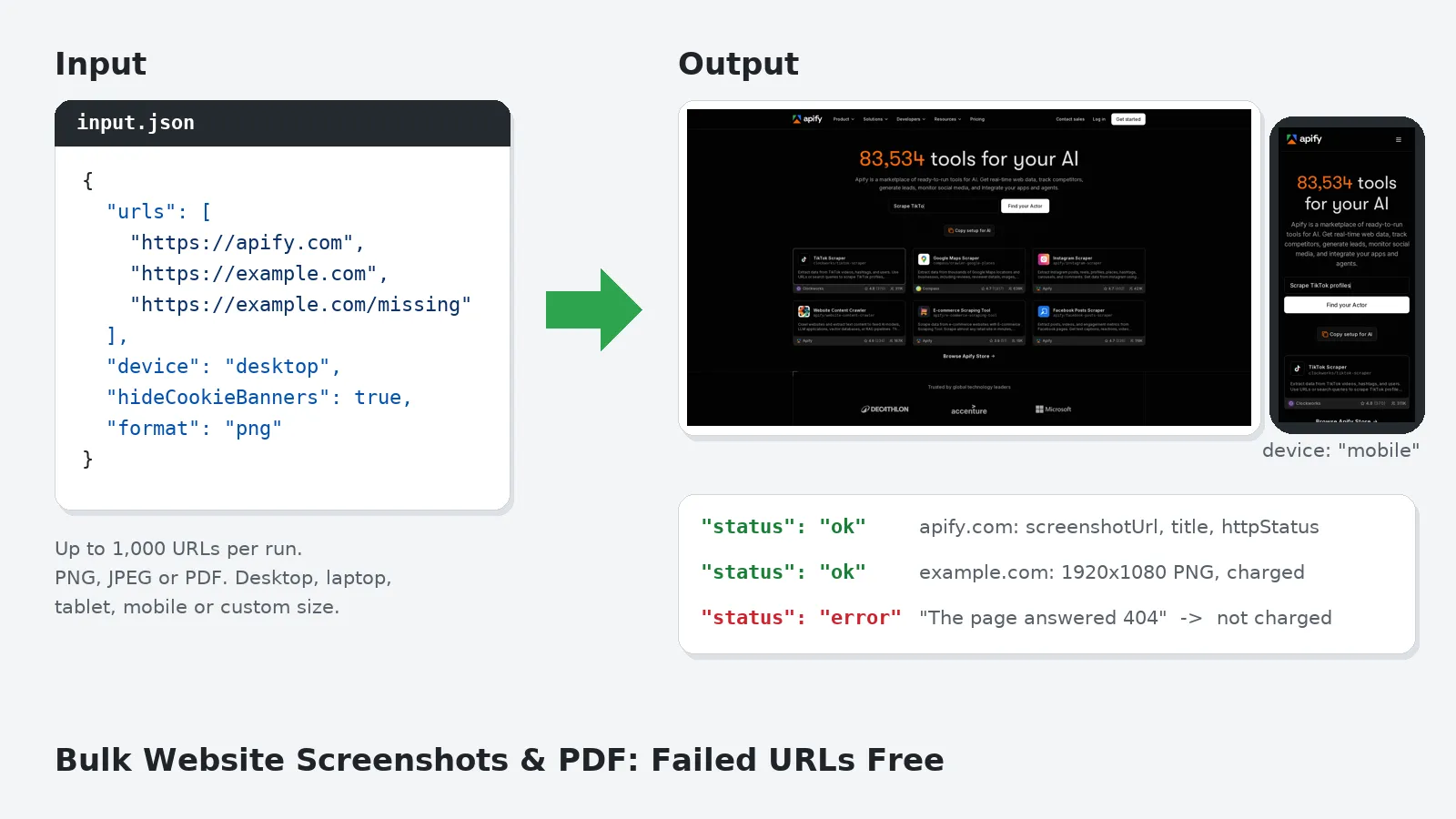
A website screenshot tool and API for batches of URLs. Capture public web pages as a PNG, JPEG or PDF: the visible screen, the full scrolling page or one element by CSS selector, at desktop, laptop, tablet or mobile size. Common cookie banners are hidden with CSS and robots.txt is respected by default. A URL that can't be captured becomes an error row with the reason, is never charged, and doesn't stop the run.
Who it's for
- QA and front-end teams: check mobile and desktop layouts across many pages in one run, or capture a single component with
selector. - SEO and marketing: snapshot your own and competitors' landing and pricing pages.
- Monitoring and archiving: schedule runs for a dated visual record, as images or PDFs.
- AI agents and LLM pipelines: give a model an image of a page; every row has a
statusfield to branch on.
Quick recipes: bulk, full page and mobile screenshots
Copy one of these into the Input tab (JSON view) and press Start.
Bulk screenshots from a URL list (visible screen, desktop):
Full-page screenshot of every page (the whole scrolling page as one PNG):
Website to PDF in bulk (one PDF per URL, using the site's print styles):
Mobile screenshots (390×844 at 3x), as compressed JPEGs:
Screenshot one element (by CSS selector):
Screenshot API for a JavaScript-heavy page (wait for a selector, then capture the full page):
Tablet screenshots of competitor landing pages (dark theme where the site supports it):
What you get
One dataset row per non-blank URL when the input contains at least one valid URL. The file is saved in the run's key-value store and screenshotUrl links to it. The Output tab links to the dataset and stored files. Overview links to each image or PDF.
Successful rows contain status, url, finalUrl, httpStatus, title, screenshotUrl, storageKey, format, device, viewportWidth, viewportHeight, fullPage, bytes and takenAt.
finalUrl is the address after redirects; title is cut at 300 characters. Viewport sizes are CSS pixels, not file dimensions. fullPage records the requested option even when element capture or PDF ignores it. bytes is the stored file size. takenAt is the UTC row creation time.
Every row has url, status and takenAt. Uncharged error rows also have error (at most 500 characters), input and scrapedAt (same time as takenAt). url is normalized, or the raw input if normalization failed. Rejected HTTP pages and bot checks also have httpStatus; successful rows use null if no navigation response was available.
Use it from code or an AI agent
Run this actor with the Apify API, the Apify Python or JavaScript (JS) clients, or as a tool through the Apify MCP server. Pass the same input JSON through any of these interfaces.
Every output row has a status field; inspect it before processing the row. For ok rows, fetch screenshotUrl; error rows explain failed captures.
Minimal input:
How to use it
- URLs: one per line, up to 1,000 per run. Omit
urlsto use["https://apify.com"]for a single daily-test capture.example.comworks too:https://is added for you. - Device:
desktop(1920×1080),laptop(1366×768),tablet(810×1080 at 2x),mobile(390×844 at 3x), orcustomwith your ownviewportWidth×viewportHeight(200-3840 × 200-2160, at 1x). - What to capture: the visible screen (default), Full page for the whole scrolling page, or an Element selector to capture only that element. If a selector is set, Full page is ignored.
- Format:
png(lossless),jpeg(setquality1-100, default 80), orpdf. - Waiting:
waitUntilisload(default),domcontentloadedornetworkidle.waitForSelectorwaits until an element is visible.delayMsadds an extra wait after load, e.g. for animations, up to 30 s. - Options:
hideCookieBanners(on),darkMode(asks the page for its dark theme),respectRobotsTxt(on),timeoutSecs(5-180, default 45), andmaxConcurrency(1-7 pages in parallel, default 3; allow about 512 MB of memory per page; memory defaults to 1 GB and supports up to 4,096 MB; raise memory for very long full-page captures). - Lazy images:
scrollToLoad(on) scrolls before PNG/JPEG capture, at most 20 steps / about 5 s, then returns to the top. PDF does not scroll. - HTTP errors:
chargeHttpErrors(off) rejects 4xx/5xx pages without charging. Set it to true to capture and charge these pages;httpStatusstill flags their status. Detected bot checks remain uncharged regardless of this option.
Example: two pages on a phone screen.
Pricing
This actor uses pay-per-event pricing: every run has a small start fee (apify-actor-start), charged once per run (per GB above 1 GB), plus a per-capture charge (screenshot) for each screenshot or PDF delivered, meaning each ok row. The rates are on the actor's Pricing tab.
- Not charged: error rows. That covers URLs that failed to load after the retry, robots.txt skips, invalid URLs, a
selectororwaitForSelectorthat wasn't found, and any other capture error. - Charged: successful captures (
okrows), including HTTP error pages only whenchargeHttpErrorsis true. Default HTTP rejections and detected bot checks are never charged. Successful-status login or paywall pages can still be captured and charged; there is no general login-wall detector. - A URL listed twice is captured, and charged, twice.
Built for batches: the start fee is per run, so capturing many URLs in one run is the cheapest way to use it.
Check the Pricing tab for the current rates. A URL that fails costs nothing.
Reliability
- One bad URL never fails the run. Any failure becomes an error row with the reason.
- Navigation and screenshot/PDF browser errors or timeouts are retried once, after a short random pause in a fresh browser context. Missing
selectororwaitForSelectorelements, HTTP rejections, bot checks and robots skips are uncharged and not retried. - Timeouts apply per step.
timeoutSecslimits page loading, waiting forwaitForSelector, and taking the image, each separately. PDF uses the browser print API without a separate timeout argument. Robots fetching has a 10 s timeout; scrolling takes about 5 s at most, anddelayMsadds up to 30 s. These are not a total per-URL deadline. - Chinese, Japanese, Korean and emoji fonts are installed, so text doesn't render as empty boxes.
- Invalid input (for example, no valid URL at all) stops the run at the start with a message saying what to fix. Nothing is charged.
Use cases
-
QA teams validating responsive layouts: A QA engineer submits a list of product page URLs with
device: "mobile"and reviews the PNG files in the dataset to spot overflow, broken components, or text clipping across a batch. -
SEO analysts tracking competitor pricing pages: An SEO specialist schedules weekly runs capturing competitors' pricing pages as PDFs, building a dated visual record that shows when plans or promotions changed.
-
AI pipeline developers feeding pages to a vision model: A developer sends URLs through the synchronous API, checks each row's
statusfield, and fetchesscreenshotUrlfor successful captures to pass as images to a multimodal LLM. -
Web designers building client portfolios: A designer captures client sites at desktop and tablet viewports, uses the element selector to grab just the hero section, and uses the JPEG outputs in their portfolio.
-
Marketing teams monitoring their own landing pages: A marketing team captures their landing pages weekly, comparing the downloaded images across runs to spot unintended layout shifts or broken images.
-
Compliance officers archiving public disclosures: A compliance officer captures regulatory disclosure pages as PDFs on a schedule, downloading each file to keep a dated visual record for audits.
FAQ
Does it respect robots.txt?
Yes, by default. Before capturing a URL, it reads that site's robots.txt (cached per origin) and skips URLs disallowed for all user agents (User-agent: *). A robots.txt that returns any 4xx status or cannot be reached counts as "allowed". One that returns a server error (5xx) counts as "disallow everything", using a conservative policy. Rules use longest-match precedence, * wildcards and $ end anchors; Allow wins ties. The final redirect target is checked before capture if its host differs. This happens after navigation, so the redirected request has already occurred. Only wildcard-agent groups are used, and percent-encoding normalization is not fully implemented. Turn respectRobotsTxt off only for pages you have the right to capture.
How do I take a full page screenshot of a website?
Set fullPage to true. The actor scrolls the page first so lazy-loaded images appear (scrollToLoad, on by default), then saves the whole scrolling page as one image.
How do I take screenshots of many URLs at once?
Put up to 1,000 URLs in urls and run once. You get one row per URL with a link to its file, and a URL that fails becomes an uncharged error row without stopping the run.
Can it save a website as a PDF?
Yes. Set format to pdf to get one PDF per URL using the site's print styles. For more PDF options (paper size, margins, page numbers, merging into one file) see URL to PDF under Related tools.
Can AI agents call it?
Yes, through the Apify API (the synchronous run endpoints suit small batches) or as a tool via Apify's MCP server. Check status on each row, then fetch screenshotUrl.
Does it get past logins, paywalls or bot protection? No. It never logs in, uses no proxy and doesn't evade bot protection. Recognized bot checks become uncharged errors. Other protections may not be recognized; successful-status login and paywall pages can be captured and charged.
How are cookie banners hidden? With CSS only; nothing is clicked or accepted. It targets common consent-manager containers and "cookie-consent" patterns. Custom pop-ups may still show.
Why are some images missing further down a full-page shot?
The default scrollToLoad pass helps load images before PNG/JPEG capture. Its 20-step / about 5 s bound cannot cover every very long page or slow image. Disable it if scrolling triggers unwanted behavior. PDFs do not scroll.
How long are the files kept? They follow your Apify plan's data retention for run storage. Download anything you want to keep.
Limits
- Up to 1,000 URLs per run, http and https only.
- PDFs are produced by the browser print engine on Letter-size pages using the site's print styles, so they can differ from the on-screen look.
fullPageandselectordon't apply to PDFs. - Extremely tall pages may hit browser image-size limits. Try
pdffor those. - No WebP output, raw-HTML input, custom cookies or headers, proxies or geo-targeting.
darkModechanges only sites that support a dark colour scheme.
Related tools
- URL to PDF: turn web pages into print-ready PDFs.
- Google Sheets Export & Import: send any run's results to a Google Sheet.
Support
Is a page not capturing correctly? Open an issue on the Issues tab with the URL and your input.


