
Shopify Store Finder: Leads by Keyword with Emails & Ratings
Pricing
from $4.00 / 1,000 stores
Shopify Store Finder: Leads by Keyword with Emails & Ratings
Find Shopify stores by keyword: business emails, phones and address, Shop app rating, sample products, installed apps, ad pixel IDs and social profiles. Filter by rating, price, store country or contacts. Skip stores from earlier runs. No login.
Pricing
from $4.00 / 1,000 stores
Rating
0.0
(0)
Developer
Andracore
Maintained by CommunityActor stats
0
Bookmarked
2
Total users
1
Monthly active users
14 days ago
Last modified
Categories
Share
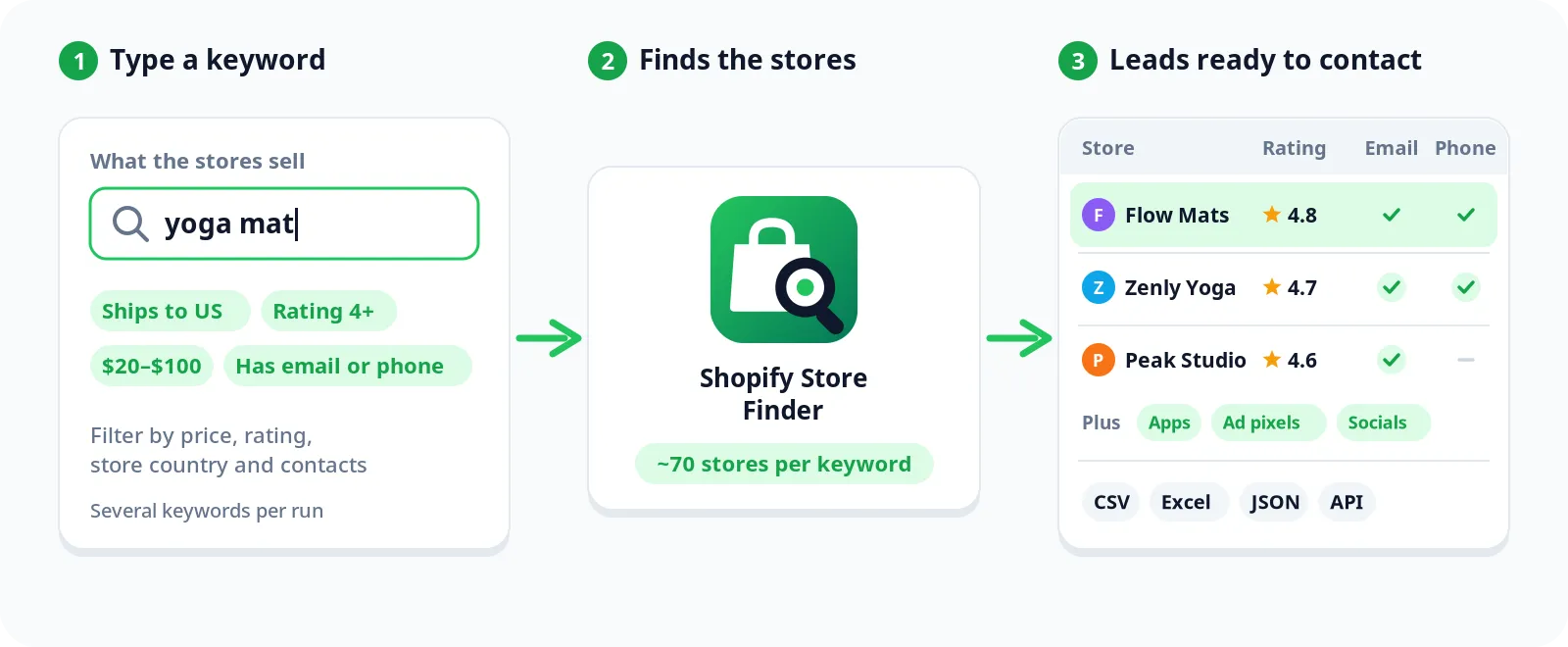
Type what you are looking for ("yoga mat", "organic coffee", "dog harness") and get a list of the Shopify stores that sell it, with business emails and phones, Shop app rating, sample products, installed apps, ad pixel IDs and social profiles in one row per store.
No login, no browser, no API key. Stores are discovered through the public search of the Shop app (Shopify's shopping app) and each store's own public pages.
Why this finder
- Complete lead in one row. Contacts, rating, catalog size, country, apps and pixels come together, so you can qualify and reach out without running a second tool.
- More stores per keyword. The search is repeated across price bands and sale items to reach stores a single search would miss: about 70 stores for "yoga mat" in our tests.
- Pay only for leads you can contact. Turn on Only stores with an email or phone and stores without contacts are skipped and not charged.
- Fresh leads every week. Only new stores remembers what earlier runs returned and never charges you twice for the same store.
- Filters that matter. Minimum rating, number of ratings, product price range and the country where the store is based.
- Ad intelligence included. Meta, TikTok, Google Ads, GA4 and Tag Manager IDs show which stores are spending on ads.
- Pairs with Shopify Store Analyzer. Find stores here, then analyze best sellers, prices, discounts and launches with Shopify Store Analyzer.
What you get for each store
| Field | What it is |
|---|---|
storeName, storeUrl, shopAppUrl, logoUrl | Who the store is and where to find it |
rating, ratingsCount, reviewsCount | Product rating on the Shop app |
sampleProducts | Up to 3 products that matched your keyword, with price and image |
contactEmails, contactPhones, tradeName, businessAddress | Business contacts the store publishes on its website and on its Shop app page |
country, city, currency, publishedProductsCount | Where the store is and how big its catalog is |
theme, apps | Theme and 60+ apps detected (Klaviyo, Judge.me, Yotpo, Recharge, Gorgias, Rebuy...) |
pixels | Meta, TikTok, Google Ads, GA4, Google Tag, Tag Manager, Pinterest, Snap, Reddit, Microsoft IDs |
socialLinks | Instagram, Facebook, TikTok, YouTube, Pinterest and X |
Use cases
- B2B lead generation. Agencies, app makers and service providers get a qualified list of stores in a niche with an email to contact.
- Supplier and wholesale outreach. Find the brands that sell a product category and pitch them.
- Market mapping. See who sells a product, at what price, with what rating and from which country.
- Ad research. Spot which stores in a niche run Meta, TikTok or Google ads.
How to use
- Add one or more Keywords, one per line.
- Choose the country the stores must ship to (prices come in that currency).
- Set Max stores per keyword and, if you want, the filters: minimum rating, price range, store country, only stores with contacts.
- Building a list over time? Turn on Only new stores and give the list a name.
- Click Start and download the leads as CSV, Excel or JSON, or read them through the Apify API.
Input example
Output example
Pricing
$5 per 1,000 stores, contacts, apps and pixels included. Paid Apify plans pay less: $4.75 on Bronze, $4.50 on Silver and $4 on Gold and above.
Platform usage is on us. Set a maximum cost per run in the run options and the Actor stops exactly there.
Good to know
- Coverage. Stores appear only if they sell on the Shop app, which includes most active Shopify brands. In our latest test of 30 stores, 19 came with a business email, 18 with a phone and 14 with a business address, and most had detectable apps.
- Contacts are the business details each store publishes on its own site. The Actor does not guess or buy emails.
- Ratings come from product reviews on the Shop app. Stores without reviews there have an empty rating.
- Speed. 30 stores with full enrichment take well under a minute. Turn off Add contacts, apps and pixels for a faster list.
- Results vary a little between runs because the Shop app search is personalized and changes over time. Only new stores takes care of duplicates across runs.
FAQ
Is this legal? The Actor reads public search results and the business information stores publish on their own pages. It collects no personal data. Follow the privacy and anti-spam rules that apply to you when you contact anyone.
Do I need a proxy? No. If a site blocks the run, the Actor moves to Apify Proxy on its own.
Can I run several niches at once? Yes. Add as many keywords as you want; each store is returned once even if it matches several keywords.
Found a bug or need a field that is missing? Open an issue in the Issues tab and it will be looked at quickly.


