

Instagram Comments Scraper
Pricing
from $1.90 / 1,000 comments
Instagram Comments Scraper
Scrape Instagram comments from posts or reels. Just add one or more Instagram post URLs to get comment text, post and comment IDs, replies, timestamp, owner IDs, usernames, profile pics. Export scraped datasets, run the scraper via API, schedule and monitor runs or integrate with other tools.
Pricing
from $1.90 / 1,000 comments
Rating
4.3
(55)
Developer

Apify
Maintained by ApifyActor stats
436
Bookmarked
51K
Total users
4.6K
Monthly active users
2.6 days
Issues response
an hour ago
Last modified
Categories
Share
What can Instagram Comment Scraper do?
Our Instagram Comment Scraper extracts comments from Instagram posts quickly and efficiently. Just add one or more Instagram post URLs, and you're ready to:
💬 Scrape Instagram comments and comment replies at scale from any public post with no limits on requests
📊 Extract engagement data and sentiment insights from user comments and replies
👥 Get commenter profiles including usernames, verification status, and profile pictures
⏰ Track comment timestamps to analyze engagement patterns over time
🔢 Monitor comment positions to understand visibility and engagement order
⬇️ Download Instagram comment data in JSON, CSV, Excel, or other formats
🦾 Export comment datasets via SDKs (Python & Node.js), use API Endpoints & webhooks
🤳 Explore our other Instagram scrapers
You can use Instagram Comment Scraper for sentiment analysis on marketing campaigns, tracking audience engagement, monitoring brand mentions and feedback, detecting misinformation or abuse, and analyzing competitor content performance.
What data can I scrape from Instagram comments?
Using this Instagram comment API, you will be able to extract the following data from Instagram comments:
| 🆔 Comment ID | 📮 Post ID | 💬 Comment text | 🔢 Comment position |
| ⏰ Timestamp | 👤 Owner ID | ✅ Owner verification status | 🏷️ Owner username |
| 📷 Owner profile picture URL | ↩️ Reply comments (if enabled) | 📊 Engagement metrics | 🔗 Comment URL |
If you need to scrape both posts and comments by profile in a single run, check out 🔗 Export Instagram Comments and Posts Tool. It lets you extract all comments and post content for any public profile at once.
Want to track comment trends over time? Use webhooks to schedule regular scraping runs and monitor how comments evolve on specific posts or campaigns.
How to scrape Instagram comments?
Instagram Comment Scraper is designed to be fast and easy to use, so there aren't too many parameters or settings. Just follow the steps below:
- Create a free Apify account.
- Open Instagram Comment Scraper.
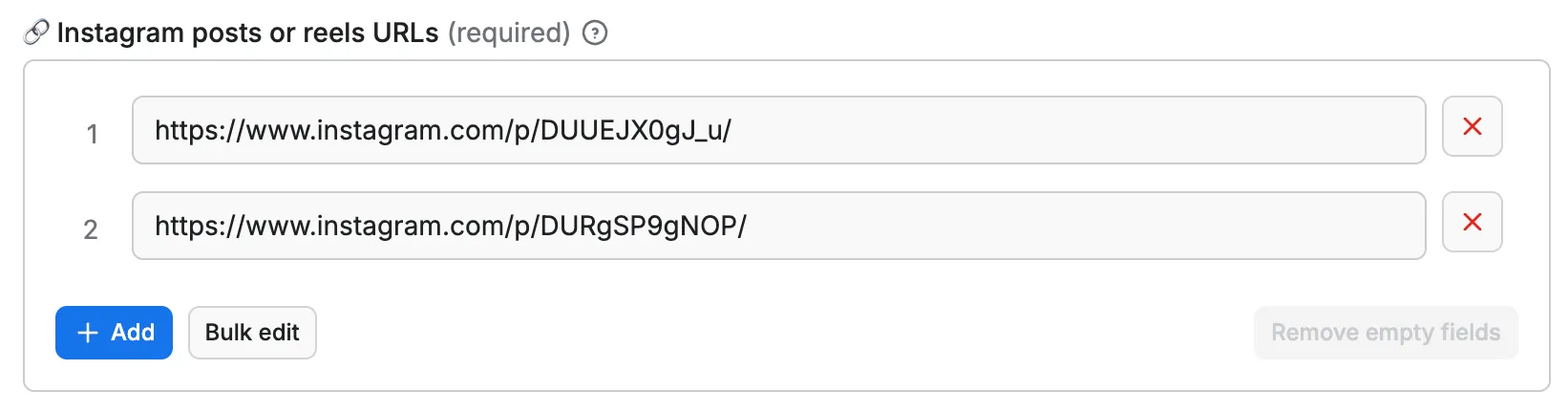
- Add one or multiple Instagram post or reel URLs to scrape.
- Click "Save & Start" and wait for the datasets to be extracted.
- Download your data in JSON, XML, CSV, Excel, or HTML.
If you want more guidance on how to use Instagram Comment Scraper, here's a full video that explains it:
For more details, check out our tutorial on how to scrape data from Instagram, full of tips and tricks.
If you need to get Instagram comments along with post content in one workflow, try combining this scraper with our 🔗 Instagram Post Scraper. You can use the Post Scraper to find posts, then feed those URLs directly to the Comment Scraper.
How much will scraping Instagram comments cost you?
Instagram Comment Scraper works on our pay-per-event (PPE) model, meaning you're charged for each result you receive. On the Free plan, the price is $2.30 per 1,000 results ($0.0023 per comment), giving you over 2,100 Instagram comments for free with the $5 credit.
On paid plans, you get more monthly credit for regular data extraction. For example, on the Starter plan ($29/month), you can scrape over 12,600 comments per month. Check the pricing tab for full details.
⬇️ Input
To use this Instagram comment scraper, enter one or more Instagram post URLs. You can enter them one by one or all at once using the Bulk edit function.
⬆️ Output
The results will be wrapped into a dataset, which you can find in the Storage tab. Here's an excerpt from the dataset you'd get if you apply the input parameters above:
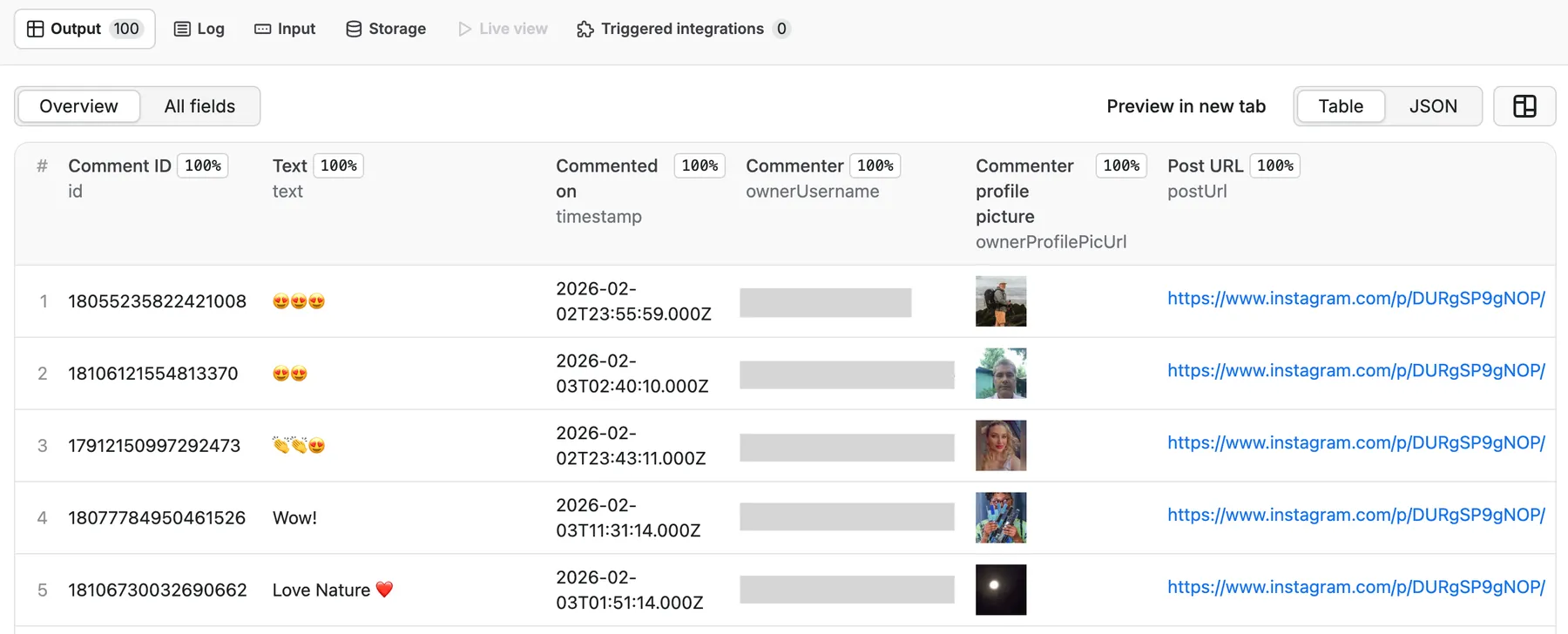
Besides the table view, you can also view your data as JSON, as well as download it as CSV, XML, Excel file, or through an API.
💬 Extracted Instagram Comment data sample
You can export the data in common formats such as JSON, XML, CSV, or Excel. The JSON sample below shows the structure of each comment in the dataset:
You can manage the results in any language (Python, PHP, Node.js/NPM). See the Apify API docs to learn more about getting results from the Instagram comment scraper.
Want to scrape Instagram hashtags, posts, or profiles?
You can use the other dedicated scrapers below if you want to scrape specific Instagram data. You'll have fewer settings to change and faster results. Just enter one or more Instagram usernames or URLs and click to scrape. Browse the full Instagram scrapers collection for more options.
If you're comfortable with more complex settings, use our more advanced 🔗 Instagram Scraper or 🔗 Instagram API Scraper. They cover almost all functionalities of the dedicated scrapers.
Want to scrape comments from other platforms?
| 📘 Facebook Comments Scraper | 🎵 TikTok Comments Scraper |
| ▶️ YouTube Comments Scraper | 🤖 Comments Analyzer Agent |
❓FAQ
How many results can you scrape with Instagram Comment Scraper?
The scraper extracts only the comments shown to Instagram users who are not logged in. That means the results may differ from what you see when logged in to your Instagram account. To try it out, open an incognito window in your browser and copy the post URL. The comments you see there are the ones this Actor will save to a dataset.
Usually, the scraper delivers as many comments and replies as it can access. However, scraping Instagram is dynamic and subject to change. There's no one-size-fits-all number for all use cases. The maximum number of results may vary depending on the complexity of the input, location, and other factors.
While we regularly run Actor tests to keep benchmarks in check, results may still fluctuate unexpectedly. The best way to know what to expect for your particular use case is to do a test run yourself.
Why scrape Instagram comments?
Scraping comments on Instagram posts can give you quick insights into how an audience is reacting to marketing campaigns and enable you to spot misinformation or abuse, track audience engagement, or help you monitor how competing content is being received.
Can I get Instagram comment replies?
Yes. Instagram Comment Scraper supports extracting reply comments if you enable the includeReplies option in the input settings. This allows you to capture full conversation threads and analyze how users interact with each other in the comments.
Is it legal to scrape Instagram comments?
Our Instagram scrapers are ethical and do not extract any private user data, such as email addresses, gender, or location. They only extract what the user has chosen to share publicly.
However, you should be aware that your results could contain personal data. Personal data is protected by the GDPR in the European Union and by other regulations around the world. You should not scrape personal data unless you have a legitimate reason to do so. If you're unsure whether your reason is legitimate, consult your lawyers. You can also read our blog post on the legality of web scraping.
Can I use integrations with Instagram Comment Scraper?
You can integrate comment data scraped from Instagram with almost any cloud service or web app. We offer integrations with Zapier, n8n, Slack, Make, Airbyte, Gumloop, CrewAI, IFTTT, Lindy, GitHub, Google Sheets, Google Drive, and plenty more.
Alternatively, you could use webhooks to carry out an action whenever an event occurs, such as getting a notification whenever the Instagram Comment Scraper successfully finishes a run.
Can I use this Instagram comment API with the Apify API?
Yes. The Apify API gives you programmatic access to the Apify platform. The API is organized around RESTful HTTP endpoints that enable you to manage, schedule, and run Apify Actors. Meaning the API will let you access any datasets, monitor actor performance, fetch scraped comment results, create and update versions, and more.
To access the API using Node.js, use the apify-client NPM package. To access the API using Python, use the apify-client PyPI package. Check out the Apify API reference docs for all the details.
Can I get Instagram comments through an MCP Server?
With Apify API, you can use almost any Actor in conjunction with an MCP server. You can connect to the MCP server using clients like ClaudeDesktop and LibreChat, or even build your own. Read all about how you can set up Apify Actors with MCP.
For Instagram Comment Scraper, go to the MCP tab and then go through the following steps:
- Start a Server-Sent Events (SSE) session to receive a
sessionId - Send API messages using that
sessionIdto trigger the scraper - The message starts the Instagram Comment Scraper with the provided input
- The response should be:
Accepted
Instagram Comment Scraper not working
We're always working on improving the performance of our Actors. So if you've got any technical feedback for Instagram Comment Scraper or simply found a bug, please create an issue on the Actor's Issues tab in Apify Console.


