
Instagram Followers and Following Scraper
Pricing
from $1.15 / 1,000 profiles
Instagram Followers and Following Scraper
Scrape Instagram followers' names. Just add Instagram profile and extract followers' username, name, profile picture URL, private or public status, verified status and Instagram user ID. Export scraped data, schedule scraper via API, and integrate with other tools or AI workflows.
Pricing
from $1.15 / 1,000 profiles
Rating
4.8
(10)
Developer
Apify
Maintained by ApifyActor stats
8
Bookmarked
5.6K
Total users
1.2K
Monthly active users
2.3 days
Issues response
14 hours ago
Last modified
Categories
Share
What can Instagram Followers & Following Scraper do?
Instagram Followers & Following Scraper extracts the follower and following lists of public Instagram profiles beyond what the Instagram API provides. Add one or multiple Instagram user names or profile URLs, and you can:
What can Instagram Followers & Following Scraper do?
Instagram Followers & Following Scraper is an Instagram follower export tool that extracts the follower and following lists of public Instagram profiles, going beyond what the Instagram API provides. Add one or multiple Instagram usernames or profile URLs, and you can:
👥 Export the full follower list of any public profile, with each account's username, user ID, and full name
➡️ Get the following list (the accounts a profile follows) in the same run
🔀 Scrape followers and following — every result is labeled with a type field (FOLLOWER or FOLLOWING)
🏷️ See which accounts are verified and which are private before you decide who to research further
🖼️ Grab profile picture URLs for every account in the list
🎯 Limit the number of results per profile so you only pay for the slice of the audience you need
⬇️ Download the follower list as CSV, Excel, JSON, or XML — no browser extension and no Instagram login required
🦾 Access the data programmatically via SDKs (Python & Node.js), API endpoints, and webhooks
🤳 Explore our other social media scrapers
Add Instagram Followers & Following Scraper to your audience research toolkit to help you out with influencer vetting, audience overlap analysis, competitor audience research, and lead list building.
What data can I export from an Instagram follower list?
For every account in a follower or following list, Instagram Followers & Following Scraper returns:
| 👤 Follower username | 🪪 Full name |
| 🆔 User ID | 🖼️ Profile picture URL |
| ✅ Verified status | 🔒 Private account flag |
| 🔗 Follower or following type | 📌 Source username |
Note: this Actor returns the list of accounts, not their full profiles. It doesn't include bios, follower counts, or post data for each account in the list. To enrich the usernames you get here with profile-level data, feed them into 🔗 Instagram Profile Scraper.
How to scrape and export Instagram followers?
- Create a free Apify account.
- Open Instagram Followers & Following Scraper.
- Add one or multiple Instagram usernames or profile URLs.
- Choose whether you want followers, following, or both, and set a results limit per profile.
- Click "Save & Start" and wait for the datasets to be generated.
- Export the follower list in CSV, Excel, JSON, or XML, or access it via API.
If you only need the number of followers rather than the list itself, use our lighter 🔗 Instagram Followers Count Scraper.
How much will scraping Instagram followers and following cost?
Instagram Followers & Following Scraper uses a pay-per-event (PPE) model, so you're charged per result returned. Check the pricing tab for the exact per-1,000-results rate on your plan and for how many results your monthly credit covers.
Because follower lists can run into the millions, always set a results limit on your first run to sample the data before scaling up.
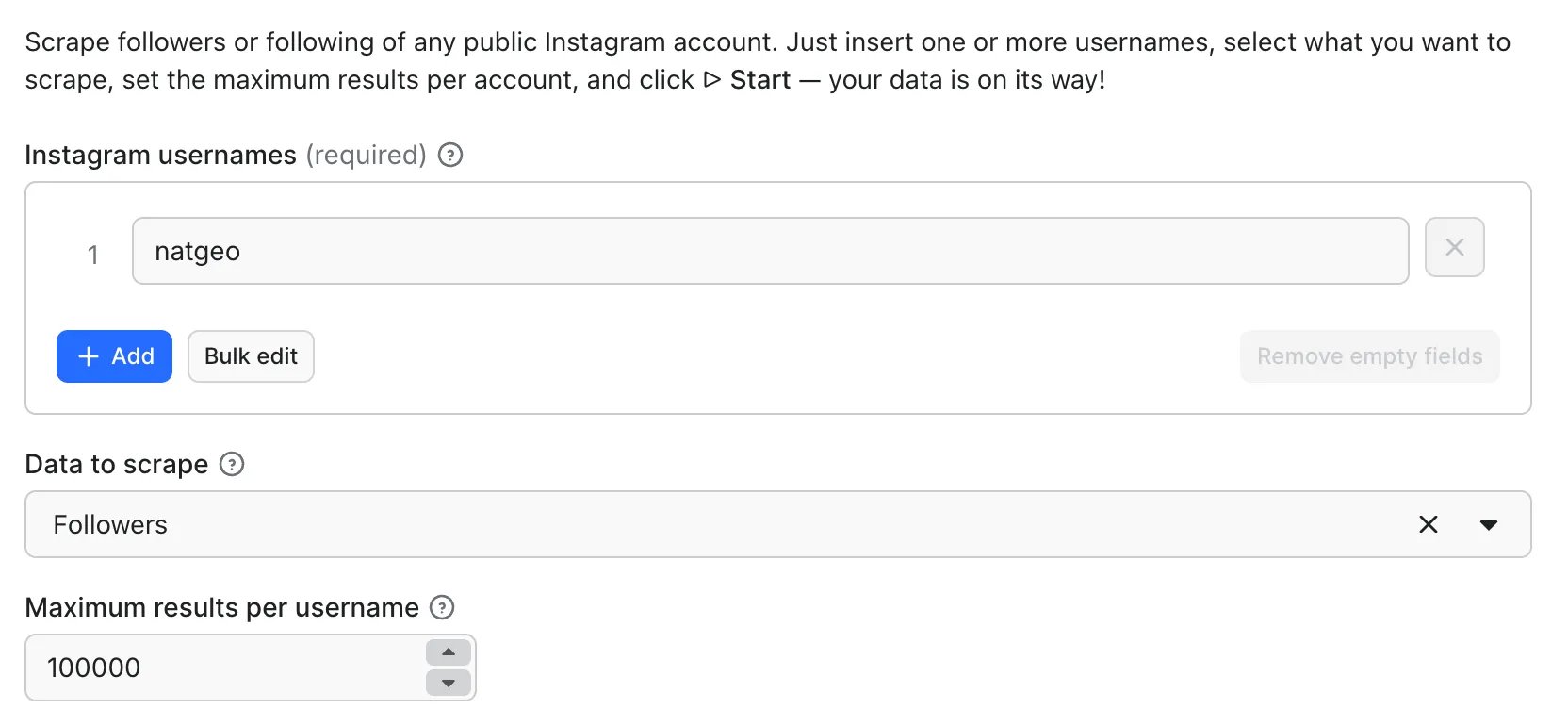
⬇️ Input
Enter either an Instagram username or a profile URL. You can input them individually or in bulk using the Bulk edit function, then pick whether to scrape followers, following, or both, and how many results you want per profile.
⬆️ Output
The results appear in a dataset in the Storage tab. You can view them as a table, download in JSON, CSV, Excel, or XML, or use API endpoints.
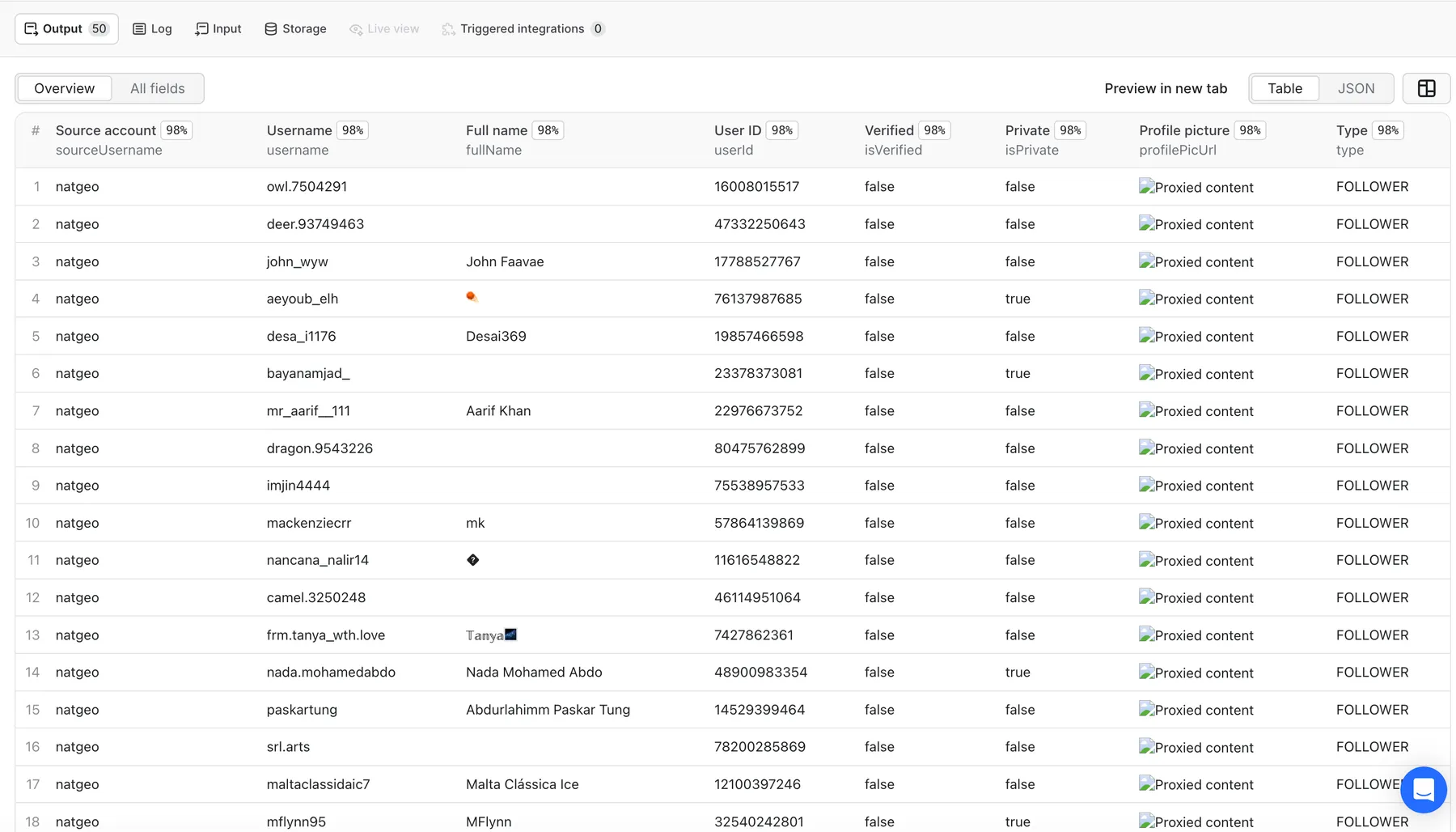
Besides the table view, you can also view your data as JSON, as well as download it as CSV, XML, Excel file, or through an API. Here's an abridged version of the output for the natgeo profile.
👥 Extracted Instagram followers data sample
If a profile you submitted is private, empty, or doesn't exist, the Actor pushes a single error item for that input instead of a list:
Want to get other details from an Instagram account?
You can use the other dedicated scrapers below if you want to scrape specific Instagram data:
If you're comfortable with more complex settings, use our more advanced 🔗 Instagram Scraper or 🔗 Instagram API Scraper. They cover almost all functionalities of the dedicated scrapers.
❓FAQ
How do I export an Instagram follower list to CSV or Excel?
Run the Actor on the profile you're interested in, then open the Storage tab and pick your format. Every run's dataset can be downloaded as CSV, Excel, JSON, or XML, so you can open the follower list straight in Google Sheets or Excel. If you'd rather not download anything by hand, hit the dataset endpoint from the Apify API with format=csv and pipe it wherever you need it.
Do I need a Chrome extension or my Instagram login to export followers?
No. Unlike browser-extension follower export tools, this Actor runs on Apify's platform and only reads public data, so you never install anything, never hand over your Instagram password, and never risk your own account. That also means it scales past what a browser tab can handle — you can queue up many profiles in one run and pull the results through the API.
How do I tell followers apart from following in the output?
Every item carries a type field: FOLLOWER means the account follows the profile in sourceUsername, and FOLLOWING means the profile in sourceUsername follows that account. If you scrape several profiles in one run, use sourceUsername to group the results, and filter on type to split the two lists.
Why do some followers have an empty fullName?
Because those accounts haven't set a display name on Instagram. The Actor returns exactly what the profile exposes, so fullName comes back as an empty string. The same goes for the generic grey-silhouette profilePicUrl you'll see repeated across accounts that never uploaded a profile picture.
Can I scrape followers of private accounts?
No. The scraper only works with public profiles. If you submit a private account (or one with no followers to show), you'll get a single item back with "error": "no_items" and the description "Profile does not exist" or "Profile is private" instead of a list.
Can I scrape the full follower list of a huge account?
Technically yes, but think it through first. Accounts like natgeo have hundreds of millions of followers, so a complete list would take a very long time and cost accordingly. Set a results limit, sample the data, and only then decide how deep you want to go.
Are the follower lists complete and in a stable order?
Instagram returns followers in pages, newest-first, and it doesn't guarantee a stable order between requests. That means two runs of the same profile can return slightly different sets at the edges, especially for fast-growing accounts. For repeatable analysis, deduplicate on userId rather than on list position.
Does the output include follower counts, bios, or posts for each account?
No — this Actor returns the list of accounts, with the fields shown in the table above. To get bios, follower counts, post counts, or external links for the accounts you found, pass their usernames to 🔗 Instagram Profile Scraper.
How long do profilePicUrl links stay valid?
They're Instagram CDN URLs with an expiry token baked in, so they stop working after a while. If you need to keep the images, download them soon after the run rather than storing the URLs long term.
Can I use this to find mutual followers or audience overlap?
Yes. Scrape two or more profiles in the same run, then compare the results on userId to find accounts that appear under more than one sourceUsername. That gives you shared audience between creators, or the overlap between your followers and a competitor's.
Is it legal to scrape Instagram followers and following lists?
Our Instagram Followers & Following Scraper only collects data that is publicly available on Instagram. It does not access private content. Follower lists consist largely of personal data under regulations like the GDPR, so you need a legitimate reason to collect and store them, and you should keep only the fields you actually need. For guidance, see our blog on the legality of web scraping.
Can I integrate Instagram follower data with other services?
Yes. Scraped follower and following data can be integrated with almost any cloud service or web app. Apify supports Zapier, n8n, Slack, Make, Airbyte, Gumloop, CrewAI, IFTTT, Lindy, GitHub, Google Sheets, Google Drive, and more. You can also use webhooks to trigger actions whenever a run finishes, like sending notifications or syncing datasets.
Can I use the Instagram Followers & Following Scraper with the Apify API?
Yes. The Apify API provides programmatic access to run Actors, fetch datasets, monitor performance, and manage tasks. For Node.js, use the apify-client NPM package. For Python, use the apify-client PyPI package. Full API docs are available in the Apify API reference.
Can I get Instagram follower data through an MCP server?
Yes. You can connect to an MCP server using clients like ClaudeDesktop or LibreChat, or build your own integration. For Instagram Followers & Following Scraper:
- Start a Server-Sent Events (SSE) session to receive a
sessionId. - Send API messages using that
sessionIdto trigger the scraper. - The message starts the Instagram Followers & Following Scraper with the provided input.
- The response should be: Accepted.
Learn more in MCP setup guide.
Instagram Followers & Following Scraper not working
The Apify team constantly improves Actor performance. If you find bugs or technical issues, please create an issue on the Actor's Issues tab.


