

Instagram Mentions Scraper
Pricing
from $1.50 / 1,000 posts
Instagram Mentions Scraper
Extract data from tagged posts and mentions on Instagram. Just add one or more Instagram usernames and get post text, hashtags, mentions, comments, images, likes, locations, and metadata. Export scraped data, run the scraper via API, schedule and monitor runs, or integrate with other tools.
Pricing
from $1.50 / 1,000 posts
Rating
5.0
(13)
Developer

Apify
Maintained by ApifyActor stats
107
Bookmarked
11K
Total users
872
Monthly active users
6.4 days
Issues response
4 hours ago
Last modified
Categories
Share
🔖 What does Instagram Mentions Scraper do?
This Instagram Mentions Scraper allows you to scrape mentions and tagged posts from any public Instagram account. It helps you extract data from tagged posts onto your computer in just a few minutes. Using this simple web scraping tool, you can get:
| 👍 Number of likes | 🔗 Post URL |
| 🖼️ Post image URL | 📐 Image dimensions |
| #️⃣ Hashtags | ✉️ Text |
| 💬 Number of comments | 💬 First comment |
| 💬 Latest comments | 👍 Number of likes |
| ⏱️ Timestamp | 📍 Location if indicated |
| 👤 Author username | 🎥 Video duration |
You can download scraped data in Excel, HTML, XML, CSV, and JSON to use in reports, data visualizations, spreadsheets, and applications.
⬇️ Input
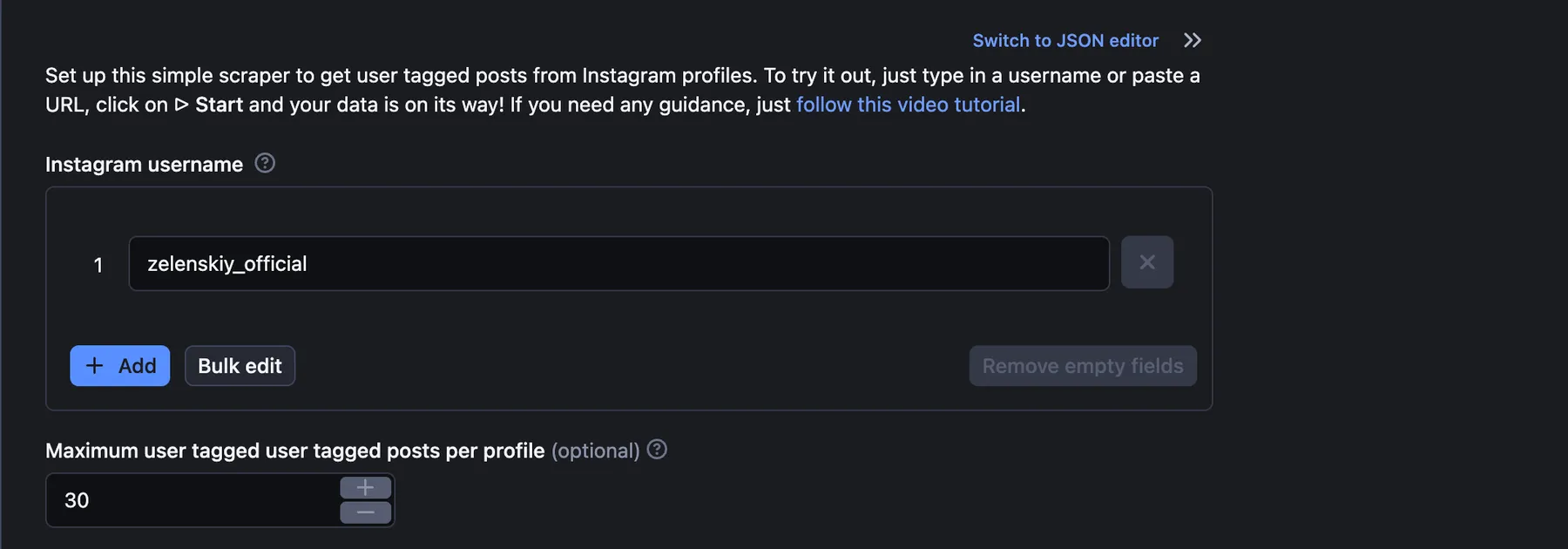
There are just two fields to fill out: an Instagram username (one or multiple) and the number of results you'd like to receive. Let's scrape the recent tagged posts and mentions from Volodymyr Zelenskiy's Instagram account:
⬆️ Output example
The scraped Instagram posts will be shown as a dataset which you can find in the Output or Storage tabs. Note that the output will first be organized as a table for viewing convenience:
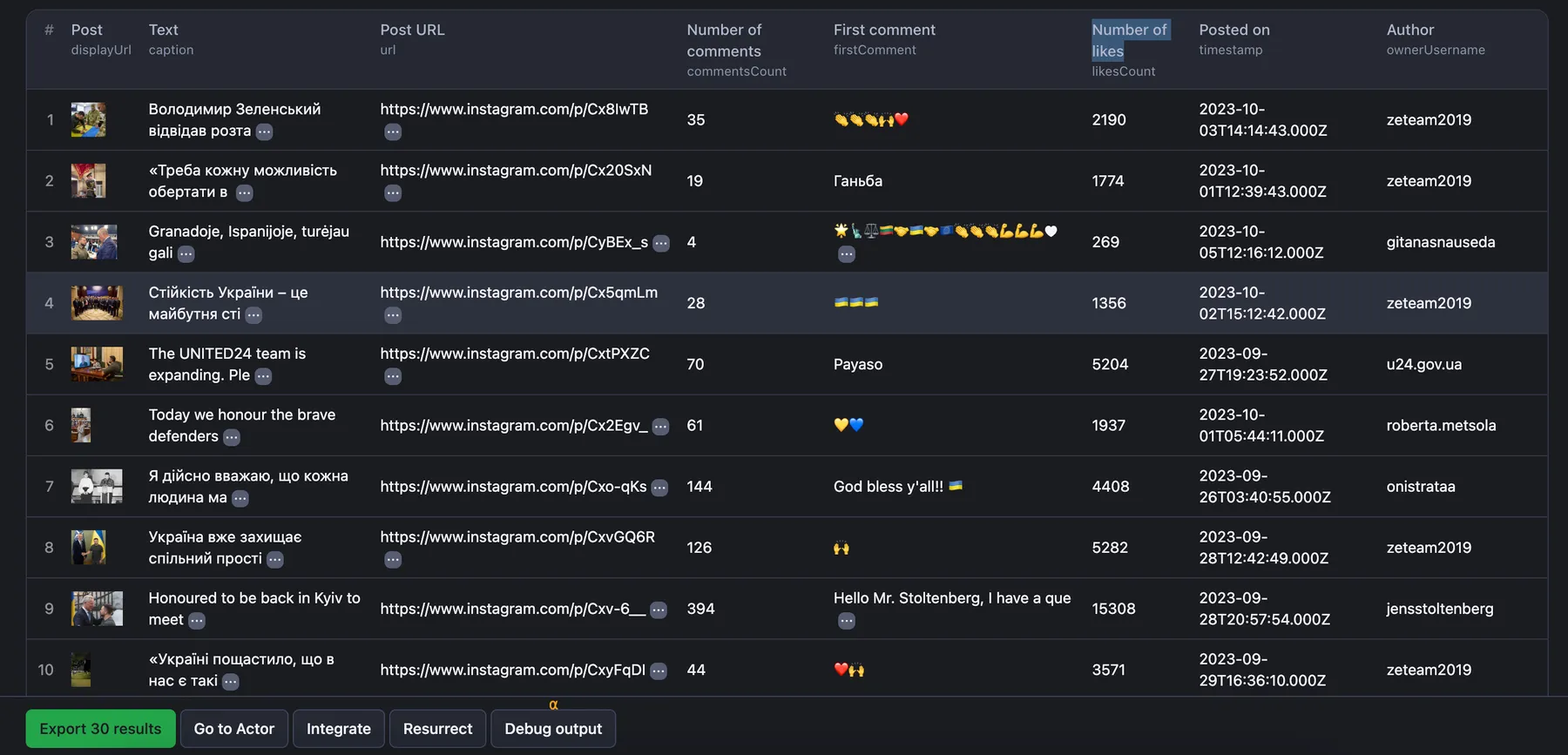
You can preview all the fields and choose in which format to download the data you’ve extracted: JSON, Excel, HTML table, CSV, or XML. Here below is the same dataset in JSON:
🎞 Need something more advanced?
If you need more options and are comfortable with changing settings, you can try our more advanced and popular Instagram Scraper. You can also let us know if you need a custom web scraping solution.
Want to scrape Instagram comments, profiles, or hashtags?
Use our super fast and easy dedicated scrapers if you want to scrape specific Instagram data. There are fewer settings to change and faster results. Just enter one or more Instagram usernames or URLs and click Start to scrape Instagram.
❓ FAQ
How do I scrape tagged posts from Instagram?
Instagram Mentions Scraper was created to be fast and easy to use. We've made two tutorials that should solve the learning question for you: a simple guide and a quick video ▷
How many results can you scrape with Instagram Mentions Scraper?
Instagram Mentions Scraper scraper is able to return thousands of results on average.
You have to keep in mind that scraping Instagram mentions and tagged posts is dynamic and subject to change. There’s no one-size-fits-all-use-cases number. The maximum number of results may vary depending on the complexity of the input, location, and other factors.
Therefore, while we regularly run Actor tests to keep the benchmarks in check, the results may also fluctuate without our knowing. The best way to know for sure for your particular use case is to do a test run yourself.
How much will scraping Instagram Mentions cost you?
When it comes to scraping, it can be challenging to estimate the resources needed to extract data as use cases may vary significantly. That's why the best course of action is to run a test scrape with a small sample of input data and limited output. You’ll get your price per scrape, which you’ll then multiply by the number of scrapes you intend to do.
→ Watch this video for a few helpful tips. And don't forget that choosing a higher plan will save you money in the long run.
Is it legal to scrape Instagram?
Our Instagram scrapers are ethical and do not extract any private user data such as email addresses, gender, or location. They only extract what the user has chosen to share publicly. We therefore believe that our scrapers, when used for ethical purposes by Apify users, are safe.
However, you should be aware that your results could contain personal data. Personal data is protected by the GDPR in the European Union and by other regulations around the world. You should not scrape personal data unless you have a legitimate reason to do so. If you're unsure whether your reason is legitimate, consult your lawyers. You can also read our blog post on the legality of web scraping.
Can I integrate Instagram Mentions Scraper with other apps?
Yes. Instagram Mentions Scraper can be connected with almost any cloud service or web app thanks to integrations on the Apify platform. You can integrate with Make, Zapier, Slack, Airbyte, GitHub, Google Sheets, Google Drive, and more. Or you can use webhooks to carry out an action whenever an event occurs, e.g. get a notification whenever Instagram Mentions Scraper successfully finishes a run.
Can I use Instagram Mentions Scraper with API?
Yes, you can do so using Apify API. It gives you programmatic access to the Apify platform. The API is organized around RESTful HTTP endpoints that enable you to manage, schedule, and run Apify Actors. The API also lets you access any datasets, monitor Actor performance, fetch results, create and update versions, and more.
To access the API using Node.js, use the apify-client NPM package. To access the API using Python, use the apify-client PyPI package. Check out the Apify API reference docs for full details or click on the API tab for code examples.
How can you use data from Instagram mentions and tagged posts?
So what can you do with all that data you collect by web scraping? Here are just some ideas:
- improve your market research
- help you optimize your marketing and PR
- assist with sentiment analysis
- help you understand audience engagement
- datasets containing thousands or millions of Instagram tagged posts can be used to train your AI models, monitor fake news, or fight hate speech.
Your feedback
We’re always working on improving the performance of our Actors. So if you’ve got any technical feedback for Instagram Mentions Scraper or simply found a bug, please create an issue on the Actor’s Issues tab in Apify Console.


