

Facebook Groups Search Scraper — Members, Activity & Admins
Pricing
from $2.00 / 1,000 groups
Facebook Groups Search Scraper — Members, Activity & Admins
Find Facebook groups by keyword or link: exact members, posts today and per month, privacy, created date, location, tags, admin and moderator names, rules and contacts from the description. Size, activity and language filters, only-new monitoring. No login. JSON, CSV, Excel.
Pricing
from $2.00 / 1,000 groups
Rating
5.0
(2)
Developer

Nikita Iakovlev
Maintained by CommunityActor stats
0
Bookmarked
20
Total users
8
Monthly active users
a day ago
Last modified
Categories
Features
Share
Type a keyword, get a spreadsheet of Facebook groups — each one with its exact member count, posts today and in the last 30 days, public or private, the date it was created, its location and topic tags, the names of its admins and moderators, every group rule, and the e-mails, phones, websites and social links written in its description.
No Facebook account, no cookies, no browser extension. You pay per group delivered — search pages, groups removed by your filters, deleted groups and errors are free.
What you get
| You give | You get |
|---|---|
Keywords (bali expats, tesla owners, real estate investors texas) | Every Facebook group the search engines know for that keyword, opened one by one for exact numbers — one row per group. |
Group links, numeric IDs or vanity names (https://www.facebook.com/groups/expatsbali, 100931413283083, expatsbali) | The same full row for each group you already have — handy for refreshing a list you keep. |
| Filters (size, activity, privacy, location, language, words to exclude, created after…) | Only the groups that pass, with exact numbers — filtered groups cost nothing. |
A monitoring name (my-niche-watch) | On scheduled runs: only groups you have never received before. |
Every group row contains 42 fields:
- Identity —
groupId,name,url(vanity link),idUrl(link by ID — never changes after a rename),vanityName,imageUrl - Size —
membersCount(exact: 295,940 — not "296K"),membersTextas Facebook writes it - Activity —
postsLastDay,postsLastMonth(Facebook's own counters),postsPerDay(30-day average),postsPerMonthPer1kMembers(engagement density — a 5,000-member group with 300 posts a month beats a 300,000-member group with 100),activityLevel(inactive / low / medium / high / very high) - Access —
privacy(Public / Private) with Facebook's sentence about it,visibility(Visible / Hidden),hasMembershipQuestions - History —
createdAt,ageDays,history("Group created on October 21, 2019. Name last changed on July 3, 2024."),nameLastChangedAt— a rename often means the group was sold or repurposed - About — full
description,descriptionLanguage(detected from the name and description),locationand alllocationswith Facebook place IDs, admintags(e.g. "Real Estate Investing", "Travel & Hospitality") - People —
adminsCount,moderatorsCount, and theadmins/moderatorsFacebook shows on the About page withname,id, profileurlandpictureUrl(people and Pages — many big groups are run by a brand Page) - Rules —
rulesCountand every rule as{ title, description } - Contacts from the description —
emails,phones,websites,socialLinks(Instagram, TikTok, YouTube, X, LinkedIn, WhatsApp, Telegram, Discord) - Where it came from —
searchQuery,foundBy(duckduckgo / yahoo / google / url),searchRank,scrapedAt
The dataset has three ready views: Groups (the numbers at a glance), Contacts and admins (for outreach lists) and Full details.
Why this one
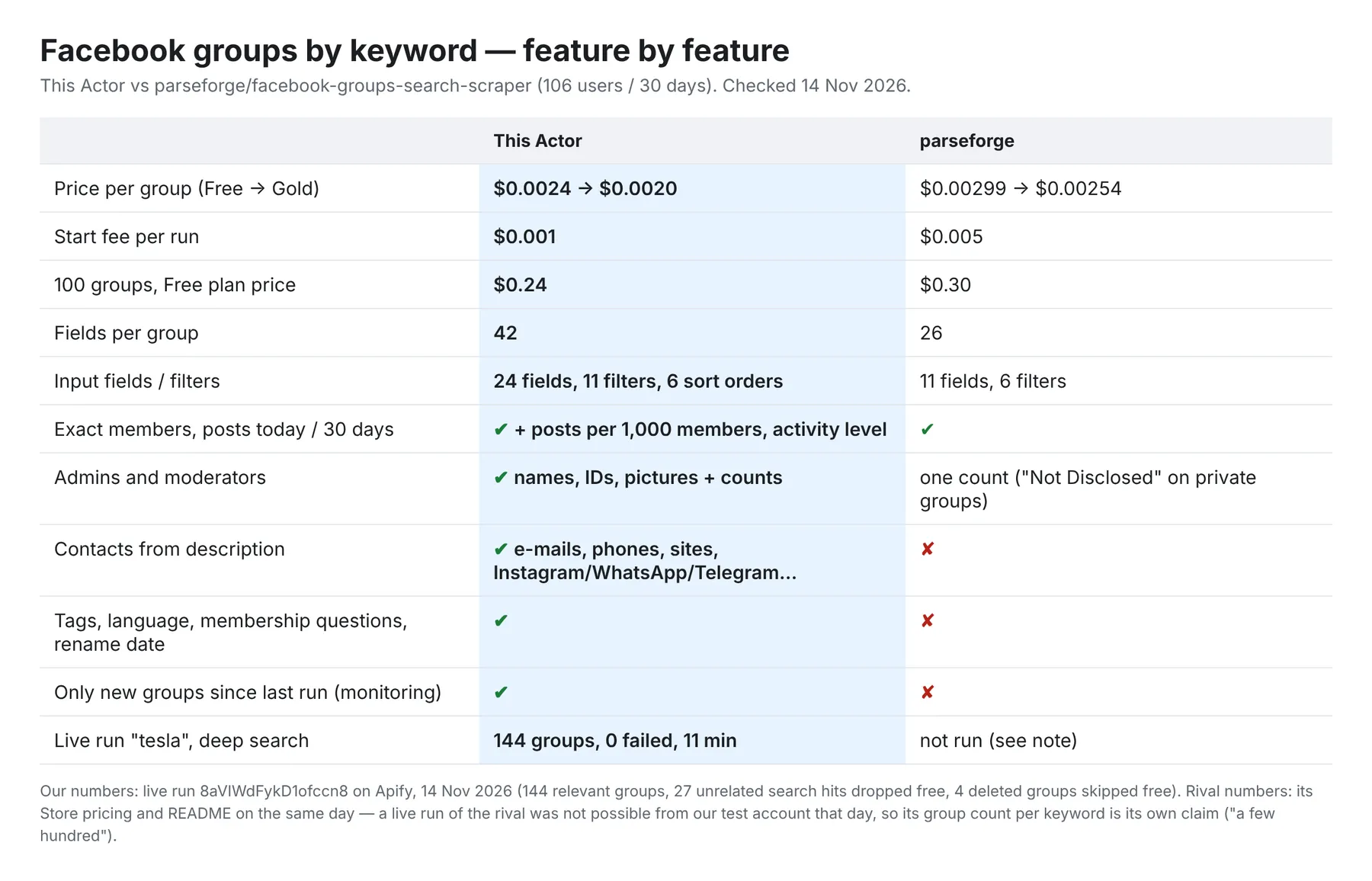
| This Actor | parseforge (Facebook Groups Search Scraper) | |
|---|---|---|
| Price per group | $0.0024 → $0.0020 on Gold+ | $0.00299 → $0.00254 on Gold+ |
| Start fee per run | $0.001 | $0.005 |
| 100 groups on the Free plan | $0.24 | $0.30 |
| Fields per group | 42 | 26 |
| Admins and moderators | names, IDs, profile links, pictures + counts | one count ("Not Disclosed" on private groups) |
| E-mails, phones, websites, social links from the description | yes | no |
| Topic tags, description language, membership questions, rename date | yes | no |
| Engagement density (posts per 1,000 members) and activity level | yes | average posts per day |
| Filters | 11: privacy, min/max members, min posts per day, min posts per month, location, keyword must match, exclude words, created after, language, only with contacts | 6 |
| Sort | 6 orders: relevance, members, activity, engagement, newest, oldest | — |
| Only new groups since the last run (monitoring) | yes, built in | no |
| Search sources | DuckDuckGo + Yahoo (free) + Google pages, up to 30 query variations | public web index, up to 35 variations |
| Unrelated search hits | dropped for free (the keyword must appear in the group) | — |
How it works (and why it needs no login)
Facebook's own group search is behind the login screen. But every group — public and private — has an About page that Facebook shows to logged-out visitors, and that page carries the exact numbers Facebook itself displays: total members, posts today, posts in the last month, privacy, visibility, the creation date, the name history, locations, tags, admins and moderators, and the rules.
- Find the groups. Each keyword is searched on DuckDuckGo and Yahoo restricted to
facebook.com/groups(free for you and for us). In standard depth up to 3 Google result pages are added; in deep depth your keyword is also combined with up to 30 variations (club,community,buy and sell,jobs,moms,worldwide…) and up to 10 Google pages. - Open every group. Each group's About page is opened through residential addresses (Facebook sends datacenter addresses to the login page), read, and turned into one clean row.
- Filter and deliver. Your filters are applied to the exact numbers. Rows stream into the dataset as they are found — or, if you chose a sort order, all at once at the end, sorted.
Nothing is read from inside a group: no posts, no member lists, no comments — that would need an account.
Quick start
- Type one or more keywords into Search keywords — or paste group links into Group links or IDs.
- Set Max groups per keyword (20–50 is a good start) and, if you want, a few filters — for example Min members 1000 and Min posts per day 1 to keep only living communities.
- Press Start. A standard search of one keyword takes about one minute; rows appear as they are found.
- Download as CSV, Excel, JSON, XML or HTML from the Storage tab, or pull the rows through the API.
Leave everything empty and press Start to see a demo search for "bali expats".
Input example
Monitoring a niche every week, new groups only:
Refreshing a list you already have:
Output example
One real row from a run with the keyword tesla (picture links shortened, two of four rules shown):
A group with contacts in its description, from the same run, carries for example "emails": ["info@teslatipsandtricks.com"], "websites": ["https://teslatipsandtricks.com"], or "socialLinks": { "instagram": "https://instagram.com/teslaclubfrance", "youtube": "…", "x": "https://twitter.com/TeslaClubFrance" }.
Input fields
What to find
| Field | What it does |
|---|---|
| Search keywords | Topics, niches, cities, brands — one per line. |
| Group links or IDs | Links, numeric IDs or vanity names, opened directly without search. |
| Max groups per keyword | How many groups to deliver per keyword after filters (1–1000, default 30). |
| Search depth | Quick — free engines only (~10–17 groups a keyword). Standard — plus up to 3 Google pages (~15–45). Deep — plus up to 30 query variations and 10 Google pages (100+ for broad keywords: "tesla" gave 144 relevant groups). |
| Query variations | The words combined with your keyword in deep depth — use your own (city names, "jobs", "for sale"…). |
| Add a location to every keyword | Appends a city / country to each search. |
Filters (applied to the exact numbers; removed groups are free)
| Field | What it does |
|---|---|
| Privacy | Any / public only / private only. |
| Min members, Max members | Exact member range. |
| Min posts per day | Posts today or the 30-day average at least this many. |
| Min posts in the last month | Facebook's 30-day post counter. |
| Location contains | Text that must appear in the group's location, name or description. |
| Name or description must contain the keyword | Every word of your keyword must appear. |
| Exclude words | Drop groups whose name, description or tags contain these words. |
| Created after | Only groups created on or after a date. |
| Description language | Two-letter codes (en, es, de, id, ru…). |
| Only groups with contacts | Keep groups with an e-mail, phone, website or social link in the description. |
Output, monitoring and advanced
| Field | What it does |
|---|---|
| Include group rules | Rules with title and text (the count is always there). |
| Include admins and moderators | Names, IDs, links and pictures (the counts are always there). |
| Sort groups by | Relevance (streaming), members, posts last month, engagement density, newest, oldest. |
| Only new groups (monitoring memory) | A name for the run's memory: later runs with the same name deliver and charge only groups not delivered before. |
| Parallel group pages | 1–10 pages opened at the same time (default 5). |
| Add a free summary row | One free row at the end with what was delivered and charged. |
| Proxy | Leave as is. Your own proxy URLs, if you set them, are used as they are. |
Pricing — pay per group
| Event | Free / Bronze | Silver | Gold, Platinum, Diamond |
|---|---|---|---|
| Group delivered | $0.0024 | $0.0022 | $0.0020 |
| Run start | $0.001 | $0.001 | $0.001 |
Free: search pages, Google pages, groups removed by your filters, unrelated search hits, deleted or hidden groups, links that are not groups, and every error row.
Examples on the Free plan:
- 30 groups for one keyword: 30 × $0.0024 + $0.001 = $0.073
- 200 groups across five keywords: 200 × $0.0024 + $0.001 = $0.48
- 1,000 groups on Gold: 1,000 × $0.0020 = $2.00 (+ $0.001 per run)
- Weekly monitoring of a niche with ~10 new groups a week: about $0.025 a week — groups you already have are skipped and not charged.
Set Max cost per run in the run options to cap any run; the Actor stops cleanly at that amount with everything written paid for.
Use cases
- Community marketing and growth. Find the 50 most active groups in your niche, sort by engagement density, and plan where to post, sponsor or partner.
- Lead generation. Admins of niche groups are the people who already gathered your audience. The Contacts and admins view lists admin names and profile links plus the e-mails, websites and social links groups publish.
- Market research. Measure how big and how alive a topic is across countries: members and posts per month for every group about "keto", "home schooling" or "solar installers".
- Local business. Search "expats Lisbon", "moms Austin", "dog owners Berlin" and get the groups where the locals talk.
- Recruiting. Job and freelancer groups by city or skill, with activity, so you post where people actually answer.
- Agencies and brands. Track new groups appearing around your brand or category every week with the only-new monitoring mode.
- Academic and social research. Group size, age, renames and rules over time; join the groups by
idUrlacross runs.
Integrations and API
- Apify API — start a run and read the dataset with one call:
POST https://api.apify.com/v2/acts/apimy~facebook-groups-search-scraper/run-sync-get-dataset-items?token=<YOUR_TOKEN>with the input JSON as the body. - Python / JavaScript —
apify-clientfor Python and Node:client.actor("apimy/facebook-groups-search-scraper").call(run_input={...}). - MCP / AI agents — add the Actor to Claude, Cursor or any MCP client through the Apify MCP server (
https://mcp.apify.com?actors=apimy/facebook-groups-search-scraper) and ask "find active Facebook groups about…". - Make, n8n, Zapier — use the Apify modules to run it on a schedule and send new groups to Google Sheets, Airtable, HubSpot or Slack.
- Schedules — Apify Console → Schedules: run weekly with Only new groups to get a feed of fresh groups.
- Webhooks — get a POST when a run finishes.
FAQ
Do I need a Facebook account or cookies? No. Everything comes from the public About page Facebook shows to logged-out visitors.
Does it work for private groups? Yes — private groups still show their exact member count, posts per day and month, creation date, location, rules and admins on the About page. The posts themselves are not readable without joining, and this Actor does not read posts.
How many groups does one keyword give? It depends on the keyword. Measured on 14 Nov 2026: "bali expats" — 10–17 in standard depth; "tesla" in deep depth — 144 relevant groups (and 27 unrelated hits removed for free). Narrow keywords give fewer groups; add a city, a product or a hobby, or several keywords, to go wider.
Why do I sometimes get fewer groups than "Max groups per keyword"? Because the search engines know only so many groups for that keyword, or because your filters removed the rest. The run log and the free summary row say how many were found, opened and filtered — and why.
Are the numbers exact? Members are exact (Facebook's "295,940 total members", not "296K"). Posts today and posts in the last month are Facebook's own counters on the About page.
Can I get the members of a group or its posts? No — both need a logged-in account. This Actor is about finding and qualifying groups.
Why is a group I know missing? Hidden groups ("Hidden — only members can find this group") are not shown to logged-out visitors at all, and some groups are not indexed by any search engine. If you have the link, paste it into Group links or IDs.
What does "foundBy" mean? The search engines that returned the group for your keyword. A group found by several engines is usually the most relevant one.
Is it legal? The Actor reads only information Facebook publishes openly to logged-out visitors. You are responsible for how you use the data — respect Facebook's terms, privacy laws (GDPR, CCPA) and anti-spam rules, especially when contacting admins.
Limits, honestly
- Search coverage is what DuckDuckGo, Yahoo and Google know — not every group on Facebook. Deep depth and several specific keywords give the widest net.
- Admins and moderators are the ones Facebook shows on the About page (usually up to 5–10); the counts are always complete.
- Contacts come only from what the group wrote in its description.
- Facebook's "new members in the last week" line is not delivered: to logged-out visitors it says "No new members" for every group, even the largest, so it would be a column of fake zeros.
- A Google page now and then returns other sites; such pages are detected and their results dropped, at no cost to you.
Changelog
- 0.1 (14 Nov 2026) — first release: keyword search across DuckDuckGo, Yahoo and Google with up to 30 variations, group links / IDs, 42 fields per group, 11 filters, 6 sort orders, only-new monitoring, free summary row.
Questions or a field you miss? Open an issue on the Actor's Issues tab — we answer within a day.


