

Instagram Followers Scraper — Followers, Following & Unfollows
Pricing
from $0.35 / 1,000 follower / following rows
Instagram Followers Scraper — Followers, Following & Unfollows
Export followers AND following of public Instagram accounts. Track new followers and unfollows on a schedule, mark mutual follows, score fake followers, filter for free, add bio, e-mail, phone and follower counts. No login. JSON, CSV, Excel.
Pricing
from $0.35 / 1,000 follower / following rows
Rating
5.0
(3)
Developer

Nikita Iakovlev
Maintained by CommunityActor stats
0
Bookmarked
42
Total users
11
Monthly active users
a day ago
Last modified
Categories
Features
Share
Export the followers and the following list of any public Instagram account — one account or hundreds in a single run. Every row comes with the username, name, numeric ID, profile link, verified and private flags, avatar, live-story flag, Facebook ID, list position and a fake-follower score. Add full profile details (follower count, bio, website, public e-mail and phone, category, account type, address) when you need leads. Put the Actor on a schedule with a tracking name and it tells you who followed and who unfollowed since the last run, and you pay full price for each person only once.
No Instagram login, no cookies, no session ID, no proxy setup. Export to JSON, CSV, Excel, XML or HTML, or read the results over the API.
Tested head-to-head — 12–13.11.2026
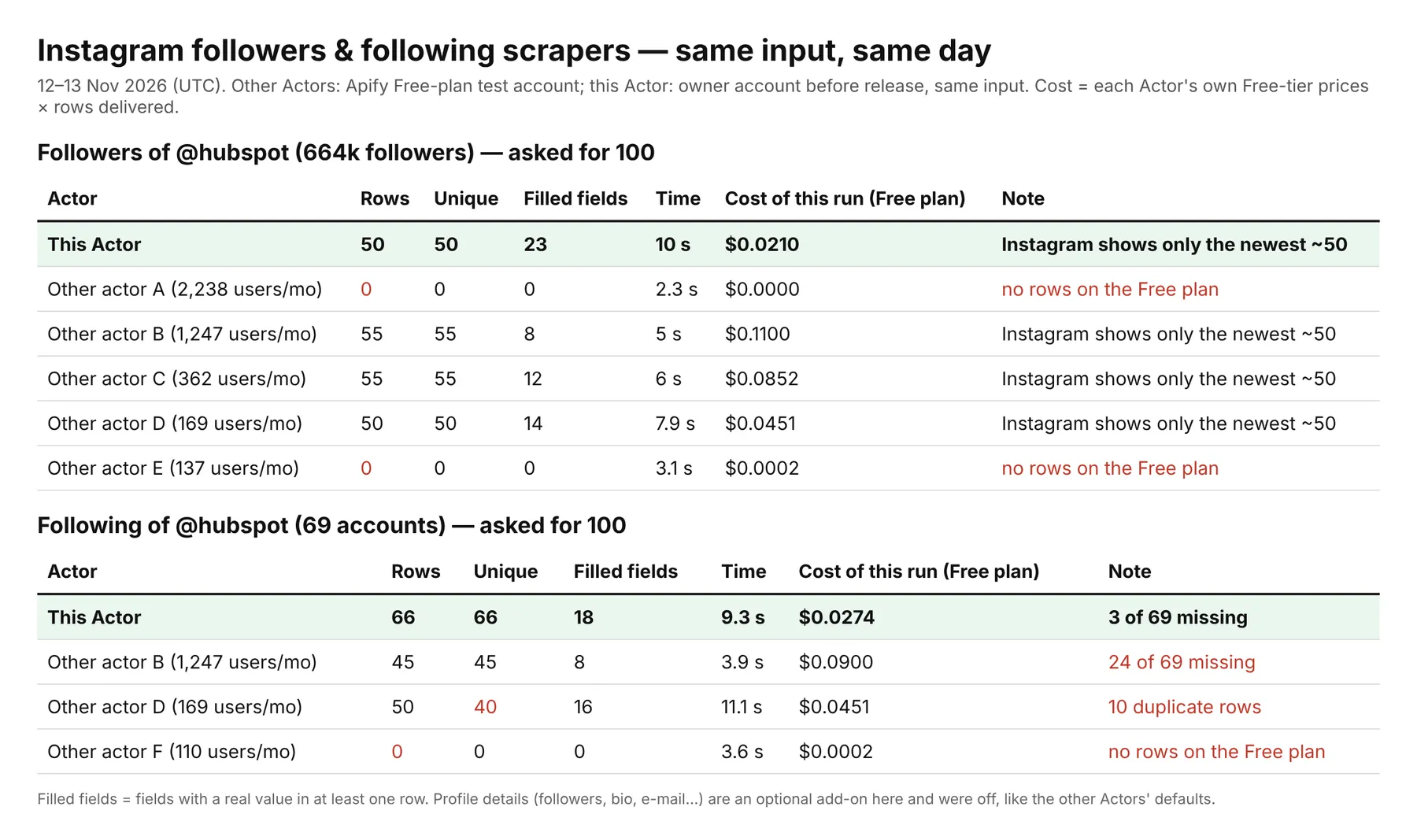
Same input for every Actor: the followers and the following list of @hubspot (664k followers, 69 followings), up to 100 rows each.
| This Actor | Other followers scrapers on the Store (5 tested) | |
|---|---|---|
| Followers of a large account | 50 — Instagram's own cap, said so in a free row | 0–55 (two returned nothing on the Free plan) |
| Following list | 66 unique of 69, no duplicates | 0–45 unique; one sent 50 rows with 10 duplicates |
| Filled fields per row | 23 (followers) / 18 (following) | 8–16 |
| Cost of the followers run (Free plan prices) | $0.021 | $0.045–$0.11 for the Actors that delivered |
| Price per 1,000 rows | $0.40 | $0.50–$2.00 |
| Followers + following in one run, mutual flag | Yes | No |
| New followers / unfollows between runs | Yes | No |
| Fake-follower score | Yes, free | No |
Smaller accounts are not capped: for @airtable (33.7k followers) the Actor delivered 150 of 150 requested followers, Instagram reporting more pages.
At a glance
| Lists | Followers, following, or both at once (+ mutual follow check) |
| Input | Usernames, @handles, profile links or numeric IDs — many per run |
| Row price | $0.40 per 1,000 rows (Silver $0.38, Gold and up $0.35) |
| Tracking | New followers / new follows, unfollows, "continue where the last run stopped" |
| Free filters | Verified only, public / private, default avatar, live story, fake score, words in name, exclude list |
| Paid add-on | Full profile: followers, posts, bio, website, e-mail, phone, category, type, address — $4.20 per 1,000 |
| Fake-follower score | 0–100 on every row, with the reasons, free |
| Output views | Followers & following · Leads & contacts · Audience quality · Changes since last run |
| Login needed | No |
What is Instagram Followers Scraper?
Instagram Followers Scraper is an Apify Actor that reads the follower list and the following list of public Instagram accounts and turns them into a clean table. You give it accounts — your own, your competitors', influencers you consider hiring — and it returns one row per person, in the order Instagram shows them (newest follower first).
It is built for four jobs:
- Audience exports — who follows a brand, a creator or a competitor, ready for a spreadsheet or a CRM.
- Following lists — whom an account follows (its partners, suppliers, favourite creators, the media it watches). Following lists are read to the end.
- Change tracking — run it daily or weekly with the same tracking name and get the new followers and the unfollows since the previous run, instead of a full list you have to compare by hand.
- Lead lists — switch on full profile details and filter by follower count, account type, e-mail, phone or website to get contactable businesses and creators out of an audience.
What data do you get?
Every row (no add-on needed):
username,fullName,id(stable numeric ID),profileUrlisVerified,isPrivate,profilePicUrl,hasDefaultAvatarhasActiveStoryandlatestStoryAt— did this person post a story in the last 24 hoursfacebookId— the Meta business ID linked to the account (useful to match with Meta ad audiences)position— place in Instagram's own list (1 = newest follower or most recent follow)sourceUsername,sourceId,sourceFullName,sourceFollowers,sourceFollowing— which account's list the row came from, and how big that account islistType—followersorfollowingisMutual— with "Both lists": they follow each other or notisNew,firstSeenAt— with a tracking name: first time you see this person, and since whenfakeScore(0–100) andfakeSignals— why the account looks fake, abandoned or bot-like
With full profile details (paid add-on, ~20 extra columns):
followers,following,posts,followerRatiobiography,externalUrl,externalUrlDomain,bioLinksemail,emailSource,emailsInBio,phone,phoneSource— business contact button first, then whatever the person wrote in the biocategory,accountType(personal / business / creator),isBusiness,contactMethodaddress,city,zip,profilePicUrlHd
Free rows explain everything that did not produce data: a typo in a username, a renamed or deleted account, a private source account, Instagram's own limit on large follower lists, filters that dropped everyone. They are marked type: error or type: notice and are never charged.
How to use it
- Open the Actor and type one or more Instagram accounts into Instagram accounts —
natgeo,@natgeoorhttps://www.instagram.com/natgeo/all work. - Choose What to export: followers, following, or both.
- Set Max rows per account and list (200 by default).
- Optional: tick free filters, switch on Full profile details, or type a Tracking name for scheduled runs.
- Click Start. Rows appear in the dataset while the Actor works; download them as CSV or Excel, or open one of the four table views.
An empty run works too: it exports the 25 newest followers of a demo account, so you can see the output before you type anything.
Input examples
Followers of two competitors, 500 rows each
Everyone an account follows, with mutual follow check
Lead list: business and creator accounts with an e-mail, 1k–50k followers
Daily new-follower and unfollow tracker (put it on a schedule)
A long following export split into runs of 2,000
Clean audience sample without bots
Input fields
The form has 25 fields in five sections. Every field has a description and a sensible default.
| Section | Field | What it does |
|---|---|---|
| 1. Accounts | usernames | Accounts to read — usernames, @handles, links or id:12345 |
listType | followers, following or both | |
maxItemsPerAccount | Rows per account and list (default 200) | |
maxTotalItems | Cap for the whole run (0 = none) | |
dedupeAcrossAccounts | One row per person even if they follow several of your accounts | |
| 2. Free filters | onlyVerified | Blue check only |
privacyFilter | Any / public only / private only | |
skipDefaultAvatar | Drop accounts without a profile photo | |
onlyWithActiveStory | Only people with a story in the last 24 h | |
maxFakeScore | Drop rows above this fake-follower score | |
includeKeywords / excludeKeywords | Words in the username or display name | |
excludeUsernames | Never return these accounts | |
| 3. Profile details (paid) | includeProfileDetails | Followers, bio, website, e-mail, phone, category, type, address |
minFollowers / maxFollowers | Size of the follower's own audience | |
accountTypes | Personal, business, creator | |
contactFilter | Has e-mail / phone / either / both | |
mustHaveWebsite | Website or link in bio | |
maxDetailLookups | Budget cap for profile checks | |
| 4. Tracking | trackingStoreName | Name of the memory for scheduled runs |
reportUnfollows | Add a row for every unfollow | |
continueFromLastRun | Start where the previous run stopped | |
| 5. Advanced | markMutuals | Mutual follow flag with "Both lists" |
maxConcurrency | Parallel profile checks (1–8) |
Output example
A follower row (no add-on):
The same kind of row with full profile details — a real row from 13.11.2026 (@airtable in the following list of @hubspot):
A row from a tracking run — someone who was in the list last time and is gone now (illustrative):
An account delivered in an earlier run under the same tracking name comes back as "type": "tracked" with "isNew": false and the same columns as a normal row, so the dataset is always the current list — new people are simply the rows with isNew: true.
Field reference
| Field | Type | Meaning |
|---|---|---|
type | string | follower, following, tracked, lost-follower, unfollowed, error, notice |
listType | string | followers or following |
sourceUsername / sourceId | string | Account whose list was read |
sourceFollowers / sourceFollowing | integer | Size of that account at run time |
position | integer | Place in Instagram's list, 1 = newest |
username, fullName, id, profileUrl | string | Who the person is |
isVerified, isPrivate | boolean | Badges |
profilePicUrl | string | 150 px avatar (Instagram CDN links expire after some days — download what you need) |
hasDefaultAvatar | boolean | Never set a photo |
hasActiveStory, latestStoryAt | boolean, string | Story in the last 24 hours |
facebookId | string | Linked Meta business ID |
isMutual | boolean | Both lists: follows back |
isNew, firstSeenAt | boolean, string | Tracking: first time seen |
fakeScore, fakeSignals | integer, array | Bot / fake / abandoned likelihood and reasons |
followers, following, posts, followerRatio | number | Profile details |
biography, externalUrl, externalUrlDomain, bioLinks | string, array | Profile details |
email, emailSource, emailsInBio | string, array | Profile details: public e-mails |
phone, phoneSource | string | Profile details: public phone |
category, accountType, isBusiness, contactMethod | string, boolean | Profile details |
address, city, zip, profilePicUrlHd | string | Profile details |
detailsIncluded | boolean | Profile details were added (and charged) |
lastSeenAt, note | string | Unfollow rows |
kind, error, notice | string | Free explanation rows |
scrapedAt | string | ISO time |
A run summary is saved in the default key-value store as SUMMARY: per account and list — pages read, rows read and delivered, whether Instagram limited the list, why the list stopped (results_limit, list_end, instagram_limit, reached_known…), whether a position was saved for the next run — plus the number of data-source requests.
Tracking new followers and unfollows
Type any short name into Tracking name and run the Actor on a schedule (Apify Console → Schedules, for example every morning).
- The first run delivers the list as normal rows and remembers every account under that name, in your own Apify storage.
- Later runs read the list from the newest end. People not seen before arrive as normal rows with
isNew: true. People already delivered arrive astype: tracked,isNew: false, at $0.15 per 1,000 instead of $0.40. - Paging stops at the first page that holds only known accounts, so checking a big account every day costs cents, not dollars.
- When the whole list fits into Max rows per account and both this run and the previous one read it to the end, every account that disappeared gets a row:
lost-follower(stopped following the source account) orunfollowed(the source account stopped following them). - Continue where the last run stopped saves the exact page and position, so a 20,000-row export can be split into ten runs of 2,000 without paying twice for anything.
Different tracking names are fully separate: use one per client or per project.
Instagram's own limit on large follower lists
Instagram does not show the full follower list of large accounts to anyone outside the account. For @hubspot (664,000 followers) every data source we tried — and every other followers scraper we ran on 12.11.2026 — returned only the newest ~50–55 followers and no next page; Instagram itself marks that answer with should_limit_list_of_followers. This Actor tells you so in a free instagram-limit row instead of pretending the export is complete, and you are charged only for the rows you get.
Smaller accounts are different: for @airtable (33,700 followers) Instagram did not limit the list, and the Actor paged on — 150 of 150 requested followers on 13.11.2026, with more pages available. The Actor always pages for as long as Instagram sends a next page.
What works for large accounts:
- Following lists are read to the end (66 of the 69 accounts @hubspot follows on 13.11.2026 — Instagram itself returned 66).
- New followers over time: the newest followers are exactly the ones Instagram does show. Schedule the Actor daily with a tracking name and you collect every new follower as it arrives, at the normal row price, while repeat sightings cost $0.15 per 1,000.
Fake-follower score
fakeScore is a quick, free audience-quality signal for every row — 0 means no warning sign, 100 means almost certainly a bot or a dead account. It adds up:
| Signal | Points |
|---|---|
default-avatar — no profile photo | 30 |
no-display-name | 15 |
many-digits-in-username (4+ digits, or a long number at the end) | 20 |
generated-looking-username (user123456789, double dots or underscores) | 15 |
no-posts (profile details) | 20 |
follows-far-more-than-followed (follows 1,000+ and 10× more than its followers; profile details) | 20 |
empty-bio and no website (profile details) | 5 |
| 1,000+ followers or a business account (profile details) | −25 |
| Verified | always 0 |
Use Max fake-follower score to drop bot-like rows before they are charged, or sort by fakeScore in the Audience quality view to estimate how much of an influencer's audience is real before you pay them.
How much does it cost?
Pay per event — you pay only for what you get, and the Apify platform usage is included.
| Event | Free / Bronze | Silver | Gold and up |
|---|---|---|---|
| Actor start (per run, 256 MB) | $0.001 | $0.001 | $0.001 |
| Follower / following row (also each unfollow found) | $0.0004 | $0.00038 | $0.00035 |
| Already-known row (tracking) | $0.00015 | $0.00015 | $0.00015 |
| Profile details (per account checked) | $0.0042 | $0.004 | $0.0038 |
Free, never charged: error and notice rows, accounts dropped by free filters, private or missing source accounts, and the run-summary row.
Examples (Free / Bronze prices):
- Following lists of 10 accounts, ~800 each → 8,000 rows × $0.0004 = $3.20 + $0.001 start.
- Newest 50 followers of 20 big brands → 1,000 rows = $0.40.
- Daily tracker of one big competitor: ~50 rows read a day, ~30 of them new → 30 × $0.0004 + 20 × $0.00015 = $0.015 a day, about $0.45 a month.
- Lead list: 300 followers checked in full, 60 pass the e-mail + 1k–50k filter → 300 × $0.0042 + 60 × $0.0004 = $1.28. Profile checks are charged also for the accounts the filter then drops — set Max profiles to check in full to cap the bill.
Set Maximum cost per run in the run options and the Actor stops cleanly at that amount: every written row is paid, nothing more, and the run ends green with a message.
Free Apify plan
On the Apify Free plan one run returns up to 100 rows from one account, with full profile details for the first 5 — every page is bought from a paid Instagram data source. Any paid Apify plan removes these limits.
Integrations and API
REST API (curl)
Python
JavaScript / TypeScript
AI agents (MCP). Add the Apify MCP server (https://mcp.apify.com) to Claude, ChatGPT, Cursor or any MCP client and ask in plain words: "Export the people @glossier follows and tell me which of them follow back." The agent calls apimy/instagram-followers-scraper with the right input. Tell the agent the cost before the first paid run — the price table above has everything it needs.
No-code. Use the official Apify apps in Make, n8n or Zapier: run the Actor on a schedule, then send isNew: true rows to Google Sheets, Slack or your CRM, and lost-follower rows to a "churned fans" list. Webhooks on run success work too.
Use cases
- Competitor audience research — export who follows three competitors, keep the people shared by several of them (
dedupeAcrossAccountsoff, then count byid). - Influencer vetting — check the newest followers of a creator for
fakeScorebefore you pay for a post. - Partner and supplier discovery — the following list of a brand shows the creators, agencies and media it works with.
- Lead generation — business and creator accounts with e-mails out of a niche audience, filtered by follower count.
- Community management — daily list of new followers to welcome, weekly list of unfollows to understand churn after a campaign.
- Mutual-follow audits — with "Both lists", see who you follow that never followed back (
isMutual: falseon following rows). - Ad audiences —
facebookIdand usernames for custom-audience matching in Meta Ads.
FAQ
Do I need an Instagram account, cookies or a session ID? No. You only give public account names. The Actor uses a commercial Instagram data source; nothing is logged in under your name and your accounts are never at risk.
Can it export all followers of a big account like natgeo? No tool can today: Instagram shows only the newest few dozen followers of large accounts to outsiders and sends no next page. The Actor says so in a free row. Schedule it with a tracking name to collect new followers as they arrive, and use the following list, which is read to the end.
How many rows can I get in one run? Up to 100,000 per account and list. Instagram sends followers 25–50 per page and following lists in bigger chunks (all 69 of @hubspot came in one answer); a run of a few thousand rows takes a few minutes.
Why are there fewer rows than I asked for?
The list ended, Instagram limited it (see the free instagram-limit row), your filters dropped people, or the run reached your max cost. SUMMARY gives the reason per account in stopReason.
Does it work with private accounts? A private account's lists are visible only to its approved followers, so you get one free row explaining that. Private people inside a public account's list are fine — you get their username, name, avatar and ID.
What does a "tracked" row cost and why is it there?
$0.15 per 1,000. It is a person you already got under the same tracking name. Delivering them (marked isNew: false) keeps the dataset a complete current list, and reading them is how the Actor knows where the new part ends and who unfollowed.
How are unfollows detected? By comparing the full list of this run with the full list of the previous run under the same tracking name. It needs the whole list to fit into Max rows per account, and Instagram must show the whole list (following lists and smaller accounts' followers).
Can I continue a long export tomorrow? Yes — tracking name + Continue where the last run stopped. The next run starts at the same page and position. If Instagram's position has expired, the Actor starts at the top and already-delivered people come back as cheap tracked rows, not as new ones.
Where do e-mails and phones come from? From the public business contact buttons on the profile and from text people wrote in their bio. The Actor does not guess addresses or buy them from databases.
Is the profile-details add-on charged when a filter drops the account? Yes — the profile had to be opened to know its follower count or e-mail. Use free filters first (they cost nothing) and set Max profiles to check in full.
How fresh is the data? Live: every run asks Instagram at that moment. Nothing is served from an old cache.
What order do rows come in?
Instagram's own order — the newest followers and the most recent follows first. position keeps it.
Can I run many accounts at once?
Yes, hundreds. Duplicates are read once (@Nike, nike and the numeric ID count as one account).
Do profile picture links last forever?
No, Instagram CDN links expire after some days. Download the images you need, or keep the id and fetch a fresh link later.
Is it legal? The Actor reads only public information. You are responsible for having a lawful purpose and for respecting privacy and data-protection law (GDPR, CCPA) when you store or contact people.
What happens on errors? Temporary errors are retried with backup data sources. A username that does not exist, a private account or an empty list gives a free explanation row — the run stays green and you are not charged for it.
Limitations
- Instagram limits the follower list of large accounts (hundreds of thousands of followers) to the newest ~50 entries for outsiders; no next page exists. Following lists and smaller accounts (tested: 33.7k followers) are paged normally.
- Private accounts' lists cannot be read.
- Instagram decides the order of the list; two runs a minute apart can differ slightly for fast-growing accounts.
- Unfollow detection needs the whole list in both runs.
- Profile details cost one data-source request per account, so the add-on is priced per account checked.
- The fake-follower score is a heuristic from public signals, not a verdict — use it to sort and sample, not to accuse.
- Avatar links expire after some days.
Responsible use
Collect only public data, only with a lawful purpose, and keep as little as you need. Do not use exported lists for spam or harassment. This Actor is not affiliated with, endorsed or sponsored by Instagram or Meta.
Support
Open an issue on the Actor's Issues tab with the run ID and what you expected. Feature requests are welcome — the follower/following niche moves fast and we ship updates often.


