

Video Frame Extractor — YouTube & TikTok to Images, Scenes, OCR
Pricing
from $1.30 / 1,000 frames
Video Frame Extractor — YouTube & TikTok to Images, Scenes, OCR
Turn any video into images: YouTube, TikTok, Instagram, Facebook, X or MP4 links → frames every N seconds, scene changes, keyframes, exact times or best thumbnails. Free contact sheet, duplicate and blank-frame skip, OCR text. No login. JSON, CSV, Excel.
Pricing
from $1.30 / 1,000 frames
Rating
5.0
(2)
Developer

Nikita Iakovlev
Maintained by CommunityActor stats
0
Bookmarked
22
Total users
10
Monthly active users
4 hours ago
Last modified
Categories
Features
Share
Video Frame Extractor — YouTube, TikTok, Instagram & MP4 to Images
Video Frame Extractor turns any public video into still images. Paste a YouTube, TikTok, Instagram, Facebook or X (Twitter) link — or a direct MP4, MOV, WebM, MKV or M3U8 file — and get sharp JPG, PNG or WebP frames: one every few seconds, a fixed number spread across the video, one per scene change, the encoder's keyframes, the exact timestamps you list, or the best thumbnails picked for you. No login, no cookies, no API key.
Every frame arrives as a dataset row with a direct image link, its exact time, size, sharpness, brightness, dominant colours and a perceptual hash — and, if you switch it on, the text written on the frame (OCR). Each video also gets a free contact sheet (one grid image of all its frames) and an optional animated preview GIF. Black frames, fades and near-duplicates are skipped and never charged.
Tested head-to-head — 10 November 2026
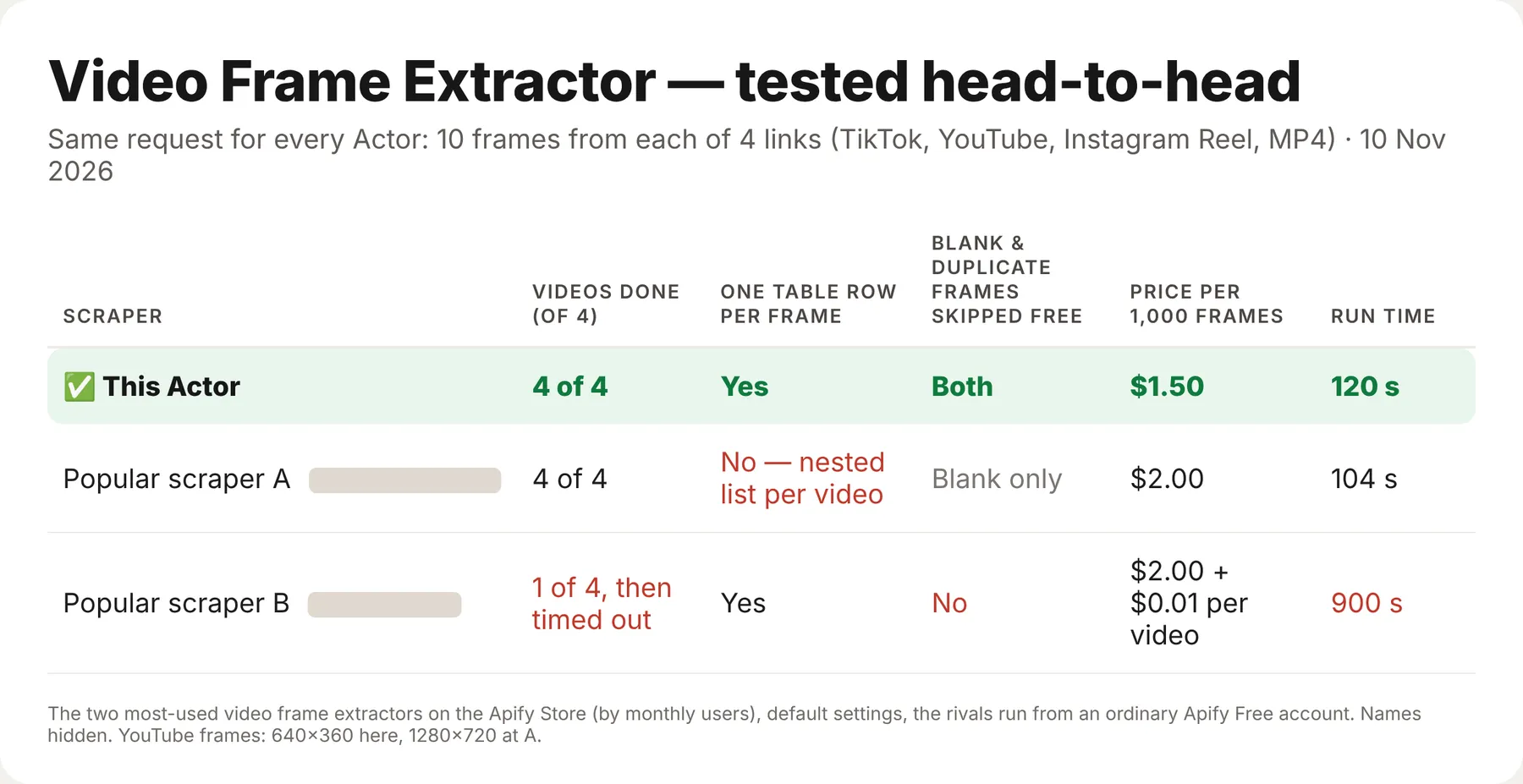
The same request — 10 frames from each of four links: a TikTok, a 10-minute YouTube video, an Instagram Reel and an MP4 file — sent to this Actor and to the two most-used video frame extractors on the Apify Store, each on its default settings.
| This Actor | The two most-used others | |
|---|---|---|
| Videos processed | 4 of 4 | 4 of 4 · 1 of 4, then the run timed out after 15 minutes |
| Frames in the dataset | One row per frame with an image preview | One row per video with frames nested inside · one row per frame |
| Black and near-duplicate frames | Both skipped, never charged | Blank frames only · neither |
| Price per 1,000 frames | $1.50 ($1.30 on Gold) | $2.00 ($1.60 on Gold) · $2.00 plus $0.01 per video |
| Run time | 120 s | 104 s · 900 s (timed out) |
| Frame size: TikTok · YouTube · Instagram | 1080×1920 · 640×360 · 720×1280 | 720×1280 · 1280×720 · 1080×1920 (the leader) |
Where we lose, we say so: on YouTube and on this Instagram Reel the leader returned larger frames — here YouTube serves its 360p copy and Instagram its 720p one (see "Limits"). On TikTok we returned the full 1080-wide copy.
What is Video Frame Extractor?
It is a cloud tool on the Apify platform that does what you would otherwise do by hand with a video player, the screenshot key and a lot of patience — or with ffmpeg on your own computer after downloading the video yourself. You give it links, it gives you images and a table.
Under the hood it finds the video stream the site serves to a logged-out visitor, then seeks straight to each moment you need instead of downloading the whole video. Ten frames from a one-hour video read a few megabytes. Only the modes that must look at every frame (scenes, auto storyboard, keyframes and best thumbnails) read the whole video — and for site links they read the smallest copy the site has (for example 256×144), then cut the final frames from the copy that matches your "Max frame width".
What you get in one run:
- Frames as image files in the run's key-value store, each with a direct link (
frameUrl) ready for spreadsheets, scripts, Make, n8n, Zapier or an AI model. - One row per frame with
timestampSecandtimestamp(00:01:23.500),width,height,fileSizeKb,sharpness,isBlurry,brightness,dominantColors,perceptualHash,sceneScore, and the video's title, channel and duration. - One free summary row per video with the source resolution, frame rate and codec, frames returned, frames skipped and why, the contact sheet link and the preview GIF link.
- On-screen text (
ocrText) for every frame when "Read text on frames" is on — captions, titles, slides, prices, product names.
Seven ways to choose frames
| Mode | What you get | Good for |
|---|---|---|
| Auto storyboard (default) | The first frame, then the strongest shot change in each equal part of the video (or the middle of that part when nothing changes there) | A representative storyboard of any video, a quick summary for an AI model |
Every N seconds (interval) | One frame every N seconds from the start time (0.5 = two per second) | Datasets, lectures, screen recordings, monitoring footage, step-by-step tutorials |
A fixed number (count) | N frames, each from the middle of an equal slice, which avoids black lead-ins and fade-outs | Thumbnails, previews, consistent sampling for AI |
Scene changes (scenes) | One frame at the start of every shot, with a sensitivity you set; the strongest cuts are kept when there are more than "Max frames per video" | Trailers, ads, music videos, storyboards and shot lists |
Keyframes (keyframes) | The encoder's own keyframes (I-frames), sampled evenly when there are more than the limit | Lossless-quality stills, shot starts in edited videos |
Exact timestamps (timestamps) | Exactly the moments you list: 90, 90.5, 1:30, 00:01:30.250, 1m30s | A timecode from a transcript, a chapter start, a highlight you already know |
Best thumbnails (bestThumbnails) | Scores up to ~70 candidate frames for sharpness, exposure, contrast, colour and faces, returns the best few, ranked and at least a few seconds apart | Picking a cover image for a video page, a course lesson, a product clip, YouTube thumbnail research |
Every mode except timestamps respects an optional start time and end time, and Max frames per video caps the output.
Which sites and files work?
- YouTube — videos, Shorts, and whole channels (
youtube.com/@name) or playlists: the newest N videos are taken automatically. - TikTok — single videos and whole profiles (
tiktok.com/@name). - Instagram — Reels and video posts.
- Facebook, X (Twitter), Vimeo, Reddit, Dailymotion, Twitch clips, Bilibili and the 1,000+ other sites yt-dlp understands.
- Direct files — MP4, M4V, MOV, WebM, MKV, AVI, FLV, MPEG, TS, 3GP and M3U8 (HLS) streams, from any public URL, including S3, Google Cloud Storage, Dropbox direct links and CDNs.
Only public videos are supported. Private, age-restricted, members-only videos and live streams that have not ended get a free row explaining why.
What data does Video Frame Extractor return?
One row per frame (type: "frame")
| Field | Example | What it is |
|---|---|---|
frameUrl | https://api.apify.com/v2/key-value-stores/…/records/v1-aqz-KE-bpKQ-frame-0003.jpg | Direct link to the image |
kvKey | v1-aqz-KE-bpKQ-frame-0003.jpg | File name in the run's key-value store |
videoUrl | https://www.youtube.com/watch?v=aqz-KE-bpKQ | The link you gave (or the video found in a channel/profile) |
platform | youtube | youtube, tiktok, instagram, facebook, x, vimeo, file, … |
videoId, videoTitle, channel | aqz-KE-bpKQ, Big Buck Bunny 60fps 4K, Blender | Video identity |
videoDurationSec | 634.6 | Length of the video |
mode | scenes | Mode that chose this frame |
frameIndex | 3 | Order of the frame within its video |
timestampSec, timestamp | 68.2, 00:01:08.200 | Exact time of the frame |
requestedTime | 1:08.2 | Timestamps mode: the time as you typed it |
pickedBy | sceneChange | Auto mode: first, sceneChange or evenSpread |
sceneScore | 0.66 | How strong the shot change was (0–1) |
isKeyframe | true | Keyframes mode |
thumbnailRank, thumbnailScore, faces | 1, 78.4, 1 | Best thumbnails mode: rank, score 0–100, faces found |
width, height, imageFormat, fileSizeKb | 1280, 720, jpg, 118.4 | The saved image |
sharpness, isBlurry | 412.7, false | Laplacian sharpness; blurry under 45 |
brightness | 112.3 | Mean brightness 0–255 |
dominantColors | [{"hex":"#2b3a55","share":0.31}, …] | Five dominant colours with their share |
perceptualHash | 03034f9b83c3e564 | 64-bit difference hash, for your own de-duplication across runs |
ocrText, ocrLines | "NOW AVAILABLE\nFOR PRE-SALE" | Text on the frame, top to bottom (OCR add-on) |
scrapedAt | 2026-11-11T02:14:09Z | When the frame was made |
One free summary row per video (type: "video")
| Field | What it is |
|---|---|
contactSheetUrl | One grid image of all frames of the video, each stamped with its time |
previewGifUrl | Animated GIF of the frames (when "Animated preview GIF" is on) |
framesExtracted | Frames delivered for this video |
framesSkipped | Free skips by reason: blank, duplicate, blurry, unreadable, overCap |
sourceWidth, sourceHeight, sourceFps, sourceCodec | The copy the frames were cut from |
scanCopy | The small copy used to find scene changes (for example 256x144) |
sceneChangesFound, keyframesFound, candidatesScored | What the scan found |
route | direct, residential or paid-source — how the video was reached |
minutesCharged, residentialMb | Exactly what this video cost beyond its frames |
viewCount, likeCount, uploadDate | When the site shows them to logged-out visitors |
processingSec | Time spent on this video |
Rows for links that could not be processed have type: "error", an errorCode (not_public, not_found, blocked, too_large, live, bad_url, …) and a plain-English error. They are free. One free notice row at the end summarises the run: rows delivered and the exact cost by event.
The dataset has three ready views: Frames (a table with image previews), Videos (contact sheets) and All fields. Export to JSON, CSV, Excel, XML, RSS or HTML from the Storage tab, or read it through the API.
How to extract frames from a video
- Open the Actor and paste one or more links into Video URLs.
- Pick a mode in Which frames and set its option — number of frames, seconds between frames, scene sensitivity or your timestamps.
- Optionally narrow the part of the video with Start time / End time, choose Image format, Max frame width and Image quality, and switch on Read text on frames or Animated preview GIF.
- Click Start. Frames appear in the Dataset tab with image previews; the files are in the Key-value store tab.
An empty run works too: it processes a 52-second sample video so you can see the output before pasting your own links.
Input examples
Storyboard of 12 frames from a TikTok and a YouTube video:
One frame per second from minute 2 to minute 3 of a file, as lossless PNG at full resolution:
Exact moments from a transcript, nothing skipped:
The three best thumbnails of every Short on a channel, with the text on them:
Every shot of a trailer, only hard cuts, as WebP:
Output example
A real frame row from a test run on 10 November 2026 (OCR on; OCR reads stylised fonts imperfectly — "GAMESS" is the artwork's lettering):
Clean frames, for free
Real videos are full of frames you do not want: black intros, fades between shots, a talking head that does not move for a minute. Three switches deal with them, and everything they remove is never charged:
- Skip black and blank frames (on by default) — when a chosen moment is black, a fade or one flat colour, the Actor steps forward up to 2 seconds to a real picture. If it stays blank, the frame is dropped.
- Skip near-duplicate frames (on by default) — a frame that looks almost the same as one already returned for that video is dropped, judged by a 64-bit perceptual hash. "Every 5 seconds" on a static talking head gives a handful of distinct frames instead of sixty identical ones. Set Duplicate sensitivity from 0 (identical only) to 20 (similar shots too).
- Skip blurry frames (off by default) — drops frames with a very low sharpness score. Every row carries
sharpnessandisBlurryanyway, so you can also filter afterwards.
Timestamps mode never skips anything: you asked for those exact moments.
Best thumbnails, explained
Best thumbnails mode looks at the whole video the way an editor would. It takes the start of every shot plus an even spread of moments — up to about seventy candidates — and scores each one from 0 to 100:
- Sharpness (32%) — the Laplacian variance of the image; motion blur and focus hunting score low.
- Faces (22%) — a clear, reasonably large face scores high (OpenCV face detector).
- Exposure (18%) — mid-tones score high, very dark or blown-out frames low.
- Contrast (16%) and colourfulness (12%).
The winners are re-cut at your full "Max frame width", ranked (thumbnailRank 1 is the best) and kept at least a few seconds apart, so you get different shots rather than three copies of one. Each row shows its thumbnailScore, faces, sharpness, brightness, contrast and colorfulness, so you can see why it won.
Text on frames (OCR)
Switch on Read text on frames and every delivered frame gets ocrText (lines joined top to bottom) and ocrLines (a list). It reads captions burned into Reels and TikToks, titles, lower thirds, presentation slides, prices on product videos, on-screen subtitles and signs. The model is PP-OCRv5 (via RapidOCR), running inside the Actor — your frames are not sent to any outside service. It reads Latin and Cyrillic scripts; text smaller than about 12 pixels high is often missed. Combine it with interval mode to turn a slide-based video into text, or with scenes mode to get one text block per shot.
Contact sheets and preview GIFs
The contact sheet (on by default, free) is one JPG per video with up to 100 frames in a grid, each stamped with its time and the video title on top. It is the cheapest way to review a long video at a glance — and often enough to send a whole video to a vision model as a single image. Set the number of columns with Contact sheet columns.
The preview GIF (off by default, free) flips through the frames at 0.7 seconds each, 360 px wide — handy for a quick look in Slack, Notion or an email.
How much does it cost to extract frames from a video?
You pay per result. There is no fee per video and no subscription. Prices on the Free and Bronze plans:
| Event | Price | When |
|---|---|---|
| Frame | $0.0015 ($1.50 per 1,000; $1.40 on Silver, $1.30 on Gold and above) | Each frame delivered. Blank, duplicate and skipped frames and failed videos are free. |
| Actor start | $0.002 per GB of memory ($0.004 at the default 2 GB) | Once per run |
| Minute scanned | $0.003 | Only in auto, scenes, keyframes and best-thumbnails modes, per started minute beyond the first 3 minutes of each video; copies taller than 720 px count 2×, taller than 1080 px 4×. Short videos never pay it. |
| Text read on a frame (OCR) | $0.0015 | Only with "Read text on frames" on |
| Residential MB | $0.005 | Only when a site blocks the direct route (often YouTube), per started MB, and only for videos that delivered frames. "Direct only" never pays it. |
| Instagram video via backup source | $0.004 | Only when Instagram refuses logged-out access on every free route, and only if the video delivered frames |
Worked examples at Free-plan prices:
- 12-frame storyboard of a 30-second TikTok: 12 × $0.0015 + $0.004 start = $0.022.
- 10 frames at exact times from a 1-hour YouTube video that YouTube only serves through residential: 10 × $0.0015 + about 8 MB × $0.005 + $0.004 = about $0.06. The Actor seeks inside the video instead of downloading the whole hour.
- Every scene of a 10-minute direct MP4 at 720p, 60 scenes: 60 × $0.0015 + 7 × $0.003 (minutes 4–10) + $0.004 = $0.115.
- 1,000 frames from 100 short product videos, with OCR: 1,000 × $0.0015 + 1,000 × $0.0015 + $0.004 = $3.00.
Ways to pay less: lower "Max frame width" (smaller copies are faster to fetch), narrow "Start time" / "End time" in scan modes, keep the clean-frame switches on, and choose "Direct only" if you never want residential traffic. Set Max cost per run in the run options to cap any run: the Actor stops cleanly at that amount with everything written already paid for.
The Apify Free plan processes up to 3 videos and 20 frames per video per run; any paid plan removes the limit.
Use it with AI vision models (GPT, Claude, Gemini)
Vision models read images, not videos. This Actor is the missing step:
- OpenAI — pass each
frameUrlas{"type": "image_url", "image_url": {"url": frameUrl}}. - Claude —
{"type": "image", "source": {"type": "url", "url": frameUrl}}. - Gemini — download the bytes of each frame and send them as
image/jpegparts, or send the contact sheet as one image. - Fewer tokens — send the single
contactSheetUrlimage instead of 12 separate frames, and addocrTextas plain text. - AI agents (MCP) — connect the Apify MCP server (
mcp.apify.com) to Claude, ChatGPT, Cursor or VS Code, and your agent can callapimy/video-frame-extractorby itself whenever it needs to look at a video.
Python example — frames of one video, then a description from a vision model:
JavaScript:
Integrations: n8n, Make, Zapier, webhooks, schedules
- n8n — the official Apify node, operation "Run actor", Actor
apimy/video-frame-extractor, then "Get dataset items" and filtertype=frame. - Make — the Apify app's "Run an Actor" module (run synchronously), then iterate over the dataset items.
- Zapier — the Apify app's "Run Actor" action; use the
frameUrlfields in the next step (Google Drive upload, Airtable attachment, Slack message). - Webhooks — Apify calls your URL when a run finishes.
- Schedules — run it daily on a channel or profile link to collect frames of every new video.
- Google Sheets — export the Frames view;
=IMAGE(frameUrl)shows the pictures in the sheet.
Use cases
- YouTube thumbnail research — pull the best thumbnails and the first frames of competitor videos and compare composition, faces, colours and text.
- Ad and creative analysis — break ads, trailers and UGC videos into scenes; read the text on every shot with OCR; compare hooks and cuts.
- Training data for computer vision — sample frames from hours of footage at a fixed rate, with duplicates and blank frames already removed.
- Storyboards and shot lists — one frame per scene, in a contact sheet ready for a deck.
- Content moderation and review — scan a video in seconds from one grid image instead of watching it.
- Social media repurposing — turn TikToks and Reels into carousel images, blog illustrations and newsletter visuals.
- E-commerce — product images and prices from product videos; on-screen text from unboxing and review clips.
- Education — slides out of recorded lectures and webinars, with their text.
- Video SEO and indexing — timestamped preview images for chapters, search results and sitemaps.
Limits, said honestly
- YouTube refuses Apify's datacenter addresses, so YouTube videos are usually reached through the residential route (charged per MB) and YouTube serves that route its 360p copy in most cases — frames are 640×360 even when "Max frame width" asks for more. Instagram's logged-out copies are often 720 px wide. TikTok and files come at the size you ask for.
- Instagram often refuses logged-out visitors. When both free routes fail, the Actor makes one lookup in a backup source (charged as "Instagram video via backup source"); a post that is a photo or carousel gets a free row.
- Some YouTube videos demand a signed-in account even from residential addresses; this Actor never uses anyone's cookies, so such a video gets a free
blockedrow. - Up to 1,000 frames per video (500 in auto and count modes), and "Max download per video" (300 MB by default) as a safety limit for full-video modes.
- Live streams work only after they have ended.
FAQ
Do I need a YouTube, TikTok or Instagram account? No. The Actor works only with what the sites show to a logged-out visitor, and never asks for your cookies.
How accurate are the timestamps? Frames are decoded at the exact time requested — not snapped to the nearest keyframe — except in keyframes mode, where the keyframe is the point. Each row says the exact time it was cut at.
Will I pay for black frames or duplicates? No. Skipped frames are counted in the video row (framesSkipped) and never charged.
Where are the images stored and for how long? In the run's key-value store, for as long as your Apify plan keeps unnamed run storage (7 days by default). Copy them to your own storage through the API, n8n, Make or Zapier if you need them for longer.
Can I get the frames as base64 or as a ZIP? The images are files in the key-value store; download them one by one by frameUrl, or all at once through the key-value store API.
What is the largest video it can handle? Seek modes work on videos of any length — a frame from hour 3 of a long stream reads only a few MB. Full-video modes read the video once at its smallest copy, up to "Max download per video".
Does it work with private videos or links that need a password? No — only public videos. Signed links (S3 presigned URLs, Google Cloud Storage signed URLs) work while they are valid.
Something is not working? Open an issue on the Actor's Issues tab with the run link. Most fixes ship within a day.
Changelog
- 0.1 (11 November 2026) — first release: 7 modes, YouTube channels and playlists, TikTok profiles, clean-frame skips, best thumbnails, OCR, contact sheets, preview GIFs, residential seeking that counts every MB.


