

BuiltWith Alternative — Tech Stack, Emails & Phones API
Pricing
from $5.00 / 1,000 website records
BuiltWith Alternative — Tech Stack, Emails & Phones API
Look up website technologies or discover indexed technology leads; distinguish indexed evidence from live checks. Bulk export: JSON, CSV, Excel and API. PPE: $5/1K website results; start fee extra.
Pricing
from $5.00 / 1,000 website records
Rating
5.0
(1)
Developer

Apivault Labs
Maintained by CommunityActor stats
0
Bookmarked
45
Total users
32
Monthly active users
an hour ago
Last modified
Categories
Share
BuiltWith Alternative — Tech Stack Leads & Domain Lookup

Use this BuiltWith alternative for technology leads, tech stack lookup, Shopify and Klaviyo leads, lookalike companies and technology monitoring using a large historical website index. Find websites by technology such as HubSpot, Stripe, WordPress, PayPal or Mailchimp, or paste domains to retrieve their known stack, contacts and firmographics.
1 site = 1 result. A fast, no-subscription BuiltWith alternative and Wappalyzer alternative for technographics, lead generation and CRM enrichment.
Source health and safe monitoring
Open SUMMARY and ERRORS in the run Key-Value Store to check source
coverage. partial=true means some sources were unavailable: useful returned
rows remain available, but coverage and counts are incomplete. If every selected
segment fails, the run fails with no result rows; an empty match from healthy
sources is a valid result. Temporary source failures are reported separately
from matching results.
Monitor preserves its baseline and emits no changes when any source fails.
When a run charge limit stops change output, only delivered changes advance
the baseline. Undelivered changes remain pending for the next run. A failed
dataset write does not advance the baseline.
Lookalike suppresses results if seed lookup is incomplete. This prevents a
missing source from being interpreted as a technology removal or migration.
verified still describes a homepage fetch, not validation of every historical
field. Invalid inputs remain errors: Find needs a technology or preset;
Detect, Lookalike and Monitor need domains. SUMMARY/ERRORS explain missing input.
Recent homepage observations
Homepage-observation fields are available where a check has been recorded.
Coverage is incomplete, and newly collected profiles may not yet be included in
this Actor. A stored observation is not a guarantee of a current verification.
Tech Checked At, Tech Verification Status and Tech Detected Stack describe
the latest public-homepage attempt. Tech Evidence includes its scope and
positive detection evidence. Untouched segments return null for these fields.
Use techCheckedWithinDays: 7 and observedTechnologies: ["Shopify"] alongside
your normal search to require a recent positive homepage observation. The
Recent homepage observations view separates those observations from the
historical stack. These filters may return few or no results while coverage
accumulates. A verified status means a homepage was fetched; it does not
validate every historical stack field. Failed checks preserve historical data.
Absent homepage signals do not prove a technology was removed. General
The derived Data Age Days metric retains its original meaning; the historical date fields themselves are not exported.
For immediate verification of a specific domain list, use the existing
mode=detect with verifyLive=true (maximum 100 domains). Stored observations and live-on-run checks have separate dates and output
fields. There is no guaranteed refresh interval across the full database; use a
targeted live check for current homepage evidence.
Unlike a plain website database, the Actor can also explain the sales opportunity: which capability is missing, how strong the lead is, what changed and what to pitch.
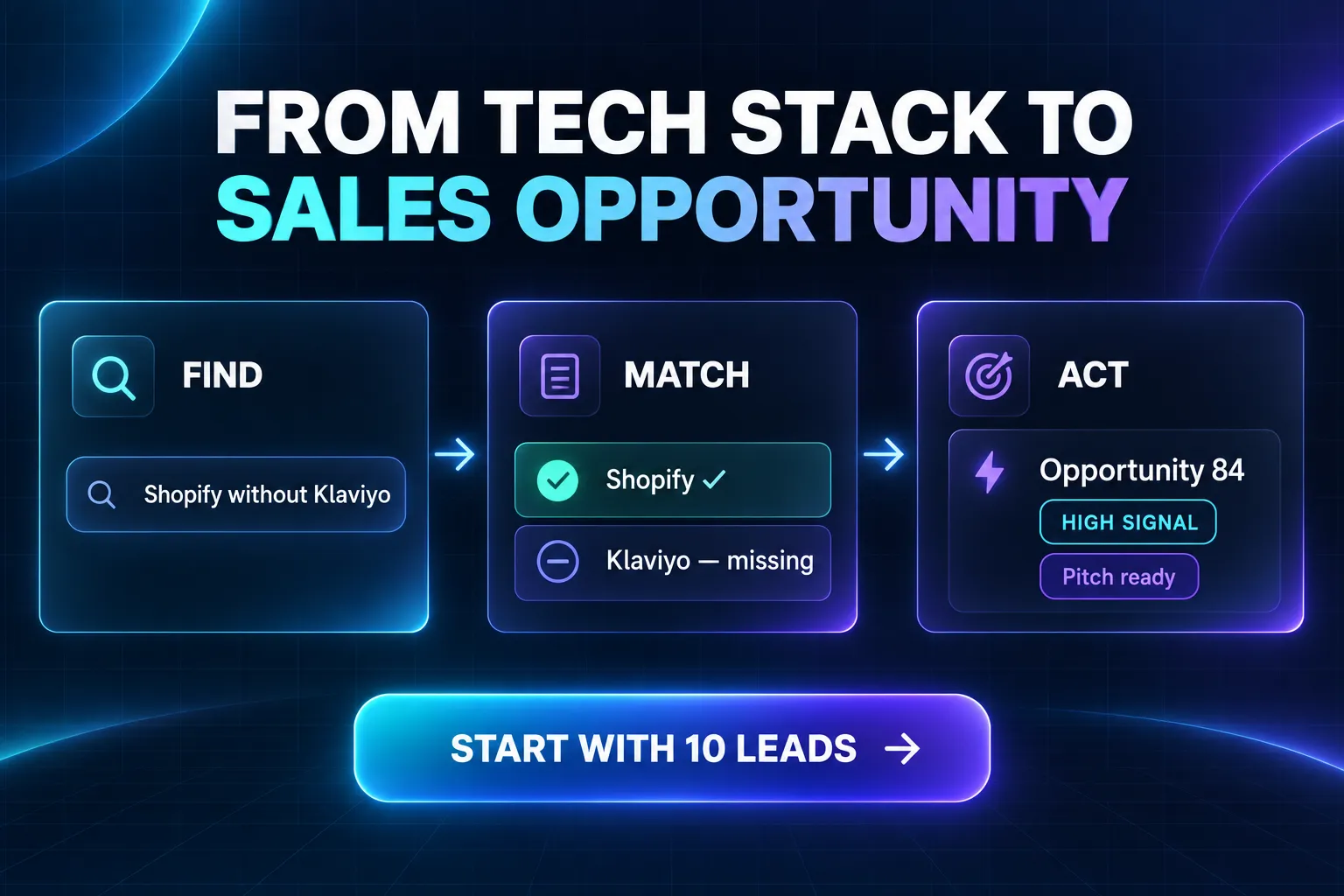
Example opportunity result (synthetic):
Start with 10 Shopify-without-Klaviyo leads →
AI agent quick start
Actor tool ID: apivault_labs/tech-stack-lookup
Agent security: the Actor requires LIMITED_PERMISSIONS. It can use its own
run storages and persistent monitor state but does not request access to unrelated
datasets, tasks or account resources.
For reliable autonomous calls, always send mode, maxItems and
outputPreset: "essential" unless the user asks for specialized fields. Use
columns only for an exact custom field list. Keep dedupeByDomain: true. Treat an empty dataset as a valid
result: the filter may have no matches, a domain may be unknown, a monitor may
have no changes, or the selected workflow may intentionally use Key-Value Store.
Choose the workflow deterministically:
| User intent | Input contract | Primary output |
|---|---|---|
| Find companies using a technology | mode=find + technologies | One lead per website |
| Find a sales-ready stack gap | mode=find + opportunityPreset | Leads with score and pitch |
| Enrich known domains | mode=detect + domains | Known profiles; unknown domains omitted |
| Verify current homepage signals | mode=detect + domains + verifyLive=true | Stored profile plus live evidence; max 100 |
| Find similar companies | mode=lookalike + seed domains | Similar leads; seeds excluded |
| Track technology changes | mode=monitor + domains + stable monitorName | Changed domains only; first run is baseline |
| Discover technology names | mode=catalog | TECHNOLOGY_CATALOG, no dataset rows |
| Estimate segment size | mode=find + target + countOnly=true | COUNT_SUMMARY, no dataset rows |
Minimal agent-safe lead request:
Agent rules:
- Do not invent technology names; use
mode=catalogwhen uncertain. - Do not call a stack gap a migration. Only monitor output with
Buying Signal=technology_migrationconfirms a change between snapshots. - Reuse the exact same
monitorNameto continue a monitor baseline. - Request small batches first. Increase
maxItemsonly after checking a sample. - Semicolon-separated technology/contact fields are strings, not JSON arrays.
- Preserve exact output field capitalization, including spaces.
Use through Apify MCP
Expose only this Actor to an MCP-compatible agent:
OAuth is recommended. Then ask the agent: Run
apivault_labs/tech-stack-lookup in find mode and return 25 US Shopify websites
using Klaviyo with business emails.
Five workflows in one Actor
🔎 Find websites by technology
Start with a technology and reverse-find matching domains. Combine required and excluded tools, then filter by country, industry, contacts or freshness and sort by company-size signals to create a prospect list.
🧰 Check the tech stack of my domains
Paste domains or URLs you already have. The Actor looks up each known website and returns its technology profile plus available emails, phones, company data, social profiles and rankings. Unknown domains are skipped and are not charged.
🧬 Find lookalike companies
Paste a few customer or competitor domains. The Actor identifies their strongest shared technology signature, then finds other companies with a similar stack. Seed domains are excluded from the result and each lead includes a similarity score plus the technologies it shares with the seed profile.
🔔 Monitor technology changes
Give a monitor a stable name and rerun it with the same domains. The first run saves a private baseline. Later runs return only domains where a technology was added or removed, so unchanged checks create no per-result charge. Missing domains do not erase their previous baseline.
The baseline is per domain. Adding a domain to an existing monitor, or finding
a previously unknown domain for the first time, saves its initial stack without
a result charge. Its existing technologies are not reported as new adoptions.
SUMMARY reports requestedDomains, knownDomains, unknownDomains,
newBaselineDomains and comparedDomains after a healthy source lookup. Unknown
domains have no readable indexed profile; this does not mean their stack is empty.
Comparison dates describe observations of the index, not a verified installation
date or a live check of the website. Partial source failures suppress comparisons
and preserve all domain baselines.
📚 Browse the technology catalog
Use Browse technology catalog when you are unsure how a product is named or
which stack category to search. The catalog is written to TECHNOLOGY_CATALOG
in Key-Value Store and creates no dataset rows.
Find websites using any technology
Give it one or more technologies and the Actor finds matching websites in the historical technology index. Instead of checking domains one by one, start with the technology and receive matching companies — ready for lead generation, market research or competitor campaigns.
Combine technologies exactly how your campaign needs:
- Any (OR) — sites using at least one, e.g.
StripeorBraintree - All (AND) — sites using every one, e.g.
Shopify+Klaviyo - Exclude — drop sites using a tool, e.g. Klaviyo users that do not use Yotpo
Optionally narrow to one stack layer:
| Stack layer | Examples |
|---|---|
| Ecommerce platform | Shopify, WooCommerce, Magento, BigCommerce, PrestaShop |
| CMS | WordPress, Wix, Squarespace, Joomla, GoDaddy |
| CRM | HubSpot, Salesforce, Brevo, ActiveCampaign, Zoho |
| Marketing automation | Klaviyo, Omnisend, Mailchimp, MailerLite, Brevo |
| Payments | PayPal, Stripe, Shop Pay, Apple Pay, Google Pay |
| Hosting | Cloudflare, AWS, Google Cloud, Vercel, Hostinger |
| AI tools | OpenAI, ChatGPT, Google Gemini, chatbots |
Leave the layer on Any (default) to match the technology anywhere in the stack — useful because a tool (e.g. HubSpot) can show up as both CRM and marketing automation.
Technology opportunity leads
Choose a Sales opportunity preset to turn a stack gap into an outreach-ready lead list. The preset automatically configures required and missing technologies.
Available campaigns include:
- Shopify stores without Klaviyo
- Klaviyo users without Yotpo
- Mailchimp replacement prospects
- WooCommerce migration prospects
- HubSpot companies without Klaviyo
- Stripe websites without PayPal
Each result can include Missing Technologies, Opportunity Score,
Signal Strength and Suggested Pitch. A stack gap is labelled as a prospecting
opportunity, not as a confirmed migration.
Buying signals from technology changes
Scheduled monitor runs classify real snapshot differences as:
technology_adoptedtechnology_removedstack_changedtechnology_migration— only when a technology was removed and another was added in the same category, such as Mailchimp → Klaviyo
Change rows include migration from/to, opportunity score, signal strength and a suggested pitch. The first run only establishes the baseline; historical migrations from before monitoring began cannot be reconstructed.
What you get per site
- Domain & company — Root Domain, Primary Domain, Company, Vertical
- Contact data — Emails, Telephones, Owner/People
- Full tech stack — eCommerce Platform, CMS, CRM, Marketing Automation, Payment Platforms, Hosting Provider, AI tools
- Firmographics — Sales Revenue, Employees, Technology Spend, Ticker
- Social profiles — LinkedIn, X/Twitter, Facebook, Instagram, and more
- Rankings — Tranco, Page Rank, Majestic, Overall Score, Performance, SEO
- Geo — City, State, Zip, Country
- Lead intelligence — matched technologies and categories, fit score, contactability score, lead tier, data age and a plain-language reason
- Lookalike intelligence — similarity score and shared technologies
For domain checks, enable Verify live website to fetch the current public homepage and add HTTP status, final URL, live technology signals, confidence, evidence and technologies found live but missing from the stored profile. Live verification is intentionally capped at 100 domains per run.
Use Essential lead fields for a readable table and efficient AI/MCP calls. Choose Contacts, Technology stack, Sales opportunity or Full export when needed. Custom Output columns override the preset. Dedicated dataset views make lead intelligence, live verification and monitor changes easier to scan.
Filters, sorting & limits
- Countries — one or more ISO-2 codes (US, DE, GB…)
- Industry / vertical — keep only sites in an industry (Fashion, Technology…)
- Only with email / phone — keep only sites with contact data (great for outreach lists)
- Freshness windows — first indexed, re-indexed or last confirmed within N days
- Sort by — Overall Score, Tranco, Sales Revenue, Employees… to get the top accounts first
- Deduplicate by domain — enabled by default; no repeated normalized Root Domain values across data segments
- Max rows — up to 250,000 per run (no total cap — use offset to page through more across runs)
- Count only — preview in
COUNT_SUMMARYwithout per-result charges, with counts per data segment and a raw total. The Actor start event may still apply; platform usage is included under the active pricing configuration. Because a domain can occur in several segments, the total is an upper bound for unique websites.
Example
Input: technologies = ["Klaviyo"], excludeTechnologies = ["Yotpo"], country = ["US"], hasEmail = true
Returns US sites running Klaviyo but not Yotpo, with a contact email — ideal for agencies and SaaS teams selling a Yotpo alternative to Klaviyo users.
_platformappears only when several data segments are queried. It identifies the segment that supplied the row, not the site's only detected technology. Choose Full export for all exported source and homepage-observation fields. The default Essential preset keeps interactive and AI responses compact.
Use cases
- Technology lead lists — build targeted prospect lists from the software companies use
- SaaS sales — find websites using a competitor and pitch a replacement
- Agencies — find Shopify, WordPress, WooCommerce or HubSpot websites that need your services
- Market research — measure technology adoption by country or industry
- Partnerships & integrations — find companies using complementary platforms
Need a broad ecommerce or CMS lead export?
Use our Shopify & Ecommerce Store Finder — Emails, Phones & Tech to browse the historical website catalog by platform, country, company attributes and any of 59 fields. Use this Actor when the technology itself defines your target audience or when you need domain-to-tech lookup.
Quick start
Check the technology stack of domains
Use this workflow for CRM enrichment, competitor research and bulk website technology checks without a BuiltWith or Wappalyzer subscription.
To confirm current public signals for a small list:
Find companies similar to your customers
Monitor a portfolio for technology changes
Schedule the same input from Apify Console. The initial run creates the baseline; subsequent runs output only detected additions or removals.
Browse supported examples and aliases
Find websites using Shopify
Use this search to create a Shopify website list for ecommerce services, development, migration, payments, retention marketing or app partnerships.
Find Shopify stores using Klaviyo
This creates a technology lead list where every result matches both products. It is useful for agencies, integrations and SaaS companies with a clearly defined ideal customer profile.
Find competitor users but exclude your customers
Use exclusions to create replacement campaigns, identify whitespace or remove companies already using a complementary product.
Measure a market before exporting
Count-only mode helps size an audience before requesting rows. It is a practical first step for market research and campaign budgeting.
Complete input reference
| Field | Type | What it controls |
|---|---|---|
mode | find / detect | Reverse-find websites by technology or check a supplied domain list |
domains | string list | Domains or URLs used by the detect workflow |
technologies | string list | Products or tools that websites must use |
matchMode | any / all | Match at least one technology or every technology |
excludeTechnologies | string list | Remove websites using any listed technology |
category | select | Search any layer or focus on ecommerce, CMS, CRM, marketing, payments, hosting or AI |
country | ISO-2 list | Include selected countries, such as US, GB, DE |
vertical | text | Focus on an industry such as Fashion, Health, Food or Technology |
hasEmail | boolean | Return only rows with an available email |
hasPhone | boolean | Return only rows with an available phone |
sortBy | select | Rank results by score, traffic rank, revenue, employees, spend or recency |
sortDesc | boolean | Return the highest values first when enabled |
dedupeByDomain | boolean | Remove repeated normalized root domains globally; enabled by default |
outputPreset | select | Essential (recommended), contacts, tech stack, opportunity or full export |
countOnly | boolean | Write a raw-row preview to COUNT_SUMMARY without per-result charges |
newWithinDays | integer | Keep records first indexed within N calendar days; 0 disables |
lastIndexedWithinDays | integer | Keep records re-indexed within N calendar days; 0 disables |
lastFoundWithinDays | integer | Keep records last confirmed within N calendar days; 0 disables |
maxItems | integer | Maximum rows to return per run, from 1 to 250,000 |
offset | integer | Skip matching rows for paginated exports |
columns | string list | Optional exact field list; overrides outputPreset |
Choosing Any or All
Use Any when several technologies describe the same audience. For example,
Stripe, Braintree and PayPal with Any finds websites using at least one of
those payment tools.
Use All when the combination defines your ideal customer. For example,
Shopify, Klaviyo and Gorgias with All finds companies matching the whole
stack combination.
Choosing a stack layer
Keep Any layer when you care whether a technology is present anywhere in a company's known stack. Select a specific layer when the product name is broad or when your analysis requires a particular role:
- Ecommerce: Shopify, WooCommerce, Magento, BigCommerce
- CMS: WordPress, Wix, Squarespace, Joomla
- CRM: HubSpot, Salesforce, Zoho, ActiveCampaign
- Marketing: Klaviyo, Mailchimp, Omnisend, Attentive
- Payments: Stripe, PayPal, Braintree, Shop Pay
- Hosting: Cloudflare, AWS, Vercel, Google Cloud
- AI: recognized AI products and website tools
Use complete technology names for precise results. Wildcard characters
(%, _) are treated literally, rather than as broad search patterns. Product naming can differ
between vendors, editions and integrations, so review a small sample before a
large export.
Sorting the best prospects first
For sales prospecting, set sortBy to Overall Score, Sales Revenue,
Employees or Technology Spend and keep sortDesc enabled. For research,
traffic-rank or recency fields may be more useful. Sorting is applied globally
across the selected data segments before maxItems, so the result is not biased
toward whichever segment happens to be scanned first. Numeric metrics are
ordered numerically, and Root Domain is used as a stable tie-breaker.
Building a recurring fresh-lead feed
Use newWithinDays to select recently indexed records and
lastFoundWithinDays to require recent confirmation. Save the input as an
Apify Task, inspect its result, and then attach a weekly Schedule if the source
index is being refreshed frequently enough for your audience. Future-dated
source anomalies are ignored by freshness filters and date sorting.
Technology lead-generation playbooks
SaaS competitor-user prospecting
Search for websites using a competing product, require an email, select target countries and sort by company size or score. The resulting B2B lead list can support personalized outreach based on a relevant, observable technology signal.
Example segments:
- Klaviyo users that do not use your review platform
- HubSpot websites that do not use your integration
- Shopify Plus stores in the United States with contact information
- WordPress businesses in a chosen industry and country
- Stripe users with high traffic or estimated revenue
Web-development and migration agencies
Find websites using a platform your agency supports. A WooCommerce agency can build a WooCommerce website list; a Shopify migration consultancy can identify Magento or legacy ecommerce users; a CRM consultancy can target HubSpot or Salesforce accounts by geography and industry.
Partnerships and integrations
Use All to identify companies whose stack makes them a good integration or channel partner. Use Exclude to remove incompatible products, current customers or technologies outside your campaign criteria.
Account-based marketing
Combine technology, country, industry, contact availability and company signals to create a focused ABM segment. Select only the columns your CRM needs, export the results and keep the technology fields for personalization and routing.
Market sizing and technology adoption
Run countOnly to compare technology audiences without per-result charges. The
result is written to the COUNT_SUMMARY key-value record rather than the paid
dataset; The Actor start event may still apply; platform usage is included under the active pricing configuration. Repeat the
same query with different countries or industries to study geographic and
vertical coverage. Counts are raw segment rows and can include the same domain
more than once, so treat the total as an upper bound. Coverage and freshness can vary, so they
should not be treated as audited market-share figures.
More search examples
Websites using Shopify or WooCommerce
HubSpot companies in technology
Payment technology prospect list
Companies using Shopify and Klaviyo but not Yotpo
Output views
The default dataset includes views for common workflows:
- Overview: domain, company, country and major technology fields
- Tech Stack: ecommerce, CMS, CRM, marketing, payments, hosting and AI
- Contacts: company, email, phone and social profiles
- Location: company, city, state, postal code and country
- Freshness: first seen, indexed and last confirmed dates
- Lead Intelligence: match, fit, contactability, tier and explanation
- Stack Gap Opportunities: missing technology, score, strength and pitch
- Buying Signals: monitored adoption, removal and migration events
- Live Verification: current homepage signals and evidence
You can download the full dataset or open a focused view in Apify Console. When
calling the Actor through the API, use the columns input to keep payloads small
and map output directly into your application or CRM.
Export
Every run stores results in a dataset — download as CSV, JSON, XML or Excel, or pull via API:
https://api.apify.com/v2/datasets/{datasetId}/items?format=csv
Run through the Apify API
For larger exports, start an asynchronous Actor run and read its default dataset after completion. You can also save a configured input as an Apify Task, call it from a workflow, or connect the dataset to your preferred integration.
Pagination
Use offset to request later result windows. Set sortBy when stable pagination
is required; without it, the Actor favors a fast balanced mix of data segments.
Keep the same technologies, filters, sorting direction and selected columns
between runs. Duplicate removal is applied before offset pagination. Technology
records can change over time, so export related pages within a reasonably short period.
Controlling spend
Start with countOnly, then select a practical maxItems. This Actor is pay per
result: website rows are the billable output. Your Apify maximum total charge can
stop a run before maxItems; increase it only when you intentionally want a
larger export.
Data quality and limitations
- Use complete product names (for example
Shopify Plus, notPlus) for the most precise technology matches. - Coverage and freshness vary by technology and field.
- Rare or very short search terms can take longer than common ones.
- Contact, company, revenue, employee and technology fields may be missing for individual websites. Enable contact filters when those fields are required.
- Revenue, spend, rankings and scores are third-party or derived business signals, not audited financial statements or guaranteed performance indicators.
- A technology can be renamed, removed, obscured or deployed only on selected pages. Validate important accounts before making time-sensitive decisions.
- Counts describe available coverage for the selected query; they are not an official census or audited market-share measurement.
Frequently asked questions
Is this a BuiltWith or Wappalyzer alternative?
Yes. Use Find mode for reverse technographics — technology to matching websites — and Detect mode for domain-to-tech-stack lookup. Results can also include contacts, company data, rankings and geo, with pay-per-result pricing instead of a monthly subscription.
Can I check the technology stack of my own domain list?
Yes. Select Check the tech stack of my domains, paste domains or URLs, and run the Actor. It returns records found in the historical index; unknown domains are skipped and are not charged.
How do I find websites using a specific technology?
Add the technology name, such as Shopify, Klaviyo, HubSpot or Stripe, and run the Actor. It returns matching domains from the historical index. Add country, industry, email and phone filters to turn the results into a targeted lead list.
Can I find companies using several technologies together?
Yes. Choose All to find a specific combination such as Shopify + Klaviyo, or Any to find companies using at least one tool from a list. Use Exclude technologies to remove sites using a competitor or incompatible product.
How is this different from checking websites one by one?
It reverses the usual workflow: start with a technology and export matching websites and company data in bulk. Large technology lead lists are fast and pay per result. Coverage and freshness can vary by field and technology.
Can I create a B2B email list by technology?
Yes. Enable Only with email, then filter by country or industry. Results can include business emails, phone numbers, company details, social profiles, rankings and the full known technology stack.
Can I find websites using Shopify?
Yes. Add Shopify to Technologies. You can narrow the Shopify website list by
country, industry, email or phone availability, then sort by supported score, ranking,
employee, revenue or technology-spend fields. Traffic sorting is not an input
to this Actor; use a traffic-enabled lead export when visits are required.
Can I find websites using Klaviyo or HubSpot?
Yes. Search for Klaviyo, HubSpot or both. Choose Any to include either tool,
or All to require both. Add another technology such as Shopify to create a more
specific prospect segment.
Can I exclude companies using a competing product?
Yes. Add unwanted products to Exclude technologies. A site is removed when it matches any technology in that list.
Does it support bulk exports?
Yes. A run can return up to 250,000 rows, and there is no total cap — use offset with sorting to page through additional result windows across runs. Start with a count and choose the fields you need.
Which export formats are available?
Apify datasets support JSON, CSV, Excel, XML and additional formats. Results are also accessible through the Apify API and integrations.
Why does a result have an empty field?
Field availability differs by website. A domain may have technology information
without a known email, phone, company name or revenue signal. Use hasEmail and
hasPhone when those contacts are mandatory.
How current are the results?
Freshness varies; historical source dates are not exported. time-sensitive analysis.
Is this an independent technology lead finder?
Yes. This is an independent Apify Actor for reverse technology lookup, market research and technology-based B2B prospecting.
Do I pay for empty searches?
The product uses pay-per-result billing for website rows. Use count-only mode to size a segment before exporting and review the active Pricing tab for current event prices and platform-usage terms.
Is it legal, and how should I use this data?
This Actor returns publicly available business (B2B) information — it does not access private, paywalled, or login-protected data.
Some fields (an email, phone, or a person's name tied to a small business) can qualify as personal data under laws such as the EU/UK GDPR and the California CCPA/CPRA. When you export and use results, you act as the data controller and are responsible for:
- having a lawful basis (for B2B outreach this is usually legitimate interest);
- honoring data-subject rights (access, correction, deletion, opt-out);
- following marketing rules (GDPR/ePrivacy, CAN-SPAM, CASL) before contacting anyone;
- keeping the data secure and using it only for the stated purpose.
Responsible use
- Intended for B2B lead generation, sales, and market research — prefer business contacts (e.g.
info@,contact@). - Do not use the data for spam, harassment, or any purpose prohibited by law.
This section is general information, not legal advice.
Ready-to-import n8n workflow
Route technology matches into a sales or migration workflow with the maintained Tech Stack Lookup n8n connector. Download the quickstart workflow, import it into n8n, add your Apify API credential, and set the technologies you want to find.
Previous 60M/69M headlines describe historical coverage estimates, not a verified count of unique current websites. Counts are segment rows, not unique websites.
Choose a technology research workflow
This Actor already supports several jobs, but they answer different questions. Choose the mode first so a historical lookup, live homepage observation and monitored change do not become interchangeable claims in your CRM.
| Your question | Mode | Evidence you receive | What it does not establish |
|---|---|---|---|
| Which websites match my technology combination? | find | Stored stack matches and available company/contact fields | Current installation across every page |
| What is known about these domains? | detect | Indexed domain profiles; optional homepage verification | Complete coverage of an unknown domain |
| Which accounts resemble my seed customers? | lookalike | Shared technology signature and similarity signals | Commercial affiliation or buying intent |
| What changed since my saved baseline? | monitor | Differences observed between successful snapshots | Changes before the baseline existed |
| Which technology names should I search? | catalog | A technology catalog in Key-Value Store | A paid website lead list |
Start with ten technology-qualified leads
This small AND query is suitable for a Shopify app agency researching Klaviyo-compatible accounts. Contact availability is required; a match remains a prospecting record, not confirmation that the business wants a new app.
Research stored profiles before requesting live checks
Use Detect for domains you already know. Unknown domains may be skipped.
Enabling verifyLive adds a bounded homepage observation; it does not turn
every indexed technology, email or revenue field into a newly verified fact.
Estimate a technology audience without exporting lead rows
Keep the same technology and geography filters for the subsequent export. Count diagnostics may contain overlapping segment rows and partial-source coverage. They are not an audited measure of technology market share.
Build a focused replacement or integration research list
Exclusion means the stored profile did not match the excluded technology. It does not prove the company has never used it or currently has no private, server-side or checkout-only integration. Review an account before presenting the inferred stack gap as a confirmed need.
Cost and result handling for technology research
Active configuration checked 20 October 2026: $0.005 per delivered website record ($5 per 1,000) and $0.00005 per Actor Start memory unit, minimum one unit. Ten delivered website rows at standard memory have event fees of $0.05005. This Actor's active configuration includes platform usage in the event-price arrangement rather than charging it separately to the user. Check the current Pricing tab before a large job. These are event calculations, not a run-time guarantee.
Catalog and count-only jobs write diagnostic records rather than paid website rows; a start event can still apply. A monitor's first run establishes its baseline. Read SUMMARY to distinguish baseline creation, no change, missing coverage and an actual change row. Do not turn a source failure into a technology-removal alert.
For integrations, store the run ID, dataset ID, query and observation dates. Re-reading a completed dataset avoids another Actor start. Keep a separate account-level deduplication key when combining lead searches and domain lookup. Exporting the same domain in another run is a new delivered result.
An agency handoff checklist
- Define the technology combination and country that makes the account useful.
- Count or inspect a small sample before increasing the output limit.
- Review stored dates and optional live evidence independently.
- Keep match reason, contact availability and company-size estimates in separate columns; none proves purchase intent.
- Save a reproducible input or use one of the existing public examples.
This gives sales and migration teams a documented technology prospect list without requiring them to treat a heuristic score as a verified business fact.
n8n and developer integrations
Use this Actor in your automation or application with the existing community integrations below. An Apify account and API token are required; Actor and platform charges follow the current pricing.
- n8n community node: n8n-nodes-apivault-tech-stack-lookup. Install package name
n8n-nodes-apivault-tech-stack-lookupin a self-hosted n8n instance that permits community packages. - n8n source and usage: GitHub.
- Python client and examples: GitHub.
- n8n source and usage: GitHub.
These are community packages. Publication on npm does not establish n8n verification or availability in n8n Cloud. Review the linked package README for supported inputs and setup.
Source selection
Fresh database lookups use the warmed source pool. dataSource: "standard" uses the previous index. Keep sourceSession together with the original filters when continuing a paged query; EXPORT_SOURCE_SELECTION stores its token. Source selection pins a live copy, not an immutable snapshot. parallelReaders: "7" allows bounded bulk fan-out; "1" keeps standard concurrency. Existing lookup, matching and charging rules are preserved. Coverage and speed depend on the selected query and available fields.
Exported source dates
The historical First Detected, Last Found, First Indexed, and Last Indexed fields are omitted from all exported rows and CSV files, including Full output and continuation pages. Existing source-date filters and sorting still operate internally. Other observation dates, such as technology, audit and traffic checks, retain their existing behavior. Source records and stored databases are unchanged.
Legacy date column selections in saved Tasks or API inputs remain accepted for compatibility; those date values are omitted from the resulting rows.


![Facebook Ad Library Scraper · Meta Ads · Reach [From $0.3💰] avatar](https://images.apifyusercontent.com/bf6DAKrnMs_0oZXj6V0XGD7D1C-ESUBLCmhAdxV7R6Y/rs:fill:76:76/cb:1/aHR0cHM6Ly9hcGlmeS1pbWFnZS11cGxvYWRzLXByb2QuczMudXMtZWFzdC0xLmFtYXpvbmF3cy5jb20vbmduOHZSRVNUa3NleVdFNnAtYWN0b3ItZGVIQ2pzQVBLTUhyTlFZVzEtR3dVTlJ3ZW1PNC1GYWNlYm9va19pY29uXzIwMTMuc3ZnLnBuZw.webp)


