
Price Tracker – Amazon, Walmart, Best Buy & Shopify
Pricing
from $3.00 / 1,000 tracked products
Price Tracker – Amazon, Walmart, Best Buy & Shopify
Track prices, stock and sellers on Amazon, Walmart, Best Buy and any Shopify store. Scheduled price monitoring with price history, price-drop, MAP-violation, stock and Buy Box seller alerts, plus webhooks. Handles anti-bot protection. Pay only for successful results.
Pricing
from $3.00 / 1,000 tracked products
Rating
0.0
(0)
Developer

Arishma
Maintained by CommunityActor stats
0
Bookmarked
2
Total users
1
Monthly active users
2 days ago
Last modified
Categories
Share
Price Tracker — Amazon, Walmart, Best Buy & Shopify
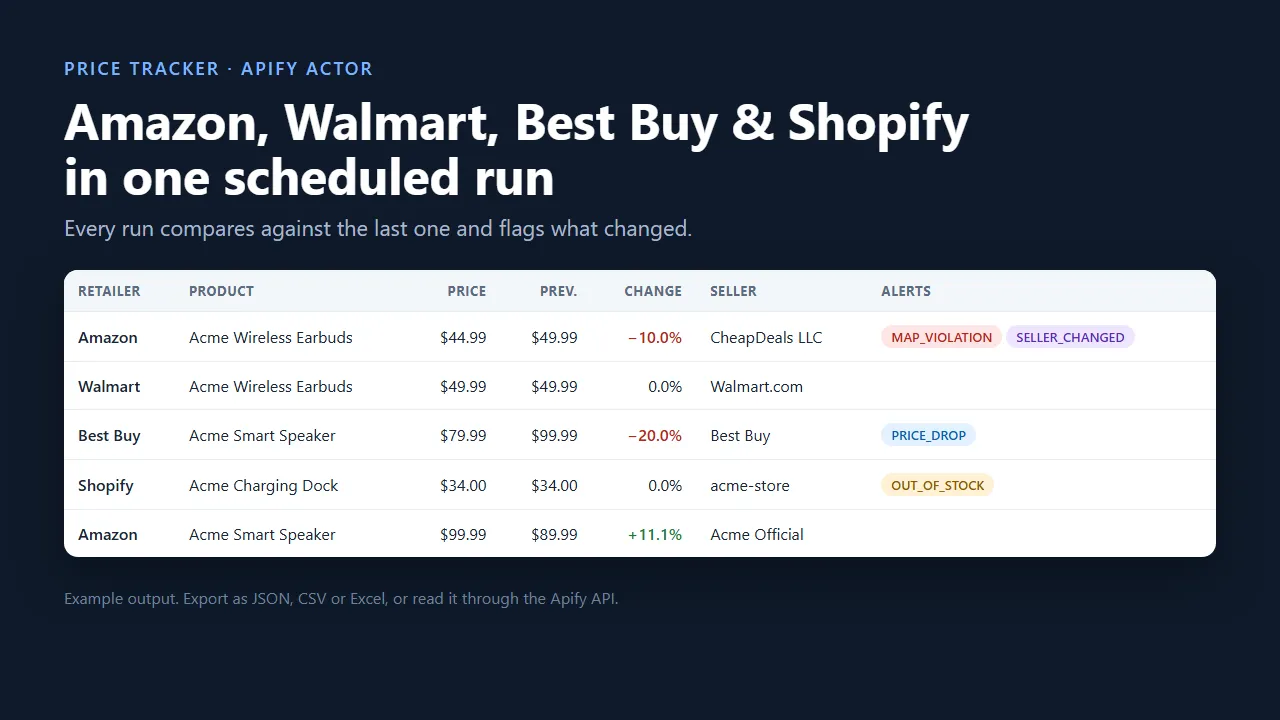
Track product prices, stock and sellers across Amazon, Walmart, Best Buy and any Shopify store in one run, for $3 per 1,000 tracked products plus Apify platform usage (about $10 per 1,000 all-in). Schedule it, and every run tells you what changed since the last one: price drops, MAP violations, stock-outs, restocks and Buy Box seller changes, delivered to your webhook (Slack, Zapier, Make or your own backend).
Built for brands enforcing MAP, e-commerce agencies reporting to clients, and resellers and analysts who need clean price data without paying for a SaaS seat.
Why use it
- One actor, four retailers. Paste product URLs; the retailer is detected automatically. No separate scraper per site.
- $3 per 1,000 products, only for successes. Failed products are reported in the dataset and never charged.
- Price history built in. Each scheduled run compares against the previous one: previous price, change %, lowest and highest price seen.
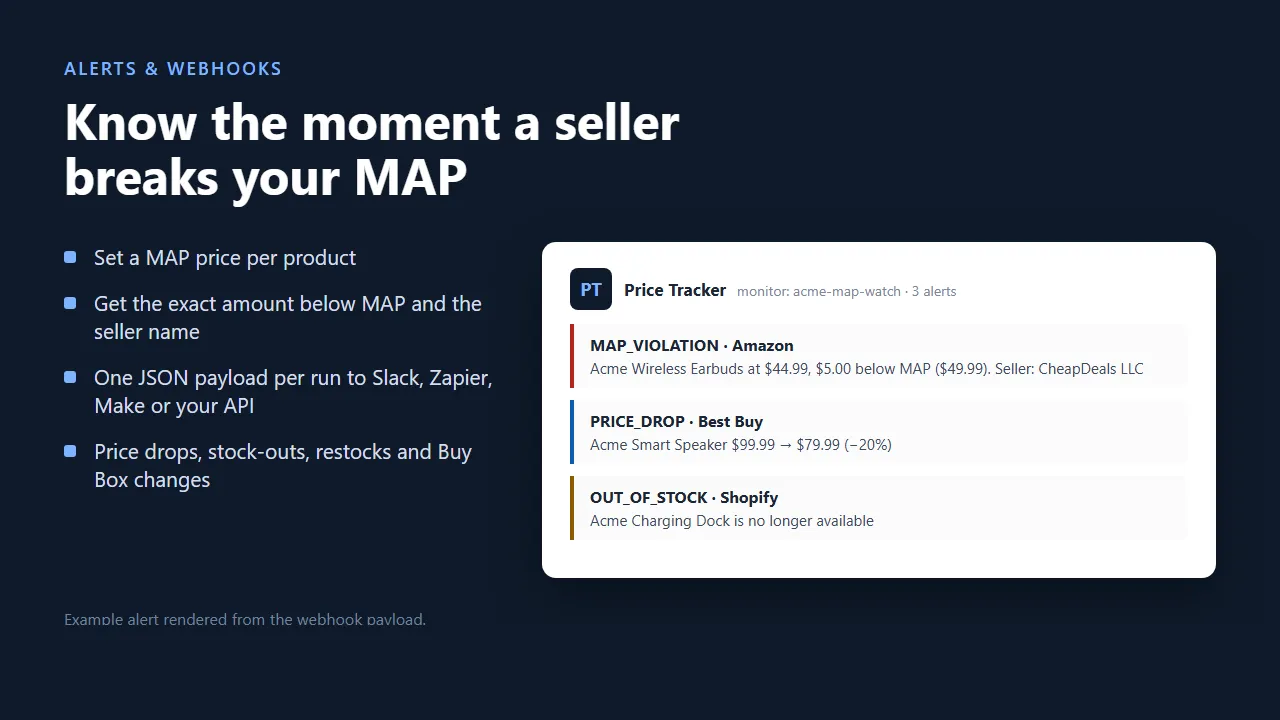
- MAP enforcement. Add a MAP price per product and get a
MAP_VIOLATIONalert with the exact amount below MAP. - Alerts that matter:
PRICE_DROP,MAP_VIOLATION,OUT_OF_STOCK,BACK_IN_STOCK,SELLER_CHANGED(for example, the Amazon Buy Box seller switched). - Webhooks. All alerts from a run are POSTed as one JSON payload, so you only hear about what moved.
- Pay only for change, if you want. Turn on Only output changed products and unchanged products are neither output nor charged.
What it costs
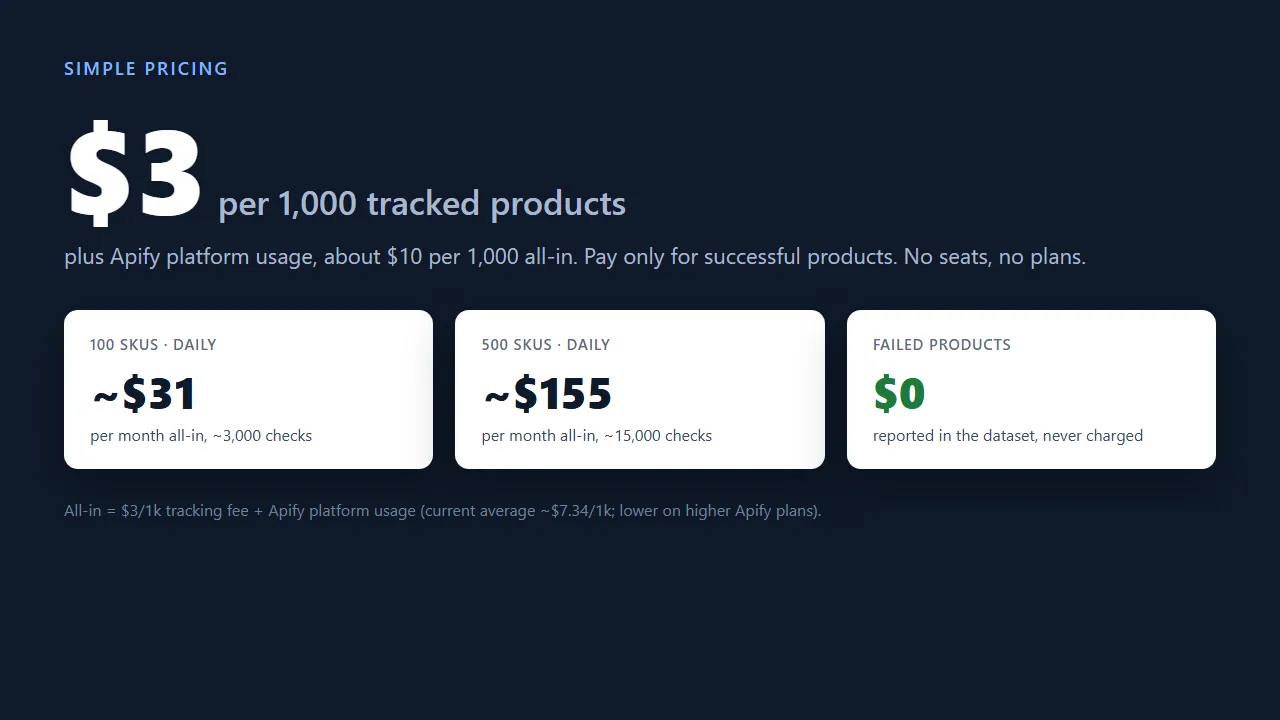
| Watchlist | Checks per month | Tracking fee ($3/1k) | All-in, incl. platform usage (~$10.34/1k) |
|---|---|---|---|
| 100 SKUs, once a day | ~3,000 | ~$9 | ~$31 |
| 500 SKUs, once a day | ~15,000 | ~$45 | ~$155 |
| 500 SKUs, 4 times a day | ~60,000 | ~$180 | ~$620 |
You pay two things: the $3 / 1,000 tracking fee, and Apify platform usage (compute and residential proxy traffic) for your runs. Platform usage currently averages about $7.34 per 1,000 products (Apify's figure for this actor), is cheaper on higher Apify plans, and is lower for Shopify-heavy watchlists. Only output changed products lowers the tracking fee but not platform usage. The free Apify plan's monthly credit is enough to try it on a real watchlist.
Use cases
- MAP monitoring for brands. Put every authorized and unauthorized listing of your SKUs in one watchlist, set
mapPrice, and get a daily list of violations with the seller name. - Agency client reporting. One Monitor ID per client; export the dataset to Google Sheets, Looker Studio or your BI tool on a schedule.
- Competitor price watch. Track competing products across Amazon, Walmart, Best Buy and competitors' Shopify stores; get a
PRICE_DROPalert when they discount. - Stock and Buy Box watch. Know when a product goes out of stock or the Buy Box moves to another seller.
- Deal and arbitrage alerts. Low
priceDropThresholdPercentplus a webhook to Slack or Discord.
How to use it
- Add product URLs (or the advanced
productslist withmapPrice,sku,label). - Set a Monitor ID for this watchlist (for example
brand-x-retailers). - Create a Schedule in Apify Console (for example every 6 hours) with this input. Each run alerts on what changed since the last one.
Input example
Output example
The run's OUTPUT record in the key-value store contains a summary (success rate and all alerts). The webhook receives the same summary.
Supported URLs
| Retailer | URL format |
|---|---|
| Amazon (.com, .ca, .co.uk, .de, .fr, .it, .es, .co.jp, .in, .com.au, .com.mx) | any URL containing /dp/<ASIN> or /gp/product/<ASIN> |
| Walmart | walmart.com/ip/.../<itemId> |
| Best Buy | bestbuy.com/site/...<sku>.p?skuId=<sku> |
| Shopify (any store) | any URL containing /products/<handle>; add ?variant=<id> to track one variant |
Reliability
The actor handles retailer anti-bot protection and retries difficult products automatically, so there is nothing to configure. Shopify products are read from the store's product data, so they are fast and unaffected by theme changes. Use US residential proxies for Amazon, Walmart and Best Buy (the default).
Pricing
Pay-per-event. You only pay for products that were tracked successfully:
| Event | Price | When |
|---|---|---|
Tracked product (price-result) | $3.00 / 1,000 | Each product successfully scraped and output |
Protected page add-on (browser-render) | $5.00 / 1,000 | Only for products on heavily protected pages that needed extra processing |
Webhook alert delivery (webhook-delivery) | $0.01 / run | Only when alerts were found and successfully POSTed to your webhook |
Failed products are never charged. Most products, including all Shopify products, never need the add-on, and you can turn off Handle protected pages to never pay it. Platform usage (compute and proxy traffic) is billed at standard Apify rates. Set a maximum charge per run in Apify Console and the actor stops cleanly when it is reached.
Integrations
- Webhook: set
webhookUrlto a Slack incoming webhook, Zapier/Make catch hook or your own endpoint. - API: start runs and read results with the Apify API or the Python/JavaScript clients.
- Exports: download the dataset as JSON, CSV or Excel, or send it to Google Sheets with Apify integrations.
Guide: MAP monitoring with Slack alerts in 15 minutes
- Build the watchlist. Use the
productslist so every result maps back to your SKU and MAP price. Use onemonitorIdper brand or client. - Run it once. The first run records baseline prices and raises only
MAP_VIOLATIONalerts. Check the Prices view:okrows have price, stock and seller;failedrows have anerrorand cost nothing. - Schedule it. Console → Schedules → Create → this actor with your saved input → cron
0 */6 * * *(every 6 hours). From the second run on you also getPRICE_DROP,OUT_OF_STOCK,BACK_IN_STOCKandSELLER_CHANGED. - Send alerts to Slack. Slack incoming webhooks expect a
textfield, so put Zapier or Make in the middle (Catch Hook → Formatter → Slack), or pointwebhookUrlat your own endpoint. Each alert carriestype,retailer,sku,title,url,seller, and for MAP alertsprice,mapPriceandbelowMapBy. - Get the data out. Actor → Integrations → Google Sheets, or the Apify API:
- Keep costs predictable. Set Max total charge per run in the run options, use Only output changed products for stable catalogs, and turn off Handle protected pages if you never want the add-on.
| Symptom | Fix |
|---|---|
Many failed rows on Amazon, Walmart or Best Buy | Keep the default US residential proxy and Handle protected pages on. |
No PRICE_DROP alerts | Alerts need history: scheduled runs must use the same monitorId. |
| Shopify price in the wrong currency | Set Shopify currency; Shopify's product data doesn't include it. |
| Wrong Shopify variant | Add ?variant=<id> to the URL. |
Changelog
October 16, 2026
- Tracked product price lowered to $3 per 1,000 (was $5). Platform usage is billed as before; failed products are still free.
- Webhook and
OUTPUTalerts now include the seller name, so aMAP_VIOLATIONshows who broke MAP. - Fixed the Protected page add-on charge, and rewrote this page with cost examples, use cases and the setup guide above.
Next up, tell us what matters most in the Issues tab: keyword discovery, more retailers (Target, Home Depot, eBay), formatted Slack messages without Zapier.
FAQ
Is this legal? The actor collects publicly available product data (prices, availability) and no personal data. Check the terms of the sites you monitor and your local laws.
Why did a product fail? It appears in the dataset with status: "failed" and an error. You are not charged for it. Common causes: the product was delisted, or the retailer temporarily blocked access. Blocked products are retried automatically on the next scheduled run.
Can I track thousands of SKUs? Yes. Large watchlists are supported; 4 GB of memory is recommended.
Can I find products by keyword? Not yet. The actor tracks product URLs you provide. Tell us in the Issues tab if keyword discovery would help you.
Something broke or a retailer changed its page? Open an issue in the Issues tab with the product URL. Fixes for supported retailers are a priority.


