

X / Twitter Lists Scraper — Members & Subscribers
Pricing
from $0.20 / 1,000 list data results
X / Twitter Lists Scraper — Members & Subscribers
Discover public X / Twitter Lists an account owns, follows, or belongs to. Export List details, owners, members, and subscribers from usernames, user IDs, List IDs, or URLs. Build audience and lead datasets with automatic pagination—no X login, cookies, or API key required.
Pricing
from $0.20 / 1,000 list data results
Rating
0.0
(0)
Developer

Arjun Data
Maintained by CommunityActor stats
0
Bookmarked
5
Total users
5
Monthly active users
a month ago
Last modified
Categories
Share
Collect public X / Twitter List data without supplying a login, cookies, API key, or proxy. Discover the Lists an account owns, follows, or belongs to, then export detailed List members and subscribers to JSON, CSV, Excel, or an API-ready Dataset.
Use one Actor to:
- Collect owned Lists, followed Lists, List memberships, members, and subscribers.
- Start from usernames, profile URLs, user IDs, List IDs, or full List URLs.
- Follow pagination automatically and control the result limit for every account or List.
- Keep valid targets running when another input is invalid, unavailable, or returns no public results.
Use the results for audience research, influencer discovery, community mapping, recruiting, competitive intelligence, and targeted lead generation.
What can this X / Twitter Lists scraper collect?
| Operation | Input | Result |
|---|---|---|
| Lists owned or followed by accounts | Username, profile URL, or user ID | Public Lists the account created or follows |
| Lists containing accounts | Username, profile URL, or user ID | Public Lists that include the account as a member |
| Members of Lists | List ID or x.com/i/lists/... URL | Visible public profiles that are members of the List |
| Subscribers of Lists | List ID or x.com/i/lists/... URL | Visible public profiles that follow the List |
How to use
- Choose the data you want: account Lists, List memberships, List members, or List subscribers.
- Enter up to 50 unique usernames, user IDs, List IDs, or List URLs for the selected operation.
- Set a result limit, or enter
0to continue through every result X makes visible. - Start the Actor and open the Dataset to review or export the results.
The Console opens with a quick-test input: Lists owned or followed by accounts, https://x.com/TheZvi, and a limit of 3 Lists per relationship.
Start with a ready-made workflow
- Discover X Lists an account owns or follows
- Export members of an X List
- Export subscribers of an X List
Each example opens with a tested input and a Dataset view tailored to that result type.
Input
Use screenNames or userIds for account-based operations. Use listIds only when collecting members or subscribers from specific Lists.
| Parameter | Type | Used by | Default | Description |
|---|---|---|---|---|
operation | string | All operations | account_lists | Select Account Lists, List memberships, List members, or List subscribers. |
screenNames | string array | Account Lists, List memberships | — | Usernames, @handles, or X / Twitter profile URLs. Numeric-only values are automatically treated as user IDs. |
userIds | string array | Account Lists, List memberships | [] | Numeric X / Twitter user IDs. Combined with screenNames, up to 50 unique account inputs are accepted. |
listIds | string array | List members, List subscribers | [] | Numeric List IDs or full List URLs. Up to 50 unique Lists are accepted. |
accountListType | string | Account Lists | all | Collect owned Lists, followed Lists, or both. |
maxListsPerAccount | integer | Account Lists, List memberships | 100 | Maximum Lists per account and relationship. Use 0 for every visible result. |
maxUsersPerList | integer | List members, List subscribers | 100 | Maximum users per List. Use 0 for every visible result. |
Inputs are normalized and deduplicated before requests are made. When accountListType is all, maxListsPerAccount applies separately to owned and followed Lists.
The Console is prefilled with maxListsPerAccount: 3 so a first run stays quick. When the field is omitted from an API input, the schema default is 100.
Example — collect both owned and followed Lists:
Example — find Lists containing an account:
Example — export List subscribers:
Example — export List members:
Pagination and limits
Pagination is automatic and independent for every account, relationship, or List. Up to 50 unique account inputs or 50 unique Lists can be submitted in one run. Result limits apply separately to each account, relationship, or List; enter 0 to continue through every page X makes visible.
When Both owned and followed is selected, maxListsPerAccount applies separately to owned and followed Lists. Protected, private, suspended, deleted, or otherwise restricted resources may return limited data or a status row.
Output
Each successful Dataset row represents one List, one visible member, or one visible subscriber. When an input has no visible result or cannot be requested, the Actor stores a status row instead of inventing data.
Account Lists Dataset
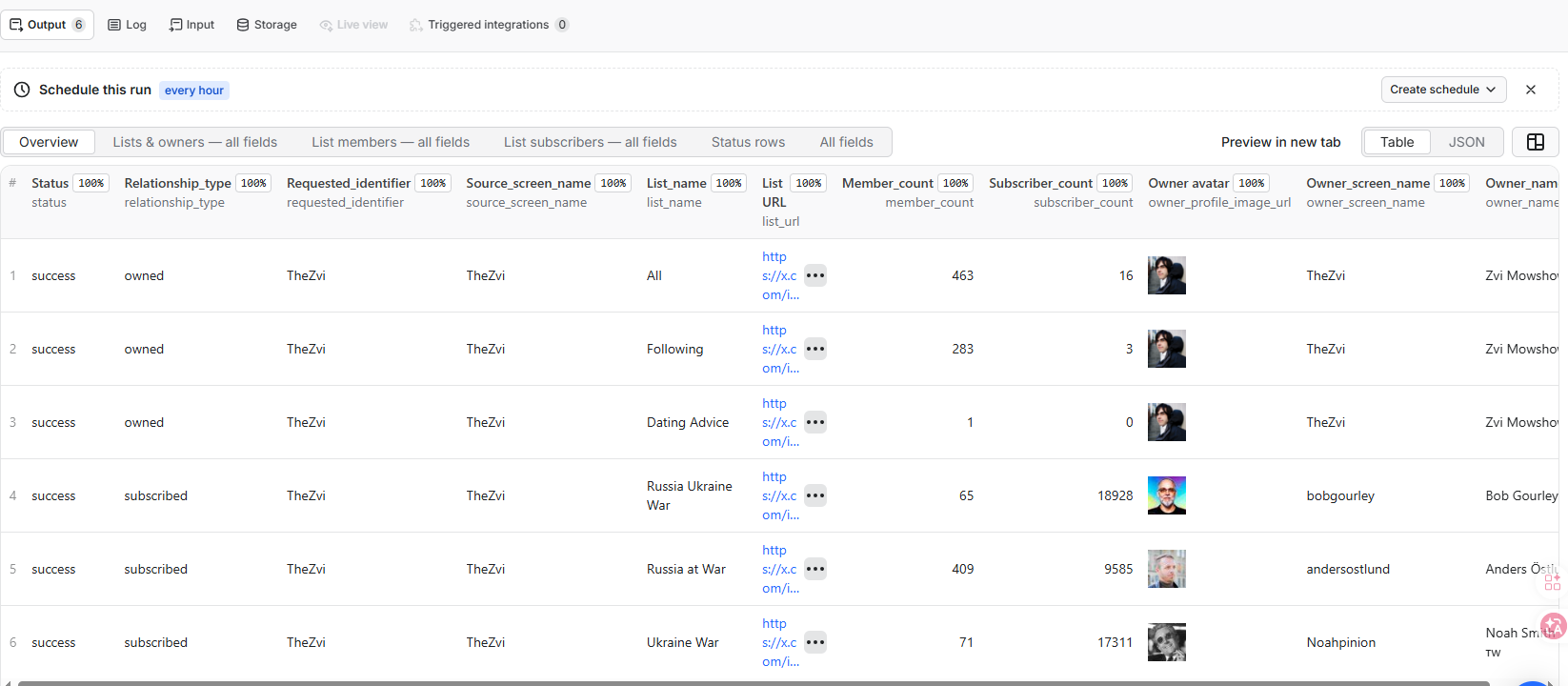
Example Dataset showing Lists owned and followed by an X account, including relationship type, List size, subscriber count, and owner details.
List members Dataset
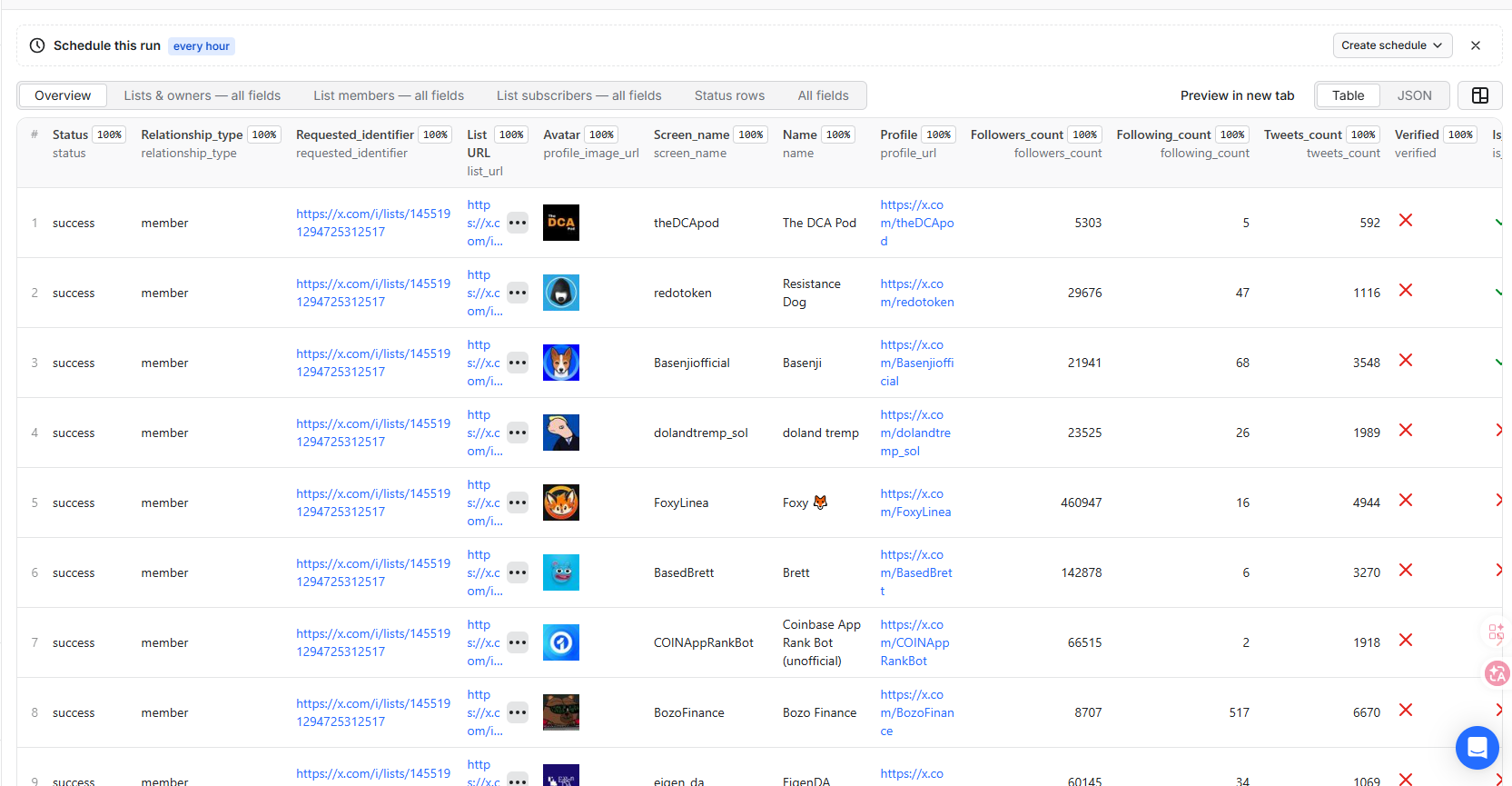
Example List members Dataset with public profile links, follower and following counts, post counts, and verification fields.
Available fields
List results include:
- List ID, name, URL, description, visibility, and creation time.
- Member and subscriber counts.
- Relationship to the requested account:
owned,subscribed, ormember_of. - List owner identity, profile, bio, counts, verification, and avatar.
Member results include:
- User ID, username, name, profile URL, bio, location, and website.
- Account creation time and profile images.
- Follower, following, post, media, and like counts.
- Blue verification, protection, sensitivity, professional, and affiliation fields when X returns them.
Subscriber results include:
- User ID, username, name, profile URL, bio, location, and website.
- Account creation time, profile images, pinned posts, and bio entities.
- Follower, following, post, media, like, and listed counts.
- Additional profile settings such as media tagging, geo, extended profile, custom timelines, and business profile state when X returns them.
Example List result
Example List member result
Example List subscriber result
Examples are shortened for readability. Counts and public profile details can change between runs.
Dataset views and exports
The Dataset provides separate views so unrelated result types do not clutter the table:
- Overview shows the most useful List or profile fields.
- Lists & owners — all fields contains complete List and creator details.
- List members — all fields contains the member profile fields returned by X.
- List subscribers — all fields contains the subscriber profile fields returned by X.
- Status rows contains
invalid_input,no_results,not_found, and request-failure details. Invalid or mismatched inputs are reported here without failing the whole run.
Download the Dataset as JSON, JSONL, CSV, Excel, XML, or RSS, or retrieve it through the Apify API.
How much does it cost to scrape X Lists?
This Actor uses pay-per-event pricing. Each successfully stored List record, List member profile, or List subscriber profile produces one list-data-result event at $0.0002, equivalent to $0.20 per 1,000 results. Platform usage is included in the event price, and diagnostic, no-result, not-found, and request-failure rows are free.
| Successful results | Estimated price |
|---|---|
| 100 | $0.02005 |
| 1,000 | $0.20005 |
| 10,000 | $2.00005 |
Estimates include one $0.00005 Actor Start event at the default 512 MB memory setting. The number of Actor Start events can increase if more than 1 GB of memory is selected.
Use the result-limit inputs and Apify's Maximum cost per run setting to control spending. When that limit is reached, the Actor stops before requesting more pages.
API, scheduling, and integrations
Start a run with a standard HTTP request:
The Actor can also be called with the Apify JavaScript or Python client. Its Output Schema links directly to the run's default Dataset.
- Save an input as an Apify Task for repeatable runs.
- Schedule recurring List or membership collection from Apify Console.
- Trigger downstream workflows with webhooks when a run succeeds or fails.
- Connect results to Make, Zapier, Google Sheets, databases, or your own application through the Dataset API.
FAQ
Do I need an X account, cookies, or an X API key?
No user-supplied X login, cookies, API key, or proxy settings are required.
Can I enter both usernames and user IDs?
Yes. Account operations accept usernames, profile URLs, and numeric user IDs. Equivalent inputs are normalized and queried only once.
Can I scrape every visible result?
Set the relevant maximum to 0. The Actor continues until no next page is available. Only public data that X makes visible can be returned.
What happens when an account or List does not exist?
The Dataset receives a status row such as not_found or no_results, including the requested input and a readable message.
What happens if I use the wrong input type?
The Actor stores a free invalid_input status row with a readable explanation. For example, member and subscriber operations require a List ID or List URL instead of a username. Other valid targets in the same run continue processing.
Why might some Lists, members, or subscribers be missing?
X may hide private Lists, protected profiles, deleted or suspended accounts, and other restricted resources. The Actor can only return public data that X makes visible at the time of the run.
Does the Actor return List posts or tweets?
No. This Actor focuses on List discovery, List metadata, owners, members, and subscribers. It does not collect List timeline posts.
Limitations and responsible use
- Only public Lists and profiles visible through X can be collected.
- X may withhold, restrict, delete, or stop returning some Lists or accounts.
- Profile counts and List membership can change after a run completes.
- This independent Actor is not affiliated with or endorsed by X Corp.
Use public data lawfully and follow applicable privacy, data-protection, and platform requirements.
Related Actors
- X Followers & Following Scraper — At Scale
- X (Twitter) People Search Scraper
- X (Twitter) Similar Accounts Finder
Support
If a public input returns unexpected results, open an issue on the Actor page and include the operation, public username or List URL, and run ID. Do not include cookies, tokens, or private credentials.


