

YouTube Channel Videos, Shorts & Streams Scraper
Pricing
from $0.64 / 1,000 basic content results
YouTube Channel Videos, Shorts & Streams Scraper
Export YouTube channel videos, Shorts and live streams from URLs, IDs or @handles. Choose fast Basic listings or Full metadata with available descriptions and metrics. Use Latest, Popular or Oldest order. Export JSON or CSV. No YouTube API key. Unofficial; not affiliated with YouTube.
Pricing
from $0.64 / 1,000 basic content results
Rating
0.0
(0)
Developer

ArjunAI Data
Maintained by CommunityActor stats
0
Bookmarked
1
Total users
0
Monthly active users
15 days ago
Last modified
Categories
Security
Limited permissionsShare
Export YouTube channel videos, Shorts, and streams
This YouTube channel scraper exports videos, Shorts, and live streams from public YouTube channels to JSON, CSV, or Excel. Build a channel content inventory, monitor recent uploads, or research a creator's back catalog using YouTube's native Latest, Popular, or Oldest order.
Enter a channel URL, ID, @handle, or username. Choose Basic for fast channel listings without opening each item, or Full to request descriptions, exact publication timestamps, available engagement metrics, tags, and chapters. Results are saved as pages and small detail batches finish, so you do not need to wait for the whole channel to be discovered first. Exact dates and other optional fields depend on what YouTube exposes.
No YouTube Data API key is required. This Actor extracts metadata, not video or audio files.
Unofficial Actor. Not affiliated with, endorsed by, or sponsored by YouTube or Google. Public information only; restricted or unavailable content is not guaranteed to be accessible.
Quick start
- Click Try for free or Start and enter a YouTube channel.
- Start with Videos, 3 results, Latest, and Basic. At the current listed prices, three Basic results plus one start cost $0.00245, before any applicable discounts.
- Run the Actor and open Output → Overview.
- Download JSON, CSV, or Excel, or connect the Dataset to your workflow.
- Select Full when you need descriptions, exact dates, and available likes or comment counts.
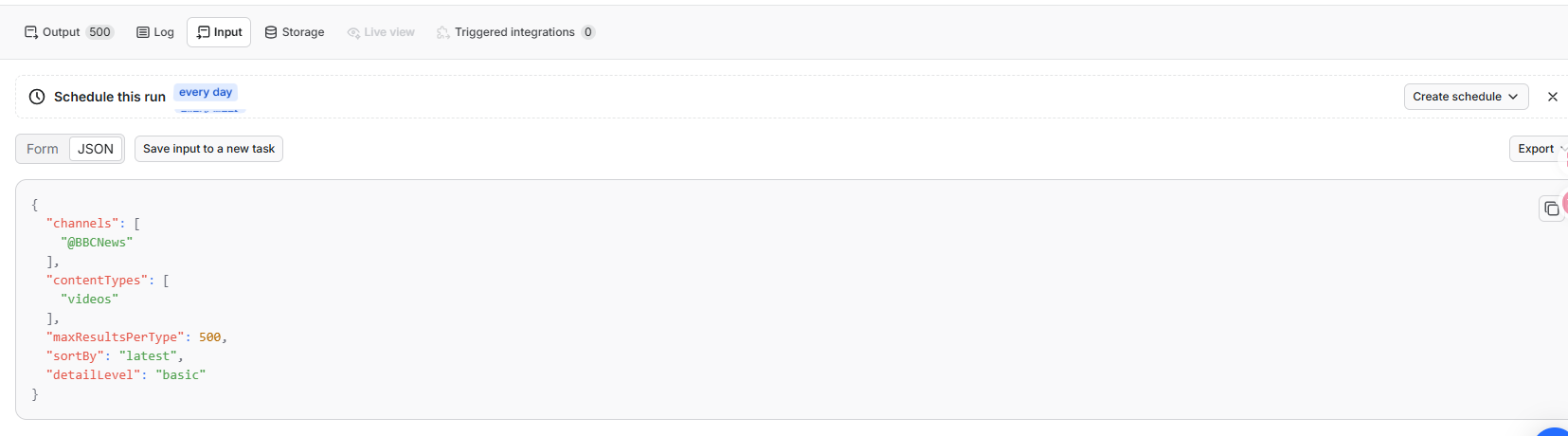
The prefilled first run is:
Ready-to-run examples:
Real 500-video Basic export
This real Apify run requested the latest 500 public videos from @BBCNews in Basic mode and saved 500 video rows to the Dataset.
The Overview table includes thumbnails, titles, channel names, numeric and display-form view counts, duration, estimated publication time, source URL, input channel, ordering, position, and row status.
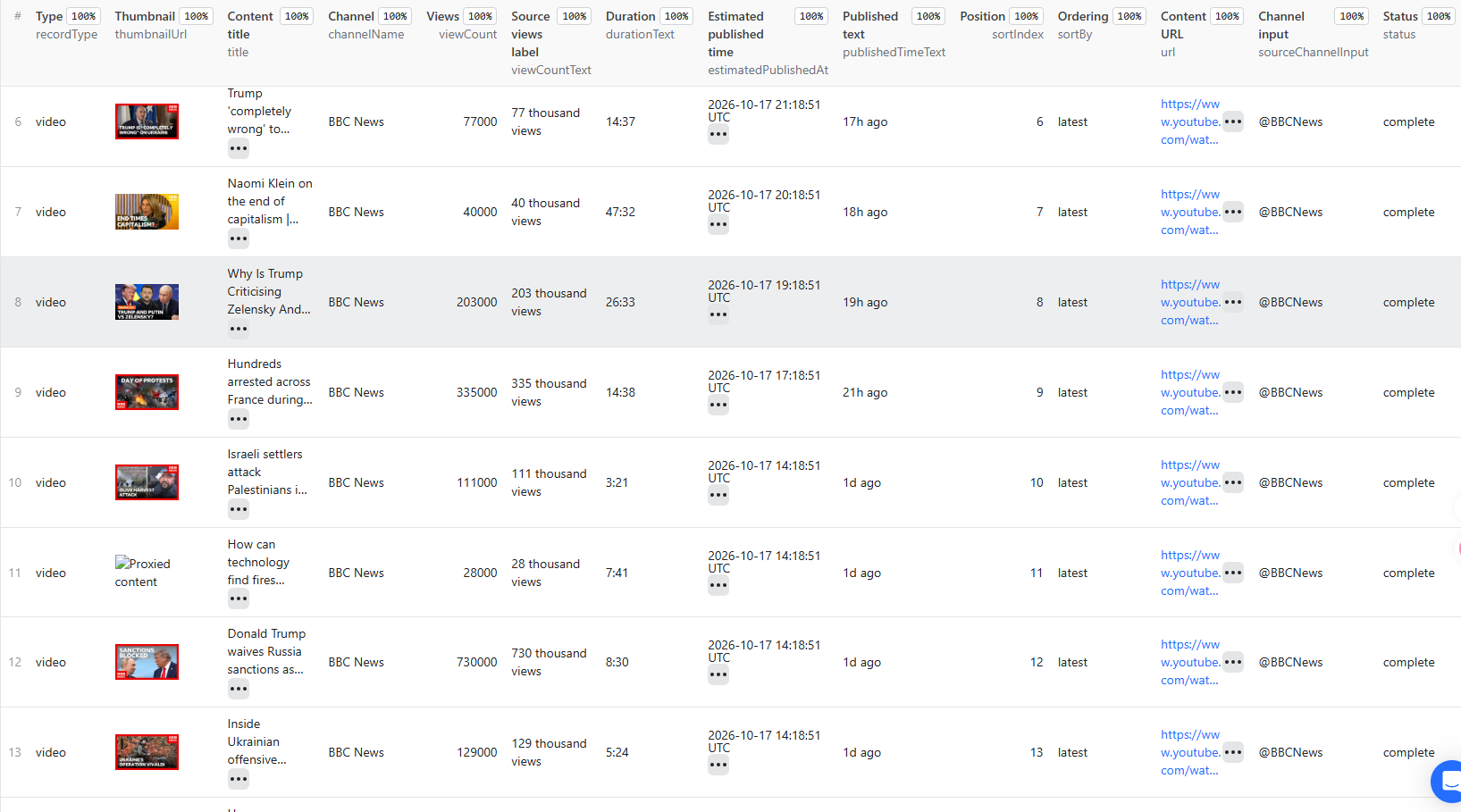
In two Apify cloud checks on October 18, 2026, this same input saved all 500 rows in 9.1–13.6 seconds, with the first Dataset rows appearing after 1.2–1.5 seconds. These are observed Basic-mode runs, not a speed guarantee. Runtime varies with the channel, selected content and ordering, YouTube responses, network conditions, and platform load.
What is this Actor for?
- Bulk channel exports: get content IDs, URLs, titles, covers, visible views, and basic channel information in a Dataset you can download or query by API.
- Upload monitoring: collect recent items for feeds, spreadsheets, and scheduled snapshots.
- Historical research: request Oldest directly, without scanning the entire channel first.
- Popular-content research: use YouTube's server-side Popular order to discover the content it ranks first.
- Creator and content research: use Full when your workflow needs available descriptions, dates, likes, comment counts, tags, or chapters.
This is a known-channel export tool, not a keyword search tool or a full channel-contact lookup. Use the related Actors below for those tasks. Repeated scheduled runs produce snapshots; this Actor does not maintain a cross-run "new items only" history.
Input parameters
| Parameter | Type | Default | Meaning |
|---|---|---|---|
| channels | string[] | NASA channel URL | 1–10 channel URLs, IDs, @handles, or usernames. Different aliases resolving to the same channel are not scraped or billed twice in one run. |
| contentTypes | string[] | ["videos"] | Select any combination of videos, shorts, and streams. Unselected tabs are not crawled. |
| maxResultsPerType | integer | 3 | Maximum per selected type and per channel. 0 means all items exposed by the selected public tabs, subject to your time and spending limits. Positive maximum: 10,000. |
| sortBy | string | latest | latest, popular, or oldest, following the native ordering exposed by YouTube for that tab. |
| detailLevel | string | basic | basic for card metadata; full for detail enrichment of each selected item. |
Accepted channel formats
Video, Shorts, playlist, and search-result URLs are not channel inputs. Invalid individual inputs receive a free status row, while valid inputs in the same run continue.
Content types and limits
- Videos: standard uploads in the channel's Videos tab.
- Shorts: native Shorts in its Shorts tab; classification is not guessed from duration.
- Streams: scheduled streams, broadcasts happening now, and completed streams still available as replays.
For two channels with Videos and Shorts selected and a limit of 50, the run can save up to 200 content results: 2 channels × 2 types × 50.
0 means "all," not "disable." Deselect a type to exclude it. Large channels can require many pages; a run ending because of budget, time, upstream errors, or platform limits is not a guaranteed complete archive of everything ever uploaded.
Ordering
Latest uses YouTube's initial channel-tab order. Popular and Oldest use the sorting command returned by YouTube and follow its continuation pages. The Actor does not fetch the whole channel and sort it locally.
Popular is not promised to be a strict numerical view-count sort. If a tab does not expose the requested ordering, the Actor reports SORT_UNAVAILABLE for that type rather than silently substituting Latest. Other selected types and previously saved pages are preserved.
Basic versus Full
| Data | Basic | Full |
|---|---|---|
| ID, title, URL, thumbnail | From channel cards | Detail metadata when available |
| Channel ID, name, handle, URL, description, avatar, subscriber and content counts, verification | From the channel header | Included without an extra About-page request |
| Views | Visible card count; may be rounded | Prefers the public detail response count |
| Duration and relative date | Only if exposed on the card; commonly absent on Shorts | Detail values when exposed |
| Video description | Not requested | Requested |
| Exact publication timestamp | Not requested | Returned only when an exact source timestamp is exposed |
| Likes and comment count | Not requested | Available public counts; not comment text |
| Tags, categories, chapters, language, caption-language lists | Not requested | When exposed by the detail response |
| Live state and scheduled start | Card information when exposed | Additional stream metadata when exposed |
Basic is intended for fast, bulk channel listings. Full requests additional metadata for each selected item and usually takes longer. Actual runtime depends on the result count and YouTube's response. Optional fields are returned only when exposed by the source; neither mode downloads video, audio, comment text, or transcripts.
Exact and estimated publication time
- publishedTimeText: original card text, such as "1h ago" or "Streamed 2 years ago".
- estimatedPublishedAt: approximate UTC conversion of that relative text, using scrapedAt as the reference. Months and years use approximate lengths.
- publishedAt: exact, timezone-aware source timestamp normalized to UTC, available in Full when exposed.
- uploadDate: source upload date, which can differ from publication or stream start.
- scheduledStartTime: the scheduled time for an upcoming stream.
publishedAt is reserved for exact source timestamps. Basic uses estimatedPublishedAt for relative-date estimates. If Full obtains an exact publishedAt, the redundant estimate is omitted; otherwise, the estimate can remain under estimatedPublishedAt while publishedAt stays null.
More input examples
Export all public videos and Shorts
Enrich the oldest completed streams exposed by a channel
Pricing
Pay per event; platform usage is included:
| Saved result | Price |
|---|---|
| Basic content result | $0.0008 each — $0.80 per 1,000 |
| Full content result with completed detail workflow | $0.003 each — $3.00 per 1,000 |
| Actor start, at supported memory up to 1 GB | $0.00005 |
| Error, empty-tab, duplicate-input, and budget-status rows | Free |
Each content item is charged once, not once for Basic plus once for Full. A Full item whose detail workflow fails is preserved with whatever metadata was already obtained and is charged at the Basic rate only.
Status rows have no result charge. The Actor start fee can still apply when a run returns only statuses and no content.
A completed Full workflow can still contain null or absent optional fields when YouTube does not expose them; it is not a guarantee that every metric exists.
Examples including one start:
- Default first run, 3 Basic results: $0.00245.
- 100 Basic results: $0.08005.
- 3 completed Full results: $0.00905.
- 100 completed Full results: $0.30005.
The Actor checks the remaining budget before requesting another result batch and stops when it cannot cover another item at the selected detail level. It preserves saved results and writes a free MAX_CHARGE_REACHED status. A small remaining balance may be insufficient for another Full result.
The Pricing tab is the source of truth for active pricing and any platform discounts.
Output
Record types
- video — standard channel video.
- short — native channel Short.
- stream — upcoming, active, processing, or completed live broadcast.
- channelContentStatus — an outcome for an input or selected tab, not an extra content result.
No separate channel row is added to the Dataset. Basic channel information accompanies content rows, while the run-level channel summary lives in OUTPUT.resultsByChannel.
Views:
- Overview: content identity, cover, metrics, time, order, and source channel input.
- Full details: descriptions, detailed metrics, language, captions, tags, chapters, and other optional metadata.
- Status & troubleshooting: input, outcome, detail state, error code, and suggestion.
Views change displayed columns, not which record types are stored. When integrating results, select video, short, and stream records for content processing and handle channelContentStatus records separately.
Real output examples
The following shortened records are from real requests on October 18, 2026. Values change over time. These are examples, not promises that every source exposes the same fields.
Basic video
Basic Short
This is the same Short used in the Full example below. Its channel card exposes views but no duration or publication date; Basic does not invent those values.
Full Short
Basic active stream
An active stream's concurrent viewers are not its cumulative views. This card has no final duration or publication timestamp.
Output field reference
| Group | Fields |
|---|---|
| Record and input | recordType, status, sourceChannelInput; status records also use inputValue, inputType, contentType |
| Ordering | sortBy, sortIndex (per channel and type) |
| Detail outcome | detailLevel, detailStatus |
| Identity and cover | videoId, url, title, thumbnailUrl, thumbnailWidth, thumbnailHeight |
| Channel | channelId, channelName, channelHandle, channelUrl, channelDescription, channelAvatarUrl, channelVideoCount, channelSubscriberCount, channelIsVerified |
| Time | durationSeconds, durationText, uploadDate, publishedAt, estimatedPublishedAt, publishedTimeText, releasedAt, releaseDate, releaseYear, modifiedAt, modifiedDate |
| Engagement | viewCount, viewCountText, likeCount, commentCount |
| Streams | liveStatus, isLive, wasLive, scheduledStartTime, concurrentViewCount, waitingCount |
| Availability | availability, ageLimit, playableInEmbed |
| Language and captions | videoLanguage, subtitleLanguages, automaticCaptionLanguages |
| Other public metadata | mediaType, tags, categories, chapters, license, location, creators, artists, track, album, genres |
| Collection and status | scrapedAt, errorCode, errorMessage, suggestion |
Some optional metadata is only present on particular response types or in the yt-dlp fallback; its absence must not be interpreted as zero. The Actor does not fabricate music, release, location, or language values to fill a schema.
Basic view/subscriber counts may be rounded. concurrentViewCount is for viewers watching an active broadcast; waitingCount is for people waiting for an upcoming one. A stream's viewCount is a different total, when exposed.
chapters contains title, startSeconds, and endSeconds. Caption arrays list available tracks, not transcript text. Empty arrays do not prove that no track, tag, or chapter will ever be available.
Visible status rows
Possible outcomes include:
| status | Meaning |
|---|---|
| invalidInput | The individual input is not a supported channel identifier. |
| notFound | YouTube did not resolve the channel. |
| duplicateInput | Another input in this run already resolved to the same channel; no repeated content charge. |
| noResults | The selected public tab has no returned content. |
| requestBlocked | YouTube rejected the request with an automated-traffic check or HTTP block. |
| failed | A request, parser, or native-sort operation failed; see errorCode. |
| chargeLimitReached | The remaining budget cannot cover another selected-level result. |
A content row with status: "partial" and detailStatus: "failed" retains Basic metadata and any detail fields already obtained. Technical error codes and messages are not included in video, Short, or stream rows. Find the affected video ID, URL, and failure reason in OUTPUT → resultsByChannel → detailErrors or the run log. Saved pages are not discarded because a later page or another type fails.
Run summary
The default Key-Value Store record OUTPUT contains returned content counts, completed/failed detail counts, duplicate inputs, budget state, first-result timing, request-attempt totals, and per-channel/tab outcomes. A partial channel is not reported as complete.
A tab's truncated flag means collection ended before its exposed inventory was exhausted—for example, because of your chosen result limit, an error, or a budget stop. It is not by itself an error.
Request and network diagnostics stay in the Key-Value Store and logs, not in normal content rows.
API and automation
The asynchronous endpoint returns a run object. Wait for completion, then read its defaultDatasetId through the Dataset API. Use asynchronous runs for complete channels or larger Full batches. For small synchronous requests, /run-sync-get-dataset-items returns Dataset rows directly, subject to the platform's synchronous request timeout.
You can schedule snapshots, call the Actor from n8n/Make/Zapier, or read the Dataset from Python and JavaScript. Keep API tokens private. The Actor does not need your YouTube login.
FAQ
Why are some Basic Shorts fields missing?
Shorts cards often omit duration and publication date. Full opens the item to request these fields. Missing card data is not filled with an invented duration or date.
Does status: "complete" mean every field is populated?
No. In Basic, it means the selected item's card metadata was saved; detailStatus is notRequested because the item was not opened. In Full, detailStatus: "complete" means the detail workflow finished, not that YouTube exposed every optional field. A missing or null count is not zero, and K/M view counts or channel totals from cards are rounded display values.
Why is commentCount null?
The public response may not expose a count, comments may be unavailable, or the supporting request may have failed. Check detailStatus: failed means the workflow did not complete. A completed workflow with null does not mean zero comments.
Is an active or upcoming stream's duration final?
No. A source may expose zero or a provisional value. Only a completed recording can have a final duration. Waiting users, concurrent viewers, and total views are separate metrics.
Why did only one selected type fail?
Types are handled independently. A missing sort option or a failed tab/page gets a status row while saved content remains available. Retrying the run is a new snapshot; there is no automatic cross-run resume.
Can this guarantee every historical upload and every field?
No. Only publicly exposed content and metadata can be collected. Deleted, private, membership-restricted, geographically restricted, or source-omitted information is not guaranteed. Time and budget limits also bound a run.
Does it scrape comments or transcripts?
No. It returns available counts and caption-language metadata. Use the dedicated Actors below for comment text or transcripts.
Related Actors
| Goal | Actor |
|---|---|
| Keyword discovery | YouTube Search Scraper |
| Full channel profile and public contact fields | YouTube Channel Details Scraper |
| Details for known video/Shorts IDs or URLs | YouTube Video and Shorts Details Scraper |
| Comment text and replies | YouTube Comments Scraper |
| Transcript text, segments, and subtitle files | YouTube Transcript Scraper |
Support and responsible use
Open this Actor's Issues tab and include the run ID, input, selected types, sorting, detail level, and affected row. Do not post API tokens, cookies, credentials, or private information.
Use this tool only for lawful processing of public data. Respect YouTube's terms, applicable laws, and your privacy and retention obligations.


