

Google Trends Scraper API & Breakout Monitor
Pricing
from $4.00 / 1,000 completed keyword groups
Google Trends Scraper API & Breakout Monitor
Google Trends scraper and API for keywords or pasted Trends links: interest over time, regions, related and rising queries, Trending Now topics. Schedule a watchlist to catch new Breakout signals. No Google account or API key needed.
Pricing
from $4.00 / 1,000 completed keyword groups
Rating
0.0
(0)
Developer

Vadim Bezrukov
Maintained by CommunityActor stats
0
Bookmarked
17
Total users
7
Monthly active users
2 days ago
Last modified
Share
Planning an article, comparing product ideas or keeping an eye on a topic? Start with the words your audience searches for. This Actor collects Google Trends interest over time, regional interest, related queries, Breakouts and Trending Now in a Dataset you can inspect and export.
Run a snapshot for today's research, or keep a watchlist to see which signals appear on later checks. Search interest is relative, not a count of searches.
Coming from the official Google Trends Scraper? Paste its JSON input as is: see Switching from the official Google Trends Scraper.
A small first run: one completed keyword group costs $0.004, including platform usage. Trending Now costs $0.002 per completed country feed. Failed and partial checks are not charged. Keyword data uses an Apify proxy; the quick start below includes that setting. You do not need a Google login.
See an example result
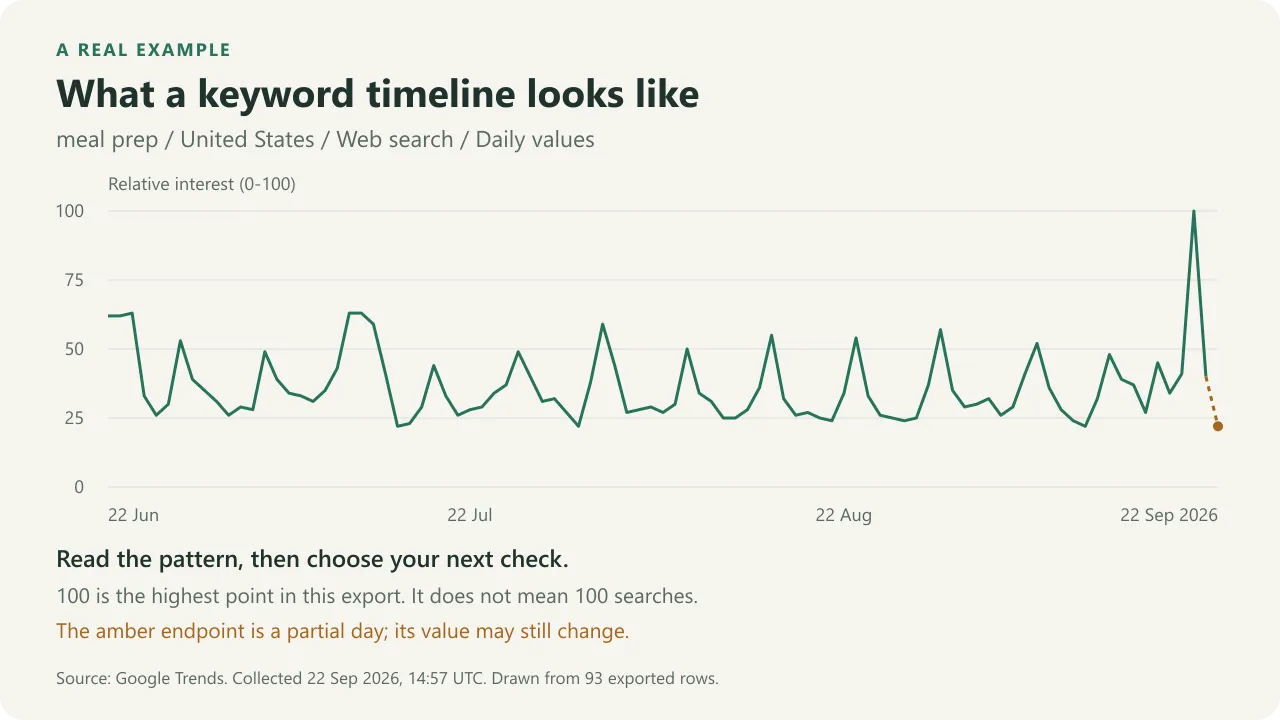
This chart uses 93 daily rows from a real public-keyword demo collected on
22 September 2026 at 14:57 UTC. It shows meal prep, US, Web search, for
22 June to 22 September. The amber endpoint is an incomplete day and may change.
100 marks the highest interest in this export, not 100 searches.
Download the plotted data.
The quick start collects related queries. Add interest_over_time to
dataTypes when you want a timeline like this one. The chart is drawn from
Actor output; it is not an additional dashboard or a screenshot of the Console.
Start in 2 minutes
- Replace
meal prepwith a topic your audience searches for, or paste a Google Trends link you already have open to check that exact view. - Keep Snapshot + All records to get useful rows on the first run.
- Keep the default Apify proxy for keyword data.
- Click Start and open the Related queries dataset view.
The Store form is prefilled with meal prep; replace it with your own keyword.
The equivalent copy-paste input is:
This returns Google's current top, rising, and Breakout related searches. To
turn the same configuration into an alerting workflow, switch to monitor +
changesOnly. The first successful monitor run creates a baseline; later runs
emit newly rising queries, new Breakouts, meaningful growth-band changes, and
new Trending Now topics.
API examples and workflows
Use the Google Trends API recipes to call this Actor from Python or Node.js, or connect a watchlist through n8n or Make. The guide covers input previews, result statuses and spending limits. Start with a preview before running a paid collection.
What's new
- October 2026: search terms from a public Google Sheet (
spreadsheetId), as in the official scraper; a one-row keyword summary per keyword; Google Trends links in Keywords. - For integrations: API and scheduled runs store rows in compact pages:
read them with
unwind=rowsor setdatasetFormat: flat(Output). A check Google refuses is aFAILEDrow in aSUCCEEDEDrun; setfailRunOnRefusal: trueto fail the run instead.
Start with one of three examples
SEO keywords · Shopping demand · Trending Now
For recurring signals, save monitor + changesOnly and keep the same Task and settings:
| Check | Example outcome | What reaches the change feed |
|---|---|---|
| First successful check | Existing rising queries are BASELINE | No new-change alert |
| Same results next time | Successful group status, no new signals | No change row |
| A query newly becomes a Breakout | BREAKOUT_NEW observation | One signal with the original source and scaling context |
| Google fails or answers only partly | FAILED or PARTIAL | Source status; last good state retained |
This is an illustrative state sequence, not a claim that the demo keyword changed. Search interest is normalized: do not calculate percentage growth by comparing independently scaled exports. Google's related-query growth labels and typed change events serve that purpose.
Where to go next
- Google Autocomplete: find phrases from topic prefixes, then compare your selected suggestions together in Trends. Match country and search property; suggestion rank is not search volume.
- Shopify Products, Price & Stock Monitor: check catalogues, prices and availability at store URLs you choose. Search interest does not tell you how much a store sells.
- Website SEO Audit: check the website you publish for noindex, canonical and broken-link issues. It checks technical conditions, not keyword rankings.
- App Store & Google Play Metadata Monitor: put branded interest alongside app releases, prices and aggregate ratings. Supply app URLs or IDs; neither release timing nor search interest proves downloads or causation.
Choose the keywords or URLs for the next tool and pass them in yourself or through your workflow. Each Actor runs separately and has its own pricing.
Pick the result and budget before running
| Existing example | Replace | First useful output | Cost at the current tariff |
|---|---|---|---|
| Country comparison | Keyword and country codes inside queries | Three timelines and related-query lists; compare shapes, not independently scaled scores | Three completed groups: $0.012 per run; $0.36 for 30 daily runs |
| Exact date window | Keyword, country and YYYY-MM-DD YYYY-MM-DD timeframe | A timeline for your campaign or season | One completed group: $0.004; rerun when the research window changes |
| Breakout signals | Keywords, market and your own stable monitorId | First run establishes a baseline; later runs return new signals plus status rows | One completed group: $0.004; $0.12 for 30 daily checks, including quiet days |
These examples include platform usage and assume every scheduled group completes. The saved spending cap is a ceiling, not the expected bill. An empty New signals view on the first monitor run is expected: inspect Group status, then repeat the same configuration. Use the daily digest to get new signals in Google Sheets and one message a day; export the timeline view as CSV for historical or country research.
Daily digest in n8n and Google Sheets
Keep your topics in a Google Sheet and get one message a day with what is new. Download the inactive n8n workflow and the Google Sheets template. Then:
- Import the template into a new Google Sheet (File > Import > Upload,
then Replace spreadsheet). In Topics, put one topic per row: up to 5
keywordsseparated by commas, an optionalgeocountry code and a uniqueexternalId. - Import the workflow JSON into n8n.
- In Configure, paste your spreadsheet ID, the long part of the sheet's
URL. Keep
monitorIdstable: it holds this watchlist's history.maxChargeUsdcaps what one run may cost. - On the five HTTP Request nodes, select an HTTP Header Auth credential with
header
Authorizationand valueBearer YOUR_APIFY_TOKEN. Select your Google Sheets credential on the Sheets nodes and your Slack credential on Send to Slack, or enable Send email instead. - Click Execute workflow. The first run saves a baseline and fills Summary; alerts start with the next run.
- Activate the workflow. It runs daily at 06:17 in your n8n time zone.
Each run starts this Actor in monitor + changesOnly mode, waits for it,
writes four tabs and sends one message:
| Tab | One row per | Updated by |
|---|---|---|
| Summary | keyword and latest data point: direction, change, peak, top rising query and the sentence | summary_id |
| Signals | signal (new rising query, new Breakout, growth level change), with first_seen_at | event_id |
| Errors | topic without full fresh data in a run, with the reason and when it was last verified | run and externalId |
| Runs | run, with its completeness line | run ID |
An example message, with made-up data:
Nothing is written unless every row of the run was read, and a run that did not succeed stops the workflow. Running it again for the same run updates the same rows and sends no second message. Each topic is one keyword group: 20 topics checked daily cost about $2.40 a month. The Code nodes are verified offline against this Actor's output; select and test your own credentials before you rely on it.
Send verified changes to Google Sheets with n8n
Download the inactive n8n workflow and CSV sheet headers. Import the JSON into n8n, then:
- In Configure run, paste a completed run ID from your own Actor run.
- On all three HTTP Request nodes, select an HTTP Header Auth credential with header
Authorizationand valueBearer YOUR_APIFY_TOKEN. Save the real token only in n8n credentials. - In Upsert Google Sheets, select your Google credential and spreadsheet. Create a tab named
Changeswith the downloaded header row. - Execute manually. Change rows and source failure statuses are written separately; successful quiet checks and baselines do not become alerts.
The template reads an existing run; it does not start or schedule Actors. Only SUCCEEDED runs of this Actor are accepted. A run can succeed with a failed input: those rows are retained as row_kind=source_status, including the error in details_json. Reprocessing the same run uses event_key to update its existing rows. Serialize executions targeting the same sheet to avoid concurrent insert races. Values use RAW cell formatting, so source text is not evaluated as a formula.
The consumer stops before writing if the Dataset is empty, incomplete, or larger than 10,000 stored items. Add pagination for larger exports. This bound counts stored items before filtering: status rows, and row_page items of a few dozen rows each. API or Sheets failures stop the workflow and can be retried with the same run ID. Node code and failure/replay cases are verified offline; select and test your own credentials before using it regularly.
Choose a workflow
| Goal | Recommended setup | Result |
|---|---|---|
| Look up one keyword from your app or agent | snapshot + all, one entry in keywords, call the API | A ~5-10 second run with timeline, regions, related queries and one status row |
| Discover rising SEO keywords | snapshot + all, collect related_queries | Top, rising, and Breakout related searches with Google's growth labels |
| Compare one keyword across countries | queries with a geo per group | One run, one group per country, each with its own scaling context |
| Study a season or campaign | timeframe: "2025-11-01 2026-01-31" | Daily or weekly buckets for exactly that window |
| Monitor AI or market breakouts | monitor + changesOnly, keep a stable monitorId | Only newly rising queries, new Breakouts, and meaningful growth-band changes |
| Compare ecommerce demand | snapshot + all, use property: shopping | Jointly normalized timelines, related searches, and regional demand |
| Track Trending Now | collect trending_now and set trendingGeos | Newly appearing topics by country with approximate traffic and related news |
Data returned
| Data type | What you get |
|---|---|
interest_over_time | Relative interest per keyword per time bucket, with is_partial |
related_queries | Top and rising queries, including Breakout entries |
interest_by_region | Relative interest per region, with has_data |
trending_now | Today's trending searches per country, with news headlines |
Every keyword of a checked group can also get one keyword_summary row: see
Keyword summary.
Use the purpose-built dataset views to inspect New signals, Keyword summary, Related queries, Interest over time, Interest by region, Trending now, or Group status without manually selecting fields.
Related topics is deliberately not offered. Google currently answers that endpoint with HTTP 200 and an empty list for every keyword tested, including high-volume ones. Shipping it would report "no related topics" for every keyword on earth, which is exactly the kind of confident-looking false zero this Actor exists to prevent. If Google starts serving it again, it will be added.
What makes this different
Most Google Trends scrapers hand you a fresh full export every run and leave you to diff it. This one is built to be scheduled:
- Bulk keyword groups. Up to 200 comparison groups per run, each with up to
5 keywords, each with your own
externalId. - A one-row summary per keyword. Up, down or stable against a comparable earlier period, the peak and the top rising query, with a sentence a person or an AI agent can read. Built from the data the run already collected.
- Breakout and rising detection. Repeat runs return only the queries that newly joined Google's rising list, became a Breakout, or crossed a growth band.
- Deterministic monitoring state. The diff is always last successful check against this successful check.
- Explicit failure semantics.
NO_RESULTSandSOURCE_FAILEDare different, always. A throttled request can never come back as "interest = 0". A group Google refuses with HTTP 400 for its own geo, timeframe, category or keyword combination is a per-groupREQUEST_REJECTEDrow, not a failed run; only a batch of five or more such groups reads as a source condition. - A refused check is a row, not a broken run. When Google refuses or does
not answer any check in time, the run still ends
SUCCEEDED: every check is aFAILEDstatus row with its reason (THROTTLED,SOURCE_UNAVAILABLEorRUN_DEADLINE), nothing is charged, and the status message says Google gave no data. Always read each group'sstatus. SetfailRunOnRefusaltotrueif your integration retries failed runs. A changed Google response format or an error in the Actor still fails the run. - Budget-aware delivery. The complete export must fit the effective event budget before its group is charged. An insufficient limit never produces a silently truncated export.
Switching from the official Google Trends Scraper
Already calling the official Google Trends Scraper from code, a schedule or n8n? Send the same JSON input here. Its fields are read as they are, so a pipeline switches by changing the Actor ID:
| Official scraper input | Read here as |
|---|---|
searchTerms | one group per term, like keywords |
isMultiple: true | "a, b, c" becomes one comparison chart (up to 5 terms; more are split into charts of 5) |
timeRange, customTimeRange | timeframe; empty means past 12 months, as there |
geo, category | the same; left out means worldwide and all categories, as there; "71" is read as 71 and "" as 0 |
startUrls | Google Trends explore links, like links in Keywords; up to 200, as for searchTerms |
maxItems | checks the first N terms; the rest are INVALID_INPUT rows, not charged |
| more than 200 groups in total | the first 200 are checked, as for this Actor's own input; the rest are INVALID_INPUT rows, not charged |
spreadsheetId | a public Google Sheet (ID or link): terms from the first column, row 1 is the header, as there; a sheet that is not public or not found is one explained INVALID_INPUT row |
viewedFrom, maxConcurrency, maxRequestRetries, pageLoadTimeoutSecs, skipDebugScreen | accepted and ignored: proxy, retries and timing are handled here |
When both a field of this Actor and its counterpart are set (for example
keywords and searchTerms), this Actor's field wins. Anything not honored is
listed in RUN_SUMMARY.inputWarnings and at the end of the status message
(Input notes: ...); it never fails the run.
What differs in the output. The official scraper writes one item per term with nested lists; this Actor writes one row per data point, with a status row per group:
| Official scraper output | Rows here |
|---|---|
searchTerm, inputUrlOrTerm | keyword, keywords, comparison_group, source_url |
interestOverTime_timelineData (time, value, hasData, isPartial) | data_type interest_over_time: timestamp, value, has_data, is_partial |
interestBySubregion (geoName, geoCode, value) | data_type interest_by_region: region, region_code, value |
relatedQueries_top, relatedQueries_rising (query, value, formattedValue) | data_type related_queries: related_query, related_type, related_value, formatted_value (Breakout kept) |
interestOverTime_averages, interestByCity, relatedTopics_* | not provided; Google's related-topics answer was empty for every keyword we tested |
Why runs end on time. When Google refuses a request, this Actor waits within
the run's own time and then ends: a check Google did not answer is a FAILED
row with its reason, never a zero, and is not charged. In snapshot mode it can
deliver your account's last verified result of the same check, marked
CACHED with its age (cachedResultOnRefusal). See
the last verified result.
Input reference
| Field | Default | Notes |
|---|---|---|
keywords | - | Search terms or Google Trends explore links, one per line; each becomes its own group. See Paste a Google Trends link |
queries | - | Up to 200 groups, 1-5 keywords each (5 is Google's limit). A group may override geo, timeframe, category and property |
geo | US | US, DE, US-CA, … Empty string (or worldwide) for worldwide; UK is accepted as an alias of GB |
timeframe | today 3-m | now 1-H, now 4-H, now 1-d, now 7-d, today 1-m, today 3-m, today 12-m, today 5-y, all, or a custom YYYY-MM-DD YYYY-MM-DD window |
category | 0 | Google Trends category ID; 0 is all |
property | web | web, images, news, shopping, youtube |
dataTypes | timeline + related + region | Fewer types means fewer requests and less throttling |
mode | snapshot | monitor remembers the last successful check |
outputMode | all | changesOnly returns only new signals plus status rows |
keywordSummaries | on for Console and AI agent runs, off for API and scheduled runs | One keyword_summary row per checked keyword; not charged |
searchTerms, isMultiple, timeRange, customTimeRange, startUrls, spreadsheetId, maxItems | - | Input of the official Google Trends Scraper, read as is: see Switching |
trendingGeos | run's geo | Countries for trending_now |
monitorId | - | Separates independent watchlist histories |
cachedResultOnRefusal | true | When Google refuses a fresh check, deliver your account's last verified result of that check, marked CACHED and not charged (snapshot mode) |
failRunOnRefusal | false | When Google answers no check, end the run FAILED instead of SUCCEEDED with FAILED status rows |
datasetFormat | empty: compact; flat for Console and AI agent runs | compact stores rows in pages that unwind=rows turns back into flat rows; flat stores one item per row |
Per-group overrides
The run-level geo, timeframe, category and property are defaults. Any
advanced group can override them, which is how one run checks the same keyword
in several countries or windows:
Each group is still scaled independently by Google, so the three rows above are three separate charts, not one ranking of countries. An invalid override rejects only its own row; the rest of the watchlist runs.
Paste a Google Trends link
Already looking at a chart in Google Trends? Copy the address from the browser and paste it into Keywords, one link per line, next to plain keywords if you like:
A link becomes one group with its own terms (up to 5, compared together),
geo, date, cat and gprop. A setting the link leaves out takes the Google
Trends default (worldwide, past 12 months, all categories, Web search), not the
run settings, so the result matches what the link shows. A link that compares
different regions or periods per term, names a topic by its id (/m/...), or
points anywhere other than a Trends explore page becomes one INVALID_INPUT
row with the reason; the rest of the run continues and nothing is charged for
it. Use queries when you also need your own externalId per group.
Modes
snapshot- what Google says right now. Nothing is stored, nothing is diffed.monitor- remembers the last successful check per configuration.
Output modes
changesOnly- new and changed rising/breakout queries, new trending topics, plus a status row per group. This is the alerting shape.all- additionally every timeline point and region score. Timelines are measurements rather than events, sochangesOnlydoes not include them.
Pricing
Completed groups are delivered as they finish, so their dataset rows survive a
later source failure. RUN_SUMMARY is updated after each delivered group;
isFinal: false means the run is still in progress or was interrupted before its
final report. Concurrent groups can appear in completion order; use the group
identity fields when joining output to your input.
The Actor reserves up to 30 seconds before Apify's configured timeout to finish
output and diagnostics. Checks it cannot complete are FAILED with an explicit
RUN_DEADLINE, RUN_ABORTED, BUDGET_LIMITED, or SOURCE_CIRCUIT_OPEN error, never
zero interest.
After three consecutive matching source failures it pauses, admits one recovery
probe, and stops that source path if the probe also fails. Keyword and RSS outage
decisions are independent. These safeguards operate within one run.
The last successfully charged group is delivered in full even when its charge
reaches the spending limit. A stopped run retains its previous monitoring
baseline. When Apify announces that it will move a run to another server, a
snapshot run saves what it has delivered and continues on the new server with
the groups and feeds that are left, without repeating rows or charges. If a run
is restarted or resurrected without that notice, or a monitor run is moved,
existing output is retained and the Actor reports
PREVIOUS_ATTEMPT_INTERRUPTED instead of replaying work that may already have
been charged. Start a new run to check again. A run that had already finished
before Apify moved it to another server, or before it was resurrected, keeps
its result and succeeds. A hard platform
kill can still interrupt an in-flight write; already stored rows and the most
recent progress report remain available.
The live Store Pricing tab is authoritative. From October 20, 2026, 22:18 UTC, a completed keyword group includes its first 250 data rows, and each further row in the same group costs $0.00002. Until then every group includes all its rows. Groups with one or a few data types usually stay under 250 rows and cost the same as before.
| Event | Price | What it covers |
|---|---|---|
| Completed keyword group | $0.004 | One fully answered group and its first 250 data rows (all rows until October 20, 2026) |
| Expanded export row (from October 20, 2026) | $0.00002 | Each further timeline, region or related-query row in that group; 1,000 extra rows cost $0.02 |
| Completed Trending Now feed | $0.002 | One country's trending feed and its topics |
These prices include Apify platform usage, including compute and the default Residential proxy traffic. You do not receive a separate platform-usage charge for a standard pay-per-event run.
You are never charged for retries, PARTIAL groups, throttled requests,
failed groups, or input rows rejected as invalid. A group that Google fully
answered with no data is charged, because checking it was the work.
100 fully completed keyword groups of up to 250 data rows each cost $0.40. A five-keyword comparison with every data type (about 950 rows) costs about $0.018 from October 20, 2026. Joint normalization is unchanged. A quiet monitoring check still incurs the group check price: the source must be checked to know it is quiet.
The Actor checks the whole export budget before charging its group. If it cannot
fit, it emits BUDGET_LIMITED, does not charge that group, writes no
partial export and retains monitoring state. Source work may already have been
performed to determine the row count. The early admission check still avoids
fetching a group when even its base charge cannot fit. A remaining $0.002 can still
pay for a Trending Now feed when it cannot pay for another keyword group.
Schedule alerts
The reason to run this twice: with mode: monitor and
outputMode: changesOnly, a repeat run returns only signals that are new since
the last successful check.
For example, run it daily and send new Breakouts to Slack, Make, Zapier, or your own webhook:
- Actor -> Schedule -> daily. Pick a minute away from the top of the
hour (for example
17 6 * * *): in the owner's own half-hourly checks, 24 of 30 Google refusals hit the runs that started at :00 and only 6 hit :30, so a cron line ending in0competes with everyone else's. - Actor -> Integrations -> Webhook on
ACTOR.RUN.SUCCEEDED. - Filter the dataset for
change_typeinBREAKOUT_NEW,RISING_QUERY_NEW.
Python:
Webhook-friendly output
Filter observation rows by change_type. The most useful alert values are
BREAKOUT_NEW, RISING_QUERY_NEW, RISING_QUERY_CHANGED, and
TRENDING_TOPIC_NEW. Keep the group_status rows in operational workflows so
that a failed check is visible instead of looking like “nothing changed”.
Upsert on event_id. Every signal row (BASELINE, RISING_QUERY_NEW,
RISING_QUERY_CHANGED, BREAKOUT_NEW, TRENDING_TOPIC_NEW) has an
event_id: a stable ID of your monitorId, the query or topic, the change
type and the growth level. It names the signal, not the moment. Reading the
same run again, or a webhook delivered twice, gives the same ID, so key your
table on it and a retry updates the row instead of adding a duplicate. If the
same query later reaches the same level again, it updates that row too; store
event_id with scraped_at if you want every occurrence. Measurements and
rows served from the cache have no event_id.
-
Google Sheets (n8n or Make): Append or update row, matching on the
event_idcolumn. -
SQL:
INSERT INTO trends_signals (event_id, scraped_at, change_type, related_query, external_id)VALUES ($1, $2, $3, $4, $5)ON CONFLICT (event_id) DO UPDATE SET scraped_at = EXCLUDED.scraped_at; -
Python or Node.js: a dictionary or
Mapkeyed byevent_id:signals = {row["event_id"]: row for row in rows if row.get("event_id")}const signals = new Map(rows.filter((r) => r.event_id).map((r) => [r.event_id, r]));
Use with AI agents through Apify MCP
Expose this Actor as a typed tool in any MCP-compatible client:
Example prompt:
For a scheduled agent, use mode: monitor, outputMode: changesOnly, and a
stable monitorId. Runs started through Apify MCP or Apify AI store one
Dataset item per row unless the input sets datasetFormat, so the MCP
dataset tool pages through rows. Values from different comparison groups,
locations, properties, or timeframes are not directly comparable.
Each keyword's keyword_summary row (on by default for runs started by AI
agents) has an explanation sentence an agent can quote as is; the
observations after it are the data it was built from.
One important rule about Google Trends numbers
Google Trends values are relative, not absolute search volume. A value of 100 means "the highest point on this chart", and the chart is renormalized for every request.
A score of 70 in one group is not comparable to a score of 70 in another.
This is the most common way Trends data gets misreported. Every row therefore
carries a source_scaling_context that identifies the measurement settings:
Matching source_scaling_context.id values are necessary, but do not prove
comparability between separate requests. The id changes when keywords,
location, timeframe, category, property or bucket size changes. A relative
timeframe such as today 3-m keeps the same id while its calendar window moves.
Google can also sample and scale separate requests independently. Treat each
request as its own snapshot; do not join the scores into one continuous scale.
What follows from that, and what this Actor therefore refuses to do:
| Compare keywords inside one group | Valid - Google normalizes them jointly. That is what a comparison group is for. |
| Compare values across groups | Not valid. Different scaling basis. |
| Compare US against DE, or 7d against 12m | Not valid. Different scaling basis. |
| Claim absolute search volume | Never. Google does not publish it. |
| Report "interest up 34% since last week" | Not emitted. Two independently normalized 0-100 series cannot be subtracted. |
Partial periods
The newest bucket in any timeline is usually still accumulating, and Google
flags it isPartial. It looks exactly like a collapse in interest, and it is
the classic source of fake "traffic is crashing" alerts. Rows carry
is_partial: true, and partial buckets are excluded from every signal this
Actor emits.
Missing data is not zero
Where Google has too little data it returns a 0 alongside hasData: false.
Those rows are published as value: null with has_data: false, never as 0.
Monitoring semantics
The first successful check of a configuration is a BASELINE - it records
what is already there without alerting on the whole backlog. From then on:
change_type | Meaning |
|---|---|
BASELINE | First successful check of this configuration |
RISING_QUERY_NEW | A query joined Google's rising list |
BREAKOUT_NEW | A query became a Breakout (rising past Google's reportable ceiling) |
RISING_QUERY_CHANGED | A rising query's growth crossed a band |
TRENDING_TOPIC_NEW | A new topic in the Trending Now feed |
UNCHANGED | Already reported; suppressed in changesOnly |
OBSERVATION | A timeline point or region score - a measurement, not an event |
Growth bands. Google's rising percentages jitter run to run, so a change is
reported only when growth crosses a band: <100%, 100-249%, 250-499%,
500-999%, 1000%+, breakout. Without this, every run would alert that
+240% became +250%.
There is no "breakout ended" event. Related queries are a top-N ranked list, not an inventory. A query dropping off it means something else outranked it - Google never says the rise ended. Reporting that as an event would be inventing information, so this Actor does not.
Monitor identity includes the full normalized configuration: keywords,
location, timeframe, category, property and data type. chatgpt in US over
today 3-m and chatgpt in DE over today 12-m are separate monitors and
never share state.
State is only advanced by runs that can stand behind it. A run that was
throttled, whose payloads stopped parsing, or that was cut short by a charging
limit leaves the previous state untouched. A verified NOT_FOUND answer is
valid state, never a source failure. Overwriting state after a failed check
would record signals as delivered that you never received, and silence them
forever.
Output
One flat row shape, discriminated by record_type and data_type, so the whole
run reads as one table. For CSV of API and scheduled runs, see the note below.
How rows are stored. By default (datasetFormat: compact; runs started
in Console or by AI agents through Apify MCP use flat) each keyword group
is one group_status item, one keyword_summary item per keyword when
summaries are on, and row_page items of a few dozen rows each, every row unchanged in
the page's rows field. A page is sized so that a
CSV export keeps every column. Apify charges storage per item, so this keeps a
large export cheap to run. You always get the flat rows
shown below:
- the Output tab and its views show flat rows;
- Console's Export button saves stored items as they are. Runs started
in Console store one item per row, so their export is flat; for an API or
scheduled run, use the
unwind=rowslink below instead; - the API returns them with
unwind=rows, for examplehttps://api.apify.com/v2/datasets/<DATASET_ID>/items?unwind=rows&format=jsonfor every row of the run in one response; - the same link with
format=csvgives one CSV of the whole run. Larger runs stored by 1.10.13 and 1.10.14 (10-11 October 2026) can miss nested columns such assource_scaling_context/...in CSV; use their JSON export instead; limitandoffsetcount stored items, not rows. Do not page withunwind=rows: clients that advance the offset by the rows they received skip items. Read the whole run in one request withunwind=rows, or page through raw items and read eachrow_page'srowsyourself;datasetFormat: flatstores one item per row, as before October 2026, for integrations that read raw items and cannot passunwind=rows.
A breakout signal:
Every requested group also gets exactly one group_status row, including the
ones that failed - 200 groups in always means 200 status rows out:
data_freshness says where a group's data comes from: FRESH (this run; for
PARTIAL, the data types that answered), CACHED (your account's earlier
verified result, see below) or NONE (no current data in this run).
last_verified_at is when that data was last verified: this run, the cached
check, or for NONE the last successful check this monitor stored (null in
snapshot mode or before a first successful check).
Keyword summary
Every keyword of a checked group (SUCCESS, PARTIAL or NOT_FOUND) gets one
keyword_summary row, right after the group's status row. It is built from the
data the run already collected: no extra requests to Google, not charged, and
it does not count toward a group's 250 included rows. Runs started in Console
or by AI agents (Apify MCP, Apify AI) get summaries unless keywordSummaries
is false; API and scheduled runs get them only with
keywordSummaries: truetoday 12-m):
- Direction compares the average of the latest complete periods of the
same chart with the same number of periods just before them: 7 days, 4
weeks or 3 months, by the chart's step (hourly charts use half the series,
up to 24 points). The last, still incomplete period is never used. A change
under 15%, or under 3 points, is
STABLE. - When there is no direction,
summary_statussays why:INSUFFICIENT_DATA(chart too short, too few points or too little interest; the reason is insummary_details.codes),NOT_REQUESTED(nointerest_over_timeindataTypes),NO_DATAorSOURCE_FAILED. The top rising query is still filled when related queries were collected. - New Breakouts of a monitor run are named in the explanation and in
summary_details.new_breakouts. summary_idstays the same for the same keyword, settings and latest data point, so it works as the key of a summary table.- The Keyword summary view shows the summary columns for every row of the
run. To get only summaries through the API, keep rows whose
record_typeiskeyword_summary.
Statuses
status | Meaning |
|---|---|
SUCCESS | Google answered with data |
NOT_FOUND | Google answered and genuinely had nothing. A real, verified absence |
PARTIAL | Some requested data types succeeded, others did not |
FAILED | We could not find out. Never means zero interest |
CACHED | Google did not answer a fresh check; your account's verified result of the same check from an earlier run was delivered instead (see below). Not charged |
Output contract
What an integration can rely on, and how it changes:
- Record types. Filter rows by
record_type.group_statusis one row per requested keyword group or Trending Now feed, always, including failed ones.observationis a timeline point, region score, related query or trending topic;data_typesays which.keyword_summaryis one row per keyword of a checked group whenkeywordSummariesis on. In compact storage a stored item can also be arow_page, which only wraps rows. New record types may be added, so do not treat every row other thangroup_statusas a signal. - Fields on every row:
record_type,source,source_id,scraped_at,schema_version,fingerprintandstatus. Missing data isnull, never0. - Identity.
source_idnames one entity within its measurement settings and stays the same across runs.fingerprintchanges when the measured content changes.external_idis your own label from the input. Join rows to your input byexternal_idand to earlier runs bysource_id.event_idnames one signal andsummary_idone keyword summary: use them as upsert keys. - Order. Groups arrive in completion order, not input order. Within a group, its status row comes first, then its keyword summaries, then its observations.
- Paging.
limitandoffsetcount stored items, not rows; see above. - Changes are additive. Fields, record types and enumeration values are
only added. A published field is never renamed, removed or given a new
meaning. A change to how rows are stored ships with a way back (such as
datasetFormat: flat), the previous build under theoldbuild tag for at least 30 days, a CHANGELOG entry marked "Action needed" and a message to users.
When Google refuses: the last verified result
Google Trends sometimes refuses requests for a few minutes at a time, for
every connection at once. A run with a short timeout cannot wait that out. In
snapshot mode the Actor then delivers your account's last verified result of
the same check (same keywords, country, timeframe, category, property and data
types), instead of failing the run:
- every delivered row keeps its original
scraped_atand carriesfreshness: "CACHED"andcache_age_seconds; - the group's status row says
CACHED, withcached_scraped_atand anerrorof codeSERVED_FROM_CACHEthat names why the fresh check failed; - the group is not charged, and the run ends with
terminalReasonCACHED_RESULT; - results up to 24 hours old are used (1 hour for
now 1-d, 6 hours fornow 7-d, never fornow 1-Hornow 4-H); - a changed Google response format, a rejected request or your spending limit is never answered from the cache.
Verified results are kept in the named key-value store
google-trends-monitor-cache in your Apify account, one record per check that
the next verified run of the same check replaces. Each record is a few
kilobytes, you can delete the store at any time, and the Actor starts a new
one on its next run. Set
cachedResultOnRefusal to false if you only want fresh data and prefer a
FAILED status row when Google refuses. monitor mode never uses the cache, so a
cached result cannot create a false change.
Run metrics land in the key-value store under RUN_SUMMARY: group counts by
status, requests, retries, 429s, session bootstraps, proxy bytes, rows by type,
new breakouts, source health, and whether state was saved.
completeness says how complete the run is: fresh, cached, partial, failed,
not checked and invalid groups, the oldest cache age, and up to 50 groups
without fresh data (by externalId, else the keywords). Its text ends the
run's status message, after the first sentence that has not changed since
1.10.15, for example
17/20 groups completed; 0 new breakouts, 3 new rising queries, 0 trending topics. 17 of 20 groups have fresh data; 2 from cache (oldest 5 h); 1 not checked (BUDGET_LIMITED).inputWarnings lists the fields of the official Google Trends Scraper input
that the run could not honor and what happened to them; it is empty for
inputs of this Actor. When it is not empty, the status message ends with
Input notes: and the same notes.
dataTypeOutcomes counts completion separately for each requested keyword data
type. operational provides a common health status, while stage, terminalReason,
build/run IDs and endpointCounters explain where a handled failure occurred.
The summary is saved before the Actor closes on input, proxy or source failures.
After HTTP 429, or an HTTP 200 HTML interstitial such as Google's Sorry page,
workers share a cooldown and subsequent requests run one at a time on a new
exit IP. Once one widget of a comparison has spent its recovery window,
each remaining sibling widget (for example the related queries of the other
keywords) gets a single attempt instead of another window; later data types
still run on the rotated session. CAPTCHA is not solved. After 20
consecutive valid payloads, concurrency increases by one, up to the original
three workers. Another failure resets that recovery streak.
Retry-After is respected for 429 and 503 responses when it fits the remaining
request and run time, reserving up to 10 seconds for a response. The related
queries widget, which Google refuses more often than the timeline and region
widgets, gets two extra exit-IP rotations within the same deadline and budget. A longer pause
fails the check explicitly without retrying early. Each logical request,
including bootstrap, retries and waiting, has a 90-second deadline; the maximum
of four attempts and run-wide retry budget remain.
If the run deadline interrupts a later widget, verified data from earlier widgets
is retained as an uncharged PARTIAL result. Pending checks remain FAILED with
RUN_DEADLINE. When at least one check was verified, the run finishes as
SUCCEEDED with terminalReason: RUN_DEADLINE, stopReason: RUN_DEADLINE and a
status message naming how many checks it could not complete. When the budget
ran out before any check was verified, it still ends SUCCEEDED with a
FAILED RUN_DEADLINE row per check and no charge, or FAILED with
failRunOnRefusal. Prior monitoring state is retained either way, so the next
run still diffs against the last full pass.
If you abort a run gracefully (the API's gracefully=true), the Actor stops
asking Google at once, marks unfinished checks RUN_ABORTED, keeps every saved
row with its charge and writes the final summary (
terminalReason: RUN_ABORTEDProxy is required for keyword data
This Actor is not affiliated with, endorsed by, or connected to Google. "Google" and "Google Trends" are trademarks of Google LLC. It reads publicly available Google Trends data.
Google Trends rate-limits its data endpoints per IP address, and it is tight. Measured on 2026-08-31 from a single clean address:
- roughly a handful of widget requests before refusal;
- a fresh cookie and a freshly-minted widget token from the same address are still refused, so the block is on the IP, not the session;
- once blocked, the address stayed blocked for over 33 minutes of once-a-minute polling, and had still not recovered when we stopped watching;
- a 5-group run direct from one address: 0% success, 50% of requests 429.
So the Actor rotates proxy sessions rather than repeatedly using a refused IP,
and proxyConfiguration is required when you request keyword data.
The default is Apify's Residential pool. On 2026-09-01, both Residential and
datacenter completed 10/10 benchmarks, but a later production run through the
default auto pool exhausted four rotated sessions with HTTP 429. A later
production check also exhausted four Residential sessions when country selection
was automatic, while RESIDENTIAL@US succeeded immediately. US-targeted
Residential therefore became the reliability-first default; a custom proxy
remains available for controlled deployments. Saved inputs that still contain
only {"useApifyProxy": true} are automatically migrated at runtime.
Trending Now alone works without a proxy. For a Trending Now-only run, the Actor ignores the proxy setting so the public RSS feed does not incur proxy traffic. The RSS part of a mixed keyword/Trending Now run also uses a direct connection.
No CAPTCHA solving, no Google login, no browser, and no access-control
circumvention is involved. The Actor uses plain HTTPS against publicly
available endpoints and honours Google's robots.txt: it never requests
/trends/explore or /explore, the two paths
trends.google.com/robots.txt disallows.
That constraint is enforced in code, not by convention.
Limitations
- Values are relative and unitless. Google does not publish absolute volume.
- Google decides the bucket size from the timeframe; it is reported per row, and daily and weekly series are not comparable.
- Maximum 5 keywords per comparison group. That is Google's limit, not ours.
- Related topics is not returned (see above).
- Trending Now is per country; there is no worldwide feed.
- Rising and breakout lists are top-N rankings, so absence from them carries no information and is not reported as an event.
- Throughput is bounded by Google's per-IP rate limit, not by this Actor.
- Search suggestions are a different surface. To collect the autocomplete phrases Google shows for a prefix and then submit the relevant ones here, use the Google Autocomplete Scraper & Rank Change Monitor.
In development
These are next on my list. There are no dates yet, and plans can change: the Changelog says what actually shipped. If one of them matters to you, say so in Issues; that moves it up.
- Fewer repeated alerts. A query already reported at a growth level is not reported again just because its growth moves back and forth around a band edge.
Support
I maintain this Actor as part of automa-flow.
If a run fails or a result looks wrong, open an Issue
and include the link to the run. Apify shares that run with me automatically,
even when your account restricts resource access, so there is no need to paste
your input. Its RUN_SUMMARY record already says what failed, for example
UPSTREAM_429 when Google kept refusing requests or RESOURCE_TIMEOUT when the
run's own time limit ran out. Never post API tokens, proxy URLs or cookies.
An unavailable source stays marked as partial or failed, so you can distinguish it from a verified empty result. Check the update history for recent fixes.
Fewer failed runs
- Keep the default run timeout, or at least 10 minutes. Many Google refusals clear within a few minutes, and the Actor only waits as long as your run allows. A short timeout can end the run before any check completes.
- Put several keyword groups into one run instead of starting many one-keyword runs at the same moment. The Actor paces requests within a run; separate runs cannot see each other's pace. A refused group in a batch is reported on its own row while the other groups still deliver.
Bounded recovery diagnostics (September 2026)
A redirected request is never followed; it is repeated on a new session, and a
redirect to Google's unusual-traffic or consent page counts as a refusal like
HTTP 429. After the explore request or a widget receives HTTP 429 or an HTML
refusal, the retry allowance is spread across a recovery window and the final attempt is scheduled at the end
of that window, provided the request/run budget permits it. The envelope
follows the budget the run has left: the window is the remaining run time
minus 30 seconds, at most 300 seconds, and the logical request deadline is 30
seconds after it. A run with less than about 95 seconds left compresses the
same attempts into its last seconds, so even a very short timeout gets several
tries on different connections. Such a run cannot wait out a longer refusal;
its status message says so and suggests a longer timeout. A refused request gets four attempts (six for
related queries), or five (seven) from a 180-second window, so three groups
checked at the same time stay within the shared retry budget for a whole wave.
Google's refusals arrive in short waves that affect every connection at once
and usually pass within one to five minutes, so the window outlasts the wave
instead of failing the group. Successful widgets are retained, not fetched
again. The authoritative Retry-After and the shared retry budget still apply.
An insufficient remaining budget produces an explicit partial/failed result
rather than an early retry or a billed incomplete check.
RUN_SUMMARY.requestDiagnostics retains the last 128 HTTP attempts, including
bootstrap. Each record contains operation, attempt, numeric session ordinal,
run-relative start time, duration, status/error type, nidSent, nidPresent,
tokenFromCurrentSession and parsed retryAfterSeconds. Session ordinals identify
client sessions, not measured exit IPs. requestDiagnosticsDropped reports
truncation. No cookie values, proxy addresses, search terms or widget tokens are
stored in these diagnostics. RUN_SUMMARY also carries status, an error
object with the failure family for a FAILED run, failureFamilyCounts,
target counts (requestedTargets, successfulTargets, negativeTargets,
failedTargets and so on), the circuit breaker state and runOptions with
the run's timeout and memory. Recovery may still fail. Check the group and component statuses before using
the results; a completed run can contain incomplete groups.


