
Facebook Ads Scraper - Meta Ad Library Scraper & API
Pricing
from $0.55 / 1,000 results
Facebook Ads Scraper - Meta Ad Library Scraper & API
Scrape Facebook and Instagram ads from the Meta Ad Library by keyword, Page or Ad Library link: ad text, images, videos, start and end dates, spend, reach and advertiser details. No login. Export to CSV, JSON or Excel, schedule runs or use the API.
Pricing
from $0.55 / 1,000 results
Rating
4.3
(4)
Developer

Automly
Maintained by CommunityActor stats
14
Bookmarked
1.4K
Total users
147
Monthly active users
0.35 hours
Issues response
19 days ago
Last modified
Categories
Share
What is Facebook Ads Scraper?
Facebook Ads Scraper is a tool that lets you scrape Facebook and Instagram ads from the Meta Ad Library by keyword, by advertiser Page or from any Ad Library link: ad text, headline, images, videos, landing page, call to action, start and end dates, platforms, the advertiser's Page, and spend, impressions and reach for political and issue ads. Type a keyword or paste a link, click Start, and download the ads as Excel, CSV or JSON, or call it as a Meta Ad Library API from your own code.
- ⚡ Fast: about 300 ads a minute for a keyword search (our tests)
- 🔗 Any input: keywords, Facebook Page links, Ad Library search links and single-ad links in one run
- 🌍 Every country: pick one country or all of them, and filter by ad status, ad type, media type and start date
- 🔓 No login: no Facebook account, no Meta developer app and no API approval
- 💸 Free to try: the $5 of free usage every Apify account gets each month covers about 7,100 ads
What can Facebook Ads Scraper do?
- Scrape Facebook ads by keyword, like
running shoesormeal kit, as any word or as an exact phrase - Scrape all ads of a Facebook Page: paste the brand's Page link, such as
https://www.facebook.com/nike - Scrape Meta Ad Library search links: paste the link of your own search and its filters are used as they are
- Look up single ads from their Ad Library links (
https://www.facebook.com/ads/library/?id=...) - Spy on competitors' Facebook and Instagram ads: copy, creatives, offers, landing pages and how long each ad has run
- Get advertiser background: Page creation date, name changes, number of active ads, Instagram account and followers
- Get EU and UK ad transparency data: reach, targeting, payer and beneficiary, and reach by country, age and gender
- Track political and issue ads with their spend, impressions, reach and who paid for them
- Export to Excel, CSV, JSON, HTML or XML, or send the data to Google Sheets, Make, Zapier, n8n and more
What data can you extract from the Meta Ad Library?
| 📝 Ad text, headline and description | 🖼️ Full-size images and thumbnail | 🎬 Videos (HD and SD) |
| 🔗 Landing page and domain | 🛒 Call-to-action button | 🗂️ Carousel and catalog cards |
| 📅 Start date, end date, days running | 🟢 Active or stopped | 📱 Platforms: Facebook, Instagram, Messenger, Audience Network, Threads |
| 🏢 Advertiser Page, likes, category, logo | 📸 Advertiser's Instagram and followers | 🕰️ Page created, renamed, merged |
| 💰 Spend, impressions and reach (political ads) | 🇪🇺 EU and UK reach and targeting | 🧾 Payer and beneficiary |
| 🏷️ Ad category (political, housing, employment, credit) | 🤖 AI-generated media label | 🔍 The search that found each ad |
How to scrape Facebook ads
- Create a free Apify account.
- Open Facebook Ads Scraper.
- Enter keywords, or paste Facebook Page links or Meta Ad Library links, one per line.
- Pick a country and any filters, and set how many ads you want per keyword or link.
- Click Start, then download the ads as Excel, CSV, JSON or HTML.
To reuse a search you made on the Meta Ad Library, copy its link from the address bar and paste it into Ad Library URLs.
How much does it cost to scrape Facebook ads?
You pay per ad saved, with a lower price on higher Apify plans:
| Apify plan | Ads per 1,000 |
|---|---|
| Free | $0.70 |
| Starter (Bronze) | $0.65 |
| Scale (Silver) | $0.60 |
| Business (Gold) and higher | $0.55 |
A run also has a start fee of $0.05 per run at the default settings. Platform usage is included in the prices above, so you pay nothing else.
From 16 October 2026: the ad prices stay the same, and the three optional extras get their own price on every plan, charged only for the ads that get their data:
| Optional extra | Price per 1,000 ads |
|---|---|
| Include advertiser details | $0.10 |
| Include EU/UK transparency and political audience | $0.15 |
| Include Page Transparency Data | $0.10 |
Example: 1,000 ads cost $0.70 on the Free plan and $0.55 on Business, plus the $0.05 start fee. Max Ads per Search keeps a run's cost under control, and you can also set a maximum cost per run.
Every Apify account gets $5 of free usage each month, enough for about 7,100 ads. See the Pricing tab for details.
⬇️ Input
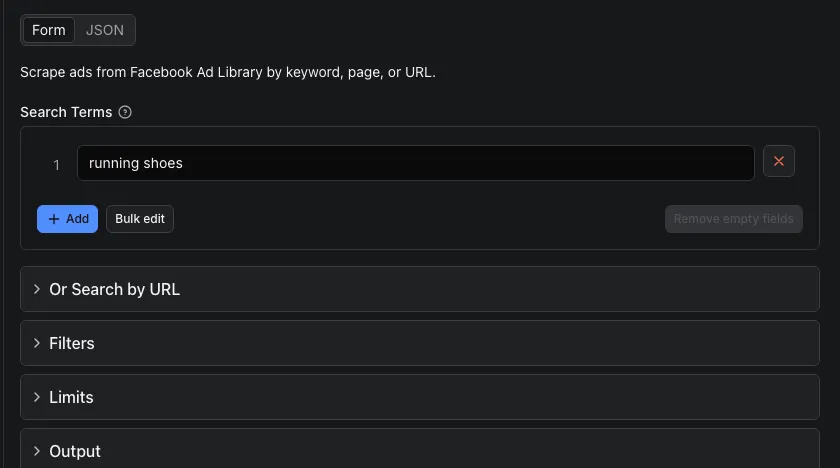
| Setting | What it does |
|---|---|
| Search Terms | Keywords to search the Ad Library for, like netflix or fitness app. Each one is its own search |
| Ad Library URLs | Facebook Page links (https://www.facebook.com/nike), Ad Library search links (their own filters are used) and single-ad links |
| Country | A two-letter code such as US, GB or DE, a country name such as United Kingdom, or ALL for every country (default US) |
| Ad Status | Active ads, stopped ads, or all of them (default active) |
| Ad Type | All ads, or only political and issue, housing, employment or credit ads |
| Media Type | All, image, video, meme or ads without media |
| Search Type | Any of the words, or the exact phrase |
| Start Date (From / To) | Only ads that started running in this date range |
| Max Ads per Search | How many ads to save for each keyword or link (default 100, up to 10,000) |
| Output format | Clean (recommended) or the old format; see below |
| Include Page Transparency Data | Adds each advertiser's Page creation date, name changes and active ad count |
| Include advertiser details | Adds each advertiser's Instagram account, followers, verified badge and About text |
| Include EU/UK transparency and political audience | Adds reach, targeting, payer and beneficiary for ads shown in the EU or UK, and audience and spend for political ads |
Connection settings - the default works for most runs.
Active ads for two keywords:
Every ad a brand has run in all countries, with its Page history:
Video ads for an exact phrase that started in September 2026, with EU/UK reach:
Page links work in all their usual forms: facebook.com/nike, m.facebook.com/nike, facebook.com/profile.php?id=..., facebook.com/p/<name>-<id>/, facebook.com/people/<name>/<id>/ and facebook.com/pages/<name>/<id>. You get the same ads as the Page's advertiser view in the Ad Library, with your country, status, type, media and date filters. Pages that Facebook shows only to logged-in visitors, such as alcohol brands, work too when the link has the Page's username.
⬆️ Output
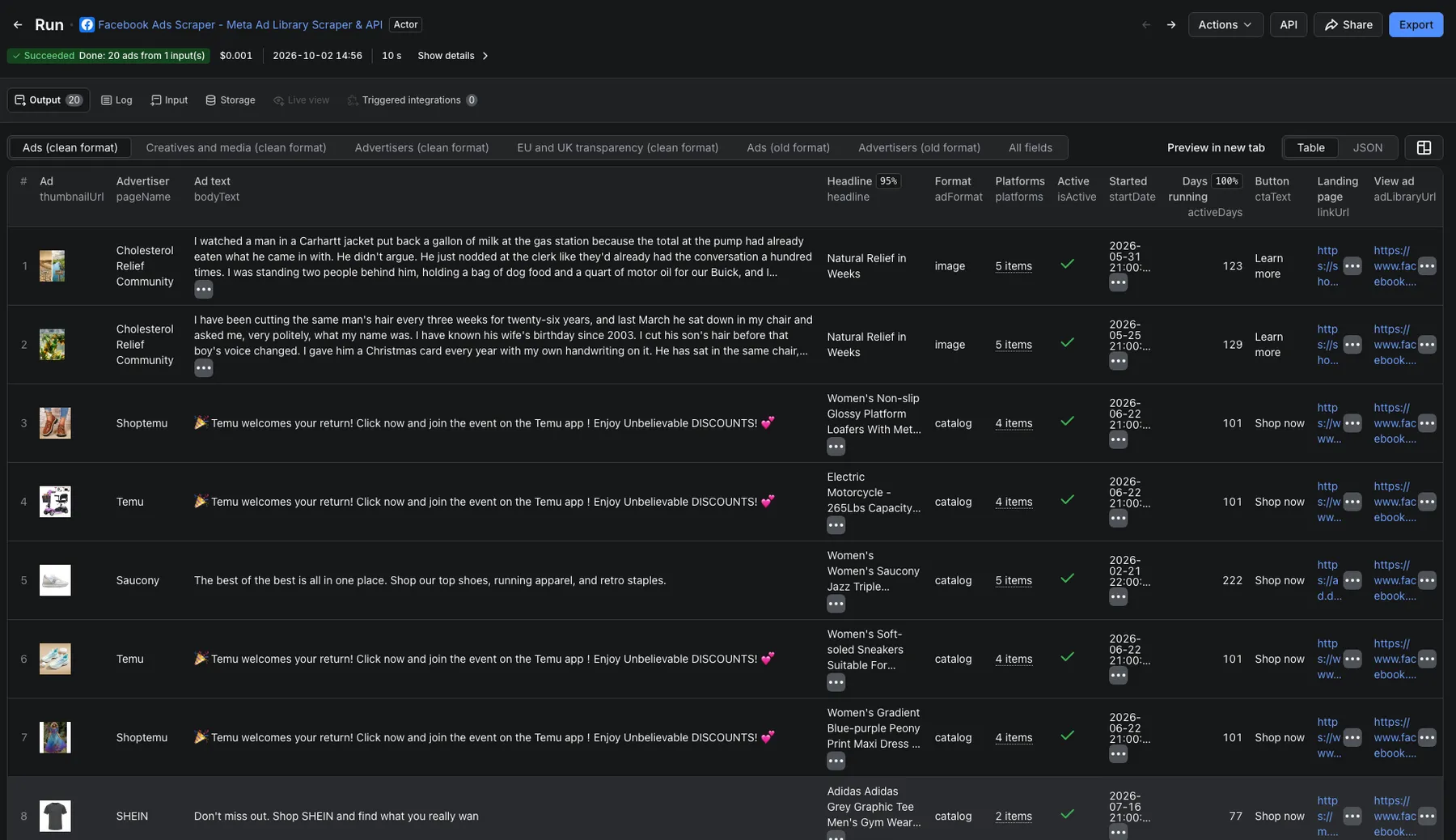
Every ad is one row. Pick the format with Output format (outputFormat):
- Clean (
"clean", preselected in the Console): one tidy row per ad. The ad link opens the ad, carousel cards keep their own headline, link and image together, catalog placeholders such as{{product.name}}are replaced by the real product text, dates areYYYY-MM-DD, spend and reach ranges also come as numbers, and every ad has a thumbnail and a days-running count. - Old format (
"legacy"): the fields this scraper has always returned. Runs that do not setoutputFormat(API calls, saved tasks, schedules and integrations) keep getting this format, so nothing breaks. Add"outputFormat": "clean"to switch.
A clean row (shortened: one of the ad's three cards and one image):
A political ad's political field:
The Output tab shows clean rows under Ads, Creatives and media, Advertisers and EU and UK transparency (marked clean format), and the old format under Ads (old format) and Advertisers (old format).
Which fields does each format have?
Clean format
| Field | Description |
|---|---|
| adArchiveId | The ad's ID in the Ad Library |
| adLibraryUrl | Link that opens the ad in the Ad Library |
| collationId, versionCount | Group ID and number of ads that use the same creative and text |
| isActive | Whether the ad is running now |
| startDate | First day the ad ran |
| endDate | Day the ad stopped; empty while it is running |
| lastSeenDate | Last day Facebook reports the ad running (today for a running ad) |
| activeDays | Days the ad has been running |
| adFormat | image, video, carousel, catalog or dynamic |
| mediaType | image, video, mixed or none |
| bodyText, headline, linkDescription, linkCaption | The ad's text, headline, description and display link |
| linkUrl, linkDomain | Landing page and its domain |
| ctaText, ctaType | Button text ("Shop now") and its code (SHOP_NOW) |
| cardCount, cards | Carousel or catalog cards, each with its own headline, text, link, button, image and video |
| thumbnailUrl | One preview image of the ad |
| imageUrls | Every full-size image of the ad and its cards |
| videos | Each video with its HD link, SD link and preview image |
| platforms | facebook, instagram, messenger, audience_network, threads |
| adCategories | political, housing, employment or credit; empty for ordinary ads |
| containsAiMedia | Meta's label for digitally created or altered media |
| hasEuTransparency | Facebook publishes EU or UK transparency for this ad |
| pageId, pageName, pageUrl, pageLikes, pageCategory, pageProfilePictureUrl | The advertiser's Page |
| political | Political and issue ads only: spend, impressions and reach as Facebook shows them and as numbers (spendMin, spendMax, ...), who paid for the ad and the advertiser's published contact details. Empty for other ads |
| searchTerm, searchUrl, scrapedAt | The search that found the ad and when it was scraped |
Page Transparency Data (includePageTransparency) adds pageCreatedDate, pageNameChangedDate, pageMergedDate (YYYY-MM-DD) and pageActiveAdsCount, the active ad count for the country and ad status you searched.
Advertiser details (includeAdvertiserDetails) add pageVerified, pageInstagramUsername, pageInstagramFollowers, pageInstagramVerified, pageAbout and pageCoverPhotoUrl; pageCategory then uses the Ad Library's advertiser panel wording and pageProfilePictureUrl a larger logo.
EU/UK transparency and political audience (includeAdDetails) add euReach, ukReach, targetAgeMin, targetAgeMax, targetGender, targetLocations, payer, beneficiary, reachByCountry, reachByAge, reachByGender and financialServicesDisclosure. Use euReach and ukReach for totals: Facebook's per-country, age and gender numbers do not add up exactly to them, so use those for shares. Political and issue ads also get audienceByAgeGender, audienceByRegion, pageSpendTotal and pageSpendLast7Days inside political.
When an option is on, its fields are on every row, empty where Facebook has nothing for that ad. If an option's data cannot be read for some ads, those ads are still saved without it, and the final status says how many (for example "advertiser details unavailable for 3 ads").
Old format
| Field | Description |
|---|---|
| ad_archive_id, ad_id | The ad's Ad Library ID |
| page_id, page_name, page_profile_url, page_like_count, page_categories | The advertiser's Page |
| ad_creative_bodies | Ad text (main text and carousel cards) |
| ad_creative_link_captions, ad_creative_link_titles, ad_creative_link_urls | Display links, headlines and landing pages |
| ad_snapshot_url | Link that opens the ad in the Ad Library |
| ad_delivery_start_time, ad_delivery_stop_time | When the ad started and stopped; the stop time is empty while it runs |
| currency, spend, impressions, estimated_audience_size | Filled for political and issue ads, as the ranges Facebook shows ("$100 - $499") |
| publisher_platforms | facebook, instagram, messenger, audience_network |
| categories | political, housing, employment or credit |
| media_type, cta_type, cta_text | Creative format (VIDEO, IMAGE, DPA, ...) and the button |
| collation_count, is_active | Ads sharing this creative, and whether the ad is running |
| images, videos | Image and video links |
| link_url, link_description | Main landing page and its description |
| searchTerm, scrapedAt | The search that found the ad and when it was scraped |
In the old format, the three options add pageTransparency (pageName, pageCreationDate such as Jan 15, 2020, lastNameChangeDate, lastMergeDate, totalActiveAds), advertiserDetails (the clean format's advertiser fields, and pageProfilePictureUrl) and adDetails (the clean format's EU/UK fields, and the political audience fields inside political; empty for ads without such details).
How can I use Facebook ads data?
- Competitor ad research: see what your competitors run on Facebook and Instagram, their copy, creatives, offers and landing pages
- Ad creative inspiration: collect the best hooks, headlines and formats in your niche; long-running ads are usually the winners
- Market and trend research: follow messaging and spend across industries and countries
- Lead generation: find businesses that are advertising right now in any niche, with their Page and website
- Ecommerce and dropshipping research: spot products that are advertised heavily
- Political ad tracking: follow political and issue ads with their spend, reach and payers for journalism, research or compliance
- Agency reporting and AI workflows: feed ad data into dashboards, Google Sheets or AI models
Facebook Ad Library API: is there an official one?
Meta has an official Ad Library API, but it needs a Meta developer account, identity confirmation and an app, and it returns political and issue ads and ads shown in the EU and UK. Ordinary commercial ads in other countries are not in it. Facebook Ads Scraper works as an unofficial Facebook Ad Library API for every kind of ad in every country, with no approval:
| Facebook Ads Scraper | Official Meta Ad Library API | |
|---|---|---|
| Ads | All ads: commercial, political, housing, employment, credit | Political and issue ads, and ads shown in the EU and UK |
| Countries | Every country | Every country for political ads; EU and UK for the rest |
| Images, videos, cards | Yes | Only a snapshot link |
| Approval | None | Developer account, identity confirmation, app |
| Export | Excel, CSV, JSON, HTML, XML, integrations | JSON |
Call it from any language through the Apify API. In Python:
The JavaScript client (apify-client on npm) works the same way.
Coming from apify/facebook-ads-scraper?
Most inputs have a direct match here:
| apify/facebook-ads-scraper | Here |
|---|---|
startUrls | urls: Ad Library links or Facebook Page links |
A keyword in the link (q=) | searchTerms, or keep the link in urls |
resultsLimit | maxAds, per keyword or link (default 100) |
activeStatus | activeStatus: active (default), inactive or all |
onlyAdsNewerThan, onlyAdsOlderThan | startDateMin, startDateMax: the ad's start date, as YYYY-MM-DD |
includeAboutPage | includePageTransparency and includeAdvertiserDetails |
isDetailsPerAd | includeAdDetails |
Ads are flat rows rather than raw nested objects: adArchiveID is ad_archive_id (old format) or adArchiveId (clean), snapshot.body.text is ad_creative_bodies or bodyText, snapshot.cards are cards in the clean format, and dates are YYYY-MM-DD. Count-only runs, custom sort orders and e-commerce product data are not available. Filters other than country, status, ad type, media type, search type, platforms and start dates in a pasted Ad Library link (such as language or sort order) are not applied.
Scrape more ad and Facebook data
| Actor | What it gets |
|---|---|
| Facebook Pages Scraper - Page Details & Contacts | Followers, category, email, phone, address and websites of Facebook Pages |
| Facebook Posts Scraper - Public Pages | Posts of public Facebook Pages with reactions, comments and shares counts |
| TikTok Ads Library Scraper | TikTok ads shown in the EU, UK and Turkey, with dates and creatives |
| Google Ads Transparency Scraper - Competitor Ad Creatives | Competitors' Google ads from the Ads Transparency Center |
| Instagram Profile Scraper | Followers, bio and stats of Instagram accounts |
🤖 Use with AI agents (MCP)
This actor works as a tool for AI agents. Connect any MCP-compatible AI assistant or agent to the Apify MCP server at mcp.apify.com (sign in with your Apify account), and it can find this actor, fill in the input and read the results by itself. Ask in plain words, for example "Show me the ads Netflix is running in the US right now", and the agent runs automly/facebook-ad-library-scraper with an input like {"searchTerms": ["netflix"], "country": "US", "maxAds": 50}. Every input and output field has a plain description, so the agent knows what to type and what each column means. Agent runs cost the same as runs you start yourself.
❓FAQ
How much does it cost to scrape Facebook ads?
$0.70 per 1,000 ads on the Free plan, down to $0.55 on Business, plus a $0.05 start fee per run, with platform usage included. See How much does it cost to scrape Facebook ads? above for every plan and the optional extras.
Do I need a Facebook account or a Meta API key?
No. The Meta Ad Library is public, and Facebook Ads Scraper gets what anyone can see there without signing in. No Facebook login, Meta developer app or approval is needed.
Can I scrape Instagram ads?
Yes. The Meta Ad Library covers Facebook, Instagram, Messenger, Audience Network and Threads. Ads that run on Instagram have instagram in platforms (clean) or publisher_platforms (old format).
How do I get all ads of one advertiser?
Paste the brand's Facebook Page link, such as https://www.facebook.com/nike, into Ad Library URLs, set Country to ALL and Ad Status to all for its whole history, and raise Max Ads per Search. You can also paste the advertiser's Ad Library link (it contains view_all_page_id=).
Can I scrape ads from several countries?
Yes. Use ALL for every country, or run one search per country to know where each ad was shown. Country names and UK work as well as codes.
How many ads can I get?
Up to 10,000 per keyword or link, as many as the Ad Library shows for that search. An ad found by several of your searches is saved once, under the first search that found it. Very narrow searches (an exact phrase plus a video filter and a date range) can rightly return no ads; try any-word search or fewer filters.
What happens with a wrong link or a Page that does not exist?
The run goes on with the other inputs. A Page that does not exist is listed as not found, and anything that could not be read is named in the final status and in the run report. Ads are saved as they are found, so a stopped run keeps everything it collected.
Will the clean format break my integration?
No. Runs that do not set outputFormat, such as API calls, saved tasks, schedules and Make, Zapier or Google Sheets integrations, keep getting the old format. Add "outputFormat": "clean" when you are ready.
Can I monitor competitors' ads automatically?
Yes. Save your input as a task and schedule it daily or weekly, then send new ads to Google Sheets, Slack, email or a webhook.
Can I connect Facebook Ads Scraper to other tools or AI agents?
Yes. Start runs and download results with the Apify API or the Python and JavaScript clients, send results to Make, Zapier, n8n, Google Sheets or Slack with Apify integrations and webhooks. AI assistants and agents can run it through the Apify MCP server, see the Use with AI agents (MCP) section above.
Is it legal to scrape Facebook ads?
The Ad Library is published by Meta for public transparency, and Facebook Ads Scraper only collects public data that anyone can see there. Ads and political ad disclosures can still contain personal data, such as names of payers or contact details, which may be protected by laws such as GDPR, so only scrape for a legitimate reason and ask a lawyer if you are unsure. You can read more in Is web scraping legal?
Facebook Ads Scraper is an independent tool. It is not affiliated with, endorsed by or sponsored by Facebook or Meta.
Something isn't working?
Open the Issues tab with your input and what you expected, or tell us which field you need. We read every one and usually reply within a day.
⭐ Your feedback
Have an idea or found a problem? Tell us in the Issues tab. If Facebook Ads Scraper saved you time, a short review on the Reviews tab helps other people find it.


