
Google Play Scraper – Developer Leads, Emails & App Data
Pricing
from $0.50 / 1,000 app rows
Google Play Scraper – Developer Leads, Emails & App Data
Scrape public Google Play app pages (ratings, installs, prices, similar apps), developer pages, top charts and category pages in any country and language, plus the developer e-mail, website and address shown on the app page. Source on every row. Not affiliated with Google.
Pricing
from $0.50 / 1,000 app rows
Rating
0.0
(0)
Developer
Badr Bouargan
Maintained by CommunityActor stats
0
Bookmarked
2
Total users
1
Monthly active users
9 hours ago
Last modified
Categories
Features
Share
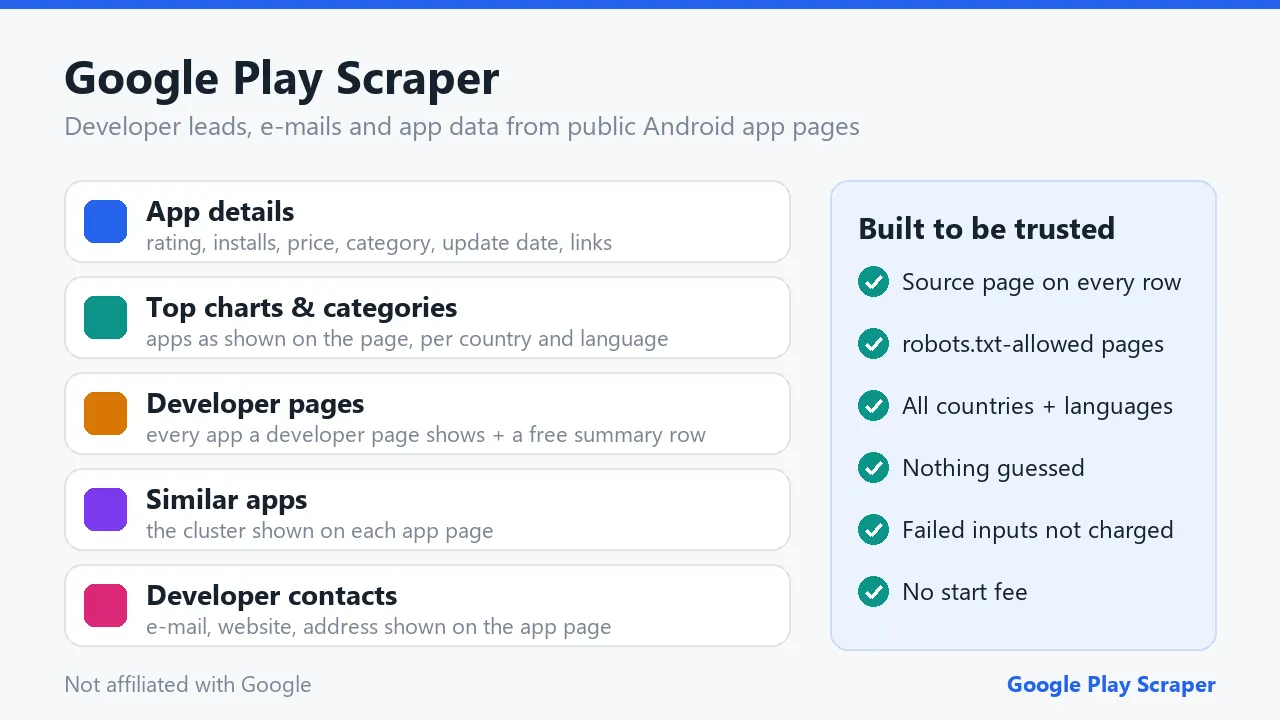
Collect public Google Play app data for any country and any language – ratings, installs, prices, categories, update dates, similar apps – discover apps from the top-charts page, category pages and developer pages, and get the developer contacts Google Play shows on the app page (e-mail, website, postal address, phone), each with the page it was shown on.
Not affiliated with, endorsed by or sponsored by Google. "Google Play" is a trademark of Google LLC, used here only to describe the public pages this Actor reads.
What it does
| Service | What you get | Source page |
|---|---|---|
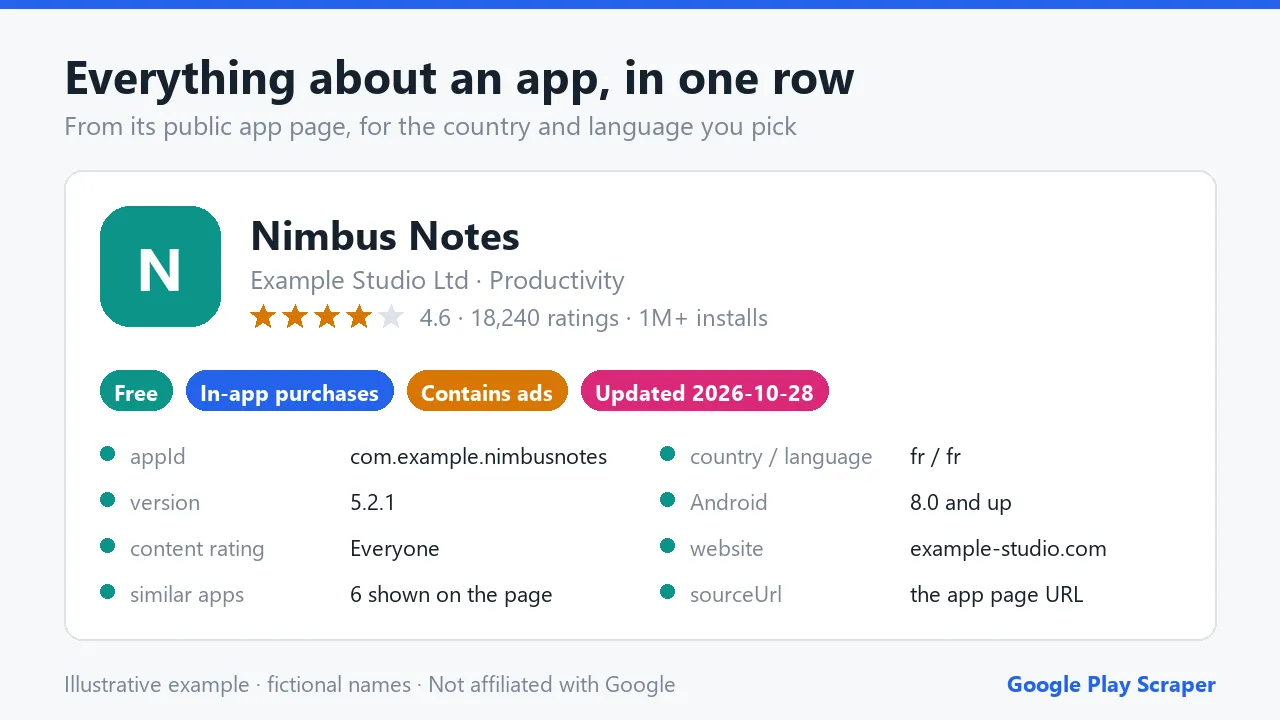
| App details | Title, summary, description, developer, category, rating + histogram, number of ratings, installs, price and currency, ads, in-app purchase range, content rating, version, minimum Android, update and release dates, what's new, icon, screenshots, video, privacy-policy link | play.google.com/store/apps/details?id=… |
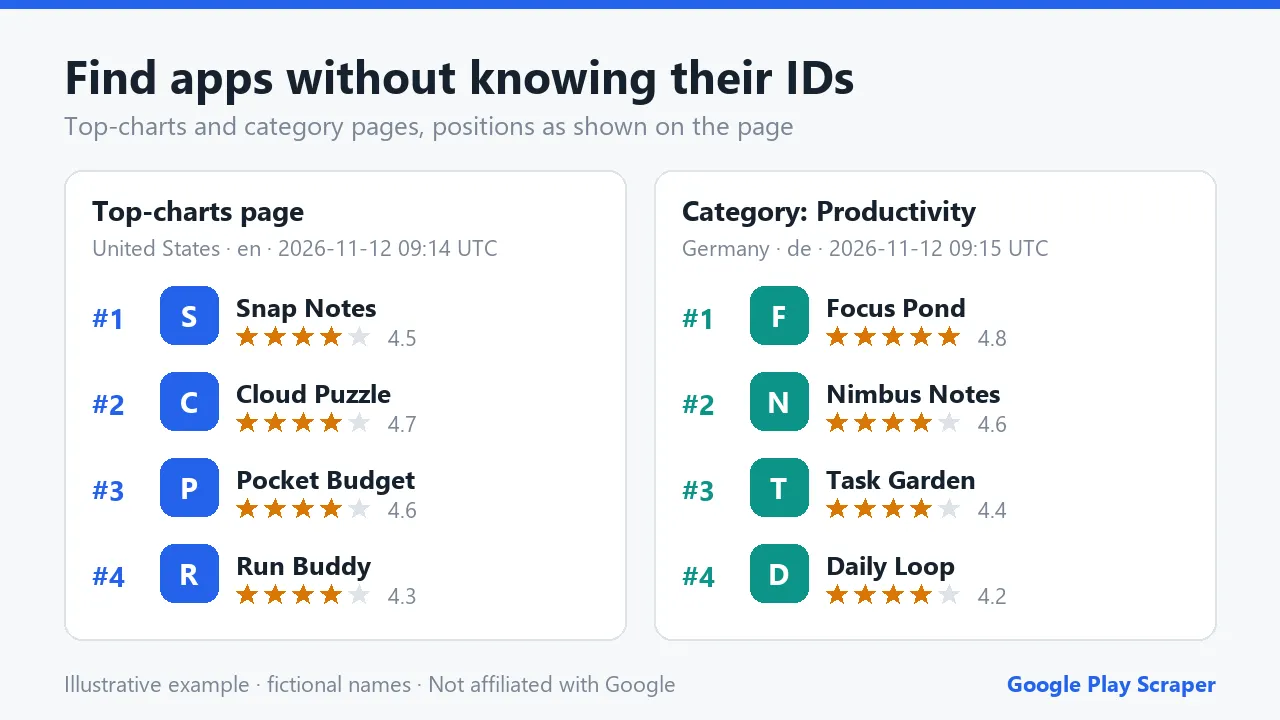
| Top-charts page | The apps Google shows on its public top-charts page for a country, in page order, with the cluster title | play.google.com/store/apps/top |
| Category pages | The apps shown on any of the 52 app and game category pages, in page order | play.google.com/store/apps/category/<CODE> |
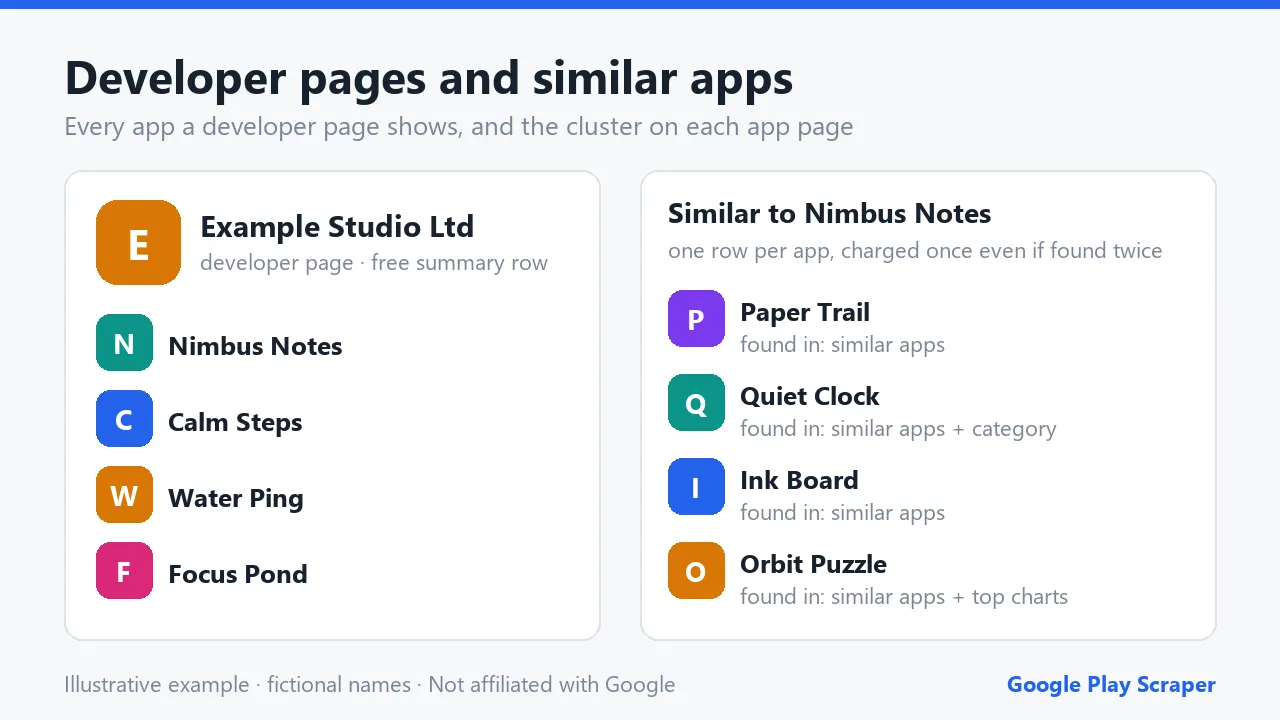
| Developer pages | One free summary row per developer page + every app it shows | /store/apps/dev?id=… and /store/apps/developer?id=… |
| Similar apps | The "Similar apps" cluster shown on each app page (usually 6–8 apps) | the app page itself |
| Developer contacts | E-mail(s), website, postal address and phone shown in "App support" / "About the developer" | the app page itself |
Every row carries sourceUrl, country, language, scrapedAt and – for apps – foundIn: every source that
listed the app in the run (page URL, position as shown, cluster title, collection time).
Quick start
1. One app, its similar apps and its developer contact (US, English)
2. Leads from a category in several countries
3. Everything a developer publishes, in French, in every country
With an empty input, a small example runs (one app in the US, developer contacts on).
Countries and languages
- Countries (
gl): type any 2-letter codes, or tick All countries to run every input in the 201 built-in country codes where Google Play serves apps (the countries you typed first, then the largest markets). Google shows no store for China, Cuba, Iran, North Korea and Syria; overseas territories get the store of their country. - Language (
hl): 80 Google Play language codes (en,fr,de,es-419,pt-BR,ja,zh-TW…). Google shows the developer's translation when one exists, otherwise the default listing language. - Prices, currencies, ratings, availability and lists differ by country: each country is a separate row.
Discovery: top charts and categories
You do not need app IDs: the top-charts page and category pages list apps that the Actor then opens one by one
(Open each discovered app page, on by default; off = the summary card shown on the list, faster and charged
with the cheaper app-summary event).
- Positions are as shown on the page for that country and language at collection time (
foundIn[].position,foundIn[].collectedAt). Google currently shows its Apps home page with ranked clusters at the top-charts address; a category page is a set of editorial clusters, not a full ranking. - An app found by several sources in the same country is one row, charged once, with every source in
foundIn. maxResultsPerPage(default 50) caps the apps taken from each list;maxApps/maxAppsPerCountrycap the run before any app page is requested.
Developer contacts (leads)
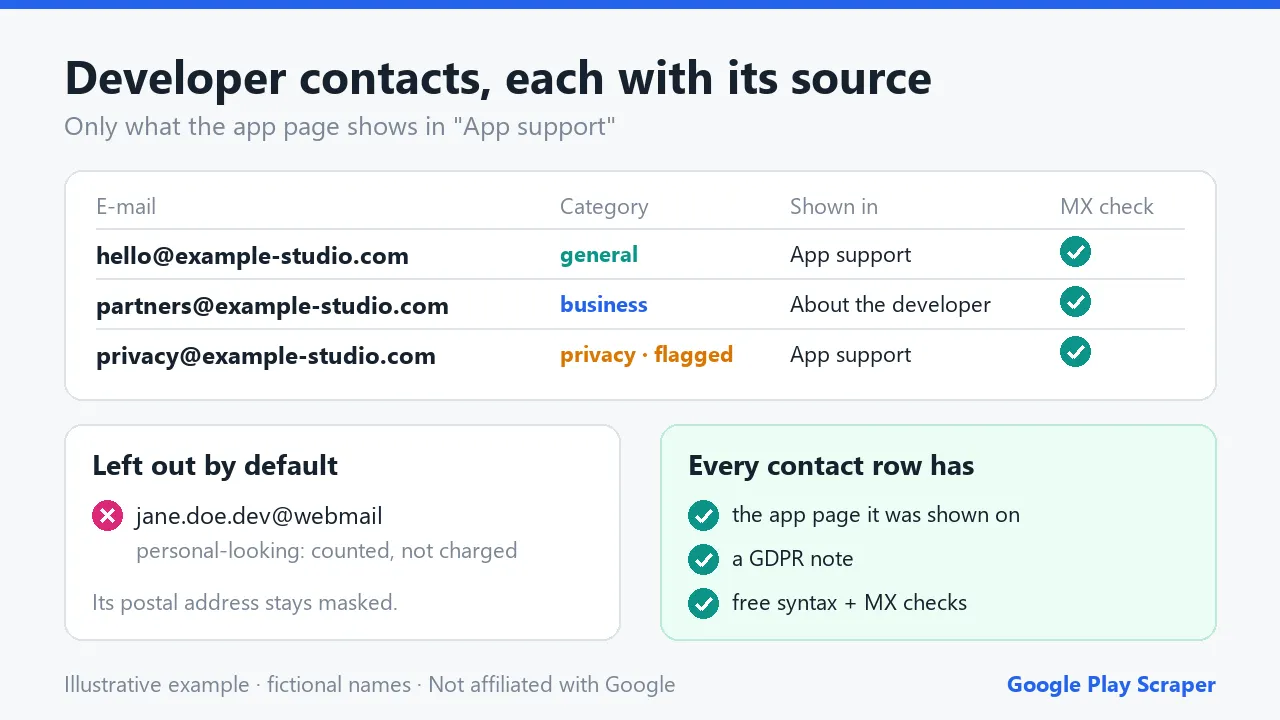
- Only what Google Play displays on the app page ("App support" and "About the developer"). Nothing is guessed, no address pattern is invented, no other website is crawled.
- Each contact row has the app page it was shown on (
sourceUrl) and the section (sourceSection). - Personal-looking addresses are left out by default (for example
firstname.lastname@, or a webmail address of a developer whose name looks like a person's): counted in the run summary, not delivered, not charged. The option Include personal-looking e-mails (includePersonalLookingContacts, off by default) delivers them withlooksPersonal: true– turn it on only with a lawful basis (see the GDPR note below). Their postal address and phone are always masked. - The phone number Google shows in "About the developer" is in the same contact row (
phoneas shown, plusphoneE164such as+14125550100when the number is written in international form – a country code is never guessed). No extra charge. - International addresses are supported (
info@müller.de, punycodexn--…domains, long endings such as.photographyor.com.br):emailis the address as shown,emailAsciithe punycode form used for de-duplication and the MX check,emailDisplaythe readable form. privacy@/dpo@mailboxes are delivered but flagged "for data-protection requests only, not for marketing" (or left out with Leave out privacy mailboxes).- Free checks on every address: syntax, MX record, disposable domain, role address. This is not mailbox verification.
- The e-mail is never in the app row (only
developer.hasPublicEmail: true); it is in thecontactrow. - One contact row per unique e-mail per run, even when several apps or countries show it.
GDPR / privacy. You are the data controller for any use of these contacts: rely on a lawful basis (for example legitimate interest), honour objections and opt-outs, collect only what you need, and do not send unsolicited bulk marketing where local law forbids it (ePrivacy / PECR / CAN-SPAM). Developer contact details are published by Google Play for user support.
Output
One dataset, three row types (rowType), with ready-made views Apps, Developer contacts and Developers.
Example (illustrative values):
Run files (key-value store): RUN_SUMMARY (counters, requests, countries done / remaining, billing, estimate),
FAILED_INPUTS (each failed input with a stable code), APPS_WITHOUT_CONTACT.
Pricing
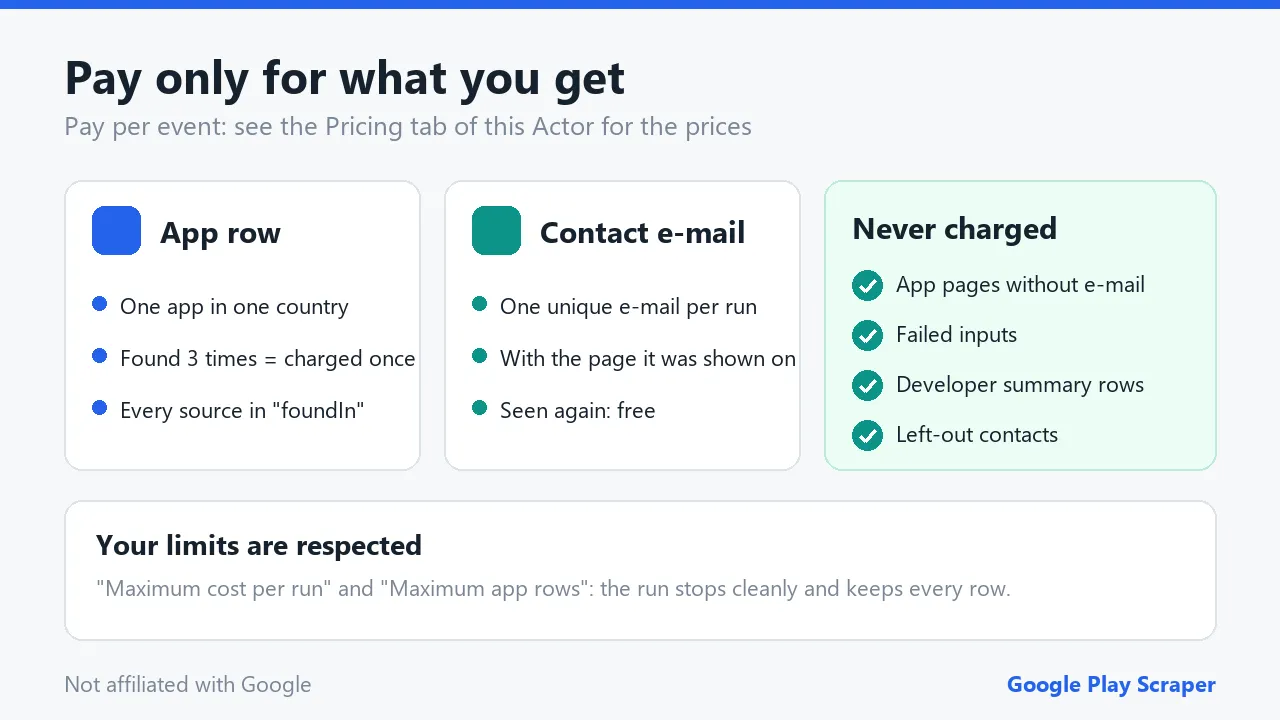
Pay per event – the Pricing tab of this Actor is the reference for the prices.
app-details: one app row read from its app page (one app in one country). The same app found by several sources in the same country is charged once.app-summary(cheaper): one app row taken from the summary card of a list page, when Open each discovered app page is off. An app row is never charged both events.developer-contact: one unique e-mail delivered in the run, with the website, postal address and phone shown next to it (no extra charge).- Run start: a small fee per run (see the Pricing tab), charged once when the run starts.
- Never charged: developer summary rows, failed inputs, left-out contacts, contacts seen again, app pages without an e-mail (no contact charged).
- Your Maximum cost per run is respected: the run stops cleanly and keeps every row already delivered.
How long does it take?
The Actor is deliberately polite: one request at a time, at most 20 per minute (maxRequestsPerMinute, 4–30).
Plan about 3 seconds per page (one app page, one category page…). One app in one country: under a minute.
50 discovered apps with details: about 3 minutes. RUN_SUMMARY.estimate.recommendedTimeoutSeconds gives the
timeout to set for your input; the start log prints it too.
| Run size (app pages read) | Time at 20 requests per minute |
|---|---|
| 100 apps | about 5 minutes |
| 1,000 apps | about 50–55 minutes |
| 5,000 apps | about 4 hours 15 minutes |
Developer contacts add no time: the e-mail is read from the app page itself. With Open each discovered app
page off, one list page gives up to 50 summary rows (maxResultsPerPage) in about 3 seconds, so even large lists finish in minutes.
The default run timeout is 2 hours (enough for about 2,000 app pages); for bigger runs, raise the timeout in the
run options. If the timeout comes first, the run still stops cleanly and keeps every row already saved.
Reliability
- Wrong IDs, removed apps, unknown categories: listed in
FAILED_INPUTSwith a code (APP_NOT_FOUND,CATEGORY_UNAVAILABLE…), never charged; the run still ends SUCCEEDED (turn onfailRunOnErrorto mark such runs FAILED for monitoring). - Time limit: the run stops cleanly before your run timeout (margin 45 s or 10 %), saves every row already
read and lists what is left in
RUN_SUMMARY.countriesRemainingandFAILED_INPUTS(TIME_LIMIT). - Migrations resume without delivering or charging twice.
- Apify datacenter proxy by default; if Google keeps refusing it, the run switches once to a direct connection. Residential proxies are not used.
Limits (please read)
This Actor reads only the pages that play.google.com/robots.txt allows, checked at the start of every run. That is why this version does not offer:
- Search results (
/store/searchis disallowed) – use categories, top charts, developer pages or similar apps. - Full review lists and permissions (served by Google's internal
/_/endpoints, disallowed). The rating, the number of ratings and the star histogram shown on the app page are included. - Data safety pages (disallowed).
- Full top-chart rankings (top free / paid / grossing to position 200): only the apps shown on the public pages.
Other limits: Google shows the latest version only (no history); the in-app purchase range is a text
("$0.99 – $9.99 per item"), not a price list; some fields (version, minimum Android) are "varies with device" for
some apps and then null; if Google changes its page layout, missing fields become null and
RUN_SUMMARY.parsing.alert says so.
Integrations
Use the Apify API, schedules, webhooks, Make, Zapier, n8n or Google Sheets exports like with any Actor. Export as JSON, CSV or Excel, per view.
Related Actors
Other Actors by the same developer that work well with this one:
- App Store Scraper – the same app or developer on iOS: charts, app data and developer contact.
- Business Email Finder – find more public e-mails on the developer websites you collected.
Legal
Public pages only; no login, no cookies, no CAPTCHA solving, no access control bypassed; only robots.txt-allowed paths, at a polite pace. You are responsible for your use of the data (see the GDPR note above) and for complying with Google's terms and the laws that apply to you. Not affiliated with Google.
FAQ
Why no reviews or search? Their pages are disallowed by Google Play's robots.txt; this Actor does not read them.
Is the e-mail verified? It is the address Google Play shows for the developer. The free checks tell you whether the domain can receive mail, not whether the mailbox exists.
Why is an app missing in a country? Google does not offer it there (APP_NOT_FOUND in FAILED_INPUTS).
Changelog
- 0.1 – first version: app details, top-charts page, category pages, developer pages, similar apps, developer contacts; all countries and languages.


