

LinkedIn Jobs Scraper
Pricing
from $0.50 / 1,000 job scrapeds
LinkedIn Jobs Scraper
LinkedIn jobs in full detail: title, company, location, salary, description, seniority, contract type, function, industries and applicant count. No account or cookie needed. The city split over 199 countries passes LinkedIn's 1,000-job ceiling. Example: 'developer', United States, past week.
Pricing
from $0.50 / 1,000 job scrapeds
Rating
5.0
(1)
Developer

Badr Bouargan
Maintained by CommunityActor stats
0
Bookmarked
2
Total users
1
Monthly active users
2 days ago
Last modified
Categories
Share
LinkedIn Jobs Scraper – Search Results & Full Job Details

Scrape LinkedIn job search results with the full detail of every posting: title, company, location, salary range, the complete description, seniority level, employment type, job function, industries and how many people have applied. No API key, no account, no cookie to paste.
Give it either a LinkedIn jobs search URL copied from your browser, or fill in the search fields. Both work; the URL wins when you provide one.
Before you run it — read this
LinkedIn's robots.txt reads Disallow: / for ordinary crawlers, and states that "the use of robots or other automated means to access LinkedIn without the express permission of LinkedIn is strictly prohibited". This Actor reads pages that any visitor can open without signing in, but that notice applies to it all the same. Running it is a decision about LinkedIn's User Agreement that only you can make — and LinkedIn runs a whitelist process at whitelist-crawl@linkedin.com for anyone who wants permission first.
Two further things worth knowing before you build on it:
- Job poster fields are personal data.
jobPosterName,jobPosterPhotoandjobPosterProfileUrlidentify a real person. Have a lawful basis before you store them, especially under the GDPR. - LinkedIn throttles. Job pages come through reliably; company pages mostly do not (see below).
What comes back, and how reliably
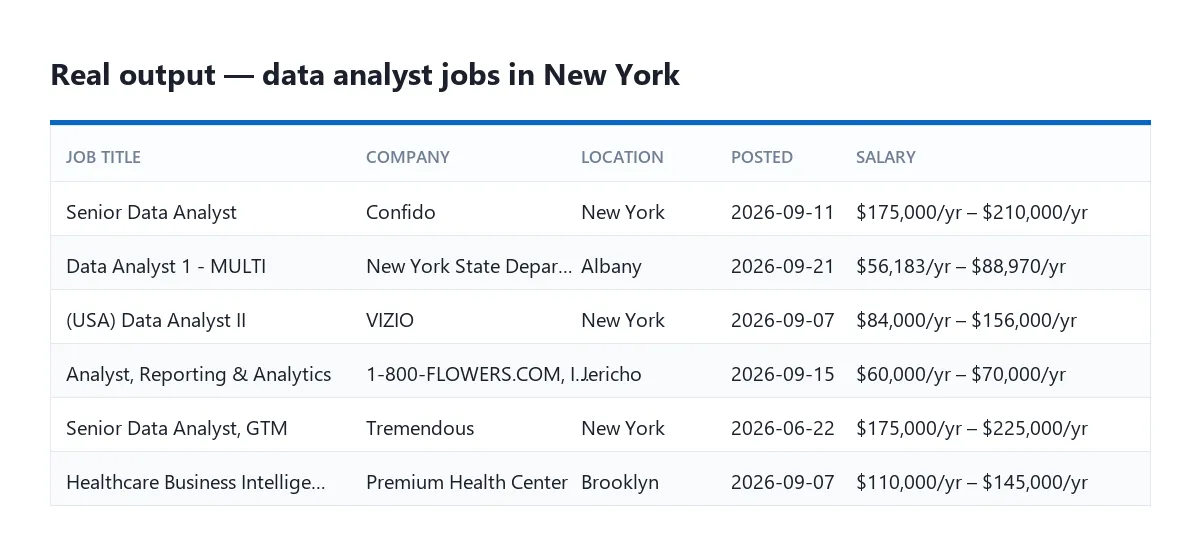
Measured on two real runs — 80 data-analyst jobs in New York and 60 developer jobs in Morocco:
| Field | Filled |
|---|---|
id, link, title, location, postedAt, companyLogo | 100 % |
descriptionHtml, descriptionText | 100 % |
seniorityLevel, employmentType, industries, applicantsCount | 100 % |
companyName, companyLinkedinUrl, jobFunction | 97 % |
benefits ("Actively Hiring", "Be an early applicant") | ~50 % |
salaryInfo | 14 % — only when the employer publishes a range |
jobPosterName and the other poster fields | 3–15 % — LinkedIn shows a poster on few jobs |
companyDescription, companyWebsite, companyEmployeesCount | near zero from datacenter addresses |
Company details are the weak spot. LinkedIn answers most requests for a company page with its refusal code 999. The Actor tries once per company, caches the result, and after fifteen refusals in a row it stops trying and says so in the log rather than billing you for requests that cannot succeed. The RESIDENTIAL proxy group improves this markedly. Job data is unaffected.
Three fields from other LinkedIn scrapers are not offered here, because the pages this Actor reads do not carry them: expireAt, insights and a per-component salary breakdown. An always-empty column is worse than no column.
Example output
The August 2026 search change
LinkedIn replaced its job search with an AI-driven one and dropped most URL filters. Only these still work in a URL:
| Still a URL filter | |
|---|---|
f_TPR / f_TP | Date posted |
f_C | Company |
f_AL | Easy Apply |
f_EA | Under 10 applicants |
keywords, location, geoId, distance | The search itself |
Experience level (f_E), job type (f_JT) and workplace (f_WT, f_WRA) are gone. With Convert dropped filters into search words switched on — the default — the Actor turns them into plain language and appends them to your keywords, whether they came from your input or from a pasted URL. That steers the search. It does not guarantee the filter, and no one can make it.
Filters whose value is an internal LinkedIn ID with no public label — f_I (industry), f_F (function), f_T (title) and similar — cannot be converted at all. The Actor names them in the log so you know they were dropped instead of silently ignoring them. Describe those in your keywords yourself.
Getting past LinkedIn's 1,000-job limit
LinkedIn stops serving a search after about a thousand jobs, no matter how many match. Switch on Split the search by city, pick a country, and the same search runs city by city. Jobs seen twice are dropped on their ID.
Measured on Morocco: one search of 14 cities plus the country returned 400 unique jobs in 63 seconds, with 343 duplicates discarded along the way.
199 countries ship with a city list — every country LinkedIn serves jobs in, from the United States (25 cities) to Tuvalu (1). Morocco has 14, the United Arab Emirates 8, Saudi Arabia 12. Every country in the dropdown has real cities behind it, so the split always happens; there is no entry that quietly does nothing.
Small markets behave honestly rather than impressively: a split across Mongolia's two cities costs two requests and returns what is actually there. Newly added Kazakhstan, for instance, returned 150 jobs across five locations in 21 requests, with 34 duplicates discarded.
Collecting new jobs every day
Set Date posted to Past 24 hours — or copy a search URL that already has that filter — and schedule the Actor daily. LinkedIn reads the window from the request each time, so the same input keeps working without being regenerated.
Step-by-step
- Paste one or more LinkedIn job search URLs, or fill in Keywords and Location.
- Set Maximum jobs. 100 is a good first run; 0 means no ceiling.
- Leave Open each job for its full details on unless you only need the search cards — off, it uses about ten times fewer requests.
- Optional: Split the search by city with one of the 199 countries, to go past 1,000.
- Optional: Also read each company — expect it to come back mostly empty unless you pick the RESIDENTIAL proxy group.
- Press Start, then export as JSON, CSV, Excel or HTML.
Input example
Or, to sweep a whole country:
Output example
Speed and cost
| Run | Jobs | Time | Requests | Platform cost |
|---|---|---|---|---|
| Search cards only, 15 cities in Morocco | 400 | 1 min 3 s | 83 | $0.005 |
| Full details, New York | 80 | 1 min 32 s | 88 | $0.006 |
| Full details + company attempts, Morocco | 60 | 1 min 42 s | 105 | $0.006 |
LinkedIn's own latency varies: the same 80-job run took 92 seconds once and 198 another time. Budget for the slower figure.
Search cards cost one request per ten jobs. Opening each job costs one request per job — that is the whole difference between the first row of the table and the second.
Frequently asked questions
Do I need a LinkedIn account or an API key? No. Everything it reads is served to signed-out visitors.
Why is salaryInfo empty on most jobs?
Because most employers do not publish a range. The Actor reads only LinkedIn's own compensation block; pulling figures out of the description text would return numbers that are not salaries.
Why did the company fields come back empty? LinkedIn refused those pages. See the section above — the Actor tells you in the log when it gives up, and the RESIDENTIAL proxy group is the fix.
Can I filter by experience level or job type? You can ask for them, and they will be turned into words inside the search. LinkedIn no longer accepts them as real filters, so treat the result as steering rather than filtering.
How do I collect more than 1,000 jobs? Split the search by city. See above.
Legal note
This Actor reads pages LinkedIn serves to anyone, but LinkedIn's robots.txt prohibits automated access without its permission, and its User Agreement governs your use. Job poster names, photos and profile links are personal data in many jurisdictions. Decide on a lawful basis before you store them, and consider whether you need the poster fields at all.


![Linkedin Search Jobs Scraper [Bypass 1K limit][Without Cookies] avatar](https://images.apifyusercontent.com/R2Hg7HUu4OYUkhlVwW1-lPBPl1NGLT-ic5bF4_S0Hnk/rs:fill:76:76/cb:1/aHR0cHM6Ly9hcGlmeS1pbWFnZS11cGxvYWRzLXByb2QuczMudXMtZWFzdC0xLmFtYXpvbmF3cy5jb20vMGlpckJJNUNkSTFIbkJxVnQvS0ZxbEVUOFFKSm1xbk8xUjgtbGlua2VkaW4ucG5n.webp)


