

Website Traffic Estimator
Pricing
from $0.75 / 1,000 domain with search traffics
Website Traffic Estimator
[from $0.75/1K domains] Bulk website traffic checker for Google search traffic: organic and paid search traffic, ranking keywords, featured snippet and local pack traffic, rank in your list. Similarweb alternative for thousands of domains; no-data domains free. Export, run via API or with AI agents.
Pricing
from $0.75 / 1,000 domain with search traffics
Rating
0.0
(0)
Developer

BlueskyScraper
Maintained by CommunityActor stats
0
Bookmarked
21
Total users
12
Monthly active users
8 days ago
Last modified
Categories
Security
Limited permissionsShare
Tested head-to-head — 11 Oct 2026
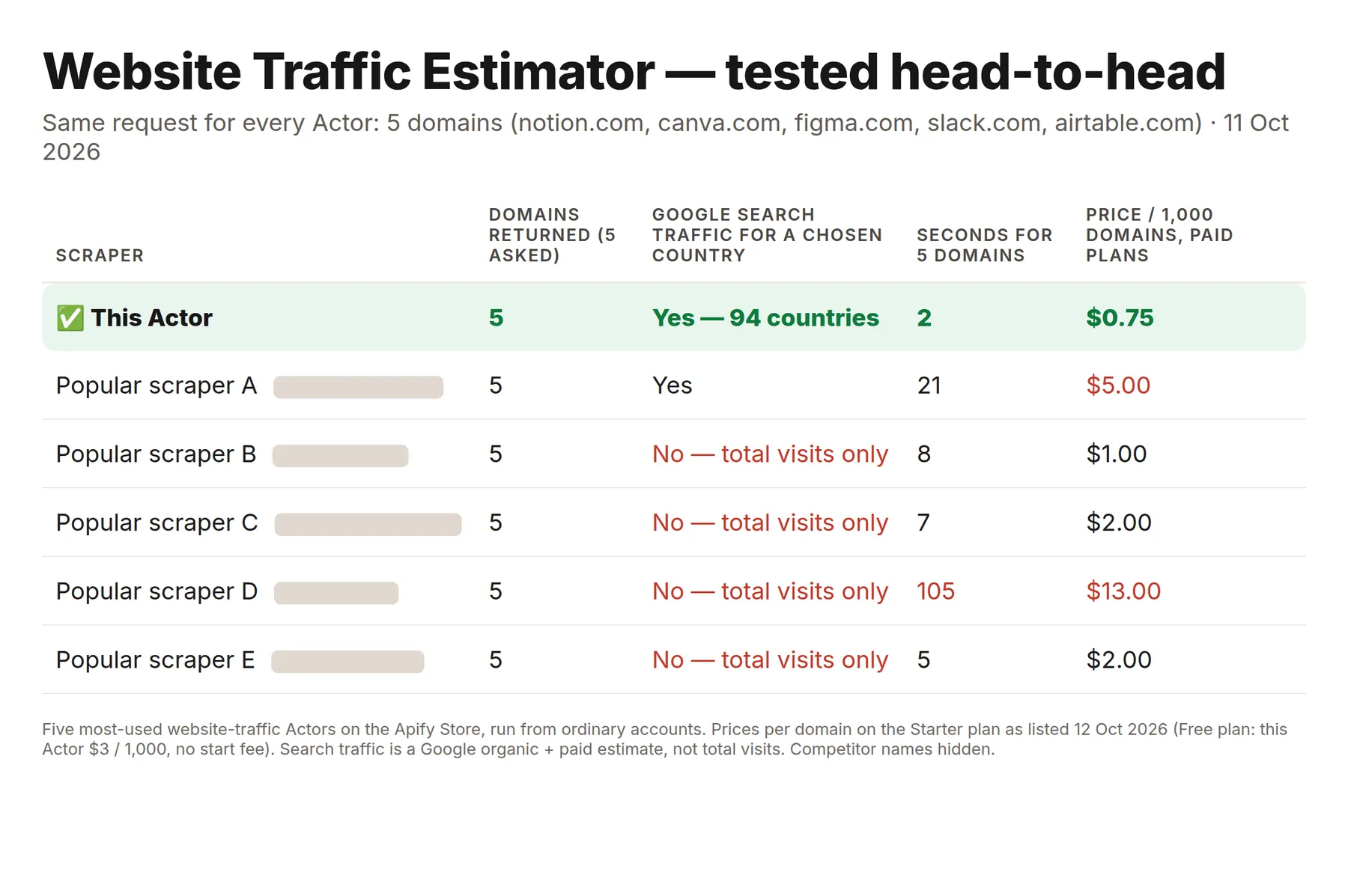
Same 5 domains for every Actor (notion.com, canva.com, figma.com, slack.com, airtable.com):
| This Actor | Five most-used website traffic Actors | |
|---|---|---|
| Domains returned (5 asked) | 5 | 5 |
| Google search traffic for a country you pick | Yes, 94 countries | 1 of 5 (the others give total visits only) |
| Seconds for 5 domains | 2 | 5–105 |
| Price per 1,000 domains on paid plans | $0.75 | $1.00–$13.00 |
| Start fee per run | None | None to $0.001 |
This Actor estimates Google search traffic (organic + paid), not total site visits — pick it when search is what you compare.
What is Website Traffic Estimator?
Website Traffic Estimator is a bulk website traffic checker for Google search traffic. Paste a list of domains, pick a country (or Worldwide), and get one row per domain with the estimated monthly organic search traffic, paid search traffic, the number of keywords the domain ranks for, featured snippet and local pack traffic, and the domain's rank and share of traffic inside your own list. It works as a Similarweb alternative for search traffic: thousands of domains in one run, no blocking, no login, no API key.
Be clear about what the number means: this is an organic & paid search traffic estimate — the visits a domain gets from Google search results, calculated from the keywords it ranks for, their search volume and the click-through rate of each position. It is not total site visits: direct, social, email and referral visits are not included, so the number is usually lower than a Similarweb "total visits" figure. For SEO, competitor research and lead qualification, search traffic is often the more useful number, because it shows how visible a site is in Google.
One row is one domain. The data is aggregated from a Google rankings and keyword search volume database via a licensed data provider, for 94 countries plus a Worldwide total.
- 💰 $0.00075 per domain with data on paid plans — $0.75 per 1,000 domains ($3 per 1,000 on the Apify Free plan), no start fee, no subscription
- 🆓 Domains without search data are free — they stay in the table with
hasData: falseand zero traffic - 📦 Bulk: up to 10,000 domains per run, sent in batches of 1,000 — a 3-domain run finishes in about 4 seconds
- 🔍 Works for small sites too: any domain that ranks for at least one Google keyword gets an estimate
- 📊 Rank details add-on ($): keyword positions (top 1 / 3 / 10 / 20 / 100), organic traffic value in USD, keyword movement
- 🤖 Works from the Apify API, MCP server (Claude, ChatGPT, Cursor), n8n, Make and Zapier
What data can Website Traffic Estimator extract?
Real values from a test run for canva.com, United States, English:
| Field | Example | What it means |
|---|---|---|
🌐 domain | canva.com | The domain as checked (no www., no path) |
📈 searchTraffic | 23949806 | Estimated monthly visits from Google search: organic + paid |
🔎 organicTraffic | 23949806 | Estimated monthly visits from organic Google results |
💵 paidTraffic | 0 | Estimated monthly visits from Google Ads search results |
organicSharePct | 100 | Computed: organic share of the search traffic, % |
🔑 organicKeywords | 844846 | Keywords the domain ranks for organically (top 100) |
paidKeywords | 0 | Keywords the domain shows search ads for |
🏆 rankInList | 1 | Computed: position by search traffic among the domains of your run |
shareOfListTrafficPct | 92.75 | Computed: the domain's share of your list's total search traffic, % |
⭐ featuredSnippetTraffic | 13908 | Estimated monthly visits from featured snippets |
featuredSnippetKeywords | 149 | Keywords where the domain holds the featured snippet |
📍 localPackTraffic | 13975 | Estimated monthly visits from the Google local pack (map results) |
localPackKeywords | 176 | Keywords where the domain appears in the local pack |
hasData | true | false = the domain ranks for no keyword in this country (free row) |
location, locationCode | United States, 2840 | Country of the estimate (Worldwide, null for the global total) |
language, languageCode | English, en | Search language (All languages, null for Worldwide) |
scrapedAt | 2026-10-01T14:17:06.159Z | When the row was made |
📊 Rank details add-on ($)
Switch on Add rank details ($) to add these columns for every domain with data. Real values for notion.com, United States:
| Field | Example | What it means |
|---|---|---|
top1Keywords | 3763 | Keywords ranking #1 organically |
top3Keywords | 7480 | Keywords in organic positions 1–3 |
top10Keywords | 19111 | Keywords on page one (positions 1–10) |
top20Keywords | 33340 | Keywords in positions 1–20 |
top100Keywords | 60939 | Keywords in positions 1–100 |
organicTrafficValueUsd | 1545397 | Estimated monthly cost in USD of buying the same organic clicks with Google Ads |
paidTrafficCostUsd | 0 | Estimated monthly cost in USD of the domain's paid search traffic |
newKeywords | 26386 | Keywords that newly entered the rankings since the previous database snapshot |
improvedKeywords | 16657 | Keywords whose position went up since the previous snapshot |
declinedKeywords | 12729 | Keywords whose position went down |
lostKeywords | 49735 | Keywords that dropped out of the rankings |
The computed fields (organicSharePct, rankInList, shareOfListTrafficPct, top3Keywords, top10Keywords, top20Keywords, top100Keywords) are calculated by the Actor, so you can sort a competitor list by visibility without a spreadsheet formula.
💰 How much does it cost to check website traffic?
Apify Free plan: up to 20 rows per run. Every row here is bought from a licensed paid data source, so on the Free plan a run returns up to 20 rows (enough to see the data and the format) and says so in a free notice row. Any paid Apify plan has no limit.
Website Traffic Estimator uses pay-per-event pricing. You pay only for domains that have search data:
| Event | Free plan | Starter (Bronze) | Scale (Silver) | Business (Gold) | What you get |
|---|---|---|---|---|---|
domain | $0.003 | $0.00075 | $0.00075 | $0.00075 | One domain row with organic and paid search traffic, keywords, SERP features and list rank |
rank-details (add-on) | $0.04 | $0.036 | $0.034 | $0.031 | Rank details for one domain with data: positions, traffic value, keyword movement |
Platinum and Diamond plans pay the Business price.
- No start fee and no charge per run.
- Domains without data are free. A domain that ranks for no Google keyword in the chosen country appears with
hasData: falseand is not charged. Switch on Skip domains without data to leave them out. - Error rows are free (an IP address, a typo that is not a domain, an unsupported country).
- Paid plans: $1 = 1,333 domains. 1,000 domains = $0.75. 10,000 domains = $7.50. On the Free plan 1,000 domains cost $3 and 10,000 domains $30.
- Apify's free plan includes $5 of monthly credit, which covers about 1,600 domains a month.
- The add-on is charged only for domains that got rank details. It is skipped and not charged for Worldwide runs.
The default run (notion.com, canva.com, figma.com, United States, English) costs $0.00225 on paid plans ($0.009 on the Free plan) and finishes in about 4 seconds.
Why is it cheaper than a Similarweb scraper?
Similarweb scrapers load one Similarweb page per domain, which is slow, gets blocked, and returns nothing for small sites that Similarweb does not track. Website Traffic Estimator asks a ranking database for up to 1,000 domains at once, so the cost per domain is a fraction of a cent and there is nothing to block.
Price check on the Apify Store, 2 October 2026: the most-used Similarweb scraper charges $0.003 per domain on the Free plan and $0.001 on paid plans, plus a run start fee. Free plan: same as the leader; paid plans ~25% cheaper.
How to check website traffic in bulk
- Open Website Traffic Estimator in Apify Console and sign in (a free account works).
- Paste your domains into 🌐 Domains, one per line. URLs are fine:
https://www.canva.com/pricingbecomescanva.com. - Type the 📍 Country (
United States,US,Germany,DE…) orWorldwide, and the 🗣️ Language (English,en…). - Optional: switch on 📊 Add rank details ($) for keyword positions and traffic value on a short competitor list.
- Click Start. Thousands of domains take seconds.
- Download the table as CSV, Excel, JSON or HTML, or open the SERP features and Rank details ($) tabs.
⬇️ Input
Search traffic for a list of domains (default)
Worldwide search traffic
Competitor list with rank details ($)
| Field | Type | Description |
|---|---|---|
🌐 domains | array | Domains or URLs, one per item, up to 10,000. Reduced to the host name; duplicates are removed. Subdomains are estimated on their own. |
📍 location | string | Country name or two-letter code, or Worldwide. Default United States. |
🗣️ language | string | Search language name or code. Default English. Empty = the country's main language. If the country has no data in that language (for example English for Germany), the country's main language is used and the run's status message says so. Ignored for Worldwide. |
📊 includeRankDetails | boolean | Paid add-on: positions, traffic value, keyword movement. Default false. Needs a country. |
skipDomainsWithoutData | boolean | Leave out domains with no search data. Default false (they appear as free rows). |
💯 maxDomains | integer | Safety cap on unique domains per run, 1–10,000. Default 1000. |
⬆️ Output
One domain with search traffic
A domain without data (free)
An error row (free)
The dataset has three tabs: Search traffic (the default table), SERP features (featured snippet and local pack) and Rank details ($) (filled when the add-on is on). Rows keep the order of your input.
Use cases for website traffic data
Competitor traffic analysis
Paste your competitors and see who gets the most search traffic, how many keywords each one ranks for, and how the market splits — rankInList and shareOfListTrafficPct answer "who wins Google in my niche" in one table.
Lead qualification and enrichment
Sales and agencies score prospect lists by search visibility. A site with 50,000 monthly search visits and no ads (paidTraffic: 0) is a different lead from one that already spends on Google Ads. Thousands of domains cost a few dollars.
SEO and link-building prospecting
Filter outreach targets by organic traffic before you write to them: guest-post sites with real search traffic pass on more value than sites with none.
Market and investment research
Compare search visibility of startups, e-commerce brands or marketplaces across countries by switching 📍 Country, or get the global total with Worldwide.
AI agents and LLM workflows
Agents call the Actor through the Apify MCP server with a domain list and get flat rows with explicit field names — organicTraffic, organicKeywords, hasData — ready to rank, filter or summarise.
Integrations
Apify API (JavaScript)
Apify API (Python)
One HTTP call
POST https://api.apify.com/v2/acts/blueskyscraper~website-traffic-estimator/run-sync-get-dataset-items?token=YOUR_APIFY_TOKEN with the input JSON as the body returns the rows directly.
No-code tools
Use the Apify integrations for n8n, Make, Zapier, Google Sheets, Airtable and webhooks: start a run when a new list arrives and send the rows to a sheet or CRM.
MCP server
Add https://mcp.apify.com to Claude, ChatGPT, Cursor or any MCP client and ask for "search traffic for these domains" — the agent finds and calls blueskyscraper/website-traffic-estimator.
🤖 For AI Agents & LLM Apps
Compact reference for agents calling this Actor through the Apify MCP server or the Apify API (blueskyscraper/website-traffic-estimator).
Purpose: one row per domain with the estimated monthly Google search traffic (organic + paid) and the number of ranking keywords in one country or worldwide. Answers "how much search traffic does this site get" and "which of these sites is biggest in Google".
Minimal input:
Output: type, domain, hasData, searchTraffic, organicTraffic, paidTraffic, organicSharePct, organicKeywords, paidKeywords, rankInList, shareOfListTrafficPct, featuredSnippetTraffic, featuredSnippetKeywords, localPackTraffic, localPackKeywords, location, locationCode, language, languageCode, scrapedAt. With includeRankDetails: true also top1Keywords, top3Keywords, top10Keywords, top20Keywords, top100Keywords, organicTrafficValueUsd, paidTrafficCostUsd, newKeywords, improvedKeywords, declinedKeywords, lostKeywords. Error rows: type: "error", domain, error.
Behaviors an agent should know:
- Traffic is search traffic from Google only — never present it as total site visits.
hasData: falsemeans the domain ranks for no keyword in that country; traffic is0and the row is free.location: "Worldwide"sums all countries; the rank details add-on is skipped there.maxDomains(default 1,000) caps unique domains;skipDomainsWithoutDataremoves free rows from the output.- Billed per domain with data (
domain) and per domain with rank details (rank-details); errors are free. - All fields are flat; there are no nested objects.
Error items / Troubleshooting
| Error | Cause | Fix |
|---|---|---|
Not a domain or URL / Not a valid domain name | The line is not a host name | Check for typos; one domain per line |
IP addresses have no search traffic data | An IP address was given | Use the domain name |
Unknown or unsupported location | Country not in the 94 supported | Use a listed country or Worldwide |
Stopped early: the remaining domains returned too little data… | Most domains in a big list have no search data | Clean the list of parked or dead domains and run again |
All error rows are free and the run still succeeds, so a scheduled run never breaks on one bad line.
❓ FAQ
How accurate is the website traffic estimate?
It is a model, not an analytics reading. For every keyword a domain ranks for, the database multiplies the keyword's monthly search volume by the expected click-through rate of the domain's position, then sums the results. This is similar to how SEO tools estimate traffic. It reflects Google visibility; it does not see direct, social or referral visits.
Why are the numbers lower than Similarweb?
Similarweb reports total visits from all channels. Website Traffic Estimator reports search traffic only (organic and paid Google search). For most sites search is a part of total traffic, so the number is lower — by design.
Does it work for small websites?
Yes. Any domain that ranks for at least one Google keyword in the chosen country gets an estimate, however small. Domains that rank for nothing come back as free rows with hasData: false.
Can I check traffic for a subdomain or a page?
Subdomains (blog.example.com) are estimated on their own. Page URLs are reduced to the domain, so canva.com/pricing returns the traffic of canva.com.
Can I get worldwide traffic?
Yes — set 📍 Country to Worldwide. The rank details add-on needs a country and is skipped (not charged) for Worldwide.
How much does it cost to check 1,000 domains?
$0.75 on paid Apify plans and $3 on the Free plan, and less if some domains have no data, because those are free. With rank details, add $0.036 on Starter ($0.04 on the Free plan) for each domain with data.
Are repeated checks of the same list cheaper?
The Actor keeps provider answers for 7 days, so a repeated list returns instantly. The price per domain is the same.
Is it legal to use website traffic estimates?
The Actor returns aggregated, modelled statistics about public websites — no personal data and no content from the sites themselves. Using such estimates for market and competitor research is common practice. If you are unsure about your use case, consult a lawyer.
Can I use Website Traffic Estimator with the Apify API?
Yes. Every run can be started, scheduled and read through the Apify API with the JavaScript or Python client, or with one HTTP call to run-sync-get-dataset-items.
Can I use it through an MCP server?
Yes. Connect https://mcp.apify.com to your AI assistant; the Actor runs with limited permissions and is available as a tool to Claude, ChatGPT, Cursor and other MCP clients.
Can I integrate it with other apps?
Yes: n8n, Make, Zapier, Google Sheets, Airtable, Slack and webhooks through Apify integrations.
Do I get one row per domain?
Yes. One row per unique domain, in input order, plus free error rows for lines that are not domains.
Your feedback
Found a domain where the numbers look wrong, or need another field? Open an issue in the Issues tab — we read every one. If the Actor saves you time, a review helps other buyers find it.
You might also like
| Actor | What it does |
|---|---|
| Bulk Domain Authority Checker | Domain rank 0–100, backlinks and referring domains for thousands of domains |
| Competitor Keywords Finder | Every keyword a competitor domain ranks for, with position and search volume |
| Keyword Search Volume Checker | Bulk Google search volume, CPC, difficulty and trend for your keywords |
| Wappalyzer Scraper | Technology lookup for any list of websites: CMS, analytics, ad pixels, payments |
Also known as: website traffic checker, website traffic estimator, Similarweb alternative, organic traffic checker, bulk traffic checker, competitor traffic checker, SEO traffic estimator, domain traffic API, search traffic estimator.


