
Google Trends Scraper & API: 100 Keywords, One Scale
Pricing
from $0.50 / 1,000 interest-over-time keywords
Google Trends Scraper & API: 100 Keywords, One Scale
Compare up to 100 keywords on one Google Trends scale, not 5. Interest over time, by region and city, related queries and trending now, plus share of search and breakout signals. No login, no API key. $2 per 1,000 keywords, less on paid plans.
Pricing
from $0.50 / 1,000 interest-over-time keywords
Rating
5.0
(1)
Developer

Brainfoods Studio
Maintained by CommunityActor stats
1
Bookmarked
1
Total users
0
Monthly active users
11 hours ago
Last modified
Categories
Security
Limited permissionsShare
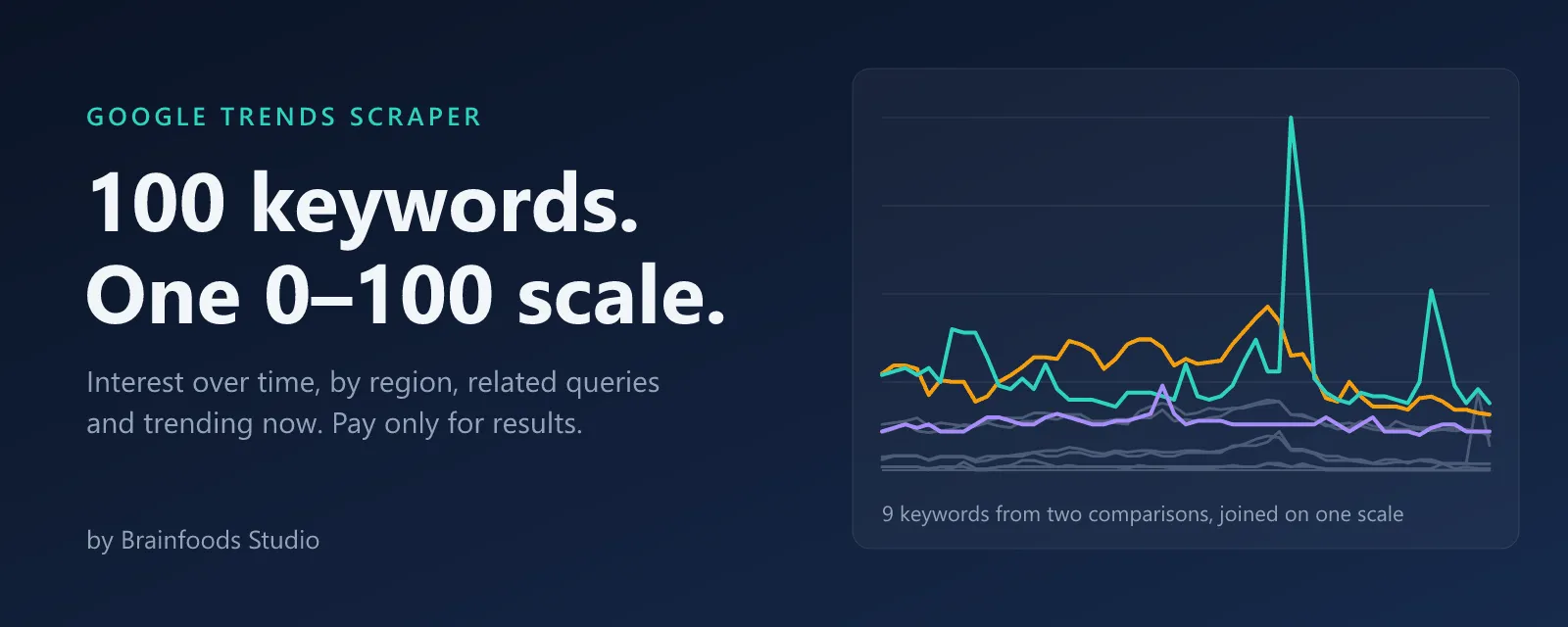
Yes, we're late to the party. This Store already has a crowded shelf of Google Trends scrapers. We built one more because nearly every one we tested still compares 5 keywords at a time, and leaves you to compare a 46 from one chart with a 100 from another. So we brought the missing piece: one scale for all your keywords.
Google Trends Scraper is a Google Trends API for keyword research, market research and AI agents. Compare up to 100 keywords on one 0–100 scale (Google stops at 5), and get interest over time, interest by region and city, related queries and trending now as JSON, CSV or Excel.
No login · No Google API key · $2 per 1,000 keywords, less on paid plans · Independent tool, not affiliated with Google
What does Google Trends Scraper do?
- Interest over time for up to 100 keywords, joined on one scale and checked against Google to within 1 point.
- Interest by region: country, state, city or metro area.
- Related queries, top and rising, with breakouts flagged.
- Trending now in any country, with no keywords needed.
- A free summary per keyword: latest, peak, change, year-on-year, and whether it's spiking.
- Premium signals: share of search, breakout score, momentum and seasonality.
Who is it for?
- SEO and content teams picking the next topic to write about, with numbers to show whoever signs off.
- Brand and market researchers tracking share of search against 5, 20 or 100 competitors at once.
- Product and growth teams checking demand for a category before building for it.
- Analysts and AI agents that need clean, comparable numbers instead of a screenshot of a chart.
Use cases
| You want to know | What to switch on |
|---|---|
| Which of 30 product names people search for most | Interest over time, 30 keywords |
| Where in the country a brand is strongest | Interest by region, with regionResolution set to REGION, CITY or DMA |
| What people search for next to your keyword | Related queries (rising) |
| What's spiking today in the UK | Trending now, with geo set to GB |
| Your brand's share of search, week after week | Signals, on a weekly schedule |
Compare more than 5 keywords on one scale
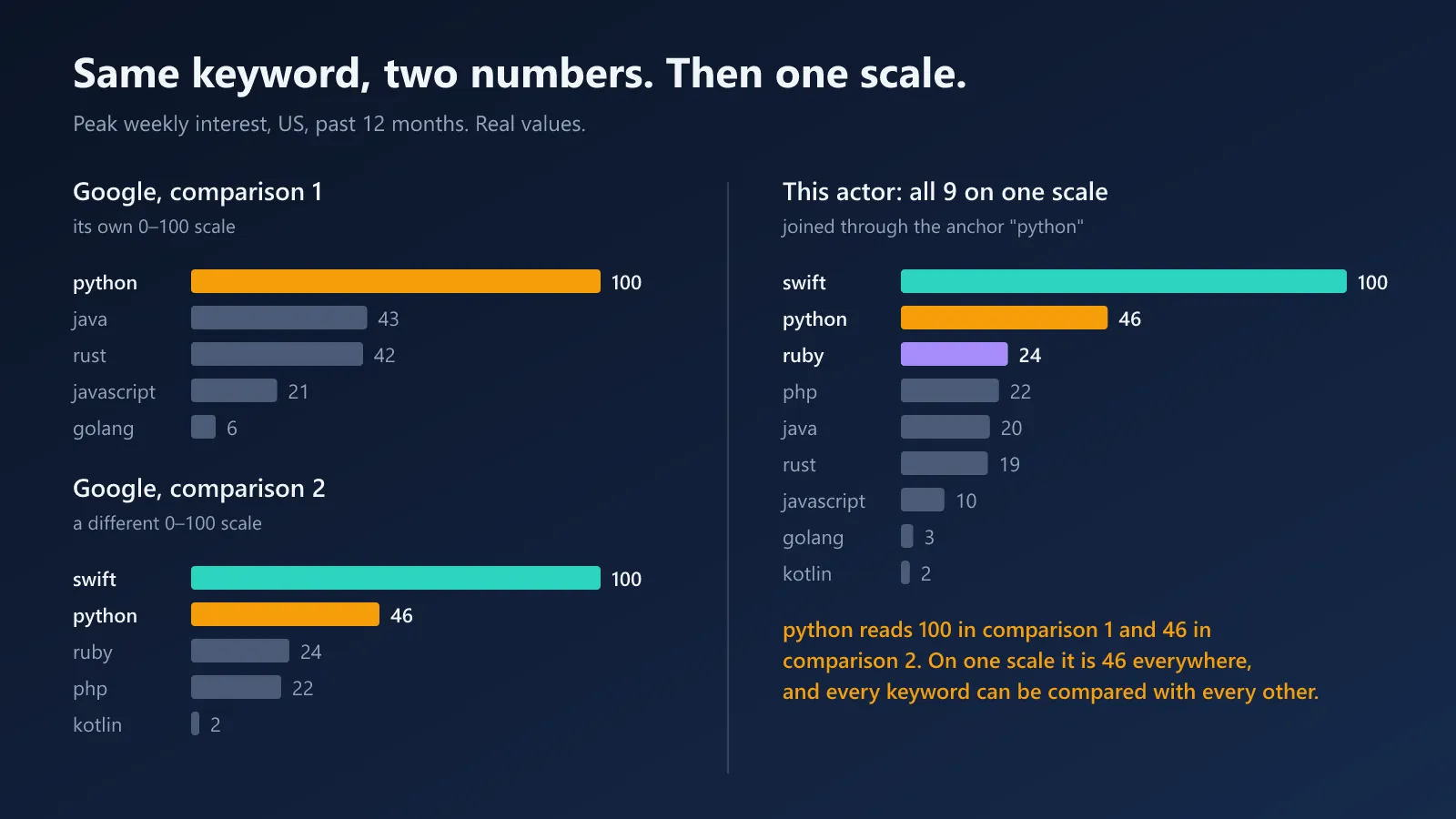
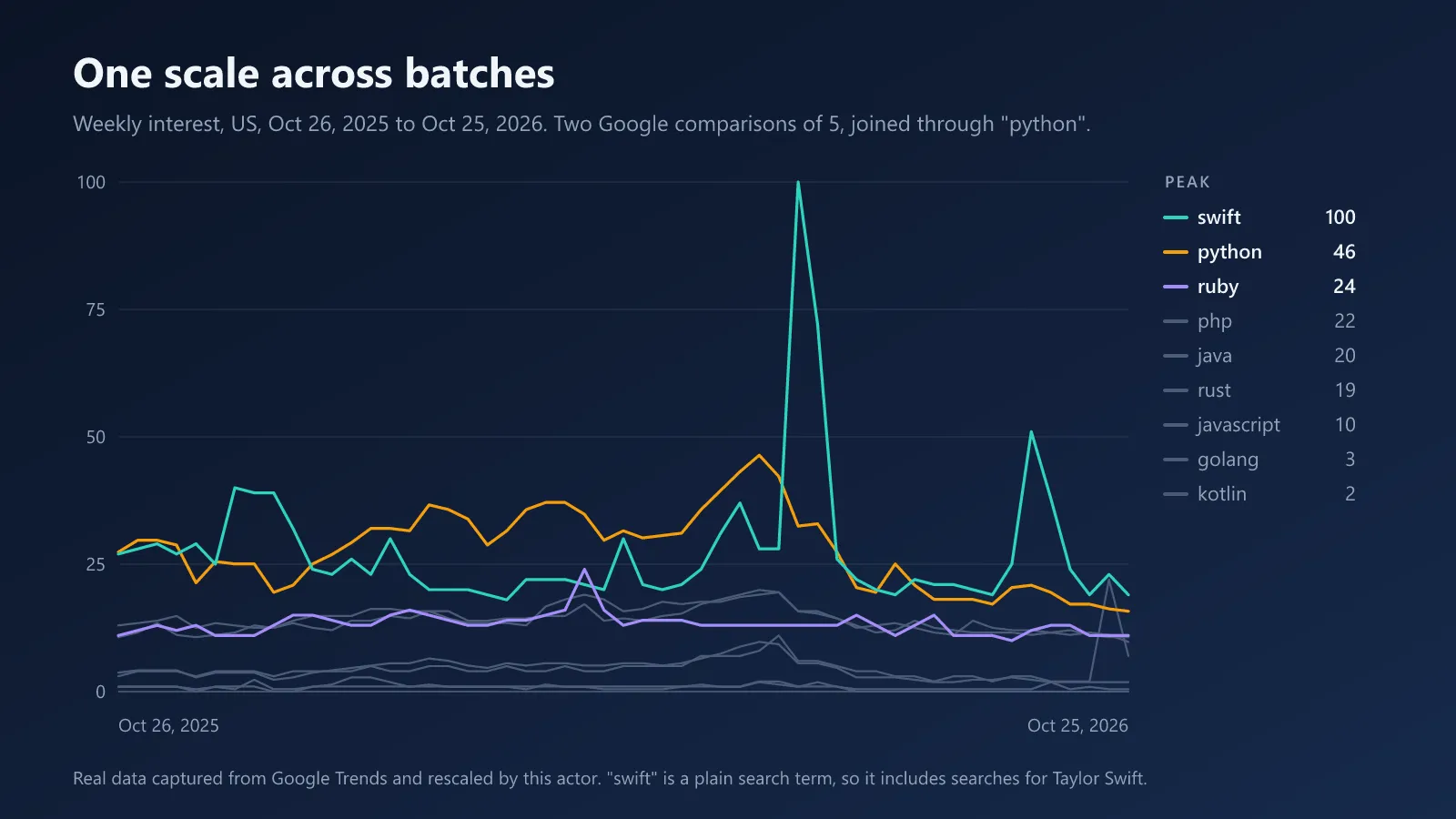
Google Trends gives every comparison its own 0–100 scale. The same keyword can read 100 in one comparison and 46 in another, so numbers from different comparisons can't be put side by side.
This actor puts one anchor keyword in every batch. The anchor shows how each batch relates to the first, and every value is scaled to match. The result is one scale for the whole run, with 100 at the highest point of any keyword.
Of the 11 most-used keyword actors on the Apify Store we checked on 1 November 2026, 10 compare at most 5 keywords on one scale.
What we measured
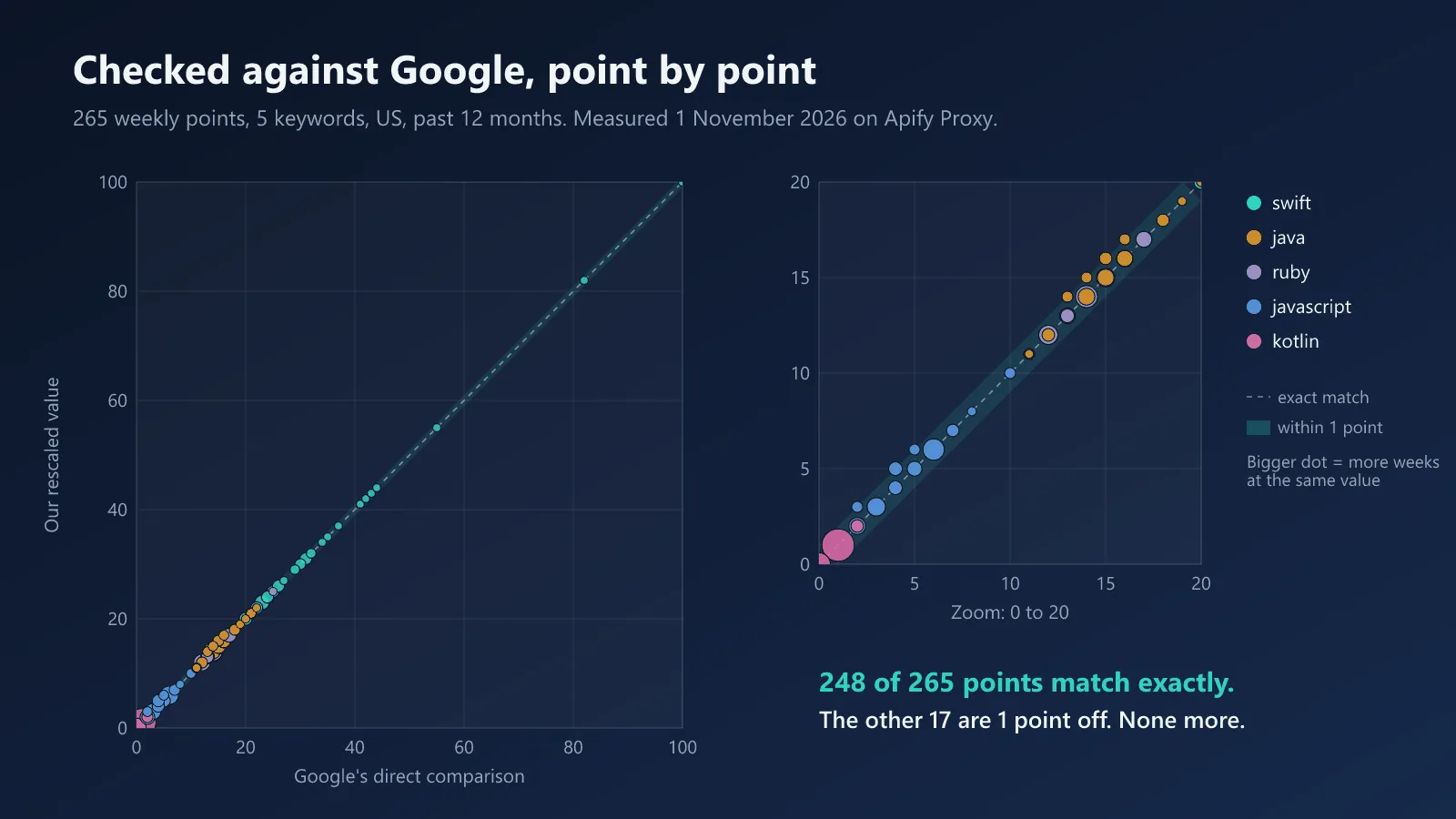
On 1 November 2026 we joined 9 keywords on one scale, then compared them with a direct Google comparison of 5 of them, taken from both batches. US, past 12 months, 265 weekly points.
| Check | Result |
|---|---|
| Rescaled values vs a direct Google comparison | 248 of 265 points match exactly; the other 17 are 1 point off |
| Same run repeated 8 times on fresh Apify Proxy addresses | identical numbers every time |
| Google's own numbers across repeat asks, including low-volume terms | identical within the same day |
| Requests on Apify Proxy, 10 keywords with regions | 27 of 27 succeeded, in 31 seconds |
Built to finish the run
- Every request runs in a warmed-up session with its own cookies and proxy address, and requests are paced.
- Rate limits and block pages get up to 4 attempts, with a growing pause. A session that stops working is replaced.
- On Apify Proxy, datacenter addresses are used first. After repeated rate limits, the actor moves to residential addresses if your plan has them.
- A failed keyword never fails the run. It gets an error row, and every other keyword still finishes.
- A
STATSrecord shows the requests, rate limits, retries and session changes of every run.
How to use the Google Trends scraper
- Click Try for free.
- Enter up to 100 keywords and a location, for example
US,GBorUS-CA. Leave the location empty for worldwide. - Pick a time range, from the past hour to 2004 until now, and switch on what you need.
- Click Start. The results land in the run's dataset.
- Download them as JSON, CSV or Excel, or run the actor from the Apify API or on a schedule.
Input example
With more than 5 keywords, rescaling is on by default. Set rescale to always to put even 2 to 5 keywords through the same join, or to never to keep Google's batches of 5. anchorKeyword is optional; by default the most popular keyword of the first batch is used. When no rescale happens, the anchor is ignored and not charged.
More ready-to-run inputs
| Use case | Input |
|---|---|
| Brand vs competitors, by state, 5 years | {"keywords": ["nike", "adidas", "puma", "new balance", "asics", "reebok"], "geo": "US", "timeRange": "today 5-y", "includeRegions": true, "regionResolution": "REGION"} |
| YouTube search interest | {"keywords": ["mrbeast", "pewdiepie", "markiplier"], "property": "youtube", "timeRange": "today 12-m"} |
| Trending now, no keywords | {"includeTrending": true, "includeTimeseries": false, "geo": "GB"} |
| Last 7 days, hourly | {"keywords": ["bitcoin", "ethereum"], "timeRange": "now 7-d"} |
Use it from an AI agent
Add the actor to any MCP client (Claude, Cursor, VS Code and others) through Apify's hosted MCP server:
Then ask in plain words: "Compare Google interest in python, rust, go, kotlin, swift, java and php in the US over the past 12 months, on one scale, and tell me which grew fastest." Your client signs in to Apify the first time. See Apify's MCP docs.
Integrations
Everything runs on Apify, so it plugs into the tools you already use:
- Apify API and SDKs (JavaScript, Python) to start runs and read results from your own code.
- Schedules to run daily or weekly. Monitor mode then returns only what's new.
- Make, Zapier and n8n to send rows to Google Sheets, a CRM or a database without writing code.
- Webhooks and Slack to get a message when a run finishes or something new turns up.
- MCP for Claude, Cursor and other AI agents, as shown above.
See Apify integrations.
What you get
| Row type | One row per | Main columns |
|---|---|---|
timeseries | keyword and period | date, value (0–100), scaled, batch |
summary | keyword, free | latest, peak, average, changePct, yoyChangePct, trend, isSpiking, lowPrecision |
region | keyword and place (country, state, city or metro area) | geoCode, geoName, value, rank, lat and lng for cities |
related | keyword and related query, top or rising | metric, query, value, isBreakout, link |
trending | trending search in a country | title, approxTraffic, pubDate, newsCount, first news title and link |
error | failed step | stage, errorKind, message, attempts |
Web, YouTube, News, Images or Shopping search; any Google Trends category; any country or region.
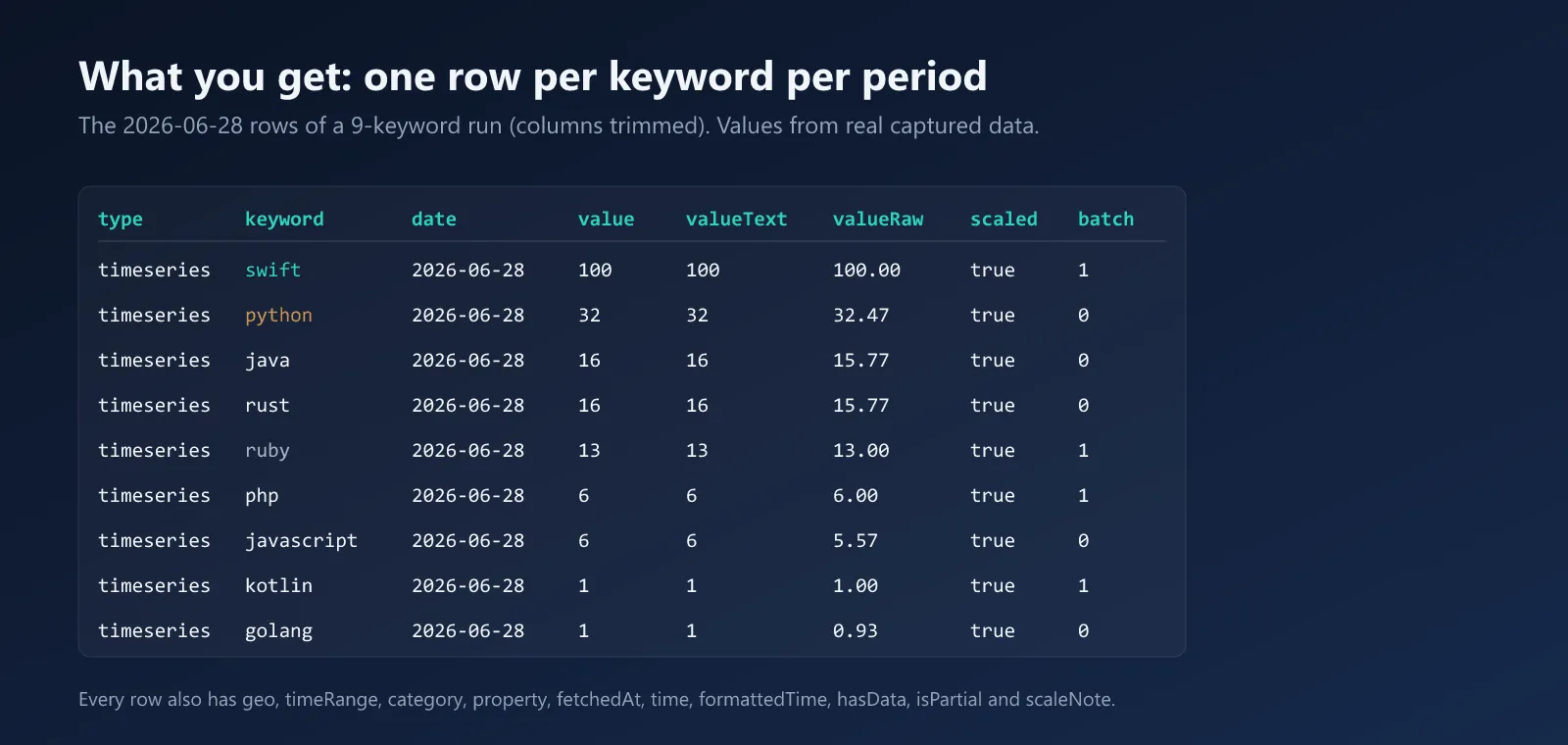
One timeseries row from the input example above:
How to read the numbers
-
Start with the summary rows. One per keyword:
changePctcompares the last quarter of your range with the first,yoyChangePctcompares the latest week with the same week a year earlier (when the range reaches back a year), andisSpikingflags a latest value at least 2× the usual level. WhenlowPrecisionis true, the keyword averages below 5 on this run's scale: a move from 1 to 0 reads as −100%, so treat its percentages as rough. Turn summaries off withincludeSummary: false. -
100 is the peak, not a search count. The highest point of any keyword in your run is 100. Everything else is a share of that peak.
-
Numbers depend on the set. Add a bigger keyword and every other keyword shrinks in proportion. That's why some values are lower than on Google, and why you should compare keywords inside one run.
-
0 means too little data, not zero searches. Check
hasDatato tell "no data" from "low". -
The last period may be partial. Rows with
isPartial: truecover a week or day that isn't over yet. -
Regions have their own scale. In region rows, 100 is the place where the keyword takes the largest share of all searches.
-
Check the math. Every row carries
valueRaw,scaledandbatch. Rows from a batch where the anchor was weak havescaleNote: "low_precision". -
Google can redraw its sample from day to day, so a run next week may differ slightly. Within one run, every keyword comes from the same day's data.
Premium features
Signals: share of search, breakout, seasonality
Set includeSignals: true and every keyword gets a signal row:
| Field | What it means |
|---|---|
shareOfSearch | the keyword's share of all your keywords' search interest over the last 4 periods, in % |
shareRank, shareChangePts | rank by share, and how the share moved from the first to the last quarter of your range, in percentage points |
breakoutScore, isBreakout | 0–100: how far the last 4 periods sit above the keyword's own baseline. A breakout needs a score of 60 or more |
momentumPct | the trend of the last 8 periods, in % of their average per period |
peakMonths, seasonalityStrength | for ranges of 2 years or more: the 3 strongest months, and how seasonal the keyword is |
comparable | true when all keywords share one scale, so the shares add up across your keywords |
On 6 sportswear brands over 5 years (1 November 2026): Nike had 53.9% share of search, down 14.2 points over the range, with peak months December and November. Signals need everything on one scale, which is what this actor does that others don't.
Monitor mode: only what's new
Set monitorKey to any name and run the actor on a schedule. Each run remembers what it returned, and the next run with the same name returns only trending searches and related queries you haven't seen yet, so you pay only for new results. Add deliveryWebhookUrl (a Slack incoming-webhook URL or any HTTPS endpoint) and a short alert with a link to the results is posted whenever something new turns up. The first run only builds the memory and never alerts. Use one monitorKey per schedule.
In monitor mode, interest over time and by region are always returned in full. Alerts list new trending searches, new related queries, and keywords that have just started spiking.
Pricing
You pay per keyword that returns data, not per row. A full 12-month weekly series for one keyword is one charge.
| Result | Free plan | Bronze | Silver | Gold and up |
|---|---|---|---|---|
| Interest over time, per keyword | $0.002 | $0.001 | $0.00075 | $0.0005 |
| Interest by region, per keyword | $0.001 | $0.0007 | $0.0005 | $0.0004 |
| Related queries, per keyword | $0.001 | $0.0007 | $0.0005 | $0.0004 |
| Related topics, per keyword | $0.001 | $0.0007 | $0.0005 | $0.0004 |
| Trending now, per country | $0.002 | $0.001 | $0.00075 | $0.0005 |
| Signals, per keyword (premium) | $0.003 | $0.002 | $0.0018 | $0.0015 |
| Monitor alert, per alert sent | $0.01 | $0.01 | $0.01 | $0.01 |
- Charged only after your results are saved. Never for error rows or empty results.
- Never past your spending limit. When the limit is reached, the actor stops starting new work, and the run still succeeds.
- No extra start fee. Only Apify's standard run start charge of $0.00005 applies.
- Summary rows are free. Rescaling is included in the interest-over-time price. An anchor that isn't in your list is charged for its interest over time only.
What typical runs cost, before the start charge:
| Run | Free plan | Bronze |
|---|---|---|
| 1 keyword, interest over time | $0.002 | $0.001 |
| 10 keywords, over time and by region | $0.03 | $0.017 |
| 50 keywords, over time, by region and related queries | $0.20 | $0.12 |
| 100 keywords on one scale, over time | $0.20 | $0.10 |
| Trending now in 5 countries | $0.01 | $0.005 |
FAQ
Do I need a Google account or an API key?
No. You only need an Apify account. Click Try for free, enter your keywords and start.
Is there an official Google Trends API?
Google announced an official Trends API in July 2025 and opened it in alpha to a limited group of testers. This actor works today for anyone with an Apify account, with no separate Google API key and no waitlist.
How many keywords can I compare?
Up to 100 per run, including the anchor, all on one scale. Each run is scaled on its own, so values from two runs can't be compared as they come. For more than 100, run the batches on the same day with the same anchor keyword, then divide each run's values by that run's anchor values to join them.
What about related topics?
You can switch them on. Google currently returns no related topics for most searches. When it does, they're included. When the list is empty, you get no rows and no charge.
Which languages and time ranges apply?
Labels, topic titles and region names are in English. Past-hour and past-4-hour ranges return one point per minute, so expect large row counts.
Legal note
This actor does not solve captchas and does not try to get around anti-bot checks. It respects Google's rate limits by waiting and backing off. Use the data in line with Google's terms and the laws where you live.
More from Brainfoods Studio
- Google News Scraper: articles by search, topic or top stories, past the 100-article cap, with real publisher URLs.
- Google Ads Transparency Scraper: every ad a brand runs on Google, by name, ID or website, with dates, countries and ad text.
- Google Play Scraper: app details and reviews, plus an App health report that shows which release hurt the rating.
Support
We're the new kids on this Store, so every issue gets an answer from the people who wrote the code. Found a problem, or need a field we don't return yet? Open an issue in the Issues tab. And if this actor saved you an afternoon, a review helps the next person find it.
Built and maintained by Brainfoods Studio.


