

Google Sheets Import & Export: No OAuth, 1,000 Rows Free
Pricing
from $0.50 / 1,000 rows
Google Sheets Import & Export: No OAuth, 1,000 Rows Free
Export any Apify dataset to Google Sheets, or import a sheet into a dataset, using your own service account: no OAuth screen, no expiring tokens. The first 1,000 rows of every run are free. Append, replace, or upsert rows. Works as a run integration on any scraper.
Pricing
from $0.50 / 1,000 rows
Rating
0.0
(0)
Developer

Bridgeworks
Maintained by CommunityActor stats
0
Bookmarked
2
Total users
2
Monthly active users
a month ago
Last modified
Categories
Share
Google Sheets Import & Export: service account, nothing expires
Export any Apify dataset to Google Sheets, or import a sheet into a dataset. Authentication is a Google service account: you paste a JSON key once, share your sheet with one email address, and it works forever. No OAuth consent screens, no tokens that expire mid-schedule, no re-authorizing after a week.
If your current Sheets integration keeps failing with cryptic auth errors, that is exactly the problem this Actor removes. OAuth-based Sheets connectors break when tokens expire or Google tightens app verification. A service account is a machine identity: it cannot expire that way, and every error this Actor can hit comes back as a plain-English message telling you the fix.
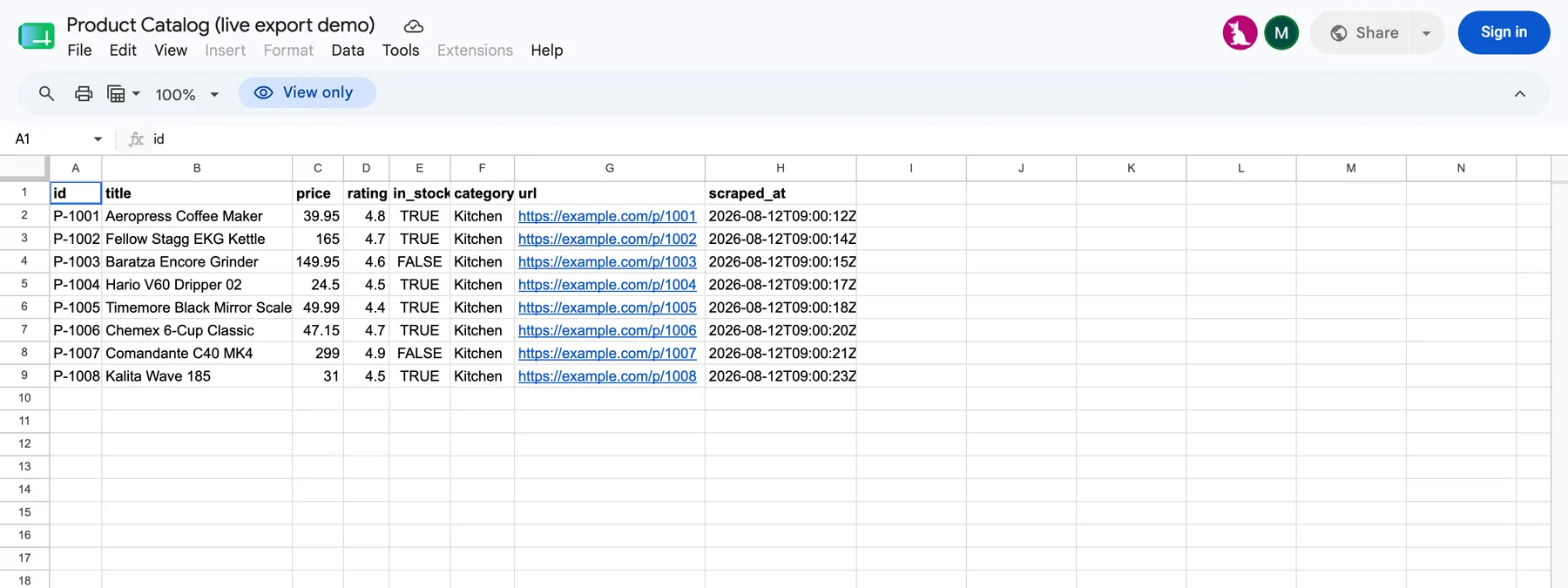
What it does
Export (dataset → sheet)
- Reads any Apify dataset by ID, or the default dataset of the run it is attached to (works as a run integration: scrape → auto-export).
- Three write modes:
- replace: write everything fresh. The new data is staged into a temp tab and atomically swapped into place, so even a mid-write failure can never leave you with a cleared sheet and no data. Tradeoff, stated plainly: the swap gives the tab a new identity, so formulas in OTHER tabs that reference this tab (
='My Tab'!A1) break with#REF!after a replace, and links using the tab's gid change. If other tabs reference your data, use append or upsert, which edit the tab in place and keep every reference intact. - append: add rows under existing data; new columns get merged into the header
- upsert: match rows on a key column (
id,url, ...); update changed rows in place, append new ones, skip identical ones. Comparison is type-aware (booleans, numbers, dates), so an identical scheduled re-run really is a no-op, and columns you maintain by hand in the sheet (anotescolumn, say) are never touched or blanked by an update.
- replace: write everything fresh. The new data is staged into a temp tab and atomically swapped into place, so even a mid-write failure can never leave you with a cleared sheet and no data. Tradeoff, stated plainly: the swap gives the tab a new identity, so formulas in OTHER tabs that reference this tab (
- Flattens nested JSON to dot-notation columns (
user.address.city), joins primitive arrays (a, b, c), JSON-encodes structured arrays. - Creates the tab automatically if it does not exist.
- Handles 100K+ rows in both directions: writes are batched and paced under Google's per-user write quota, reads are paged, and 429/5xx get exponential-backoff retries.
- Formula-injection safe: scraped cells starting with
=,+or@are stored as literal text, never executed as formulas in your sheet. - Truncates cells that exceed Google's 50,000-character limit instead of failing the whole run.
Import (sheet → dataset)
- Reads a whole tab or an A1 range (
A2:F500), paged, so very large sheets import without memory or response-size failures. - First row as header (dataset items keyed by column names) or positional
column_1..n. - Values arrive typed: numbers stay numbers, booleans stay booleans, empty cells become
null. Or switch to formatted strings if you want what the sheet displays.
Quickstart (export)
- Create a service account and paste its JSON key (3-step setup below, ~2 minutes, one time ever).
- Share your spreadsheet with the service account's email as Editor.
- Fill the input: spreadsheet URL, tab name, dataset ID (or leave empty and attach the Actor to another Actor's run).
- Run. Your data is in the sheet.
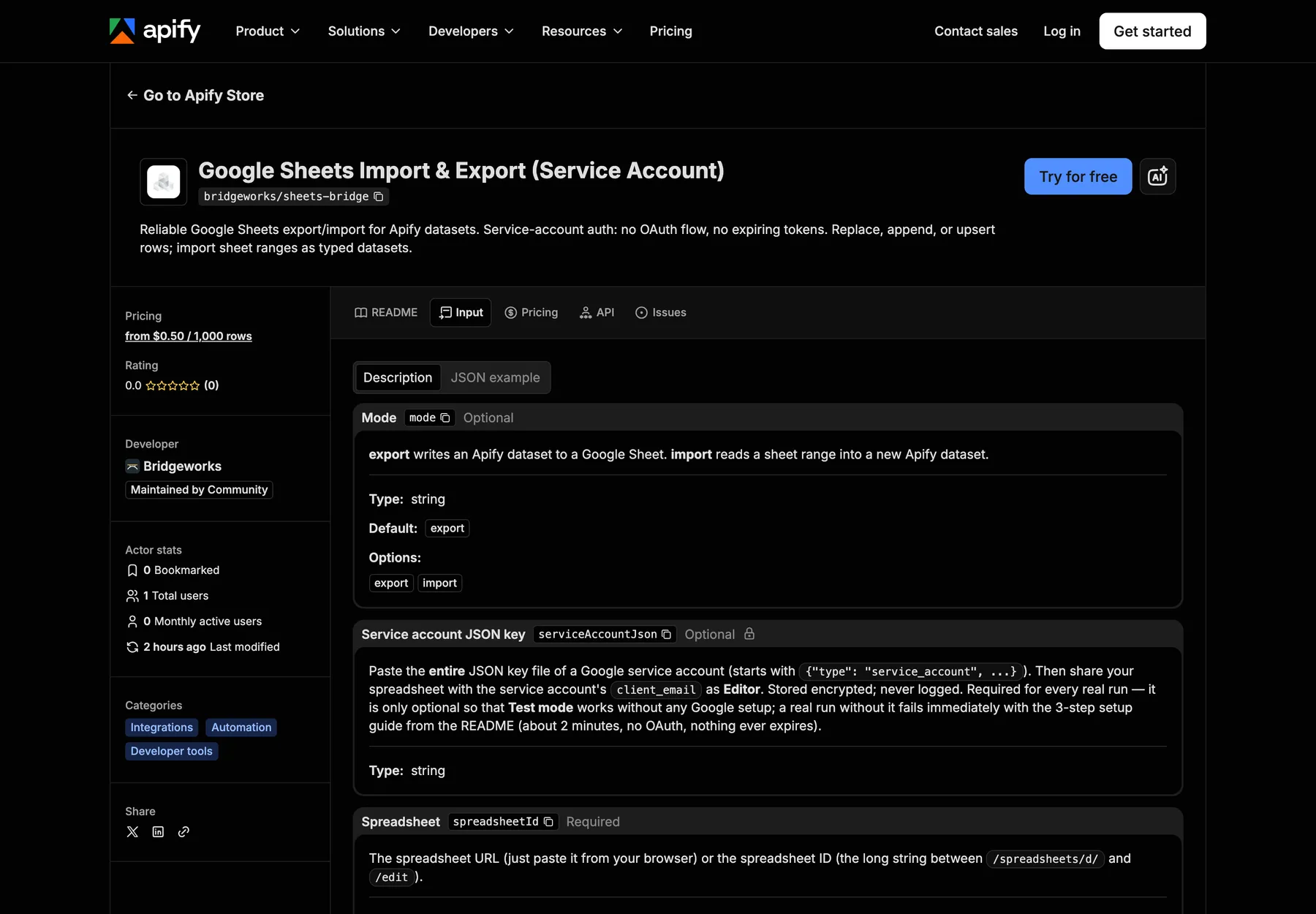
Service account setup (one time, ~2 minutes)
- Enable the API. Go to console.cloud.google.com, create or pick a project, and enable the Google Sheets API (direct link).
- Create the key. IAM & Admin → Service Accounts → Create service account (any name, no roles needed) → open it → Keys → Add key → Create new key → JSON. A
.jsonfile downloads. - Paste and share. Paste the entire file into this Actor's Service account JSON key field (it is stored encrypted and never logged). Open the downloaded file, copy the
client_emailvalue (looks likesomething@yourproject.iam.gserviceaccount.com), and share your spreadsheet with that email as Editor, same as sharing with a person.
That's it. The key does not expire. You never do this again.
Errors that tell you what to do
Every failure path returns a specific, actionable message instead of a stack trace:
| Situation | What you'll see |
|---|---|
| Sheet not shared with the service account | "Share the sheet with <your-sa-email> as Editor", with the exact email filled in |
| Sheets API not enabled on your project | A direct enable link with your project ID filled in |
| Wrong spreadsheet ID / URL | Where exactly in the URL the ID lives |
| Pasted an OAuth client secret instead of a service-account key | Which file you grabbed by mistake and where the right one is |
| Truncated/corrupted private key | How to mint a fresh key in two clicks |
| Google quota hit | Retried automatically with backoff; only surfaces if it truly persists |
| Bad tab name or A1 range | Which of the two it is, and that tab names are case-sensitive |
Pricing: the first 1,000 rows of every run are free
| What | Price |
|---|---|
| Runs that read or write up to 1,000 rows | Free |
| Run fee, only once a run passes 1,000 rows | $0.01 |
| Each row beyond the first 1,000 | $0.0005 ($0.50 per 1,000) |
Most scheduled exports (a daily scrape of a few hundred rows, a weekly sync) never pay anything. A 5,000-row export costs $2.01. Upsert runs count only rows actually written, so unchanged rows are free too. Demo runs are always free. No subscription, no rental fee.
If your run has a spending limit (maxTotalChargeUsd) that does not cover the whole job, the Actor processes the free rows plus whatever the limit covers, tells you how many rows were skipped, and never charges for work it did not do.
Use as a run integration
Attach this Actor as an integration on any scraper: when the scraper finishes, this Actor runs with the scraper's default dataset and pushes the results into your sheet. Leave Dataset ID empty and the run's dataset is used automatically. With upsert mode and a key column, a scheduled scraper maintains a living sheet: new items appended, changed items updated, untouched rows left alone.
Input reference
See the input schema in the console for full descriptions. The short version:
| Field | Notes |
|---|---|
mode | export (default) or import |
serviceAccountJson | The whole JSON key file, pasted as-is. Secret field, encrypted at rest. |
spreadsheetId | Spreadsheet URL or bare ID |
sheetName | Tab name; auto-created on export. Default Sheet1 |
datasetId | Export source; empty = the run's default dataset |
exportMode | replace / append / upsert |
keyColumn | Required for upsert, e.g. id or user.email (dot notation for nested fields) |
range | Import only; A1 range, empty = whole tab |
headerRow | Import only; first row provides field names (default on) |
valueRender | Import only; typed (default) or formatted |
testMode | Runs the whole pipeline against an in-memory fake, so you can try the Actor without any Google setup |
FAQ
Why a service account instead of OAuth? OAuth was designed for apps acting on behalf of a user, which drags in consent screens, app verification, and refresh tokens that expire or get revoked. For an automation writing to a sheet on a schedule, a service account is the mechanism Google built for exactly this. One shared email, one pasted key, zero moving parts afterward.
Is my key safe? The field is marked secret, so Apify stores it encrypted and this Actor never logs it. The key's only power is what you share with it: a service account with no roles can touch nothing except sheets explicitly shared with its email. You can revoke the key any time in Google Cloud Console.
Does it work with sheets on a Google Workspace domain? Yes, as long as the domain allows sharing with the service-account email. If your admin restricts external sharing, ask them to allow it or create the service account inside your own Workspace project.
Can it write to a specific range or cell offset? Export always writes tables starting at A1 (header) with data below. For partial-range surgery, use import to read, transform in your own Actor, and re-export.
What about datasets bigger than 100K rows? Fine, both ways. Exports are written in batches of 5,000 with ~1.1s pacing that stays under Google's binding quota (60 write requests/min/user); a 100K-row export is ~20 write calls. Imports and upsert reads are paged in 20,000-row chunks. The practical ceiling is Google's own: 10 million cells per spreadsheet.
What happens to rows without a key column value in upsert mode? They are skipped and counted in the run summary, not appended. Appending them would silently duplicate those rows on every scheduled run.
What happens on a Google outage or rate limit? 429 and 5xx responses are retried up to 5 times with exponential backoff and jitter. Only a persistent failure surfaces, and the message says whether to wait, split the export, or check Google's status page.
Import gives me numbers as strings?
Set Cell value type to typed (the default). If you see strings anyway, your sheet cells are literally text-formatted; either fix the sheet formatting or keep formatted and parse downstream.
Can I try it without a Google account? Yes. Turn on Test mode and run: the whole pipeline executes against an in-memory fake Sheets API, so you can see the run flow, output summary, and dataset handling before doing any setup.
Is scraped content safe to write into my sheet?
Yes. Under the default USER_ENTERED mode, any cell that starts with =, + or @ is escaped to literal text, so a scraped page can never plant an =IMPORTXML or =HYPERLINK formula in your spreadsheet. RAW mode stores strings verbatim and never executes anything.
Whether you got here searching for a Google Sheets export for your dataset, a Google Sheets import into Apify, or just a Sheets integration that does not break on OAuth, this Actor is built to be the one you stop thinking about.
More from Bridgeworks
We build small, dependable data plumbing for automations and AI agents. Every Bridgeworks Actor has a free demo run, plain-English errors, and pay-per-event pricing that AI agents can call directly.
- Google Sheets Import & Export: push any Apify dataset into Google Sheets (or pull a sheet back in) using service-account auth, so nothing ever expires mid-schedule.
- AI Answer Watch: track what ChatGPT Search, Google AI Overviews, and Perplexity say about your brand, with share-of-voice scoring and change alerts.
- Job Board Monitor: watch any company's Greenhouse, Lever, or Ashby board and get events the moment a job is added, changed, or closed.
Built by Bridgeworks: clear errors, honest metering, and nothing that expires.


