

Apple App Store Reviews Scraper – iOS, Worldwide
Pricing
from $0.07 / 1,000 reviews
Apple App Store Reviews Scraper – iOS, Worldwide
Scrape Apple App Store reviews for any iOS app from every country's storefront in one run, by app ID, URL or name, with a since-date filter: rating, title, text, version, date, votes. Optional translation, topics and sentiment with your own Claude key. $0.10 per 1,000 reviews.
Pricing
from $0.07 / 1,000 reviews
Rating
0.0
(0)
Developer

Brisa Works
Maintained by CommunityActor stats
0
Bookmarked
2
Total users
1
Monthly active users
2 days ago
Last modified
Categories
Share
This Apple App Store reviews scraper collects iOS app reviews from every country's App Store storefront in one run, straight from Apple's official customer-review RSS feed. Add apps by ID, App Store URL or name, and keep only reviews since a date. For each review you get the rating, title, full text, app version, date and helpful votes. Optionally, translate every review into one language and tag topics and sentiment with your own Claude API key. No login, no browser, no proxy. $0.10 per 1,000 reviews.
Contents: What it does · Use cases · How to use · Input · Output · How it compares · Pricing · Use with AI agents (MCP) · API · Schedules and integrations · Example tasks · Limits · Data source · Privacy · FAQ
What it does
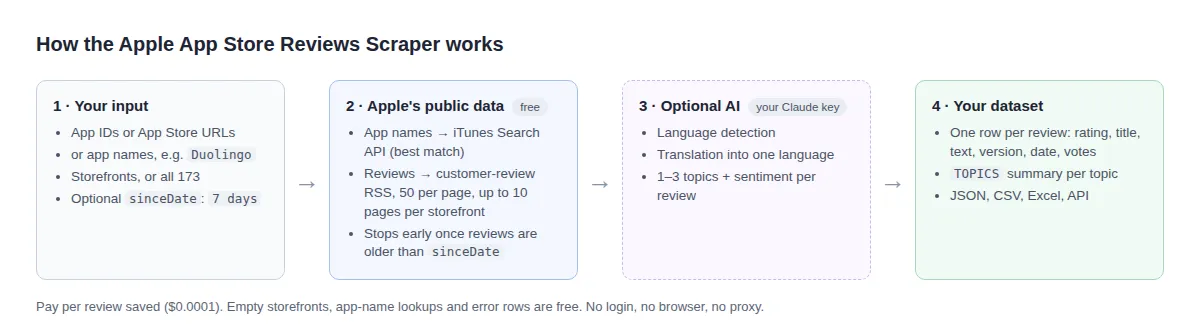
- Every storefront in one run. Reads Apple's per-country customer-review feed for each app and storefront you choose, or all 173 storefronts at once. Storefronts with no reviews return nothing and cost nothing.
- Apps by ID, URL or name. Paste app IDs (
284882215), App Store links, or plain names (Duolingo). A name is looked up in Apple's free iTunes Search API, and the best match in your first storefront is used. The run log names the app it picked, and each review row carries the app's name. - Only new reviews with
sinceDate. Keep reviews posted on or after a date (2026-10-01) or a relative date (7 days). With the most-recent order the Actor stops reading a storefront as soon as it reaches older reviews, so a weekly run makes few requests and you pay only for the new reviews. - Up to 500 reviews per storefront (Apple's feed limit), most recent or most helpful first.
- Optional AI layer (your Anthropic key): detects each review's language, translates title and text into the language you pick, tags 1–3 topics ("login problems", "subscription price"…) and a sentiment, and saves a topic summary (
TOPICS) with review counts, average rating and storefronts per topic. - Privacy by default: reviewer nicknames are left out unless you turn them on.
Use cases
1. One app, every country. See how your app is received in each market, including the small ones you never check by hand.
2. Competitor sweep by name. Pull the latest reviews of the apps you compete with, without looking up their IDs first.
3. Weekly monitoring. Schedule a run every Monday that keeps only the last 7 days of reviews in your main markets.
4. Read foreign-language reviews in English. Translate German, French and Japanese reviews into English with your own Anthropic key.
5. What users complain about after a release. Tag topics and sentiment on every review since the release date, then read the TOPICS summary: the most-mentioned topics with their average rating.
How to use
- Add one or more apps: app IDs or App Store links under Apps (the ID is the number after
idin the URL), or names under Apps by name. - Choose storefronts (e.g.
us,gb,de) or switch on All storefronts. - Optionally set Only reviews since to a date or a relative date such as
7 days. - Optionally set Translate into and/or Tag topics and sentiment and add your Anthropic API key.
- Run, then export the dataset as JSON, CSV or Excel, or read it through the Apify API.
- Schedule the Actor (e.g. weekly with
sinceDate: "7 days") to keep a running archive, and connect the dataset to your tools with Apify integrations.
Input
| Field | Description |
|---|---|
appIds | App IDs or App Store URLs, e.g. 284882215 or https://apps.apple.com/us/app/facebook/id284882215. |
appNames | App names to look up, e.g. Duolingo. The best match in the first storefront you chose (US with All storefronts) is used. Use IDs when you need an exact app. |
countries / allCountries | Storefronts to read (two-letter codes, default us), or all 173. |
maxReviewsPerCountry | Up to 500 per storefront (default 100). |
sortBy | mostrecent (default) or mosthelpful. |
sinceDate | Keep reviews on or after this date: YYYY-MM-DD, a full ISO timestamp, or relative (7 days, 2 weeks, 1 month; a month counts as 30 days). Empty means all reviews. |
translateTo, classifyTopics, anthropicApiKey, model | Optional AI enrichment with your key (default model claude-haiku-5-5). |
includeAuthorNames | Off by default (see Privacy). |
Add at least one app in appIds or appNames. Example:
Output
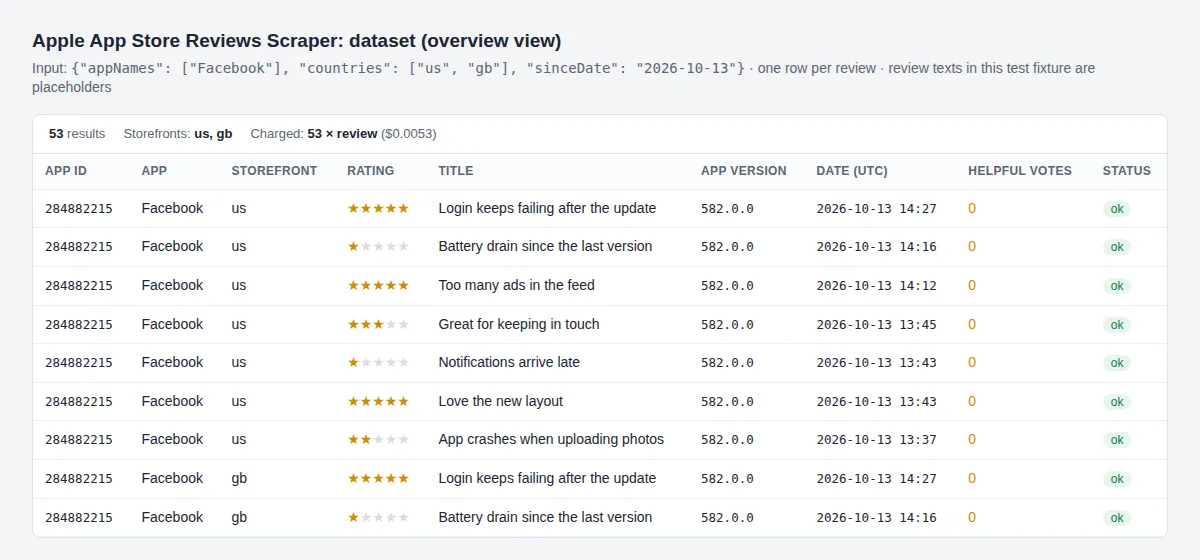
One row per review. The IDs, rating, version, date and votes below come from Apple's US feed page recorded on 13 Oct 2026; the title and text are placeholders:
| Field | Meaning |
|---|---|
appId | The App Store app ID. |
appName | The app's App Store name, on rows of apps you added by name. |
country | Storefront the review was written in (two-letter code). |
reviewId | Apple's review ID; use it to remove duplicates across scheduled runs. |
rating | Stars, 1 to 5. |
title, content | Review title and full text, in the reviewer's language. |
appVersion | App version the reviewer had installed. |
reviewedAt | Date and time of the review, ISO 8601 in UTC. |
voteSum, voteCount | Helpful votes and total votes from other App Store users. |
status, error | ok for reviews; error or not_found on free rows. |
- With AI enrichment each row also has
language,translatedTitle,translatedContent,topicsandsentiment. - With topic tagging on, the key-value store gets a
TOPICSrecord, sorted by review count (illustrative values):
- A storefront that fails returns one free row with
status: "error". An app name with no match returns one free row withstatus: "not_found", the name and the storefront.
How it compares
Facts from each Actor's own README and input schema, read on 22 Oct 2026. Prices are each Actor's base price per 1,000 reviews.
| This Actor | thewolves/appstore-reviews-scraper | johnvc/apple-app-store-reviews-api | sourabhbgp/apple-app-store-scraper | |
|---|---|---|---|---|
| Storefronts per run | all 173, or any list | one country per run | one country per run (52 in its list) | a countries list (50+) |
| Input | app IDs, App Store URLs, app names | app IDs + country, or App Store URLs | app IDs, or one app name | app IDs or App Store URLs |
| Look up an app by name | yes, free | not listed | yes (app_name) | separate search mode |
| Reviews per storefront | up to 500 (Apple's feed limit) | up to 500 | about 1,250 per app (50-page cap) | "a few hundred to a few thousand", varies by run |
| Sort orders | most recent, most helpful | not listed | 4 (recent, helpful, favorable, critical) | 2, noted as "not honored" by Apple |
| Only reviews since a date | yes (sinceDate, also relative) | not listed | not listed | yes (sinceDate) |
| Translation, topics, sentiment | yes, with your Anthropic key | not listed | not listed | not listed |
| Reviewer names | opt-in, off by default | included | included | included |
| App details, charts, in-app purchases | no | no | no (separate Actors) | yes |
| Proxy | none needed | rotated inside the Actor | not stated | Apify residential proxies |
| Delivery to Notion etc., custom map function | no (use Apify integrations) | yes | not listed | not listed |
| Price per 1,000 reviews | $0.10 | $0.10 | $1.50, plus $0.02 per run | $2.00 |
Pick this Actor to read many storefronts at once, to monitor only new reviews, or to translate and tag reviews. Pick a deeper scraper if you need more than 500 reviews from a single storefront, or app details and charts.
Pricing
Pay per event: you pay for the reviews you get, nothing for empty storefronts, app-name lookups or errors.
| Event | Price | Per 1,000 | Charged when |
|---|---|---|---|
review | $0.0001 | $0.10 | A review is saved |
review-enriched | $0.0005 | $0.50 | A review is translated and/or tagged (only with your Anthropic key) |
Apify Bronze, Silver and Gold subscribers pay less:
| Event | Free plan | Bronze | Silver | Gold |
|---|---|---|---|---|
review | $0.0001 | $0.00009 | $0.00008 | $0.00007 |
review-enriched | $0.0005 | $0.00045 | $0.0004 | $0.00035 |
How much does it cost to scrape App Store reviews?
- 10,000 reviews: $1.00 ($0.70 on Gold).
- One app, 50 reviews in each of the 173 storefronts: at most 8,650 reviews, so at most $0.87. Storefronts with fewer reviews cost less.
- A weekly
sinceDate: "7 days"run on an app that gets 200 reviews a week in your markets: $0.02 a week. - 1,000 reviews with translation and topics: $0.10 + $0.50 = $0.60, plus Claude tokens on your Anthropic account (Claude Haiku 5.5 lists at $0.10 per million input and $0.50 per million output tokens).
- Apify adds its standard small run-start fee.
Set a maximum cost per run in the run options: the Actor checks it before saving each review and stops before going over it.
Use with AI agents (MCP)
AI agents can call this Actor through Apify's hosted MCP server at https://mcp.apify.com. Add the server to your MCP client (Claude Desktop, Claude Code, Cursor, VS Code) and enable the tool brisaworks--app-store-reviews. Agents that only know an app's name can pass it in appNames. Example prompt:
"Using brisaworks--app-store-reviews, get the last 14 days of Duolingo reviews in the US and UK and list the three most common complaints."
The agent sends an input like this one:
API
Start a run and get its rows in one call (replace <YOUR_TOKEN> with your Apify API token):
Node.js (npm install apify-client):
Python (pip install apify-client):
Schedules and integrations
- Schedules: in Apify Console, create a schedule (e.g. every Monday at 08:00) for this Actor or one of its tasks. Use a relative
sinceDatethat matches the schedule (7 daysfor weekly,1 dayfor daily) so each run returns only the new reviews. - Webhooks: add a webhook on "run succeeded" to post the dataset URL to your own endpoint, or to Slack through an integration.
- Make, Zapier, n8n: Apify's integrations for these tools can start the Actor and read its dataset, e.g. to append new 1- and 2-star reviews to a Google Sheet or open a ticket for each.
- Exports: every run's dataset downloads as JSON, CSV, Excel, XML or HTML, and the
overviewview keeps the columns shown above.
Example tasks
Ready-made inputs you can run or copy:
- Get an iOS app's reviews from every App Store country
- Scrape App Store reviews by app name, no app ID needed
- Monitor the last 7 days of App Store reviews (weekly)
- Compare App Store reviews of two competing apps
- Read an app's most helpful App Store reviews
Limits
- Apple's feed holds the latest 500 reviews per storefront and sort order, and only reviews that have text (star-only ratings are not included).
- Reviews are per storefront; a review appears only in the country where it was written.
sinceDatefilters the reviews the feed holds; it cannot reach reviews older than the latest 500. Withmosthelpfulthe feed is not in date order, so every page is read and filtered.- An app name gives the best match in one storefront. Names shared by several apps can pick the wrong one: check the run log, or use the app ID.
- Apple publishes no rate limit for the review feeds; the Actor makes two requests a second at most and retries throttled requests with a back-off. Apple asks for about 20 iTunes Search API calls a minute; the Actor makes one per app name.
Data source
- Apple customer-review RSS,
https://itunes.apple.com/{country}/rss/customerreviews/page={1-10}/id={appId}/sortby={mostrecent|mosthelpful}/json, checked live on 2026-10-14 (50 reviews per page, 10 pages). Apple's RSS feed generator (https://rss.marketingtools.apple.com/, read 2026-10-14) publishes these feeds without separate usage terms; reviews remain Apple's and the reviewers' content, so use them for analysis rather than re-publication. - App-name lookup: Apple's iTunes Search API,
https://itunes.apple.com/search?term={name}&country={country}&entity=software&limit=1, documented at https://developer.apple.com/library/archive/documentation/AudioVideo/Conceptual/iTuneSearchAPI/, checked live on 2026-10-22. - Optional AI enrichment: Anthropic Messages API with structured outputs, https://platform.claude.com/docs/en/build-with-claude/structured-outputs.md (read 2026-10-14).
Privacy
Reviewer nicknames can identify people, so they are dropped by default; turn on Include reviewer nicknames only if you have a lawful reason to process them. When you use the AI layer, review titles and texts (never nicknames) are sent to Anthropic under your own API account.
FAQ
Can I get reviews from all countries at once?
Yes. Switch on All storefronts to read all 173 storefronts in one run; storefronts without reviews return nothing and cost nothing.
Can I search for an app by name instead of its ID?
Yes. Put names in Apps by name (appNames). Each name is looked up in Apple's iTunes Search API in the first storefront you chose, and the best match is used. The lookup is free. If nothing matches you get a free not_found row.
How do I get only new reviews?
Set Only reviews since (sinceDate) to a date such as 2026-10-01 or a relative date such as 7 days, and keep the default most-recent order. On a schedule, match it to the interval: 7 days for a weekly run.
Why do I get at most 500 reviews per country?
Apple's review feed holds the latest 500 reviews per storefront and sort order (10 pages of 50). Run the Actor on a schedule to build a longer history.
Do I need an Apple account or API key?
No. The feed and the iTunes Search API are public. A key is needed only for the optional translation and topics, and it is your own Anthropic key.
How much does it cost?
$0.10 per 1,000 reviews on the free plan, down to $0.07 per 1,000 on Gold. Translation and topics add $0.50 per 1,000 enriched reviews, plus your own Claude tokens. See Pricing.
How do I find an app's ID?
Open the app's page on apps.apple.com: the ID is the number after id in the URL (https://apps.apple.com/us/app/facebook/id284882215 → 284882215). You can also paste the whole URL, or use the app's name.
Why does a storefront return no reviews?
Either the app is not sold in that country, or nobody has written a review with text there yet. Those storefronts return nothing and cost nothing. Apple's feed also leaves out star-only ratings.
How do I avoid paying twice for the same review on a schedule?
Use a relative sinceDate that matches your schedule (7 days for weekly) and the default most-recent order. If runs overlap, remove duplicates by reviewId.
Can I scrape Google Play reviews with it?
No, this Actor reads the Apple App Store only.
Support
Open an issue on the Actor's Issues tab; issues are answered within a few days and fixed within 14 days.


