
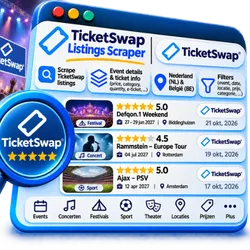
TicketSwap Listings Scraper ($2/1K)
Pricing
from $1.50 / 1,000 listings
TicketSwap Listings Scraper ($2/1K)
Scrape resale ticket listings from TicketSwap: price per ticket with and without fees, face value, quantity, seats, seller note, ticket type, event, date, venue and city. Event, ticket-type or city URLs; available, reserved and sold listings; any currency.
Pricing
from $1.50 / 1,000 listings
Rating
0.0
(0)
Developer

Carabain Digital
Maintained by CommunityActor stats
0
Bookmarked
1
Total users
1
Monthly active users
a day ago
Last modified
Categories
Features
Share
What is TicketSwap Listings Scraper?
TicketSwap Listings Scraper scrapes resale ticket listings from TicketSwap (ticketswap.com), the fan-to-fan ticket marketplace for concerts, festivals, club nights and sports in Europe. You get clean, flat listing data as JSON, CSV, Excel, XML or HTML: the price per ticket with and without fees, the face value, how many tickets, seat numbers, the seller's note, ticket type, event, date, venue and city. Paste event pages, ticket-type pages or city pages; collect available, reserved and recently sold listings, in any currency TicketSwap offers. Prefilled example: 10 listings each for 2 events on the Amsterdam page. Costs $2.00 per 1,000 listings (plus a small start fee).
- 🎟 Every ticket type: an event URL opens all its ticket types (regular, seats, VIP, festival days ...); a ticket-type URL opens just that one
- 🏙 Discover events: paste a city page (
/city/amsterdam/3,/city/berlin/2) and the Actor opens the events it shows first - 💶 Full price picture: buyer price with fees, seller price, face value, and the price in the seller's own currency
- ✅ Sold prices too: switch on
soldto see what tickets actually went for - 💱 Any currency: EUR by default, or GBP, USD, DKK and the other currencies in TicketSwap's menu
- 🔌 Connect anywhere: API, schedules, webhooks, Google Sheets, Make, Zapier, MCP / AI agents
What data can I extract from TicketSwap?
| 🆔 Stable listing ID and URL | 🟢 Status: available, reserved, sold |
| 🎤 Event name, category and URL | 📅 Event date and time |
| 📍 Venue, city, country | 🎟 Ticket type and group (e.g. festival day) |
| 💶 Price per ticket incl. fees | 🧾 Seller price per ticket |
| 🏷 Face value | 🌍 Price in the seller's currency |
| 🔢 Tickets available / in listing | 💺 Section, row and seat |
| 📝 Seller's note | 📊 Tickets available and sold per ticket type |
Fields TicketSwap does not show for a listing stay null (description when the seller wrote nothing); seating is an empty list for standing tickets. No seller names or profile pictures are collected.
How do I scrape TicketSwap listings?
- Create a free Apify account and open this Actor.
- Paste one or more Start URLs: an event page, a ticket-type page, or a city page from ticketswap.com.
- Choose the Listing status (available by default; add sold and reserved if you want them), Max listings per event and, for city pages, Max events.
- Optionally set a Currency such as
GBP. - Click Start, then download the listings from the Output tab as JSON, CSV, Excel, XML or HTML.
How much does it cost to scrape TicketSwap?
You pay per listing that ends up in your dataset: $2.00 per 1,000 listings, plus a small start fee of $0.025 per GB of run memory (the Actor needs a real browser; the default 2 GB run costs $0.05 to start). No subscription. The monthly credit of Apify's Free plan ($5) covers roughly 2,000 listings. Paid plans get volume discounts. Failed runs and events without listings cost nothing apart from the start fee; you can cap spending with Maximum cost per run in the run options. See the Pricing tab for the current prices.
⬇️ Input
| Field | Description |
|---|---|
Start URLs (startUrls) | Event pages, ticket-type pages, or city / category pages of ticketswap.com |
Listing status (statuses) | available (default), reserved, sold, any combination |
Max listings per event (limit) | Stop an event after this many listings (default 50) |
Max events per city / category page (maxEvents) | How many events of such a page to open (default 10) |
Currency (currency) | 3-letter code from TicketSwap's currency menu; empty = EUR |
Proxy (proxyConfiguration) | Apify datacenter proxy (default) |
Which URL to use:
- Event page (
/concert-tickets/<event>-<id>): all ticket types of the event, in the site's order, untillimit. - Ticket-type page (
/<event path>/<type>/<number>, the page you get when you click a ticket type): only that type. - City page (
/city/amsterdam/3,/city/berlin/2): the firstmaxEventsevents on it, soonest first. Country and category pages (/netherlands,/concert-tickets) show events near the proxy's location (a US datacenter IP gets US events), so prefer city pages. - Events that already started are closed for trading on TicketSwap and return no listings.
Within a ticket type, available listings come cheapest first, as on the site. TicketSwap shows only the 3 most recent reserved and sold listings per ticket type, so sold prices are a sample, not the full sales history.
⬆️ Output
Listings are stored in the default dataset. View them as a table in the Output tab or export JSON, CSV, Excel, XML or HTML.
price_per_ticketis what a buyer pays per ticket, TicketSwap's fees included;seller_price_per_ticketis what the seller asks. Both are inprice_currency(the currency you chose).face_value_per_ticketis the original ticket price the seller entered, inface_value_currency. TicketSwap caps resale prices relative to it.- A sold listing has
statussoldandtickets_available0.
What can I do with TicketSwap data?
- 📈 Resale price tracking: follow prices per event and ticket type as the date gets closer
- 🎯 Demand research: see which shows and festival days sell out and what tickets go for
- 🔔 Alerts: send new cheap listings for an event to Slack, Telegram or e-mail
- 🧠 Analytics and AI: compare resale against face value across cities, venues and genres
Tips for best results
- For one event you care about, paste its event URL and schedule the run every hour or day.
- For a market overview, paste several city pages and raise Max events.
- Big events have many ticket types;
limitcaps the listings per event, so raise it to cover them all. - Leave Currency empty for euro; any other currency costs a few seconds extra once per run.
Frequently asked questions
Can I use TicketSwap Listings Scraper with the Apify API?
Yes. Every run has a dataset you can read through the Apify API. Python:
JavaScript:
Can I use TicketSwap Listings Scraper through an MCP server or with AI agents?
Yes. Add it to an AI agent through the Apify MCP server (https://mcp.apify.com?tools=carabain-digital/ticketswap-listings), or let the agent find it with search-actors and run it with call-actor. The prefilled example (2 events, 10 listings each) takes about 30 to 60 seconds because it starts a real browser, so the agent polls the run and then reads the small, flat items with get-dataset-items. Example prompt: "Use TicketSwap Listings Scraper on this event URL and tell me the cheapest seated ticket and how it compares to face value."
Can I integrate TicketSwap data with other apps?
Yes: Google Sheets, Slack, Make, Zapier, n8n, Airtable or your own webhook, through Apify integrations and webhooks. Schedule runs to keep the prices fresh.
Why do I get fewer sold listings than the event page says were sold?
TicketSwap only shows the 3 most recent reserved and sold listings per ticket type, and one listing can hold several tickets. The per-type totals are in type_available_tickets and type_sold_tickets.
Why does a run take a minute, and which proxy do I need?
TicketSwap checks every visitor with a JavaScript challenge, so the Actor runs a real (stealth) browser and opens each ticket-type page like a visitor: about 2 to 10 seconds per page, roughly 10 to 40 seconds per event. The Apify datacenter proxy (the default) passed the check in our tests; switch to RESIDENTIAL only if your runs get blocked.
Is it legal to scrape TicketSwap?
The Actor only collects publicly visible listing data, the same information anyone sees on ticketswap.com, and leaves out seller names and pictures. A seller's note can still contain personal data, and rules such as GDPR may apply to how you store and use it. Check your use case with a lawyer. More background: Is web scraping legal?
TicketSwap Listings Scraper not working? Feedback
Open an issue on the Issues tab of this Actor with the run link and we will look at it. Feature ideas are welcome there too.
⭐ Does it work well for you? A review on the Store page helps others find this Actor and helps us keep it maintained.


