
White-Label WCAG Audit Report Generator
Pricing
$30.00 / 1,000 audited pages
White-Label WCAG Audit Report Generator
Crawl client websites, detect WCAG 2.2 accessibility issues, and generate branded HTML and PDF reports with selectors, evidence, risk scores, and developer-ready remediation guidance.
Pricing
$30.00 / 1,000 audited pages
Rating
0.0
(0)
Developer

Arya Singh
Maintained by CommunityActor stats
0
Bookmarked
3
Total users
1
Monthly active users
4 months ago
Last modified
Categories
Share
Crawl client websites, detect WCAG 2.2 accessibility issues, and generate branded HTML and PDF reports with selectors, evidence, risk scores, and developer-ready remediation guidance.
Live Demo Report
See the deliverable first: HTML report - PDF report - JSON export - CSV export
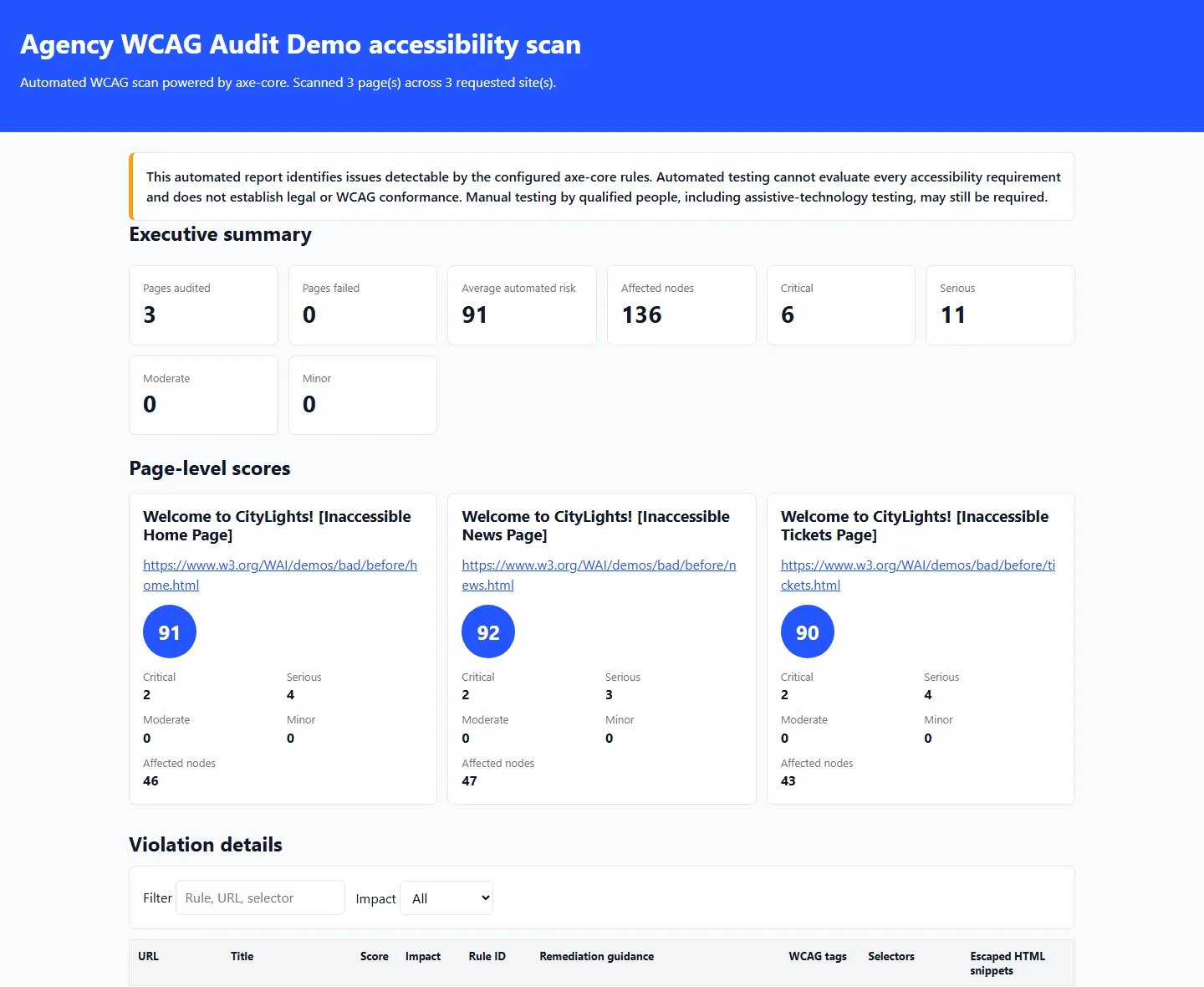
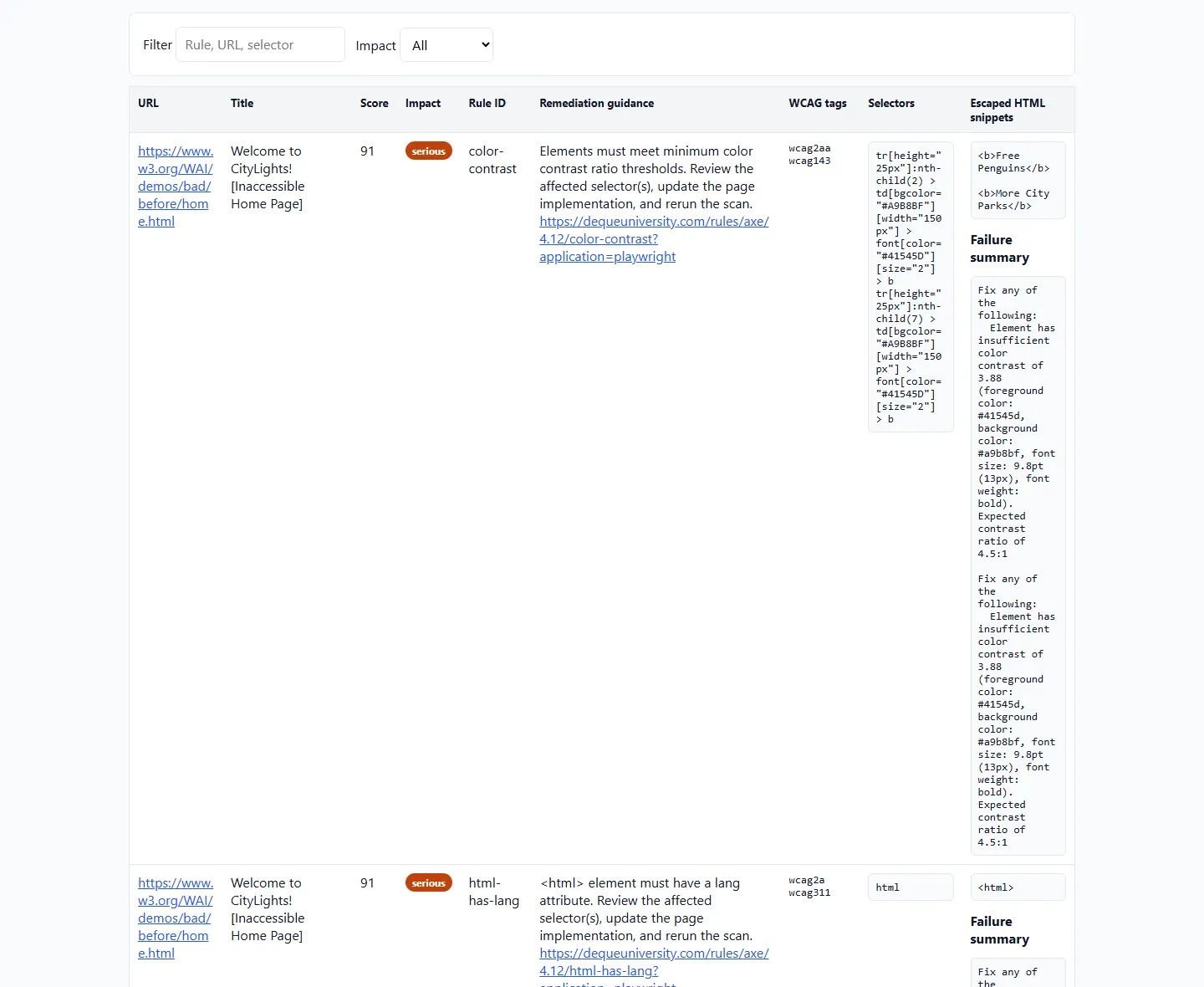
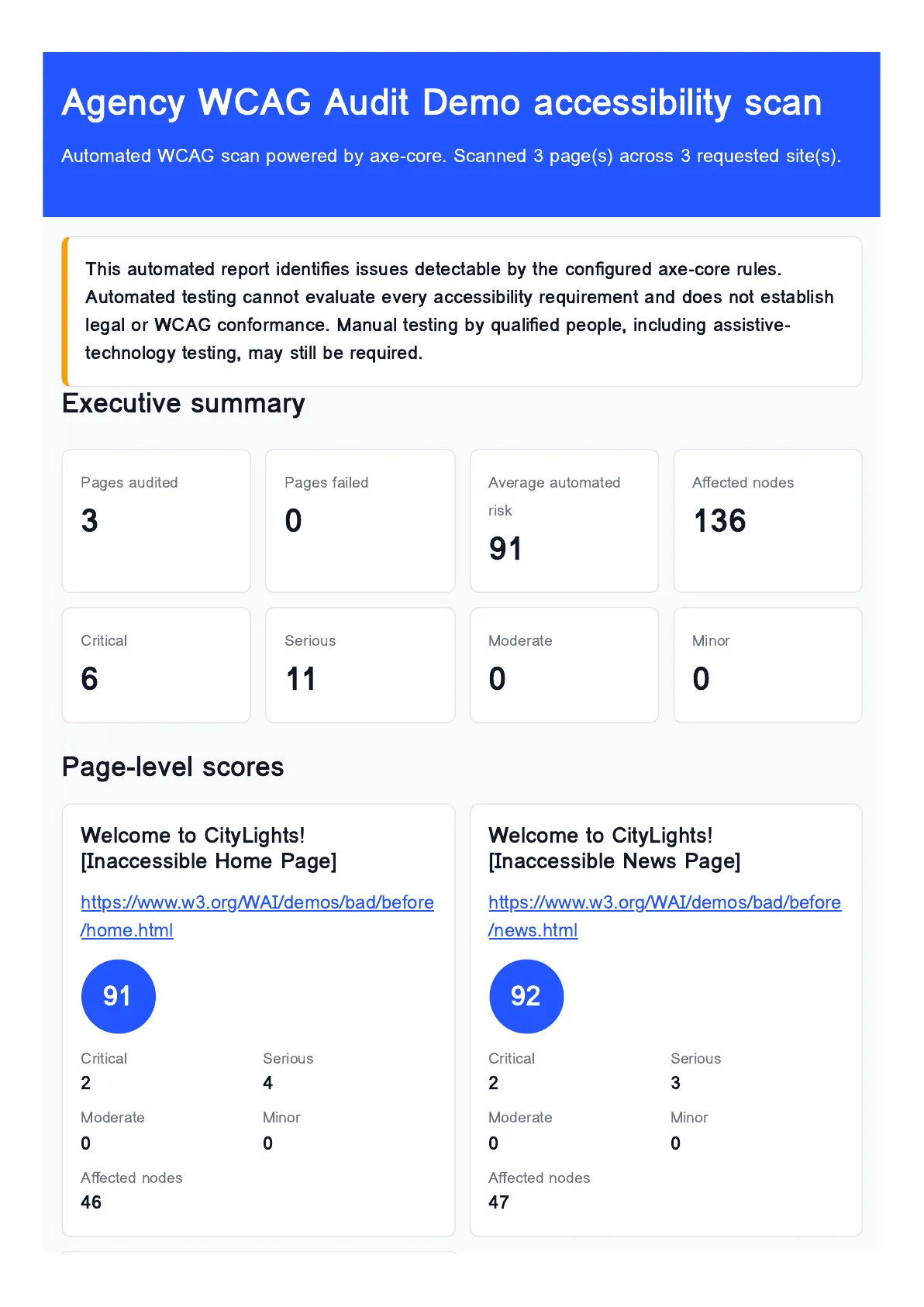
This demo run audited W3C's intentionally inaccessible Before and After Demo pages. It scanned 3 public pages, found 6 critical and 11 serious WCAG issues, produced an average automated risk score of 91, and exported branded HTML, PDF, JSON, and CSV reports.
Common Buyer Workflows
- Generate a white-label WCAG audit PDF for an agency client.
- Run a Shopify accessibility audit for WCAG 2.2 storefront issues.
- Run a WordPress accessibility audit across public marketing pages.
- Audit ecommerce pages for EAA accessibility risk signals.
- Find missing alt text across a website.
- Find unlabelled forms, buttons, links, and missing accessible names.
- Create an accessibility fix backlog for developers.
- Export WCAG violations to JSON and CSV for QA or ticketing systems.
Example Client Report
Northstar Retail WCAG 2.2 Audit
Prepared for Acme Digital - Branded HTML and PDF report
| Overall automated risk | Pages audited | Critical | Serious | Moderate |
|---|---|---|---|---|
| 68 / 100 | 24 | 3 | 14 | 31 |
Executive summary: The audit found recurring image alternative text, form label, button name, and color contrast issues across product listing and checkout-adjacent public pages. The developer backlog below prioritizes critical and serious findings first, with exact selectors, escaped HTML evidence, and remediation guidance for each affected page.
| Priority | WCAG rule | Affected page | Selector | Developer action |
|---|---|---|---|---|
| Critical | image-alt | /collections/sale | img.product-card__image | Add useful alternate text or mark decorative images empty. |
| Serious | label | /pages/contact | input[name="email"] | Associate the input with a visible label or accessible name. |
| Serious | button-name | /products/classic-bag | button.icon-only | Add an accessible button name that describes the action. |
| Moderate | color-contrast | / | .promo-banner__text | Increase text/background contrast for WCAG AA. |
Each run stores polished REPORT_HTML and REPORT_PDF files for clients, plus REPORT_JSON, REPORT_CSV, and one structured Dataset item per successfully audited page.
A11yBatch scans public client websites with Playwright and axe-core, then returns developer-ready accessibility findings as Apify Dataset items plus branded JSON, CSV, HTML, and PDF reports. It is built for agencies, QA teams, product teams, and developers who need repeatable automated accessibility checks inside Apify workflows. Apify supplies accounts, billing, scheduling, API access, storage, integrations, and marketplace delivery.
This automated report identifies issues detectable by the configured axe-core rules. Automated testing cannot evaluate every accessibility requirement and does not establish legal or WCAG conformance. Manual testing by qualified people, including assistive-technology testing, may still be required.
What You Get
- One billable Dataset item per successfully audited page
- Run-level
OUTPUTsummary with totals, average automated risk score, and report URLs ERRORSrecord for failed, unreachable, robots-blocked, invalid, or unsafe pages- Stable
REPORT_JSON,REPORT_CSV,REPORT_HTML, andREPORT_PDFkey-value records - Developer-ready rule IDs, impacts, WCAG tags, selectors, escaped evidence, and axe help links
What It Checks
- WCAG 2.0, WCAG 2.1, and WCAG 2.2 axe-core rules
- WCAG A or AA rule tags
- Public HTTP and HTTPS pages only
- Same-origin crawl by default, with optional subdomain inclusion
- Sitemap discovery plus same-site link discovery
- Violations, incomplete checks, affected selectors, offending HTML snippets, and remediation links
Inputs
startUrls- required public HTTP/HTTPS URLs, up to 100maxPagesPerSite- 1 to 100 pages per site, default 10useSitemap- read/sitemap.xmland sitemap indexes first, default trueincludeSubdomains- include subdomains of the starting host, default falsewcagLevel-AorAA, defaultAAstandards-WCAG_2_0,WCAG_2_1,WCAG_2_2, default allincludePasses- include passed axe checks in output, default falsegenerateHtmlReport- store responsive HTML report, default truegeneratePdfReport- store PDF report, default truebrandName,brandColor,logoUrl- optional report brandingwaitAfterLoadMs- extra wait after DOMContentLoaded, default 1000pageTimeoutSecs- navigation timeout, default 30respectRobotsTxt- obey robots.txt, default true
Output
Each successfully audited page creates exactly one default Dataset item:
Failed pages are not pushed as Dataset items. They are stored in the default key-value store under ERRORS.
The run-level summary is stored under OUTPUT and includes requested sites, attempted pages, successful audits, failures, totals by impact, total affected nodes, top violation rules, average automated risk score, timestamps, status message, and report URLs.
Automated Risk Score
automatedRiskScore is not a compliance score. It is a deterministic prioritization score from 0 to 100.
Formula:
The score rises faster for critical and serious findings, and for rules that affect many nodes.
Reports
A11yBatch stores stable report records in the default key-value store:
REPORT_JSONREPORT_CSVREPORT_HTMLREPORT_PDF
The HTML and PDF reports include optional branding, an executive summary, page-level scores, severity totals, filterable violation rows, exact selectors, safely escaped HTML snippets, remediation guidance, official axe help links, metadata, and limitations.
Before: manual browser extension checks one page at a time. After: batch scan public pages, export structured findings, and share a client-ready report.
API Usage
Scheduling Example
Create an Apify Task with the input above, then schedule it weekly or monthly in Apify Console. Use integrations or webhooks to send the OUTPUT record or Dataset export to Slack, email, Google Drive, or your QA workflow.
Pricing
Use Apify Store pay-per-event monetization with one chargeable event:
| Event | Price |
|---|---|
| Actor start | No charge |
| Successfully audited page | $0.03 |
| HTML and PDF report | Included |
| Failed or unreachable page | $0 |
Configure apify-default-dataset-item as the primary event with title Audited page. Remove the synthetic apify-actor-start event from monetization so Actor starts are not charged. Failed and unreachable pages are stored in ERRORS, not the default Dataset, so they do not create paid events.
Responsible Use
- Scan only public pages you are allowed to test.
- Do not submit credentials or authenticated account URLs.
- Leave
respectRobotsTxtenabled unless you have permission to scan blocked paths. - Keep
maxPagesPerSitemodest for routine monitoring. - Treat automated findings as triage input, not legal proof of conformance.
When Not to Use This
- Authenticated applications, account dashboards, checkout steps, or pages requiring cookies
- Legal certification, formal WCAG conformance claims, or final EAA compliance sign-off
- Manual screen-reader, keyboard-only, cognitive, usability, or assistive-technology testing
- Any page you do not have permission to scan
Limitations
- Automated axe-core checks do not cover every WCAG success criterion.
- Dynamic states behind logins, forms, modals, and authenticated flows are out of scope.
- Some sites block automation, throttle requests, or serve different content to browsers.
- PDF rendering depends on Chromium support in the Apify Playwright image.
- Sitemap discovery is bounded by
maxPagesPerSite.
FAQ
Does this prove WCAG compliance?
No. It identifies automated findings only. Manual expert testing is still required.
Can I scan logged-in pages?
No. A11yBatch is intentionally limited to public pages and does not collect credentials.
Why are failed pages not in the Dataset?
Only successfully audited pages are billable results. Failed pages are stored in ERRORS.
Can I include subdomains?
Yes. Set includeSubdomains to true.
Can I turn off PDF generation?
Yes. Set generatePdfReport to false for faster runs.
Troubleshooting
- If no pages are audited, check
ERRORSfor robots.txt, DNS, redirect, timeout, or SSRF safety failures. - If a site is slow, increase
pageTimeoutSecsor reducemaxPagesPerSite. - If reports are missing, confirm
generateHtmlReportandgeneratePdfReportsettings. - If local Playwright cannot launch, run inside the Apify Docker image or install Chromium locally for tests.
Development
Deploy with:


