

Alerts Sender: Email, Slack, Discord & Teams
Pricing
from $0.80 / 1,000 message delivereds
Alerts Sender: Email, Slack, Discord & Teams
Send an alert or a digest to email (your Resend, Postmark, SendGrid or SMTP account), Slack, Discord, Microsoft Teams or any webhook, with a table of results rendered for each. Run it after another actor or on a schedule. $1 per 1,000 messages delivered.
Pricing
from $0.80 / 1,000 message delivereds
Rating
0.0
(0)
Developer

CleanPull
Maintained by CommunityActor stats
0
Bookmarked
2
Total users
1
Monthly active users
2 days ago
Last modified
Categories
Features
Share
This alerts sender sends alerts to email, Slack, Discord, Teams or any webhook from your Apify runs: email through your own Resend, Postmark, SendGrid or SMTP account, Slack, Discord, Microsoft Teams or any webhook (Zapier, Make, n8n, your own). Write the message in light markdown and add a table of rows, from the input or straight from another run's dataset. Each channel gets its own rendering: an HTML and plain-text email, Slack blocks, a Discord message with embeds, a Teams Adaptive Card, and JSON for webhooks. Nothing is charged for a message that was not delivered. Run it after another actor, on a schedule or through the API.
How to send alerts
- Open Alerts Sender on Apify and go to its input form.
- Write the Subject and the Message (light markdown). For a table, add rows in Items, or pick a run's dataset in Items from a dataset and list its Table columns.
- Fill in the channels: Email to with Email from, Email provider and Email API key (or the SMTP fields), Slack webhook, Discord webhook, Microsoft Teams webhook or Other webhook. Turn on Preview only to see what each channel would receive without sending.
- Start the run. Open the Deliveries view to read each Channel, Status, Sent to and Reason.
- To alert only when a monitor found something, add Alerts Sender as an integration on the monitor's run (or its task) with Items from a dataset set to that run's dataset and Skip when there are no items on.
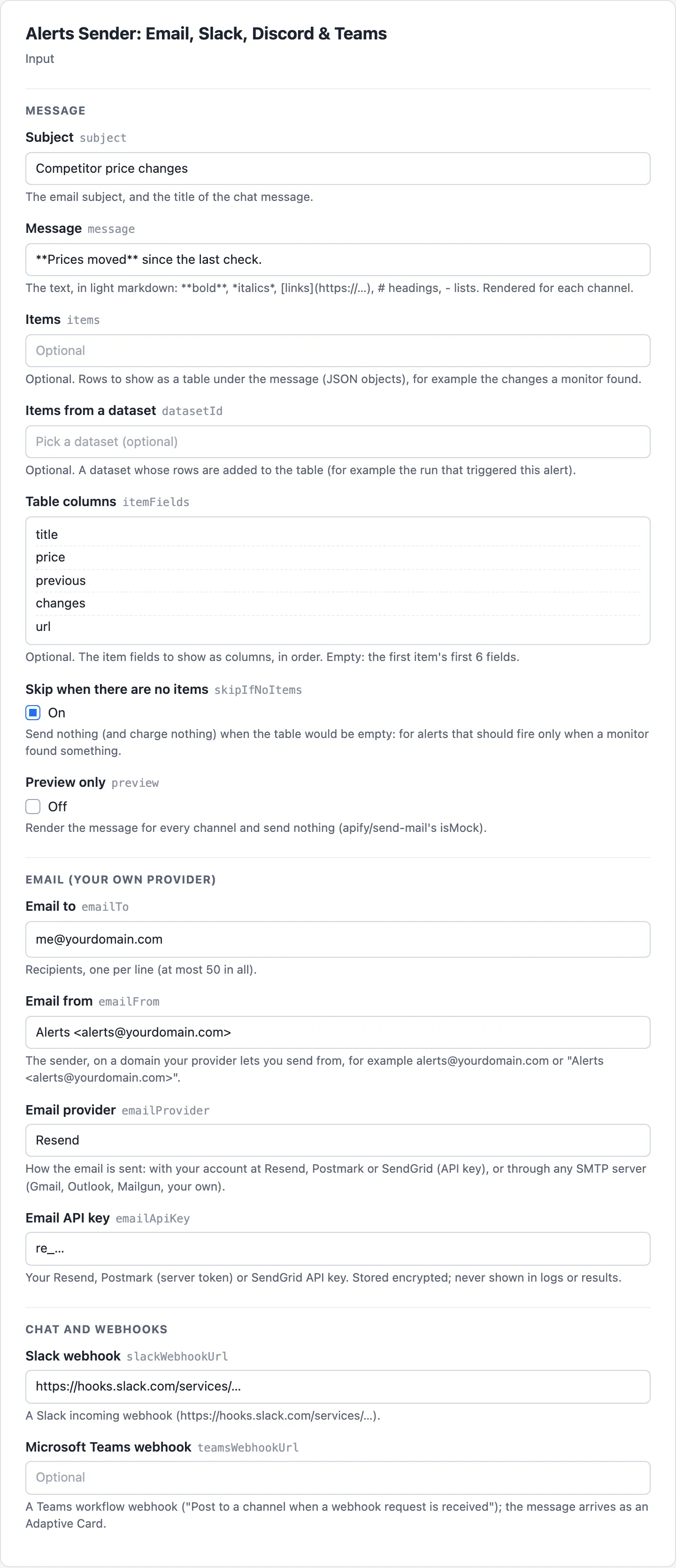
What the alerts sender gives you
- "Email me when a competitor changes a price." Run it after a monitor (as an integration on the monitor's run, or from a task) with Items from a dataset set to that run's dataset, and Skip when there are no items on: you get an email only when something changed.
- "Post a daily digest to our Slack channel." Schedule it with your message and a table of the day's rows.
- "Send the same alert to email, Slack and Teams at once." Every channel you fill in gets it; one failing never stops the others.
- "Keep my apify/send-mail integrations." Its input keys (
to,cc,bcc,subject,text,html,replyTo,isMock,attachments) are read here too. Add your email provider and key, and the email goes from your own address. - "Preview what each channel would receive." With no channel filled in, the run returns the rendered email, Slack, Discord and Teams messages without sending anything (free).
Alert delivery reliability
- Your accounts, your sender. Email goes from your own domain through your own provider, so it lands like your other mail and the sending reputation is yours. Keys, SMTP passwords and webhook addresses are secret inputs: stored encrypted, never written to the results or the log (results show only the host and last 4 characters).
- Each channel within its limits. Slack sections stay under 3,000 characters and 50 blocks. Discord content stays under 2,000 characters, with at most 10 embeds and 6,000 characters across them, and mentions turned off, so a product name can never ping a channel. Long tables say how many more rows there were.
- Never the same message twice. Resend requests carry an idempotency key made from the run's ID, so a retried request cannot send again. Postmark, SendGrid and your own webhook are retried only when the request never left (or on 429), never after a server error or a dropped connection. Slack, Discord and Teams connectors are retried after a server error (which means not posted), and Teams workflows are not. If you resurrect a run within 24 hours after changing what it sends, Resend answers 409 for the keys it has already seen: start a new run instead.
- Built against spam. At most 50 recipients a run, and each "to" recipient gets their own email (nobody sees the other addresses), unless you add CCs or turn Send separately off. SMTP always uses TLS (STARTTLS on 587, TLS from the start on 465) with a login; port 25 is not used.
- Retries where they help. A 429 waits as the service asks (Retry-After), and a request that never reached the service is retried, three tries in all, with a backoff. Server errors are retried only where that cannot send twice (see above). A wrong address or key (4xx) is reported at once with the service's own message.
- Only real addresses. Chat webhooks must be on the service's own webhook host. No request follows a redirect or connects to a private network address, so a webhook cannot be used to reach inside a network.
- A clear record. One row per channel: sent (with the provider's message ID), failed (with the reason), or skipped.
RUN_SUMMARYgives the outcome:COMPLETE,PARTIAL(some channels failed),SKIPPED,PREVIEWorFAILED.
Alerts sender input
| Field | Key | What it does |
|---|---|---|
| Subject, Message, Email HTML (optional) | subject, message, html | The subject, the message in light markdown, and optional HTML of your own for the email |
| Items, Items from a dataset, Table columns, Rows shown | items, datasetId, itemFields, maxItemsShown | Rows for the table: given directly, or from a dataset; the columns (empty: the first item's first 6 fields); how many rows to show (25 by default) |
| Skip when there are no items | skipIfNoItems | Send nothing (and charge nothing) when the table would be empty |
| Preview only | preview | Render for every channel and send nothing |
| Email to, Email CC, Email BCC, Send separately | emailTo, emailCc, emailBcc, emailSeparately | Recipients (at most 50 in all); each "to" recipient gets their own email unless you add CCs or turn Send separately off |
| Email from, Reply to | emailFrom, emailReplyTo | A sender on your own domain, and where replies go |
| Email provider, Email API key | emailProvider, emailApiKey | Resend (the default), Postmark (server token) or SendGrid, with your key; or SMTP server |
| Attachments | attachments | Files as [{ "filename", "data" (base64), "contentType" }], at most 10 and 5 MB in all |
| SMTP host, SMTP port, SMTP secure (port 465), SMTP user, SMTP password | smtpHost, smtpPort, smtpSecure, smtpUser, smtpPassword | Or any SMTP server with a login (Gmail and Outlook with an app password, Mailgun, your own), over TLS |
| Slack webhook, Discord webhook, Microsoft Teams webhook, Other webhook | slackWebhookUrl, discordWebhookUrl, teamsWebhookUrl, webhookUrl | Chat webhooks and any other endpoint |
Example inputs
After a price monitor, email and Slack, only when it found changes:
A Teams message with a table given directly:
Alerts sender output
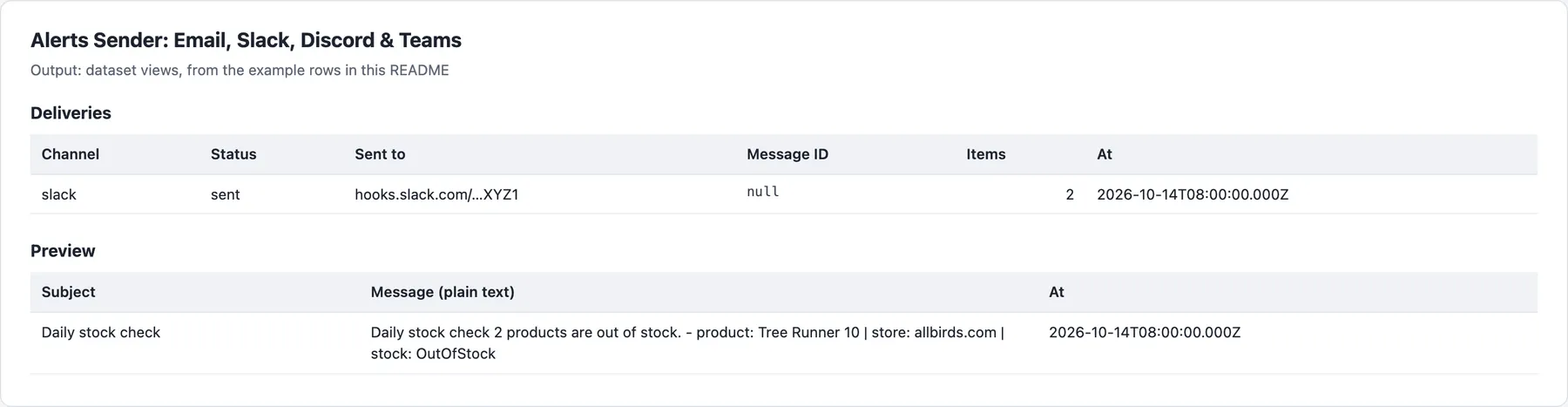
One row per channel, in the Deliveries view. With no channel set (or Preview only on), one preview row, in the Preview view.
Example rows
Illustrative: the Slack row of the first example input above, on a run whose dataset had 2 rows:
The second example input with its Teams webhook left out (a preview), shortened to the fields of the Preview view:
The preview row also holds the rendered html, slack, discord and teams messages.
Delivery rows and billing
Each channel's delivery row has one status. A preview is a separate recordType: "preview" row with no status, and is free.
| Row | When | Billed |
|---|---|---|
sent | Every message for the channel went out | One message per email or post sent |
partial | Some emails went out before an error; or your spending limit stopped the channel's sends, also before the first one on any channel (then messages: 0) | Only the messages that went out |
failed | The service refused it, or its settings were refused before sending, with the service's answer in reason, for example Resend answered 422: domain is not verified | Free |
skipped | Nothing to send (Skip when there are no items on) | Free |
Once the spending limit stops the run, the channels after the one it stopped on get no row. When nothing at all was delivered, RUN_SUMMARY's outcome is FAILED while the run itself succeeds.
Pricing
| Event | Free | Bronze | Silver | Gold and above |
|---|---|---|---|---|
| Message delivered (per email sent, or per chat or webhook post) | $1.00 | $1.00 | $0.90 | $0.80 |
Per 1,000 messages. Each run also has a $0.00005 start fee. Only messages that were delivered are charged: a failed channel, a skipped or preview run and refused settings cost only the start. Your email provider bills its own sending as usual (Resend, Postmark and SendGrid all have free tiers).
Limits
- Email needs your own provider account and a sender address on a domain it lets you send from. The actor does not send email from shared addresses.
- Example content is never sent. With a channel set and nothing to send, the run stops with a clear message (or sends nothing, with Skip when there are no items on); the form's example is used only for previews.
- Teams accepts messages through a workflow webhook ("Post to a channel when a webhook request is received"). Teams' older connector webhooks are being retired by Microsoft.
- Items from a dataset: pick the dataset in the form (or pass a run's dataset in an integration), which gives this actor read access to that one dataset. The actor runs with limited permissions. A monitor's free explanation rows (
recordType: "unreadable") are left out of the table and the count, so Skip when there are no items skips a run that found nothing. - Nothing delivered: when your settings or endpoint refuse a message (a wrong webhook, key, address or SMTP login, or a dataset that is not there), the run still succeeds, with a
deliveryrow per channel giving thereasonandstatus: "failed"; nothing is charged, and RUN_SUMMARY'soutcomeisFAILED. The run fails only when nothing was delivered and the cause is ours: an unexpected error while sending, or a dataset that exists but could not be read.
FAQ
How much does it cost to send an alert to email, Slack, Discord or Teams?
$0.001 per message delivered on the Free and Bronze plans: 1,000 alerts are $1. Each email sent counts once, so an alert to 3 recipients with Send separately on is 3 messages ($0.003), and one email to all of them (with CCs, or Send separately off) is 1. Each Slack, Discord, Teams or webhook post is 1. A daily alert to Slack and one email address is $0.002 a day, about $0.06 a month. Failed channels, skipped runs and previews are not charged; each run also has the $0.00005 start fee, and higher Apify plans pay less (see Pricing above).
How do I send an alert only when a monitor found changes?
Add Alerts Sender as an integration on the monitor (or its task): Integrations → Connect Actor or Task → Alerts Sender, with Items from a dataset set to {{resource.defaultDatasetId}} and Skip when there are no items on, as in the first example input. With the monitor in Changes only mode, its dataset holds only the changes, so a quiet run sends nothing and costs only the start fee. Watch Digest does this for many watchers at once, in one digest.
What is the difference between Items and Items from a dataset?
Items are rows you give in the input, as JSON objects. Items from a dataset reads the rows of a dataset you pick (for example the run that triggered the alert), up to Rows shown, and the message says how many more there were. Both can be used together: your own rows come first. Table columns picks and orders the columns; empty, the first item's first 6 fields are shown.
Why was my alert not delivered?
- A wrong key, address or webhook: the channel's row has
status: "failed"and the service's answer inreason, such asResend answered 422: domain is not verified. - No items: with Skip when there are no items on, an empty table sends nothing (
status: "skipped"). - No channel, or Preview only on: the run writes a
previewrow and sends nothing. - Spending limit: a message your limit cannot pay for is not sent. The channel where it stopped gets a
partialrow (messages: 0when nothing went out on it, on any channel), the channels after it get no row, andRUN_SUMMARYsays it stopped at your spending limit; when nothing was delivered at all, itsoutcomeisFAILEDthough the run succeeds. - Teams: only workflow webhooks are accepted; older connector webhooks are being retired by Microsoft.
Which email providers and chat apps does it support?
Email through Resend, Postmark or SendGrid with your API key, or any SMTP server with a login (Gmail and Outlook with an app password, Mailgun, your own) over TLS; Slack incoming webhooks; Discord channel webhooks; Microsoft Teams workflow webhooks (an Adaptive Card); and any https endpoint (Zapier, Make, n8n, your own), which receives the subject, text, markdown and items as JSON.
Can I use the alerts sender through the API?
Yes. Start runs through the Apify API or an API client with the same input as the form, or with apify/send-mail's keys (to, subject, text, html, isMock…). Read the Deliveries and Preview views of the dataset, or RUN_SUMMARY with the outcome, the channels delivered and failed, and the charges.
Does it work with Google Sheets, Make, Zapier or Claude?
Yes. Other webhook posts each alert as JSON to Zapier, Make, n8n or your own endpoint, and Google Sheets Sync puts the same rows in a sheet. From Claude, the MarketMage plugin sets up watchlists whose digests reach your email or chat through this actor.
Is my data safe with the alerts sender?
Keys, SMTP passwords and webhook addresses are secret inputs: stored encrypted, never written to the results or the log (results show only the host and last 4 characters). The actor reads only the dataset you pick and sends only to the channels you fill in, from your own email account. How you use it, and following the laws and terms that apply to you, is your responsibility. This is not legal advice.
Related actors
Other CleanPull actors for monitoring:
- Watch Digest: one scheduled digest of price, stock, rank and review changes.
- Google Sheets Sync: send any dataset to Google Sheets, or read a sheet into one.
- Price Tracker & Stock Monitor for Any Online Store: price and stock changes on product pages of any online store.
Use it from Claude
The MarketMage plugin runs these actors from a Claude chat.
Found it useful? A rating on the Store helps others find it.
Changelog
- 0.1.x, reliability (2026-10-24): a message refused by your own settings or endpoint ends SUCCEEDED with a row saying why (RUN_SUMMARY still says FAILED), instead of a FAILED run; channels refused before sending now get their own row; input that cannot work is explained in a free row instead of failing. Prices unchanged.
- 0.1 (October 2026): email through Resend, Postmark, SendGrid or SMTP; Slack, Discord, Teams and any webhook; markdown with tables rendered per channel; items from a dataset; skip when empty; preview mode; apify/send-mail's keys accepted.


