

🏡 ImmoScout24 Apply Bot - Auto Applications ImmobilienScout24
Pricing
from $199.00 / 1,000 applications
🏡 ImmoScout24 Apply Bot - Auto Applications ImmobilienScout24
Automate ImmoScout24 apartment applications. Apply to multiple listings instantly with personalized messages. Supports standard and Mieter+ premium listings. Beat other applicants with instant submissions. Free during launch.
Pricing
from $199.00 / 1,000 applications
Rating
0.0
(0)
Developer

ClearPath
Maintained by CommunityActor stats
6
Bookmarked
59
Total users
5
Monthly active users
19 hours ago
Last modified
Categories
Share
🏡 ImmoScout24 Bewerbungs-Bot - Automatisierte Wohnungsbewerbungen
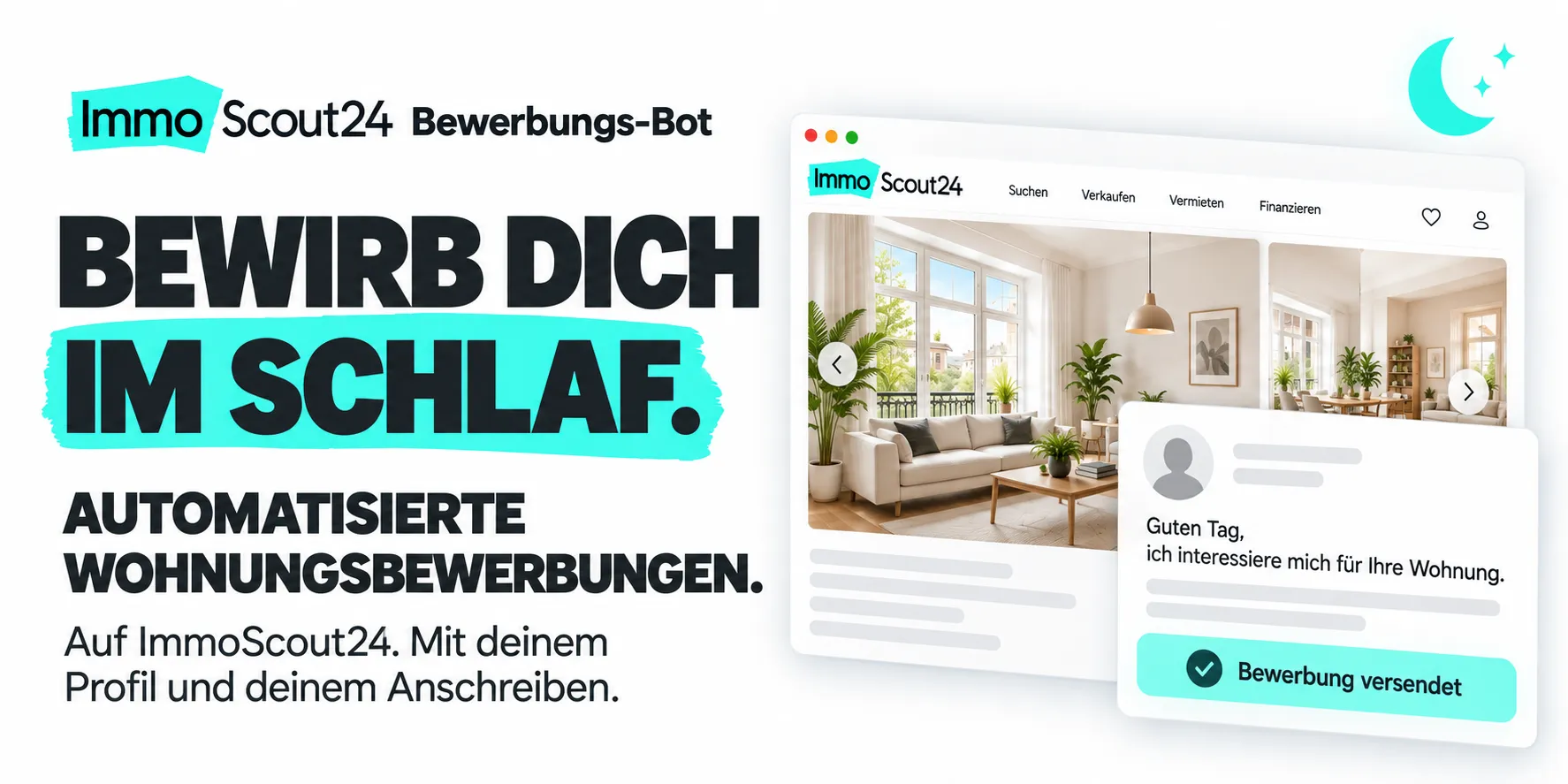
Von Clearpath, den Entwicklern von ImmoScout24 Pro, ImmoScout24 Lite und Immobilien Export Pro. Eine spezialisierte Suite für die Immobiliensuche, Exposé-Daten und automatisierte Bewerbungen.
Warum diesen Actor wählen?
Dein Anschreiben wird automatisch versendet. Wähle die Inserate und hinterlege deine Nachricht. Der Bot bewirbt sich mit deinem bestehenden ImmoScout24-Profil auf bis zu zehn Angebote pro Lauf. Mit einem geplanten Task geht das auch, während du schläfst.
Dein Text, mit persönlicher Anrede. Die Vorlage bleibt unter deiner Kontrolle. Mit {{anrede}} ergänzt der Bot eine passende Begrüßung anhand des Kontakts; ohne geeigneten Namen verwendet er eine allgemeine Anrede. Deine ausgefüllte Selbstauskunft liefert die Profilangaben.
Bereits beworben? Wird erkannt. Vom Bot gespeicherte, erfolgreiche Bewerbungen werden bei späteren Läufen standardmäßig übersprungen. Für jedes Inserat siehst du im Ergebnis, ob die Bewerbung versendet, übersprungen oder nicht abgeschlossen wurde.

Erste Bewerbung einrichten
Du brauchst ein ImmoScout24-Konto mit vollständiger Selbstauskunft. Ersetze alle Platzhalter, wähle ein aktuelles Inserat und passe dein Anschreiben an. Trage dein Passwort im geschützten Eingabefeld ein. Ein gestarteter Lauf versendet echte Bewerbungen.
Actor-Eingabe öffnen und deine Bewerbung vorbereiten. Falls ImmoScout24 einen E-Mail-Code verlangt, schließe die Anmeldung über die angezeigte Verifizierung ab. Für Mieter+-Angebote brauchst du ein entsprechendes Abo auf deinem Konto.
Über Nacht arbeiten lassen: Richte nach der ersten Anmeldung einen Apify-Task mit Zeitplan ein. Der Bot verarbeitet die eingetragenen Inserat-URLs. Für neu gefundene Angebote kannst du in deinem Workflow URLs aus ImmoScout24 Lite oder Pro übergeben. Eine erneut angeforderte Anmeldeverifizierung muss abgeschlossen werden, bevor weitere Bewerbungen versendet werden.
| Clearpath · Immobilien-Suite | ||||
 Bewerbungs-Bot Bewerbungs-BotDu bist hier |  ImmoScout Lite ImmoScout LiteNeue Angebote |  ImmoScout Pro ImmoScout ProSuche & Details |  Exposé-Details Exposé-DetailsEinzelne Inserate |  Immo-Export Immo-ExportMehrere Portale |
Copy to your AI assistant
Copy this block into ChatGPT, Claude, Cursor, or any LLM to start using this actor.
📋 Voraussetzungen
Bevor du diesen Bot verwendest, stelle Folgendes sicher:
- Ein gültiges ImmoScout24-Konto mit vollständigen Profilinformationen
- Deine "Selbstauskunft" in deinem ImmoScout24-Profil ausgefüllt
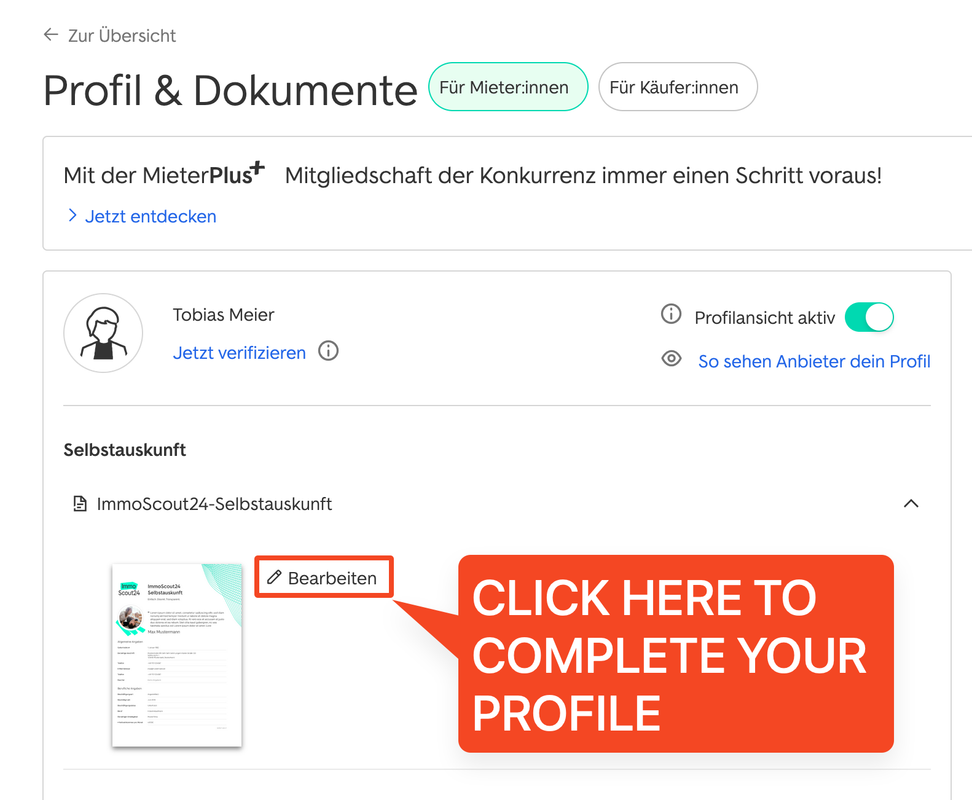
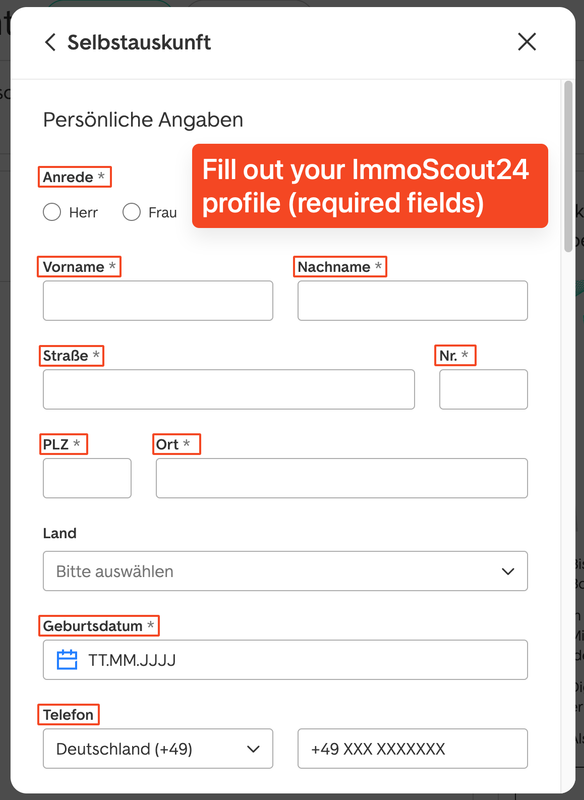
Ohne ein vollständiges Profil wird ImmoScout24 automatisierte Bewerbungen ablehnen. Stelle sicher, dass du alle erforderlichen Felder in deinen Profileinstellungen ausgefüllt hast.
🚀 Schnellstart
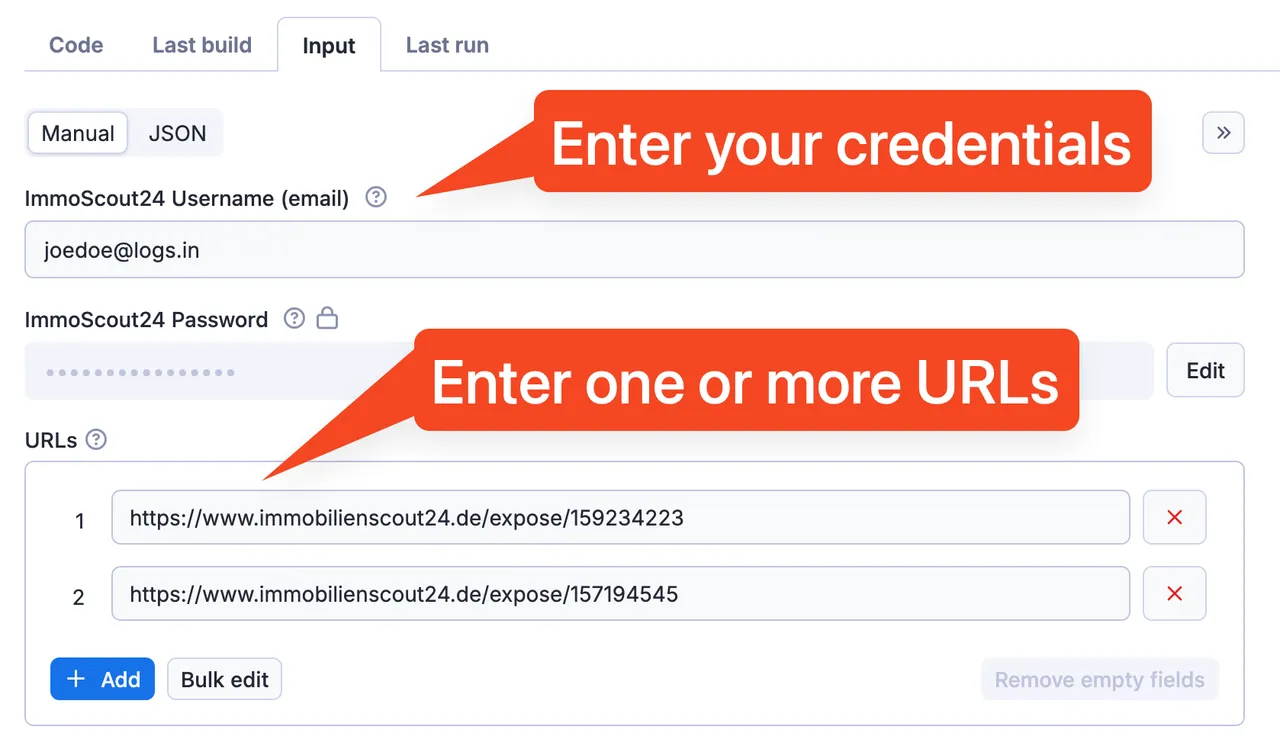
- Gib deine ImmoScout24-Anmeldedaten ein (E-Mail und Passwort)
- Das Passwort wird sicher verschlüsselt und nur innerhalb deines Actor runs verwendet
- Wir nutzen Apifys Secret Input-Feature, um deine Daten zu schützen
-
Fügen deine Bewerbungs-URLs hinzu (bis zu 10 pro Durchlauf)
- Unterstützt derzeit nur immobilienscout24.de (nicht .at oder .ch Domains)
- Auf 10 Bewerbungen pro Durchlauf beschränkt, um keine Rate-Limits auszulösen
-
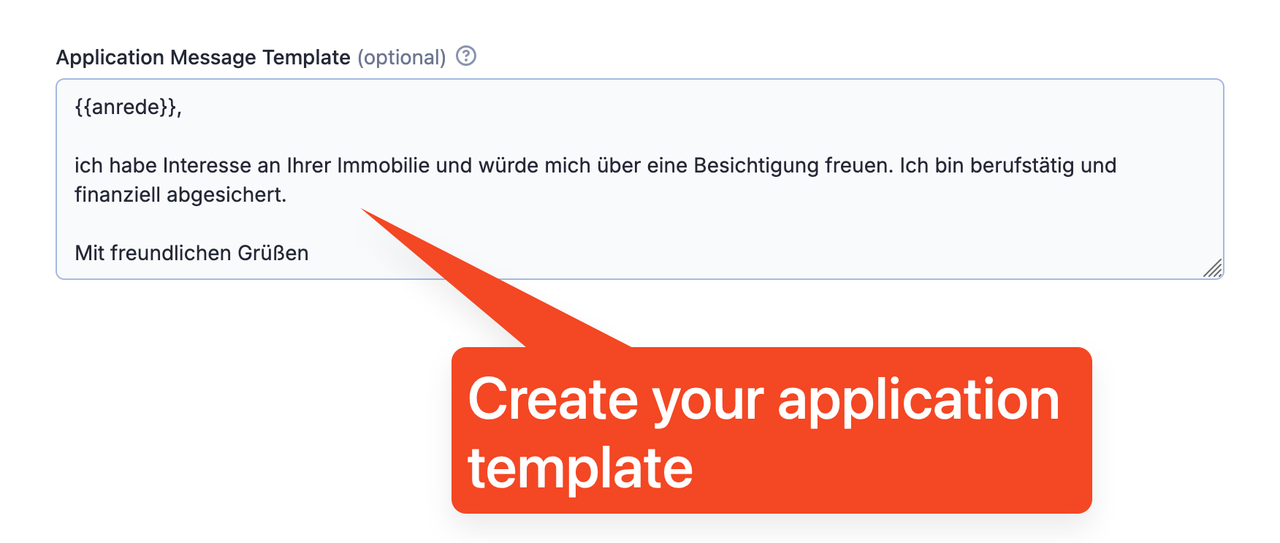
Passe deine Bewerbungsnachrichtenvorlage an
- Verwende den {{anrede}} Platzhalter für automatische Anredenerkennung
- Das System erkennt automatisch die passende Begrüßung basierend auf den Kontaktinformationen
- Führe den Actor aus
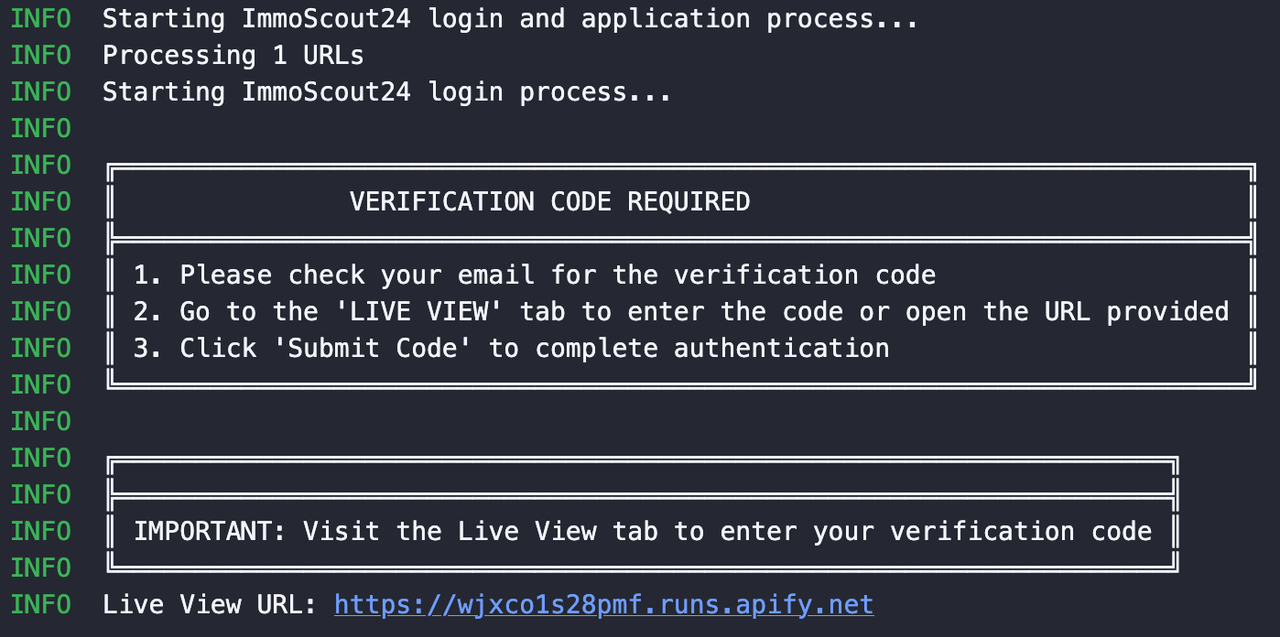
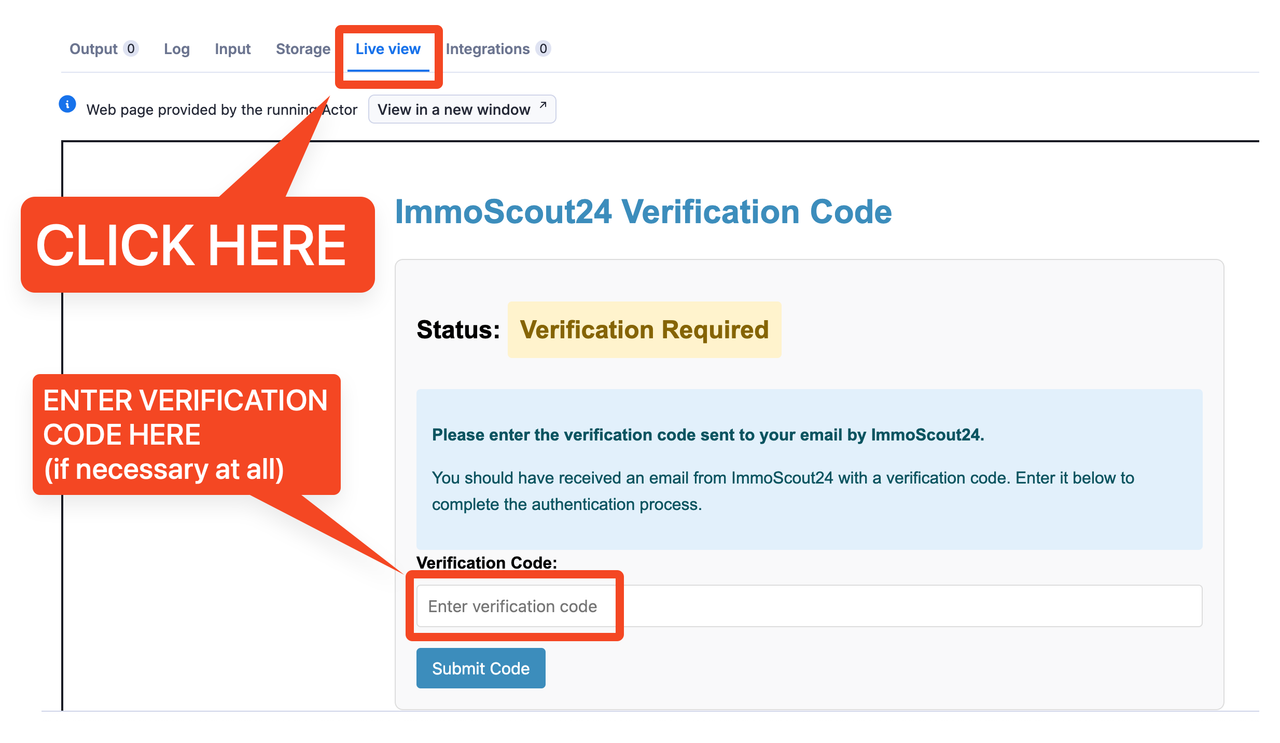
- Wenn für den Login ein Verifizierungs-Code notwendig ist, musst du den Code im "Live View" Tab eingeben (achte auf die Meldung im Log)
📝 Bewerbungsvorlage
Verwende den {{anrede}} Platzhalter in deiner Bewerbungsnachricht, um deine Begrüßung automatisch auf der Grundlage der Kontaktinformationen des Angebots zu personalisieren:
- Wenn ein Kontaktname verfügbar ist, wird "Sehr geehrter Herr [Name]" oder "Sehr geehrte Frau [Name]" verwendet
- Wenn kein spezifischer Name verfügbar ist, wird standardmäßig "Sehr geehrte Damen und Herren" verwendet
Beispielvorlage:
⬆️ Ausgabe
Der Actor liefert detaillierte Ausgaben für jeden Bewerbungsversuch:
Programmatische Verifizierung (API / Automatisierung)
Wird der Actor per Apify-API, Scheduler oder von einem anderen Actor gestartet, gibt es keinen Live-View-Tab für eine manuelle Eingabe. Verlangt ImmoScout24 einen E-Mail-Verifizierungs-Code, endet der Lauf innerhalb von Sekunden:
status=FAILED,statusMessage=MFA_REQUIRED- der Standard-Datensatz enthält einen Eintrag:
{"status": "verification_required", "message": "...", "timestamp": "..."}
Zum Abschließen der Anmeldung einen neuen Lauf mit demselben username und dem per E-Mail erhaltenen Code im Feld verificationCode starten — innerhalb weniger Minuten, da der Code schnell abläuft (seitens ImmoScout24).
Ist der Code falsch oder zu spät, endet der Folgelauf erneut mit MFA_REQUIRED und es wird ein neuer Code per E-Mail versendet. Mit dem neuesten Code erneut starten — nicht den alten wiederverwenden. Das ist eine neue Anfrage, keine ignorierte: Bei erneutem MFA_REQUIRED die neueste E-Mail lesen und einen weiteren Lauf starten, nicht denselben Code wiederholen.
Automatisierungs-Tipp: Die Integration sollte auf statusMessage == "MFA_REQUIRED" (oder den verification_required-Datensatz) reagieren, den Code automatisch aus dem Postfach lesen (z. B. IMAP-Abfrage des ImmoScout24-Absenders) und sofort den Folgelauf mit gesetztem verificationCode starten. Manuelles Prüfen verfehlt meist das Zeitfenster.
Beim Start über den „Run"-Button der Apify Console (Live View vorhanden) bleibt das Verhalten unverändert: Code im Live-View-Tab eingeben.
Hinweis: Einzelne fehlgeschlagene Bewerbungen lassen den Lauf nicht fehlschlagen, prüfe die Felder success und applied pro Angebot. Die Authentifizierung ist anders: Kann die Anmeldung nicht abgeschlossen werden, endet der Lauf mit Status FAILED. Wird eine E-Mail-Verifizierung benötigt und der Lauf wurde per API/Automatisierung gestartet, endet er schnell mit der Statusmeldung MFA_REQUIRED und einem Datensatz {"status": "verification_required"} — siehe „Programmatische Verifizierung" oben.
Nur falls die Authentifizierung fehlschlägt (z.B. falsche Benutzerdaten), scheitert der Actor run.
❓ Häufig gestellte Fragen
Ist mein Passwort sicher?
Ja, dein Passwort wird als sicherer Input mit Apifys Secret Input-Feature behandelt. Es wird verschlüsselt und nur innerhalb deines Actor-Laufs verwendet.
Warum gibt es eine Begrenzung von 10 Bewerbungen pro Durchlauf?
Die Begrenzung ist vorhanden, um das Auslösen von ImmoScout24's Rate-Limiting und Sicherheitssystemen zu verhindern. Dies stellt sicher, dass der Bot zuverlässig arbeiten kann.
Benötige ich ein Mieter+ Abonnement?
Nur wenn du dich auf Angebote bewerben möchten, die es erfordern. Dieser Bot unterstützt die Bewerbung auf Mieter+ Angebote, wenn dein Konto ein aktives Abonnement hat.
Warum war meine Bewerbung nicht erfolgreich?
Häufige Gründe sind:
- Unvollständige Profilinformationen (Selbstauskunft)
- Das Angebot erfordert zusätzliche Informationen, die in deinem Profil nicht verfügbar sind
- Das Angebot wurde entfernt oder akzeptiert keine Bewerbungen mehr
- Rate-Limiting oder Sicherheitsprüfungen von ImmoScout24
Kann ich mich erneut auf ein Angebot bewerben?
Standardmäßig überspringt der Bot Angebote, auf die du dich bereits beworben hast. Wenn du dich erneut bewerben möchtest, setze die Option skipDeduplication auf true.
Kann ich dies für .at oder .ch ImmoScout-Domains verwenden?
Derzeit unterstützt dieser Actor nur immobilienscout24.de. Unterstützung für andere Domains könnte in Zukunft hinzugefügt werden.
🙋♀️ Feature-Anfragen und Support
Hast du Fragen oder Feature-Anfragen? Wir sind hier, um zu helfen:
- ✉️ Email: max@mapa.slmail.me
- 💬 Issues Tab: Hinterlasse einen Kommentar auf der Actor-Seite im "Issues" Tab
- 🔄 Antwortzeit: Wir antworten in der Regel innerhalb von 24 Stunden
English Version
🏡 ImmoScout24 Apply Bot - Automated Apartment Applications
🤖 What is ImmoScout24 Apply Bot?
The ImmoScout24 Apply Bot is an advanced automation tool designed specifically for the competitive German rental market. With no official API available from ImmoScout24, this Actor serves as a crucial solution to automate the time-consuming process of applying to multiple apartment listings. It integrates seamlessly with your ImmoScout24 account to submit professional applications at lightning speed.
🤩 Why Use This Application Bot?
ImmoScout24 (ImmobilienScout24) apartment applications can be time-consuming and repetitive. Our specialized application bot:
- ✅ Automatically applies to multiple listings with a single click
- ✅ Supports Mieter+ premium listings that require subscription
- ✅ Saves you hours of manual application work
- ✅ Uses your existing profile data from ImmoScout24 to complete applications
- ✅ Handles personalized salutations for more professional applications
Whether you're frantically searching for an apartment in a competitive market or simply want to streamline your application process, this tool sends your applications within seconds without the tedious manual work.

🌟 Features
- 🚀 Fully Automated - Apply to multiple listings with a single click
- 🔒 Secure Authentication - Handles login and optional email verification if needed
- 📝 Smart Templates - Personalized salutations for each listing contact
- 👤 Profile Integration - Uses your existing ImmoScout24 profile data
- ⭐ Mieter+ Support - Works with premium listings requiring an ImmoScout24 Premium subscription
- 🛡️ Secure - Your password is encrypted and never exposed
⚡ Speed
- 🏎️ Lightning Fast - Processes all 10 applications in just a few seconds
- ⏱️ Time-Saving - What would take hours manually is done almost instantly
- 🔄 Quick Response - Beat other applicants by applying immediately when listings go live
👥 Use Cases | Who Can Use ImmoScout24 Apply Bot
- 🏢 Apartment Hunters - Anyone searching for an apartment in competitive German markets who needs to apply quickly
- 💼 Busy Professionals - People who don't have time to manually fill out multiple applications
- 🎓 Students - Those moving to a new city for studies and needing to secure housing efficiently
- 👪 Families - Parents who need to find suitable family accommodations in competitive neighborhoods
- 🏠 Real Estate Agents - Professionals who help clients apply to multiple properties
💰 Pricing
You pay $0.25 for every application that is actually sent. No monthly fee.
- 🧾 Pay for results - listings you already applied to, failed submissions and runs that send nothing are not charged as applications
- 💸 Great ROI - a sent application costs a fraction of what the apartment does, and it goes out while the listing is still fresh
- 📊 Transparent - each run also carries a small start fee; your exact rates are on the Pricing tab of this Actor
- 📉 Cheaper on higher Apify plans
📋 Prerequisites
Before using this bot, ensure you have:
- A valid ImmoScout24 account with complete profile information
- Your "Selbstauskunft" (tenant self-disclosure) form filled out in your ImmoScout24 profile
Without a complete profile, ImmoScout24 will reject automated applications. Make sure to complete all required fields in your profile settings.
🚀 Quick Start
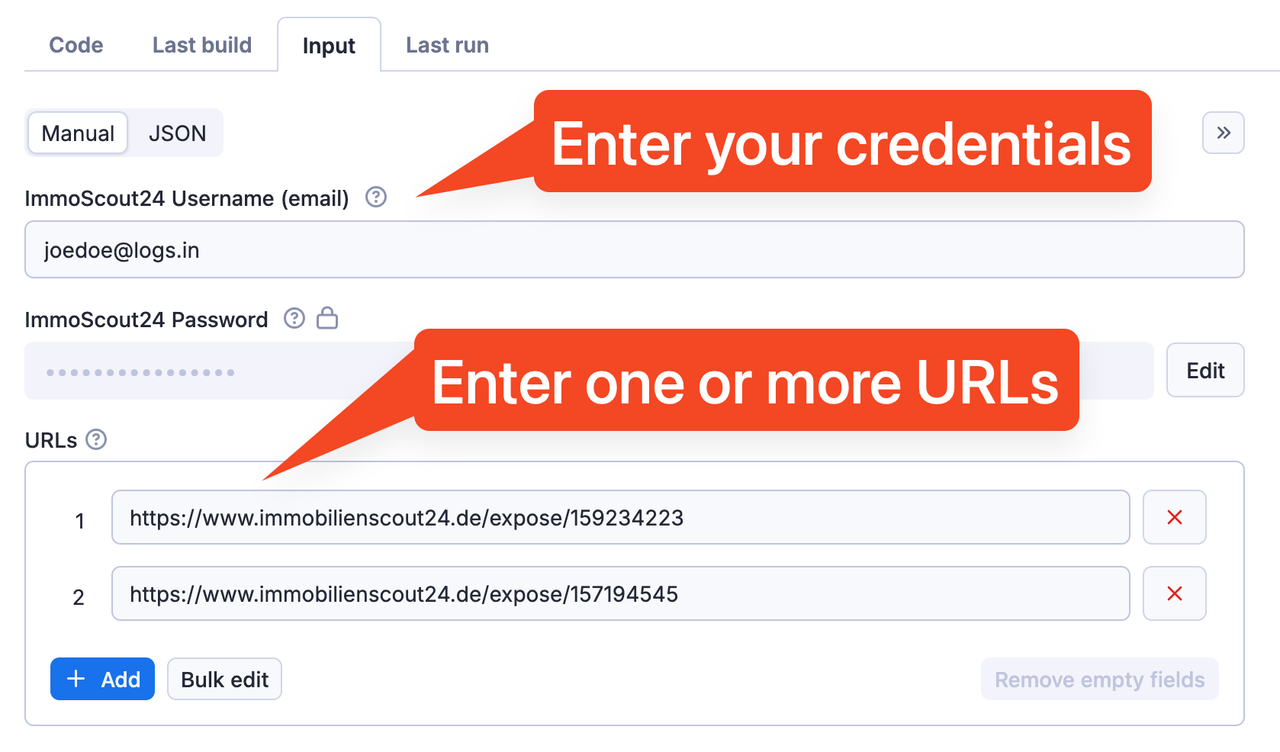
- Enter your ImmoScout24 login credentials (email and password)
- Your password is securely encrypted and only used within your Actor run
- We use Apify's Secret Input feature to keep your data safe
-
Add your application URLs (up to 10 per run)
- Currently only supports immobilienscout24.de (not .at or .ch domains)
- Limited to 10 applications per run to avoid triggering rate limits
-
Customize your application message template
- Use the {{anrede}} placeholder for automatic salutation detection
- The system will automatically detect the appropriate greeting based on contact information
- Run the Actor
- If the login requires a verification code, you'll need to enter the code in the "Live View" tab. Keep an eye on the Log.
📝 Application Template
Use the {{anrede}} placeholder in your application message to automatically personalize your greeting based on the listing's contact information:
- If a contact name is available, it will use "Sehr geehrter Herr [Name]" or "Sehr geehrte Frau [Name]"
- If no specific name is available, it defaults to "Sehr geehrte Damen und Herren"
Example template:
⬆️ Output
The actor provides detailed output for each application attempt:
Programmatic verification (API / automation)
When the actor is started via the Apify API, a scheduler, or another actor, there is no Live View tab for a human to use. If ImmoScout24 requires an email verification code, the run ends within seconds:
- run
status=FAILED,statusMessage=MFA_REQUIRED - the default dataset contains one record:
{"status": "verification_required", "message": "...", "timestamp": "..."}
To complete sign-in, start a new run with the same username and the emailed code in the verificationCode input. Do this within a few minutes — the code expires quickly (ImmoScout24-side).
If the code is wrong or submitted too late, the follow-up run ends with MFA_REQUIRED again and a new code is emailed. Resubmit with the newest code — do not reuse the previous one. This is a fresh challenge, not an ignored request, so handle a repeated MFA_REQUIRED by reading the latest email and starting another run, not by retrying the same code.
Automation tip: have your integration watch for statusMessage == "MFA_REQUIRED" (or the verification_required dataset record), fetch the code from the mailbox automatically (e.g. an IMAP poll of the ImmoScout24 sender), and immediately fire the follow-up run with verificationCode set. Manual mailbox checking will usually miss the expiry window.
When the actor is started from the Apify Console "Run" button (Live View available), behaviour is unchanged: enter the code in the Live View tab.
Note: Individual application failures do not fail the run — check the success and applied fields per listing. Authentication is different: if sign-in cannot complete the run ends with status FAILED. When email verification is required and the run was started via API/automation, it ends quickly with status message MFA_REQUIRED and a dataset record {"status": "verification_required"} — see "Programmatic verification" above.
In some cases, a listing may have already been deactivated. In this case, the Actor will show a warning in the log. This is also the case if a listing requires a Mieter+ subscription and your accout doesn't have the necessary privileges.
❓ Frequently Asked Questions
Is my password secure?
Yes, your password is handled as a secure input using Apify's Secret Input feature. It is encrypted and only used within your Actor run.
Why is there a limit of 10 applications per run?
The limit is in place to prevent triggering ImmoScout24's rate limiting and security systems. This ensures the bot can operate reliably.
Do I need a Mieter+ subscription?
Only if you want to apply to listings that require it. This bot supports applying to Mieter+ listings if your account has an active subscription.
Why was my application not successful?
Common reasons include:
- Incomplete profile information (Selbstauskunft)
- The listing requires additional information not available in your profile
- The listing has been deactivated/removed
- Rate limiting or security checks from ImmoScout24
Can I re-apply to a listing?
By default, the bot skips listings you've already applied to. To re-apply, set the skipDeduplication input option to true.
Can I use this for .at or .ch ImmoScout domains?
Currently, this Actor only supports immobilienscout24.de. Support for other domains may be added in the future.
🙋♀️ Feature Requests and Support
Have questions or feature requests? We're here to help:
- ✉️ Email: max@mapa.slmail.me
- 💬 Issues Tab: Leave a comment on the Actor page in the "Issues" tab
- 🔄 Response Time: We typically respond within 24 hours


![ImmobilienScout24 ImmoScout24 Scraper [From $0.7💰] avatar](https://images.apifyusercontent.com/N0ZLAtb27aQnW5E77UVF4aHjnFgK0gl06k1ISxGBJUc/rs:fill:76:76/cb:1/aHR0cHM6Ly9hcGlmeS1pbWFnZS11cGxvYWRzLXByb2QuczMudXMtZWFzdC0xLmFtYXpvbmF3cy5jb20vajdkM3JHN0p0RlA1Z3N6bTYtYWN0b3ItUk1LdzM5OGNkcGU0WGZ4Y20tWjdvOVBpdldtdC1pbWFnZXNfJTI4MiUyOS5wbmc.webp)


