

Newsletter List Cleaner - Validate & Score Subscribers
Pricing
from $5.99 / 1,000 email validateds
Newsletter List Cleaner - Validate & Score Subscribers
Clean and validate your newsletter subscriber list. Upload exports from Mailchimp, Beehiiv, Substack, ConvertKit, Ghost, ActiveCampaign, MailerLite, or Buttondown. Get quality scores, keep/re-engage/remove recommendations, and a full list health report.
Pricing
from $5.99 / 1,000 email validateds
Rating
0.0
(0)
Developer

ClearPath
Maintained by CommunityActor stats
0
Bookmarked
2
Total users
0
Monthly active users
2 days ago
Last modified
Categories
Share
Newsletter List Cleaner — Validate & Score Subscriber Lists (2026)
Built by Clearpath, creators of Email Finder and Email Validator, with 130,000+ combined lifetime runs across those two email tools.
Why choose this actor?
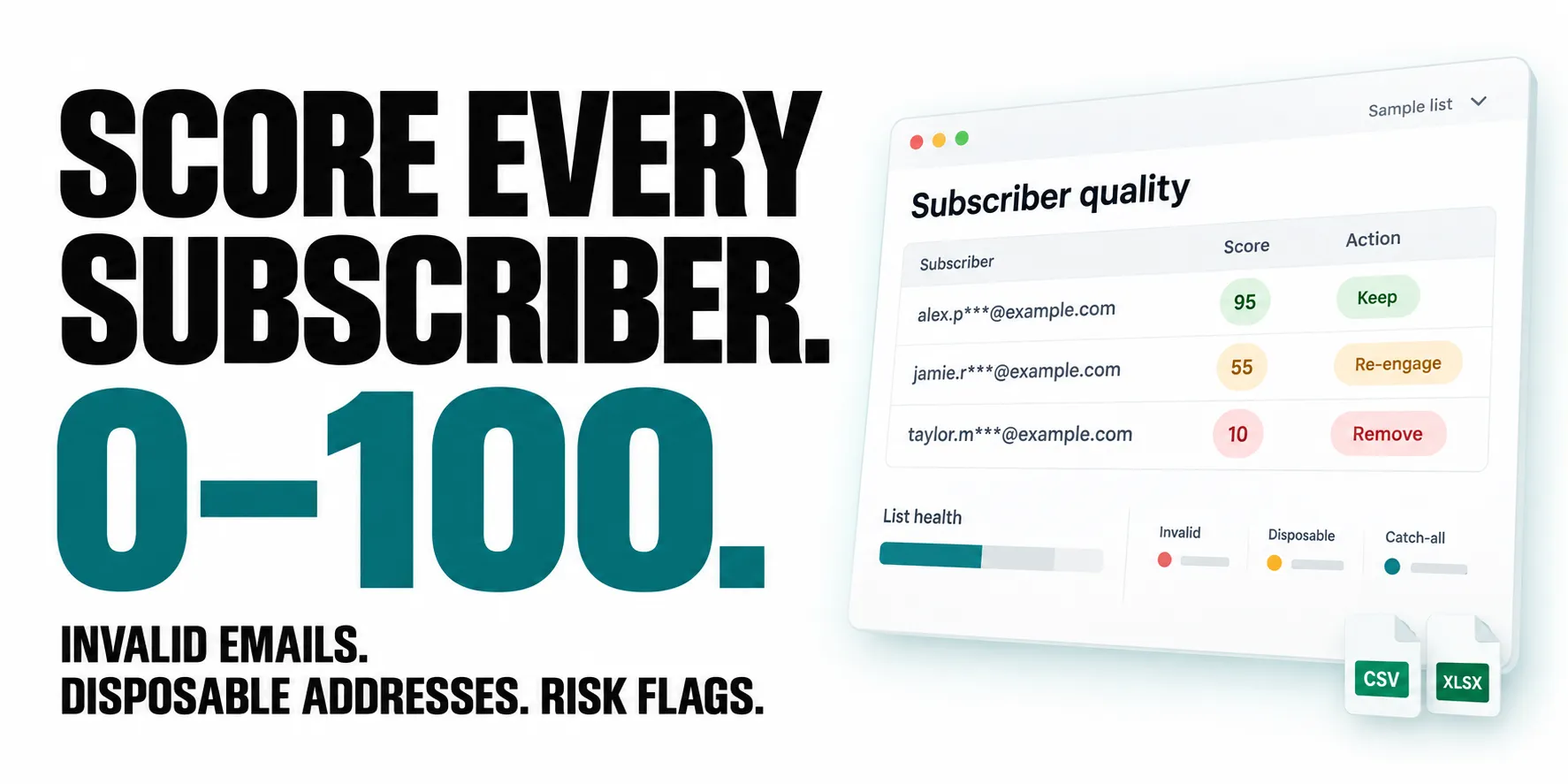
See the risk behind each address. Every validated subscriber gets a 0–100 quality score, a validation status and readable risk tags. Identify invalid or disposable addresses, catch-all domains, role accounts and full inboxes before your next campaign.
Get clear next steps for your list. Receive keep, re-engage and remove recommendations, with a separate email list for each group. The health report adds an overall score, risk breakdown and domain analysis so you can prioritize cleanup.
Use the export you already have. Upload CSV, XLSX, TXT or a Mailchimp ZIP, or provide a shareable Google Sheets link. Automatically recognize exports from Mailchimp, Beehiiv, Substack, Kit and four other newsletter platforms, with email-column detection for other formats.

Quick start
Upload your subscriber export in the input form and set the first test to 10 addresses. For an API call, replace the example URL below with your own accessible file URL.
Open actor input to upload a file or paste email addresses. Subscriber results appear as dataset rows; the final row contains the list health report and the three recommended email lists.
Free-tier accounts can try one run with up to 10 addresses. Paid accounts with a run budget below $1 are also limited to 10 addresses. Recommendations reflect address-validation signals, not subscriber engagement history.
| Clearpath · Email Tools | ||
 Newsletter Cleaner Newsletter CleanerYou are here |  Email Finder Email FinderFind business emails |  Email Validator Email ValidatorCheck email addresses |
Copy to your AI assistant
Copy this block into ChatGPT, Claude, Cursor, or any LLM to start using this actor.
The Problem with Newsletter Lists
Subscriber lists decay. People abandon email addresses, fill inboxes, sign up with disposable emails, or get flagged as spamtraps. Sending to a dirty list tanks your deliverability score, lands you in spam folders, and wastes money on every send.
This actor cleans your list automatically.
Upload your export from any newsletter platform. Every subscriber gets validated at the mail server level and scored 0-100. You get three lists back: who to keep, who to try re-engaging, and who to remove immediately.
What You Get Per Subscriber
Every validated email returns:
- ✅ Quality Score (0-100) with keep / re-engage / remove action
- ✅ Deliverability Status — safe, risky, invalid, disposable, catch-all, unknown
- ✅ Risk Flags — spamtrap, role account, disabled mailbox, inbox full, catch-all, disposable
- ✅ Domain Info — MX records, free vs business email detection
- ✅ Tags — human-readable labels for quick filtering
List Health Report
Every run generates a health report at the end:
| Metric | Description |
|---|---|
| List Health Score | 0-100 grade for your entire subscriber list |
| Action Summary | How many to keep, re-engage, and remove |
| Risk Breakdown | Safe, risky, invalid, disposable, catch-all, spamtrap counts |
| Domain Analysis | Top 10 domains, free vs business split, unique domain count |
| Quality Distribution | Excellent / good / moderate / poor breakdown |
| Recommendations | Specific tips based on your list's problems |
| Ready Lists | Clean list, re-engage list, and remove list as email arrays |
Supported Platforms
Upload your subscriber export and the platform is detected automatically:
| Platform | Auto-detected | Export format |
|---|---|---|
| Mailchimp | Yes | CSV or ZIP |
| Beehiiv | Yes | CSV |
| Substack | Yes | CSV |
| ConvertKit (Kit) | Yes | CSV |
| Ghost | Yes | CSV |
| ActiveCampaign | Yes | CSV |
| MailerLite | Yes | CSV |
| Buttondown | Yes | CSV |
| Any other | Yes | CSV, XLSX, TXT, Google Sheets |
Don't see your platform? The 7-layer detection pipeline handles unknown formats too. It scans column headers in 12 languages and falls back to content analysis when headers don't match.
How Email Column Detection Works
Most tools require you to map columns manually. This actor finds the email column automatically:
| Layer | Method | Cost | What it catches |
|---|---|---|---|
| 1 | User override | Free | Explicit column name if provided |
| 2 | Platform fingerprints | Free | Mailchimp, Beehiiv, Substack, etc. |
| 3 | Known header patterns | Free | 35+ patterns in 12 languages |
| 4 | Partial header match | Free | Any header containing "email", "correo", etc. |
| 5 | Content scan (80%) | Free | Columns where 80%+ values are emails |
| 6 | LLM fallback | ~$0.001 | Unusual headers, non-Latin scripts |
| 7 | Relaxed scan (60%) | Free | Sparse columns with some emails |
The LLM only fires when layers 1-5 fail. Zero extra cost for the vast majority of runs.
Quality Scoring
Each subscriber gets a quality score from 0-100, adjusted for newsletter-specific risk factors:
| Factor | Impact | Why |
|---|---|---|
| Spamtrap | -50 | Destroys sender reputation |
| Disabled mailbox | -40 | Dead address, guaranteed bounce |
| Disposable email | -30 | Temporary address, zero engagement |
| Full inbox | -20 | Won't receive your newsletter |
| Role account | -15 | info@, admin@ rarely read newsletters |
| Catch-all domain | -10 | Inflates list without engagement signal |
Action buckets:
- Keep (score ≥ 70, status safe) — safe to send
- Re-engage (score 40-69 or risky) — send re-engagement campaign first
- Remove (score < 40, invalid, disposable, spamtrap) — remove immediately
Input
Upload a subscriber file
Supports CSV, XLSX, TXT (one email per line), ZIP (Mailchimp exports), and Google Sheets URLs. The file format and email column are detected automatically.
Paste emails directly
Both combined with a limit
Google Sheets
Paste a Google Sheets URL directly. The sheet must be set to "Anyone with the link can view."
Input Parameters
| Parameter | Type | Description | Default |
|---|---|---|---|
subscriberFile | string | Upload CSV, XLSX, TXT, ZIP, or paste a Google Sheets URL | — |
emailAddresses | array | Enter emails manually. Can combine with file upload. | — |
maxItems | integer | Limit how many subscribers to validate. 0 = validate all. | 0 |
platform | string | Override automatic platform detection. | auto |
csvEmailColumn | string | Override automatic email column detection. | — |
Output Examples
Subscriber result
Health report (last item in dataset)
Pricing
| Apify Plan | Per 1,000 emails |
|---|---|
| Free | $7.99 |
| Starter | $7.49 |
| Scale | $6.99 |
| Business | $5.99 |
Cost examples
| List size | Free plan | Business plan |
|---|---|---|
| 100 | $0.80 | $0.60 |
| 500 | $4.00 | $3.00 |
| 1,000 | $7.99 | $5.99 |
Free tier includes 1 run with up to 10 emails at no cost.
API Integration
Python
JavaScript
Data Export
Download results as JSON, CSV, or Excel directly from the Apify dataset. The CSV export works well for re-importing your clean list back into your newsletter platform.
Automation
- Scheduled runs — clean your list weekly or monthly on autopilot
- Webhooks — get notified when cleaning completes
- API — integrate into your subscriber management pipeline
Use with AI Assistants (MCP)
Connect this actor to AI assistants via Apify's MCP server.
Setup
- Go to mcp.apify.com and add
clearpath/newsletter-list-cleaner - Connect to your AI assistant (Claude Desktop, Cursor, etc.)
Example prompts
"Clean my newsletter list from this CSV and tell me how many subscribers to remove"
"Validate these 50 email addresses and flag any spamtraps or disposable addresses"
"Upload my Mailchimp export and give me a health report"
LLM context
FAQ
Q: What file formats are supported? A: CSV, XLSX, TXT (one email per line), ZIP archives (Mailchimp exports), and Google Sheets URLs. Detected automatically.
Q: Do I need to specify which column has emails? A: No. The 7-layer detection pipeline finds it automatically. Override in settings if needed.
Q: What does the quality score mean? A: 0-100 based on deliverability and risk factors. 70+ with "safe" status = keep. Below 40 = remove. In between = re-engage.
Q: How accurate is the validation? A: Email deliverability is verified at the mail server level (SMTP). Spamtrap, disposable, and catch-all detection included.
Q: Can I combine file upload with manual emails? A: Yes. Duplicates are removed automatically.
Q: What happens with files that have no email column? A: Clear error message. No credits charged.
Q: How long does validation take? A: A few seconds for small lists. 10,000+ emails take 1-2 minutes.
Q: Does it work with non-English files? A: Yes. Email column headers recognized in 12 languages including German, Spanish, French, Italian, Portuguese, Japanese, Korean, Chinese, and Arabic.
Q: Is there a free trial? A: Free tier includes 1 run with up to 10 emails at no cost.
Q: What's the difference between this and the Email Validator API? A: The Email Validator API validates raw email addresses. This actor is designed for newsletter workflows: it handles file uploads, detects platforms, scores subscribers, and generates a health report with recommendations.
Support
- Email: max@mapa.slmail.me
- Bugs: Issues tab
- Features: Email or issues
Legal Compliance
Validates publicly provided email addresses at the mail server level. No email content is read or stored. Users must comply with applicable data protection regulations (GDPR, CCPA).
Clean your newsletter list. Keep the engaged, re-engage the risky, remove the dead weight.


