

Apartments.com Rentals Scraper: Rents & Floor Plans
Pricing
from $1.40 / 1,000 property with full details
Apartments.com Rentals Scraper: Rents & Floor Plans
Collect Apartments.com rentals by city to compare rents: price ranges, beds, baths, sqft, floor plans, amenities and property phone numbers. No login. For landlords and rental analysts.
Pricing
from $1.40 / 1,000 property with full details
Rating
0.0
(0)
Developer

Cliqto Media
Maintained by CommunityActor stats
0
Bookmarked
2
Total users
1
Monthly active users
8 days ago
Last modified
Categories
Features
Share
This Apartments.com scraper collects US rental properties for a city, or from your own Apartments.com links, so you can compare rents. It returns one row per property with rent range, beds, baths, size, floor plans, amenities, property phone and, with full details, map position, with no login and no API key.
Use it if you are a landlord or a rental analyst and want to check the market. The smallest run costs about $0.05 and ends in under 3 minutes: enter Austin, TX, keep 10 properties and click Start.
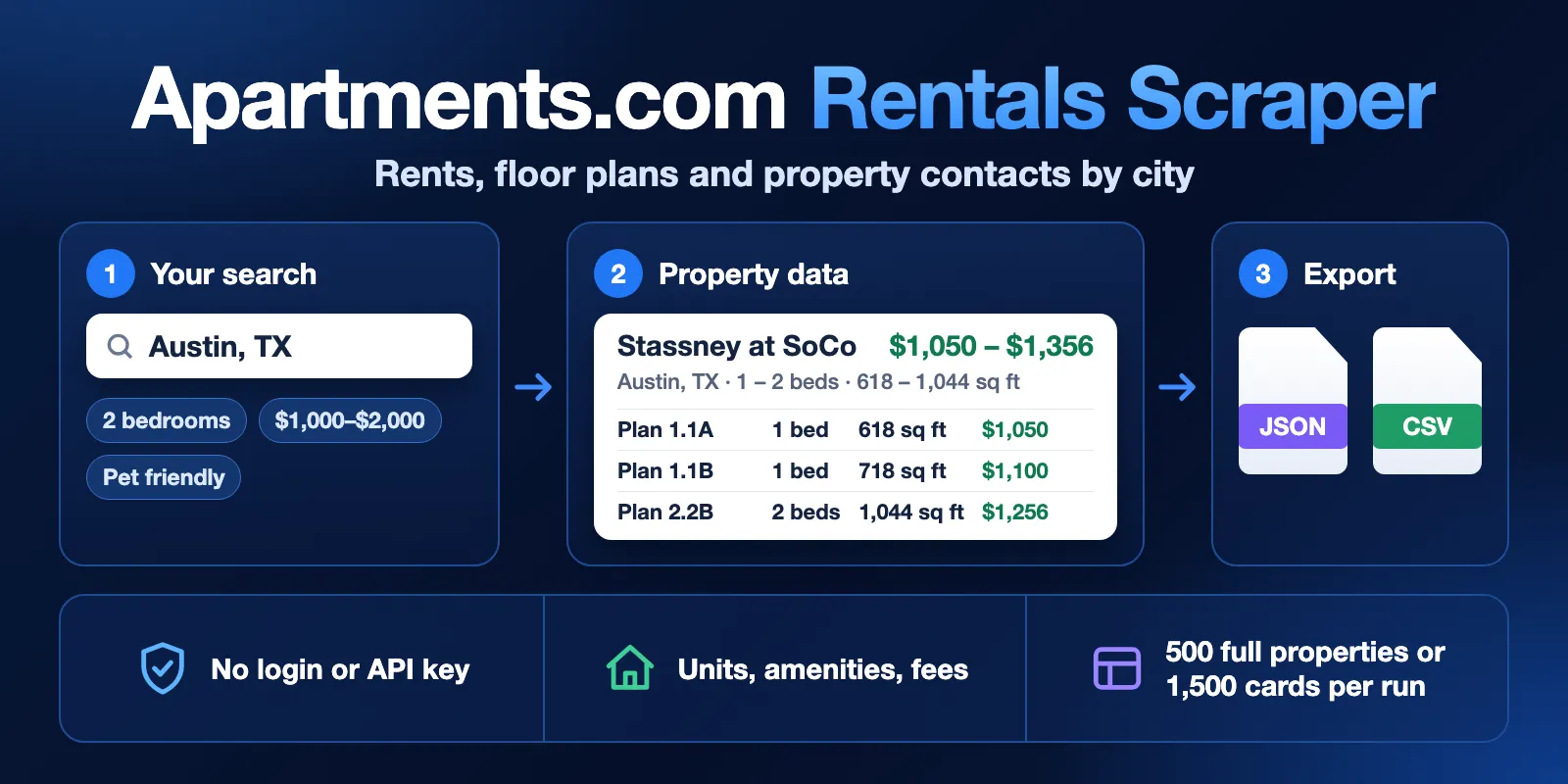
Table of contents
- What it does
- How it works
- Quick start
- Use cases
- Input
- Output
- Pricing
- Limits
- API, export and integrations
- Troubleshooting
- FAQ
- Related Actors
- Support
What it does
The Actor reads public rental pages on Apartments.com. You give it a city and optional filters, or direct links. It saves one row per property.
It has two data depths:
- Full details opens each property page. You get floor plans, units, amenities, fees, pet policy, contact and rating.
- Search cards only reads the search results. You get rent range, beds, baths, size and phone, without floor plans. It is cheaper and faster.
This Actor is not affiliated with, endorsed by or connected to Apartments.com or its owners. It does not collect tenant data or review texts.
Good fit
- Landlords who want to set rent by comparing nearby properties.
- Rental analysts who track rent ranges by city, bedroom count or manager.
- Teams that need property manager names and office phones for a market.
- People who already have a list of Apartments.com links and need clean rows.
How it works
- The Actor opens Apartments.com search pages for your places and filters, or opens your links.
- It reads each property from the search card, and from the property page when you choose full details. It removes properties found twice in one run.
- It saves rows to the Dataset with a
statusfor each row, and writes a short run report to theRUN_SUMMARYrecord. A failed page gets a status. It never looks like an empty result.
Quick start
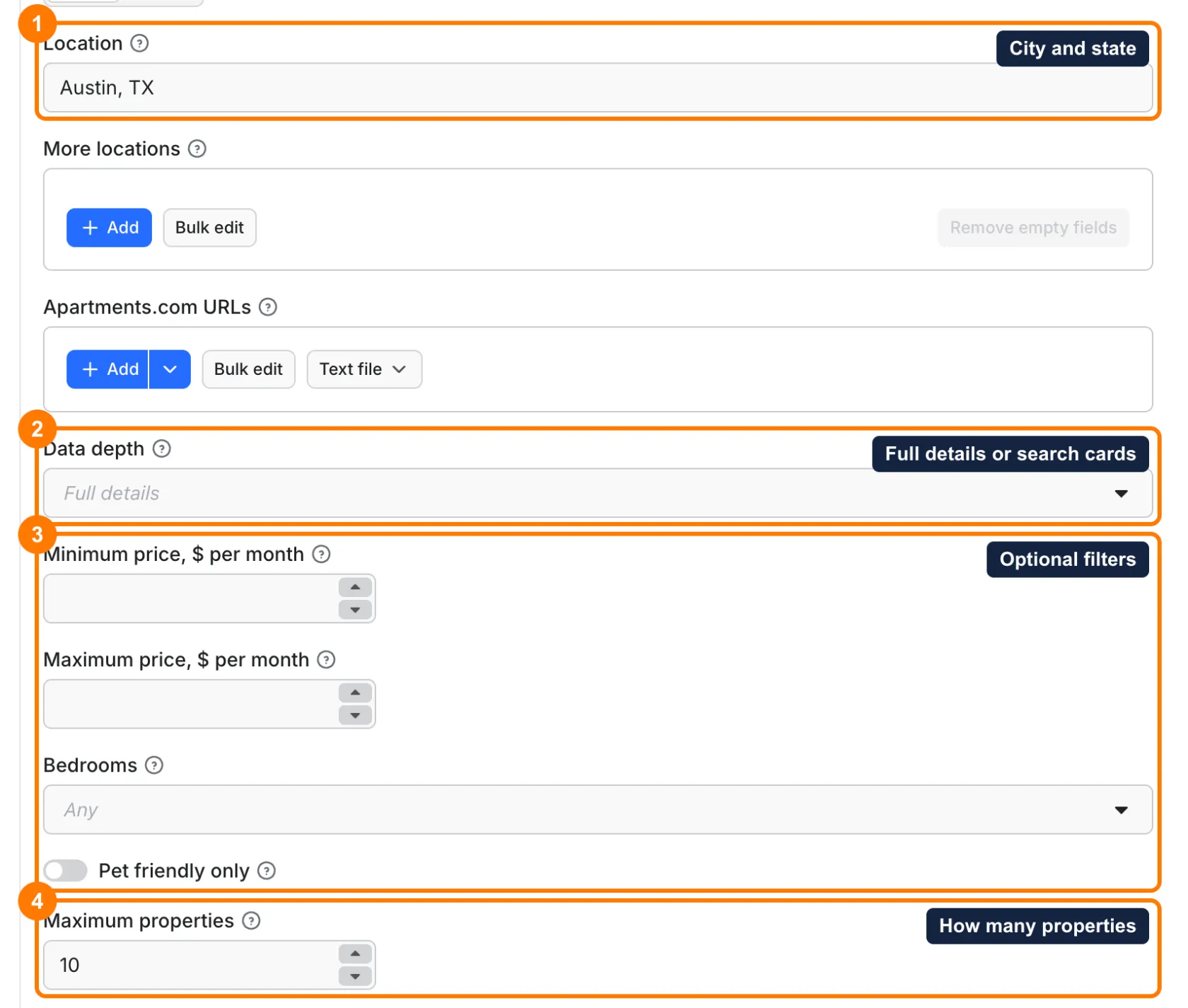
- Open the Input tab. Keep
Austin, TXin Location, or enter your city and state (box 1). - Keep Data depth on Full details, or choose Search cards only (box 2).
- Leave the price, Bedrooms and Pet friendly only filters empty for the first run, or set them (box 3).
- Keep Maximum properties at
10(box 4).
Click Start. Then open the Output tab and check the columns in the boxes: property and address (box 1), rent range (box 2), beds, baths and size (box 3), phone and manager (box 4).
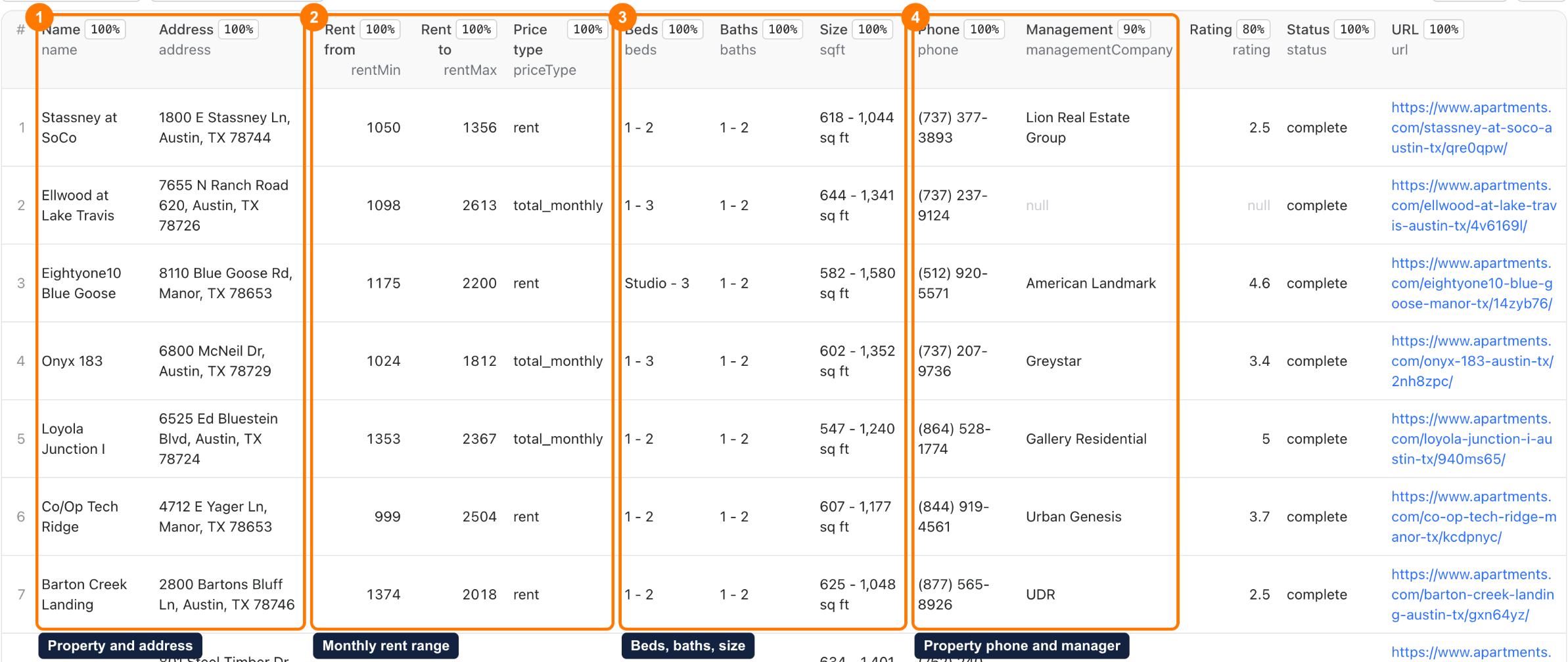
Expected result: 10 rows for Austin properties, each with status equal to complete in a normal run.
Use cases
| Buyer job | Input path | Output entity | Key fields | Next integration |
|---|---|---|---|---|
| Set a fair rent for my building | location, beds, mode: details | Property with floor plans | rentMin, rentMax, floorPlans, sqft | CSV or spreadsheet |
| Compare rent ranges across cities | location, additionalLocations, mode: listings | Property from a search card | rentMin, rentMax, beds, city | JSON or API |
| Find property managers in a market | location, maxItems | Property | managementCompany, phone, website | CSV export |
| Refresh data for my own list of properties | startUrls | Property with floor plans | floorPlans, specials, fetchedAt | Scheduled run and API |
| Find pet-friendly rentals in a price range | location, minPrice, maxPrice, petFriendly | Property | rentMin, petPolicy, url | Slack or Notion summary |
Input
Input fields
| Field | Plain name | Type | Required | Default / prefill | Allowed values | Effect | Example | Recommendation |
|---|---|---|---|---|---|---|---|---|
location | Location | string | One of location, additionalLocations, startUrls | Form prefill Austin, TX | City and state, with an optional ZIP code | Searches this place | Austin, TX 78741 | A ZIP code alone is not accepted |
additionalLocations | More locations | array of strings | no | empty | Up to 20 places | Searches more places with the same filters | ["Denver, CO"] | maxItems is shared by all places |
startUrls | Apartments.com URLs | array of links | no | empty | Up to 1000 apartments.com links; a run opens at most 500 property pages | Reads your search or property links | https://www.apartments.com/austin-tx/ | Use it for a filter the form does not have |
mode | Data depth | string | no | details | details, listings | Sets how much data and the price per row | listings | Start with details if you need floor plans |
minPrice | Minimum price, $ per month | integer | no | empty | 0 or more | Search filter on the site | 1000 | Applies to locations only |
maxPrice | Maximum price, $ per month | integer | no | empty | 1 or more | Search filter on the site | 2000 | Applies to locations only |
beds | Bedrooms | string | no | any | any, studio, 1, 2, 3, 4plus | Search filter on the site | 2 | Applies to locations only |
petFriendly | Pet friendly only | boolean | no | false | true, false | Search filter on the site | true | Applies to locations only |
maxItems | Maximum properties | integer | no | Default 100, form prefill 10 | 1 to 500 with details, 1 to 1500 with listings | Stops the run at this number of rows | 10 | Start small, then raise it |
deliveryConnector | Send results to | string | no | empty | Your connector from Apify Console | Posts a summary after the run | Your Slack connector | Optional |
deliveryTarget | Notion page or channel | string | no | empty | Notion page link or Slack channel ID | Sets where the summary goes | C0123456789 | Empty lets the connector decide |
A run with no place and no link stops with a clear message. A property found twice in one run is saved once.
Interacting settings
| When | Input A | Input B | Effective behavior | Example | Cost/result effect |
|---|---|---|---|---|---|
| You use links and filters | startUrls | minPrice, maxPrice, beds, petFriendly | Filters do not change your links | A search link with its own filter | Rows follow the link |
You use a property link in listings mode | startUrls | mode | A property link always opens the property page | One property link | Charged as property |
| You use many places | additionalLocations | maxItems | maxItems counts all places together | 3 cities, maxItems 30 | The first cities can use the full limit |
| You choose full details | mode | maxItems | Values above 500 stop the run with a clear message | maxItems 800 | Use listings for more rows |
Input examples
Small first run
Expected behavior: searches Austin and opens 10 property pages.
Expected output: 10 properties with rentMin, rentMax, floorPlans and phone.
Limit or cost note: about $0.05 in total, under 3 minutes.
Two-bedroom rentals in a price range, search cards only
Expected behavior: reads search pages with these filters and does not open property pages.
Expected output: properties with rentMin, rentMax, beds and phone; floorPlans is null.
Limit or cost note: the site applies the filters, so some rows can be outside your range. See Limits.
Output
Output fields
| Field | Meaning | Type | Can be empty? | Example / enum | Source / notes |
|---|---|---|---|---|---|
propertyId | Property ID on the site | string | no | qre0qpw | From the link |
name | Property name | string | yes | Stassney at SoCo | |
address | Full address | string | yes | 1800 E Stassney Ln, Austin, TX 78744 | |
streetAddress, city, state, postalCode, neighborhood | Address parts | string | yes | Austin, TX, 78744 | neighborhood is often null |
lat, lng | Map position, empty in listings mode | number | yes | 30.19771, -97.76139 | |
rentMin, rentMax | Lowest and highest monthly price | integer | yes | 1050, 1356 | null means the price is not listed, never 0 |
priceType | What the price means | string | yes | rent, total_monthly | total_monthly includes required monthly fees |
baseRentMin, baseRentMax | Base rent without fees | integer | yes | 1050, 1356 | null in listings mode |
beds, baths, sqft | Ranges as shown on the site | string | yes | 1 - 2, 618 - 1,044 sq ft | |
bedsMin, bedsMax, bathsMin, bathsMax, sqftMin, sqftMax | The same ranges as numbers | number | yes | 1, 2, 618, 1044 | A studio has 0 beds |
availability | Availability text | string | yes | null in most rows | As shown on the page |
floorPlans | Plans with beds, baths, size, rent and units | array | yes | [{"name":"1.1B","rentMin":1100,"units":[...]}] | null in listings mode, [] when the page has no plans |
amenities | Amenities by group | array | yes | [{"group":"Community Amenities","items":["Pool"]}] | Full details only |
phone | Property or management office phone | string | yes | (737) 377-3893 | null for private owners |
managementCompany | Management company | string | yes | Lion Real Estate Group | Never a private person's name |
website | Property website | string | yes | http://www.stassneysoco.com/ | Full details only |
petPolicy, fees, specials | Pet rules, fees and offers | array | yes | [{"name":"Dog Fee","value":"$400"}] | Full details only |
rating, reviewCount | Rating and number of reviews | number | yes | 2.5 | No review text |
description, photos, schools, transit | Page description, photo links, nearby schools and transit | mixed | yes | Full details only, when the page has them | |
url | Property link | string | no | https://www.apartments.com/stassney-at-soco-austin-tx/qre0qpw/ | |
status | Row result | string | no | complete, partial, not_found, error | See the next table |
statusMessage | Reason for a partial, not_found or error row | string | yes | The source has no such page. | |
searchLocation | Place that gave this row | string | yes | Austin, TX | null for links |
source, fetchedAt | Source and time of reading | string | no | apartments.com, 2026-11-07T17:29:40.000Z |
Output entities and surfaces
| Situation | Dataset/API/KVS/live view | Result shape | User action |
|---|---|---|---|
| Normal item | Dataset, Properties view | One row with status: complete | Open, export or call the API |
| Domain-empty result | Dataset empty, run succeeds, RUN_SUMMARY shows 0 properties | No rows | Check the place and filters |
| Unknown place or removed property | Dataset | Row with status: not_found, not charged | Check the link or place |
| Partial result | Dataset | Row with status: partial and search card data, reason in statusMessage | Run that link again if you need floor plans |
| Technical failure | Dataset row with status: error, or a RUN_SUMMARY stop reason such as SOURCE_BLOCKED | Failed pages are not charged as rows. A run stopped by blocking is marked failed and keeps the rows it saved | Try again later |
Output example
This example is trimmed and shows one property from the Austin run. null means the page does not show the value, or this data depth does not read it. It does not mean 0.
Send results to Slack or Notion
Pick your connector in the optional deliveryConnector field. After the run saves its data, the Actor posts a short summary (up to 25 rows and a link to the full dataset) there. Put a Notion page link or a Slack channel ID in deliveryTarget: in Notion every run is added on top of that one page, so your workspace does not fill up with new pages. A delivery error never fails the run and costs nothing extra. Connect a service once in Apify Console → MCP connectors.
Use case → fields
| Buyer job | Input path | Output entity | Key fields | Next integration |
|---|---|---|---|---|
| Set a fair rent | location, beds | Property | rentMin, rentMax, floorPlans, sqftMin | CSV |
| Compare cities | additionalLocations, mode: listings | Property | city, rentMin, rentMax | API |
| Find managers | location | Property | managementCompany, phone, website | CSV |
| Check a list of properties | startUrls | Property | floorPlans, specials, fetchedAt | Schedule and API |
Pricing
Pricing unit
You pay per saved property, plus a small start fee. You also pay Apify platform usage (compute and proxy traffic) from your own account. The price per row depends on your Apify plan:
| Event | Free | Bronze | Silver | Gold and above |
|---|---|---|---|---|
property: one property with full details, per 1000 | $2.00 | $1.80 | $1.60 | $1.40 |
listing: one property from a search card, per 1000 | $0.38 | $0.342 | $0.304 | $0.266 |
apify-actor-start: per run, per GB of memory (at least one) | $0.001 | $0.001 | $0.001 | $0.001 |
Measured platform usage at 1024 MB is about $1.80 per 1000 full-detail rows and about $0.08 per 1000 search cards. So with the Free tier price the total is about $3.80 and $0.46 per 1000.
What you pay in other cases:
- A place with no rentals, or filters with no match: no row charge. You pay the start fee and platform usage. A measured empty search used $0.0028 of usage.
not_foundanderrorrows: free as rows. The page was still opened, so you pay its usage. A measurednot_foundrun used $0.0038. A property page costs about $0.0018 of usage in a 500-row run, so we estimate about $0.90 for 500 removed links.partialrows: charged aslisting, because the row holds search card data only.- Failed or cancelled runs: you pay for the rows saved before the stop, the start fee and usage so far.
- Maximum cost per run: this limit counts row and start charges. It does not count platform usage. When the next row does not fit, the run stops with the rows it has.
The start fee grows with the memory of the run: one fee per GB. The default of 1024 MB means one fee.
Cost examples
These use the Free tier price and measured usage at 1024 MB. Real usage changes with how often the site blocks requests.
| Scenario | Input scope | Expected item/event count | Base charge | Optional charge | Stop/cap behavior |
|---|---|---|---|---|---|
| First run | Austin, TX, 10 details, under 3 min | 10 property | $0.021 | About $0.02 usage | Stops at 10 |
| Normal run | One city, 100 details | 100 property | $0.201 | About $0.18 to $0.21 usage | Stops at 100 |
| Largest details run | 500 details, 20 to 28 min | 500 property | $1.001 | About $0.86 to $0.88 usage | Stops at 500 |
| Search cards | 1000 cards, estimate from the 1500 card run | 1000 listing | $0.381 | About $0.08 usage | Stops at 1000 |
| Largest cards run | 1500 cards, 7 to 12 min | 1500 listing | $0.571 | About $0.10 to $0.12 usage | Stops at 1500 |
| Empty search | A place with no results | 0 rows | $0.001 | About $0.003 to $0.004 usage | Ends at once |
Limits
- US rentals on Apartments.com only. No other sites, no homes for sale.
- At most 500 properties with full details and 1500 with search cards per run. These are the largest sizes we tested with success. A test with 1000 full-detail rows stopped at 915 because the site blocked it.
- A run opens at most 500 property pages, also from direct links.
- Speed: a 500-row full-detail run took 20 to 28 minutes, about 2.3 to 3.4 seconds per row. Shorter runs can take longer per row: a 10-row run took up to about 160 seconds in our tests.
- The site applies price filters, and the Actor does not check them again. In our tests, about 1 in 10 rows was outside the range. Filter on
rentMinandrentMaxif you need an exact range. - The site shows up to 700 results for one search. The Actor adds a warning when a search reaches this. Use smaller places or filters to see more.
maxItemscounts all places together, not per place.- A ZIP code alone is not accepted. Use
Austin, TX 78741. - About 1% of rows can be
partialwhen a property page fails and only search card data is left. - The site can block a run. The run then stops, is marked failed and keeps the rows it saved.
RUN_SUMMARYshows the reasonSOURCE_BLOCKED. - A run stops early when it reaches one of its own limits, and keeps the rows it saved. It stops up to 20 seconds before the run timeout, or 45 seconds with
deliveryConnector(DEADLINE), and after 200 requests plus 10 per row ofmaxItems(REQUEST_LIMIT). The harder pages have their own limit of 1.5 Web Unblocker calls per row, with at least 20 per run. When this limit is used up, the remaining hard pages count as failed. After 10 failed pages in a row, or 3 before the first page opens, the run stops asSOURCE_BLOCKEDand is marked failed, and the saved rows stay. A page larger than 8 MB also counts as failed. - No review texts, no tenant data and no private owners' names or phones.
- No login. Only public pages are read. Pages that need an account are not available.
- Rents are what the site shows at the time of the run. Check
fetchedAt. - Not affiliated with Apartments.com. Follow the site's terms and your local laws when you use the data.
API, export and integrations
- API: start a run with the Apify API using the same input as the form. Read rows from the run's default Dataset.
- Export: download the Dataset as JSON, CSV, Excel, XML or HTML from the Output tab or the API.
- Scheduling: add a schedule in Apify Console to read the same place or links every week. Compare rows by
propertyIdandfetchedAt. - Webhooks / no-code: use an Apify webhook or integration on run success. The next system reads the Dataset of that run.
- Slack or Notion: see Send results to Slack or Notion.
Use with AI agents (MCP)
MCP server URL with only this Actor: https://mcp.apify.com?tools=cliqtomedia/apartments-scraper.
The smallest useful input:
Key output fields: name and address name the property, rentMin and rentMax give the monthly price range, floorPlans lists plans and units, phone is the property office phone, status shows if the row is complete.
This run takes under 3 minutes and costs about $0.05. The limits are 500 properties with details and 1500 with listings. A ZIP code alone is not accepted.
Troubleshooting
The run stops at once with a message about the location
Symptom: no rows, and the message asks for a city and state.
Likely reason: the place has only a ZIP code, or the place is empty.
Check: read Location in your input.
Action: use the form Austin, TX or Austin, TX 78741.
The Dataset has rows with status not_found
Symptom: rows with no rent and status equal to not_found.
Likely reason: the site has no such city or the property is removed.
Check: open url in your browser.
Action: fix the place or remove the link. These rows are free.
The run has fewer rows than Maximum properties
Symptom: fewer rows than maxItems.
Likely reason: the search has fewer results, the site limit of 700 per search was reached, your maximum cost per run was reached, the run timeout or request limit was reached, or the site blocked the run.
Check: the RUN_SUMMARY record shows the stop reason and warnings.
Action: use smaller places, raise your limit or the run timeout for DEADLINE, split the run for REQUEST_LIMIT, or try again later for SOURCE_BLOCKED.
The run stops with a proxy message
Symptom: no rows, and the log has a proxy access error. Likely reason: your Apify plan may not include the residential proxy or the Web Unblocker that this Actor uses. Check: open Proxy in Apify Console and read your plan. Action: upgrade your plan, or open an issue with the run ID.
A price is outside my filter
Symptom: rentMin or rentMax is outside minPrice or maxPrice.
Likely reason: the site shows a property when a part of it fits the filter.
Check: compare with floorPlans.
Action: filter the rows after the run.
FAQ
Do I need an Apartments.com account or an API key?
No. The Actor reads public pages with no login. You need only an Apify account.
Why do I pay platform usage as well as the row price?
Apartments.com blocks simple requests, so each property page needs paid proxy traffic. You pay it at Apify's rate, and the row price stays low. See Pricing for the measured totals.
Is the data complete and fresh?
Rows show what the site shows at the time in fetchedAt. A search returns up to 700 results and some fields can be null. A price of null means it is not listed.
Do I get owners' or tenants' personal data?
No. phone and managementCompany are for properties and management companies only. For a private owner they are null. The Actor does not read review texts.
Can I replace another Apartments.com scraper with this one without changes?
Not without changes. Field names can differ. Check Output fields and run 10 rows first.
Related Actors
- Zillow Listings Scraper: Zestimates & Price Cuts, No Login — compare with US homes for sale and rent on Zillow.
- Redfin & Realtor Listings Scraper (US): Sale, Sold & Rent — get US sale, sold and rent listings from two more sources.
Support
For a bug, question or feature request, open the Actor's Issues tab on Apify. Include the run ID, your input and the error text. Never send tokens, cookies or billing data.


