
Coles, Woolworths & Aldi Price Scraper - No Login
Pricing
from $0.38 / 1,000 product saveds
Coles, Woolworths & Aldi Price Scraper - No Login
Get Woolworths, Coles and Aldi Australia product prices in one table: current and was price, unit price, specials and promo text, stock, category, barcode and links. Search by keyword, category URL or product URL. No login.
Pricing
from $0.38 / 1,000 product saveds
Rating
0.0
(0)
Developer

Cliqto Media
Maintained by CommunityActor stats
0
Bookmarked
2
Total users
1
Monthly active users
5 days ago
Last modified
Categories
Share
Get Coles, Woolworths and Aldi Australia prices in one table. Search by keyword, or paste category or product links. Each row has the price, was price, unit price, special and promo text, stock, brand, size and link. No login or API key. A 20-product Woolworths search costs $0.014 on the Free plan.
Use it to compare supermarket prices, track specials or feed a grocery price app. The smallest run is one keyword in one store, and it finishes in a few seconds.
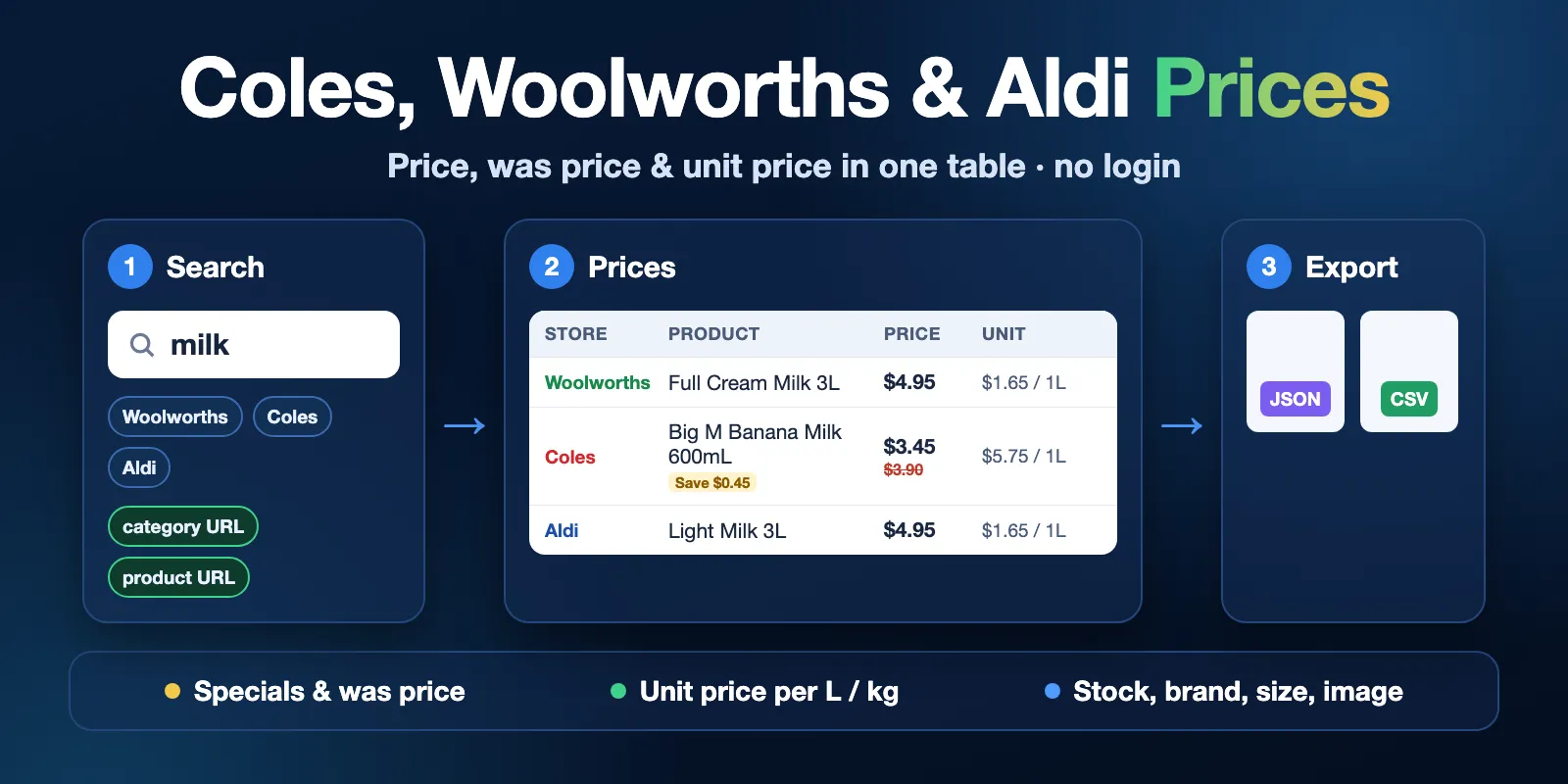
Table of contents
- What it does
- Quick start
- Use cases
- Input
- Input examples
- Output
- Pricing and limits
- API, export and integrations
- Limits and data notes
- Troubleshooting
- FAQ
- Support
What it does
The Actor reads public product listings on three Australian supermarket websites: Woolworths, Coles and Aldi. It saves one row per product. All three stores use the same fields, so you can sort and compare them in one table.
There are three ways to choose products:
- Search terms: each term is searched in every store you pick.
- Category links: a category page from a store website, for example Coles milk.
- Product links: one product page per link.
You can keep only products on special. Prices are the default online prices of each store. The Actor does not pick a local store or postcode.
Good fit
- Compare the price of the same product type in Coles, Woolworths and Aldi.
- Watch specials and was prices for a list of products or a category.
- Get unit prices (per litre, per kg, per 100 g) for fair comparison.
- Build price history: schedule the same input and keep each run's rows.
Not a fit
- Prices for one store branch or postcode, or delivery prices.
- Nutrition facts, ingredients or product descriptions. They are not collected.
- Other stores, such as IGA, or stores outside Australia.
- Login, loyalty prices (Flybuys, Everyday Rewards) or carts.
Quick start
- Open the Input tab.
- Keep Search terms as
milkand Stores asWoolworths(the prefill). - Keep Max products per search or category at
20. - Click Start.
- Open the Prices view of the dataset. Check
store,name,priceandunitPriceText.
Expected result: 20 Woolworths milk products with prices, in about 4 seconds.
Use cases
| Task | Input | Key fields | Next step |
|---|---|---|---|
| Compare three supermarkets | searchTerms + all three stores | store, price, unitPrice, unitOfMeasure | Sort by unitPrice in a spreadsheet |
| Track specials in a category | categoryUrls + onlyOnSpecial: true | price, wasPrice, savings, promoText | Schedule a daily run |
| Watch a fixed product list | productUrls | productId, price, onSpecial, inStock | Compare rows from each run by store + productId |
| Feed a price app or dashboard | Any mode | name, brand, size, image, url | Read the dataset by API |
Input
At least one of searchTerms, categoryUrls or productUrls is required. Duplicate terms and links are removed.
| Field | Type | Default / prefill | Allowed values | What it does |
|---|---|---|---|---|
searchTerms | array of strings | empty / ["milk"] | Up to 50 terms | Each term is searched in every store from stores. Example: coffee pods, Tim Tam. |
stores | array | all three / ["woolworths"] | woolworths, coles, aldi | Stores for searchTerms. An empty list means all three. It does not change category or product links. |
maxItems | integer | 50 / 20 | 1–1000 | Products to save for each search term in each store, and for each category link. |
onlyOnSpecial | boolean | false | true / false | Keep only discounted or multi-buy products in searches and categories. It reads up to 25 store pages per search or category. |
categoryUrls | array of strings | empty | Up to 50 links from the three store websites | Products from a category page. The store comes from the link. |
productUrls | array of strings | empty | Up to 500 links from the three store websites | One product per link. |
Links from other websites are rejected with a clear message before any page is read.
Settings that work together
searchTerms×stores: 2 terms in 3 stores make 6 searches.maxItemsapplies to each of them, so the run can save up to 6 ×maxItemsproducts.onlyOnSpecialwithmaxItems: the Actor reads pages until it hasmaxItemsspecials, the listing ends or 25 pages are read. Each page read is charged, also when it has no specials.onlyOnSpecialdoes not filterproductUrls. Use theonSpecialfield instead.- The same product in two searches gives two rows, one per search. Within one search each product appears once.
Input examples
Compare milk in all three stores
Returns up to 60 rows: 20 from each store. Costs about $0.038 on the Free plan.
Specials in a Coles category
Returns up to 100 milk products on special. Every row has onSpecial: true, and most have a wasPrice.
A fixed list of products
Returns one row for each product that exists. A product that no longer exists gives no row and is listed as not_found in the run summary.
Output
One dataset row is one product in one store. The Prices view shows the main columns. The All fields view shows all fields. Download JSON, CSV or Excel from the dataset.
Output example
This is one full row from a milk search in October 2026. null means the store did not show this value. A missing price is null, never 0.
Output fields
| Field | Type | Can be null? | Meaning |
|---|---|---|---|
store | string | no | woolworths, coles or aldi. |
productId | string | no | The store's own product ID (stockcode or SKU). |
name | string | no | Product name as the store shows it. |
brand | string | yes | Brand, such as Big M. |
size | string | yes | Pack size, such as 3L or 800g. |
price | number | yes | Current price in AUD. |
wasPrice | number | yes | Price before the discount. Only when the product is on special. |
savings | number | yes | wasPrice minus price. |
unitPrice | number | yes | Price per comparison unit. |
unitOfMeasure | string | yes | Comparison unit, such as 1L, 1kg or 100g. |
unitPriceText | string | yes | Unit price as the store shows it, such as $1.65 / 1L. |
onSpecial | boolean | no | true when the product is discounted or on a multi-buy offer. |
promoText | string | yes | Offer text, such as Save $0.45 or Pick any 3 for $7.50. |
category | string | yes | Store category, such as Dairy, Eggs & Fridge > Milk. |
inStock | boolean | yes | Online availability. Always null for Aldi, because Aldi does not sell online. |
isSponsored | boolean | no | true for a paid (sponsored) position in search results. |
barcode | string | yes | GTIN barcode. Woolworths shows it; Coles and Aldi usually do not. |
url | string | no | Product page link. |
image | string | yes | Product image link. |
currency | string | no | Always AUD. |
sourceType | string | no | search, category or product: the input that gave this row. |
query | string | yes | The search term, for search rows. |
sourceUrl | string | yes | The category or product link, for those rows. |
position | integer | yes | Place in the store's results (before the specials filter). |
fetchedAt | string | no | Time the row was read, ISO UTC. |
Run summary
The key-value store record RUN_SUMMARY has status, reason, message, counts per store and per search or link, warnings and request statistics. The run's Output tab links to it.
| Situation | Dataset | Status / run | What to do |
|---|---|---|---|
| Products saved | One row per product | complete, succeeded | Export the rows. |
| No product matches | Empty | not_found, succeeded | Check spelling or try a wider term. |
| Spending limit reached | Rows saved so far | partial + CHARGE_LIMIT, succeeded | Raise the maximum cost per run. |
| Run timeout reached | Rows saved so far | partial + TIME_LIMIT, succeeded | Raise the timeout or split the input. |
| A store blocked or failed | Rows from other stores and pages stay | partial or error + SOURCE_ERROR, failed | Check tasks in the summary and retry later. |
| Invalid input | Empty | invalid_input, failed | Read the message; fix the field it names. |
Pricing and limits
Pay per event. The price includes proxy and platform usage. There are three events:
| Event | Price | When it is charged |
|---|---|---|
| Actor start | $0.002 | Once per run (per GB of memory; the default 256 MB counts as one). |
| Store page read | $0.003 | Each search, category or product page read from a store. One page has up to 36 (Woolworths), 48 (Coles) or 60 (Aldi) products. |
| Product | $0.00045 – $0.00038 | Each saved row. The price depends on your Apify plan (see below). |
| Apify plan | Per product | Per 1,000 products, with pages and start |
|---|---|---|
| Free | $0.00045 | about $0.50–$0.54 |
| Bronze | $0.00043 | about $0.48–$0.52 |
| Silver | $0.0004 | about $0.45–$0.49 |
| Gold and higher | $0.00038 | about $0.43–$0.47 |
A page that a store blocked or failed to return is not charged. A product page for a product that no longer exists is charged as a page read, with no product event.
Cost examples (Free plan)
| Scenario | Input | Pages | Products | Total |
|---|---|---|---|---|
| Prefill | milk, Woolworths, 20 | 1 | 20 | $0.014 |
| Three stores | milk, all stores, 20 each | 3 | 60 | $0.038 |
| No matches | an unknown word, all stores | 3 | 0 | $0.011 |
| Specials only | rice, Coles, onlyOnSpecial | 15 | 277 | $0.172 |
| Large search | 1,000 Woolworths products | 28 | 1,000 | $0.536 |
| Product links | 100 product URLs | 100 | 100 | $0.347 |
These totals use the listed event prices and the page and product counts from test runs. Searches with many products are the cheapest per product. Product links cost more, because each link is one page read.
Set a maximum cost per run to control spending. The Actor checks it before each page read and each row. When the limit is reached, the run stops and keeps the rows saved so far (CHARGE_LIMIT, succeeded).
Speed and size
- Default memory is 256 MB; the maximum is 512 MB. More memory does not make runs faster.
- In tests, 20 products took about 4 seconds, 1,800 products took 36 seconds and 5,000 products took 2 minutes.
- Product links are slower: one page per link, about 1 second each. 500 links took about 9 minutes.
- The default timeout is 300 seconds. For more than about 5,000 products or more than about 250 product links, raise the run timeout (for example to 900 seconds) or split the input into several runs.
API, export and integrations
Start a run with the Apify API and the same JSON input as in the examples:
POST https://api.apify.com/v2/acts/cliqtomedia~au-supermarket-prices/runs
Read the default dataset when the run finishes. Export JSON, CSV or Excel. Use store + productId as the key when you join rows from different runs. Keep your Apify token private.
You can create an Apify schedule yourself to collect prices every day or week. This Actor does not create schedules or send alerts.
Use with AI agents (MCP)
Apify MCP gives agents access to this Actor. The smallest useful input is:
Key output fields: store names the supermarket, name and size describe the product, price and wasPrice are in AUD, unitPrice with unitOfMeasure allows fair comparison, and onSpecial marks a discount. This run takes about 4 seconds and costs $0.014 on the Free plan. Limits: up to 1,000 products per search or category, 50 search terms, 50 category links and 500 product links per run.
Limits and data notes
- Online prices. Prices are the default online prices of each store. Local store and postcode prices can differ.
- Aldi. Aldi does not sell online, so
inStockis alwaysnull. Aldi shows few specials on its website, sowasPriceandpromoTextare usuallynullandonlyOnSpecialoften returns no Aldi rows. - Names. Each store writes names its own way. Coles adds the size after a bar, for example
Coles Full Cream Milk | 3L; the size is also insize. - Coles product links. Coles finds a product by the number at the end of the link. If the name part of the link is wrong but the number exists, you get that product.
- Sponsored results. Store search results can include paid positions. They are kept and marked with
isSponsored: true. - Not complete. Store search decides which products match a term. The Actor does not promise every product of a store.
- Changes. If a store changes its website, a run can fail with
SOURCE_ERRORuntil the Actor is updated.
Data comes from the public websites of Woolworths, Coles and Aldi Australia. Their website terms limit automated access and commercial use of their content. You are responsible for checking that your use of the data is allowed. This Actor is an independent tool. It is not made by or endorsed by Woolworths, Coles or Aldi.
Troubleshooting
The dataset is empty
Open RUN_SUMMARY. not_found means the stores returned no products for your terms or links. Check the spelling, or try a shorter term. With onlyOnSpecial, there may be no specials in the first 25 pages; the summary warns about this.
One store has no rows
Check tasks in RUN_SUMMARY. not_found means that store has no match. error with BLOCKED or SOURCE_UNAVAILABLE means the store did not answer after retries. Rows from other stores stay. Try again later.
The run stopped early
CHARGE_LIMIT means the maximum cost per run was reached; raise it. TIME_LIMIT means the run timeout was reached; raise the timeout or split the input. In both cases the run succeeds and keeps saved rows.
"… is not a woolworths.com.au, coles.com.au or aldi.com.au link"
Only links from woolworths.com.au, coles.com.au and aldi.com.au are accepted. Copy the link from the product or category page in your browser.
FAQ
Do I need a store account or API key?
No. The Actor reads public pages. You only need an Apify account.
Are these the prices in my local store?
They are the default online prices. Prices in a local store or another state can be different.
Does an empty search cost money?
Yes, but little. It charges the start and the pages read. A search for an unknown word in all three stores costs $0.011.
Can I get price history?
Each run gives the current prices. Schedule the same input and keep the datasets to build your own history.
Why is the same product in two rows?
You searched for two terms and the product matched both. Each search keeps its own rows. Remove duplicates by store + productId if you need one row per product.
Support
Open an issue in this Actor's Issues tab. Include the run ID, your input (without private data) and the error text from RUN_SUMMARY. Never share your Apify token.


