
Website to Markdown for RAG: Crawl & Changed Pages
Pricing
from $0.16 / 1,000 pages
Website to Markdown for RAG: Crawl & Changed Pages
Turn a website or docs section into clean Markdown, one row per page, for RAG and LLM pipelines. Stays inside your start path, respects robots.txt and maxPages exactly. Repeat runs can return only new and changed pages. No login.
Pricing
from $0.16 / 1,000 pages
Rating
0.0
(0)
Developer

Cliqto Media
Maintained by CommunityActor stats
0
Bookmarked
3
Total users
2
Monthly active users
2 days ago
Last modified
Categories
Share
Turn a website or a docs section into clean Markdown for RAG and LLM pipelines: one Dataset row per page, without menus, footers or cookie banners.
Add one start URL and a page limit. The smallest run (20 pages of a docs site) takes a few seconds. On repeat runs, onlyChanged returns only new, changed and removed pages. No login, no browser.
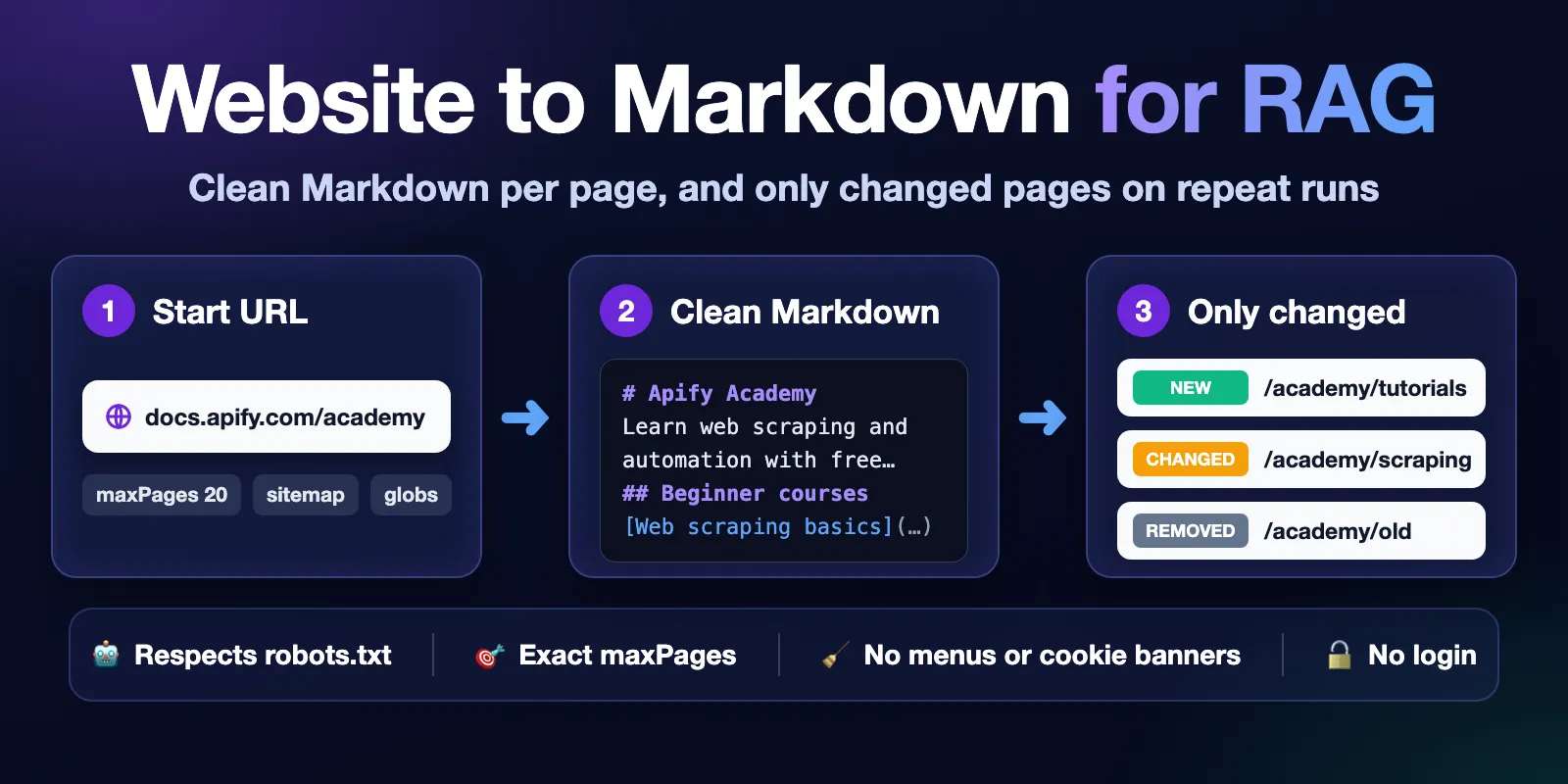
Table of contents
- What it does
- Quick start
- Use cases
- Input
- Output
- Pricing and limits
- API, export and integrations
- Troubleshooting
- FAQ
- Related Actors
- Support
What it does
The Actor starts from your URLs and follows links inside the same path (for example /docs/…). It loads each HTML page over plain HTTP, removes site chrome (navigation, header, footer, sidebars, cookie banners, "copy for LLM" buttons) and converts the main content to Markdown. Each page becomes one Dataset row with url, title, markdown, wordCount and a contentHash.
It reads robots.txt before crawling and skips blocked pages. It waits the site's Crawl-delay (up to 10 seconds). It never saves more than maxPages pages.
With onlyChanged: true the Actor remembers the hash of every page. The next run with the same input saves only pages that are new or changed. Pages from the last run that are no longer linked are checked directly; if one now answers HTTP 404 or 410, you get a free row with changeStatus: removed. Unchanged pages are not saved and cost less.
Good fit
- Feed a docs site or help center into a vector database or a RAG chatbot.
- Refresh that index every day or week and re-embed only the pages that changed.
- Get LLM-ready Markdown of a blog section, a product guide or an API reference.
Not a fit / limits
- JavaScript is not executed. Single-page apps that render content in the browser give empty or short pages, marked
status: partial. - No login, cookies, CAPTCHA or paywalled pages. PDF, DOCX and images are skipped.
- Up to 2000 pages per run and up to 50 start URLs. The output is whole pages; the Actor does not split text into chunks or create embeddings.
Quick start
- Open the Input tab.
- In Start URLs (
startUrls) keep the prefillhttps://docs.apify.com/academyor add your own page, for examplehttps://docs.example.com/guide. - Keep Max pages (
maxPages) at the prefill 20. Keep Crawl scope at the defaultpath. - Click Start.
- Open the Output tab, view Markdown, and check the
markdownfield of the first row.
Expected result: about 20 rows, one per page under /academy, each with a title and clean Markdown.
Use cases
| Buyer job | Input path | Output entity | Key fields | Next integration |
|---|---|---|---|---|
| Index a docs site for RAG | startUrls + maxPages (+ useSitemap) | Page | url, title, markdown, wordCount | Chunk markdown, embed, store with url as source |
| Keep the index fresh | same input + onlyChanged: true on a schedule | Changed page | changeStatus, url, markdown, contentHash | Upsert new/changed, delete removed by url |
| One section only | startUrls + includeGlobs / excludeGlobs | Page | url, markdown | LLM context, knowledge base |
| Collect page links | includeLinks: true | Page | url, links | Site map, link checks |
Input
Input fields
| Field | Plain name | Type | Required | Default / prefill | Allowed values | Effect | Example | Recommendation |
|---|---|---|---|---|---|---|---|---|
startUrls | Start URLs | array of URLs | yes | prefill https://docs.apify.com/academy | 1–50 public http(s) URLs | Where crawling starts and what scope means | ["https://docs.example.com/guide"] | Use the top page of the section you want |
maxPages | Max pages | integer | no | default 50, prefill 20 | 1–2000 | Maximum pages saved and charged | 500 | Start small, then raise |
maxDepth | Max link depth | integer | no | 5 | 0–20 | Clicks away from a start URL; 0 = only start URLs | 2 | Raise for deep docs trees |
crawlScope | Crawl scope | select | no | path | path, host, domain | Which links count as in scope | host | path for docs, host for a small site |
useSitemap | Use sitemap.xml | boolean | no | false | — | Adds in-scope URLs from the sitemap; sitemap dates fill lastModified | true | Use when pages are not linked from each other |
includeGlobs | Include URL patterns | array | no | empty | up to 50 patterns, 500 characters each | Crawl only matching URLs (full URL). * = inside one path part, ** = anything | ["https://docs.example.com/**/api/**"] | Narrow a big site |
excludeGlobs | Exclude URL patterns | array | no | empty | up to 50 patterns | Never crawl matching URLs | ["**/changelog/**"] | Skip archives, tags, pagination |
onlyChanged | Only changed pages | boolean | no | false | — | Saves only new, changed and removed pages | true | Use for scheduled refreshes |
stateKey | Delta state name | string | no | derived from start URLs, scope and patterns | letters, digits, -_.!'(), up to 200 | Name of the saved state | my-docs | Set it if you change patterns but want to keep the history |
removeSelectors | Extra elements to remove | string | no | empty | CSS selectors | Removes more elements before conversion | .ad, .related-posts | Use for site-specific widgets |
includeLinks | Include page links | boolean | no | false | — | Adds links (up to 1000 per page, including links to other sites) | true | Off for smaller rows |
maxConcurrency | Parallel requests | integer | no | 5 | 1–10 | Pages loaded at the same time | 3 | Lower for small sites |
proxyConfiguration | Proxy | proxy | no | no proxy | Apify Proxy (automatic or datacenter) or own proxies; residential and SERP groups are not supported | Connection route | {"useApifyProxy": true} | Only if a site blocks the default connection |
Start URLs that repeat are crawled once. URLs with utm_* parameters and #fragments are treated as the same page. Private and local addresses (like 127.0.0.1) are rejected.
Interacting settings
| When | Input A | Input B | Effective behavior | Example | Cost/result effect |
|---|---|---|---|---|---|
| Patterns and scope | includeGlobs | crawlScope | When set, the patterns replace the path rule, but the crawl stays on the start hosts. Start URLs are always loaded. Pages in between must match too: if a hub page does not match, the pages linked only from it are not found (add the hub pattern or use useSitemap) | include https://docs.example.com/**/api/** | Only matching pages |
| Sitemap and scope | useSitemap | crawlScope, globs | Only sitemap URLs inside the scope and patterns are added | — | More pages found, still capped by maxPages |
| Delta history | onlyChanged | stateKey | Same input (or same stateKey) continues the same history | — | Unchanged pages cost less |
| Removed pages | onlyChanged | maxPages | removed rows appear for pages of the last run that now answer 404 or 410. Pages not reached by links are re-checked directly while maxPages allows; the rest stay in the history | — | removed rows are free |
Input examples
Small docs section (prefill)
Expected behavior: crawls pages under /academy, stops at 20.
Expected output: 20 rows with url, title, markdown, wordCount.
Limit or cost note: one run start plus 20 page events.
Weekly refresh of a whole docs site
Expected behavior: the first run saves all pages as new. Later runs save only new, changed and removed pages.
Expected output: changed pages with changeStatus and markdown.
Limit or cost note: unchanged pages are charged as unchanged-page, cheaper than page.
Output
Output fields
| Field | Meaning | Type | Can be empty? | Example / enum | Source / notes |
|---|---|---|---|---|---|
url | Page URL after redirects | string | no | https://docs.apify.com/academy | Normalized, without #fragment and utm_* |
title | Page title | string | yes | Apify Academy | Academy | Apify Documentation | <title>, then og:title, then first h1 |
description | Meta description | string | yes | Learn everything about web scraping… | null if the page has none |
language | Page language | string | yes | en | <html lang> |
markdown | Clean Markdown of the main content | string | only for removed | # Apify Academy… | Up to 500 000 characters |
wordCount | Words in markdown | integer | only for removed | 183 | Markup is not counted |
contentHash | SHA-256 of the Markdown (whitespace ignored) | string | only for removed | f5aa6306… | Same text → same hash |
changeStatus | Delta status | string | yes | new, changed, removed | null when onlyChanged is off |
previousCrawledAt | When the page was saved before | ISO date | yes | 2026-10-07T10:00:00.000Z | null for new pages and outside delta |
lastModified | Last change date from the site | ISO date | yes | 2026-10-13T19:47:40.000Z | HTTP Last-Modified or sitemap lastmod; null if the site gives none |
httpStatus | HTTP status | integer | only for removed | 200 | |
depth | Clicks from a start URL | integer | yes | 0 | |
referrerUrl | Page where the link was found | string | yes | null | null for start and sitemap URLs |
links | Links on the page, including links to other sites (whole page, menus too) | array | field absent by default | ["https://…"] | Only with includeLinks; up to 1000 |
status | Row quality | string | no | complete, partial, removed | partial = likely needs JavaScript, or page was cut |
note | Why a row is partial or removed | string | yes | null | |
crawledAt | When the page was loaded | ISO date | no | 2026-10-14T02:35:12.564Z | |
source | Source type | string | no | website |
null means "unknown or not given by the site". It never means zero.
Output entities and surfaces
| Situation | Dataset/API/KVS/live view | Result shape | User action |
|---|---|---|---|
| Normal page | Dataset, views Pages and Markdown | One row per page | Use markdown and url |
| Nothing to crawl (robots.txt blocks all, no HTML) | Dataset empty; KVS RUN_SUMMARY status: not_found | 0 rows, run succeeded | Check scope, start URL and robots.txt |
| Delta with no changes | Dataset empty; RUN_SUMMARY.counts.unchangedPages | 0 rows | Nothing to re-index |
| Time or charge limit | Dataset with saved rows; RUN_SUMMARY status: partial, reason: TIMEOUT or CHARGE_LIMIT | Saved rows stay | Lower maxPages or raise the limit |
| Site fails (DNS, 4xx/5xx) | RUN_SUMMARY status: error, list failedPages (up to 100) | Run fails | Check the URL in a browser; try later or with a proxy |
RUN_SUMMARY also has counts (pages crawled, saved, new, changed, unchanged, removed, failed, skipped by robots.txt, not HTML, duplicates) and warnings.
Output example
This example is trimmed (markdown is shortened). It is the first row of the prefill run with onlyChanged: true.
Moving from Website Content Crawler
If your pipeline reads the output of apify/website-content-crawler, change these paths:
| Website Content Crawler | This Actor |
|---|---|
url | url |
markdown | markdown |
crawl.loadedTime | crawledAt |
crawl.depth | depth |
crawl.referrerUrl | referrerUrl |
metadata.title | title |
metadata.description | description |
metadata.languageCode | language |
text, html | not returned (use markdown) |
Pricing and limits
Pricing unit
You pay per event (pay per event). Platform usage is included in the price.
| Event | When | Price |
|---|---|---|
| Run start | Once per run (memory is fixed at 1 GB) | $0.002 |
page | A page saved to the Dataset | $0.00019 (Free plan) → $0.00016 (Gold and higher) |
unchanged-page | With onlyChanged, a page that did not change (not saved) | $0.00012 |
extra-second | Run time above the included time (see below) | $0.0003 per second |
- Included run time: 5 seconds per run plus 0.4 seconds per charged page. Normal sites stay well inside it (2000 heavy pages took 577 of 805 included seconds), so
extra-secondis not charged. extra-secondappears only on very slow sites or whenrobots.txtsets a longCrawl-delay.removedrows are free.- Failed pages, skipped pages (robots.txt, not HTML, duplicates) are free.
- A run with no pages (for example,
robots.txtblocks everything) costs only the run start. Failed runs (site not reachable, invalid input) also pay the run start. - The Actor stops when it reaches your Maximum cost per run. Rows saved before that stay in the Dataset.
Cost examples
Free plan prices, memory 1 GB.
| Scenario | Input scope | Expected events | Base charge | Optional charge | Stop/cap behavior |
|---|---|---|---|---|---|
| Prefill | academy, maxPages 20 | 1 start + 20 page | $0.0058 | none | stops at 20 pages |
| Small site | 100 pages | 1 start + 100 page | $0.021 | none | stops at maxPages |
| Docs site | 500 pages | 1 start + 500 page | $0.097 | none | stops at maxPages |
| Large docs | 1000 pages | 1 start + 1000 page | $0.192 | none | stops at maxPages |
| Maximum | 2000 pages | 1 start + 2000 page | $0.382 | none | 2000 is the limit |
| Weekly refresh | 500 pages, 10 changed | 1 start + 10 page + 490 unchanged-page | $0.0627 | removed free | — |
| Nothing found | robots.txt blocks all | 1 start | $0.002 | none | run succeeds, 0 rows |
| Slow site | Crawl-delay: 10, 1 hour | 1 start + ~360 page + ~3450 extra-second | $0.070 | ~$1.04 extra time | use a lower maxPages or a shorter timeout |
Measured on the platform: 20 pages in about 5 seconds, 1000 pages in about 4–5 minutes, 2000 heavy pages in under 10 minutes.
API, export and integrations
- API: start a run with
POST https://api.apify.com/v2/acts/cliqtomedia~website-to-markdown/runsand the input JSON. Read rows from the run's default Dataset. - Export: JSON, JSONL, CSV, Excel and other formats from the Dataset. For RAG, JSON or JSONL keeps
markdownintact. - Scheduling: create a schedule with the same input and
onlyChanged: true. Each run returns only what changed since the last run. - Webhooks / no-code: on "run succeeded", read the Dataset and upsert rows by
url; delete rows withchangeStatus: removed.
Use with AI agents (MCP)
- MCP server URL with only this Actor:
https://mcp.apify.com?tools=cliqtomedia/website-to-markdown. - Smallest useful input:
{"startUrls": ["https://docs.apify.com/academy"], "maxPages": 20}. - Key output fields:
url(source link),title,markdown(page text),wordCount,changeStatus(withonlyChanged). - A 20-page run takes about 5–10 seconds and costs about $0.006. Keep
maxPagessmall for interactive use; up to 2000 pages per run.
Troubleshooting
Pages have almost no text
Symptom: rows with status: partial and a note about JavaScript.
Likely reason: the site renders content in the browser.
Check: open the page with JavaScript off, or look at the page source.
Action: this Actor does not run JavaScript. Use a browser-based crawler for that site.
The run returned 0 rows
Symptom: empty Dataset, RUN_SUMMARY status: not_found.
Likely reason: robots.txt blocks the pages, the start URL is not HTML, or patterns exclude everything.
Check: RUN_SUMMARY.counts.skippedByRobots, skippedNotHtml and message.
Action: change the start URL, crawlScope or includeGlobs.
Fewer pages than expected
Symptom: the run ends before maxPages.
Likely reason: there are no more linked pages inside the scope or depth.
Check: RUN_SUMMARY.stopReason and counts.
Action: turn on useSitemap, raise maxDepth or use crawlScope: host. With includeGlobs, check that hub pages between the start URL and the target pages match too.
Note: pages are loaded in parallel, so when maxPages cuts a big site, the exact set of pages can differ a little between runs. Set maxPages above the site size for a stable set.
The run failed
Symptom: run status Failed, RUN_SUMMARY status: error or partial with reason: SOURCE_ERROR.
Likely reason: the site returned errors for most pages or could not be reached.
Check: RUN_SUMMARY.failedPages (URL, HTTP status, error).
Action: check the site in a browser; try later, lower maxConcurrency, or use a datacenter proxy.
FAQ
Do I need an account on the website or an API key?
No. The Actor reads only public pages without login.
Does the Actor respect robots.txt?
Yes. It reads robots.txt for each host, skips blocked URLs and waits the Crawl-delay (up to 10 seconds). If robots.txt cannot be read because of a server error, the host is not crawled.
Why was I charged extra-second?
The site was slow or its robots.txt asks to wait between requests (Crawl-delay). The Actor waits as asked, and that waiting time above the included time is charged. Check RUN_SUMMARY.counts.chargedExtraSeconds. Lower maxPages, set a shorter run timeout or a Maximum cost per run to cap it.
How does "only changed" decide that a page changed?
It compares a hash of the clean Markdown. Changes in menus, ads or whitespace do not count. A page is downloaded each time, but an unchanged page is not saved and costs less. History is kept in your account in the key-value store website-to-markdown-delta.
When do I get removed pages?
When a page from the last delta run now answers HTTP 404 or 410. Pages that the crawl no longer reaches by links are re-checked directly (they count as normal or unchanged pages). Pages that fail with other errors, or are not re-checked because maxPages was reached, stay in the history and are not reported as removed. If no page loads at all in a run (the whole site answers 404), nothing is marked removed. A page that now redirects to another URL is not marked removed either. Up to 1000 removed rows per run.
Is the Markdown complete?
It is the main content of the HTML page. Very large pages are cut (the row gets status: partial and a note). Content that appears only after JavaScript runs is not included.
Related Actors
- PDF & Image to Text OCR for AI Agents — get text from the PDF files that this Actor skips.
Support
For bugs, questions or feature requests, open an issue in the Issues tab of this Actor. Include the run ID, your input (without secrets) and the error text from RUN_SUMMARY. Never send tokens, cookies or passwords.


