

Bulk Email List Validator: Clean CSV, No Login
Pricing
from $0.55 / 1,000 email checkeds
Bulk Email List Validator: Clean CSV, No Login
Upload a CSV or Google Sheet, or paste emails, and get a clean list back. Syntax, MX, disposable, role and typo checks, a status per address, a clean CSV with your columns and a list-health summary. No login. No SMTP mailbox check.
Pricing
from $0.55 / 1,000 email checkeds
Rating
0.0
(0)
Developer

Cliqto Media
Maintained by CommunityActor stats
0
Bookmarked
2
Total users
1
Monthly active users
8 days ago
Last modified
Categories
Features
Share
Bulk Email List Validator takes a CSV file, a Google Sheet link or a pasted list of email addresses, removes duplicates, checks every address and gives you back a clean CSV with your original columns. Each address gets a status (deliverable, risky, undeliverable or unknown) and a reason, based on syntax, DNS mail records, disposable domains, role addresses and domain typos. No login and no API key.
Use it before a newsletter, a cold email campaign or a CRM import. The smallest run is one address; checking 1,000 addresses costs $0.785 on the Free plan and less on paid plans.
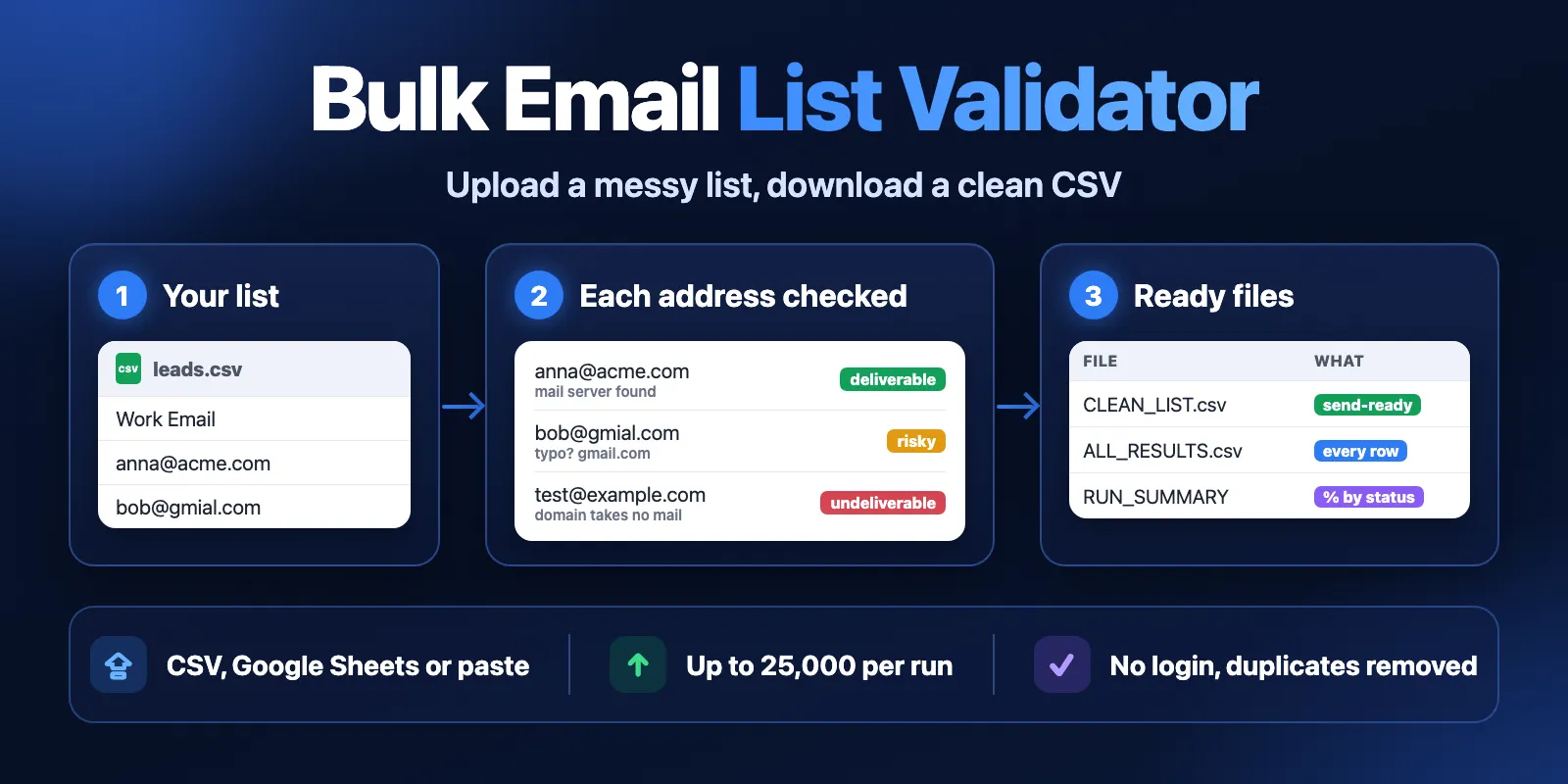
Table of contents
- What it does
- Quick start
- Use cases
- Input
- Output
- Pricing and limits
- API, export and integrations
- Troubleshooting
- FAQ
- Related Actors
- Support
What it does
- Reads your list: a CSV file you upload, a public CSV link, a Google Sheets share link, or addresses you paste. It finds the email column by its name or by its content.
- Removes duplicate addresses (upper and lower case count as the same address).
- Checks each address:
- Syntax by the email standards.
john..doe@example.comfails because of the two dots. - Domain mail records (DNS): MX records, a "null MX" record that says the domain takes no mail (RFC 7505), and the A/AAAA fallback when a domain has no MX.
- Disposable domains (temporary inboxes like mailinator.com), role addresses (info@, sales@, support@…) and free providers (gmail.com, outlook.com…).
- Typos in popular domains:
hello@gmial.com→ suggestionhello@gmail.com.
- Syntax by the email standards.
- Writes one Dataset row per address and three files:
CLEAN_LIST.csv(only the rows you can send to),ALL_RESULTS.csvandRUN_SUMMARY(how clean your list is).
Good fit
- Clean a CSV export from Mailchimp, HubSpot, Excel or a CRM before the next send.
- Find and remove fake, mistyped, disposable and role addresses from a sign-up list.
- Get a quick "how dirty is this list" report: percent of bad addresses and the main reasons.
Not a fit / limits
- No mailbox check (SMTP). The Actor does not connect to the mail server, so it cannot tell if a mailbox exists on a working domain. A made-up
someone-fake-123@gmail.comisdeliverablehere. It also does not detect catch-all domains. - It does not find new email addresses. It only checks the ones you give.
- Up to 25,000 unique addresses and a 10 MB CSV file per run.
Quick start
- Open the Input tab.
- Keep the example addresses in Emails (
emails), paste your own, or upload a file in CSV file (csvUrl). - Keep Remove duplicates (
dedupe) on and Clean list keeps (cleanList) atdeliverable. - Click Start. Two addresses take a few seconds.
- Open the Output tab. Check the
statusandreasoncolumns, then downloadCLEAN_LIST.csvfrom the storage tab.
Expected result for the example: info@apify.com is risky (a role address), test@example.com is undeliverable (the domain takes no mail).
Use cases
| Buyer job | Input path | Output | Key fields | Next step |
|---|---|---|---|---|
| Clean a CRM or ESP export | csvUrl (upload) | CLEAN_LIST.csv | your columns + email_status, email_reason | import the file back into your email tool |
| Check a shared Google Sheet | csvUrl (share link) | Dataset + ALL_RESULTS.csv | status, reason, didYouMean | fix typos in the sheet |
| Check a few pasted addresses | emails | Dataset | status, reason, role, disposable | decide who to email |
| Measure list quality | any | RUN_SUMMARY | percent, byReason, listHealth | decide if the list is safe to send |
Input
Input fields
| Field | Plain name | Type | Required | Default / prefill | Allowed values | Effect |
|---|---|---|---|---|---|---|
emails | Emails | array of strings | one of emails or csvUrl | prefill: info@apify.com, test@example.com | one or more addresses per line; commas, semicolons and spaces also split | addresses to check |
csvUrl | CSV file | string | one of emails or csvUrl | none | uploaded file, public http(s) CSV link, Google Sheets share link; up to 10 MB | list to check; original columns are kept in the CSV files |
emailColumn | Email column | string | no | automatic | column name or column number (1 = first) | use when the column is not found automatically |
dedupe | Remove duplicates | boolean | no | true | true / false | checks each address once, ignoring upper/lower case |
cleanList | Clean list keeps | string | no | deliverable | deliverable, deliverable_and_risky | which rows go into CLEAN_LIST.csv |
concurrency | Parallel checks | integer | no | 20 | 5–50 | how many DNS lookups run at once; 20 was faster than 50 in our tests |
You can use emails and csvUrl together: the pasted addresses come first, then the file rows. With an empty input the run fails at once with a clear message and costs only the start fee.
A Google Sheet must be shared as "Anyone with the link can view". A CSV file can use commas, semicolons or tabs, and UTF-8, UTF-16 or Windows-1252 text.
Input examples
Paste a few addresses
Expected output: 2 Dataset rows, info@apify.com → risky / role_account, test@example.com → undeliverable / null_mx_domain_accepts_no_mail. The clean list is empty because neither address is deliverable.
Clean a CSV file and keep risky rows
Expected output: one Dataset row per unique address, and CLEAN_LIST.csv with your sheet columns plus email_status and email_reason for every deliverable or risky row.
Output
Output example
This is a full row from the prefill run.
Output fields
| Field | Meaning | Type | Can be empty? | Example |
|---|---|---|---|---|
email | address as it was in your input | string | no | info@apify.com |
status | the verdict | string | no | deliverable, risky, undeliverable, unknown |
reason | main reason code | string | no | role_account |
reasons | all reason codes | array | no | ["role_account", "mailbox_not_verified"] |
mx | main mail server (lowest MX priority) | string | empty when the domain has no mail server | aspmx.l.google.com |
mxProvider | mail provider found from the MX host | string | yes | Google, Microsoft |
disposable | temporary inbox domain | boolean | null when the syntax is invalid | false |
role | shared address like info@ or sales@ | boolean | null when the syntax is invalid | true |
freeProvider | free mail service | boolean | null when the syntax is invalid | false |
didYouMean | suggested fix for a domain typo | string | yes | hello@gmail.com |
inCleanList | the row is in CLEAN_LIST.csv | boolean | no | false |
source / sourceRow | where the row came from: emails (position in the list) or csv (data row number, header not counted) | string / integer | no | csv / 4 |
checkedAt | check time (UTC) | string | no | 2026-10-15T17:37:39.844Z |
Statuses
| Status | Meaning | In the clean list? |
|---|---|---|
deliverable | good syntax, the domain has a working mail server, no warning | yes |
risky | the domain takes mail, but there is a warning: role address, disposable domain, likely typo, no MX (A record only), non-ASCII name | only with deliverable_and_risky |
undeliverable | bad syntax, the domain does not exist, or it takes no mail | no |
unknown | the DNS lookup failed; try again later | no, and not charged |
deliverable always includes the reason mailbox_not_verified, because the mailbox itself is not checked.
Files in the key-value store
| Key | What is inside |
|---|---|
CLEAN_LIST.csv | rows that passed, with your original CSV columns plus email_status and email_reason; ready to import |
ALL_RESULTS.csv | every checked row with status, reason, MX host, flags and typo suggestion |
RUN_SUMMARY | counts and percent by status and reason, duplicates removed, rows without an email, listHealth (good under 5% undeliverable or disposable, fair under 15%, poor 15% or more). Counts only, no addresses. |
CSV cells that start with =, +, - or @ get a leading ', so a spreadsheet does not run them as formulas.
Empty, partial and failed runs
| Situation | What you see | What to do |
|---|---|---|
| All addresses checked | run SUCCEEDED, RUN_SUMMARY.status = COMPLETE | download the files |
| Your max charge was reached | run SUCCEEDED, status PARTIAL, message "Stopped at the maximum total charge…" | raise the max charge and run the rest |
| Time limit almost over | run SUCCEEDED, status PARTIAL | raise the timeout or split the list |
| Empty input, no email column, bad link, too many addresses | run FAILED, status INVALID_INPUT, the message says what to fix | fix the input |
| The CSV server or DNS failed | run FAILED, status ERROR | try again later |
Pricing and limits
Pricing unit
You pay per event (pay-per-event). Apify platform usage is included in the price.
| Event | When | Free | Bronze | Silver | Gold and up |
|---|---|---|---|---|---|
| Email checked | one address checked with a deliverable, risky or undeliverable result | $0.000785 | $0.000707 | $0.000628 | $0.000549 |
| Actor start | once per run | $0.002 | $0.002 | $0.002 | $0.002 |
| CSV megabyte | each started megabyte of the downloaded CSV after the first one | $0.001 | $0.001 | $0.001 | $0.001 |
unknownrows (DNS failed) are not charged.- Duplicates removed by
dedupeare not charged. - A CSV of 1 MB or less has no file fee. A 25,000-row file with one email column is about 0.8 MB.
- A run that fails on input pays the start fee, plus the CSV megabytes if a large file was downloaded.
Cost examples (Free plan)
| Scenario | Addresses | Charge |
|---|---|---|
| The example input | 2 | $0.0036 |
| 1,000 pasted addresses | 1,000 | $0.787 |
| 10,000-row CSV, 3 MB | 10,000 | $7.854 |
| 25,000-row CSV, under 1 MB | 25,000 | $19.627 |
| Empty input | 0 | $0.002 |
On Gold, Platinum and Diamond plans 1,000 addresses cost $0.552.
Set the maximum total charge for the run (in the run options, or maxTotalChargeUsd in the API) to cap the cost. The Actor stops before it goes over the cap and keeps all results so far (status PARTIAL).
Limits
- 25,000 unique addresses per run (25,000 took about 5 minutes in our tests). Split bigger lists into several runs.
- CSV file up to 10 MB.
- CSV links:
httporhttpsonly, public addresses only, ports 80, 443, 8080, 8443.
API, export and integrations
- API: start the Actor with the Apify API and the same JSON input. Rows are in the default Dataset; files are in the default key-value store under
CLEAN_LIST.csv,ALL_RESULTS.csvandRUN_SUMMARY. - Export: download the Dataset as CSV, Excel or JSON from the Output tab.
- Scheduling and webhooks: use Apify schedules and webhooks to check a sheet every week and send the clean file to your tool.
Use with AI agents (MCP)
- MCP server URL with only this Actor:
https://mcp.apify.com?tools=cliqtomedia/bulk-email-validator - Smallest input:
{"emails": ["info@apify.com", "test@example.com"]} - Key output fields:
status(the verdict),reason(main reason code),didYouMean(typo fix),inCleanList(safe to send), andRUN_SUMMARY.listHealthfor the whole list. - A run with a few addresses takes about 3 seconds and costs under $0.01. A run checks at most 25,000 addresses.
Troubleshooting
The run failed with "No email column found"
Likely reason: the column name is not like "email" and the values were not recognised.
Check: the message lists your column names.
Action: set emailColumn to the column name or its number.
The run failed with an HTTP error for a Google Sheet
Likely reason: the sheet is private. Action: share the sheet as "Anyone with the link can view", or download it as CSV and upload the file.
Many rows are unknown
Likely reason: DNS lookups failed for those domains at that moment.
Action: run the same list again later. unknown rows are free.
The run stopped with status PARTIAL
Likely reason: the maximum charge per run or the time limit was reached.
Action: read the message in RUN_SUMMARY, raise the limit, and run the addresses that are not in the Dataset.
FAQ
Do I need an account with an email verification service?
No. The Actor uses public DNS and built-in lists. No API key, no login. Your list is not sent to a third-party verification service.
Why is a fake gmail.com address "deliverable"?
Because the Actor does not ask the mail server if the mailbox exists (outgoing SMTP port 25 is closed on the platform). gmail.com has working mail servers, so the address passes. Use this Actor to remove clearly bad addresses before a mailbox check, not instead of it.
Should I remove every risky address?
Not always. Role addresses like info@ often work, but many senders avoid them in cold email. Disposable and typo addresses are usually not worth sending to. Choose deliverable_and_risky if you want to keep risky rows in the clean list and decide yourself.
Is my list stored?
The results stay in your own Apify storage. RUN_SUMMARY and the run log contain counts only, not addresses. Uploaded files are kept as your Apify storage keeps them.
Related Actors
- Bulk Email Verifier — the same checks for a list of addresses or an Apify dataset, without CSV files.
Support
Open an issue in the Issues tab of this Actor. Include the run ID and the error message. Do not post your email list or any tokens.


