

Google Ads Transparency Scraper - Ad Text, No Login
Pricing
from $1.00 / 1,000 ads
Google Ads Transparency Scraper - Ad Text, No Login
Get Google ads by advertiser name, AR ID or domain from the Ads Transparency Center: ad text, image and YouTube links, first/last shown dates, per-country reach and impressions. Region, format and date filters. No login.
Pricing
from $1.00 / 1,000 ads
Rating
0.0
(0)
Developer

Cliqto Media
Maintained by CommunityActor stats
0
Bookmarked
1
Total users
0
Monthly active users
11 days ago
Last modified
Security
Limited permissionsShare
Google Ads Transparency Scraper gets the ads that a brand or website runs on Google. Add a domain, an advertiser name or an advertiser ID (AR…), and the Actor returns one row per ad from the public Google Ads Transparency Center: ad text, image or YouTube link, first and last shown dates, countries and impression ranges.
No Google login, cookies or API key. The prefilled run (20 ads for apify.com) usually takes about 30–70 seconds and costs about $0.028 ($0.004 start + 20 ads, from $0.024 on paid plans).
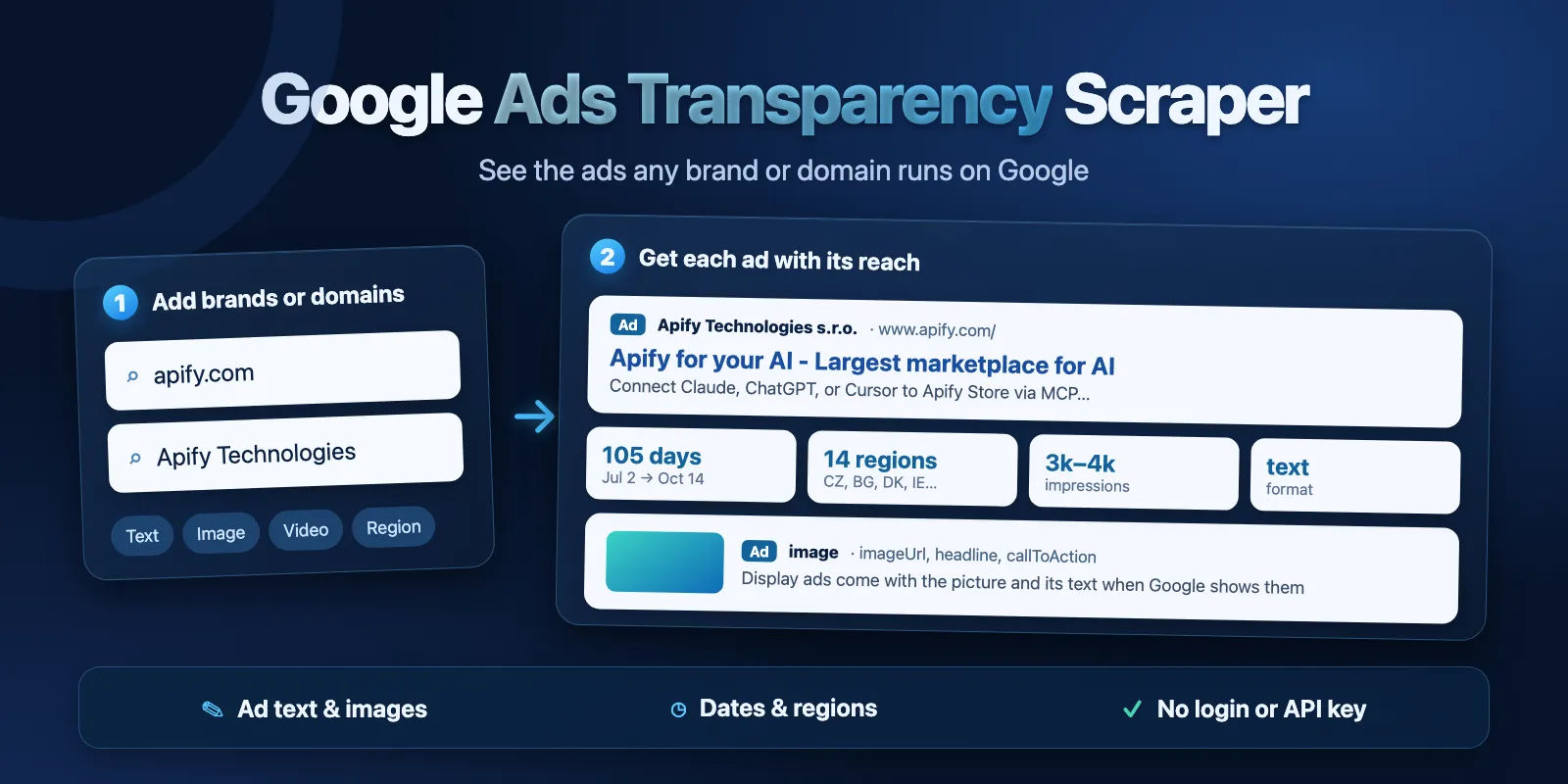
Table of contents
- What it does
- Quick start
- Input
- Output
- Pricing
- Use cases
- Scheduling and monitoring
- API, export and integrations
- Limits and partial results
- Troubleshooting
- FAQ
- Related Actors
- Support
What it does
The Google Ads Transparency Center shows the ads that verified advertisers run on Google: search (text) ads, image and display ads, and YouTube video ads. This Actor reads the same public pages for you and saves each ad as a clean dataset row.
For every ad you get:
- Who: advertiser name, advertiser ID (AR…), domain.
- What: format (
text,image,video), headline, description, display URL, call-to-action, image URL, YouTube link. - When: first shown, last shown, days shown, as reported by Google.
- Where and how much: countries where the ad ran, with dates and impression ranges per country, plus a total impression range.
- Links: the public Transparency Center page of the ad and the Google preview URL.
Filters: region (one country or anywhere), format, and a date range.
Good fit
- See which ads a competitor runs on Google right now, and when Google first showed them.
- Collect ad copy (headlines and descriptions) of a brand for PPC research.
- Check in which countries a brand advertises and how big the reach is.
- Save image ads and YouTube ads of a brand for creative research.
Not a fit / limits
- The Actor shows what Google publishes in the Transparency Center. It does not show clicks, spend, keywords or targeting.
- Impressions are ranges from Google (for example 1,000–2,000), not exact numbers. Google does not show them for every ad.
- Some text ads exist only as a picture. For them
headlineanddescriptionarenull, andimageUrlhas the picture. - Up to 500 ads per advertiser or domain, and about 600–800 ads per run in total. For more, split the job across several runs.
- The Actor does not solve CAPTCHAs. If Google blocks all requests, the run stops with a clear error.
Quick start
- Open the Input tab.
- Keep the prefilled domain
apify.comin Domains, or add your own domain, for exampleshopify.com. - Keep Max ads per advertiser or domain at
20and Region atanywhere. - Click Start.
- Open the Output tab. The Ads view shows advertiser, format, dates, impressions and ad text.
Expected result: about 20 ad rows for the domain, each with status complete.
Input
Input fields
| Field | Plain name | Type | Required | Default / prefill | Allowed values | Effect | Example | Recommendation |
|---|---|---|---|---|---|---|---|---|
domains | Domains | array of strings | one of domains / advertisers | prefill ["apify.com"] | domain or URL | ads of every advertiser that links to the domain | ["shopify.com"] | best way to find a brand |
advertisers | Advertisers (name or ID) | array of strings | one of domains / advertisers | empty | name, AR… ID or advertiser page URL | ads of one advertiser account | ["AR04545223091738902529"] | use the AR… ID for an exact account |
region | Region | string | no | anywhere | anywhere or a 2-letter country code | only ads shown in this country | US, DE | keep anywhere for all countries |
format | Ad format | string | no | all | all, text, image, video | only this ad format | text | use for copy or creative research |
dateFrom | Shown from | string | no | empty | YYYY-MM-DD, from 2018-01-01 | only ads shown on or after this date | 2026-09-01 | for a time window |
dateTo | Shown until | string | no | empty (today) | YYYY-MM-DD, not before dateFrom | only ads shown on or before this date | 2026-09-30 | leave empty for today |
maxAds | Max ads per advertiser or domain | integer | no | 20 | 1–500 | max ad rows for each domain or advertiser | 100 | each ad row is charged |
includeDetails | Per-country reach and impressions | boolean | no | true | true, false | adds regions and impression ranges | true | keep on; it is in the price |
includeAdText | Ad text and YouTube link | boolean | no | true | true, false | reads headline, description, image and YouTube link from the ad preview | true | keep on; it is in the price |
proxyConfiguration | Proxy | object | no | Apify Proxy (datacenter) | Apify Proxy settings | how requests reach Google | {"useApifyProxy": true} | keep the default |
Notes:
- Add at least one domain or advertiser. You can mix both, up to 20 inputs in total.
- Duplicates are merged:
apify.comandhttps://www.apify.com/count as one input. - An advertiser name must match whole words of an advertiser in the Transparency Center. If several advertisers match, the Actor takes the best match and writes a warning in the run summary. If nothing matches, you get a free
not_foundrow that lists the closest names with their AR… IDs. - With the default proxy, the Actor switches to Apify residential proxy by itself when Google blocks the datacenter proxy. If you choose your own proxy group or URLs, this switch is off.
Interacting settings
| When | Input A | Input B | Effective behavior | Example | Cost/result effect |
|---|---|---|---|---|---|
| Filter by country and date | region | dateFrom / dateTo | only ads shown in this country in this window | FR, September 2026 | fewer rows, fewer charges |
| Only text ads | format = text | includeAdText = true | headline and description for each text ad that has them | shopify.com | some text ads have only an image |
| Faster light run | includeDetails = false | includeAdText = false | no regions, no headline/description/YouTube link (image and creative links stay) | — | same price per row |
Input examples
Ads of a website
Expected behavior: finds all advertisers that link to apify.com and returns up to 20 ads.
Expected output: rows with advertiserName, format, headline, firstShown, regions.
Limit or cost note: 20 ad rows + start = about $0.028.
Image ads of one advertiser in France, one month
Expected behavior: returns only image ads of this account shown in France in September 2026.
Expected output: rows with imageUrl, callToAction, firstShown, lastShown.
Limit or cost note: if the advertiser had no such ads, you get one free not_found row.
Output
Each ad is one row in the default dataset. Each input without ads gives one free not_found row, so you always see what happened to every input.
Output example
Input: {"domains": ["apify.com"], "maxAds": 20}. One row, regions trimmed to two countries:
creativeUrl is left out here because it is long. In this row Google shows no dates or impressions for Israel, so those values are null.
How much you get depends on the ad. In our test runs, 9 of 20 apify.com ads had a headline (the rest were text ads shown only as a picture), and 18 of 20 shopify.com image ads had an imageUrl.
Output fields
| Field | Meaning | Type | Can be empty? | Example / enum | Source / notes |
|---|---|---|---|---|---|
status | row result | string | no | complete, partial, not_found, error | only complete and partial are charged |
statusReason | why a row is partial, not_found or error | string | yes, null when complete | The Transparency Center shows no ads for ... | plain English |
errorCode | machine code of an error row | string | yes | SOURCE_BLOCKED, DEADLINE_REACHED | null if no error |
input | your input as given | string | no | apify.com | |
inputType | how the input was read | string | no | domain, advertiserId, advertiserName | |
advertiserId | Google advertiser ID | string | yes | AR04545223091738902529 | |
advertiserName | advertiser name in the Transparency Center | string | yes | Apify Technologies s.r.o. | |
advertiserCountry | advertiser country, 2-letter code | string | yes | null | often null: Google shows it only for some advertisers |
domain | domain the ad links to | string | yes | apify.com | when Google shows it |
creativeId | Google ad ID | string | yes | CR12249652250414153729 | |
format | ad format | string | yes | text, image, video | |
firstShown | first time the ad was shown | string (ISO time) | yes | 2026-07-02T13:54:49.000Z | |
lastShown | last time the ad was shown | string (ISO time) | yes | 2026-10-14T10:26:38.000Z | |
daysShown | days shown, as reported by Google | integer | yes | 105 | |
regions | countries where the ad ran | array | yes | [{"code": "IE", ...}] | code, name, criteriaId, firstShown, lastShown, impressionsMin, impressionsMax |
impressionsMin | lower end of the total impression range | integer | yes | 1000 | Google range, not exact |
impressionsMax | upper end of the total impression range | integer | yes | 2000 | |
variations | number of ad variations | integer | yes | 1 | |
headline | text ad headline | string | yes | Apify for your AI - Largest marketplace for AI | from the ad preview |
description | text ad description | string | yes | Connect Claude, ChatGPT, or Cursor ... | from the ad preview |
displayUrl | display URL of a text ad | string | yes | www.apify.com/ | |
callToAction | button text of a display ad | string | yes | Sign Up | when Google shows it |
text | headline and description in one string | string | yes | null when the ad has no text | |
imageUrl | image of the ad | string | yes | https://tpc.googlesyndication.com/archive/simgad/... | image, display and image-only text ads |
videoUrl | YouTube link of a video ad | string | yes | https://www.youtube.com/watch?v=... | |
creativeUrl | Google preview URL of the ad | string | yes | ||
adUrl | public Transparency Center page of the ad | string | yes | https://adstransparency.google.com/advertiser/AR.../creative/CR... | |
regionFilter | region filter of this run | string | no | anywhere | |
sourceUrl | Transparency Center page for your input | string | yes | ||
fetchedAt | when the Actor read the row | string (ISO time) | no | 2026-10-14T11:15:51.596Z |
null means Google does not show this value for the ad. The Actor never writes 0 or an empty string instead of a missing value. Impression ranges can start at 0 because Google shows "less than 1,000" as 0–1,000.
Output entities and surfaces
| Situation | Dataset/API/KVS/live view | Result shape | User action |
|---|---|---|---|
| Normal ad | Dataset, Ads view | one row, status = complete | open, export or use the fields |
| Some details missing | Dataset | row with status = partial and statusReason | data is still useful; missing fields are null |
| No ads for an input | Dataset | one free row, status = not_found | check the domain, name, region or dates |
| Google blocked the run or time ran out | Dataset + key-value store RUN_SUMMARY | free error rows for inputs not done, summary with status and stopReason | run again later, or split the inputs |
The key-value store record RUN_SUMMARY has the run status (COMPLETE, PARTIAL, NO_RESULTS, CAPPED, ERROR, INVALID_INPUT, CANCELLED), counts for each input, and warnings.
Pricing
Pricing unit
This Actor uses pay-per-event pricing:
| Event | When | FREE | BRONZE | SILVER | GOLD and higher |
|---|---|---|---|---|---|
| Actor start | once per run (per GB of memory; default 256 MB = 1 event) | $0.004 | $0.004 | $0.004 | $0.004 |
| Ad | each complete or partial ad row | $0.0012 | $0.0011 | $0.00105 | $0.001 |
Ad text, images, YouTube links, countries and impressions are all included in the ad price. not_found and error rows are free. A run with no ads costs only the start event ($0.004). You pay no separate platform usage.
You can set a maximum cost for a run in Apify. When the Actor reaches it, it stops cleanly, keeps the rows it already saved, and the run summary shows CAPPED with CHARGE_LIMIT.
Cost examples
| Scenario | Input scope | Ad rows | Start | Ads (FREE plan) | Stop/cap behavior |
|---|---|---|---|---|---|
| Small | 1 domain, maxAds 10 | 10 | $0.004 | $0.012 | about 30–70 seconds |
| Prefill | 1 domain, maxAds 20 | 20 | $0.004 | $0.024 | about 30–70 seconds |
| Medium | 3 domains, maxAds 100 | 300 | $0.004 | $0.36 | about 1–2 minutes |
| Large | 5 domains, maxAds 200 | up to ~800 | $0.004 | up to ~$0.96 | stops after about 4.5 minutes of work with the rows it has |
| 1,000 ads | 2 runs, 500 ads each | 1,000 | $0.008 | $1.20 (GOLD: $1.00) | split into 2 runs |
| Nothing found | 20 domains with no ads, or a filter with no match | 0 | $0.004 | $0 | 20 free not_found rows |
Use cases
| Buyer job | Input path | Output entity | Key fields | Next integration |
|---|---|---|---|---|
| Competitor ad monitoring | domains | one row per ad | headline, firstShown, lastShown, daysShown | schedule + Google Sheets |
| PPC copy research | domains or advertisers, format = text | text ad | headline, description, displayUrl | export CSV |
| Market and country check | advertisers + region | ad with regions | regions, impressionsMin, impressionsMax | BI tool via API |
| Creative library | format = image or video | image or video ad | imageUrl, videoUrl, callToAction | download images |
Scheduling and monitoring
- Create an Apify schedule that runs the same input every day or week.
- Each run returns the ads Google shows at that time. Compare runs by
creativeIdto find new ads, or sort byfirstShown. lastShowntells you if an ad is still running.- The Actor does not keep state between runs; each run is a full snapshot and each ad row is charged again.
API, export and integrations
- API: start the Actor with the Apify API and read the dataset items as JSON.
- Export: download the dataset as JSON, CSV, Excel or XML from the Output tab.
- Webhooks / no-code: use Apify integrations (Make, Zapier, Google Sheets, webhooks) to send new rows to your tools.
Use with AI agents (MCP)
- MCP server URL with only this Actor:
https://mcp.apify.com?tools=cliqtomedia/google-ads-transparency-scraper - Smallest useful input:
- Key output fields:
advertiserName(who runs the ad),format(text, image or video),headlineanddescription(ad copy),firstShown/lastShown(when it ran),regions(countries with impression ranges). - Typical run: 20 ads in about 30–70 seconds for about $0.028. Limits: up to 20 inputs and 500 ads per input; about 600–800 ads per run.
Limits and partial results
- Up to 20 domains and advertisers per run, up to 500 ads for each.
- One run works for about 4.5 minutes and collects about 600–800 ads in total in our tests. If it has more to do, it stops with the ads it has and the summary shows
CAPPEDwithDEADLINE. Split big jobs into several runs. - A larger run timeout does not make one run collect more.
- A row with
statuspartialis still charged: the ad is there, but some details (for example text or countries) could not be read.statusReasonsays what is missing. - Inputs that were not done when the run stopped get free
errorrows.
Troubleshooting
I get a not_found row for my advertiser name
Symptom: status is not_found and statusReason lists "Closest" names.
Likely reason: the name does not match whole words of an advertiser in the Transparency Center.
Check: look at the closest names and their AR… IDs in statusReason.
Action: put the right AR… ID in Advertisers, or use the website domain in Domains.
I get not_found for a domain that runs ads
Symptom: status is not_found with "The Transparency Center shows no ads for ...".
Likely reason: there are no ads for this region, format or date range. For example, a brand may show no text ads in one country.
Check: open the sourceUrl link in your browser.
Action: set Region to anywhere, Ad format to all, or remove the dates.
The run stopped with SOURCE_BLOCKED
Symptom: the run summary shows ERROR or PARTIAL with SOURCE_BLOCKED, and inputs that were not done have free error rows.
Likely reason: Google showed a CAPTCHA to all proxy IPs. The Actor does not solve CAPTCHAs.
Check: did you set your own proxy? Then the automatic switch to residential proxy is off.
Action: keep the default proxy and run again later.
I asked for 500 ads but got fewer
Symptom: the summary shows CAPPED with DEADLINE, or the advertiser simply has fewer ads.
Likely reason: one run works for about 4.5 minutes; many inputs with large maxAds do not fit.
Action: run fewer inputs per run.
FAQ
Do I need a Google account or an API key?
No. The Actor reads the public Ads Transparency Center pages. No login, cookies or API key.
Why are headline and description empty for some text ads?
Google stores some text ads only as a picture. Then the text is only in the image, headline and description are null, and imageUrl has the picture.
Are impressions exact?
No. Google shows ranges, for example 1,000–2,000. The Actor returns the lower and upper end. Google does not show impressions for every ad or country; then the values are null.
How fresh is the data?
Every run reads the Transparency Center live. lastShown tells you when Google last showed the ad.
Which name match does the Actor use?
For a name, it looks for an advertiser whose name has the same whole words (exact name first). It never guesses a different company. For an exact account, use the AR… ID from the advertiser page URL.
Related Actors
- Google Autocomplete Scraper — find the search phrases around a brand before you check its ads.
- Website Metadata & Open Graph Scraper — check titles and descriptions of the landing pages from the ads.
Support
For a bug, a question or a feature request, open an issue in the Issues tab of this Actor. Include the run ID, your input (domains or advertisers) and the statusReason or error text. Never send tokens, cookies or billing data.


