
ClinicalTrials.gov Studies Search & Monitor: Recruitment
Pricing
from $0.28 / 1,000 study saveds
ClinicalTrials.gov Studies Search & Monitor: Recruitment
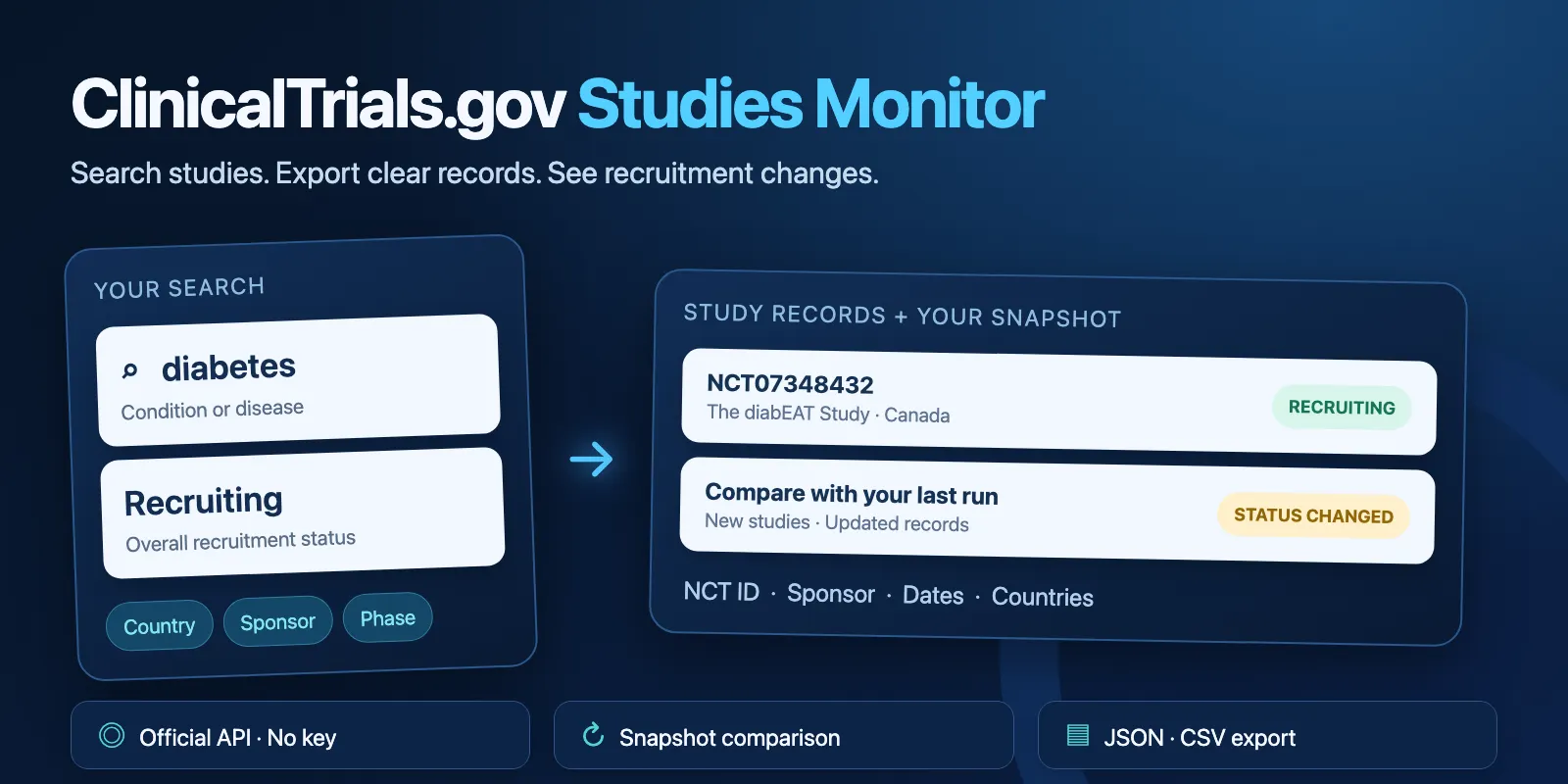
Search ClinicalTrials.gov by condition, drug, sponsor, country, status and phase. Export study data and compare recruitment status changes with your snapshot. No API key or personal contacts.
Pricing
from $0.28 / 1,000 study saveds
Rating
0.0
(0)
Developer

Cliqto Media
Maintained by CommunityActor stats
0
Bookmarked
2
Total users
1
Monthly active users
5 days ago
Last modified
Features
Share
Search ClinicalTrials.gov by disease, treatment, sponsor, country, recruitment status or phase. Get study records and compare them with your own earlier snapshot. No API key is needed. The 25-study demo costs $0.025 on the Free tier; a search with no matches still has a $0.015 start fee.
Contents
- What it does
- Study data
- Quick start
- Input
- Output
- Pricing
- Use cases
- Monitoring
- API, export and integrations
- Limits and errors
- Troubleshooting
- FAQ
- Related Actors
- Support
What it does
Choose filters. The Actor searches the official ClinicalTrials.gov API and returns the newest updated studies first. It follows all needed pages, up to your limit. It removes duplicate NCT IDs.
Use it for pharma business research, CRO planning and registry analysis. It returns public study information. It does not match patients, give medical advice or return personal contact details.
Study data
Each row has the NCT ID, titles, overall status, phases, conditions, treatments, lead sponsor, collaborators, enrollment, dates and countries. It also has links and the source dates. Some fields are not present in the registry. These return null or an empty array.
Dates retain their source type: ACTUAL means a reported actual date; ESTIMATED means an expected date, also called anticipated. A date can have year or month precision. The Actor does not invent a day.
Quick start
- Open Input. The new form has
condition: "diabetes",overallStatus: ["RECRUITING"],maxResults: 25andonlyNew: false. - Click Start.
- Open Output → Studies. Check
nctId,briefTitleandoverallStatus. - Export JSON, CSV or Excel from the Dataset.
- For a later comparison, open Next snapshot and save the whole JSON object.
The same demo works on the next run. It uses no saved hidden state. A typical small run takes a few seconds, plus platform startup time. Sending {} through the API instead searches all recent studies, up to the runtime default of 100; it does not add the diabetes demo filters.
Input
All fields are optional, except that onlyNew: true needs previousSnapshot.
| Field | Type | Runtime default / form prefill | Limits and use |
|---|---|---|---|
condition | string | "" / "diabetes" | Disease search, for example diabetes. Up to 200 characters. Empty skips this filter. |
intervention | string | "" / empty | Drug or treatment search, for example metformin. Up to 200 characters. |
sponsor | string | "" / empty | Sponsor or collaborator search, for example Novo Nordisk. Up to 200 characters. |
countries | string array | [] / empty | Exact registry country names, for example ["United States", "Canada"]. Up to 20. A study needs a site in at least one listed country. |
overallStatus | string array | [] / ["RECRUITING"] | Overall recruitment statuses. Up to 20 values; choose from the list below. Empty allows all. |
phase | string array | [] / empty | EARLY_PHASE1, PHASE1, PHASE2, PHASE3, PHASE4, NA. Empty allows all. NA means Not Applicable; a missing phase is different. |
updatedSince | string | "" / empty | Inclusive last update posted date, YYYY-MM-DD. For example 2026-09-01. This is not the study start date. |
maxResults | integer | 100 / 25 | 1–500 distinct studies to scan. Start small. In changes-only mode it caps studies scanned, not changes returned. |
previousSnapshot | object | absent / absent | Copy the entire SNAPSHOT record from your earlier run. Up to 2,000 study fingerprints and 2 MB. Keep all filters and maxResults the same. |
onlyNew | boolean | false / false | False returns all matched studies with change labels. True returns only new or changed studies and needs a baseline. |
Supported statuses: RECRUITING, NOT_YET_RECRUITING, ENROLLING_BY_INVITATION, ACTIVE_NOT_RECRUITING, COMPLETED, SUSPENDED, TERMINATED, WITHDRAWN, UNKNOWN, AVAILABLE, NO_LONGER_AVAILABLE, TEMPORARILY_NOT_AVAILABLE, APPROVED_FOR_MARKETING, WITHHELD.
Filters combine with AND. Values inside country, status or phase lists combine with OR. Duplicate list values are removed. The text search fields use the registry search rules, including synonyms and supported search expressions. They do not mean an exact string match. Country filtering checks site country, not whether that site is recruiting.
Recruiting diabetes studies
Phase 3 studies with a US site, updated since a date
Snapshot format
previousSnapshot is the full object returned under Next snapshot. Its shape is:
This shows the format, not a ready-to-run baseline. Copy real values from your earlier run. A snapshot from a different query, or one with complete: false, is rejected before searching. complete: false appears when the input was invalid, or when a failed run saved no studies and had no baseline; then RUN_SUMMARY.snapshotUsable is false. Run the search again without previousSnapshot to get a new baseline.
Output
One Dataset row represents one study. A real diabetes demo row contains:
This is a shortened row from a live run on 2026-10-13. The registry can change it later.
| Field | Type / empty value | Meaning / example |
|---|---|---|
nctId | string, not null | Registry ID, such as NCT07348432. |
briefTitle | string, not null | Short study title. |
officialTitle | string or null | Full official title, when present. |
overallStatus | string, not null | Overall recruitment status. |
phases | string array, [] | Source phases; combined phase 2/3 has both values. |
studyType | string or null | For example OBSERVATIONAL or INTERVENTIONAL. |
conditions | string array, [] | Reported conditions. |
interventions | object array, [] | {name, type}; either member can be null. No contacts. |
leadSponsor | string or null | Lead organization name, such as McGill University. |
leadSponsorClass | string or null | Source organization class, such as OTHER. |
collaborators | object array, [] | {name, class} organization records; members can be null. |
enrollment | number or null | Participant count reported by the source. Null is not zero. |
enrollmentType | string or null | ACTUAL or ESTIMATED. |
startDate | object | {date, type}; either member can be null. |
primaryCompletionDate | object | Date of main outcome collection, with actual/estimated type. |
completionDate | object | Study completion date and type. |
locationsCount | integer or null | Number of reported location entries. Null means the source did not return this list. |
countries | string array, [] | Unique reported site countries. Empty does not mean a study has no sites. |
lastUpdatePostDate | string or null | Date the study update was posted. |
url | string | Public study page. |
provider | string | ClinicalTrials.gov. |
sourceUrl | string | Official study API URL. |
fetchedAt | string | Time this Actor fetched the row, in ISO UTC. |
sourceUpdatedAt | string or null | Same study-level value as lastUpdatePostDate. |
providerDataTimestamp | string or null | Registry data processing timestamp from the version response, kept as reported. Different from study update and fetch time. |
license | string | Terms notice. Reuse permission is not independently confirmed. |
licenseUrl | string | Link to source terms. |
changeType | string | SNAPSHOT, NEW, UNCHANGED, STATUS_CHANGED or UPDATED. |
changedFields | string array, [] | overallStatus for status change, record for other change. This is not a full field diff. |
contentHash | string | Normalized content fingerprint for comparison. Fetch time is excluded. |
Run summary (RUN_SUMMARY) has these keys: status, errorCode (null on success), error (same code), statusReason (plain-English reason), provider, sourceUrl, scannedStudies, emittedStudies (saved and charged rows), pages, limitReached, sourceExhausted, requests, retries, responseBytes, durationMs, internalDeadlineSecs, snapshotStudies, snapshotCarriedOver, snapshotDropped, snapshotCap, snapshotUsable, resumedAfterMigration and snapshotScope. Error runs have the same keys, with zero counts.
Next snapshot (SNAPSHOT) contains the query fingerprint and study fingerprints for your next comparison. Both records live in the default key-value store.
There is no separate OUTPUT record. The Output tab links directly to the Dataset and these two records. The run's own STATE record is internal: it lets a moved run continue and is not needed for monitoring.
Pricing
Pay per event. One automatic start costs $0.015 per run at the supported 256 MB memory. Each saved study has one study event. Unchanged studies skipped by onlyNew have no study event. The start fee is also charged when nothing is saved: no match, no change, an unknown country, a search text that ClinicalTrials.gov rejects, or a source error. Platform usage is covered by this model for standard runs.
| Plan | Price per saved study | Price per 1,000 saved studies |
|---|---|---|
| Free | $0.00040 | $0.40 |
| Bronze | $0.00038 | $0.38 |
| Silver | $0.00036 | $0.36 |
| Gold, Platinum, Diamond | $0.00034 | $0.34 |
| Example on Free tier | Event total |
|---|---|
| No matches or no changes | $0.015 |
| 1 study | $0.0154 |
| 10 studies | $0.019 |
| 25-study demo | $0.025 |
| 100 studies | $0.055 |
| 500 studies, one run | $0.215 |
| 1,000 studies across at least two distinct searches | $0.43 |
The limit is 500 per run. The last line is a price calculation, not a promise of a 1,000-study scan or automatic split. Do not repeat the same search to get the next 500; the Actor starts with the newest studies again. Set a total charge limit of at least $0.0154. A lower limit may not start the run. When your charge limit is reached, the Actor stops, keeps the saved studies and ends as Succeeded with status: "partial" and errorCode: "CHARGE_LIMIT". Studies that were not saved are not charged.
Use cases
| Task | Filters | Useful fields |
|---|---|---|
| Review a disease research pipeline | condition, phase | NCT ID, phases, sponsor, enrollment |
| Review an organization portfolio | sponsor | Titles, countries, dates |
| Watch recruitment updates | previousSnapshot, onlyNew | Change type, status, content fingerprint |
| Export a regional registry list | countries, overallStatus | Countries, status, source links |
Monitoring
Run a search and save SNAPSHOT. Later, run the same filters and maxResults with that object in previousSnapshot. Set onlyNew: true for changes only. A new study gets NEW; a different overall status gets STATUS_CHANGED; other study content changes get UPDATED. With onlyNew: false, unchanged rows get UNCHANGED.
The next snapshot starts from your baseline. Studies saved in this run replace their old entries. Baseline studies that this run did not see, for example because they moved beyond maxResults, stay in the snapshot unchanged. So a study that comes back later is compared with its old entry and is not sold again as NEW. Studies that were not saved, for example after the charge limit, are not added. The snapshot keeps up to 2,000 studies; when it is full, the studies not seen for the longest time are dropped first. A record absent from the later result is never called deleted or closed. For recruitment monitoring, avoid a status filter if you need to see a study change out of that status. The Actor does not keep a shared baseline or create schedules. You can set up an Apify schedule yourself and supply your saved baseline.
API, export and integrations
Use the Apify API, Dataset exports or your own Make, Zapier or n8n flow. Get JSON or CSV through the Output links; Excel export is available in the Dataset page. The CSV export (fixed columns) link has the same columns every run and leaves out list fields. A full Dataset CSV puts list items into numbered columns, such as countries/0 and countries/1, so the number of columns can change between runs. Use JSON or Excel when you need the lists.
Start a run using the Apify API endpoint https://api.apify.com/v2/actors/cliqtomedia~clinicaltrials-gov-studies-monitor/runs. Send the same JSON input as in the examples. Use your own Apify token in an authorization header. Do not put it into the input or a shared URL.
Use with AI agents (MCP)
Connect Apify MCP for this Actor. Send {"condition":"diabetes","overallStatus":["RECRUITING"],"maxResults":25}. Read nctId, briefTitle, overallStatus, leadSponsor and changeType in the results. The Free-tier demo event price is $0.025. A small run usually finishes in seconds; large or slow source runs take longer. The Actor uses limited permissions and pay-per-event pricing.
Limits and errors
The proven maximum is 500 distinct studies per run. Work at the source stops after 90 seconds. Requests have a 15-second limit, including the body. The Actor retries temporary errors at most three attempts, with at most two timeouts. It reads at most 10 study pages and accepts at most 6 MB of response data. A large or slow response can produce partial output.
RUN_SUMMARY.status separates:
| Status | Meaning | Platform result |
|---|---|---|
complete | The requested bounded scan finished; may have zero changes. | SUCCEEDED |
not_found | No studies matched; not a source error. | SUCCEEDED |
partial with CHARGE_LIMIT | Your charge limit was reached; saved rows are kept. | SUCCEEDED |
partial with another code | A source or runtime error stopped the run after some studies; saved rows are kept. | FAILED; inspect saved rows |
error | Input, source, resource or runtime failed before useful output. | FAILED |
limitReached: true means more results may exist. It does not mean all matching studies were exported. The snapshot of a partial run is still a valid baseline when it holds studies saved in that run or your earlier baseline. If a failed run saved nothing and had no baseline, the snapshot has complete: false. Source errors, invalid JSON, redirects and rate limits do not become an empty result. Studies are saved and charged together, one source page at a time. If the platform moves a run to another server, the run continues from the last saved page. In a rare case one page may repeat: its studies are then saved and charged twice. Also rarely, if the platform confirms a page write too late and the write is retried, one page of studies can appear twice in the Dataset while being charged once. Deduplicate by nctId if you need a strict list.
Registry updates may be delayed, especially over weekends and holidays. Check providerDataTimestamp and lastUpdatePostDate. Records are supplied by study sponsors; inclusion in the registry does not mean government approval or verified scientific quality.
Source and reuse
Source: ClinicalTrials.gov and its official API documentation. This independent Actor is not affiliated with NIH or NLM.
Read the ClinicalTrials.gov Terms and Conditions before reuse. The terms require attribution, current data, the provider processing date and disclosure of modifications. Data can carry international or third-party copyright. This Actor does not grant a new data license or proprietary rights over the government database. It selects fields, flattens selected modules, sorts list values, removes duplicate IDs and contacts, adds links/provenance, and adds snapshot comparison labels. It does not change medical values. Refresh your export when you distribute it.
Troubleshooting
| Problem | Action |
|---|---|
| No rows | Check spelling and combined filters. Read summary: not_found is a valid result. |
| No changes | This can be normal. Check scanned count and the same search fingerprint. |
SNAPSHOT_QUERY_MISMATCH | Restore the filters and maxResults from the baseline run. |
INVALID_previousSnapshot | Copy the full successful SNAPSHOT, not Dataset rows. |
SOURCE_QUERY_REJECTED | Check the text search syntax, for example an unclosed bracket or quote. The $0.015 start fee is charged. |
| Unknown country name | The run returns not_found and the $0.015 start fee is charged. Use registry country names such as United States, Korea, Republic of or Turkey (Türkiye). |
SOURCE_RATE_LIMIT or SOURCE_UNAVAILABLE | Retry later. Do not run many copies at once. |
| Deadline or byte limit | Use a smaller or narrower search. Partial data remains visible. |
CHARGE_LIMIT | The run succeeded with fewer rows. Raise your per-run limit or lower maxResults. |
| Missing date or enrollment | The registry did not report that value. Null is not zero. |
FAQ
Do I need a ClinicalTrials.gov key? No.
Can I export every trial? This Actor exports at most 500 per run. It does not promise all registry records.
Is this real-time monitoring? It compares two snapshots you supply. The registry has its own update schedule.
Can I see which fields changed? A status change is named. Other changes get UPDATED and changedFields: ["record"]. A full field-level diff is not included.
Does it return investigator emails? No. It selects study and organization fields only.
Can I use it to choose treatment? It is a registry data tool, not a treatment or patient selection tool.
Related Actors
For literature work, use your preferred research tools with the NCT IDs from this export.
Support
Open the Issues tab on this Actor in Apify Store. Include the run ID, safe filters and the error code. Do not include tokens or personal data.


