

Forex Factory Economic Calendar Scraper, No Login
Pricing
from $1.30 / 1,000 calendar events
Forex Factory Economic Calendar Scraper, No Login
Get Forex Factory economic calendar events with actual, forecast and previous values for any date range. Plan trades, backtest on news or get alerts on new releases. Filter by currency and impact; times in your zone. No login.
Pricing
from $1.30 / 1,000 calendar events
Rating
0.0
(0)
Developer

Cliqto Media
Maintained by CommunityActor stats
0
Bookmarked
2
Total users
1
Monthly active users
2 days ago
Last modified
Categories
Features
Share
Get economic calendar events from Forex Factory for any date range: time, currency, impact, actual, forecast and previous values, one row per event. No login and no API key.
For traders, analysts and bots that need the week's news events in a table. The smallest run is one click: high-impact events from today to 7 days ahead, which cost about $0.01 in a test run.
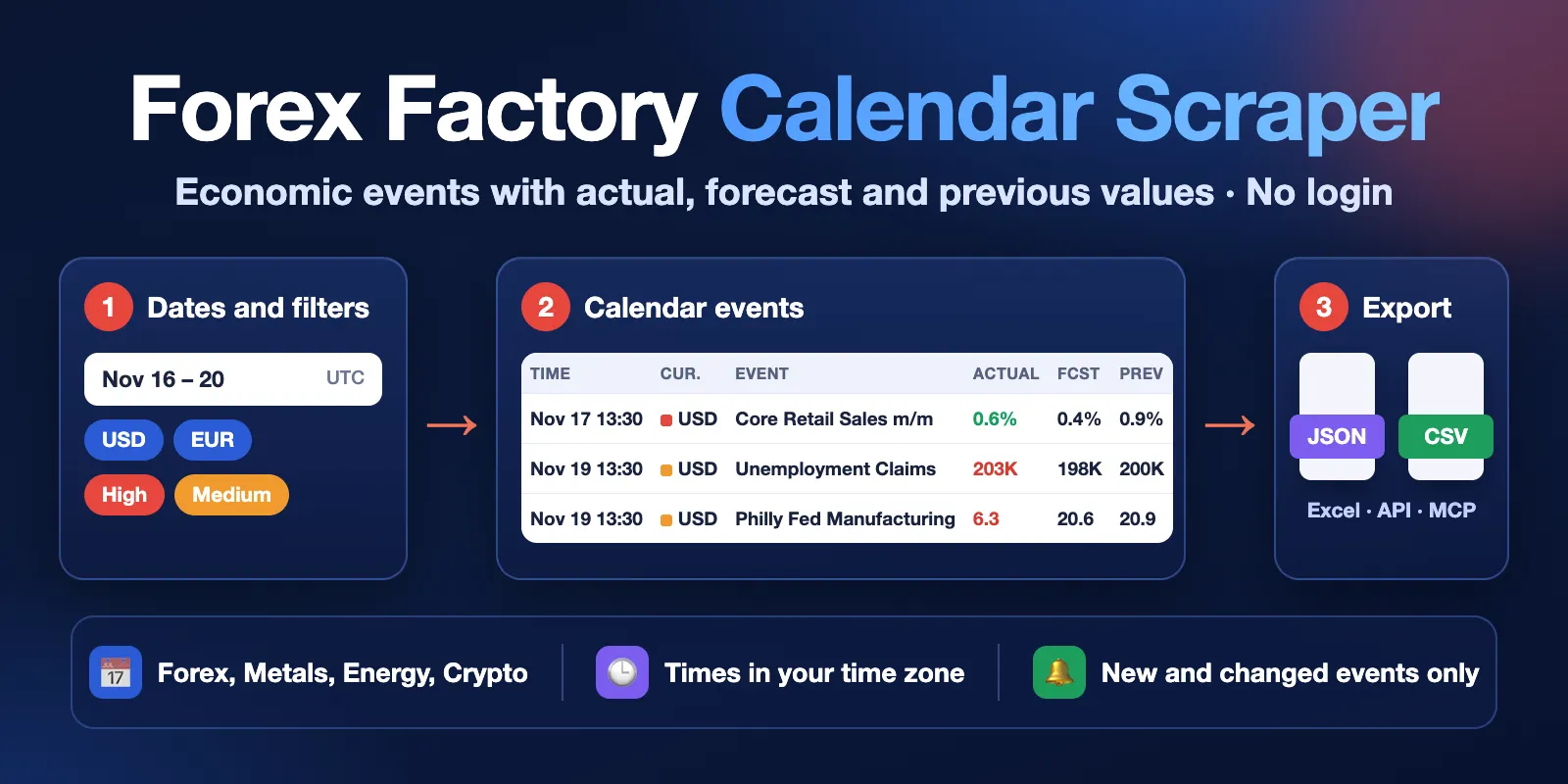
Table of contents
- What it does
- How it works
- Quick start
- Use cases
- Input
- Output
- Pricing
- Limits
- API, export and integrations
- Troubleshooting
- FAQ
- Support
What it does
The Actor reads the public Forex Factory calendar and saves every event as a row: date and time, currency, impact (high, medium, low, holiday), event name, and the actual, forecast and previous values. It also reads the three sister calendars on the same site network: MetalsMine, EnergyExch and CryptoCraft.
You choose the dates, or a ready period like This week. You can keep only some currencies, impact levels, event types or event names. Times come in the time zone you pick, and every row also has the time in UTC.
Good fit
- Get this week's high-impact USD and EUR events before you trade.
- Load a year of releases with actual vs forecast for a backtest.
- Check every hour for new actual values and send only the changes to Slack or Notion.
- Give an AI agent a clean list of upcoming events with their times.
What makes it different
- All matching events, not the first 10. On a test week (USD and EUR, high and medium impact) two popular calendar Actors each returned 10 rows. This Actor returned all 13.
- Both previous values. When the source revises the previous value, you get the published one in
previousand the revised one inrevisedPrevious. - Numbers ready for math.
actualValue,forecastValueandpreviousValueare numbers with the unit inunit(0.6 and%for "0.6%", 203 andKfor "203K"), andactualVsForecastsays better or worse as the site colours it. - Four calendars: Forex, Metals, Energy and Crypto, in one run.
- Change monitor: on a schedule, save only events that are new or changed since the last run.
- Event details: what an indicator measures, its source agency, usual effect, next release and up to 100 past releases.
How it works
- The Actor works out the date range from your input and reads the calendar pages for it, up to 31 days per page.
- It keeps the events that match your filters (currency, impact, type, name, release status) and converts times to your time zone.
- It saves one row per event to the Dataset. A short run summary with a status (COMPLETE, NO_RESULTS, PARTIAL, ERROR, INVALID_INPUT, CANCELLED) goes to the
RUN_SUMMARYrecord in the Key-value store.
If Forex Factory blocks the default proxy, the Actor switches to a residential proxy by itself. You do not pay for that proxy.
Quick start
-
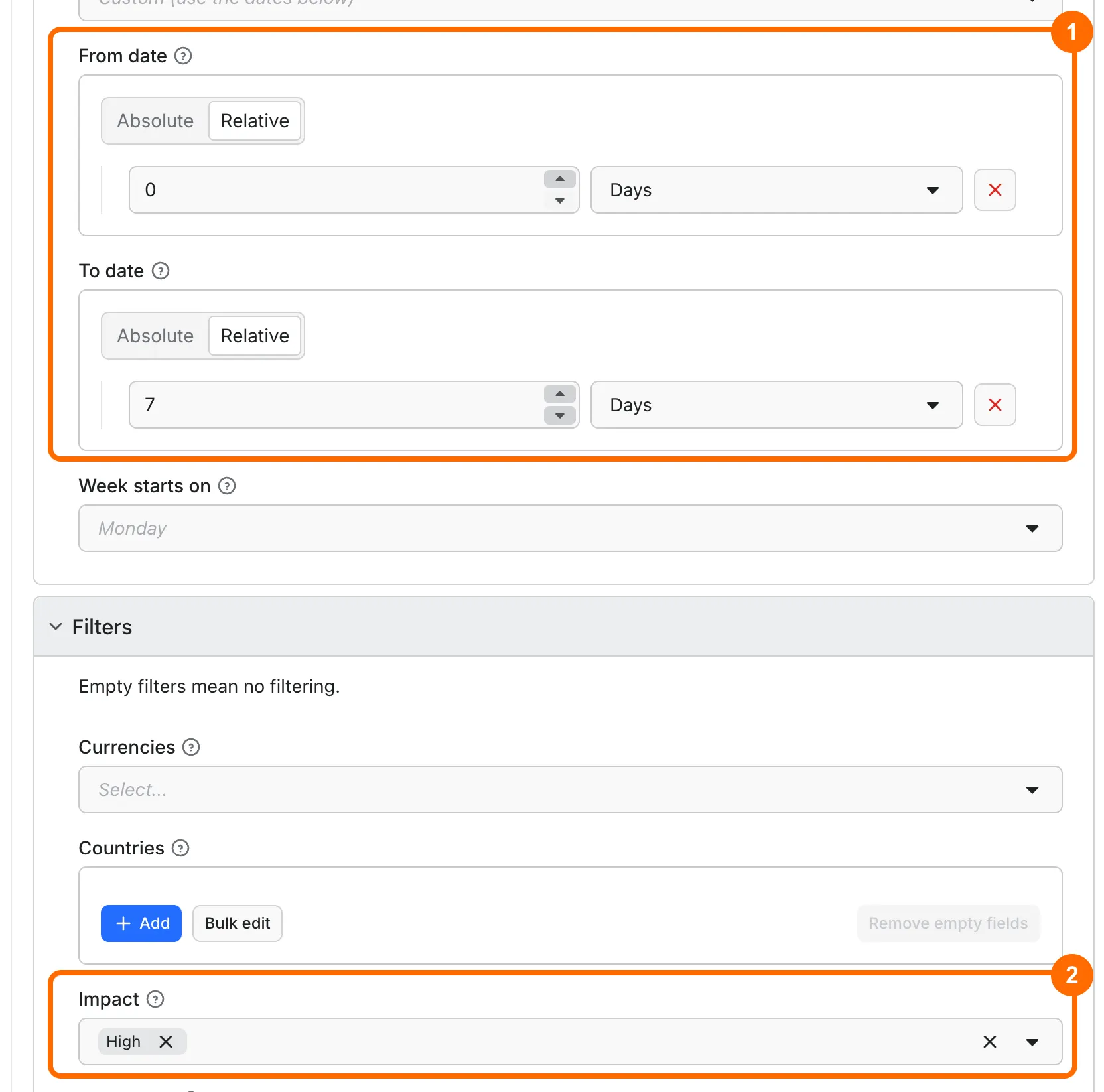
Open the Input tab. From date is
0 days(today) and To date is7 days(box 1). -
Impact is set to
high(box 2). Addmediumif you want more events, or pick Currencies such asUSD. -
Click Start.
-
When the run ends, open the Output tab. Check the date, time and currency columns (box 1) and the event title, actual and forecast columns (box 2).
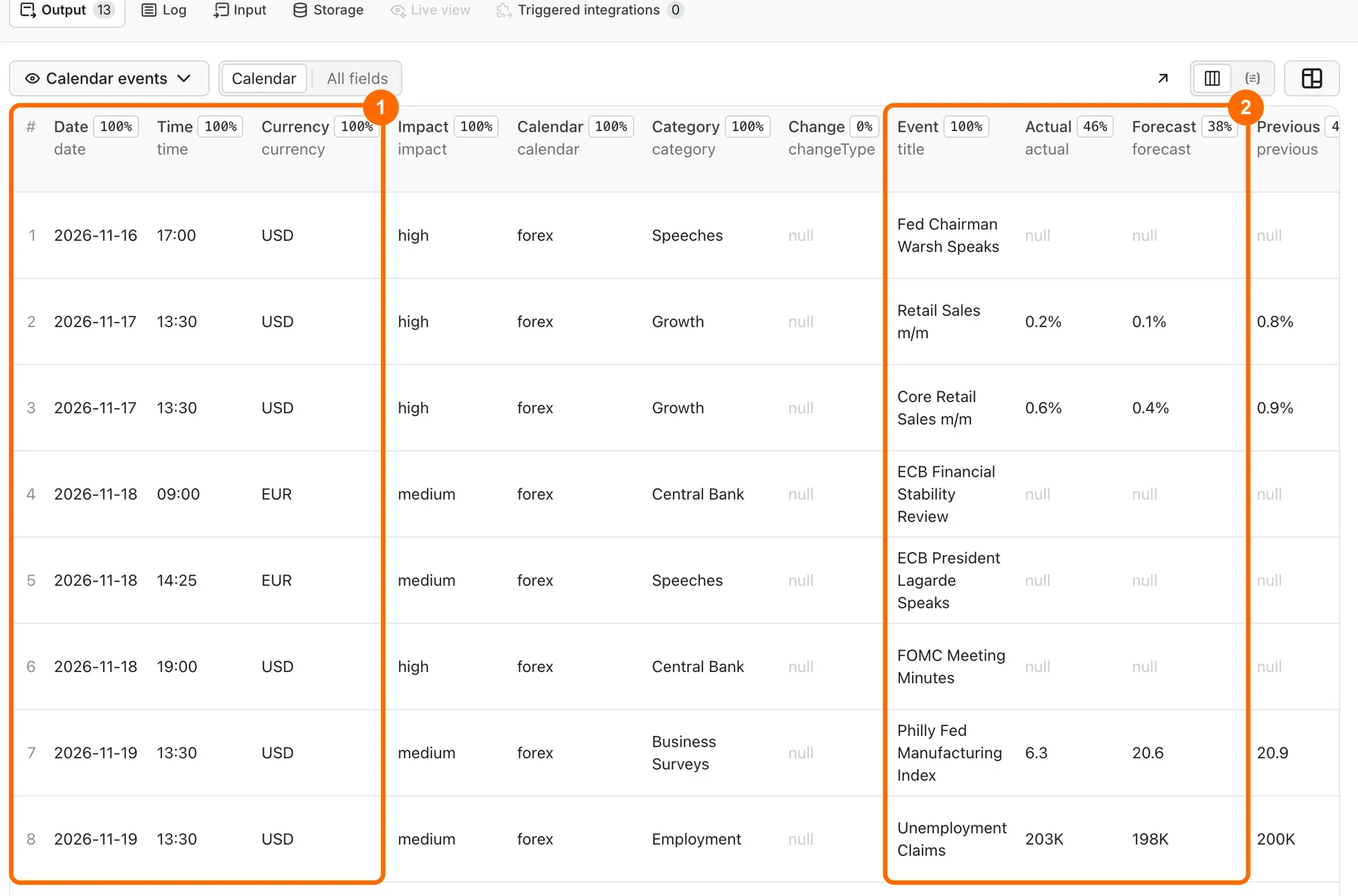
Expected result: one row per high-impact event in the next 7 days, in time order. Events that are not out yet have actual: null.
Use cases
| Buyer job | Input path | Output entity | Key fields | Next integration |
|---|---|---|---|---|
| Plan the trading week | period: "thisWeek", impact, currencies | Calendar event | datetime, currency, impact, title | CSV, Google Sheets |
| Backtest on news | dateFrom, dateTo (up to 366 days), maxItems | Calendar event | datetimeUtc, actualValue, forecastValue, actualVsForecast | JSON via API |
| Alert on new releases | changesOnly, releaseStatus: "released", schedule | Changed event | changeType, actual, forecast, title | Slack or Notion delivery, webhook |
| Explain an indicator | includeDetails, historyLimit, eventNames | Event with details | details.measures, details.usualEffect, details.history | AI agent via MCP |
| Watch gold, oil or crypto news | calendars: ["metals", "energy", "crypto"] | Calendar event | calendar, title, impact, datetime | Dataset export |
Input
No field is required. With empty input the Actor reads the Forex calendar from today to 7 days ahead, all impact levels.
Input fields
| Field | Plain name | Type | Default / prefill | Allowed values | Effect |
|---|---|---|---|---|---|
calendars | Calendars | array | ["forex"] | forex, metals, energy, crypto | Which calendars to read. Each row has a calendar field. |
period | Period | string | custom | custom, today, tomorrow, yesterday, thisWeek, nextWeek, lastWeek, thisMonth, nextMonth, lastMonth | A ready range. Anything but custom replaces From and To date. |
dateFrom | From date | string | prefill 0 days | YYYY-MM-DD or N days | First day. Empty means today. |
dateTo | To date | string | prefill 7 days | YYYY-MM-DD or N days; up to 366 days after From | Last day. Empty means 7 days from today. |
weekStartsOn | Week starts on | string | monday | monday, sunday | First day for the week periods. |
currencies | Currencies | array | empty (all) | USD, EUR, GBP, JPY, AUD, NZD, CAD, CHF, CNY, BRL, INR, MXN, RUB, ZAR, All | Keep only these currencies. |
countries | Countries | array | empty (all) | site codes: US, EZ, UK, JN, GE, CA, AU, NZ … | Keep only these countries. Case does not matter. |
impact | Impact | array | prefill ["high"]; empty means all | high, medium, low, holiday | Keep only these impact levels. |
categories | Categories | array | empty (all) | growth, inflation, employment, centralBank, bonds, housing, consumerSurveys, businessSurveys, speeches, misc | Keep only these event types. One extra free request per type. |
eventNames | Event name contains | array | empty | any words | Keep events whose name contains one of the words, for example CPI. |
excludeEventNames | Event name does not contain | array | empty | any words | Skip events whose name contains one of the words, for example Speaks. |
releaseStatus | Release status | string | all | all, released, upcoming | Released means the actual value is out or the time has passed. |
onlyWithForecast | Only events with a forecast | boolean | false | Skip events without a forecast. | |
nextHours | Next hours | integer | empty | 1–720 | Events from now to N hours ahead. Replaces the dates. |
timezone | Time zone | string | UTC | IANA name, for example America/New_York | Zone for date, time, datetime and for reading the dates. |
includeDetails | Add event details | boolean | false | Adds details for up to 500 events per run. Priced as a detailed event. | |
historyLimit | History length | integer | 10 | 0–100 | Past releases kept in details.history. |
sortBy | Sort by | string | time | time, impact | impact puts high first, each level in time order. |
includeRaw | Add raw event | boolean | false | Adds raw with the event as the site lists it. | |
maxItems | Max events | integer | 1000 | 1–20000 | Stop after this many rows. |
changesOnly | Only new or changed events | boolean | false | Save only events new or changed since the last run with the same key. The first run saves everything. | |
monitorKey | Monitor key | string | default | letters, digits, dashes, up to 60 | Name of the saved snapshot. Use one key per schedule. |
startUrls | Start URLs | array | empty | calendar links of the four sites: day, week, month, range, this/next/last | Replace Calendars, Period and dates. Up to 50 links; a bad link is skipped with a warning. |
proxyConfiguration | Proxy | object | Apify proxy | Apify proxy settings | If blocked, the Actor switches to a residential proxy by itself. |
deliveryConnector | Send results to | string | empty | your MCP connector | Posts a short summary after the run. |
deliveryTarget | Notion page or channel | string | empty | Notion page link or Slack channel ID | Where the summary goes. |
Duplicates in lists are ignored. Unknown currency values are rejected before the run starts.
Interacting settings
| When | Effective behavior |
|---|---|
startUrls is set | The links decide calendars and dates; calendars, period, dateFrom, dateTo are ignored. Filters still apply. |
nextHours is set | Replaces period, dateFrom and dateTo. Events without an exact time (All Day, Tentative) are left out. |
period is not custom | Replaces dateFrom and dateTo. |
includeDetails is off | historyLimit does nothing. |
changesOnly with a schedule | Each run compares with the snapshot saved under monitorKey. An unchanged week saves 0 rows. |
Input examples
High-impact USD and EUR events this week
Expected output: one row per event, with datetime in New York time and datetimeUtc in UTC.
A year of CPI releases with history
Expected output: every USD CPI release in the range, each with details.history. Details are added to the first 500 events of a run.
Hourly monitor for new actual values
Run it on an Apify schedule. Each run saves only events that came out or changed since the run before.
Output
Each Dataset row is one calendar event. Empty values are null, never 0: a missing forecast is null, a real forecast of zero is "0".
Output fields
| Field | Meaning | Type | Can be null? | Example |
|---|---|---|---|---|
calendar | Which calendar | string | no | forex |
eventId | Event ID on the site | number | no | 148047 |
title | Event name | string | no | Core Retail Sales m/m |
currency | Currency the event affects | string | no | USD |
country | Site country code | string | no | US |
impact | Impact level | string | no | high, medium, low, holiday |
category | Event type as the site names it | string | yes | Growth, Employment |
date | Day in your time zone | string | no | 2026-11-17 |
time | Time in your time zone | string | yes (All Day, Tentative) | 13:30 |
timezone | Zone used for date and time | string | no | UTC |
datetime | Date and time in your time zone, ISO 8601 | string | yes | 2026-11-17T13:30:00Z (UTC), 2026-11-17T08:30:00-05:00 (New York) |
datetimeUtc | Date and time in UTC | string | yes | 2026-11-17T13:30:00Z |
timeNote | Text instead of a time | string | yes | All Day, Tentative |
actual | Actual value as shown | string | yes (not out yet) | 0.6% |
forecast | Forecast as shown | string | yes | 0.4% |
previous | Previous value as first published | string | yes | 0.9% |
revisedPrevious | Previous value after revision | string | yes (no revision) | 1.1% |
actualValue, forecastValue, previousValue, revisedPreviousValue | The same values as numbers | number | yes | 0.6 |
unit | Unit or scale of the value | string | yes | %, K, M, B |
actualVsForecast | How the site rates the actual | string | yes | better, worse |
status | Is the actual value out | string | no | released, scheduled |
changeType | Change since the last monitor run | string | yes (monitor off) | new, changed |
url | Link to the event on the calendar | string | no | see example |
eventPageUrl | Link to the event's own page | string | yes | |
details | Indicator details (only with includeDetails) | object | yes | see below |
raw | Event as the site lists it (only with includeRaw) | object | yes | |
scrapedAt | When the row was read | string | no | 2026-11-21T09:04:48.005Z |
details has source, sourceUrl, measures, usualEffect, frequency, nextRelease, notes, whyTradersCare, derivedVia, alsoCalled and history (a list of past releases with date, actual, forecast, previous, revisedPrevious, url). Any of them can be null when the site has no text for it.
Output entities and surfaces
| Situation | Where | Result | What to do |
|---|---|---|---|
| Events found | Dataset, status COMPLETE | One row per event | Open, export or call the API |
| No event matches | Dataset empty, status NO_RESULTS | Message names the date range | Widen the dates or filters |
| Timeout or max charge in the middle | Dataset has rows, status PARTIAL, run succeeds | Rows read so far | Give the run more time or a higher max charge |
| Site error or block in the middle | Dataset has rows, status PARTIAL, run is marked Failed | Rows read so far stay in the Dataset | Run again later |
| Source failure with no rows | status ERROR, run fails | Message with the reason | Run again later |
| Bad input | status INVALID_INPUT, run fails | Message says which field and why | Fix the field |
Output example
This example is trimmed: eventPageUrl and scrapedAt are left out.
Send results to Slack or Notion
Pick your connector in the optional deliveryConnector field. After the run saves its data, the Actor posts a short summary (up to 25 rows and a link to the full dataset) there. Put a Notion page link or a Slack channel ID in deliveryTarget: in Notion every run is added on top of that one page, so your workspace does not fill up with new pages. Without a page link, Notion delivery is skipped and the log says so. A delivery error never fails the run and costs nothing extra. Connect a service once in Apify Console → MCP connectors.
Pricing
Pricing unit
You pay per event (pay-per-event). Prices for the Free plan:
| Event | Price | When |
|---|---|---|
| Actor start | $0.0005 | Once per run, per GB of run memory, at least one. The default 512 MB run pays one. |
| Calendar page | $0.002 | Each calendar page read, up to 31 days of one calendar. |
| Calendar event | $0.00185 | Each saved row without details ($1.85 per 1000). |
| Calendar event with details | $0.0037 | Each saved row with details. |
Paid Apify plans get lower event prices (shown on the Pricing tab). Apify platform usage (compute, proxy, storage) is paid by the developer, not by you.
- A run with no matching events or an unchanged monitor run pays the start and the calendar pages it read: $0.0025 for one week of one calendar.
- A page that fails to load is not charged. Rows saved before a timeout or block are charged as usual.
- Event types (
categories) use extra requests that are free. - Your max charge per run is respected: when it is reached the run stops, keeps the rows saved so far and ends as PARTIAL.
Cost examples
Free plan prices, default 512 MB memory.
| Scenario | Input | Pages | Rows | Cost |
|---|---|---|---|---|
| One week, all impacts | period: "thisWeek" | 1 | 127 | $0.24 |
| One week, USD + EUR, high and medium, with details | includeDetails: true | 1 | 13 | $0.051 |
| No matches or unchanged monitor | 1 | 0 | $0.0025 | |
| One year, 4 calendars | maxItems: 20000 | 48 | 12 775 | $23.73 |
Limits
- Up to 366 days per run and up to 20 000 rows (
maxItems). One year of all four calendars is about 12 800 rows and takes about 5 minutes. - Details are added to at most 500 events per run. The rest of the rows are saved without
details, and the run summary says how many. - Values are what the site shows. The Actor does not fill in missing forecasts and does not invent values.
- Events with All Day or Tentative time have
time: nulland the text intimeNote. - Only the public calendar pages. No forum, news, trades or account data.
API, export and integrations
- API: start a run with
POST https://api.apify.com/v2/acts/cliqtomedia~forex-factory-calendar/runsand the input JSON. Read rows from the run's Dataset. See the Apify API docs. - Export: download the Dataset as JSON, CSV, Excel, XML or HTML from the Output tab.
- Scheduling: run it hourly or daily with Apify Schedules. With
changesOnlyeach run saves only what changed. - Webhooks / no-code: send the Dataset to Make, Zapier, n8n or your endpoint with Apify integrations.
Use with AI agents (MCP)
-
MCP server with only this Actor:
https://mcp.apify.com?tools=cliqtomedia/forex-factory-calendar -
Smallest useful input (same as the form):
{ "dateFrom": "0 days", "dateTo": "7 days", "impact": ["high"] } -
Key output fields:
datetimeUtc(event time in UTC),currency,impact,title,actual/forecast/previous(values as shown,nullwhen not out). -
A one-week run takes about 10 seconds. A no-match run costs $0.0025. Limits: 366 days, 20 000 rows, details for 500 events per run.
Troubleshooting
The run ends with NO_RESULTS
Symptom: the Dataset is empty and the status is NO_RESULTS.
Likely reason: the filters match no event in the date range. For example, eventNames: ["CPI"] with impact: ["low"].
Action: remove a filter or widen the dates. The message in the run summary shows the exact range that was read.
The run ends with PARTIAL
Symptom: some rows are saved and the status is PARTIAL. Likely reason: the run timeout was reached on a long range, or the max charge per run was reached. Action: raise the timeout (1800 s is enough for a full year of four calendars) or the max charge, then run again.
The run fails after a site error
Symptom: the run is marked Failed. The summary status is ERROR (no rows) or PARTIAL (rows saved before the error stay in the Dataset and are charged), and the run summary says Forex Factory blocked the requests, did not answer in time, or changed its page format. Likely reason: the site was down or blocked the requests even after retries and a proxy switch. Action: run again later. If the message says the page format changed, open an issue.
Some rows have details: null
Symptom: includeDetails is on, but some rows have details: null.
Likely reason: the details request for that event failed, or the run already added details to 500 events. After 3 failures in a row the Actor stops asking for details. The other rows are still saved and are charged as plain events.
Action: run again for a shorter date range.
Some rows have category: null
Symptom: category is null for some rows.
Likely reason: the category list for that calendar did not load. The rows are still saved. If you set the categories filter, the run stops with an error instead, so that no wrong rows are returned.
Action: run again later.
Times look shifted
Symptom: time is a few hours off from what you expect.
Likely reason: timezone is UTC by default.
Action: set timezone to your zone, for example Europe/London. datetimeUtc is always UTC.
FAQ
Do I need a Forex Factory account or an API key?
No. The Actor reads the public calendar pages. No login, no cookies.
Can I use the input from another Forex Factory calendar Actor?
Yes, for common inputs. Fields like dateRange, rangeFrom, rangeTo, minImpact and includeDetail are read and mapped to this Actor's fields, and the log names each one it mapped.
Why is actual null?
The event is not out yet, or it is a speech or holiday with no value. status is scheduled until the actual value is published.
How fresh is the data?
Each run reads the calendar at the time of the run. To catch new actual values soon after release, run it on a schedule with changesOnly.
Support
For a bug, question or feature request, open the Issues tab of this Actor on Apify. Include the run ID, your input (without private data) and the message from the run summary. Never send tokens or passwords.
⭐ Found it useful? Rate this Actor. Something wrong? Report a problem — we fix reported problems.


