

France Company Search: SIREN, SIRET & VAT (Sirene)
Pricing
from $2.03 / 1,000 company records
France Company Search: SIREN, SIRET & VAT (Sirene)
Look up French companies by SIREN, SIRET or VAT number, or search by name with department, NAF and status filters. Official Sirene data with legal form, NAF, head office, establishments and clear not-found status.
Pricing
from $2.03 / 1,000 company records
Rating
0.0
(0)
Developer

Cliqto Media
Maintained by CommunityActor stats
0
Bookmarked
2
Total users
1
Monthly active users
6 days ago
Last modified
Categories
Features
Share
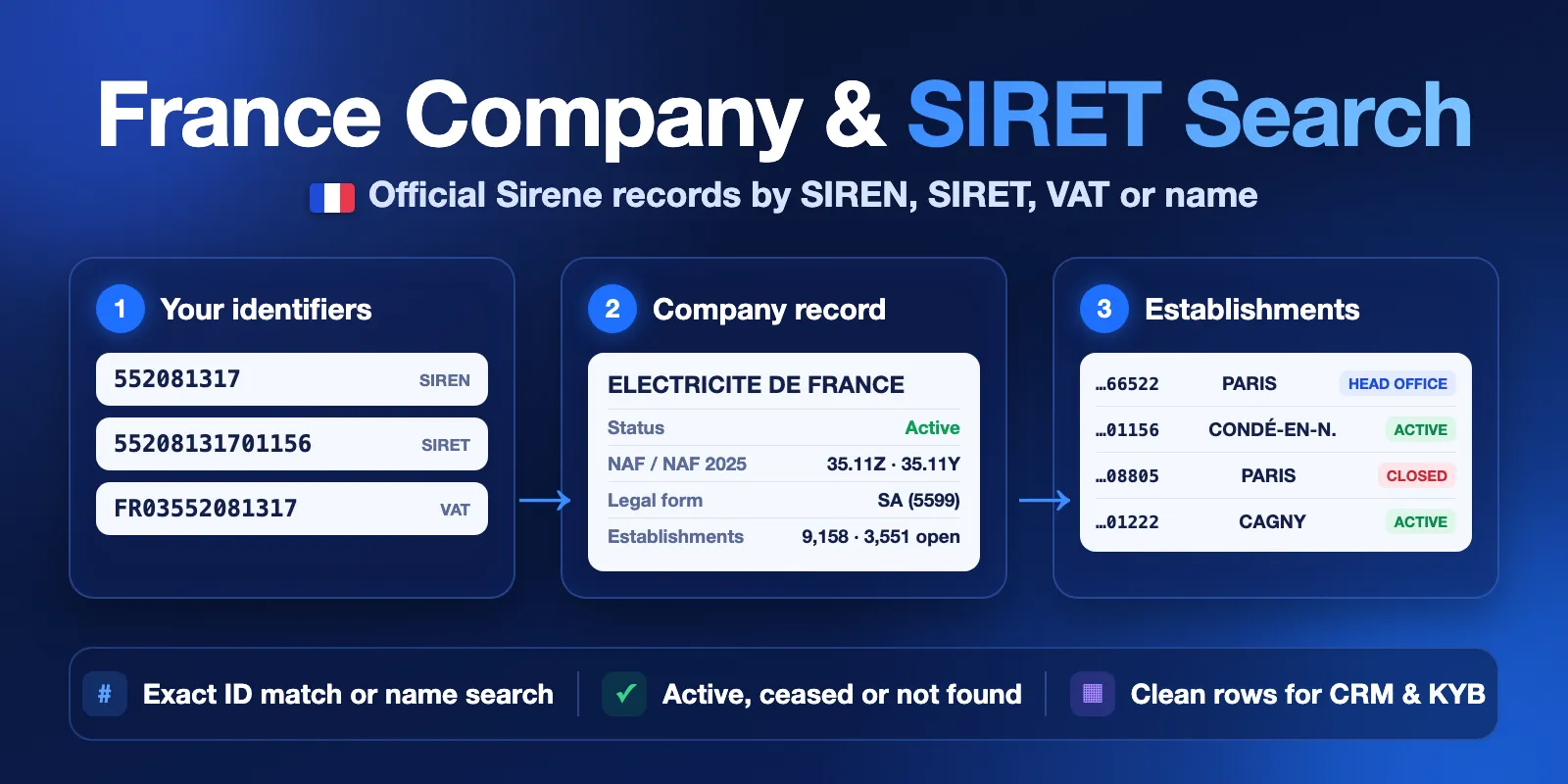
France Company & SIRET Search looks up French companies in the official Sirene directory. Add SIREN, SIRET or French VAT numbers, or search by company name with department, postal code, NAF code and status filters. You get one clean row per company, with legal form, NAF activity, size, dates, head office and a clear status: active, ceased or not found.
It is made for KYB checks, CRM cleaning and B2B lead lists. No login and no API key are needed. A typical run of three SIREN numbers finishes in a few seconds and costs about $0.011.
Contents
- What it does
- How it works
- Quick start
- Use cases
- Input
- Output
- Pricing
- Limits
- API, export and integrations
- Troubleshooting
- FAQ
- Data source and licence
- Related Actors
- Support
What it does
The Actor reads the public Recherche d'entreprises API of the French administration. This API serves INSEE Sirene and INPI RNE data. The Actor has two modes:
- Identifier lookup. Each SIREN, SIRET or VAT number is an exact match. A SIRET also returns that establishment. A wrong or unknown number returns a
not_foundrow, so no input is lost. - Name search. A full-text search on company names, brands and addresses, with filters. Results are ranked by the source. Check
sirenandnamebefore you use a search result as a verified match.
Optionally, the Actor adds one row per establishment (SIRET): address, status, head-office flag, NAF code and trade names.
Good fit
- Check that a supplier or customer exists and is still active (KYB, onboarding).
- Fill CRM records with the official name, legal form, NAF code, VAT number and head office.
- Build a list of companies in a department or with a NAF code.
- Find the open and closed establishments of a company.
Not a fit
- Directors, shareholders, phone numbers or emails. The Actor does not output them. Note: a sole trader (entrepreneur individuel) is registered under a person's name, and Sirene shows that name as the company name, unless the person hid it.
- Companies that asked to hide their data (non-diffusible). The public API does not serve them.
- A full copy of the Sirene database. Use the official Sirene files for bulk downloads.
- Legal certificates such as a Kbis extract.
How it works
- The Actor reads your list of SIREN, SIRET or VAT numbers, or your search words and filters.
- It asks the official French company directory for each number or search page, about 3 requests per second.
- It saves one row per company (and per establishment if you ask), with a clear status, and a run summary with counts and the reason the run stopped.
Quick start
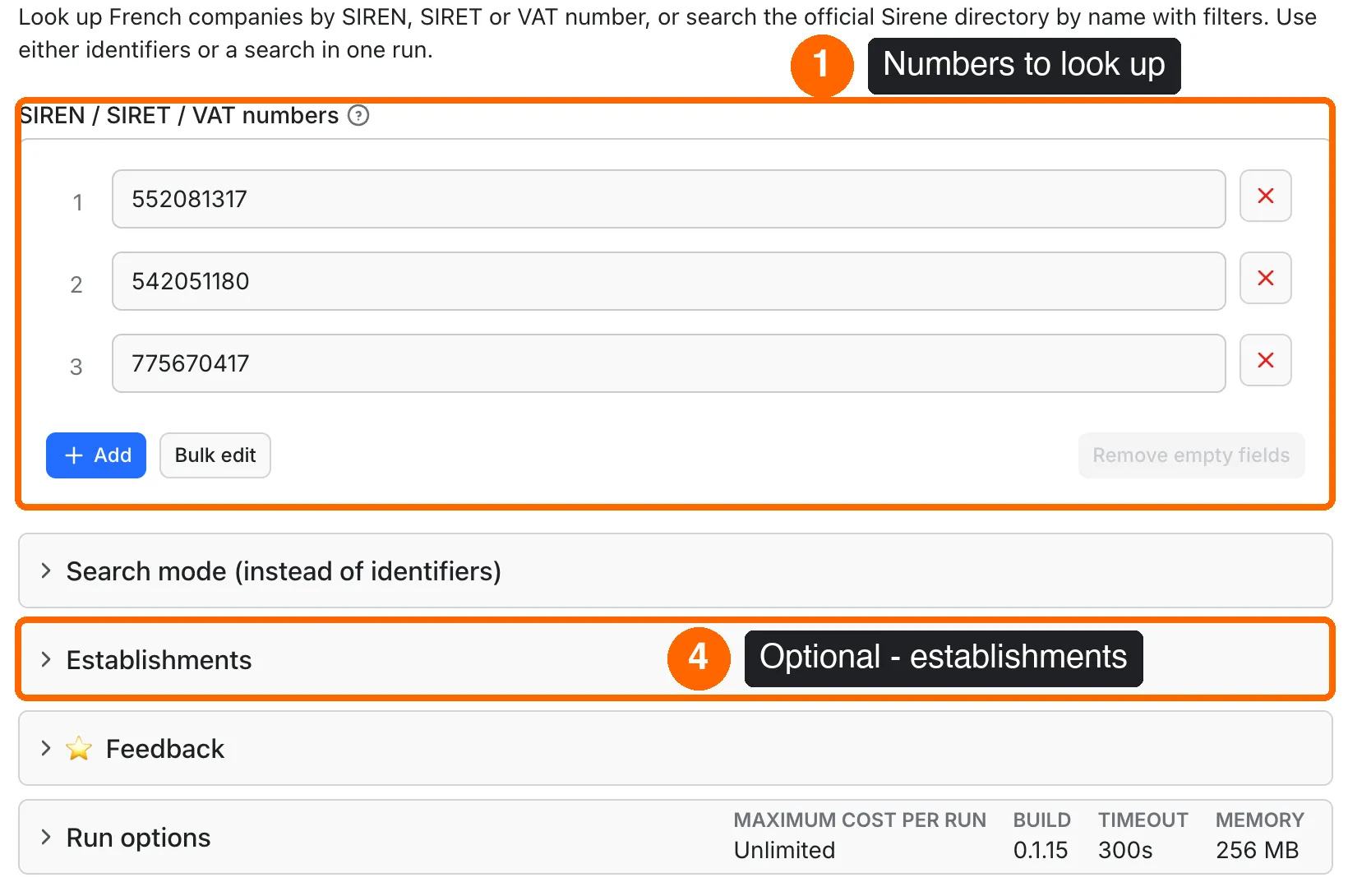
- Open the Input tab. The form already has three SIREN numbers (box 1): EDF, TotalEnergies and LVMH.
- Click Start.
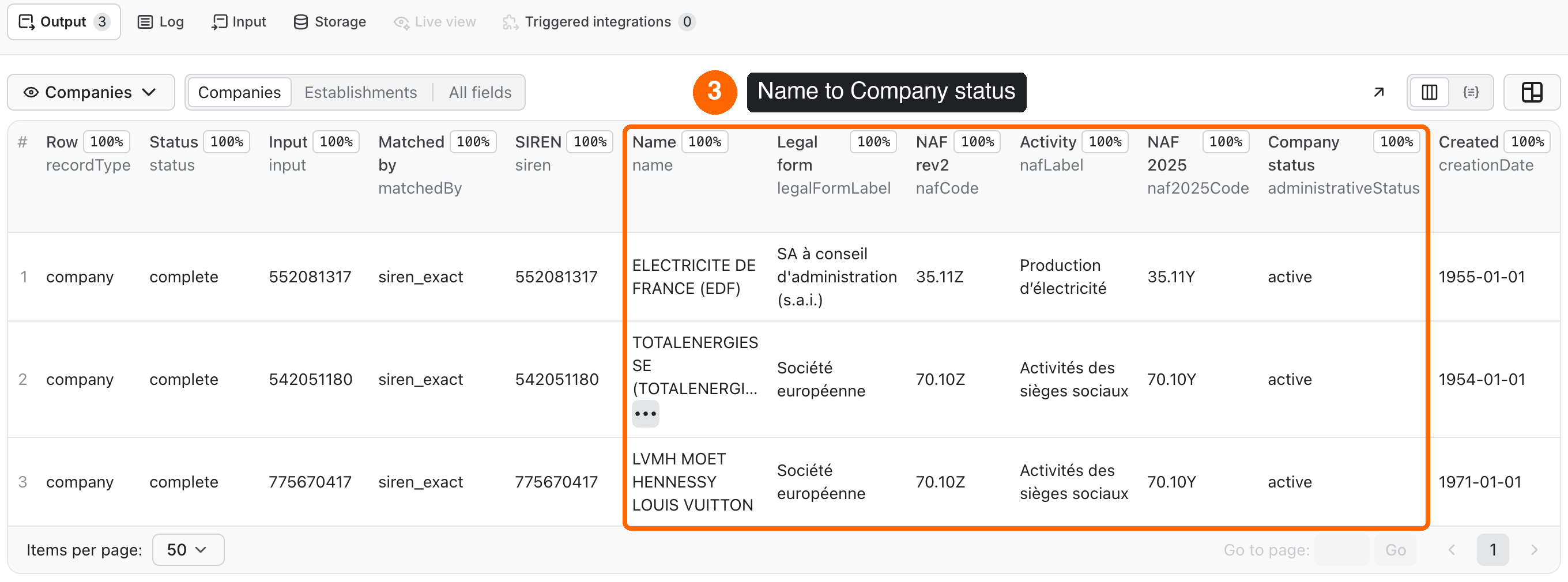
- Open the Companies view in the Output tab. Check Name and Company status (box 3): active or closed.
- Replace the numbers with your own list (up to 100). Open Establishments (box 4) and turn on Include establishments if you need SIRET rows.
Expected result: three complete company rows in a few seconds.
Use cases
| Buyer job | Input | Output | Key fields |
|---|---|---|---|
| Verify a company (KYB) | identifiers | company row | status, administrativeStatus, closureDate, legalFormLabel |
| Clean CRM records | identifiers (SIREN, SIRET or VAT) | company row | name, vatNumber, nafCode, headOfficeAddress |
| Map a company's sites | identifiers + includeEstablishments | establishment rows | siret, address, administrativeStatus, isHeadOffice |
| Prospect list by area and activity | query + departments / nafCodes | company rows | name, employeeRangeLabel, companyCategory, searchRank |
Input
Use either identifiers or a search (query and filters) in one run. A run with both is rejected with INVALID_INPUT.
| Field | Type | Default | Allowed values | What it does |
|---|---|---|---|---|
identifiers | array of strings | none (form example: 3 SIREN) | up to 100; SIREN (9 digits), SIRET (14 digits), French VAT (FR + 2 characters + SIREN) | Exact lookup. Spaces, dots and dashes are ignored. The same number written twice (or a SIREN and its VAT number) is looked up once. A SIREN and a SIRET of the same company are two lookups. |
query | string | none | 3–200 characters, or shorter with a filter | Fuzzy search on names, brands and addresses. |
departments | array of strings | empty | up to 20; 01–95, 2A, 2B, 971–976 | Keeps companies with at least one establishment in these departments. |
postalCodes | array of strings | empty | up to 20; 5 digits | Keeps companies with at least one establishment in these postal codes. |
nafCodes | array of strings | empty | up to 20; NAF rev. 2 codes like 62.01Z or 6201Z | Activity filter. Unknown codes and NAF 2025 codes are rejected with INVALID_INPUT. |
companyStatus | string | any | any, active, ceased | Company status filter for search. |
maxResults | integer | 25 | 1–100 | Maximum companies in a search. |
includeEstablishments | boolean | false | Adds establishment (SIRET) rows. | |
maxEstablishmentsPerCompany | integer | 20 | 1–100 | Maximum establishment rows per company. |
Filters belong to search mode and cannot be combined with identifiers. With identifiers, the number already selects one company.
Moving from another Actor? maxItems, limit and resultsLimit are read as maxResults, and queries, searchTerms and keywords are read as query (from a list, the first text is used). If you also set our own field to a value other than its default, our field wins. An explicit maxResults: 25 looks the same as the default, so in that case maxItems (or its synonyms) wins. Each such case is written in the run log. Other unknown fields are ignored with a warning and listed in RUN_SUMMARY.ignoredInputFields. An input error names the field and shows a valid example.
Input examples
Lookup with establishments:
Search for active bakeries in Paris:
Output
Each Dataset row has recordType: company or establishment. Use the Companies and Establishments views, or filter on recordType in your export. The key-value store has a RUN_SUMMARY record with the run status and counts.
Row status
status | Meaning | Charged |
|---|---|---|
complete | The record was found. Fields are as complete as the public data allows. | yes |
partial | The company was found, but a requested SIRET was not found, or extra establishments could not be listed. Read statusReason. | yes |
not_found | The number is not in the public index: unknown, hidden (non-diffusible) or not yet indexed. A ceased company is not not_found: it is complete with administrativeStatus: "ceased". | not-found price |
error | Not a valid identifier (INVALID_IDENTIFIER) or a source failure (RATE_LIMITED, SOURCE_UNAVAILABLE, …). | no |
Company fields
| Field | Meaning | Example |
|---|---|---|
input, inputType | Your value and its type (siren, siret, search, invalid) | "55208131701156", "siret" |
matchedBy | siren_exact, siret_exact or search | "siret_exact" |
checksumValid | INSEE checksum of your number; false usually means a typo | true |
searchRank, searchQuery | Position and query in search mode, else null | 1 |
siren, name, legalName, acronym | Company number and names | "552081317", "ELECTRICITE DE FRANCE (EDF)" |
legalFormCode, legalFormLabel | INSEE legal category | "5599", "SA à conseil d'administration (s.a.i.)" |
nafCode, nafVersion, nafLabel | Main activity, NAF rev. 2 | "35.11Z", "NAFRev2", "Production d’électricité" |
naf2025Code | Main activity in the new NAF 2025, kept separate; can be null | "35.11Y" |
nafSectionCode, nafSectionLabel | NAF section | "D" |
employeeRangeCode, employeeRangeLabel, employeeRangeYear | INSEE headcount band and its year | "53", "10 000 salariés et plus", 2024 |
companyCategory, companyCategoryYear | PME, ETI or GE | "GE" |
creationDate, closureDate | Dates in YYYY-MM-DD | "1955-01-01", null |
administrativeStatus, administrativeStatusCode | active (A) or ceased (C) | "active" |
diffusionStatus, hiddenFields | partial when some data is hidden by law; hidden fields are null and listed | "partial", ["headOffice.adresse"] |
vatNumber | Intra-EU VAT number as given by the source; null if the source has none | "FR03552081317" |
isIndividualEntrepreneur, isAssociation, isSocialEconomy | Source flags | false |
isEmployer | Employer flag at company level; the source often leaves it empty, so it is usually null. Use the establishment isEmployer instead. | null |
latestFinancialYear, revenueEur, netIncomeEur | Latest published accounts, when the company files them | 2024, 118690000000 |
establishmentsTotal, establishmentsOpen | All known establishments and open ones | 9158, 3551 |
establishmentsReturned, establishmentsComplete, establishmentsScope | How many establishment rows this run returned, and whether that is the full list | 20, false, "name_matched_subset" |
headOfficeSiret, headOfficeAddress, headOfficePostalCode, headOfficeCity, headOfficeCommuneCode, headOfficeDepartment, headOfficeRegion, headOfficeLatitude, headOfficeLongitude, headOfficeStatus | Head office | "55208131766522", "22-30 22 AVENUE DE WAGRAM 75008 PARIS" |
annuaireUrl | Public page on annuaire-entreprises.data.gouv.fr | |
status, statusReason, errorCode | Row result, see above | |
source, sourceUrl, fetchedAt, sourceUpdatedAt, sourceUpdatedAtInsee, sourceUpdatedAtRne | Provenance and update dates |
Establishment fields
siret, siren, companyName, isHeadOffice, wasHeadOffice, administrativeStatus (active or closed), administrativeStatusCode (A or F), creationDate, activityStartDate, closureDate, address, postalCode, city, communeCode, department, region, latitude, longitude, nafCode, nafVersion, nafLabel, naf2025Code, employeeRangeCode, employeeRangeLabel, employeeRangeYear, isEmployer, tradeNames, commercialName, diffusionStatus, hiddenFields, matchedBy, annuaireUrl, status, statusReason, errorCode, input, source, sourceUrl, fetchedAt.
matchedBy tells where the row comes from: siret_exact (your SIRET), head_office, company_establishments (listed for your SIREN) or search_match (matched your search).
Output example
A trimmed company row for a ceased company:
null means the source has no value. It never means zero.
Run summary
RUN_SUMMARY.status is one of COMPLETE, PARTIAL, NOT_FOUND (no identifier was found), NO_RESULTS (empty search), CAPPED (stopped at a limit), ERROR, INVALID_INPUT or CANCELLED. counts shows rows by status and charged rows. source names the data licence.
When the run stops early, stopReason says why: MAX_ITEMS (the Max items run option), CHARGE_LIMIT (your maximum cost per run), DEADLINE (time limit), SOURCE_ERROR (the source failed) or CANCELLED. partial: true means the Dataset holds only part of the result. unprocessedIdentifiers lists the numbers that were not looked up, so you can run them again. ignoredInputFields lists unknown input fields.
| Stop | Run status | RUN_SUMMARY |
|---|---|---|
| Max items reached | Succeeded | limitReached: "MAX_ITEMS", partial: false |
| Maximum cost per run reached | Succeeded | status: "CAPPED", stopReason: "CHARGE_LIMIT", partial: true |
| Time limit after some rows | Succeeded | status: "CAPPED", stopReason: "DEADLINE", partial: true |
| Source failure, outage or invalid input | Failed | stopReason: "SOURCE_ERROR" or status: "INVALID_INPUT"; rows saved before the stop stay in the Dataset |
Pricing
Pay per event. Platform usage is included.
| Event | Price | When |
|---|---|---|
| Actor start | $0.002 | Once per run (per GB of memory; the default 256 MB counts once) |
| Company record | $0.0029 | Each complete or partial company row |
| Not-found lookup | $0.001 | Each not_found company row |
| Establishment record | $0.0003 | Each complete establishment row |
error rows are free. An empty search costs only the start.
Prices above are for the Apify Free plan. Paid Apify plans get lower prices on the company, not-found and establishment rows: Bronze −10%, Silver −20%, Gold and higher −30%.
| Run | Example cost |
|---|---|
| 3 SIREN (form example) | $0.0107 |
| 10 SIREN | $0.031 |
| 100 SIREN | $0.292 |
| 100 SIREN with establishments (1,854 rows in our test) | $0.848 |
| 100 unknown numbers | $0.102 |
Set a maximum cost per run in the run options to cap your spend. The Actor stops before a paid row that does not fit and reports CAPPED. The Max items run option caps paid rows: the Actor stops at that number and sends no more requests to the source. Every paid row is saved and charged in the same step, so you never pay for a row that is not in the Dataset.
Limits
- Up to 100 identifiers per run, or up to 100 companies per search.
- Up to 100 establishments per company. The source cannot list more. Check
establishmentsComplete: in our test of 100 transport companies, 96 had their full list. - In search mode, establishments are the ones that matched your search or filters, not all establishments of the company.
- The Actor sends at most about 3 requests per second. The source allows 7 per second per IP and shares a limit across cloud providers, so a busy moment can give
RATE_LIMITEDrows. Run them again later. - Internal time budget is 240 seconds. 100 identifiers with establishments took 94 seconds in our test.
naf2025Codeis a temporary field of the source. The source says it may be removed after 2027-01-01.
API, export and integrations
Start a run with the same JSON input through the Apify API (POST /v2/acts/cliqtomedia~france-sirene-company-search/runs), then read the Dataset. Export to CSV, Excel or JSON from the Dataset, or connect the run to other tools with the usual Apify integrations.
Join rows on siren (company) and siret (establishment). For CSV, use the Companies or Establishments view.
There is no built-in monitoring mode. To re-check the same list regularly, create an Apify schedule for a saved task and compare administrativeStatus or sourceUpdatedAt between runs.
Use with AI agents (MCP)
AI agents can call this Actor through the Apify MCP server: add https://mcp.apify.com?tools=cliqtomedia/france-sirene-company-search to your MCP client (Claude, Cursor, VS Code and others). The MCP server needs your Apify account (OAuth sign-in or an Apify API token); the data source itself needs no key. The agent builds the input from the input schema. The smallest useful input:
Key output fields for an agent: status (complete, not_found, …), name, administrativeStatus (active or ceased), legalFormLabel, nafCode, vatNumber, headOfficeAddress. A call with 10 numbers usually finishes in well under 30 seconds and costs about $0.031; up to 100 numbers or 100 search results fit in one run. A large run (100 numbers, around 45 seconds) can outlast the MCP call wait, so the agent may need to poll the run for its result. Search results are fuzzy, so an agent should verify a company by SIREN or SIRET.
Troubleshooting
| Symptom | Check | Action |
|---|---|---|
not_found for a real company | checksumValid | false means a typo. If true, the company may be non-diffusible or very new. |
| A ceased company | administrativeStatus, closureDate | This is correct data, not an error. |
Address is null | diffusionStatus, hiddenFields | The company hides some data by law. |
RATE_LIMITED rows | RUN_SUMMARY.http.rateLimited | Run the failed identifiers again later. |
Fewer establishments than establishmentsTotal | establishmentsComplete, maxEstablishmentsPerCompany | Raise the limit up to 100. Above 100, the source gives a subset. |
| Run stopped early | RUN_SUMMARY.stopReason, unprocessedIdentifiers | Run the listed identifiers again, or raise Max items or the maximum cost per run. |
INVALID_INPUT | RUN_SUMMARY.message (names the field and shows an example) | Common causes: identifiers and a search in one run; no valid SIREN/SIRET/VAT in the list; an unknown NAF code; a search query shorter than 3 characters without a filter. |
FAQ
Do I need an API key or a French account?
No. The source is open and free. You only need your Apify account.
Is a search result a verified match?
No. Search is fuzzy. For verification, use the SIREN or SIRET. Exact lookups show matchedBy: "siren_exact" or "siret_exact".
Why are directors not included?
They are personal data. This Actor gives company data only. Sole traders still appear under their registered name.
How fresh is the data?
Each run reads the source live. Each row has fetchedAt (our read time) and sourceUpdatedAt (the source update time of that record).
Can I use the data commercially?
The Sirene data is published under the French Licence Ouverte 2.0, which allows commercial reuse with attribution. See below.
Data source and licence
Data: API Recherche d'entreprises (DINUM, annuaire-entreprises.data.gouv.fr), built on INSEE Sirene and INPI RNE data, under the Licence Ouverte / Etalab 2.0. When you reuse the data, name the source and the update date (sourceUpdatedAt). This Actor is independent and not endorsed by INSEE, INPI or the French administration.
Related Actors
- EU VAT Number Validator (VIES) — check that the French VAT number of a company is active in VIES.
- LEI Lookup & Change Monitor (GLEIF) — add the Legal Entity Identifier and parent company for KYB.
- Norway Company Register (Brreg) & Updates — the same kind of official company lookup for Norway.
- Finland Company Register (PRH YTJ) — the same kind of official company lookup for Finland.
Support
For a bug, question or feature request, open the Actor's Issues tab on Apify. Add the run ID, the mode (identifiers or search) and the statusReason or errorCode you saw. Never send API tokens or private data.
⭐ Found it useful? Rate this Actor. Something wrong? Report a problem — we fix reported problems.


