
Google Play Search, Rank & App Details — No Login
Pricing
from $0.38 / 1,000 app rows
Google Play Search, Rank & App Details — No Login
Search Google Play for many keywords in many countries in one run, with rank per term, or get app details by package name or URL: rating, ratings count, install range, price, genre, age rating, version, last update. No login, no API key.
Pricing
from $0.38 / 1,000 app rows
Rating
0.0
(0)
Developer

Cliqto Media
Maintained by CommunityActor stats
0
Bookmarked
1
Total users
0
Monthly active users
5 days ago
Last modified
Categories
Share
Search Google Play by keyword in one or many countries and get the ranked list of apps for every term, with rating, ratings count, install range, price, genre, age rating, version and last update. Or add package names or Google Play URLs and get the same app details.
No login, no API key and no proxy setup. A typical run (pdf scanner, US, 20 apps) takes about 20 seconds and costs about $0.012.
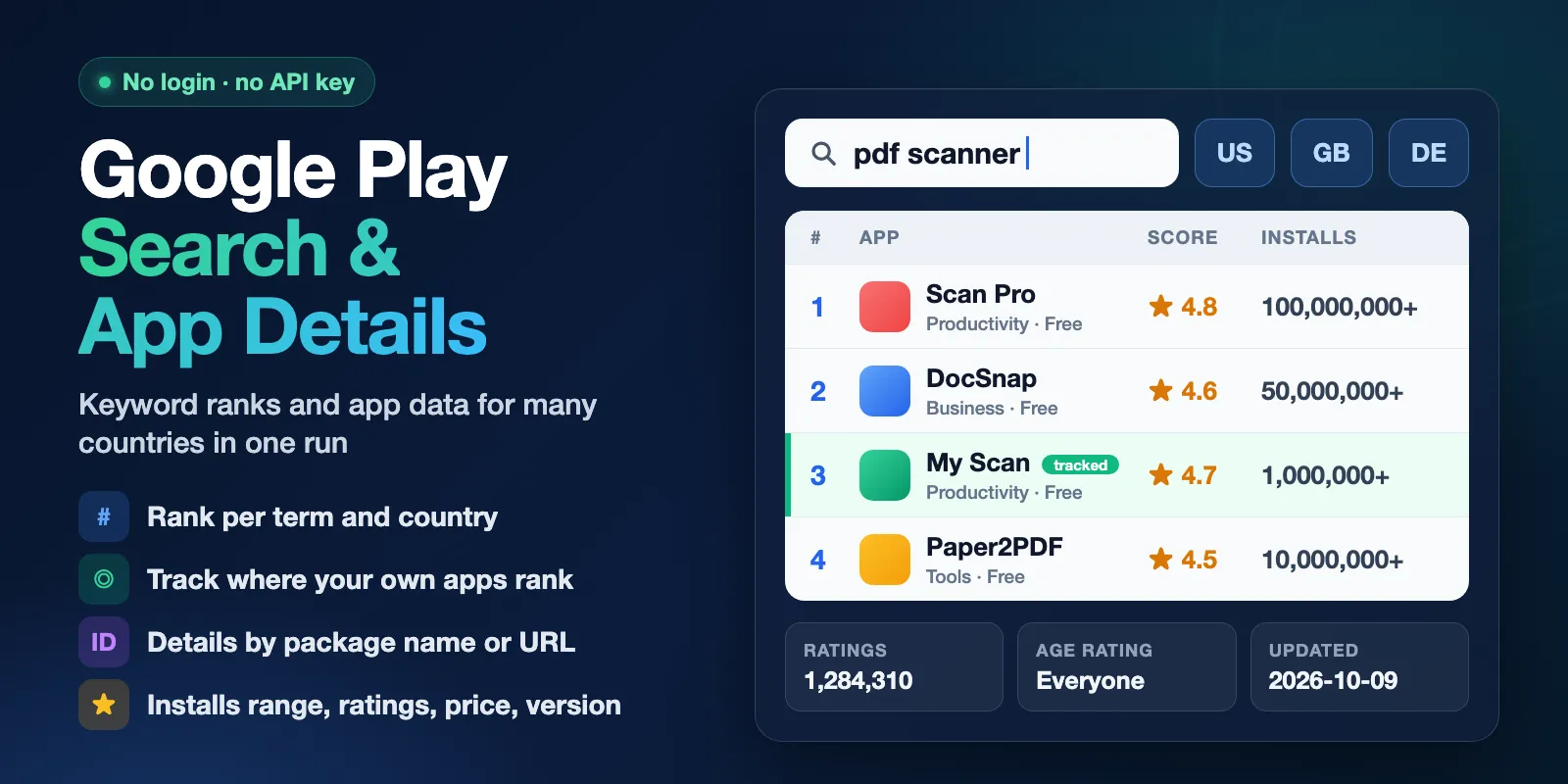
Table of contents
- What it does
- Quick start
- Use cases
- Input
- Output
- Pricing and limits
- API, export and integrations
- Troubleshooting
- FAQ
- Related Actors
- Support
What it does
The Actor reads public Google Play pages, like a person in a browser who is not signed in. It works in two modes:
search— for each keyword (term) and country, it runs one Google Play search and returns the apps in the same order as Google shows them. Every row hasrank(1, 2, 3…),termandcountry. By default it also opens each app page and adds installs, ratings count, genre, age rating, version and last update.details— for each package name (for examplecom.whatsapp) or Google Play URL, it opens the app page in every country you choose and returns one row per app and country.
Many terms × many countries go into one run and one dataset. You can also mark your own apps with trackAppIds and see their rank for every term and country in the run summary.
Good fit
- App store optimization (ASO): check which apps rank for your keywords in each country.
- Rank tracking: see where your own apps stand for 10–30 keywords, run after run.
- Competitor research: compare install range, rating, price, in-app purchases and last update of rival apps.
- App catalog enrichment: turn a list of package names into rows with title, developer, genre and age rating.
Not a fit / limits
- No exact install numbers. Google shows a public range such as
10,000,000+. The Actor returns this text ininstallsand its lower bound inminInstalls. It never estimates an exact count. - About 30 apps per search. Google's search page shows about 30 apps for a term and has no next page.
maxItemsis 1–30. - No reviews, screenshots, permissions, data safety or developer contact details (email, phone, address).
- No top charts, categories or "similar apps" lists.
- Results are what Google shows to a signed-out visitor in that country and language. Personal results on a phone can differ.
Quick start
- Open the Input tab.
- Keep Mode =
Search by keywords(the default). - Keep the prefilled Search terms
pdf scannerand Countriesus, or add your own. - Keep Results per term and country = 20 and click Start.
- Open the Output tab and the Search results view. Check
rank,title,installsandscore.
Expected result: 20 rows for pdf scanner in the US, ranks 1–20, each with app page details.
Use cases
| Buyer job | Input path | Output entity | Key fields | Next step |
|---|---|---|---|---|
| Keyword rank research | terms + countries | App row per rank | term, country, rank, appId, title | Export CSV, compare countries |
| Track my app's rank | terms + trackAppIds | Run summary rankTracking | rank, status (ranked / not_in_results) | Schedule a daily run |
| Competitor snapshot | mode: details + appIds | App row per app and country | installs, score, ratings, price, updatedAt, version | Google Sheets or API |
| Fast keyword scan | includeDetails: false | Search row | rank, title, developer, score, price | Pick apps for a details run |
Input
Input fields
| Field | Plain name | Type | Required | Default / prefill | Allowed values | Effect |
|---|---|---|---|---|---|---|
mode | Mode | string | no | default search | search, details | Keyword search or app details |
terms | Search terms | array of strings | yes in search | prefill ["pdf scanner"] | 1–30 terms, up to 100 characters each | One search per term and country |
countries | Countries | array of strings | no | default and prefill ["us"] | 1–30 two-letter codes (us, gb, de, br…) | Every term or app ID is processed in every country |
language | Language | string | no | default en | en, de, pt-BR… | Language of genre, age rating, description; also changes search results |
maxItems | Results per term and country | integer | no | default and prefill 20 | 1–30 | How many apps to keep per search |
includeDetails | Add app page details | boolean | no | default true | true, false | false = faster, search fields only |
trackAppIds | Track my apps' rank | array of strings | no | — | up to 30 package names or URLs | Marks rows with isTracked and adds rankTracking to the run summary |
appIds | Package names or Google Play URLs | array of strings | yes in details | — | up to 300 | Apps to read in details mode |
includeDescription | Include description and what's new | boolean | no | default false | true, false | Adds description and recentChanges; rows get much larger |
Duplicate terms are removed without regard to case (PDF Scanner = pdf scanner). Duplicate app IDs are removed too. A package name and its Google Play URL count as the same app.
Interacting settings
| When | Input A | Input B | Effective behavior |
|---|---|---|---|
| Search size | terms | countries | terms × countries must be at most 60 searches |
| Search with details | terms × countries | maxItems | With includeDetails: true, terms × countries × maxItems must be at most 400 app pages |
| Details size | appIds | countries | appIds × countries must be at most 400 |
| Mode | mode: details | terms, trackAppIds, maxItems, includeDetails | Ignored in details mode; app page details are always read |
If a limit is exceeded, the run fails at once with a clear message and nothing is charged except the Actor start.
Input examples
Rank of your app for several keywords
Expected behavior: 4 searches (2 terms × 2 countries), up to 30 apps each, with app page details.
Expected output: up to 120 app rows; rows of the tracked app have isTracked: true. The run summary lists the tracked app's rank for each of the 4 searches, or not_in_results.
App details by package name or URL
Expected behavior: 4 app page lookups (2 apps × 2 countries).
Expected output: 4 rows with rank: null. Prices, currency and age rating are for each country.
Output
Each row is one app in one search (or one app in one country in details mode). Every row has the same 46 fields. A field is null when Google does not show the value or when it was not requested.
The dataset has two views: Search results (search columns first) and App details (app page columns first).
Output fields
| Field | Meaning | Type | Can be empty? | Example |
|---|---|---|---|---|
status | Row type | string | no | complete, partial, not_found, error |
term, country, rank | Search term, country, position in Google's list | string, string, integer | rank is null in details mode | pdf scanner, us, 2 |
isTracked | App is in trackAppIds | boolean | null without trackAppIds | true |
appId, title, developer | Package name, app name, developer name | string | no on app rows | com.whatsapp |
score | Average rating, 1–5 | number | null when nobody rated the app yet | 4.877 |
ratings, reviews | Number of ratings and written reviews | integer | null without app page details | 2426697 |
ratingHistogram | Count of 1–5 star ratings | object | null without details | {"fiveStars": 2274811, …} |
installs, minInstalls | Google's public install range and its lower bound | string, integer | null without details | 50,000,000+, 50000000 |
price, free, currency, priceText | Price in the country's currency | number, boolean, string | priceText needs details | 0, true, USD, Free |
offersIAP, iapRange, adSupported | In-app purchases, their price range, ads | boolean, string | null without details | true, $1.99 per item |
genre, contentRating | Category and age rating, in the chosen language | string | null without details | Productivity, Everyone |
updatedAt, released, version, androidVersion | Last update (ISO time, UTC), release date, version, minimum Android | string | version is null when Google shows "Varies with device" | 2026-09-28T13:34:21.000Z, 1.7.8 |
url, icon, developerUrl | Links to the app page, icon and developer page | string | no on app rows | https://play.google.com/store/apps/details?id=… |
developerId | The developer ID from the Google Play developer link: a number or a name, as Google uses it | string | null when the page has no developer link | Simple+Design+Ltd. |
description, recentChanges | Full description and What's New | string | null unless includeDescription: true | — |
queryIds | App IDs a not_found or error row is about | array | null on app rows | ["com.example.missing"] |
errorCode, errorMessage | Why a row is partial or an error | string | null on complete rows | DETAILS_NOT_FOUND |
detailsIncluded, sourceUrl, fetchedAt | Whether the app page was read, the page used, time of reading | boolean, string, string | no | true |
Output example
From the Quick start run (pdf scanner, US). Trimmed: some fields are left out.
Output entities and surfaces
| Situation | Where | Result | What to do |
|---|---|---|---|
| Normal app | Dataset | status: complete row | Use or export |
| Search with no apps | Dataset | One not_found row for that term and country | Check the spelling or try another country |
| App ID not on Google Play in that country | Dataset | A not_found row with the missing IDs in queryIds (one row per country for each group of up to 10 IDs) | Check the package name; some apps exist only in some countries |
| Invalid app ID or URL | Dataset | One error row with INVALID_IDENTIFIER and the bad values in queryIds | Fix the value |
| App page failed but the search worked | Dataset | status: partial row with search fields only | Run again later for the details |
| Run stopped early (Google blocked access, timeout, cost limit) | Dataset + RUN_SUMMARY | Rows already read stay; the rest is listed as NOT_PROCESSED | Read the run status message, then run again |
The Run summary (key-value store record RUN_SUMMARY) has the run status (COMPLETE, NO_RESULTS, CAPPED, PARTIAL, ERROR…), counts, one line per search or lookup, and rankTracking for tracked apps. In details mode counts.queries counts groups of up to 10 app IDs per country, while counts.chargedQueries counts single app ID lookups (the paid query events).
Pricing and limits
Pricing unit
This Actor uses pay-per-event pricing. You pay for:
| Event | When | Price |
|---|---|---|
| Actor start | Once per run (per GB of memory; default 1 GB) | $0.003 |
| Google Play query answered | One search (term × country) or one app ID lookup (app ID × country) that Google answered | $0.0001 |
| App row | One complete app row stored in the dataset | $0.00045 (Free plan), $0.00042 (Bronze), $0.0004 (Silver), $0.00038 (Gold and higher) |
partial, not_found and error rows are free. A search with no apps costs only its query ($0.0001). Failed or skipped queries are free. Platform usage (compute, traffic) is included in these prices.
To cap the cost, set Max total charge in run options. When the limit is reached, the run stops, keeps all rows it already stored and reports CAPPED.
Cost examples
Event counts from our test runs, priced at Free plan prices:
| Scenario | Input scope | Charged events | Cost |
|---|---|---|---|
| One app | pdf scanner, US, maxItems: 1 | start + 1 query + 1 app | $0.0036 |
| Typical | pdf scanner, US, maxItems: 20 | start + 1 query + 20 apps | $0.0121 |
| No apps found | one nonsense term, US | start + 1 query | $0.0031 |
| Many keywords | 20 terms × 2 countries × 10 apps, with details | start + 40 queries + 399 apps | about $0.19 |
Limits per run
- Up to 60 searches (terms × countries) and up to 30 apps per search.
- With app page details: up to 400 app pages per run (for example 20 terms × 2 countries × 10 apps). Such a run takes about 3.5 minutes.
- Without details: up to 60 × 30 = 1,800 rows, in under a minute.
- Details mode: up to 300 app IDs and 400 lookups (app IDs × countries).
For more, split the work into several runs.
API, export and integrations
- API: start the Actor with the Apify API and the same JSON input as above. Read rows from the run's dataset and the run summary from the
RUN_SUMMARYrecord. - Export: download the dataset as JSON, CSV, Excel, XML or HTML from the Output tab or the API.
- Scheduling: create a task with your terms and
trackAppIdsand add a schedule (for example daily) to collect a rank history.
Use with AI agents (MCP)
- Apify MCP server URL with only this Actor:
https://mcp.apify.com?tools=cliqtomedia/google-play-apps-search - Smallest useful input:
{"terms": ["pdf scanner"], "countries": ["us"], "maxItems": 20} - Key output fields:
rank(position in Google Play search),appId(package name),title,installs(public install range),score(average rating). - A typical call takes about 20 seconds and costs about $0.012. Limits: 60 searches, 30 apps per search, 400 app pages per run.
Troubleshooting
The run shows SOURCE_BLOCKED
Symptom: the status message says Google blocked access, and some searches are NOT_PROCESSED.
Likely reason: Google showed a consent or CAPTCHA page. The Actor does not try to get around it.
Action: rows read before the block stay in the dataset. Run the missing terms again later.
A search returned a not_found row
Symptom: one row with status: not_found for a term and country.
Likely reason: Google returned no apps for this term in this country and language.
Action: check the spelling, try language: en, or try another country. This row is free.
My tracked app shows not_in_results
Symptom: in RUN_SUMMARY.rankTracking, the app has status: not_in_results.
Likely reason: the app is not in the first ~30 apps Google shows for that term and country.
Action: this is a real result, not an error. Check the package name in trackAppIds.
The run failed at once with INVALID_INPUT
Symptom: the run ends in a few seconds with a message about a limit.
Likely reason: too many searches or app pages for one run (see Limits per run).
Action: lower maxItems, turn off includeDetails or split the terms into several runs.
FAQ
Do I need a Google account or API key?
No. The Actor reads public Google Play pages without login.
Why don't I get the exact number of installs?
Google Play shows only a range, such as 10,000,000+. Other numbers you may see elsewhere are estimates. This Actor returns only what Google shows: installs and its lower bound minInstalls.
Why is score null for some apps?
Nobody has rated the app yet. In that case ratings is 0 and score is null, not 0.
Why is version null?
Many large apps show "Varies with device" instead of a version number. The Actor returns null instead of a wrong value.
Are the results the same as on my phone?
Not always. The Actor sees what a signed-out visitor in the chosen country and language sees. Google can personalize results for signed-in users and change the order during the day.
How fresh is the data?
Every run reads Google Play live. fetchedAt shows when each row was read.
Related Actors
- App Store Search, Rank & App Details — the same keyword rank and app details for the Apple App Store, to compare both stores.
Support
For a bug, question or feature request, open an issue in the Issues tab of this Actor. Include the run ID, the mode and the error message. Never send tokens or passwords.


