
App Store Search, Rank & App Details — No Login
Pricing
from $0.75 / 1,000 app rows
App Store Search, Rank & App Details — No Login
Search the Apple App Store for many keywords in many countries in one run, with exact rank per term, or look up apps by App ID, bundle ID or URL. Ratings, price, version, developer and genres from Apple's official API. No login, no API key.
Pricing
from $0.75 / 1,000 app rows
Rating
0.0
(0)
Developer

Cliqto Media
Maintained by CommunityActor stats
0
Bookmarked
2
Total users
1
Monthly active users
8 days ago
Last modified
Categories
Share
Search the Apple App Store for many keywords in many countries in one run and get a ranked list of apps with rating, price, version and developer — or look up exact apps by App ID, App Store URL or bundle ID. The data comes from Apple's official iTunes Search & Lookup API. No login, no API key, no browser.
It is for ASO specialists, mobile marketers, app developers and AI agents. The smallest run is one keyword in one country: pdf scanner in us returns about 20 ranked apps in a few seconds and costs about $0.025 on the Apify Free plan.
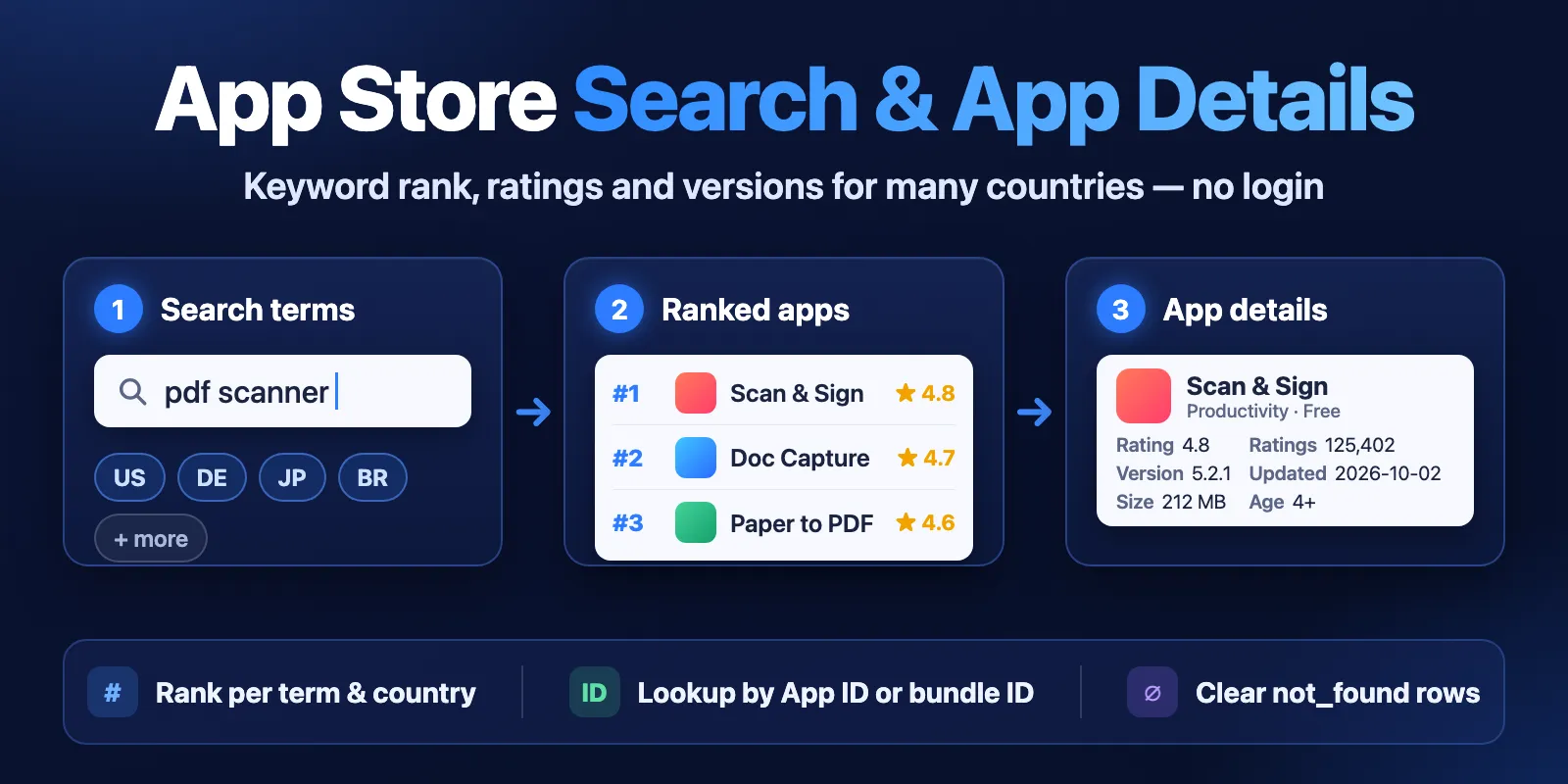
Table of contents
- What it does
- Quick start
- Use cases
- Input
- Output
- Pricing and limits
- API, export and integrations
- Limits and partial results
- Troubleshooting
- FAQ
- Related Actors
- Support
What it does
The Actor has two modes.
- Search mode (
mode: search). Each term is searched in each country. Every term × country pair becomes its own ranked list:rank1, 2, 3… Every row also carries itstermandcountry, so you can put many keywords and markets in one table. - Lookup mode (
mode: lookup). You give App IDs, App Store URLs or bundle IDs. The Actor returns the app details for each ID in each country you choose. An ID that is not in a country's store gets a clearnot_foundrow. It is never silently dropped.
Both modes return the same app fields: App ID, bundle ID, name, seller, developer, price and currency, genres, star rating and number of ratings, version, release dates, size, age rating, store URL and icon.
You can also add rank tracking. Put your own App IDs in trackAppIds. Their rows get isTracked: true, and the run summary shows where each one ranks for every term and country. It also says when an app is outside the returned list.
Good fit
- Check which apps rank for a keyword in several countries in one run.
- Watch where your app and your competitors rank for your main keywords.
- Get fresh details (rating, version, price, size) for a list of known apps.
- Check in which countries an app is available. Missing countries get
not_foundrows.
Not a fit / limits
- No downloads, installs, revenue or keyword search volume. Apple does not publish them, and this Actor does not estimate them.
- No reviews and no top charts. For reviews, use Apple App Store Reviews Scraper.
rankis the position in Apple's Search API results. It is close to the search order in the App Store app, but not always the same.- Up to 200 apps per term and country. This is Apple's maximum, and Apple often returns a few fewer.
Quick start
- Open the Input tab. It is prefilled with
terms: ["pdf scanner"],countries: ["us"]andlimit: 20. - Add more terms or countries if you want, for example
deandjp. - Click Start.
- Open the Output tab, choose the Search results view, and sort by
term,countryandrank.
Expected result: about 20 rows for pdf scanner in the US, from rank 1 to about 20. Each row has the app name, rating, number of ratings, price, version and store URL. This run usually takes under 10 seconds.
Use cases
| Buyer job | Input path | Output entity | Key fields | Next integration |
|---|---|---|---|---|
| Keyword research in many markets | terms + countries | Ranked app per term and country | term, country, rank, name, userRatingCount | Export CSV or Google Sheets |
| Track your app's keyword rank | terms + countries + trackAppIds | Rank tracking in RUN_SUMMARY | rankTracking[].rank, status | Schedule daily, compare runs |
| Competitor app monitoring | mode: lookup + appIds | App details per country | version, currentVersionReleaseDate, averageUserRating, price | Schedule weekly, alert on change |
| Availability check by country | mode: lookup + bundleIds + countries | App row or not_found row | status, country, queryIds | Filter status = not_found |
| AI agent app search | terms (MCP) | Ranked app | name, trackId, url, averageUserRating | Agent answer or next tool call |
Input
Input fields
| Field | Plain name | Type | Required | Default / prefill | Allowed values | Effect | Example | Recommendation |
|---|---|---|---|---|---|---|---|---|
mode | Mode | string | no | default search | search, lookup | Keyword search or exact lookup by ID | "lookup" | Use lookup when you already know the apps |
terms | Search terms | array of strings | yes in search mode | prefill ["pdf scanner"] | up to 50 terms, 100 characters each | Each term is searched on its own and gets its own ranks | ["pdf scanner", "budget"] | Use real user phrases, one per line |
countries | Countries | array of strings | no | default and prefill ["us"] | up to 50 two-letter App Store country codes | Each term or ID is processed in each country | ["us", "de", "jp"] | Use lower-case codes like gb, not uk. Over the API, a single country string also works |
limit | Results per search | integer | no | default 50, prefill 20 | 1–200 | How many apps per term and country | 100 | 200 for full keyword research, 20 for a quick check |
entity | App type | string | no | default software | software (iPhone), iPadSoftware, macSoftware | Which store section to search (search mode only) | "macSoftware" | Keep software for most iPhone apps |
trackAppIds | Apps to track | array of strings | no | empty | up to 50 App IDs or App Store URLs | Marks rows with isTracked and adds rank tracking to RUN_SUMMARY | ["1199564834"] | Add your app and 2–5 competitors |
appIds | App IDs | array of strings | yes in lookup mode (or bundleIds) | empty | numbers like 284882215, id284882215 or App Store URLs; leading zeros are removed | Lookup by Apple App ID | ["284882215"] | Paste App Store URLs as they are |
bundleIds | Bundle IDs | array of strings | yes in lookup mode (or appIds) | empty | bundle IDs, case-insensitive; up to 500 IDs and bundle IDs together | Lookup by bundle identifier | ["com.adobe.scan.ios"] | Use when you have bundle IDs from your own data |
includeDescription | Include description | boolean | no | false | true, false | Adds description and releaseNotes | true | Keep off unless you need the text. Rows get much larger |
Empty and duplicate input:
- In search mode, an empty
termslist stops the run with a clear input error. In lookup mode,appIdsandbundleIdsmust not both be empty. - Duplicate terms are removed, ignoring upper and lower case. Duplicate IDs and countries are also removed.
- If a value is not a valid App ID, App Store URL or bundle ID, it is not sent to Apple. All such values are listed together in one
INVALID_IDENTIFIERerror row (itsqueryTypeisappId), and the valid IDs are still processed. - If you give the same app twice, once by App ID and once by bundle ID, you get two rows for it, and both are charged.
Interacting settings
| When | Input A | Input B | Effective behavior | Example | Cost/result effect |
|---|---|---|---|---|---|
| Search mode | terms | countries | One search per term × country; at most 100 per run | 10 terms × 5 countries = 50 searches | One query charge per answered search |
| Search mode | terms | limit | Up to limit apps per term and country | 2 terms × limit 200 | Up to 400 charged app rows |
| Lookup mode | appIds / bundleIds | countries | Each ID is looked up in each country. IDs are sent in batches of up to 100 | 500 IDs × 3 countries = 15 requests | One query charge per answered batch, one app charge per app found |
| Lookup mode | entity, limit, terms, trackAppIds | — | Ignored, not checked | — | None |
| Any mode | trackAppIds | terms | Tracked apps are found only inside the returned limit | limit 20 → apps ranked 21+ show not_in_results | No extra charge |
Input examples
Keyword research in three countries
Expected behavior: 6 searches (2 terms × 3 countries), each with its own ranks.
Expected output: up to 1,200 app rows with term, country, rank, name, averageUserRating.
Limit or cost note: 6 query events, plus one app event per returned app.
Track your app's rank
Expected behavior: 4 searches. The tracked app's rows have isTracked: true.
Expected output: RUN_SUMMARY.rankTracking has one entry per term × country × tracked app, with rank or not_in_results, in the order of your terms, countries and tracked apps.
Lookup by App ID, URL and bundle ID
Expected behavior: each ID is looked up in the US and in the UK store.
Expected output: one app row per found app per country, and one not_found row per request batch, listing the missing IDs in queryIds.
Output
Results go to the default Dataset. There are two views: Search results (search mode) and App details (lookup mode). The Key-value store has a RUN_SUMMARY record with the run status, counts, every query's outcome, rank tracking and request statistics.
Output example
One row from the prefill run (pdf scanner, us, limit 20). The languages and screenshot lists are shortened:
A lookup not_found row for an App ID that does not exist:
null means Apple did not return the value (or it does not apply to this row). 0 is used only when Apple returns 0. For example, price: 0 means a free app. If an app has no ratings yet, averageUserRating is null, not 0.
Output fields
| Field | Meaning | Type | Can be empty? | Example / enum | Source / notes |
|---|---|---|---|---|---|
status | Row result | string | no | complete, not_found, error | Only complete rows are charged |
mode | Run mode | string | no | search, lookup | From input |
queryType | What the row answers | string | no | term, appId, bundleId | |
query | Your term or ID as processed | string | no | pdf scanner | A grouped status row lists all its IDs or terms, comma-separated |
queryIds | IDs or terms covered by one grouped status row | array or null | yes | ["1234567890123"] | Lookup not_found/error rows (one per batch of up to 100 IDs per country) and the row for queries skipped after a rejected country. null on app rows |
term | Search term | string or null | lookups: null | pdf scanner | |
country | App Store country code | string | no | us | |
entity | App type searched | string or null | lookups: null | software | |
rank | Position in the results for this term and country | integer or null | lookups: null | 1 | Duplicates removed; based on the Search API order |
isTracked | App is in your trackAppIds | boolean or null | null if nothing is tracked | true | |
trackId | Apple App ID | integer or null | status rows: null | 1199564834 | The number after id in the store URL |
bundleId | Bundle identifier | string or null | yes | com.adobe.scan.ios | |
name | App name in this country | string or null | yes | Adobe Scan: PDF & Doc Scanner | |
kind | Apple kind | string or null | yes | software, mac-software | |
sellerName | Legal seller | string or null | yes | Adobe Inc. | |
developerName | Developer name | string or null | yes | Adobe Inc. | |
developerId | Apple developer ID | integer or null | yes | 331646274 | |
developerUrl | Developer page on the App Store | string or null | yes | ||
sellerUrl | Developer website | string or null | often null | Only if the app lists one | |
price | Upfront price | number or null | yes | 0, 4.99 | 0 = free; in-app purchases not included |
formattedPrice | Price as Apple shows it | string or null | yes | Free, $4.99 | |
currency | Price currency | string or null | yes | USD | |
primaryGenre | Main category | string or null | yes | Productivity | |
primaryGenreId | Apple genre ID | integer or null | yes | 6007 | |
genres | All categories | array or null | yes | ["Business", "Productivity"] | |
averageUserRating | Average stars (0–5) in this country | number or null | null without ratings | 4.87591 | All versions |
userRatingCount | Number of ratings in this country | integer or null | yes | 1598867 | |
averageUserRatingCurrentVersion | Average stars for the current version | number or null | yes | As Apple reports it | |
userRatingCountCurrentVersion | Ratings for the current version | integer or null | yes | As Apple reports it | |
version | Current version | string or null | yes | 26.09.29 | |
releaseDate | First release date | string or null | yes | 2017-05-31T14:12:55Z | ISO 8601 |
currentVersionReleaseDate | Current version date | string or null | yes | 2026-09-29T18:04:04Z | ISO 8601 |
fileSizeBytes | Download size in bytes | integer or null | yes | 418327552 | |
contentRating | Age rating | string or null | yes | 4+, 12+ | |
minimumOsVersion | Minimum OS version | string or null | yes | 18.0 | |
languages | Supported languages | array or null | yes | ["EN", "DE"] | ISO 639-1, upper case, as Apple lists them (a code can repeat, e.g. ZH) |
supportedDevicesCount | Number of supported device models | integer or null | yes | 130 | |
url | App Store page | string or null | yes | ||
iconUrl | App icon | string or null | yes | 512 px when available | |
screenshotUrls | iPhone or Mac screenshots | array or null | yes | ||
ipadScreenshotUrls | iPad screenshots | array or null | yes | ||
description | Full store description | string or null | null unless includeDescription | ||
releaseNotes | What's New text | string or null | null unless includeDescription | ||
errorCode | Machine reason for an error row | string or null | null on other rows | INVALID_IDENTIFIER, SOURCE_BAD_REQUEST, RATE_LIMITED, SOURCE_UNAVAILABLE, SOURCE_TIMEOUT, SOURCE_SCHEMA_CHANGED, NOT_PROCESSED | |
errorMessage | Plain-English reason | string or null | null on other rows | ||
source | Data source | string | no | apple-itunes-search-api | |
sourceUrl | Exact Apple API request behind the row | string | empty for rows not sent to Apple | ||
fetchedAt | When the row was fetched | string | no | ISO 8601 UTC |
Output entities and surfaces
| Situation | Dataset/API/KVS | Result shape | User action |
|---|---|---|---|
| Normal item | Dataset | One complete row per app per term and country (search) or per ID and country (lookup) | Filter, sort, export |
| No apps for a search | Dataset | One not_found row for that term and country | Try another term or country |
| ID missing in a country | Dataset | One not_found row per batch, IDs in queryIds | The app is not sold in that country, or the ID is wrong |
| Some queries failed | Dataset + RUN_SUMMARY | error rows with errorCode; run status PARTIAL | Re-run only the failed terms or countries |
| All queries failed | RUN_SUMMARY + error rows | Run fails with a clear status message | See Troubleshooting |
The run status in RUN_SUMMARY.status is one of COMPLETE, PARTIAL, NO_RESULTS, CAPPED (stopped at your maximum charge), ERROR, INVALID_INPUT, RESOURCE_ERROR (run timeout under 60 seconds; nothing is sent to Apple) or CANCELLED. NO_RESULTS means Apple answered but found nothing. It is not the same as ERROR.
Moving from another App Store scraper
If you used a scraper with fields like appId, appName, developer, rating, ratingCount and currentVersionDate, use this map:
| Other field | Field here |
|---|---|
appId | trackId |
appName | name |
developer | developerName |
rating | averageUserRating |
ratingCount | userRatingCount |
currentVersionDate | currentVersionReleaseDate |
scrapedAt | fetchedAt |
bundleId, price, currency, genres, version, releaseDate, fileSizeBytes, contentRating, iconUrl and description keep the same names. New here: rank, term, country, isTracked, status, errorCode and sourceUrl. Many terms and many countries go in one run.
Pricing and limits
Pricing unit
This Actor uses pay-per-event pricing. You pay for:
| Event | When | Price |
|---|---|---|
| Actor start | Once per run | $0.003 |
| Query | Each search (term × country) or lookup batch that Apple answered | $0.0003 |
| App | Each complete app row | $0.0012 on the Free plan, $0.001 on Bronze, $0.0009 on Silver, $0.00075 on Gold and higher |
not_found and error rows are free. A search with no apps costs only its query charge, $0.0003. A query that Apple rejects or that fails is not charged. A run with invalid input pays only the start charge. Platform usage is included in the price. You can set a maximum total charge for a run. The Actor stops at that limit and marks the run CAPPED.
Cost examples
Prices on the Free plan. On higher plans the app price is lower.
| Scenario | Input scope | App rows | Start + queries | App charge | Total |
|---|---|---|---|---|---|
| 10 apps | 1 term, 1 country, limit 10 | 10 | $0.0033 | $0.012 | $0.0153 |
| 100 apps | 1 term, 1 country, limit 100 | 100 | $0.0033 | $0.12 | $0.1233 |
| 1,000 apps | 5 terms, 1 country, limit 200 | 1,000 | $0.0045 | $1.20 | $1.2045 |
| No results | 1 term, 1 country, nothing found | 0 | $0.0033 | $0 | $0.0033 |
On Gold and higher plans, the 1,000-app example costs $0.0045 + $0.75 = $0.7545.
API, export and integrations
- API: start a run with
POST https://api.apify.com/v2/acts/cliqtomedia~app-store-apps-search/runsand the input JSON, then read the default Dataset. The API tab has ready code. See the Apify API docs. - Export: download the Dataset as CSV, Excel, JSON or XML from the Output tab.
- Scheduling: create an Apify schedule to run the same terms daily or weekly. Each run stores rows with
fetchedAt, so you can compare ranks and versions over time. - No-code: connect the Actor in Make, Zapier or n8n with the Apify integration.
Use with AI agents (MCP)
- MCP server with only this Actor:
https://mcp.apify.com?tools=cliqtomedia/app-store-apps-search(see Apify MCP server). - Smallest useful input:
{"terms": ["pdf scanner"], "countries": ["us"], "limit": 20} - Key output fields:
rank(position for the term and country),name,trackId(Apple App ID),averageUserRatinganduserRatingCount,status(complete/not_found/error). - A one-term run usually finishes in under 10 seconds and costs about $0.003 + $0.0003 + $0.0012 per app. At most 100 searches or lookup batches per run; a 100-search run takes about one minute.
Limits and partial results
- Up to 50 terms and 50 countries, and at most 100 term × country searches per run.
- Up to 500 App IDs and bundle IDs together. At most 100 lookup batches per run (up to 100 IDs per batch, per country).
- Up to 200 apps per search. Apple often returns a few fewer, and the Actor never pads results.
- Give the run a timeout of at least 60 seconds (the default is 300).
- The Actor waits at least half a second between requests to Apple, with at most 3 requests at a time. A run stops calling Apple after about 4 minutes, even with a longer timeout. Unfinished queries are listed as
NOT_PROCESSEDrows. - If Apple slows the Actor down (HTTP 429 or 403), it waits and slows its pace. After 8 such answers in one run it stops calling Apple. It also stops after 2 failed requests in a row or 4 failed requests in total. The rows already stored stay, and the rest are listed as
NOT_PROCESSED. - If Apple rejects a country code, the Actor does not send other queries for that country. They are listed together in one error row per country, with the terms or IDs in
queryIds. - Data comes from Apple's public iTunes Search API. Apple's terms apply to its use. App names, icons and screenshots belong to their owners.
Troubleshooting
Error rows with SOURCE_BAD_REQUEST
Symptom: a country has error rows with errorCode: SOURCE_BAD_REQUEST.
Likely reason: the country code is not an App Store storefront. A common mistake is uk instead of gb.
Check: the country value of the error row.
Action: fix the code and run again for that country only.
Run stopped with RATE_LIMITED
Symptom: the run ends PARTIAL or ERROR, with RATE_LIMITED or NOT_PROCESSED rows.
Likely reason: Apple limited requests from the shared IP for a short time.
Check: RUN_SUMMARY.http.rateLimited.
Action: wait a few minutes, then run again with fewer terms or countries. You are not charged for queries that Apple did not answer.
A search returns fewer apps than the limit
Symptom: limit is 200, but a term has only 150 rows.
Likely reason: Apple returned fewer apps. This is normal for narrow terms and small countries.
Action: nothing to fix. The run never pads results.
My app is not found in a country
Symptom: a lookup gives a not_found row for your App ID in some countries.
Likely reason: the app is not sold in that country's store, or the ID is wrong.
Check: open https://apps.apple.com/<country>/app/id<App ID> in a browser.
FAQ
Do I need an Apple account or API key?
No. The Actor uses Apple's public iTunes Search API. It needs no login, cookies or API key.
Why is the rank different from what I see on my iPhone?
rank is the order of Apple's Search API results. The App Store app can personalise results and show ads. The two orders are usually close, but not always identical.
Am I charged for empty results?
You pay $0.003 per run and $0.0003 for each search or lookup batch that Apple answered, even with no apps. App charges apply only to complete app rows. not_found and error rows are free.
How fresh is the data?
Each row is fetched live from Apple during the run (fetchedAt). Apple may cache its own answers for up to a day, so a rating or version can lag slightly behind the App Store page.
Can I get downloads or revenue?
No. Apple does not publish them, and this Actor does not estimate them.
Related Actors
- Apple App Store Reviews Scraper — get user reviews for the apps you found here, using their
trackId. - Google Play Reviews Scraper — reviews for the Android versions of the same apps.
Support
For bugs, questions or feature requests, open an issue in the Issues tab. Include the run ID, the mode, and the terms or IDs that look wrong. Do not send tokens or private data.


