

Google Search Results Scraper (SERP) - No Login, Per Page
Pricing
from $1.50 / 1,000 results pages
Google Search Results Scraper (SERP) - No Login, Per Page
Scrape Google search results for your keywords: organic positions, titles, URLs, snippets, dates, sitelinks and related searches. Pick country and language, up to 10 pages per query. One row per result. No login.
Pricing
from $1.50 / 1,000 results pages
Rating
0.0
(0)
Developer

Cliqto Media
Maintained by CommunityActor stats
0
Bookmarked
2
Total users
1
Monthly active users
4 days ago
Last modified
Share
Add search queries, pick a Google country and language, and get the public Google search results (SERP) as one row per result: organic results and related searches, each with its position. No Google login, no API key; you pay per loaded results page, about $0.006 for the first page of one query.
Use it for rank tracking, SEO research and competitor checks. The smallest run is the prefilled query apify web scraping with one page; it finishes in a few seconds.
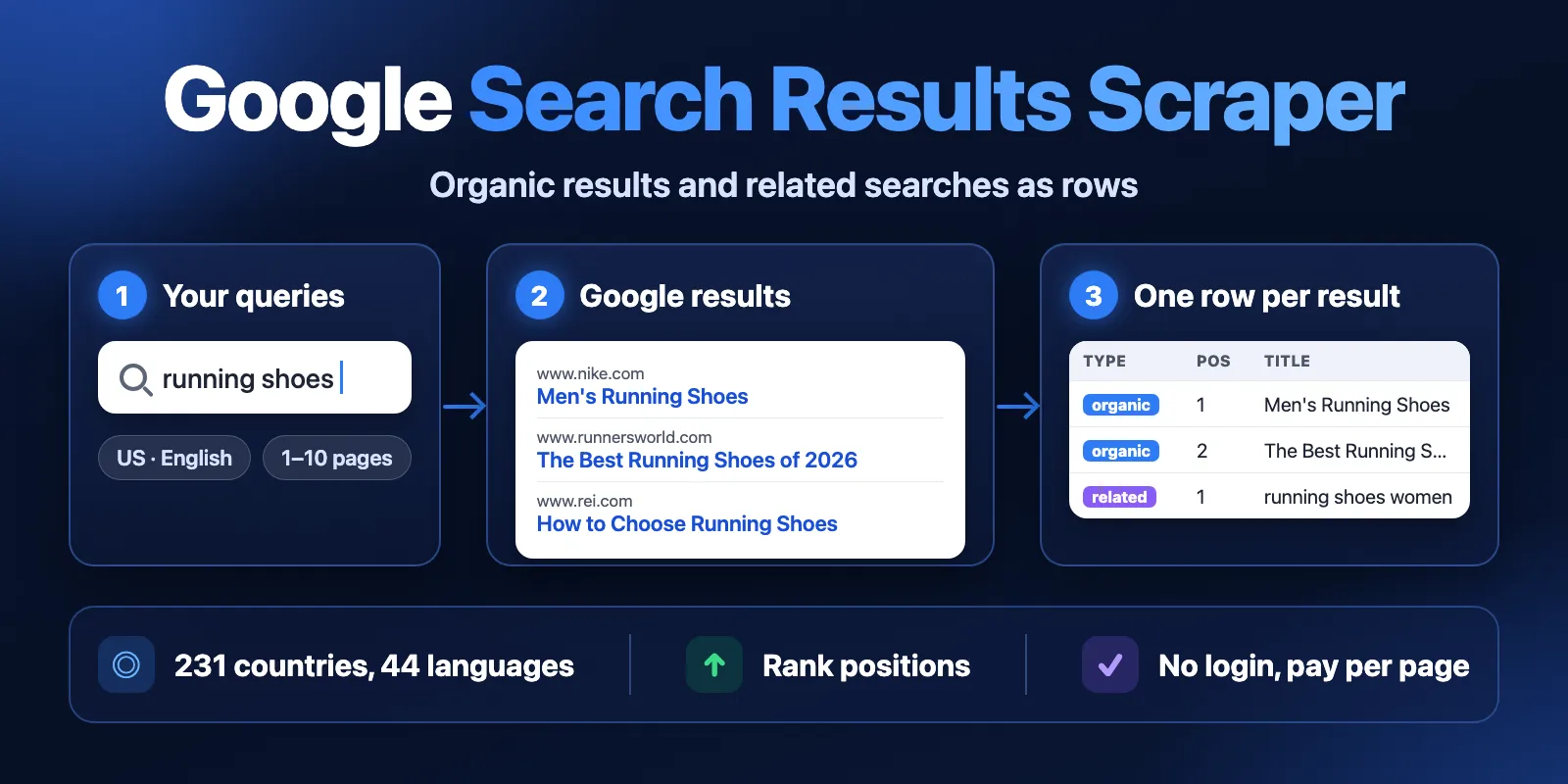
Table of contents
- What it does
- Quick start
- Use cases
- Input
- Output
- Pricing and limits
- API, export and integrations
- Troubleshooting
- FAQ
- Related Actors
- Support
What it does
The Actor opens the public Google results page for each query, in the country (gl) and language (hl) you choose, and reads up to 10 result pages per query. It saves:
- organic results: position, title, URL, displayed URL, snippet, date and sitelinks (when Google shows them);
- related searches: the "People also search for" list, once per query.
Google's simple results page does not carry ads or prices. The field price stays in every row for compatibility (always null), and the includeAds option adds no rows today. Sitelinks (the short links under some results) are saved in the sitelinks list of that result and are not separate rows; the list is empty when Google shows none.
Every row has the query, page number and status, so you can filter and sort in the Dataset, in a spreadsheet or by API.
Good fit
- Track where a site ranks for a list of keywords in one country.
- Collect top 10–100 URLs for a topic for SEO or content research.
- See which shops and brands rank for product queries.
- Find related searches to grow a keyword list.
Not a fit / limits
- The Actor reads Google's simple HTML results page. It does not return ads, shopping prices, People Also Ask, AI Overviews, featured snippets, maps or image packs.
- Results are not personalised and not tied to a city. A Google Ads account, Search Console data or search volume are not included.
- Google sometimes blocks automated traffic. The Actor changes IP addresses and retries, but it never solves CAPTCHAs (see Troubleshooting).
Quick start
- Open the Input tab.
- In Search queries (
queries), keep the prefilledapify web scrapingor add your own queries, one per line. - Keep Country
usand Languageen(defaults), or choose others. - Keep Pages per query (
maxPagesPerQuery) at1(prefill), or set up to10. - Click Start.
- Open the Output tab (Dataset) and check
type,position,titleandurl.
Expected result: 9–10 organic rows and about 8 related searches for each query page.
Use cases
| Buyer job | Input path | Output entity | Key fields | Next integration |
|---|---|---|---|---|
| Rank tracking | queries, countryCode, maxPagesPerQuery | organic row | query, position, url, page | Schedule + Google Sheets or API |
| SEO content research | queries, languageCode | organic row | title, description, displayedUrl, date | Export CSV / JSON |
| Shop and brand check | queries, countryCode | organic row | title, url, displayedUrl, description | Export to spreadsheet |
| Keyword ideas | queries, includeRelated | related row | title, url | Feed back into queries |
Input
Input fields
| Field | Plain name | Type | Required | Default / prefill | Allowed values | Effect | Example |
|---|---|---|---|---|---|---|---|
queries | Search queries | array of text | yes | prefill ["apify web scraping"] | 1–500 queries, up to 256 characters each | One Google search per query. Operators like site: and "exact phrase" work. Duplicates and extra spaces are removed. | ["best running shoes", "site:apify.com scraper"] |
countryCode | Country | text | no | default us | Google country codes, e.g. us, gb, de, fr, jp | Country for ranking (gl) | "de" |
languageCode | Language | text | no | default en | Google language codes, e.g. en, de, fr, pt-BR | Interface language (hl) | "de" |
maxPagesPerQuery | Pages per query | integer | no | default 1, prefill 1 | 1–10 | How many result pages per query (usually 9–10 organic results each). Each loaded page is charged. | 3 |
includeAds | Include ads (not available) | true/false | no | default true | true, false | Kept for compatibility. Google's simple results page shows no ads, so this option adds no rows today. | false |
includeRelated | Include related searches | true/false | no | default true | true, false | Adds related search rows once per query | false |
proxyConfiguration | Proxy | object | no | Apify datacenter proxy | Apify proxy groups or your own URLs | Where requests come from. With the default, a page that Google refuses on several datacenter IPs is retried through Apify residential proxy in the chosen country. | {"useApifyProxy": true} |
An empty queries list stops the run with a clear input error and no page charge.
Interacting settings
| When | Input A | Input B | Effective behavior | Cost effect |
|---|---|---|---|---|
| Google has fewer pages | maxPagesPerQuery | the query | The Actor stops at the last page Google has | Only loaded pages are charged |
| Ads on or off | includeAds | any query | No ad rows either way: the simple Google page has none | No change |
| Own proxy | proxyConfiguration | countryCode | No automatic switch to residential proxy | Same price per page; own proxy URLs are paid by you |
Input examples
Track 3 keywords in Germany, 2 pages each
Expected behavior: 6 result pages, organic rows only.
Expected output: query, page, position, title, url.
Cost note: 6 pages + 1 start = $0.016 on the Free plan.
Output
One Dataset row per result. A query without results gets one not_found row; a query that could not be scraped gets one error row.
Output fields
| Field | Meaning | Type | Can be empty? | Example / enum |
|---|---|---|---|---|
query | Your search query | text | no | "apify web scraping" |
page | Google result page (1 = first) | number | null on status rows | 1 |
type | Row type (ad is reserved and not written today) | text | null on status rows | organic, related |
position | Place among rows of the same type for this query; organic positions continue across pages; a URL that Google repeats on a later page is saved once | number | null on status rows | 1 |
title | Result title or related search text | text | yes | "Apify" |
url | Result URL; for related, a Google search URL | text | yes, when Google hid the link | "https://apify.com/" |
displayedUrl | Site as Google shows it (domain and breadcrumb) | text | yes | "www.apify.com › store" |
description | Snippet text | text | yes | |
date | Date shown before the snippet, as Google prints it | text | yes | "Oct 9, 2026" |
sitelinks | Links shown under a result, as {title, url}; an empty list when Google shows none. They are not separate rows and do not change position | array | no | [{"title": "Python Introduction", "url": "https://www.tutorialspoint.com/python/index.htm#introduction"}] |
price | Always null: the simple Google page has no prices | text | always null | |
countryCode, languageCode | Country and language used | text | no | "us", "en" |
searchUrl | Google page that was read | text | no | |
status | complete, not_found or error | text | no | complete |
statusReason, errorCode | Reason for not_found/error rows or a note on a result | text | yes | SOURCE_BLOCKED |
fetchedAt | When the page was read (ISO 8601) | text | no |
null means Google did not show this value. It is not zero and not an error.
Output entities and surfaces
| Situation | Where | Shape | What to do |
|---|---|---|---|
| Normal result | Dataset | one row per result, status: complete | Use type, position, url |
| No results for a query | Dataset | one not_found row | Check the query spelling or operators |
| Some queries failed | Dataset + RUN_SUMMARY | error rows, run status PARTIAL | Run the failed queries again |
| Query stopped after some pages | Dataset + RUN_SUMMARY | rows of the loaded pages, then one error row; query status partial | Run this query again later |
| Run stopped by time or charge limit | RUN_SUMMARY | status CAPPED, rows so far are kept | Raise the limit or split the queries |
RUN_SUMMARY in the Key-value store has the run status (COMPLETE, PARTIAL, NO_RESULTS, CAPPED, ERROR), the stop reason, totals (pages, charged pages, rows, organic, ads (0 today), related, errors) and, per query, its status (results, partial, not_found, error, not_processed), pages and organic, ad and related counts.
The Apify run itself shows SUCCEEDED for COMPLETE, PARTIAL, NO_RESULTS and CAPPED. It shows FAILED when no query could be loaded or Google kept refusing; rows already saved stay in the Dataset.
Output example
Trimmed first row of a run for coffee machine (us/en, 1 page):
A page usually returns 9–10 organic rows and about 8 related searches.
Moving from a one-row-per-page format
Some SERP tools save one row per page with nested lists. Here each result is its own row:
| One-row-per-page field | This Actor |
|---|---|
searchQuery.term | query |
searchQuery.page | page |
organicResults[].title / url / displayedUrl / description / date | rows with type: "organic", same field names |
organicResults[].siteLinks | sitelinks (when Google shows them) |
paidResults[], paidProducts[] | not available: no ad rows |
relatedQueries[] | rows with type: "related" |
Pricing and limits
Pricing unit
You pay per loaded Google results page (serp-page) plus a small start fee per run. Organic results and related searches on that page are included. Platform usage (proxy, compute) is included in the price.
| Event | Free | Bronze | Silver | Gold+ |
|---|---|---|---|---|
Run start (apify-actor-start) | $0.004 | $0.004 | $0.004 | $0.004 |
Results page (serp-page) | $0.002 | $0.0018 | $0.0017 | $0.0015 |
- A query with no results costs one page: Google was asked and answered.
errorrows (Google refused the page) are free.- If you set a maximum charge for the run, the Actor stops before it, keeps the rows and ends with status CAPPED.
Cost examples (Free plan)
| Scenario | Input scope | Pages | Charge |
|---|---|---|---|
| Prefill | 1 query, 1 page | 1 | $0.006 |
| Small keyword list | 10 queries, 1 page | 10 | $0.024 |
| Top 100 for 10 keywords | 10 queries, 10 pages | 100 | $0.204 |
| Large batch | 250 queries, 4 pages | 1,000 | $2.004 |
| Query without results | 1 query | 1 | $0.006 |
Limits
- Up to 500 queries and 10 pages per query in one run.
- Run time depends on Google's answers: in the latest test, 40 pages took about 7 seconds without blocks. Very large runs were not measured on the current route, so start with a smaller list. After 3,600 seconds the run stops with status CAPPED and keeps all rows; split bigger lists across runs.
- Google decides how many pages a query has; some queries end before page 10.
API, export and integrations
- API: start the Actor with the same JSON input and read the Dataset items. See the API tab for ready code.
- Export: download the Dataset as JSON, CSV, Excel or HTML from the Output tab.
- Scheduling: create a Schedule with your keyword list to track rankings every day or week.
Use with AI agents (MCP)
- MCP server with only this Actor:
https://mcp.apify.com?tools=cliqtomedia/google-search-scraper - Smallest input:
- Key output fields:
type(organic or related),position,title,url,description. - One query page takes a few seconds and costs $0.006 with the start fee. Keep
maxPagesPerQuerylow for quick answers.
Troubleshooting
Some queries have error rows with SOURCE_BLOCKED
Symptom: the run is PARTIAL, some queries have one error row.
Likely reason: Google showed an "unusual traffic" page to all tried IP addresses.
Check: statusReason and RUN_SUMMARY.
Action: run only the failed queries again later. Error rows are not charged.
Fewer pages than maxPagesPerQuery
Symptom: a query has 3 pages, you asked for 10. Likely reason: Google has no next page for this query. Action: nothing to fix; only loaded pages are charged.
No ad rows
Symptom: includeAds is on, but there are no ad rows.
Likely reason: Google's simple results page does not carry ads, so the Actor cannot read them.
Action: use the organic rows; ad rows are not available. Empty sitelinks on a result means Google showed no sitelinks for it.
Results look different from my browser
Likely reason: your browser shows personalised results for your location and account. The Actor gets anonymous results for the chosen country.
FAQ
Do I need a Google account or API key?
No. The Actor reads public results pages without login or cookies of any account.
How many results do I get per page?
Usually 9–10 organic results and 8–10 related searches, depending on the query.
Is the order the same as on google.com?
position follows the order on the simple Google results page for the chosen country and language. It can differ a little from a personalised desktop page.
What does null mean?
Google did not show that value, for example no date. It is not zero and not an error.
Related Actors
- Google Autocomplete Scraper — get keyword ideas to use as
queries. - Website Metadata & Open Graph Scraper — read titles and descriptions of the result URLs.
- Domain WHOIS & DNS Lookup — check the domains you found.
- Website Screenshot & PDF — save pages from the results as images or PDF.
Support
For bugs, questions or feature requests, open the Issues tab of this Actor. Add the run ID, your input (queries can be shortened) and the statusReason text. Never send tokens, cookies or passwords.


