

Website Screenshot & PDF Generator: Full Page & Mobile
Pricing
from $13.00 / 1,000 page captureds
Website Screenshot & PDF Generator: Full Page & Mobile
Take full-page screenshots (PNG, JPEG) or PDFs of up to 200 public URLs. Desktop, mobile, tablet or custom screen, cookie banners closed, optional ad blocking. One row per page with a file link, size, title and HTTP status. No login.
Pricing
from $13.00 / 1,000 page captureds
Rating
0.0
(0)
Developer

Cliqto Media
Maintained by CommunityActor stats
0
Bookmarked
2
Total users
1
Monthly active users
11 days ago
Last modified
Categories
Share
Take full-page screenshots (PNG or JPEG) or PDFs of a list of public web pages. Cookie banners are closed for you, and you can pick a desktop, laptop, tablet, mobile or custom screen. Each page gets one Dataset row with a link to the file, its size, the page title, the HTTP status and a clear error code if something went wrong. No login needed.
Paste up to 200 URLs. The prefilled run (apify.com and example.com) finishes in 20–30 seconds. You pay only for saved files: 100 full-page screenshots cost about $1.50.
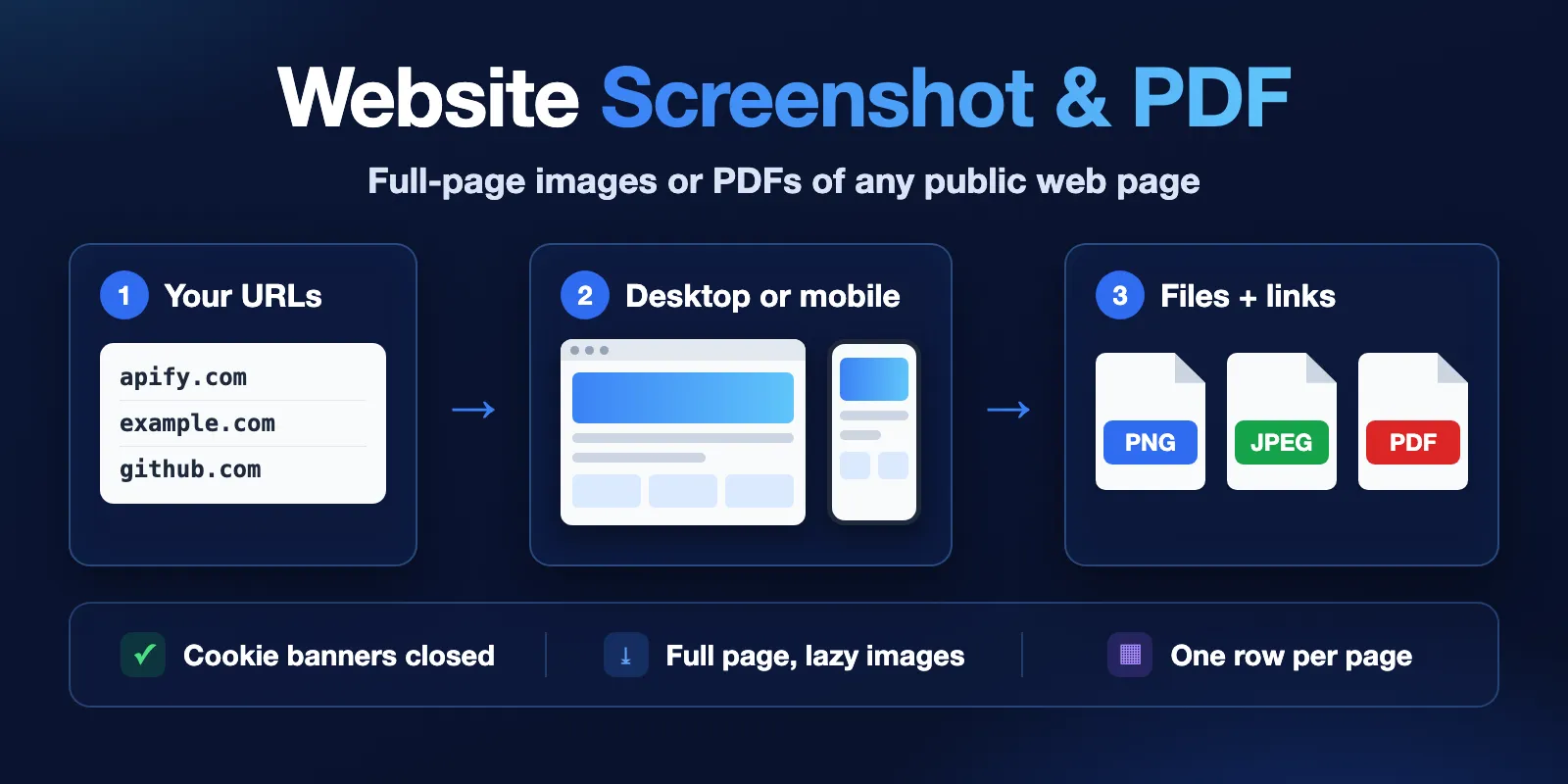
Table of contents
- What it does
- Quick start
- Use cases
- Input
- Output
- Pricing and limits
- API, export and integrations
- Use with AI agents (MCP)
- Troubleshooting
- FAQ
- Support
What it does
For each URL, the Actor opens the page in a real Chrome browser (Playwright Chromium) and:
- Waits until the page has loaded (you choose how:
load,domcontentloaded,networkidleor a CSS selector). - Closes the cookie consent banner. It uses the open-source Autoconsent rules, which know more than 200 consent tools such as OneTrust, Cookiebot, Didomi, Quantcast and Sourcepoint. It clicks "reject" or "save choices" when it can. Anything left is hidden with cosmetic filters.
- Scrolls down the page so lazy images load, then goes back to the top.
- Saves a full-page PNG or JPEG, a screenshot of the first screen only, or a PDF.
- Stores the file in the run's Key-value store and writes one Dataset row with the file link and page details.
Pages that fail (bad URL, unknown domain, timeout, private address) get a row with status: "failed", an errorCode and a short error text. They are not charged.
Good fit
- Visual archive of your own or competitors' landing pages, every day or week.
- Mobile and desktop screenshots of the same page, for design and QA checks.
- PDF copies of articles, policies and terms pages for records.
- Screenshots for reports, link previews or AI agents that need to "see" a page.
- Drop-in input for the
apify/screenshot-urlexample Actor: its fieldsurls,waitUntil,delay,viewportWidth,scrollToBottom,selectorsToHideandproxyare accepted as they are.
Not a fit / limits
- Pages behind a login. The Actor does not sign in, does not use your cookies and does not solve CAPTCHAs. A login or "access denied" page is captured as it is, with a warning.
- Some sites block cloud browsers (for example some big news sites answer HTTP 401 or 403). You get a screenshot of what the site shows, plus a warning with the HTTP status.
- Very long pages are cut at
maxFullPageHeight(15,000 px by default, 30,000 px max) and the row hastruncated: true. - No video, GIF or animation recording. Animations are stopped before the screenshot.
- Local and private addresses (
localhost,192.168.x.x,10.x.x.xand similar) are blocked.
Quick start
- Open the Input tab.
- In Website URLs (
urls), keep the prefilledhttps://apify.comandhttps://example.com, or paste your own URLs, one per line. - Keep Output format =
pngand Full page on. - Click Start.
- Open the Output tab. The Captures view shows a preview of each screenshot. Click
fileUrlto open or download the file.
Expected result: two rows with status: "success", two PNG files and the message "Captured 2 of 2 pages."
Use cases
| Buyer job | Input | Output | Key fields | Next step |
|---|---|---|---|---|
| Archive landing pages every week | urls, format: "png" | 1 PNG per page | fileUrl, takenAt, title | Schedule + webhook, save files to your storage |
| Check a page on phones | viewport: "mobile" | 780 px wide PNG (390 px × 2) | fileUrl, width, height | Compare with the desktop run |
| Save articles as PDF | format: "pdf", pdfFormat | 1 PDF per page | pdfUrl, pdfPages, bytes | Store with your documents |
| Lighter files for many pages | format: "jpeg", jpegQuality | 1 JPEG per page | fileUrl, bytes | Thumbnails, reports |
| Give an AI agent a "look" at a page | urls, fullPage: false | 1 screen-sized PNG | screenshotUrl, title, statusCode | Pass the link to a vision model |
Input
Input fields
| Field | Type | Default | Allowed values | What it changes |
|---|---|---|---|---|
urls | array of strings | required (prefill: apify.com, example.com) | 1–200 http/https URLs | Pages to capture. example.com without https:// works. Duplicates are skipped. |
format | string | png | png, jpeg, pdf | File type. PDF uses print layout and ignores the screenshot settings. |
fullPage | boolean | true | true: the whole page, top to bottom. false: only the first screen. | |
viewport | string | desktop | desktop (1920×1080), laptop (1366×768), tablet (768×1024, ×2), mobile (390×844, ×2), custom | Screen size. Tablet and mobile also send a mobile browser signature and touch support. |
viewportWidth | integer | 1920 | 320–3840 | Width for custom. |
viewportHeight | integer | 1080 | 320–2160 | Height for custom (and the size of the "first screen"). |
deviceScaleFactor | integer | 1 for desktop/laptop, 2 for tablet/mobile | 1–3 | Pixel density. 2 = sharper ("retina") image, twice as wide and high. |
waitFor | string | load | load, domcontentloaded, networkidle, selector | When the page counts as ready. networkidle waits up to 10 more seconds for quiet network and adds the extra-wait add-on. |
waitForSelector | string | empty | CSS selector | With waitFor: "selector": wait until this element is visible. If it does not appear, the row fails with SELECTOR_NOT_FOUND (free). |
delayMs | integer | 0 | 0–5000 | Extra wait before the screenshot, for slow animations or charts. Above 0 adds the extra-wait add-on. |
navigationTimeoutSecs | integer | automatic | 5–60 | How long to wait for the page to answer. Empty = 15 s until 3 pages are captured, then 30 s; pages that missed 15 s are tried again with 30 s. |
scrollToLoadLazyContent | boolean | true | Scroll down first so lazy images appear in full-page screenshots. | |
hideCookieBanners | boolean | true | Close or hide cookie consent banners. | |
blockAds | boolean | false | Block ads and trackers (EasyList and EasyPrivacy lists). Pages often load faster. | |
hideSelectors | array of strings | empty | CSS selectors | Elements to hide, for example #chat-widget or .newsletter-popup. |
maxFullPageHeight | integer | 15000 | 1000–30000 | Longest full-page screenshot in CSS pixels. Longer pages are cut and marked truncated. |
jpegQuality | integer | 80 | 1–100 | JPEG quality. Lower = smaller file. |
pdfFormat | string | A4 | A4, Letter, Legal, A3, Tabloid | PDF paper size. |
pdfLandscape | boolean | false | PDF in landscape. | |
pdfPrintBackground | boolean | true | Print background colors and images in the PDF. | |
pdfUseScreenMedia | boolean | false | Make the PDF look like the screen, not the print version of the site. | |
proxyConfiguration | object | no proxy | Apify Proxy settings | Use Apify Proxy, for example for a country-specific version of a site. Proxy traffic is billed by Apify to you. |
If urls is empty or has more than 200 entries, the run stops at once with a clear "Invalid input" message and no charge for pages. A URL that cannot be read (for example ftp://…) gets a free failed row; the others are still captured.
Interacting settings
| When | Setting A | Setting B | What happens |
|---|---|---|---|
format: "pdf" | fullPage, viewport scale, jpegQuality | Ignored. The PDF uses print pages (pdfFormat, pdfLandscape). | |
| Custom size | viewport: "custom" | viewportWidth, viewportHeight | Used. If you set only viewportWidth/viewportHeight, custom is chosen for you. |
| High density | deviceScaleFactor: 2 | maxFullPageHeight | The image is limited to 16,384 device pixels high, so at scale 2 long pages are cut at about 8,190 CSS px. |
| Waiting | waitFor: "selector" | waitForSelector | The selector is required for this mode. |
Input examples
Desktop full-page PNG (prefill)
Two full-page PNGs, 1920 px wide. About 20–30 seconds.
Mobile screenshots of the first screen
Two PNGs, 780 × 1688 px (390 × 844 screen at pixel density 2).
PDF of an article
One A4 PDF; pdfPages tells you the number of pages.
Output
The Actor writes:
- Dataset: one row per input URL, in the order pages finish. Views: Captures (with image preview) and Failed URLs.
- Key-value store: the files, named
capture-0001-apify.com.png,capture-0002-example.com.pngand so on (the number is the position in your list), andRUN_SUMMARYwith counts and the final status.
Output fields
| Field | Meaning | Type | Empty when |
|---|---|---|---|
url | URL as you gave it | string | never |
finalUrl | URL after redirects | string | failed before loading |
status | success or failed | string | never |
statusCode | HTTP status of the page | integer | no answer (DNS, timeout) |
format | png, jpeg or pdf | string | never |
fileUrl | Link to the saved file | string | failed |
screenshotUrl | Same as fileUrl for PNG/JPEG | string | PDF or failed |
pdfUrl | Same as fileUrl for PDF | string | PNG/JPEG or failed |
kvsKey | Key of the file in the Key-value store | string | failed |
contentType | image/png, image/jpeg or application/pdf | string | failed |
bytes | File size | integer | failed |
width, height | Image size in pixels | integer | PDF or failed |
pageHeight | Full page height in CSS pixels, before any cut | integer | failed or unknown |
truncated | true if the page was longer than maxFullPageHeight | boolean | never |
pdfPages | Number of PDF pages | integer | PNG/JPEG or failed |
title | Page title | string | no title or failed |
viewport, viewportWidth, viewportHeight, deviceScaleFactor, fullPage | Settings used for this capture | mixed | never |
cookieBanner | {detected, cmp, handled}: was a consent banner found, which tool (cmp), was it closed | object | banner hiding off or failed |
warnings | Notes such as "The site answered HTTP 403…" or "Page is 42008px tall; the screenshot was cut…" | array | empty array when all is fine |
loadTimeMs | Time from start of loading to the screenshot | integer | failed |
takenAt | When the row was written (ISO 8601, UTC) | string | never |
errorCode | Why the page failed (see below) | string | success |
error | Short error text | string | success |
Error codes: INVALID_URL, BLOCKED_URL (private or local address), DNS_ERROR, CONNECTION_FAILED, NAVIGATION_TIMEOUT, SELECTOR_NOT_FOUND, NOT_A_WEB_PAGE (the URL is a download, not a page), CAPTURE_FAILED, OUTPUT_TOO_LARGE (file over 40 MB).
Output example
A failed row from the same kind of run:
(Trimmed: a failed row has all the fields above, with null where there is no value.)
The fileUrl link works without an Apify token, so you can paste it into other tools. The file stays as long as the run's storage is kept (see your Apify data retention).
Run status
RUN_SUMMARY in the Key-value store and the run's status message tell you how the run ended:
status | Meaning |
|---|---|
SUCCEEDED | Every URL was captured. |
PARTIAL | Some URLs were captured, some failed or were not processed. stopReason says why it stopped early: CHARGE_LIMIT (your maximum cost per run was reached), TIMEOUT (the run timeout is close), TOO_MANY_TIMEOUTS or TOO_MANY_FAILURES. |
FAILED | No URL could be captured. |
CANCELLED | You aborted the run. Files already saved stay. |
URLs that were not processed are listed in notProcessedUrls, so you can run them again.
The Apify run itself ends as SUCCEEDED in all these cases (it only fails on invalid input or a browser crash), so check status in RUN_SUMMARY or the status message, not only the run status.
Pricing and limits
Pricing unit
This Actor uses pay-per-event pricing. You pay for:
- Page captured (
page-capture): one event per saved file (PNG, JPEG or PDF). Price by Apify Store plan: $0.015 on the Free plan, $0.0145 on Bronze, $0.014 on Silver, $0.013 on Gold and higher. - Extra wait (
extra-wait): $0.006 per captured page, only when you setwaitFor: "networkidle"ordelayMsabove 0. These waits keep the browser busy for longer. The default settings never charge it. - Actor start (
apify-actor-start): $0.003 per GB of run memory, once per run. The Actor picks 2 GB for 1–2 URLs and 4 GB for more, so a start costs $0.006 or $0.012.
Failed URLs, skipped duplicates and URLs not processed are not charged. Domains that do not exist are found before the browser starts, so a list with typos costs almost nothing. Pages that answer with an error status (for example HTTP 403 or 404) are still screenshotted and charged, because you get a file; the row has a warning. Platform usage (compute, storage) is included in the price. Apify Proxy, if you turn it on, is billed by Apify separately.
You can set a maximum cost per run in Apify. The Actor stops before it would go over it and marks the run PARTIAL with stopReason: "CHARGE_LIMIT".
Cost examples (free plan prices)
| Scenario | Memory | Files | Cost |
|---|---|---|---|
| Prefill: 2 URLs | 2 GB | 2 | 2 × $0.015 + $0.006 = $0.036 |
| 1 URL with a typo (DNS error) | 2 GB | 0 | $0.006 |
| 100 URLs | 4 GB | 100 | 100 × $0.015 + $0.012 = $1.512 |
| 200 URLs (maximum) | 4 GB | 200 | 200 × $0.015 + $0.012 = $3.012 |
100 URLs with networkidle | 4 GB | 100 | 100 × ($0.015 + $0.006) + $0.012 = $2.112 |
| 200 URLs on Gold plan | 4 GB | 200 | 200 × $0.013 + $0.012 = $2.612 |
Speed and limits
- Up to 200 URLs per run. Larger lists: split them into several runs.
- About 7–8 full-page screenshots per minute at 4 GB (200 real sites took 26 minutes). 4 GB is the maximum memory; for 200 URLs set the run timeout to about 35 minutes.
- Each page has its own time limit (page load timeout + about 1 minute), so one slow site cannot block the run.
- If at least 3 pages time out or never show
waitForSelector, and they are more than a third of the captured pages, the run stops withstopReason: "TOO_MANY_TIMEOUTS"so a list of dead sites or a wrong selector does not run for hours. - In the same way, 10 or more failed pages of any kind (for example refused connections), when they are more than a third of the captured pages, stop the run with
stopReason: "TOO_MANY_FAILURES". Invalid URLs and unknown domains do not count: they never open a browser. - Default run timeout in Apify Console is 300 seconds. For more than about 30 URLs, raise the run timeout. The Actor stops 25 seconds before the timeout and lists the URLs it did not reach.
API, export and integrations
- API: start the Actor with
POST https://api.apify.com/v2/acts/cliqtomedia~website-screenshot-pdf/runsand the input JSON. Read rows from the run's Dataset; download files fromfileUrl. - Export: the Dataset exports to JSON, CSV, Excel, XML or RSS. Files are in the Key-value store.
- Scheduling: add a schedule in Apify to capture the same pages every day or week.
- Webhooks / no-code: use an Apify webhook, Make, Zapier or n8n to send
fileUrlto Google Drive, Slack or your database when the run finishes.
Use with AI agents (MCP)
- MCP server with only this Actor:
https://mcp.apify.com?tools=cliqtomedia/website-screenshot-pdf. - Smallest useful input:
{"urls": ["https://example.com"]}. - Key output fields:
screenshotUrl(image link a vision model can open),title,statusCode,status,errorCode,warnings. - A 1–2 URL run takes 20–30 seconds and costs $0.021–0.036 on the Free plan (1 URL: $0.015 + $0.006; 2 URLs: $0.030 + $0.006). Use
fullPage: falsefor a small, screen-sized image.
Troubleshooting
The screenshot shows "Access denied" or a bot check
Symptom: status: "success" but the image shows a block page; warnings has "The site answered HTTP 403".
Likely reason: the site blocks cloud browsers.
Action: try proxyConfiguration with Apify Proxy (residential, country of the site). The Actor does not solve CAPTCHAs.
A cookie banner is still visible
Symptom: cookieBanner.detected: true, handled: false, and a warning.
Action: add the banner's CSS selector to hideSelectors.
Images are missing in the lower part of the page
Action: keep scrollToLoadLazyContent on and add delayMs (for example 2000).
NAVIGATION_TIMEOUT
The page did not answer in navigationTimeoutSecs. Check that the site is online, or raise the timeout to 60 seconds.
The image is cut at the bottom
The row has truncated: true. Raise maxFullPageHeight (up to 30,000) or use PDF for very long pages.
FAQ
Can it screenshot pages that need a login?
No. It does not sign in and does not accept cookies or passwords. Only public pages.
Do I pay for failed URLs?
No. Only saved files are charged, plus the small start fee.
How long are the files kept?
They live in the run's default Key-value store, as long as your Apify plan keeps run storage. Download or copy them if you need them longer.
Is the full page always captured?
Up to maxFullPageHeight. For very long pages with many elements (for example long Wikipedia articles) the Actor makes the browser window as tall as the screenshot instead of scrolling; elements sized to the screen height may then look taller, and the row has a warning.
Can I use it instead of apify/screenshot-url?
Yes for input: its fields are accepted unchanged, within our limits (delay up to 5000 ms, up to 200 URLs). A network-idle waitUntil (their default is often networkidle2) or a delay above 0 adds the extra-wait add-on; use load and no delay for the base price. The output names differ: use url (their startUrl), fileUrl/screenshotUrl (their screenshotUrl) and kvsKey (their screenshotKey).
Support
For bugs or questions, open an issue in the Issues tab of this Actor. Include the run ID and the URLs that look wrong. Do not send API tokens, cookies or private data.


